Solved Hardwired connection issues...

xlcgroup

New member
Hi guys, hope you can help me... yesterday, my hardwired connection had no internet connection after I started up my laptop. I tried to troubleshoot but came up empty so I tried WIFI to no avail as well. I went downstairs to the router to see if that was the problem and reset it. Checking my connections to my iPad and cell phone, the connection was good and running so this is clearly an issue with my laptop as all my other devices were connected to the internet.

I did not update anything the day before nor had I installed any new software so I am completely lost as to how this could've happened. I was able to restore from "Backup and Restore", Recover System Settings or Your Computer/Open System Restore and restoring from the day before. I'm not sure why it started saving restore points a day prior to the date of the restore but now there are three consecutive restores from the day before the issue started. I am also pretty sure I didn't mess with any of the settings in the network afterward while troubleshooting. Also, 3 out of 6 restore points are "Critical Updates' and the rest are "Undo'.

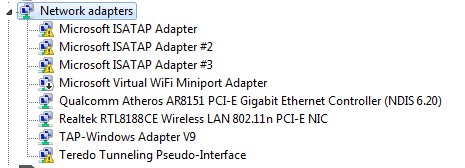
When I go into device manager, under network adapters, Microsoft ISATAP adapter, Microsoft ISATAP adapter #2, Microsoft ISATAP adapter #3 & Teredo Tunneling Pseudo-Interface all have yellow exclamation marks. I tried to update them but they were already up to date.

So now, I can no longer use my hardwired connection and I must use WIFI after I restore daily.

Here is the requested data:

1. Is this a wired or wireless connection issue? wired

2. Who is your Internet Service Provider (ISP)? ATT

3. What type of Broadband connection are you using? Fios

4. What is the exact Make and Model of your Modem, Router or Modem/Router Combo - BGW210-700

5. What is the Name of the Anti-Virus, Security or Firewall Software installed from the problematic computer Zone Alarm, Malware Bytes

6. Windows IP Configuration

Host Name . . . . . . . . . . . . : Alex-PC
Primary Dns Suffix . . . . . . . :
Node Type . . . . . . . . . . . . : Mixed
IP Routing Enabled. . . . . . . . : No
WINS Proxy Enabled. . . . . . . . : No

Ethernet adapter Local Area Connection 2:

Media State . . . . . . . . . . . : Media disconnected
Connection-specific DNS Suffix . :
Description . . . . . . . . . . . : TAP-Windows Adapter V9
Physical Address. . . . . . . . . : 00-FF-EE-D1-A4-4C
DHCP Enabled. . . . . . . . . . . : Yes
Autoconfiguration Enabled . . . . : Yes

Wireless LAN adapter Wireless Network Connection:

Connection-specific DNS Suffix . :
Description . . . . . . . . . . . : Realtek RTL8188CE Wireless LAN 802.11n PCI-E NIC
Physical Address. . . . . . . . . : E0-B9-A5-90-B9-E0
DHCP Enabled. . . . . . . . . . . : No
Autoconfiguration Enabled . . . . : Yes
IPv4 Address. . . . . . . . . . . : 192.168.1.124(Preferred)
Subnet Mask . . . . . . . . . . . : 255.255.255.0
Default Gateway . . . . . . . . . : 192.168.1.254
DNS Servers . . . . . . . . . . . : 208.67.222.222
208.67.220.220
NetBIOS over Tcpip. . . . . . . . : Enabled


I appreciate it and thank you in advance guys. :)
 

Attachments

My Computer

Computer type
Laptop
Computer Manufacturer/Model Number
DELL LATTITUDE E6520
OS
Windows 7 Pro, 64-bit, SP1
CPU
intel Core i7-2760QM @ 2.40 GHz - Sandy Bridge 32nm
Motherboard
Dell Inc. 0J4TFW (CPU 1)
Memory
8.00GB Dual-Channel DDR3 @ 665MHz (9-9-9-24)
Graphics Card(s)
511MB NVIDIA NVS 4200M (Dell)
Sound Card
NVIDIA High Definition Audio
Monitor(s) Displays
Panasonic 55"
Screen Resolution
1920 x 1080@ 60Hz
Hard Drives
465GB WD WDC WD50000BKPT-75PK4 (SATA)
558GB INTEL 320 SERIES VO0600EC HPP (SATA)
556GB MAXTOR ONETOUCH USB DEVICE (SATA)
Antivirus
MalwareBytes
Browser
Firefox
On the ipconfig it shows network cable unplugged did you have a cable plugged in if so it's a cable fault or Network port. Is the network card OK in device manager
 

My Computer

Computer type
PC/Desktop
OS
win 8 32 bit
I just checked the cable and it is plugged in. I also went into CMD and next to media state, it still says media disconnected... is this what you're referring to with network cable unplugged?

Here is the screenshot of the device manager, I think it's ok but not sure. The exclamation marks are already the latest drivers.
 

Attachments

  • 2017-08-03 at 14-19-36.png
    2017-08-03 at 14-19-36.png
    9.7 KB · Views: 35

My Computer

Computer type
Laptop
Computer Manufacturer/Model Number
DELL LATTITUDE E6520
OS
Windows 7 Pro, 64-bit, SP1
CPU
intel Core i7-2760QM @ 2.40 GHz - Sandy Bridge 32nm
Motherboard
Dell Inc. 0J4TFW (CPU 1)
Memory
8.00GB Dual-Channel DDR3 @ 665MHz (9-9-9-24)
Graphics Card(s)
511MB NVIDIA NVS 4200M (Dell)
Sound Card
NVIDIA High Definition Audio
Monitor(s) Displays
Panasonic 55"
Screen Resolution
1920 x 1080@ 60Hz
Hard Drives
465GB WD WDC WD50000BKPT-75PK4 (SATA)
558GB INTEL 320 SERIES VO0600EC HPP (SATA)
556GB MAXTOR ONETOUCH USB DEVICE (SATA)
Antivirus
MalwareBytes
Browser
Firefox
If it's saying disconnected it's not seeing the cable do you have another cable or can you try it in another PC?
 

My Computer

Computer type
PC/Desktop
OS
win 8 32 bit
I have just tried another cable that is working on my TV and it says disconnected still. Do my adapter settings matter at all or will it detect regardless? i have tried enabling and disabling the local area connection and wireless network connections to no avail.
 

My Computer

Computer type
Laptop
Computer Manufacturer/Model Number
DELL LATTITUDE E6520
OS
Windows 7 Pro, 64-bit, SP1
CPU
intel Core i7-2760QM @ 2.40 GHz - Sandy Bridge 32nm
Motherboard
Dell Inc. 0J4TFW (CPU 1)
Memory
8.00GB Dual-Channel DDR3 @ 665MHz (9-9-9-24)
Graphics Card(s)
511MB NVIDIA NVS 4200M (Dell)
Sound Card
NVIDIA High Definition Audio
Monitor(s) Displays
Panasonic 55"
Screen Resolution
1920 x 1080@ 60Hz
Hard Drives
465GB WD WDC WD50000BKPT-75PK4 (SATA)
558GB INTEL 320 SERIES VO0600EC HPP (SATA)
556GB MAXTOR ONETOUCH USB DEVICE (SATA)
Antivirus
MalwareBytes
Browser
Firefox
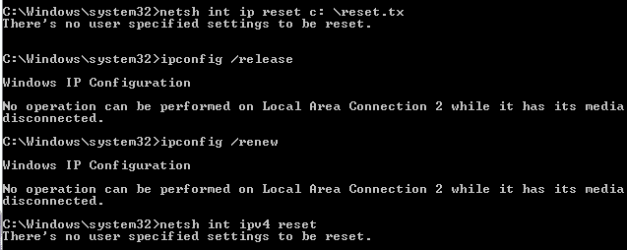
Open a admin cmd prompt rgen type these cmd one after another press return after each one

netsh advfirewall reset
netsh advfirewall set allprofiles state ON
ipconfig /flushdns
netsh winsock reset catalog
netsh int ip reset c:\resetlog.txt
ipconfig /release
ipconfig /renew
netsh int ipv4 reset
netsh int ipv6 reset

reboot if it doesnt work then lets see if this tells us the problem


Please download and save FRST 64bit or FRST 32 bit to your Desktop.

http://download.bleepingcomputer.com/farbar/FRST.exe

http://download.bleepingcomputer.com/farbar/FRST64.exe

Right click to run as administrator (XP users click run after receipt of Windows Security Warning - Open File). When the tool opens click Yes to disclaimer.

Make sure that Addition option is checked.
Press Scan button.
It will produce a log called FRST.txt in the same directory the tool is run from.
Please copy and paste log back .
The first time the tool is run it generates another log (Addition.txt - also located in the same directory as FRST.exe/FRST64.exe).
 

My Computer

Computer type
PC/Desktop
OS
win 8 32 bit
These commands were not accepted, the rest were... will wait to hear if I should proceed anyway to the next steps.
 

Attachments

  • 2017-08-04 at 11-02-08.png
    2017-08-04 at 11-02-08.png
    7.5 KB · Views: 28

My Computer

Computer type
Laptop
Computer Manufacturer/Model Number
DELL LATTITUDE E6520
OS
Windows 7 Pro, 64-bit, SP1
CPU
intel Core i7-2760QM @ 2.40 GHz - Sandy Bridge 32nm
Motherboard
Dell Inc. 0J4TFW (CPU 1)
Memory
8.00GB Dual-Channel DDR3 @ 665MHz (9-9-9-24)
Graphics Card(s)
511MB NVIDIA NVS 4200M (Dell)
Sound Card
NVIDIA High Definition Audio
Monitor(s) Displays
Panasonic 55"
Screen Resolution
1920 x 1080@ 60Hz
Hard Drives
465GB WD WDC WD50000BKPT-75PK4 (SATA)
558GB INTEL 320 SERIES VO0600EC HPP (SATA)
556GB MAXTOR ONETOUCH USB DEVICE (SATA)
Antivirus
MalwareBytes
Browser
Firefox
Yes do the scan some didn't work as it was no cable
 

My Computer

Computer type
PC/Desktop
OS
win 8 32 bit
hi

could you confirm if the IP address you have set on the Ethernet and WIFI is manual or DHCP ???

If its manual could revert back to DHCP and let us know ?
 

My Computer

Computer Manufacturer/Model Number
Nothing specific....what ever the clients provide for Repair
OS
Windows 7 ultimate x64
hi

could you confirm if the IP address you have set on the Ethernet and WIFI is manual or DHCP ???

If its manual could revert back to DHCP and let us know ?

Sorry, could you give directions on how to do that please?
 

My Computer

Computer type
Laptop
Computer Manufacturer/Model Number
DELL LATTITUDE E6520
OS
Windows 7 Pro, 64-bit, SP1
CPU
intel Core i7-2760QM @ 2.40 GHz - Sandy Bridge 32nm
Motherboard
Dell Inc. 0J4TFW (CPU 1)
Memory
8.00GB Dual-Channel DDR3 @ 665MHz (9-9-9-24)
Graphics Card(s)
511MB NVIDIA NVS 4200M (Dell)
Sound Card
NVIDIA High Definition Audio
Monitor(s) Displays
Panasonic 55"
Screen Resolution
1920 x 1080@ 60Hz
Hard Drives
465GB WD WDC WD50000BKPT-75PK4 (SATA)
558GB INTEL 320 SERIES VO0600EC HPP (SATA)
556GB MAXTOR ONETOUCH USB DEVICE (SATA)
Antivirus
MalwareBytes
Browser
Firefox
If you post results of the test we will know the situation in stead of shooting in the dark
 

My Computer

Computer type
PC/Desktop
OS
win 8 32 bit
Sorry, could you give directions on how to do that please?

Sorry I think the answer to that question was already mentioned in the first post, my bad.

So lets try troubleshooting this one by one.

Firstly let rule out the obvious even if it looks stupid. Make sure you have a working cable. Then make sure the cables are connected at both end FIRMLY. sometime a loose connection could be the root cause. if the Ethernet is a PCIE adapter that slots in to the computer motherboard, then check to see if its FIRMLY fitted to the slot. If this resolves the issue, good .... else follow the next step

Secondly lets rule out driver issue. Go to device manager and right click on each adapter and uninstall it even the ones with exclamation. Make sure while you do this you only uninstall and NOT DELETE the drivers. reboot and check to see of this resolves the issue. Post a screenshot of the Network adapters after the reboot.

let me know so we can advice you the next course of action
 

My Computer

Computer Manufacturer/Model Number
Nothing specific....what ever the clients provide for Repair
OS
Windows 7 ultimate x64
Here is the file, too long to paste.
 

Attachments

My Computer

Computer type
Laptop
Computer Manufacturer/Model Number
DELL LATTITUDE E6520
OS
Windows 7 Pro, 64-bit, SP1
CPU
intel Core i7-2760QM @ 2.40 GHz - Sandy Bridge 32nm
Motherboard
Dell Inc. 0J4TFW (CPU 1)
Memory
8.00GB Dual-Channel DDR3 @ 665MHz (9-9-9-24)
Graphics Card(s)
511MB NVIDIA NVS 4200M (Dell)
Sound Card
NVIDIA High Definition Audio
Monitor(s) Displays
Panasonic 55"
Screen Resolution
1920 x 1080@ 60Hz
Hard Drives
465GB WD WDC WD50000BKPT-75PK4 (SATA)
558GB INTEL 320 SERIES VO0600EC HPP (SATA)
556GB MAXTOR ONETOUCH USB DEVICE (SATA)
Antivirus
MalwareBytes
Browser
Firefox
There is a second file additions from the scan please post that. Does the network work in safe mode?
 

My Computer

Computer type
PC/Desktop
OS
win 8 32 bit
I will try the safemode later today and repot back.
 

Attachments

My Computer

Computer type
Laptop
Computer Manufacturer/Model Number
DELL LATTITUDE E6520
OS
Windows 7 Pro, 64-bit, SP1
CPU
intel Core i7-2760QM @ 2.40 GHz - Sandy Bridge 32nm
Motherboard
Dell Inc. 0J4TFW (CPU 1)
Memory
8.00GB Dual-Channel DDR3 @ 665MHz (9-9-9-24)
Graphics Card(s)
511MB NVIDIA NVS 4200M (Dell)
Sound Card
NVIDIA High Definition Audio
Monitor(s) Displays
Panasonic 55"
Screen Resolution
1920 x 1080@ 60Hz
Hard Drives
465GB WD WDC WD50000BKPT-75PK4 (SATA)
558GB INTEL 320 SERIES VO0600EC HPP (SATA)
556GB MAXTOR ONETOUCH USB DEVICE (SATA)
Antivirus
MalwareBytes
Browser
Firefox
You have problems you have loads of security software running half of it is crashing you need to remove the firewall,avast,two VPNs, McAfee etc. You need to clear thousands of firewall rules as trusted and blocked are the same you should got to av makers websites and get their remotely tool to remove stuff uninstall leaves behind
 

My Computer

Computer type
PC/Desktop
OS
win 8 32 bit
Safemode with networking allows WIFI but not hardwired connections to work.
 

My Computer

Computer type
Laptop
Computer Manufacturer/Model Number
DELL LATTITUDE E6520
OS
Windows 7 Pro, 64-bit, SP1
CPU
intel Core i7-2760QM @ 2.40 GHz - Sandy Bridge 32nm
Motherboard
Dell Inc. 0J4TFW (CPU 1)
Memory
8.00GB Dual-Channel DDR3 @ 665MHz (9-9-9-24)
Graphics Card(s)
511MB NVIDIA NVS 4200M (Dell)
Sound Card
NVIDIA High Definition Audio
Monitor(s) Displays
Panasonic 55"
Screen Resolution
1920 x 1080@ 60Hz
Hard Drives
465GB WD WDC WD50000BKPT-75PK4 (SATA)
558GB INTEL 320 SERIES VO0600EC HPP (SATA)
556GB MAXTOR ONETOUCH USB DEVICE (SATA)
Antivirus
MalwareBytes
Browser
Firefox
You have problems you have loads of security software running half of it is crashing you need to remove the firewall,avast,two VPNs, McAfee etc. You need to clear thousands of firewall rules as trusted and blocked are the same you should got to av makers websites and get their remotely tool to remove stuff uninstall leaves behind

Are you saying that the only way to fix this connection problem with my hardwired is to download their uninstaller or can I manually remove these firewall rules? If manual is possible, is it possible to remove more than one at a time or is it individual removal only?
 

My Computer

Computer type
Laptop
Computer Manufacturer/Model Number
DELL LATTITUDE E6520
OS
Windows 7 Pro, 64-bit, SP1
CPU
intel Core i7-2760QM @ 2.40 GHz - Sandy Bridge 32nm
Motherboard
Dell Inc. 0J4TFW (CPU 1)
Memory
8.00GB Dual-Channel DDR3 @ 665MHz (9-9-9-24)
Graphics Card(s)
511MB NVIDIA NVS 4200M (Dell)
Sound Card
NVIDIA High Definition Audio
Monitor(s) Displays
Panasonic 55"
Screen Resolution
1920 x 1080@ 60Hz
Hard Drives
465GB WD WDC WD50000BKPT-75PK4 (SATA)
558GB INTEL 320 SERIES VO0600EC HPP (SATA)
556GB MAXTOR ONETOUCH USB DEVICE (SATA)
Antivirus
MalwareBytes
Browser
Firefox
The quickest is to just reset firewall as there are 14000 http://www.thewindowsclub.com/reset-windows-firewall-settings

I reset the settings to no avail, is there anything else I can do? When I restarted, I was forced to restore from a previously saved restore point as my WIFI had limited connection and I couldn't connect to the internet. I have had to do this every day for about a week just to connect to the internet at all.
 

My Computer

Computer type
Laptop
Computer Manufacturer/Model Number
DELL LATTITUDE E6520
OS
Windows 7 Pro, 64-bit, SP1
CPU
intel Core i7-2760QM @ 2.40 GHz - Sandy Bridge 32nm
Motherboard
Dell Inc. 0J4TFW (CPU 1)
Memory
8.00GB Dual-Channel DDR3 @ 665MHz (9-9-9-24)
Graphics Card(s)
511MB NVIDIA NVS 4200M (Dell)
Sound Card
NVIDIA High Definition Audio
Monitor(s) Displays
Panasonic 55"
Screen Resolution
1920 x 1080@ 60Hz
Hard Drives
465GB WD WDC WD50000BKPT-75PK4 (SATA)
558GB INTEL 320 SERIES VO0600EC HPP (SATA)
556GB MAXTOR ONETOUCH USB DEVICE (SATA)
Antivirus
MalwareBytes
Browser
Firefox
Back
Top