Startup System Recovery Repair Loop

Maricha

New member
Local time
5:11 PM
Messages
13
My PC Windows 7 will NOT:
- start in Normal
- start in Safe Mode
- start in Last Knows Good Configuration
- Repair and fix
- find System Restore points
It all startet out with the PC continuously on for a few days and I believe that an update has taken place. On the next startup it started a Repair with a Diagnosis and Repair detail:
Root cause found: Boot critical file ntfs.sys is corrupt -> Repair Failed
and
Boot critical file ksecdd.sys is corrupt - Repair Failed
I tried Checkdsk but disc is fine.
Tried SFC a lot but now it only gives:
"Startup Repair has tried several times but still cannot determine the cause of the problem."
my syntax is:
set windows_tracing_logfile=f:\temp\cbs.log.file.name
sfc /scannow /offbootdir=f:\ /offwindir=f:\windows
Ex. Info: At the time it got corrupted I had 3 monitors attached - but now only 1.
I am trying to avoid Reset to Factory Settings with a new install and are hoping for a kind of magic update or fix to make it run a little longer before I eventually will reset it.

I attached the cbs.log and sfcdetails.txt {find "[SR]" f:\TEMP\cbs.log.file.name > f:\TEMP\sfcdetails.txt} If anyone can guide me to an upstart I would really appreciate it!

Thanks for reading so far.
 

Attachments

My Computer

Computer type
PC/Desktop
Computer Manufacturer/Model Number
Vision computer
OS
Microsoft Windows 7 Professional 64-bit 7601 Multiprocessor Free Service Pack 1
CPU
Intel(R) Core(TM) i7-2600K CPU @ 3.40GHz
Motherboard
Gigabyte Technology Co., Ltd. Z68X-UD3H-B3
Memory
16,00 GB
Graphics Card(s)
(1) NVIDIA GeForce GTX 1060 6GB (2) Intel(R) HD Graphics 3
Sound Card
(1) NVIDIA High Definition Audio (2) High Definition Audio
Monitor(s) Displays
3 x BenQ ET-0027-B
Screen Resolution
(1) 1920 x 1080 x 32 bits (4294967296 colors) @ 60 Hz (2)
Hard Drives
(1) OCZ-AGILITY3 (2) ST31000524AS (3) WDC WD30EZRX-00DC0B0
Antivirus
Avast free
Browser
Chrome / FireFox
Hello and welcome Maricha I know you have run the chkdsk but was it just a plian chkdsk if so run it again pleas and use the /r switch as well see this
Disk Check - Windows 7 Help Forums < if necessary include the /f switch and if this does not make any improvement then just run this switch instead /r in the command line as per Option 2

Now just how old is this machine ?? as your specs area bit scant and do you have an AV on board and what is it??
 

My Computer

Computer type
PC/Desktop
Computer Manufacturer/Model Number
Own build (new) Desk1 / Asus ROG Win 7 / Desk2 1st build
OS
Desk1 7 Home Prem / Desk2 10 Pro / Main lap Asus ROG 10 Pro 2 laptop Toshiba 7 Pro Asus P2520 7 & 10
CPU
Desk1 i5 3750K / Laptop i7 GTX 860M / Desk2 i5 2500
Motherboard
Desk1 Asus P877-V / Desk2 Gigabyte H67 UD3H / Laptop ?
Memory
Desk1 8GB (1866) / Desk2 16GB (1333) / Laptop 8Gb DDR3
Graphics Card(s)
Desk 1& 2NVidia GTX 650 & Laptops on board Intel
Sound Card
Desk 1 & 2 -XONAR DG Realtek High Def audio Laptop
Monitor(s) Displays
Desk 1 Benq HD 2450 / Desk2 Philips 24" / Laptop 17.5"
Screen Resolution
1920x1080 D1 & D2 & Laptop 1
Hard Drives
Desk1 Samsung 120GB 830 SSD
Asus ROG 256GB 850 Pro SSD
Desk2 Samsung 840 256 SSD
Toshiba 120GB EVO
PSU
Desk 1 Corsair HX 1050/ Laptop ? / Desk 2 Corsair HX 650
Case
Desk 1 Cooler HAF XM ? Toshiba laptop / Desk2 Coolermaster
Cooling
Fans on all Desk1 -2 Desk2 - all Coolermasters 5 Laptop ?
Keyboard
Desk 1 MS Sidewinder X6 Desk 2 MS Sidewinder X 4
Mouse
Desk 1&2 - Gigabyte MS 900 gamer - laptop - Logitec wireless
Internet Speed
ADSL2+
Other Info
One other Desktop (tester) and spare Toshba laptop both with SSD's
Running Kaspersky 2016 ISS on all machines config'd identically
Logitec audio stereo systems on each machine (x3)
Canon MG5250MFC
Router/modem TP-Link running WPA2SK
Reply to ICIT2LOL

Hi ICIT2LOL.
Thanx for replying.
ICIT2LOL said:
Now just how old is this machine ?? as your specs area bit scant and do you have an AV on board and what is it??
The pc is an older model as between 2010/2011.
[I'm afraid that I'm not sure what you are asking as the last part. I have nothing connected atm except the most needed - a monitor, mouse, keyboard.
The motherboard has an internal graphic/sound card
] {Deleted Pictures as AV=AntiVirus and not Audio/Video :o}

ICIT2LOL said:
I know you have run the chkdsk but was it just a plian chkdsk if so run it again pleas and use the /r switch as well see this
Disk Check - Windows 7 Help Forums < if necessary include the /f switch and if this does not make any improvement then just run this switch instead /r in the command line as per Option 2
It is a little while ago but I'm sure it was a /f switch only.
I tried again to day first the /f and then the /r - in both cases it says "Windows has checked the file system and found no problems." and yet it says in the end "Failed to transfer logged messages to the event log with status 50."

With the little options I have in the cmd prompt session I tried to find the chckdsk-log but didn't succeed. I only found the Startup Repair diagnosis and repair log txt-file and disklayout.txt with the DiskPart info.

------ edited ------
Ahh, just found the chkdsk-logs - and the day it crashed the log is mega-large and it said: "Correcting errors in the master file table's (MFT) BITMAP attribute.
- Correcting errors in the volume Bitmap.
- Windows has made corrections to the file system.
"
The next checkdsk it is replacing some bad clusters.
The next 5 checkdsk's Windows found no problems! but SrtTrail says "Root cause found: Startup Repair has tried several times but still cannot determine the cause of the problem."
 
Last edited:

My Computer

Computer type
PC/Desktop
Computer Manufacturer/Model Number
Vision computer
OS
Microsoft Windows 7 Professional 64-bit 7601 Multiprocessor Free Service Pack 1
CPU
Intel(R) Core(TM) i7-2600K CPU @ 3.40GHz
Motherboard
Gigabyte Technology Co., Ltd. Z68X-UD3H-B3
Memory
16,00 GB
Graphics Card(s)
(1) NVIDIA GeForce GTX 1060 6GB (2) Intel(R) HD Graphics 3
Sound Card
(1) NVIDIA High Definition Audio (2) High Definition Audio
Monitor(s) Displays
3 x BenQ ET-0027-B
Screen Resolution
(1) 1920 x 1080 x 32 bits (4294967296 colors) @ 60 Hz (2)
Hard Drives
(1) OCZ-AGILITY3 (2) ST31000524AS (3) WDC WD30EZRX-00DC0B0
Antivirus
Avast free
Browser
Chrome / FireFox

My Computers

System One System Two

  • Computer type
    PC/Desktop
    OS
    7 X64
    CPU
    i5 8400
    Motherboard
    gigabyte b365m ds3h
    Memory
    2x8gb 3200mhz
    Hard Drives
    various
    PSU
    pure power 11 400w cm
    Case
    Coolermaster
    Cooling
    cryorig m9i
  • Computer type
    PC/Desktop
    OS
    7x64
    CPU
    g5400
    Motherboard
    ga b365m ds3h
    Memory
    8gb ddr4 2400
    PSU
    xfx pro 450w
Try this boot media:

17514x64-v3.iso

And it will do what? A little info on what it is would be great....

If my trouble was "I have no money" and your suggestion in other words would be "Try rob a bank" - it might at first seem like the solution, but also create a whole new set of problems :sarc:

I guess the iso should be copied on a bootable cd?
 

My Computer

Computer type
PC/Desktop
Computer Manufacturer/Model Number
Vision computer
OS
Microsoft Windows 7 Professional 64-bit 7601 Multiprocessor Free Service Pack 1
CPU
Intel(R) Core(TM) i7-2600K CPU @ 3.40GHz
Motherboard
Gigabyte Technology Co., Ltd. Z68X-UD3H-B3
Memory
16,00 GB
Graphics Card(s)
(1) NVIDIA GeForce GTX 1060 6GB (2) Intel(R) HD Graphics 3
Sound Card
(1) NVIDIA High Definition Audio (2) High Definition Audio
Monitor(s) Displays
3 x BenQ ET-0027-B
Screen Resolution
(1) 1920 x 1080 x 32 bits (4294967296 colors) @ 60 Hz (2)
Hard Drives
(1) OCZ-AGILITY3 (2) ST31000524AS (3) WDC WD30EZRX-00DC0B0
Antivirus
Avast free
Browser
Chrome / FireFox
hmm I am not sure what that media is that SIW 2 has linked but if they are ISO's for the system then you will need DVD's not CD's.

The other thing I asked is the AV just what antivirus are you using ?
 

My Computer

Computer type
PC/Desktop
Computer Manufacturer/Model Number
Own build (new) Desk1 / Asus ROG Win 7 / Desk2 1st build
OS
Desk1 7 Home Prem / Desk2 10 Pro / Main lap Asus ROG 10 Pro 2 laptop Toshiba 7 Pro Asus P2520 7 & 10
CPU
Desk1 i5 3750K / Laptop i7 GTX 860M / Desk2 i5 2500
Motherboard
Desk1 Asus P877-V / Desk2 Gigabyte H67 UD3H / Laptop ?
Memory
Desk1 8GB (1866) / Desk2 16GB (1333) / Laptop 8Gb DDR3
Graphics Card(s)
Desk 1& 2NVidia GTX 650 & Laptops on board Intel
Sound Card
Desk 1 & 2 -XONAR DG Realtek High Def audio Laptop
Monitor(s) Displays
Desk 1 Benq HD 2450 / Desk2 Philips 24" / Laptop 17.5"
Screen Resolution
1920x1080 D1 & D2 & Laptop 1
Hard Drives
Desk1 Samsung 120GB 830 SSD
Asus ROG 256GB 850 Pro SSD
Desk2 Samsung 840 256 SSD
Toshiba 120GB EVO
PSU
Desk 1 Corsair HX 1050/ Laptop ? / Desk 2 Corsair HX 650
Case
Desk 1 Cooler HAF XM ? Toshiba laptop / Desk2 Coolermaster
Cooling
Fans on all Desk1 -2 Desk2 - all Coolermasters 5 Laptop ?
Keyboard
Desk 1 MS Sidewinder X6 Desk 2 MS Sidewinder X 4
Mouse
Desk 1&2 - Gigabyte MS 900 gamer - laptop - Logitec wireless
Internet Speed
ADSL2+
Other Info
One other Desktop (tester) and spare Toshba laptop both with SSD's
Running Kaspersky 2016 ISS on all machines config'd identically
Logitec audio stereo systems on each machine (x3)
Canon MG5250MFC
Router/modem TP-Link running WPA2SK
hmm I am not sure what that media is that SIW 2 has linked but if they are ISO's for the system then you will need DVD's not CD's.

The other thing I asked is the AV just what antivirus are you using ?

LoL - Thought you were asking of Audio/Video...
I think it was only Microsoft Security Essentials. Where will I get the info? I have had installed a few AntiVirus prg during the time from KasperSky, Avast, AVG to MSE - MSE might even have been turned off for a periode when the update/crash happened...
 

My Computer

Computer type
PC/Desktop
Computer Manufacturer/Model Number
Vision computer
OS
Microsoft Windows 7 Professional 64-bit 7601 Multiprocessor Free Service Pack 1
CPU
Intel(R) Core(TM) i7-2600K CPU @ 3.40GHz
Motherboard
Gigabyte Technology Co., Ltd. Z68X-UD3H-B3
Memory
16,00 GB
Graphics Card(s)
(1) NVIDIA GeForce GTX 1060 6GB (2) Intel(R) HD Graphics 3
Sound Card
(1) NVIDIA High Definition Audio (2) High Definition Audio
Monitor(s) Displays
3 x BenQ ET-0027-B
Screen Resolution
(1) 1920 x 1080 x 32 bits (4294967296 colors) @ 60 Hz (2)
Hard Drives
(1) OCZ-AGILITY3 (2) ST31000524AS (3) WDC WD30EZRX-00DC0B0
Antivirus
Avast free
Browser
Chrome / FireFox
Just a quick query did you use the proper removal tools when you uninstalled those other AV's ?? because if you didn't they could be causing conflicts within your system.

I use Kaspersky exclusively on my machines and even though it has a good removal tool it still leaves registry entries behind and a couple of the ones you mentioned I wouldn't touch them with a dirty stick let alone install them on my machines.
 

My Computer

Computer type
PC/Desktop
Computer Manufacturer/Model Number
Own build (new) Desk1 / Asus ROG Win 7 / Desk2 1st build
OS
Desk1 7 Home Prem / Desk2 10 Pro / Main lap Asus ROG 10 Pro 2 laptop Toshiba 7 Pro Asus P2520 7 & 10
CPU
Desk1 i5 3750K / Laptop i7 GTX 860M / Desk2 i5 2500
Motherboard
Desk1 Asus P877-V / Desk2 Gigabyte H67 UD3H / Laptop ?
Memory
Desk1 8GB (1866) / Desk2 16GB (1333) / Laptop 8Gb DDR3
Graphics Card(s)
Desk 1& 2NVidia GTX 650 & Laptops on board Intel
Sound Card
Desk 1 & 2 -XONAR DG Realtek High Def audio Laptop
Monitor(s) Displays
Desk 1 Benq HD 2450 / Desk2 Philips 24" / Laptop 17.5"
Screen Resolution
1920x1080 D1 & D2 & Laptop 1
Hard Drives
Desk1 Samsung 120GB 830 SSD
Asus ROG 256GB 850 Pro SSD
Desk2 Samsung 840 256 SSD
Toshiba 120GB EVO
PSU
Desk 1 Corsair HX 1050/ Laptop ? / Desk 2 Corsair HX 650
Case
Desk 1 Cooler HAF XM ? Toshiba laptop / Desk2 Coolermaster
Cooling
Fans on all Desk1 -2 Desk2 - all Coolermasters 5 Laptop ?
Keyboard
Desk 1 MS Sidewinder X6 Desk 2 MS Sidewinder X 4
Mouse
Desk 1&2 - Gigabyte MS 900 gamer - laptop - Logitec wireless
Internet Speed
ADSL2+
Other Info
One other Desktop (tester) and spare Toshba laptop both with SSD's
Running Kaspersky 2016 ISS on all machines config'd identically
Logitec audio stereo systems on each machine (x3)
Canon MG5250MFC
Router/modem TP-Link running WPA2SK
I guess the iso should be copied on a bootable cd?

Yes, the iso is only about 380mb - burn it cd/dvd or extract to usb using rufus or similar.

Boot it up.

See if you have any shadow copies - use shadowcopyview. It is under start menu\Datarecovery.

If you can use windows, you can use that boot media.
 

My Computers

System One System Two

  • Computer type
    PC/Desktop
    OS
    7 X64
    CPU
    i5 8400
    Motherboard
    gigabyte b365m ds3h
    Memory
    2x8gb 3200mhz
    Hard Drives
    various
    PSU
    pure power 11 400w cm
    Case
    Coolermaster
    Cooling
    cryorig m9i
  • Computer type
    PC/Desktop
    OS
    7x64
    CPU
    g5400
    Motherboard
    ga b365m ds3h
    Memory
    8gb ddr4 2400
    PSU
    xfx pro 450w
Yes, the iso is only about 380mb - burn it cd/dvd or extract to usb using rufus or similar.

Boot it up.

See if you have any shadow copies - use shadowcopyview. It is under start menu\Datarecovery.

If you can use windows, you can use that boot media.

That sound confusing! I already said windows won't start:
Starting Post said:
My PC Windows 7 will NOT:
- start in Normal
- start in Safe Mode
So I can't use the boot media after all when windows fail to start normal???
 

My Computer

Computer type
PC/Desktop
Computer Manufacturer/Model Number
Vision computer
OS
Microsoft Windows 7 Professional 64-bit 7601 Multiprocessor Free Service Pack 1
CPU
Intel(R) Core(TM) i7-2600K CPU @ 3.40GHz
Motherboard
Gigabyte Technology Co., Ltd. Z68X-UD3H-B3
Memory
16,00 GB
Graphics Card(s)
(1) NVIDIA GeForce GTX 1060 6GB (2) Intel(R) HD Graphics 3
Sound Card
(1) NVIDIA High Definition Audio (2) High Definition Audio
Monitor(s) Displays
3 x BenQ ET-0027-B
Screen Resolution
(1) 1920 x 1080 x 32 bits (4294967296 colors) @ 60 Hz (2)
Hard Drives
(1) OCZ-AGILITY3 (2) ST31000524AS (3) WDC WD30EZRX-00DC0B0
Antivirus
Avast free
Browser
Chrome / FireFox
OK Maricha now you can try this please because if it will not start in safe or normal mode then something is obviously wrong with the drive and the OS but it is up to you
Personally I just want to see what you have on that drive to see if there is anything to boot from and perhaps run some tests but the choice is yours

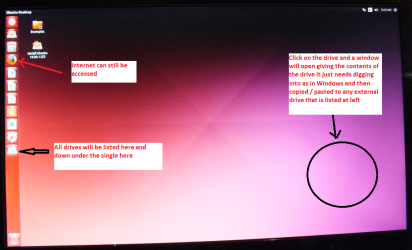
BOOTABLE UBUNTU

Makea bootable Ubuntu disk https://www.ubuntu.com/download/desktop

Setthe BIOS to boot from the optical when the machine boots it will showyou a screen with TRYor INSTALL> select TRYnotINSTALL

Whenit is finished - it takes very little time you will get a screen likein the pic .

Openthe drive you want > User and dig down until you get to the data /settings you may be able to copy / paste the material you want to anexternal source or other installed drive doing this.

Iam not sure if it will but I have recovered tons of data etc usingthis method both on "dead" or just plain drives that youcannot get data from using Windows.


Or there is thisEmergency Kit - save your files from a dead OS I prefer Ubuntu a tad easier to set up but this does the same thing

Now with this you will still have access to the net and be able to download and run say a drive tests from Seatools at minimum you will be able to recover your data in case you need to reinstall Windows.
 

Attachments

  • UBUNTU SCREEN X2.PNG
    UBUNTU SCREEN X2.PNG
    1.1 MB · Views: 0

My Computer

Computer type
PC/Desktop
Computer Manufacturer/Model Number
Own build (new) Desk1 / Asus ROG Win 7 / Desk2 1st build
OS
Desk1 7 Home Prem / Desk2 10 Pro / Main lap Asus ROG 10 Pro 2 laptop Toshiba 7 Pro Asus P2520 7 & 10
CPU
Desk1 i5 3750K / Laptop i7 GTX 860M / Desk2 i5 2500
Motherboard
Desk1 Asus P877-V / Desk2 Gigabyte H67 UD3H / Laptop ?
Memory
Desk1 8GB (1866) / Desk2 16GB (1333) / Laptop 8Gb DDR3
Graphics Card(s)
Desk 1& 2NVidia GTX 650 & Laptops on board Intel
Sound Card
Desk 1 & 2 -XONAR DG Realtek High Def audio Laptop
Monitor(s) Displays
Desk 1 Benq HD 2450 / Desk2 Philips 24" / Laptop 17.5"
Screen Resolution
1920x1080 D1 & D2 & Laptop 1
Hard Drives
Desk1 Samsung 120GB 830 SSD
Asus ROG 256GB 850 Pro SSD
Desk2 Samsung 840 256 SSD
Toshiba 120GB EVO
PSU
Desk 1 Corsair HX 1050/ Laptop ? / Desk 2 Corsair HX 650
Case
Desk 1 Cooler HAF XM ? Toshiba laptop / Desk2 Coolermaster
Cooling
Fans on all Desk1 -2 Desk2 - all Coolermasters 5 Laptop ?
Keyboard
Desk 1 MS Sidewinder X6 Desk 2 MS Sidewinder X 4
Mouse
Desk 1&2 - Gigabyte MS 900 gamer - laptop - Logitec wireless
Internet Speed
ADSL2+
Other Info
One other Desktop (tester) and spare Toshba laptop both with SSD's
Running Kaspersky 2016 ISS on all machines config'd identically
Logitec audio stereo systems on each machine (x3)
Canon MG5250MFC
Router/modem TP-Link running WPA2SK
That sound confusing! I already said windows won't start:

The boot media has an interface that is similar to windows.

Therefore, if you know how to use windows, you will know how to use the boot media.


So I can't use the boot media after all when windows fail to start normal???

The .iso is bootable, that is why it is called boot media. It is for use when your installed windows cannot start.
 

My Computers

System One System Two

  • Computer type
    PC/Desktop
    OS
    7 X64
    CPU
    i5 8400
    Motherboard
    gigabyte b365m ds3h
    Memory
    2x8gb 3200mhz
    Hard Drives
    various
    PSU
    pure power 11 400w cm
    Case
    Coolermaster
    Cooling
    cryorig m9i
  • Computer type
    PC/Desktop
    OS
    7x64
    CPU
    g5400
    Motherboard
    ga b365m ds3h
    Memory
    8gb ddr4 2400
    PSU
    xfx pro 450w
Hey all.
Sorry for the very long delay! Work took over...
I found a Windows 7 install disk in my hidings, but is from one of my other oldies and was another version. I tried to delete the ei.cfg to make it universal - but it didn't do the trick! I couldn't repair with it.

I am capable of going CMD in the repair menu - and it's possible with Notepad to copy from disk to disk (Did copy pictures and document that way) so the disks seems find.
I can see that the last thing it did was an update (can't remember right now how I saw that).
I think there should be some restore points, but it can't find it.

I tried to do that SIW2:
Yes, the iso is only about 380mb - burn it cd/dvd or extract to usb using rufus or similar.

Boot it up.

See if you have any shadow copies - use shadowcopyview. It is under start menu\Datarecovery.

If you can use windows, you can use that boot media.

- I don't know shadowcopyview - but there was nothing showed in the program!

Anyone know what the cbs.log means with:
Code:
00001e78 [SR] Beginning Verify and Repair transaction
00001e79 (F) STATUS_OBJECT_NAME_NOT_FOUND #1008776# from Windows::Rtl::SystemImplementation::DirectFileSystemProvider::SysCreateFile(flags = (AllowSharingViolation), handle = {provider=NULL, handle=0}, da = (SYNCHRONIZE|FILE_READ_ATTRIBUTES), oa = @0x10dfe0->OBJECT_ATTRIBUTES {s:48; rd:NULL; on:[122]"\??\f:\Windows\WinSxS\amd64_microsoft-windows-b..environment-windows_31bf3856ad364e35_6.1.7601.22908_none_c7f6f962bc7c22a5"; a:(OBJ_CASE_INSENSITIVE)}, iosb = @0x10e0d0, as = (null), fa = 0, sa = (FILE_SHARE_READ|FILE_SHARE_WRITE|FILE_SHARE_DELETE), cd = FILE_OPEN, co = (FILE_SYNCHRONOUS_IO_NONALERT|0x00004000), eab = NULL, eal = 0, disp = Invalid)
00001e7a@2017/9/7:11:21:11.565 (F) d:\win7sp1_gdr\base\wcp\sil\merged\ntu\ntsystem.cpp(2057): Error STATUS_OBJECT_NAME_NOT_FOUND originated in function Windows::Rtl::SystemImplementation::DirectFileSystemProvider::SysCreateFile expression: (null)
00001e7b (F) STATUS_OBJECT_NAME_NOT_FOUND #1008775# from Windows::Rtl::SystemImplementation::CDirectory::OpenExistingDirectory(...)
00001e7c (F) STATUS_OBJECT_NAME_NOT_FOUND #1008774# from Windows::Rtl::SystemImplementation::CDirectory_IRtlDirectoryTearoff::OpenExistingDirectory(flags = 0, da = (SYNCHRONIZE), oa = @0x10e9e8->SIL_OBJECT_ATTRIBUTES {s:40; on:"amd64_microsoft-windows-b..environment-windows_31bf3856ad364e35_6.1.7601.22908_none_c7f6f962bc7c22a5"; a:(OBJ_CASE_INSENSITIVE)}, sa = (FILE_SHARE_READ|FILE_SHARE_WRITE|FILE_SHARE_DELETE), oo = (FILE_DIRECTORY_FILE|FILE_SYNCHRONOUS_IO_NONALERT|FILE_OPEN_FOR_BACKUP_INTENT), dir = NULL, disp = Invalid)
???

Anything in the cbs.log (I attached in #1) that is so fatal i can't go so far as to login? (It says starting windows but then the recovery repair start)

I'm not sure what path to go. Except that I have to make dinner right now :geek:
 

My Computer

Computer type
PC/Desktop
Computer Manufacturer/Model Number
Vision computer
OS
Microsoft Windows 7 Professional 64-bit 7601 Multiprocessor Free Service Pack 1
CPU
Intel(R) Core(TM) i7-2600K CPU @ 3.40GHz
Motherboard
Gigabyte Technology Co., Ltd. Z68X-UD3H-B3
Memory
16,00 GB
Graphics Card(s)
(1) NVIDIA GeForce GTX 1060 6GB (2) Intel(R) HD Graphics 3
Sound Card
(1) NVIDIA High Definition Audio (2) High Definition Audio
Monitor(s) Displays
3 x BenQ ET-0027-B
Screen Resolution
(1) 1920 x 1080 x 32 bits (4294967296 colors) @ 60 Hz (2)
Hard Drives
(1) OCZ-AGILITY3 (2) ST31000524AS (3) WDC WD30EZRX-00DC0B0
Antivirus
Avast free
Browser
Chrome / FireFox
The CBS.log also says that the:

  • aspnet_compiler.exe,
  • aspnet_regbrowser.exe,
  • aspnet_regsql.exe and
  • infocard.exe
cannot be repaired!

Has that anything to do with the startup?
 

My Computer

Computer type
PC/Desktop
Computer Manufacturer/Model Number
Vision computer
OS
Microsoft Windows 7 Professional 64-bit 7601 Multiprocessor Free Service Pack 1
CPU
Intel(R) Core(TM) i7-2600K CPU @ 3.40GHz
Motherboard
Gigabyte Technology Co., Ltd. Z68X-UD3H-B3
Memory
16,00 GB
Graphics Card(s)
(1) NVIDIA GeForce GTX 1060 6GB (2) Intel(R) HD Graphics 3
Sound Card
(1) NVIDIA High Definition Audio (2) High Definition Audio
Monitor(s) Displays
3 x BenQ ET-0027-B
Screen Resolution
(1) 1920 x 1080 x 32 bits (4294967296 colors) @ 60 Hz (2)
Hard Drives
(1) OCZ-AGILITY3 (2) ST31000524AS (3) WDC WD30EZRX-00DC0B0
Antivirus
Avast free
Browser
Chrome / FireFox
No one seems to have a possible answer to help me out of this loop!

I just want to point out that the pc almost starts up - i mean:
  • -> if [Save Mode] is chosen the screen becomes black for a little while then a lot of files scrolls up the screen
  • -> goes black with the white bar telling "Windows is loading files..." for 25sec
  • -> then the more graphical start of windows appears [© Microsoft Corporation] loading bar and the blue-graphic background.
  • -> You would think now is about the time of login, but then comes the Startuo Repair Dialog
.

Is there any way I can log where it goes wrong? I tried the Advanced Start menu : debugging mode, enable boot logging - but I can't see any logfiles or anything different for the startup.

It seems that the last day it was idle it installed an update of MS Security Essentials (KB2310138) and files like appid.sys, +5 other appid-files and Authui.dll +.mui +.ptxml
And some pending FileMaps was made.
Could those corrupt the startup?
Though the cbs.log mention for .exe files like infocard, aspnet_regsql, aspnet_regbrowsers, aspnet_compiler: Cannot repair member file!

if I am on an impossible path here I will do a reinstall, but if there is any chance of correcting it manually I would love to learn how to do is for future refferences.

Please Summon a Wizzard, Blizzard :geek:
 

My Computer

Computer type
PC/Desktop
Computer Manufacturer/Model Number
Vision computer
OS
Microsoft Windows 7 Professional 64-bit 7601 Multiprocessor Free Service Pack 1
CPU
Intel(R) Core(TM) i7-2600K CPU @ 3.40GHz
Motherboard
Gigabyte Technology Co., Ltd. Z68X-UD3H-B3
Memory
16,00 GB
Graphics Card(s)
(1) NVIDIA GeForce GTX 1060 6GB (2) Intel(R) HD Graphics 3
Sound Card
(1) NVIDIA High Definition Audio (2) High Definition Audio
Monitor(s) Displays
3 x BenQ ET-0027-B
Screen Resolution
(1) 1920 x 1080 x 32 bits (4294967296 colors) @ 60 Hz (2)
Hard Drives
(1) OCZ-AGILITY3 (2) ST31000524AS (3) WDC WD30EZRX-00DC0B0
Antivirus
Avast free
Browser
Chrome / FireFox

My Computer

Computer type
PC/Desktop
Computer Manufacturer/Model Number
Self built custom
OS
64-bit Windows 11 Pro for Workstations
CPU
Intel i7-8700K OC'd to 5 GHz
Motherboard
ASUS ROG Maximus XI Formula Z390
Memory
64 GB (4x16GB) G.SKILL TridentZ RGB DDR4 3600 MHz
Graphics Card(s)
ASUS ROG-STRIX-GTX1080TI-O11G-GAMING
Sound Card
Integrated
Monitor(s) Displays
2 x Samsung Odyssey G7 27"
Screen Resolution
2560x1440
Hard Drives
1TB Samsung 990 PRO M.2,
4TB Samsung 990 PRO PRO M.2,
TerraMaster F8 SSD Plus NAS
PSU
Seasonic Prime Titanium 850W
Case
Thermaltake Core P3
Cooling
Corsair Hydro H115i
Keyboard
Logitech wireless K800
Mouse
Logitech MX Master 4
Internet Speed
2 Gb/s Download and 100 Mb/s Upload
Antivirus
Malwarebyte Anti-Malware Premium
Browser
Google Chrome
Other Info
Logitech Z625 speaker system,
Logitech BRIO 4K Pro webcam,
HP Color LaserJet Pro MFP M477fdn,
APC SMART-UPS RT 1000 XL - SURT1000XLI,
Galaxy S23 Plus phone
I just wrote a long informative post that this tablet decided to freeze in a preview post :cry:

A long story short.

Hello Maricah, :)

If you haven't already, you might see if the method in the tutorial below may be able to help with your startup repair loop.

:ar: Startup Repair Infinite Loop Recovery - Windows 7 Help Forums

yes - I did - but no difference apparently.

I also tried to download a windows repair install, but my product key was not accepted as my pc came with an installation setup.
The win 7 disc I have and tried to make universal didnt work for me either - I wonder if I should have changed the ei.cfg instead of removing it?!?

I did the sfc /scannow and beforehand sat the offwindir and offbootdir. I just realise that the boot folder is on a diffrent drive named System. I tried a new sfc but the cbs log didn't change!

Thx again.
 

My Computer

Computer type
PC/Desktop
Computer Manufacturer/Model Number
Vision computer
OS
Microsoft Windows 7 Professional 64-bit 7601 Multiprocessor Free Service Pack 1
CPU
Intel(R) Core(TM) i7-2600K CPU @ 3.40GHz
Motherboard
Gigabyte Technology Co., Ltd. Z68X-UD3H-B3
Memory
16,00 GB
Graphics Card(s)
(1) NVIDIA GeForce GTX 1060 6GB (2) Intel(R) HD Graphics 3
Sound Card
(1) NVIDIA High Definition Audio (2) High Definition Audio
Monitor(s) Displays
3 x BenQ ET-0027-B
Screen Resolution
(1) 1920 x 1080 x 32 bits (4294967296 colors) @ 60 Hz (2)
Hard Drives
(1) OCZ-AGILITY3 (2) ST31000524AS (3) WDC WD30EZRX-00DC0B0
Antivirus
Avast free
Browser
Chrome / FireFox
No one seems to have a possible answer to help me out of this loop!

I just want to point out that the pc almost starts up - i mean:
  • -> if [Save Mode] is chosen the screen becomes black for a little while then a lot of files scrolls up the screen
  • -> goes black with the white bar telling "Windows is loading files..." for 25sec
  • -> then the more graphical start of windows appears [© Microsoft Corporation] loading bar and the blue-graphic background.
  • -> You would think now is about the time of login, but then comes the Startuo Repair Dialog
.

Is there any way I can log where it goes wrong? I tried the Advanced Start menu : debugging mode, enable boot logging - but I can't see any logfiles or anything different for the startup.

It seems that the last day it was idle it installed an update of MS Security Essentials (KB2310138) and files like appid.sys, +5 other appid-files and Authui.dll +.mui +.ptxml
And some pending FileMaps was made.
Could those corrupt the startup?
Though the cbs.log mention for .exe files like infocard, aspnet_regsql, aspnet_regbrowsers, aspnet_compiler: Cannot repair member file!

if I am on an impossible path here I will do a reinstall, but if there is any chance of correcting it manually I would love to learn how to do is for future refferences.

Please Summon a Wizzard, Blizzard :geek:

This is still not solved!
I've been reading about a lot of similar problems.
As the far I get (Windows Loading Graphic), it has nothing to do with my BIOS, Right?
Or the Bootmgr?
I am too scared to ruin the "Reset to Factory" install, which is still an option, but I would REALLY like to not go back to install all updates and programs, if anyone of you can help it!

I tried again to re-make a Universal install disc from the Install disk I have - but it says something similar to: This version of setup for System Repair is not compatible with the version of windows you are trying to repair. Try using a Repair Disc, which is compatible with this version of Windows."-Translated freely.
Is that bec. the windows on PC has SP1? or that I can't choose the same Language? or the PC has a retail version? - It is a win7 Professional on both PC and disc - so I don't get it.

As there haven't been much posting-help here I will also try the Microsoft Forum to see if they have a solution to mend new windows-startup-files to my PC.
Maybe even resolving the cbs-log issues that started with a corrupted ntfs.sys and ksecdd.sys.

What are the windows startup-files? - can I copy them to the pc?
Does some services start before the login?
Is it a service I need to stop? I see some MS.NET related issues. Can that be a startup-issue?
Can I from CMD give command to restart without services? or minimalistic and without any of the startup programs? or to log whereto it stops?
I earlier in this thread stated that a log showed an installed update of MS Security Essentials (KB230138) but there is no such folder in Program Files or anywhere....

There are some Pending files in winsxs - can that ruin the startup?

Give it a last try, pls. What can be done from the cmd or from SIW2's upstart? Can I from that upstart interfere with another windows-upstart?
I see a DISM++ but I'am to scared to mess up the drive with Retail Windows 7 for Factory Install.
That would be a bummer :o
 

My Computer

Computer type
PC/Desktop
Computer Manufacturer/Model Number
Vision computer
OS
Microsoft Windows 7 Professional 64-bit 7601 Multiprocessor Free Service Pack 1
CPU
Intel(R) Core(TM) i7-2600K CPU @ 3.40GHz
Motherboard
Gigabyte Technology Co., Ltd. Z68X-UD3H-B3
Memory
16,00 GB
Graphics Card(s)
(1) NVIDIA GeForce GTX 1060 6GB (2) Intel(R) HD Graphics 3
Sound Card
(1) NVIDIA High Definition Audio (2) High Definition Audio
Monitor(s) Displays
3 x BenQ ET-0027-B
Screen Resolution
(1) 1920 x 1080 x 32 bits (4294967296 colors) @ 60 Hz (2)
Hard Drives
(1) OCZ-AGILITY3 (2) ST31000524AS (3) WDC WD30EZRX-00DC0B0
Antivirus
Avast free
Browser
Chrome / FireFox
Back
Top