
Solved Fresh install win7 home prem 64 bit can not get disk to run !

Put the HDD on SATA 0 port. ODD may stay on SATA 4
Manual http://download.gigabyte.us/FileList/Manual/mb_manual_ga-h61ma-d2v_v2.0_e.pdf
- Update your BIOS (yours is F1 and last is F6) http://download.gigabyte.us/FileList/BIOS/mb_bios_ga-h61ma-d2v_f6.exe
Use Q-Flash (F8).

BIOS settings

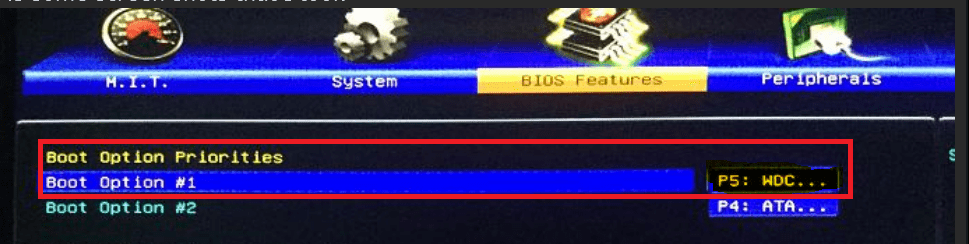
BIOS Features
Boot option 1 - WD HDD
Boot option 2 - ODD

PCI ROM Priority - EFI Compatible ROM
Limit CPUID Maximum - Disabled

Peripherals
LAN PXE Boot Option ROM - Disabled
SATA Controller - Enabled
SATA Mode Selection - AHCI
Init Display First - IGFX (if you use internal graphics)
Internal Graphics - Enabled
Internal Graphics Memory Size - 1024M
DVMT Total Memory Size = Max

To install Win 7 64 follow post #16
Boot Win 7 64 disk as UEFI

update BIOS from DRIVE ? or save BIOS to DRIVE ? cant pick anything unresponsive !Man I have no idea how to Q flash i went in there and the PC locked up and the download mb_bios_ga_h61.....exe could not be opened !
 
Last edited:

My Computer My Computer

At a glance

Windows 7 home premium 64 bit
Computer type
PC/Desktop
OS
Windows 7 home premium 64 bit
Hard Drives
2.0 TB SATA Western Digital
Antivirus
NIL
Browser
NIL
Other Info
its not working yet that is why i haven't filled in all the info
Download the F6 BIOS.
Extract to a USB flash disk.
Enter BIOS. Launch Q-Flash (F8). Browse to the USB flash and select F6 BIOS. Don't interrupt.
 

My Computers My Computers

  • At a glance

    Windows 7 HP 64i5 6600K - 800MHz to 4200MHz4+4G GSkill DDR4 3000IG - Intel 530
    Computer type
    PC/Desktop
    Computer Manufacturer/Model Number
    custom build
    OS
    Windows 7 HP 64
    CPU
    i5 6600K - 800MHz to 4200MHz
    Motherboard
    GA-Z170-HD3P
    Memory
    4+4G GSkill DDR4 3000
    Graphics Card(s)
    IG - Intel 530
    Monitor(s) Displays
    Samsung 226BW
    Screen Resolution
    1680x1050
    Hard Drives
    (1) -1 SM951 – 128GB M.2 AHCI PCIe SSD drive for Windows 7 and Lubuntu
    (2) -1 WD SATA 3 - 1T for Data
    (3) -1 WD SATA 3 - 1T for backup
    PSU
    Thermaltake 450W TR2 gold
    Keyboard
    Old and good Chicony mechanical keyboard
    Mouse
    Logitech mX performance - 9 buttons (had to disable some)
    Internet Speed
    500Mb/s
    Browser
    Firefox 64
    Other Info
    TinyWall firewall
  • At a glance

    Windows 7 Proi7-4500U 800MHz to 3.0GHz(4+4)G DDR3 1600IG intel 4400 + NVIDIA GeForce GT 745M
    Computer type
    Laptop
    System Manufacturer/Model Number
    Asus Q550LF
    OS
    Windows 7 Pro
    CPU
    i7-4500U 800MHz to 3.0GHz
    Motherboard
    Asus Q550LF
    Memory
    (4+4)G DDR3 1600
    Graphics Card(s)
    IG intel 4400 + NVIDIA GeForce GT 745M
    Sound Card
    Realtek
    Monitor(s) Displays
    LG Display LP156WF4-SPH1
    Screen Resolution
    1920 x 1080
    Hard Drives
    BX500 120G SSD for Windows and programs +
    1T HDD for data
    Internet Speed
    500 Mb/s
    Browser
    Firefox
    Other Info
    TinyWall firewall
If you`re not sure how to update the Bios, then don't even attempt it.
 

My Computer My Computer

At a glance

Windows 10 Pro x64Intel Core i7 6700KGSkill TridentZ RGB 16GB 3600 16-16-16-36EVGA GTX 980 Ti SC x2
Computer type
PC/Desktop
Computer Manufacturer/Model Number
Skylake Special #666
OS
Windows 10 Pro x64
CPU
Intel Core i7 6700K
Motherboard
Asus Sabertooth Z170 Mark 1
Memory
GSkill TridentZ RGB 16GB 3600 16-16-16-36
Graphics Card(s)
EVGA GTX 980 Ti SC x2
Sound Card
Realtek High Definition
Monitor(s) Displays
AOC G2460PG
Screen Resolution
1920 x 1080 144Hz
Hard Drives
Samsung 860 Pro 256GB, Seagate Barracuda 4TB x2
PSU
EVGA 1000 P2, EVGA White Custom Braided Cables
Case
Corsair Vengeance C70 Gunmetal Black
Cooling
Corsair H100i v2, Corsair ML120 x2, Thermal Grizzly Kryonaut
Keyboard
Logitech G910 Orion Spectrum
Mouse
Logitech G700s
Internet Speed
Verizon Fios Quantum Gateway 75/75
Antivirus
Windows Defender, Malwarebytes Free 3.8.3
Browser
Chrome
Other Info
Corsair SP120 x4, LG Blu-ray Drive, Durabrand HT-395 100 Watt Dolby Digital Amp, Corsair H2100 Wireless 7.1 Headset
If you`re not sure how to update the Bios, then don't even attempt it.
yes i went in there to try but i had no idea what was what. I heard you can stuff things up real bad if you dont know how to do it !
 

My Computer My Computer

At a glance

Windows 7 home premium 64 bit
Computer type
PC/Desktop
OS
Windows 7 home premium 64 bit
Hard Drives
2.0 TB SATA Western Digital
Antivirus
NIL
Browser
NIL
Other Info
its not working yet that is why i haven't filled in all the info
Have you gotten Windows installed yet ?
 

My Computer My Computer

At a glance

Windows 10 Pro x64Intel Core i7 6700KGSkill TridentZ RGB 16GB 3600 16-16-16-36EVGA GTX 980 Ti SC x2
Computer type
PC/Desktop
Computer Manufacturer/Model Number
Skylake Special #666
OS
Windows 10 Pro x64
CPU
Intel Core i7 6700K
Motherboard
Asus Sabertooth Z170 Mark 1
Memory
GSkill TridentZ RGB 16GB 3600 16-16-16-36
Graphics Card(s)
EVGA GTX 980 Ti SC x2
Sound Card
Realtek High Definition
Monitor(s) Displays
AOC G2460PG
Screen Resolution
1920 x 1080 144Hz
Hard Drives
Samsung 860 Pro 256GB, Seagate Barracuda 4TB x2
PSU
EVGA 1000 P2, EVGA White Custom Braided Cables
Case
Corsair Vengeance C70 Gunmetal Black
Cooling
Corsair H100i v2, Corsair ML120 x2, Thermal Grizzly Kryonaut
Keyboard
Logitech G910 Orion Spectrum
Mouse
Logitech G700s
Internet Speed
Verizon Fios Quantum Gateway 75/75
Antivirus
Windows Defender, Malwarebytes Free 3.8.3
Browser
Chrome
Other Info
Corsair SP120 x4, LG Blu-ray Drive, Durabrand HT-395 100 Watt Dolby Digital Amp, Corsair H2100 Wireless 7.1 Headset
Have you gotten Windows installed yet ?

NO it just seems to be getting complicated !!! its driving me crazy ! people are very helpful but its going around and around I am asked to do something or check this way but i run into some difficulties every time !!! I cant understand how ****ing hard it is to just do a fresh install FFS! :banghead: plus the laptop im using now is all in Chinese so it even more frustrating !
 
Last edited:

My Computer My Computer

At a glance

Windows 7 home premium 64 bit
Computer type
PC/Desktop
OS
Windows 7 home premium 64 bit
Hard Drives
2.0 TB SATA Western Digital
Antivirus
NIL
Browser
NIL
Other Info
its not working yet that is why i haven't filled in all the info
im done with it !!!!!!!!!

This drove me crazy !!! I have been up until 6 and 7 in the morning trying to fix this for weeks !!!!!! So I just grabbed another PC I had lying around and loaded win 7 64 bit with out any problems at all !!! I just have to get the internet up and running and copy a few programs from a external HD and load a few drivers !!! But I do thank everyone for there help awesome !!! I guess I should mark this as solved for now !
 

My Computer My Computer

At a glance

Windows 7 home premium 64 bit
Computer type
PC/Desktop
OS
Windows 7 home premium 64 bit
Hard Drives
2.0 TB SATA Western Digital
Antivirus
NIL
Browser
NIL
Other Info
its not working yet that is why i haven't filled in all the info
Hi,
Sorry to hear that you're quitting :(

If you haven't tried using F7 to optimize defaults and F10 to save and exit you should.

Now that you posted some screen shots please after the F7 & F10 see what has changed in the settings

One that is curious
not sure.PNG
Since the right side column is not in your screen shot that describes what that option is and what other options are available to use ?
 

My Computer My Computer

At a glance

Win-7-Pro64bit 7-H-Prem-64biti7-5930K 2nd i9-9940x both water blocked VRM'...Trident-z 3200C14 2nd Trident-z 3600C16EVGA 1080ti ftw3 2nd Titan Xp both water blocked
Computer type
PC/Desktop
Computer Manufacturer/Model Number
Custom assembled by me :}
OS
Win-7-Pro64bit 7-H-Prem-64bit
CPU
i7-5930K 2nd i9-9940x both water blocked VRM's too
Motherboard
ASUS SABERTOOTH X99 2nd ASUS x299 Apex
Memory
Trident-z 3200C14 2nd Trident-z 3600C16
Graphics Card(s)
EVGA 1080ti ftw3 2nd Titan Xp both water blocked
Sound Card
Built-in Realtek
Monitor(s) Displays
1-AOC G2460PG 24"G-Sync 144Hz/ 2nd 1-ASUS VG248QE 24" 144Hz
Screen Resolution
1920 x 1080 144Hz
Hard Drives
2-Samsung M.2 Evo & Evo Plus
2-Samsung 850 EVO 500GB SSD's/ 3-2.5 W.D. Black 1tb-&3-1tb/3-3.5 WD Black 1tb hdd's
PSU
EVGA SuperNOVA 1000-P2 2nd 1200-P2
Case
2-Corsair Obsidian Series 450D Black ATX Mid Tower
Cooling
Custom water loops
Keyboard
Logitech G710+/ 2nd Logitech G910
Mouse
2-RedDragon M901 Perdition 16400 dpi Gaming mouse = wired
Internet Speed
Comcast Ping 19ms 89.31mbps download speed 6.12mbps upload
Antivirus
Malwarebytes Pro/ Superantispyware Pro
Browser
FireFox & Pale moon
Other Info
2nd ASUS X299 Apex/Intel i9-9940x with Custom water loop/7H-Prem-x64/Corsair 450D case/Ram Trident-z 3600C16 4x8gb / Samsung970Evo plus 500gb SSD/Dual ssd EZ swap evo/PSU EVGA SuperNova 1200w-P2 80+Platinum/GPU Titan Xp /8-ML-140 on push-pull on 2-280GTX rads
Hi,
Sorry to hear that you're quitting :(

If you haven't tried using F7 to optimize defaults and F10 to save and exit you should.

Now that you posted some screen shots please after the F7 & F10 see what has changed in the settings

One that is curious
View attachment 400748
Since the right side column is not in your screen shot that describes what that option is and what other options are available to use ?
Ohhhhh I am not quitting all together but I need a break from hours and hours of getting nowhere up all night days at a time and no results !!!! I have very little computer skills and the terminology that gets used is like a different language ! in fact it is a different language and for the beginner to find the meaning behind each abbreviation or computer jargon is taxing to say the least !!!! add that to the technical side which is very often plagued with problems ! Thats why sevenforums is !! And the help offered on this site is fantastic ! I guess I will give it ago again in a few weeks . :o
 

My Computer My Computer

At a glance

Windows 7 home premium 64 bit
Computer type
PC/Desktop
OS
Windows 7 home premium 64 bit
Hard Drives
2.0 TB SATA Western Digital
Antivirus
NIL
Browser
NIL
Other Info
its not working yet that is why i haven't filled in all the info
Hi,
Sorry to hear that you're quitting :(

If you haven't tried using F7 to optimize defaults and F10 to save and exit you should.

Now that you posted some screen shots please after the F7 & F10 see what has changed in the settings

One that is curious
View attachment 400748
Since the right side column is not in your screen shot that describes what that option is and what other options are available to use ?

Ohh Im not quitting altogether but I need a break from been up all night for hours and hours days on end and getting no results ! I have very little computer skills at all , and trying to understand the terminology is like another language ! In fact it is another language and for a beginner to understand the abbreviations and technical jargon is very taxing and time consuming looking it up etc and often preforming simple tasks can be plagued will problems ! thats why sevenforums exists .And the help offered from members on this site is fantastic ! So I guess I will give it another go in a few weeks in the mean time I will try to brush up on my PC knowledge .
 

My Computer My Computer

At a glance

Windows 7 home premium 64 bit
Computer type
PC/Desktop
OS
Windows 7 home premium 64 bit
Hard Drives
2.0 TB SATA Western Digital
Antivirus
NIL
Browser
NIL
Other Info
its not working yet that is why i haven't filled in all the info
You`ll have to tell us step by step what you are doing and what happens when you get to the problem.

Installing W7 on that board should be no harder than enabling Legacy boot in the Bios, that`s all you should have to do.

Get back to us when you can :)
 

My Computer My Computer

At a glance

Windows 10 Pro x64Intel Core i7 6700KGSkill TridentZ RGB 16GB 3600 16-16-16-36EVGA GTX 980 Ti SC x2
Computer type
PC/Desktop
Computer Manufacturer/Model Number
Skylake Special #666
OS
Windows 10 Pro x64
CPU
Intel Core i7 6700K
Motherboard
Asus Sabertooth Z170 Mark 1
Memory
GSkill TridentZ RGB 16GB 3600 16-16-16-36
Graphics Card(s)
EVGA GTX 980 Ti SC x2
Sound Card
Realtek High Definition
Monitor(s) Displays
AOC G2460PG
Screen Resolution
1920 x 1080 144Hz
Hard Drives
Samsung 860 Pro 256GB, Seagate Barracuda 4TB x2
PSU
EVGA 1000 P2, EVGA White Custom Braided Cables
Case
Corsair Vengeance C70 Gunmetal Black
Cooling
Corsair H100i v2, Corsair ML120 x2, Thermal Grizzly Kryonaut
Keyboard
Logitech G910 Orion Spectrum
Mouse
Logitech G700s
Internet Speed
Verizon Fios Quantum Gateway 75/75
Antivirus
Windows Defender, Malwarebytes Free 3.8.3
Browser
Chrome
Other Info
Corsair SP120 x4, LG Blu-ray Drive, Durabrand HT-395 100 Watt Dolby Digital Amp, Corsair H2100 Wireless 7.1 Headset
You`ll have to tell us step by step what you are doing and what happens when you get to the problem.

Installing W7 on that board should be no harder than enabling Legacy boot in the Bios, that`s all you should have to do.

Get back to us when you can :)

Ohhhhhhh ! I wish it was that easy ! Ok so do you want all the BIOS screen shots and how they are set ? Or just detailed INFO on what the major settings are ( you know which ones are important ) and then what happens when I try the installation and describe any error messages or problems ? Yes can do and I will only try one solution at a time so that it will be easier for you monitor the steps as I go along , unless you see a multitude of problems lol So should I just enable legacy boot and thats it ? or load the default settings in the BIOS first as I am unsure what changes have been made etc ? other than SATA has been set as AHCI and UEFI set over Legacy pretty much as the BIOS screen shots show that I down loaded in previous posts .
 
Last edited:

My Computer My Computer

At a glance

Windows 7 home premium 64 bit
Computer type
PC/Desktop
OS
Windows 7 home premium 64 bit
Hard Drives
2.0 TB SATA Western Digital
Antivirus
NIL
Browser
NIL
Other Info
its not working yet that is why i haven't filled in all the info
Yes, set the Bios to defaults,(F5) but make sure you set it to Legacy Boot, and disable Secure boot if that Bios has that feature, then hit F10 to save and exit.

Put your install media in, dvd or usb stick, make sure it boots from that.

Only have the drive you want to install windows on plugged in.

Tell us your results.

This should not be so difficult.
 

My Computer My Computer

At a glance

Windows 10 Pro x64Intel Core i7 6700KGSkill TridentZ RGB 16GB 3600 16-16-16-36EVGA GTX 980 Ti SC x2
Computer type
PC/Desktop
Computer Manufacturer/Model Number
Skylake Special #666
OS
Windows 10 Pro x64
CPU
Intel Core i7 6700K
Motherboard
Asus Sabertooth Z170 Mark 1
Memory
GSkill TridentZ RGB 16GB 3600 16-16-16-36
Graphics Card(s)
EVGA GTX 980 Ti SC x2
Sound Card
Realtek High Definition
Monitor(s) Displays
AOC G2460PG
Screen Resolution
1920 x 1080 144Hz
Hard Drives
Samsung 860 Pro 256GB, Seagate Barracuda 4TB x2
PSU
EVGA 1000 P2, EVGA White Custom Braided Cables
Case
Corsair Vengeance C70 Gunmetal Black
Cooling
Corsair H100i v2, Corsair ML120 x2, Thermal Grizzly Kryonaut
Keyboard
Logitech G910 Orion Spectrum
Mouse
Logitech G700s
Internet Speed
Verizon Fios Quantum Gateway 75/75
Antivirus
Windows Defender, Malwarebytes Free 3.8.3
Browser
Chrome
Other Info
Corsair SP120 x4, LG Blu-ray Drive, Durabrand HT-395 100 Watt Dolby Digital Amp, Corsair H2100 Wireless 7.1 Headset
Yes, set the Bios to defaults,(F5) but make sure you set it to Legacy Boot, and disable Secure boot if that Bios has that feature, then hit F10 to save and exit.

Put your install media in, dvd or usb stick, make sure it boots from that.

Only have the drive you want to install windows on plugged in.

Tell us your results.

This should not be so difficult.

Ok sounds like a good plan and indeed not difficult at all to set it that way :cool:
 

My Computer My Computer

At a glance

Windows 7 home premium 64 bit
Computer type
PC/Desktop
OS
Windows 7 home premium 64 bit
Hard Drives
2.0 TB SATA Western Digital
Antivirus
NIL
Browser
NIL
Other Info
its not working yet that is why i haven't filled in all the info
Hi,
F7 is actually Optimize defaults not F5
F10 is save and exit.
 

My Computer My Computer

At a glance

Win-7-Pro64bit 7-H-Prem-64biti7-5930K 2nd i9-9940x both water blocked VRM'...Trident-z 3200C14 2nd Trident-z 3600C16EVGA 1080ti ftw3 2nd Titan Xp both water blocked
Computer type
PC/Desktop
Computer Manufacturer/Model Number
Custom assembled by me :}
OS
Win-7-Pro64bit 7-H-Prem-64bit
CPU
i7-5930K 2nd i9-9940x both water blocked VRM's too
Motherboard
ASUS SABERTOOTH X99 2nd ASUS x299 Apex
Memory
Trident-z 3200C14 2nd Trident-z 3600C16
Graphics Card(s)
EVGA 1080ti ftw3 2nd Titan Xp both water blocked
Sound Card
Built-in Realtek
Monitor(s) Displays
1-AOC G2460PG 24"G-Sync 144Hz/ 2nd 1-ASUS VG248QE 24" 144Hz
Screen Resolution
1920 x 1080 144Hz
Hard Drives
2-Samsung M.2 Evo & Evo Plus
2-Samsung 850 EVO 500GB SSD's/ 3-2.5 W.D. Black 1tb-&3-1tb/3-3.5 WD Black 1tb hdd's
PSU
EVGA SuperNOVA 1000-P2 2nd 1200-P2
Case
2-Corsair Obsidian Series 450D Black ATX Mid Tower
Cooling
Custom water loops
Keyboard
Logitech G710+/ 2nd Logitech G910
Mouse
2-RedDragon M901 Perdition 16400 dpi Gaming mouse = wired
Internet Speed
Comcast Ping 19ms 89.31mbps download speed 6.12mbps upload
Antivirus
Malwarebytes Pro/ Superantispyware Pro
Browser
FireFox & Pale moon
Other Info
2nd ASUS X299 Apex/Intel i9-9940x with Custom water loop/7H-Prem-x64/Corsair 450D case/Ram Trident-z 3600C16 4x8gb / Samsung970Evo plus 500gb SSD/Dual ssd EZ swap evo/PSU EVGA SuperNova 1200w-P2 80+Platinum/GPU Titan Xp /8-ML-140 on push-pull on 2-280GTX rads
Most boards it`s F5, but you understand :)

Thanks Mike :)
 

My Computer My Computer

At a glance

Windows 10 Pro x64Intel Core i7 6700KGSkill TridentZ RGB 16GB 3600 16-16-16-36EVGA GTX 980 Ti SC x2
Computer type
PC/Desktop
Computer Manufacturer/Model Number
Skylake Special #666
OS
Windows 10 Pro x64
CPU
Intel Core i7 6700K
Motherboard
Asus Sabertooth Z170 Mark 1
Memory
GSkill TridentZ RGB 16GB 3600 16-16-16-36
Graphics Card(s)
EVGA GTX 980 Ti SC x2
Sound Card
Realtek High Definition
Monitor(s) Displays
AOC G2460PG
Screen Resolution
1920 x 1080 144Hz
Hard Drives
Samsung 860 Pro 256GB, Seagate Barracuda 4TB x2
PSU
EVGA 1000 P2, EVGA White Custom Braided Cables
Case
Corsair Vengeance C70 Gunmetal Black
Cooling
Corsair H100i v2, Corsair ML120 x2, Thermal Grizzly Kryonaut
Keyboard
Logitech G910 Orion Spectrum
Mouse
Logitech G700s
Internet Speed
Verizon Fios Quantum Gateway 75/75
Antivirus
Windows Defender, Malwarebytes Free 3.8.3
Browser
Chrome
Other Info
Corsair SP120 x4, LG Blu-ray Drive, Durabrand HT-395 100 Watt Dolby Digital Amp, Corsair H2100 Wireless 7.1 Headset
Most boards it`s F5, but you understand :)

Thanks Mike :)

I have started the install ! everything seems to be going ok . I will let you know when it is finished .
 

My Computer My Computer

At a glance

Windows 7 home premium 64 bit
Computer type
PC/Desktop
OS
Windows 7 home premium 64 bit
Hard Drives
2.0 TB SATA Western Digital
Antivirus
NIL
Browser
NIL
Other Info
its not working yet that is why i haven't filled in all the info
Good to hear. It should take no more than 15 minutes.
 

My Computer My Computer

At a glance

Windows 10 Pro x64Intel Core i7 6700KGSkill TridentZ RGB 16GB 3600 16-16-16-36EVGA GTX 980 Ti SC x2
Computer type
PC/Desktop
Computer Manufacturer/Model Number
Skylake Special #666
OS
Windows 10 Pro x64
CPU
Intel Core i7 6700K
Motherboard
Asus Sabertooth Z170 Mark 1
Memory
GSkill TridentZ RGB 16GB 3600 16-16-16-36
Graphics Card(s)
EVGA GTX 980 Ti SC x2
Sound Card
Realtek High Definition
Monitor(s) Displays
AOC G2460PG
Screen Resolution
1920 x 1080 144Hz
Hard Drives
Samsung 860 Pro 256GB, Seagate Barracuda 4TB x2
PSU
EVGA 1000 P2, EVGA White Custom Braided Cables
Case
Corsair Vengeance C70 Gunmetal Black
Cooling
Corsair H100i v2, Corsair ML120 x2, Thermal Grizzly Kryonaut
Keyboard
Logitech G910 Orion Spectrum
Mouse
Logitech G700s
Internet Speed
Verizon Fios Quantum Gateway 75/75
Antivirus
Windows Defender, Malwarebytes Free 3.8.3
Browser
Chrome
Other Info
Corsair SP120 x4, LG Blu-ray Drive, Durabrand HT-395 100 Watt Dolby Digital Amp, Corsair H2100 Wireless 7.1 Headset
I just got this message ....Installation was canceled any changes that were made to your computer during the installation process will not be saved .......install windows ..setup cannot continue due to a corrupted installation file . Contact the vendor of the windows installation disc or your system administrator for assistance ......I have another win 7 installation disc that I will swap for this one and try again .
 

My Computer My Computer

At a glance

Windows 7 home premium 64 bit
Computer type
PC/Desktop
OS
Windows 7 home premium 64 bit
Hard Drives
2.0 TB SATA Western Digital
Antivirus
NIL
Browser
NIL
Other Info
its not working yet that is why i haven't filled in all the info
I just got this message ....Installation was canceled any changes that were made to your computer during the installation process will not be saved .......install windows ..setup cannot continue due to a corrupted installation file . Contact the vendor of the windows installation disc or your system administrator for assistance ......I have another win 7 installation disc that I will swap for this one and try again .

windows could not install required files,the files might be corrupt or missing make sure all files required for installation are available and restart installation error code 0x80070570
No device drivers were found make sure that the installation media contains the correct drivers .
windows Installation encounted an unexpected error verify that the installation sources are accessible and restart the installation error code 0x0000005
 

My Computer My Computer

At a glance

Windows 7 home premium 64 bit
Computer type
PC/Desktop
OS
Windows 7 home premium 64 bit
Hard Drives
2.0 TB SATA Western Digital
Antivirus
NIL
Browser
NIL
Other Info
its not working yet that is why i haven't filled in all the info
Back
Top