Solved Installiation trouble with Win-7 Home Premium 64 bit

john1955

New member
Member
Local time
4:50 AM
Messages
52
Location
Southern California
Lets see if I can clearly state my issue . . . My computer is a home build Gigabyte GA-Z77-HD3 with 8GB ram and I have FOUR hard drives. I had three HDs but just bought a new one. One drive is a WD 1TB 7200 rpm drive I use for backups and storage.

I have Win-XP on a Samsung 150 EVO SSD
I have Win-7 32 bit on a Samsung 250 EVO SSD.

I had them set up to not use a boot manager because I want to just be able to hit F12 for the Bios boot menu and it's been working great for over a year.

I just bought a Samsung 850 Pro 256GB to install and test Win-7 64 bit. My plan is - if, after a few months of testing, all my programs I need work on it, then I will use the 64 bit as my primary OS and activate it and quit using Win-7 32 because I don’t want to buy another license (but I digress)

When I tried to install the 64 bit on the new drive it gave me an error message that it could not install it on the MBR partition so I tried it again and got the same message but then I just clicked OK and it continued the installation but when it was done I had a boot manager screen every time I restarted. I found no solution on line so I went into MSConfig and deleted the second drive (64 bit) from boot manager. Then I unplugged the XP and Win-7 32 bit drives from the Mother Board and started over. I still got the error message "cant install on MBR" (paraphrased) so I just selected "delete" from the setup screen wich deleted that MBR and it set itself up with three partitions (going by memory here) but it only shows up as two partitions in Disk Management with the first one being EFI System.

So now the part that bugs me . . . When I go into the BIOS, the three Samsung drives do not show up at all so I cannot set the boot order but I now have a "boot manager" listed and my WD and my two CD's are listed.


So the BIG QUESTION is . . . Is there a way I can get rid of the boot manager? Where is it? Only the "current" OS (default OS) is listed in the Boot Tab of MSConfig in Win-7 32 bit which is what I'm using as my primary operating system still since I haven’t installed any programs on x64 yet.

And do I HAVE to have that EFI System Partition with Win-7 64 bit? (is that another thread?)


I know you guys on Seven Forums are great. I've never not gotten good advice here even though I cam to Windows 7 way late in the game making almost all the threads old and inactive. :0)

[FONT=&quot]Thanks in advance

Edit: When I do hit F12 for the BIOS's boot menu and I select the Boot Manager I then get a screen that states something to the effect that it did not boot correctly and when I make a selection it then gives me the message "Reboot and select Proper Boot device or insert boot media in selected boot device . . ."

Edit: Now one of the Samsung SSD is showing up in the Bios. I'm not making any changes so I don't know why the Bios is changing but the other two SSD's are still missing and the WD is missing from this screen but they are all listed when I hit F12 for the boot options after the motherboard posts (beeps)

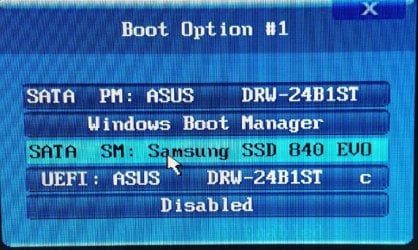
The Boot Options image is from Bios Setup.
[/FONT]
 

Attachments

  • Disk Management.jpg
    Disk Management.jpg
    144.4 KB · Views: 0
  • Bios Boot Option.jpg
    Bios Boot Option.jpg
    226.3 KB · Views: 0
Last edited:

My Computer My Computer

At a glance

Win-7 32bit. 64bit, Win-10 and XPi5-3570K 3.40Ghz16 GBNVIDIA GeForce 1050
Computer type
PC/Desktop
Computer Manufacturer/Model Number
Custom built
OS
Win-7 32bit. 64bit, Win-10 and XP
CPU
i5-3570K 3.40Ghz
Motherboard
GA-Z77-HD3
Memory
16 GB
Graphics Card(s)
NVIDIA GeForce 1050
Sound Card
On Motherboard
Monitor(s) Displays
Asus VP278H-P
Screen Resolution
1920x1080
Hard Drives
Samsung 840 EVO 120GB SSD
Samsung 840 EVO 250GB SSD
Samsung 850 PRO 256GB SSD
WDC_WD1001FALS-00E8B0
PSU
EVGA 550W
Case
Gigabyte
Keyboard
Fujitsu FKB70D (dont laugh)
Internet Speed
15
Antivirus
Windows Defender
Browser
Mostly Fire Fox
Can you post a screenshot of disk management window?
 

My Computers My Computers

  • At a glance

    7 X64i5 84002x8gb 3200mhz
    Computer type
    PC/Desktop
    OS
    7 X64
    CPU
    i5 8400
    Motherboard
    gigabyte b365m ds3h
    Memory
    2x8gb 3200mhz
    Hard Drives
    various
    PSU
    pure power 11 400w cm
    Case
    Coolermaster
    Cooling
    cryorig m9i
  • At a glance

    7x64g54008gb ddr4 2400
    Computer type
    PC/Desktop
    OS
    7x64
    CPU
    g5400
    Motherboard
    ga b365m ds3h
    Memory
    8gb ddr4 2400
    PSU
    xfx pro 450w

My Computer My Computer

At a glance

Win-7 32bit. 64bit, Win-10 and XPi5-3570K 3.40Ghz16 GBNVIDIA GeForce 1050
Computer type
PC/Desktop
Computer Manufacturer/Model Number
Custom built
OS
Win-7 32bit. 64bit, Win-10 and XP
CPU
i5-3570K 3.40Ghz
Motherboard
GA-Z77-HD3
Memory
16 GB
Graphics Card(s)
NVIDIA GeForce 1050
Sound Card
On Motherboard
Monitor(s) Displays
Asus VP278H-P
Screen Resolution
1920x1080
Hard Drives
Samsung 840 EVO 120GB SSD
Samsung 840 EVO 250GB SSD
Samsung 850 PRO 256GB SSD
WDC_WD1001FALS-00E8B0
PSU
EVGA 550W
Case
Gigabyte
Keyboard
Fujitsu FKB70D (dont laugh)
Internet Speed
15
Antivirus
Windows Defender
Browser
Mostly Fire Fox
I guess I don't have a stable install yet. If I select the Boot Manager From the F12 Boot Menu it wont boot into anything. It says "reboot and select a proper boot device or insert a boot media in selected boot device . . ."

I again disconnected the Win7 and XP drives and tried to boot but got the same message so I inserted the Win7 64 bit disk and tried to run "repair" but got the message: "This version of System Recovery Options is nor compatible with the version of windows you are trying to repair".

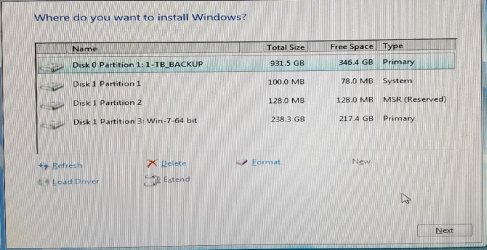
If I try and reinstall I get the following screen . . .

I'm tempted to delete all three partitions and start over but should I delete them here or with Easeus Partion Magic or some other method. I'd rather not have these THREE partitions.
 

Attachments

  • Install.jpg
    Install.jpg
    136.8 KB · Views: 0

My Computer My Computer

At a glance

Win-7 32bit. 64bit, Win-10 and XPi5-3570K 3.40Ghz16 GBNVIDIA GeForce 1050
Computer type
PC/Desktop
Computer Manufacturer/Model Number
Custom built
OS
Win-7 32bit. 64bit, Win-10 and XP
CPU
i5-3570K 3.40Ghz
Motherboard
GA-Z77-HD3
Memory
16 GB
Graphics Card(s)
NVIDIA GeForce 1050
Sound Card
On Motherboard
Monitor(s) Displays
Asus VP278H-P
Screen Resolution
1920x1080
Hard Drives
Samsung 840 EVO 120GB SSD
Samsung 840 EVO 250GB SSD
Samsung 850 PRO 256GB SSD
WDC_WD1001FALS-00E8B0
PSU
EVGA 550W
Case
Gigabyte
Keyboard
Fujitsu FKB70D (dont laugh)
Internet Speed
15
Antivirus
Windows Defender
Browser
Mostly Fire Fox
Basic Rule: When installing a OS on a disk, ALWAYS detach ALL other disks (detach SATA or power cable)

As you already have Win 7 64 on disk 1, try this:
- Detach ALL other disks (detach SATA or power cable) leaving on only disk 1 (Samsung 850 Pro 256GB SSD) and the ODD drive.
- Boot from the Win 7 installation disk as UEFI, go to repair - Do a boot repair.
- It will create EFI boot loader that will take you to the Win 7 64.

The Win 7 installation disk can be booted as Legacy or UEFI (two options on boot menu). Look at your picture of boot menu:
- fist (SATA PM Asus..) is legacy mode
- 4th (UEFI: Asus...) is UEFI mode

You have:
Disk 0 (win 32) is MBR - Legacy
Disk 1 (win 64) is UEFI - GPT
Disk 2 (win XP) is MBR - Legacy
Disk 3 (Backup) is MBR - Legacy
 

My Computers My Computers

  • At a glance

    Windows 7 HP 64i5 6600K - 800MHz to 4200MHz4+4G GSkill DDR4 3000IG - Intel 530
    Computer type
    PC/Desktop
    Computer Manufacturer/Model Number
    custom build
    OS
    Windows 7 HP 64
    CPU
    i5 6600K - 800MHz to 4200MHz
    Motherboard
    GA-Z170-HD3P
    Memory
    4+4G GSkill DDR4 3000
    Graphics Card(s)
    IG - Intel 530
    Monitor(s) Displays
    Samsung 226BW
    Screen Resolution
    1680x1050
    Hard Drives
    (1) -1 SM951 – 128GB M.2 AHCI PCIe SSD drive for Windows 7 and Lubuntu
    (2) -1 WD SATA 3 - 1T for Data
    (3) -1 WD SATA 3 - 1T for backup
    PSU
    Thermaltake 450W TR2 gold
    Keyboard
    Old and good Chicony mechanical keyboard
    Mouse
    Logitech mX performance - 9 buttons (had to disable some)
    Internet Speed
    500Mb/s
    Browser
    Firefox 64
    Other Info
    TinyWall firewall
  • At a glance

    Windows 7 Proi7-4500U 800MHz to 3.0GHz(4+4)G DDR3 1600IG intel 4400 + NVIDIA GeForce GT 745M
    Computer type
    Laptop
    System Manufacturer/Model Number
    Asus Q550LF
    OS
    Windows 7 Pro
    CPU
    i7-4500U 800MHz to 3.0GHz
    Motherboard
    Asus Q550LF
    Memory
    (4+4)G DDR3 1600
    Graphics Card(s)
    IG intel 4400 + NVIDIA GeForce GT 745M
    Sound Card
    Realtek
    Monitor(s) Displays
    LG Display LP156WF4-SPH1
    Screen Resolution
    1920 x 1080
    Hard Drives
    BX500 120G SSD for Windows and programs +
    1T HDD for data
    Internet Speed
    500 Mb/s
    Browser
    Firefox
    Other Info
    TinyWall firewall
Thanks, I tried that very thing while I was waiting and I got the message: "This version of System Recovery Options is not compatible with the version of Windows you are trying to repair..." I read on a Microsoft Help page that it would work if I disabled all other drives but I did disconnect them (except the DVD) and still got the message.

Do you think there are any other options other than completely starting over from a clean disk? How should I wipe this disk if that's what I need to do. There's more than one way to skin a cat . . . I mean wipe a disk :)

Basic Rule: When installing a OS on a disk, ALWAYS detach ALL other disks (detach SATA or power cable)

As you already have Win 7 64 on disk 1, try this:
- Detach ALL other disks (detach SATA or power cable) leaving on only disk 1 (Samsung 850 Pro 256GB SSD) and the ODD drive.
- Boot from the Win 7 installation disk as UEFI, go to repair - Do a boot repair.
- It will create EFI boot loader that will take you to the Win 7 64.

The Win 7 installation disk can be booted as Legacy or UEFI (two options on boot menu). Look at your picture of boot menu:
- fist (SATA PM Asus..) is legacy mode
- 4th (UEFI: Asus...) is UEFI mode

You have:
Disk 0 (win 32) is MBR - Legacy
Disk 1 (win 64) is UEFI - GPT
Disk 2 (win XP) is MBR - Legacy
Disk 3 (Backup) is MBR - Legacy
 

My Computer My Computer

At a glance

Win-7 32bit. 64bit, Win-10 and XPi5-3570K 3.40Ghz16 GBNVIDIA GeForce 1050
Computer type
PC/Desktop
Computer Manufacturer/Model Number
Custom built
OS
Win-7 32bit. 64bit, Win-10 and XP
CPU
i5-3570K 3.40Ghz
Motherboard
GA-Z77-HD3
Memory
16 GB
Graphics Card(s)
NVIDIA GeForce 1050
Sound Card
On Motherboard
Monitor(s) Displays
Asus VP278H-P
Screen Resolution
1920x1080
Hard Drives
Samsung 840 EVO 120GB SSD
Samsung 840 EVO 250GB SSD
Samsung 850 PRO 256GB SSD
WDC_WD1001FALS-00E8B0
PSU
EVGA 550W
Case
Gigabyte
Keyboard
Fujitsu FKB70D (dont laugh)
Internet Speed
15
Antivirus
Windows Defender
Browser
Mostly Fire Fox
One more question . . .

what do you mean by Boot from the Win 7 installation disk as UEFI, go to repair - Do a boot repair.

I don't know what the "as UEFI" means.
 

My Computer My Computer

At a glance

Win-7 32bit. 64bit, Win-10 and XPi5-3570K 3.40Ghz16 GBNVIDIA GeForce 1050
Computer type
PC/Desktop
Computer Manufacturer/Model Number
Custom built
OS
Win-7 32bit. 64bit, Win-10 and XP
CPU
i5-3570K 3.40Ghz
Motherboard
GA-Z77-HD3
Memory
16 GB
Graphics Card(s)
NVIDIA GeForce 1050
Sound Card
On Motherboard
Monitor(s) Displays
Asus VP278H-P
Screen Resolution
1920x1080
Hard Drives
Samsung 840 EVO 120GB SSD
Samsung 840 EVO 250GB SSD
Samsung 850 PRO 256GB SSD
WDC_WD1001FALS-00E8B0
PSU
EVGA 550W
Case
Gigabyte
Keyboard
Fujitsu FKB70D (dont laugh)
Internet Speed
15
Antivirus
Windows Defender
Browser
Mostly Fire Fox
The Win 7 installation disk can be booted as Legacy or UEFI (two options on boot menu). Look at your picture of boot menu:
- fist (SATA PM Asus..) is legacy mode
- 4th (UEFI: Asus...) is UEFI mode
 

My Computers My Computers

  • At a glance

    Windows 7 HP 64i5 6600K - 800MHz to 4200MHz4+4G GSkill DDR4 3000IG - Intel 530
    Computer type
    PC/Desktop
    Computer Manufacturer/Model Number
    custom build
    OS
    Windows 7 HP 64
    CPU
    i5 6600K - 800MHz to 4200MHz
    Motherboard
    GA-Z170-HD3P
    Memory
    4+4G GSkill DDR4 3000
    Graphics Card(s)
    IG - Intel 530
    Monitor(s) Displays
    Samsung 226BW
    Screen Resolution
    1680x1050
    Hard Drives
    (1) -1 SM951 – 128GB M.2 AHCI PCIe SSD drive for Windows 7 and Lubuntu
    (2) -1 WD SATA 3 - 1T for Data
    (3) -1 WD SATA 3 - 1T for backup
    PSU
    Thermaltake 450W TR2 gold
    Keyboard
    Old and good Chicony mechanical keyboard
    Mouse
    Logitech mX performance - 9 buttons (had to disable some)
    Internet Speed
    500Mb/s
    Browser
    Firefox 64
    Other Info
    TinyWall firewall
  • At a glance

    Windows 7 Proi7-4500U 800MHz to 3.0GHz(4+4)G DDR3 1600IG intel 4400 + NVIDIA GeForce GT 745M
    Computer type
    Laptop
    System Manufacturer/Model Number
    Asus Q550LF
    OS
    Windows 7 Pro
    CPU
    i7-4500U 800MHz to 3.0GHz
    Motherboard
    Asus Q550LF
    Memory
    (4+4)G DDR3 1600
    Graphics Card(s)
    IG intel 4400 + NVIDIA GeForce GT 745M
    Sound Card
    Realtek
    Monitor(s) Displays
    LG Display LP156WF4-SPH1
    Screen Resolution
    1920 x 1080
    Hard Drives
    BX500 120G SSD for Windows and programs +
    1T HDD for data
    Internet Speed
    500 Mb/s
    Browser
    Firefox
    Other Info
    TinyWall firewall
I have TWO Asus DVD drives. I was wondering how one of them got changed to UEFI. I'll try it from the other drive and see if that works . . . be right back . . .

If that does not work I was wondering if I should delete the two top partitions of that drive and then run Repair.

The Win 7 installation disk can be booted as Legacy or UEFI (two options on boot menu). Look at your picture of boot menu:
- fist (SATA PM Asus..) is legacy mode
- 4th (UEFI: Asus...) is UEFI mode
 

My Computer My Computer

At a glance

Win-7 32bit. 64bit, Win-10 and XPi5-3570K 3.40Ghz16 GBNVIDIA GeForce 1050
Computer type
PC/Desktop
Computer Manufacturer/Model Number
Custom built
OS
Win-7 32bit. 64bit, Win-10 and XP
CPU
i5-3570K 3.40Ghz
Motherboard
GA-Z77-HD3
Memory
16 GB
Graphics Card(s)
NVIDIA GeForce 1050
Sound Card
On Motherboard
Monitor(s) Displays
Asus VP278H-P
Screen Resolution
1920x1080
Hard Drives
Samsung 840 EVO 120GB SSD
Samsung 840 EVO 250GB SSD
Samsung 850 PRO 256GB SSD
WDC_WD1001FALS-00E8B0
PSU
EVGA 550W
Case
Gigabyte
Keyboard
Fujitsu FKB70D (dont laugh)
Internet Speed
15
Antivirus
Windows Defender
Browser
Mostly Fire Fox
It isn't the ODD drive that has a UEFI option. Is the disk in it.
Put the Win 7 installation disk in any of them and select UEFI from the boot menu.

If you delete the two top partitions on the drive it will be un boot able. As explained, disk one isn't MBR - Legacy. It is UEFI - GPT.
And UEFI - GPT needs the UEFI partition as it has the boot loader.
 

My Computers My Computers

  • At a glance

    Windows 7 HP 64i5 6600K - 800MHz to 4200MHz4+4G GSkill DDR4 3000IG - Intel 530
    Computer type
    PC/Desktop
    Computer Manufacturer/Model Number
    custom build
    OS
    Windows 7 HP 64
    CPU
    i5 6600K - 800MHz to 4200MHz
    Motherboard
    GA-Z170-HD3P
    Memory
    4+4G GSkill DDR4 3000
    Graphics Card(s)
    IG - Intel 530
    Monitor(s) Displays
    Samsung 226BW
    Screen Resolution
    1680x1050
    Hard Drives
    (1) -1 SM951 – 128GB M.2 AHCI PCIe SSD drive for Windows 7 and Lubuntu
    (2) -1 WD SATA 3 - 1T for Data
    (3) -1 WD SATA 3 - 1T for backup
    PSU
    Thermaltake 450W TR2 gold
    Keyboard
    Old and good Chicony mechanical keyboard
    Mouse
    Logitech mX performance - 9 buttons (had to disable some)
    Internet Speed
    500Mb/s
    Browser
    Firefox 64
    Other Info
    TinyWall firewall
  • At a glance

    Windows 7 Proi7-4500U 800MHz to 3.0GHz(4+4)G DDR3 1600IG intel 4400 + NVIDIA GeForce GT 745M
    Computer type
    Laptop
    System Manufacturer/Model Number
    Asus Q550LF
    OS
    Windows 7 Pro
    CPU
    i7-4500U 800MHz to 3.0GHz
    Motherboard
    Asus Q550LF
    Memory
    (4+4)G DDR3 1600
    Graphics Card(s)
    IG intel 4400 + NVIDIA GeForce GT 745M
    Sound Card
    Realtek
    Monitor(s) Displays
    LG Display LP156WF4-SPH1
    Screen Resolution
    1920 x 1080
    Hard Drives
    BX500 120G SSD for Windows and programs +
    1T HDD for data
    Internet Speed
    500 Mb/s
    Browser
    Firefox
    Other Info
    TinyWall firewall
I see. Well this time the repair program ran after I ignorantly put the disk in the other DVD :o haha

But repair failed to make the repair.

See image below . . .

I figured it would be unbootable if I delete those partitions but hoped the repair would fix it or there might be a way to add the boot section on manually (shows my lack of knowledge)

Just what is that second partition for since it seems to be totally unused

It isn't the ODD drive that has a UEFI option. Is the disk in it.
Put the Win 7 installation disk in any of them and select UEFI from the boot menu.

If you delete the two top partitions on the drive it will be un boot able. As explained, disk one isn't MBR - Legacy. It is UEFI - GPT.
And UEFI - GPT needs the UEFI partition as it has the boot loader.
 

Attachments

  • Repair.jpg
    Repair.jpg
    186.5 KB · Views: 0

My Computer My Computer

At a glance

Win-7 32bit. 64bit, Win-10 and XPi5-3570K 3.40Ghz16 GBNVIDIA GeForce 1050
Computer type
PC/Desktop
Computer Manufacturer/Model Number
Custom built
OS
Win-7 32bit. 64bit, Win-10 and XP
CPU
i5-3570K 3.40Ghz
Motherboard
GA-Z77-HD3
Memory
16 GB
Graphics Card(s)
NVIDIA GeForce 1050
Sound Card
On Motherboard
Monitor(s) Displays
Asus VP278H-P
Screen Resolution
1920x1080
Hard Drives
Samsung 840 EVO 120GB SSD
Samsung 840 EVO 250GB SSD
Samsung 850 PRO 256GB SSD
WDC_WD1001FALS-00E8B0
PSU
EVGA 550W
Case
Gigabyte
Keyboard
Fujitsu FKB70D (dont laugh)
Internet Speed
15
Antivirus
Windows Defender
Browser
Mostly Fire Fox
Did you booted the win 7 installation disk as UEFI?
Did you detach ALL other drives (including disk 3 - Backup)?
 

My Computers My Computers

  • At a glance

    Windows 7 HP 64i5 6600K - 800MHz to 4200MHz4+4G GSkill DDR4 3000IG - Intel 530
    Computer type
    PC/Desktop
    Computer Manufacturer/Model Number
    custom build
    OS
    Windows 7 HP 64
    CPU
    i5 6600K - 800MHz to 4200MHz
    Motherboard
    GA-Z170-HD3P
    Memory
    4+4G GSkill DDR4 3000
    Graphics Card(s)
    IG - Intel 530
    Monitor(s) Displays
    Samsung 226BW
    Screen Resolution
    1680x1050
    Hard Drives
    (1) -1 SM951 – 128GB M.2 AHCI PCIe SSD drive for Windows 7 and Lubuntu
    (2) -1 WD SATA 3 - 1T for Data
    (3) -1 WD SATA 3 - 1T for backup
    PSU
    Thermaltake 450W TR2 gold
    Keyboard
    Old and good Chicony mechanical keyboard
    Mouse
    Logitech mX performance - 9 buttons (had to disable some)
    Internet Speed
    500Mb/s
    Browser
    Firefox 64
    Other Info
    TinyWall firewall
  • At a glance

    Windows 7 Proi7-4500U 800MHz to 3.0GHz(4+4)G DDR3 1600IG intel 4400 + NVIDIA GeForce GT 745M
    Computer type
    Laptop
    System Manufacturer/Model Number
    Asus Q550LF
    OS
    Windows 7 Pro
    CPU
    i7-4500U 800MHz to 3.0GHz
    Motherboard
    Asus Q550LF
    Memory
    (4+4)G DDR3 1600
    Graphics Card(s)
    IG intel 4400 + NVIDIA GeForce GT 745M
    Sound Card
    Realtek
    Monitor(s) Displays
    LG Display LP156WF4-SPH1
    Screen Resolution
    1920 x 1080
    Hard Drives
    BX500 120G SSD for Windows and programs +
    1T HDD for data
    Internet Speed
    500 Mb/s
    Browser
    Firefox
    Other Info
    TinyWall firewall

My Computer My Computer

At a glance

Win-7 32bit. 64bit, Win-10 and XPi5-3570K 3.40Ghz16 GBNVIDIA GeForce 1050
Computer type
PC/Desktop
Computer Manufacturer/Model Number
Custom built
OS
Win-7 32bit. 64bit, Win-10 and XP
CPU
i5-3570K 3.40Ghz
Motherboard
GA-Z77-HD3
Memory
16 GB
Graphics Card(s)
NVIDIA GeForce 1050
Sound Card
On Motherboard
Monitor(s) Displays
Asus VP278H-P
Screen Resolution
1920x1080
Hard Drives
Samsung 840 EVO 120GB SSD
Samsung 840 EVO 250GB SSD
Samsung 850 PRO 256GB SSD
WDC_WD1001FALS-00E8B0
PSU
EVGA 550W
Case
Gigabyte
Keyboard
Fujitsu FKB70D (dont laugh)
Internet Speed
15
Antivirus
Windows Defender
Browser
Mostly Fire Fox
I just tried it again but this time I ran system restore (a restore point before updating IE to IE 11) but that failed as well saying an unspecified error occurred (0x8000ffff)

If it falls to this . . . what's the best way to wipe this desk and start over AGAIN (this will be the third attempt) the last install (last night) worked fine until it went into hibernation. It woke up from hibernation this morning but then would not boot up again after I booted into Win-7 32. (I have no programs on the 64 bit yet.)

I booted into it four or five times last night till it was time to watch the World Series . . .

OK. The one change I made was disabling hibernation this morning and then deleting the hibernation system file. I got NO error message that the fire was in use. Surly THAT can't be an issue.
 

My Computer My Computer

At a glance

Win-7 32bit. 64bit, Win-10 and XPi5-3570K 3.40Ghz16 GBNVIDIA GeForce 1050
Computer type
PC/Desktop
Computer Manufacturer/Model Number
Custom built
OS
Win-7 32bit. 64bit, Win-10 and XP
CPU
i5-3570K 3.40Ghz
Motherboard
GA-Z77-HD3
Memory
16 GB
Graphics Card(s)
NVIDIA GeForce 1050
Sound Card
On Motherboard
Monitor(s) Displays
Asus VP278H-P
Screen Resolution
1920x1080
Hard Drives
Samsung 840 EVO 120GB SSD
Samsung 840 EVO 250GB SSD
Samsung 850 PRO 256GB SSD
WDC_WD1001FALS-00E8B0
PSU
EVGA 550W
Case
Gigabyte
Keyboard
Fujitsu FKB70D (dont laugh)
Internet Speed
15
Antivirus
Windows Defender
Browser
Mostly Fire Fox
I took the time to delete all the partitions and reinstall to a clean disk with no other drive connected.

The install went without a hitch and I could boot into it at will but as soon as I re-connected the other drives and booted into one of them I could no longer boot into Win-7-64-bit. To wipe the drive and reinstall only takes about 30 minutes.

When I try to boot into it it just stalls and boots into WinXP. If I disconnect XP it boots into 7-32-bit If I disconnect that as well it just wont boot at all.

I'm stumped.
 

My Computer My Computer

At a glance

Win-7 32bit. 64bit, Win-10 and XPi5-3570K 3.40Ghz16 GBNVIDIA GeForce 1050
Computer type
PC/Desktop
Computer Manufacturer/Model Number
Custom built
OS
Win-7 32bit. 64bit, Win-10 and XP
CPU
i5-3570K 3.40Ghz
Motherboard
GA-Z77-HD3
Memory
16 GB
Graphics Card(s)
NVIDIA GeForce 1050
Sound Card
On Motherboard
Monitor(s) Displays
Asus VP278H-P
Screen Resolution
1920x1080
Hard Drives
Samsung 840 EVO 120GB SSD
Samsung 840 EVO 250GB SSD
Samsung 850 PRO 256GB SSD
WDC_WD1001FALS-00E8B0
PSU
EVGA 550W
Case
Gigabyte
Keyboard
Fujitsu FKB70D (dont laugh)
Internet Speed
15
Antivirus
Windows Defender
Browser
Mostly Fire Fox
I've managed to fix it two more times but every time I hook up the SSD with Win-XP on it, it brakes the boot system for 7-64 and I have to run system restore. I cannot for the life of me figure out how this can be happening. I've spent hours installing drivers and security updates and setting preferences this time so I hope I have enough restore points that I wont ruin it trying to figure this out. I've been going back and forth between 7-64 & 7-32 all day with no problems as long as I keep the XP drive unplugged.

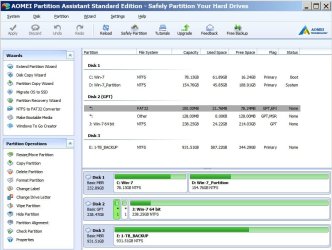
One really strange issue is that Windows Disk Management shows two partitions, AOMEI Partition Manager shows three partitions and EaseUs shows FIVE partitions on that Drive. What the heck is this about?

The boot menu has changed as well. It now has a selection for UEFI: Samsung SSD 850 PRO 256GB. If I select the SATA version of the same drive the boot fails with or without XP. If I select Windows Boot Manager it fails as well and asks me to provide a bootable device (paraphrased)

Is this Boot Manager NORMAL for a UEFI install of a 64 bit OS? I read somewhere that it is. It sure is annoying. Can this boot manager be edited so that if I select it I get some valid options? If it's going to be there it ought to do something besides asking me to provide it something bootable. I have only a little experience with bcdedit.exe (just used it to rename OSs)

Thanks for listening
John
 

Attachments

  • Boot Menue.jpg
    Boot Menue.jpg
    199 KB · Views: 2
  • Easues Partitions.jpg
    Easues Partitions.jpg
    90.5 KB · Views: 0
  • AOMEI Partitions.jpg
    AOMEI Partitions.jpg
    86.6 KB · Views: 0

My Computer My Computer

At a glance

Win-7 32bit. 64bit, Win-10 and XPi5-3570K 3.40Ghz16 GBNVIDIA GeForce 1050
Computer type
PC/Desktop
Computer Manufacturer/Model Number
Custom built
OS
Win-7 32bit. 64bit, Win-10 and XP
CPU
i5-3570K 3.40Ghz
Motherboard
GA-Z77-HD3
Memory
16 GB
Graphics Card(s)
NVIDIA GeForce 1050
Sound Card
On Motherboard
Monitor(s) Displays
Asus VP278H-P
Screen Resolution
1920x1080
Hard Drives
Samsung 840 EVO 120GB SSD
Samsung 840 EVO 250GB SSD
Samsung 850 PRO 256GB SSD
WDC_WD1001FALS-00E8B0
PSU
EVGA 550W
Case
Gigabyte
Keyboard
Fujitsu FKB70D (dont laugh)
Internet Speed
15
Antivirus
Windows Defender
Browser
Mostly Fire Fox
As I already described, you have two kinds of disk low level format: MBR - Legacy and UEFI - GPT.
The disk 1 and 3 are MBR - Legacy and disk 2 is UEFI - GPT.
You made a big mess when installing Win 7 64 on disk 2. Fist of all, you have used a program to partition the disk and that is why you have two unallocated partitions. It is not necessary to use this kind of programs as Win 7 installation wizard will do it for you.

My suggestion: Reinstall win 7, making the disk 2 Legacy
- Detach Disk 1 and 3 (SATA cable or power cable)
- Normally boot you win 7 installation disk (not UEFI boot)
- Go to install, advanced, delete ALL partitions- create new.
- it will create two partitions:
- 100M MS reserved - RAW
- A big NTFS

Install on the big NTFS
It will install Win 7 64 on disk 2 as MBR - Legacy, so all disks will be the same type (MBR - Legacy)
 

My Computers My Computers

  • At a glance

    Windows 7 HP 64i5 6600K - 800MHz to 4200MHz4+4G GSkill DDR4 3000IG - Intel 530
    Computer type
    PC/Desktop
    Computer Manufacturer/Model Number
    custom build
    OS
    Windows 7 HP 64
    CPU
    i5 6600K - 800MHz to 4200MHz
    Motherboard
    GA-Z170-HD3P
    Memory
    4+4G GSkill DDR4 3000
    Graphics Card(s)
    IG - Intel 530
    Monitor(s) Displays
    Samsung 226BW
    Screen Resolution
    1680x1050
    Hard Drives
    (1) -1 SM951 – 128GB M.2 AHCI PCIe SSD drive for Windows 7 and Lubuntu
    (2) -1 WD SATA 3 - 1T for Data
    (3) -1 WD SATA 3 - 1T for backup
    PSU
    Thermaltake 450W TR2 gold
    Keyboard
    Old and good Chicony mechanical keyboard
    Mouse
    Logitech mX performance - 9 buttons (had to disable some)
    Internet Speed
    500Mb/s
    Browser
    Firefox 64
    Other Info
    TinyWall firewall
  • At a glance

    Windows 7 Proi7-4500U 800MHz to 3.0GHz(4+4)G DDR3 1600IG intel 4400 + NVIDIA GeForce GT 745M
    Computer type
    Laptop
    System Manufacturer/Model Number
    Asus Q550LF
    OS
    Windows 7 Pro
    CPU
    i7-4500U 800MHz to 3.0GHz
    Motherboard
    Asus Q550LF
    Memory
    (4+4)G DDR3 1600
    Graphics Card(s)
    IG intel 4400 + NVIDIA GeForce GT 745M
    Sound Card
    Realtek
    Monitor(s) Displays
    LG Display LP156WF4-SPH1
    Screen Resolution
    1920 x 1080
    Hard Drives
    BX500 120G SSD for Windows and programs +
    1T HDD for data
    Internet Speed
    500 Mb/s
    Browser
    Firefox
    Other Info
    TinyWall firewall
I hope your solution works but I did not use any program to partition the disk. It was a new disk and I only used the partition program to look at it. I did however format the disk with Windows Disk Management console before installing 7-64-bit. On my second install attempt I did as you suggest and selected "delete ALL partitions" before installing.

I will try it again and reboot after deleting all partitions to make sure they are in fact deleted. I dont remember doing that last time.

Now that its running good with all MB drivers and updates and personal tweaks (without the XP disk installed) I will first try and back up the Windows installation with Acronis TI and do as you suggested . . . and then restore the backup but NOT the boot sector (not the entire drive of course)

I'll wait a while to see if you have a reason to not do that backup/restore.

Thanks for hanging in here with me.

As I already described, you have two kinds of disk low level format: MBR - Legacy and UEFI - GPT.
The disk 1 and 3 are MBR - Legacy and disk 2 is UEFI - GPT.
You made a big mess when installing Win 7 64 on disk 2. Fist of all, you have used a program to partition the disk and that is why you have two unallocated partitions. It is not necessary to use this kind of programs as Win 7 installation wizard will do it for you.

My suggestion: Reinstall win 7, making the disk 2 Legacy
- Detach Disk 1 and 3 (SATA cable or power cable)
- Normally boot you win 7 installation disk (not UEFI boot)
- Go to install, advanced, delete ALL partitions- create new.
- it will create two partitions:
- 100M MS reserved - RAW
- A big NTFS

Install on the big NTFS
It will install Win 7 64 on disk 2 as MBR - Legacy, so all disks will be the same type (MBR - Legacy)
 

My Computer My Computer

At a glance

Win-7 32bit. 64bit, Win-10 and XPi5-3570K 3.40Ghz16 GBNVIDIA GeForce 1050
Computer type
PC/Desktop
Computer Manufacturer/Model Number
Custom built
OS
Win-7 32bit. 64bit, Win-10 and XP
CPU
i5-3570K 3.40Ghz
Motherboard
GA-Z77-HD3
Memory
16 GB
Graphics Card(s)
NVIDIA GeForce 1050
Sound Card
On Motherboard
Monitor(s) Displays
Asus VP278H-P
Screen Resolution
1920x1080
Hard Drives
Samsung 840 EVO 120GB SSD
Samsung 840 EVO 250GB SSD
Samsung 850 PRO 256GB SSD
WDC_WD1001FALS-00E8B0
PSU
EVGA 550W
Case
Gigabyte
Keyboard
Fujitsu FKB70D (dont laugh)
Internet Speed
15
Antivirus
Windows Defender
Browser
Mostly Fire Fox
Will the Windows Backup that comes with Windows 7 do what I want . . . to backup my system in it's present state with all the updates and restore it? Backup up to another drive?

Ive been using backup software for a long time. Started with Colorado Tape Backup in the early 90's but what i always hated about Microsoft is they changed programs with the new operating system and they would not work with the older archives so I quit trusting any backup program MS provided.
 

My Computer My Computer

At a glance

Win-7 32bit. 64bit, Win-10 and XPi5-3570K 3.40Ghz16 GBNVIDIA GeForce 1050
Computer type
PC/Desktop
Computer Manufacturer/Model Number
Custom built
OS
Win-7 32bit. 64bit, Win-10 and XP
CPU
i5-3570K 3.40Ghz
Motherboard
GA-Z77-HD3
Memory
16 GB
Graphics Card(s)
NVIDIA GeForce 1050
Sound Card
On Motherboard
Monitor(s) Displays
Asus VP278H-P
Screen Resolution
1920x1080
Hard Drives
Samsung 840 EVO 120GB SSD
Samsung 840 EVO 250GB SSD
Samsung 850 PRO 256GB SSD
WDC_WD1001FALS-00E8B0
PSU
EVGA 550W
Case
Gigabyte
Keyboard
Fujitsu FKB70D (dont laugh)
Internet Speed
15
Antivirus
Windows Defender
Browser
Mostly Fire Fox
You could use windows system image. It works well enough.

It is present in windows 10 also, bizarrely named "windows 7 backup". The win 10 image restore gui does not restore win7 created images. However, the win10 wbadmin.exe commandline does.

The advantage of windows system image is that it is in .vhd format ( .vhdx in win10 ). Several 3rd party applications can mount and extract .vhd(x) images. They can also be mounted read/write and serviced - adding/removing things as you wish.

Images created by 3rd party programs are usually proprietary, can't be accessed by any other programs, and can't be mounted read/write.

[ Note: There are a few 3rd party imagers that will offer to create in either their own proprietary format, or in .vhd format - Paragon and O&O diskimage, for example. ]
 

My Computers My Computers

  • At a glance

    7 X64i5 84002x8gb 3200mhz
    Computer type
    PC/Desktop
    OS
    7 X64
    CPU
    i5 8400
    Motherboard
    gigabyte b365m ds3h
    Memory
    2x8gb 3200mhz
    Hard Drives
    various
    PSU
    pure power 11 400w cm
    Case
    Coolermaster
    Cooling
    cryorig m9i
  • At a glance

    7x64g54008gb ddr4 2400
    Computer type
    PC/Desktop
    OS
    7x64
    CPU
    g5400
    Motherboard
    ga b365m ds3h
    Memory
    8gb ddr4 2400
    PSU
    xfx pro 450w
Back
Top