Can't Access External Hard Drive/Former laptop Hard disk

RobertN

New member
Local time
6:05 AM
Messages
15
About a year ago my laptop hard drive stopped working. Got another one, but would still like to access the data on it. Don't know how. Have connected it to USB externally, but when I do that, two drives show up- E: and F:, and neither of them are accessible. Properties shows 0 bytes on both, and when I try to access disk management, it stalls and I never get any info to see what's going on. Any ideas please? Would like to access it all again without having to reformat and delete any data.

Thanks.
 

My Computer My Computer

At a glance

Windows 7 Ultimate x64, Serice Pack 1Intel Core i3 M350 2.27 GHz4 GBRealtek
Computer type
Laptop
Computer Manufacturer/Model Number
Toshiba Satellite A665
OS
Windows 7 Ultimate x64, Serice Pack 1
CPU
Intel Core i3 M350 2.27 GHz
Memory
4 GB
Graphics Card(s)
Realtek
Hard Drives
Momentus 7200 4 500 GB
Browser
Mozilla
About a year ago my laptop hard drive stopped working. Got another one, but would still like to access the data on it. Don't know how. Have connected it to USB externally, but when I do that, two drives show up- E: and F:, and neither of them are accessible. Properties shows 0 bytes on both, and when I try to access disk management, it stalls and I never get any info to see what's going on. Any ideas please? Would like to access it all again without having to reformat and delete any data.
Try to load one of these Linux based operative systems on cd-rom and see if they can access the drive.
 

My Computer My Computer

At a glance

Windows 7 Ultimate x64Intel i5-6600K 3.50GHzCorsair DDR4 2x8GBMSI GeForce GTX1070 Gaming X
Computer type
PC/Desktop
Computer Manufacturer/Model Number
Custom build
OS
Windows 7 Ultimate x64
CPU
Intel i5-6600K 3.50GHz
Motherboard
Asus Pro Z170 Gaming
Memory
Corsair DDR4 2x8GB
Graphics Card(s)
MSI GeForce GTX1070 Gaming X
Sound Card
On board Realtek
Monitor(s) Displays
Dell SP2309W
Screen Resolution
1920x1080
Hard Drives
OS Samsung 850 EVO 500GB SATA III SSD
2x Hitachi Deskstar 1GB SATA data drives
1x Western Digital Caviar Black 1TB SATA data drive
PSU
Corsair HX650W
Case
CoolerMaster CM 690 III
Cooling
Coolermaster Hyper 212 EVO 1x200mm 1x140mm 2x120mm case fan
Keyboard
Logitech usb keyboard
Mouse
Logitech G500 $27 bargain :)
Internet Speed
ADSL2
Antivirus
Microsoft Security Essential, MalwareBytes
Browser
SRWare Iron, Internet Explorer
Other Info
Very happy with this buid.
I struggled a lot to find all compatible parts since I wanted an Intel 1151 based motherboard so to be able to install Windows 7.
I chose this case because it has amazing air flow, it's sturdy and looks good.
The case included 1x 200mm front and 1x 120mm back fans, I added 1x 200mm on the top and 1x120 bottom fans and modded the panels with black stockings for women s
I don't know what that is, what you're referring to, or how to access it. Not very tech savvy. Sorry.

-Robert
 

My Computer My Computer

At a glance

Windows 7 Ultimate x64, Serice Pack 1Intel Core i3 M350 2.27 GHz4 GBRealtek
Computer type
Laptop
Computer Manufacturer/Model Number
Toshiba Satellite A665
OS
Windows 7 Ultimate x64, Serice Pack 1
CPU
Intel Core i3 M350 2.27 GHz
Memory
4 GB
Graphics Card(s)
Realtek
Hard Drives
Momentus 7200 4 500 GB
Browser
Mozilla
Linux is an operating system the same as Windows. There are different versions of Linux such as Ubuntu or Linux Mint. You can make what is called a “live” version of Linux. This is when you use a DVD or USB flash drive and put the Linux operating system on either one of them. The operating system runs off the flash drive or dvd. No files are written to your hard drive. You boot from the dvd or usb flash drive and you will reach the Desktop, just like you do in Windows. When you Shutdown, there is no trace of it left behind.

If you are going to try Linux, I would make a live Linux usb flash drive. It will be a much smoother experience.

When you boot from the flash drive or dvd, you might be asked if you want to “Install Linux” or “Try” Linux. Make sure you select “Try”.

Here is one guide to make the live Linux usb flash drive. If you do a google search, you will find many others.

How to Create Ubuntu Live USB in Windows [Step-by-Step]

Just to get familiar with Ubuntu or Linux Mint, do a YouTube search of the either one. You will see how to use them. They are similar to Windows 7.
 

My Computer My Computer

At a glance

Windows 7 Home Premium 64bitiNTEL Core i7 2630QM 2GHz8GBNVIDIA GeForce GT 555M
Computer type
Laptop
Computer Manufacturer/Model Number
Alienware
OS
Windows 7 Home Premium 64bit
CPU
iNTEL Core i7 2630QM 2GHz
Memory
8GB
Graphics Card(s)
NVIDIA GeForce GT 555M
Hard Drives
INTEL SSDSC2CW240A3
Antivirus
Windows Defender
Browser
Google Chrome
I don't know what that is, what you're referring to, or how to access it
You need to download Linux Mint (it's the most common) and choose the "Cinnamon 64-bit edition" if your computer is 64 bit or choose the 32 bit installation https://linuxmint.com/download.php
You should have a burning program on your computer so you've to burn the downloaded file (.iso file) on a DVD or USB drive. To load the DVD or USB restart the computer and don't forget to change the settings in BIOS (press F8 or Esc, or F2 depending on the computer) so you have to set to load from optical drive (DVD) or USB drive, they have to be on the top of the list.

Once you load the DVD or USB Linux will start (it is not an installation) as a fully functioning operative system, from there you can try to access to the drives.
 

My Computer My Computer

At a glance

Windows 7 Ultimate x64Intel i5-6600K 3.50GHzCorsair DDR4 2x8GBMSI GeForce GTX1070 Gaming X
Computer type
PC/Desktop
Computer Manufacturer/Model Number
Custom build
OS
Windows 7 Ultimate x64
CPU
Intel i5-6600K 3.50GHz
Motherboard
Asus Pro Z170 Gaming
Memory
Corsair DDR4 2x8GB
Graphics Card(s)
MSI GeForce GTX1070 Gaming X
Sound Card
On board Realtek
Monitor(s) Displays
Dell SP2309W
Screen Resolution
1920x1080
Hard Drives
OS Samsung 850 EVO 500GB SATA III SSD
2x Hitachi Deskstar 1GB SATA data drives
1x Western Digital Caviar Black 1TB SATA data drive
PSU
Corsair HX650W
Case
CoolerMaster CM 690 III
Cooling
Coolermaster Hyper 212 EVO 1x200mm 1x140mm 2x120mm case fan
Keyboard
Logitech usb keyboard
Mouse
Logitech G500 $27 bargain :)
Internet Speed
ADSL2
Antivirus
Microsoft Security Essential, MalwareBytes
Browser
SRWare Iron, Internet Explorer
Other Info
Very happy with this buid.
I struggled a lot to find all compatible parts since I wanted an Intel 1151 based motherboard so to be able to install Windows 7.
I chose this case because it has amazing air flow, it's sturdy and looks good.
The case included 1x 200mm front and 1x 120mm back fans, I added 1x 200mm on the top and 1x120 bottom fans and modded the panels with black stockings for women s
About a year ago my laptop hard drive stopped working. Got another one, but would still like to access the data on it. Don't know how. Have connected it to USB externally, but when I do that, two drives show up- E: and F:, and neither of them are accessible. Properties shows 0 bytes on both, and when I try to access disk management, it stalls and I never get any info to see what's going on. Any ideas please? Would like to access it all again without having to reformat and delete any data.

Thanks.

Due to the way that NTFS works It's possibly due to permissions issue ( assuming you re-installed onto the new drive)

To get around this right click on the root of each partition in turn ( the drive letter level ) in File Explorer , click on security and either Take ownership of the whole partition or add your user name to the user permissions with full permissions

These tutorials may help with these tasks

Permissions - Allow or Deny Users and Groups - Windows 7 Help Forums

Take Ownership of file

Take Ownership Shortcut - Windows 7 Help Forums

   Note
As you said that this drive was failing before you changed it out there is also a chance that the files maybe lost completely without the skills of a professional Data recovery company, and may be even then
 

My Computers My Computers

  • At a glance

    Windows 11 Pro x64 [Latest Release and Releas...Ryzen 9 5950X, 3.8 - 5.2 MHz64GB [2 x 32GB] DDR4 3200MHz4GB NVIDIA GEFORCE GTX 1650 Ti
    Computer type
    PC/Desktop
    Computer Manufacturer/Model Number
    ChillBlast - Custom to my design
    OS
    Windows 11 Pro x64 [Latest Release and Release Preview]
    CPU
    Ryzen 9 5950X, 3.8 - 5.2 MHz
    Motherboard
    Asus Prime X570-Pro
    Memory
    64GB [2 x 32GB] DDR4 3200MHz
    Graphics Card(s)
    4GB NVIDIA GEFORCE GTX 1650 Ti
    Sound Card
    On-board SPDIF to 5.1 System + HDMI [5.1 system]
    Monitor(s) Displays
    32" UHD 32 Bit HDR Monitor + 43" UHD 4K 32Bit HDR TV
    Screen Resolution
    2 x 3840 x 2160 @60Hz
    Hard Drives
    1TB M2 SSD OS, 500GB Fast Access SSD, 2 x 8TB Data + Various Externals from 1TB to 4TB, 10TB NAS
    PSU
    NZXT C750 80 PLUS Gold 750W Modular PSU
    Case
    Workstation Case [Matt Black]
    Cooling
    NZXT Kraken X63 280mm CPU Cooler +2x Quiet Case fans
    Keyboard
    Logitech Wireless MX Keys & K400 + others
    Mouse
    Logitech Wireless MX Master 3S
    Internet Speed
    920 MB Down 50 MB Up
    Antivirus
    BitDefender Total Security Pro
    Browser
    Chrome (always run latest Non-Beta)
    Other Info
    Also run ...
    Laptop - Quad 8GB - Windows 10 Pro x64
    Nexus 7 Android tablet x2
    Samsung 10.2" tablet
    Blackview TAB 8 4G Android Tablet c/w Keyboard
    Wacom Intuos Pro Medium Pen Pad
    Wacom Intuos Pro Small Pen Pad
    Wacom Expresskeys Remote
    Loopdeck+ Graphics Controller
    Shuttle Pro v2 Control
  • At a glance

    Windows 11 Pro x64 Latest RPIntel I7 10750H 5.0GHz32GB [2x16GB] DDR4 2933 MHznVidia GTX1650Ti 4 GB GDDR6
    Computer type
    Laptop
    System Manufacturer/Model Number
    Dell XPS 17 10750H
    OS
    Windows 11 Pro x64 Latest RP
    CPU
    Intel I7 10750H 5.0GHz
    Motherboard
    Dell XPS
    Memory
    32GB [2x16GB] DDR4 2933 MHz
    Graphics Card(s)
    nVidia GTX1650Ti 4 GB GDDR6
    Sound Card
    Stock [Realtek] 4 Speaker
    Monitor(s) Displays
    17" IPS UHD+ Infinity Edge Touchscreen
    Screen Resolution
    3840 x 2400
    Hard Drives
    2TB M2 NVMe, 4TB External + various 500GB & 1TB External NVMe (also have access to spinner HDD from
    PSU
    Stock
    Case
    Stock XPS Aluminium & Carbon Fibre
    Cooling
    Stock - Active Fan Control
    Keyboard
    Backlit + Various Logitech
    Mouse
    Stock Track Pad + Logitech MX Trackball
    Internet Speed
    72 MB Down 18MB Up
    Browser
    Chrome
    Other Info
    Also run ...
    Laptop - Quad 8GB - Windows 10 Pro x64
    Nexus 7 Android tablet x2
    10.2" tablet
    Sony Z3 Android Smartphone
    Wacom Intuos Pro Medium Pen Pad
    Wacom Intuos Pro Small Pen Pad
    Wacom Expresskeys Remote
    Loopdeck+ Graphics Controller
    Shuttle Pro v2 Control Pad
    10TB NAS
Have connected it to USB externally, but when I do that, two drives show up- E: and F:, and neither of them are accessible. Properties shows 0 bytes on both, and when I try to access disk management, it stalls and I never get any info to see what's going on.

If you replaced the HDD because it wasn't working, It can be because the HDD is dead.
Open disk management, expand the columns, and with the sniping toll take a snapshot of the hole screen.
Post it here as an attachment. Use the paper clip - browse to the file - upload.
 

My Computers My Computers

  • At a glance

    Windows 7 HP 64i5 6600K - 800MHz to 4200MHz4+4G GSkill DDR4 3000IG - Intel 530
    Computer type
    PC/Desktop
    Computer Manufacturer/Model Number
    custom build
    OS
    Windows 7 HP 64
    CPU
    i5 6600K - 800MHz to 4200MHz
    Motherboard
    GA-Z170-HD3P
    Memory
    4+4G GSkill DDR4 3000
    Graphics Card(s)
    IG - Intel 530
    Monitor(s) Displays
    Samsung 226BW
    Screen Resolution
    1680x1050
    Hard Drives
    (1) -1 SM951 – 128GB M.2 AHCI PCIe SSD drive for Windows 7 and Lubuntu
    (2) -1 WD SATA 3 - 1T for Data
    (3) -1 WD SATA 3 - 1T for backup
    PSU
    Thermaltake 450W TR2 gold
    Keyboard
    Old and good Chicony mechanical keyboard
    Mouse
    Logitech mX performance - 9 buttons (had to disable some)
    Internet Speed
    500Mb/s
    Browser
    Firefox 64
    Other Info
    TinyWall firewall
  • At a glance

    Windows 7 Proi7-4500U 800MHz to 3.0GHz(4+4)G DDR3 1600IG intel 4400 + NVIDIA GeForce GT 745M
    Computer type
    Laptop
    System Manufacturer/Model Number
    Asus Q550LF
    OS
    Windows 7 Pro
    CPU
    i7-4500U 800MHz to 3.0GHz
    Motherboard
    Asus Q550LF
    Memory
    (4+4)G DDR3 1600
    Graphics Card(s)
    IG intel 4400 + NVIDIA GeForce GT 745M
    Sound Card
    Realtek
    Monitor(s) Displays
    LG Display LP156WF4-SPH1
    Screen Resolution
    1920 x 1080
    Hard Drives
    BX500 120G SSD for Windows and programs +
    1T HDD for data
    Internet Speed
    500 Mb/s
    Browser
    Firefox
    Other Info
    TinyWall firewall
I can't even open disk management. I just get the little blue circle that says it's working but it never opens. And for some reason, when I connect the external hard drive, it creates local disk E: AND local disk F:. The external drive seems to stall the functions on my computer.
 

My Computer My Computer

At a glance

Windows 7 Ultimate x64, Serice Pack 1Intel Core i3 M350 2.27 GHz4 GBRealtek
Computer type
Laptop
Computer Manufacturer/Model Number
Toshiba Satellite A665
OS
Windows 7 Ultimate x64, Serice Pack 1
CPU
Intel Core i3 M350 2.27 GHz
Memory
4 GB
Graphics Card(s)
Realtek
Hard Drives
Momentus 7200 4 500 GB
Browser
Mozilla
"To get around this right click on the root of each partition in turn ( the drive letter level ) in File Explorer , click on security and either Take ownership of the whole partition or add your user name to the user permissions with full permissions"

It won't open the tabs when I right-click. Yesterday for some reason it did, but security was not one of the tabs. Today it's just not cooperating at all.
 

My Computer My Computer

At a glance

Windows 7 Ultimate x64, Serice Pack 1Intel Core i3 M350 2.27 GHz4 GBRealtek
Computer type
Laptop
Computer Manufacturer/Model Number
Toshiba Satellite A665
OS
Windows 7 Ultimate x64, Serice Pack 1
CPU
Intel Core i3 M350 2.27 GHz
Memory
4 GB
Graphics Card(s)
Realtek
Hard Drives
Momentus 7200 4 500 GB
Browser
Mozilla
I can't figure out the prtscn function. Like I said, not savvy. But finally got computer management screen open, clicked disk management in left column. Nothing appears in the middle. Below it just says "Connecting to Virtual Disk Service..." but it just hangs there.
 

My Computer My Computer

At a glance

Windows 7 Ultimate x64, Serice Pack 1Intel Core i3 M350 2.27 GHz4 GBRealtek
Computer type
Laptop
Computer Manufacturer/Model Number
Toshiba Satellite A665
OS
Windows 7 Ultimate x64, Serice Pack 1
CPU
Intel Core i3 M350 2.27 GHz
Memory
4 GB
Graphics Card(s)
Realtek
Hard Drives
Momentus 7200 4 500 GB
Browser
Mozilla
"You should have a burning program on your computer so you've to burn the downloaded file (.iso file) on a DVD or USB drive. To load the DVD or USB restart the computer and don't forget to change the settings in BIOS (press F8 or Esc, or F2 depending on the computer) so you have to set to load from optical drive (DVD) or USB drive, they have to be on the top of the list."

Does the USB have to be totally blank? I have a few but they have data on them.
 

My Computer My Computer

At a glance

Windows 7 Ultimate x64, Serice Pack 1Intel Core i3 M350 2.27 GHz4 GBRealtek
Computer type
Laptop
Computer Manufacturer/Model Number
Toshiba Satellite A665
OS
Windows 7 Ultimate x64, Serice Pack 1
CPU
Intel Core i3 M350 2.27 GHz
Memory
4 GB
Graphics Card(s)
Realtek
Hard Drives
Momentus 7200 4 500 GB
Browser
Mozilla
E: finally opened after right-click, but only tabs shown are general, tools, hardware, previous versions, and customize.
 

My Computer My Computer

At a glance

Windows 7 Ultimate x64, Serice Pack 1Intel Core i3 M350 2.27 GHz4 GBRealtek
Computer type
Laptop
Computer Manufacturer/Model Number
Toshiba Satellite A665
OS
Windows 7 Ultimate x64, Serice Pack 1
CPU
Intel Core i3 M350 2.27 GHz
Memory
4 GB
Graphics Card(s)
Realtek
Hard Drives
Momentus 7200 4 500 GB
Browser
Mozilla
There are 3rd party free alternatives to the disk manger the one I prefer is the free partition wizard a quick Google should find a download link - see if that can give more info
 

My Computers My Computers

  • At a glance

    Windows 11 Pro x64 [Latest Release and Releas...Ryzen 9 5950X, 3.8 - 5.2 MHz64GB [2 x 32GB] DDR4 3200MHz4GB NVIDIA GEFORCE GTX 1650 Ti
    Computer type
    PC/Desktop
    Computer Manufacturer/Model Number
    ChillBlast - Custom to my design
    OS
    Windows 11 Pro x64 [Latest Release and Release Preview]
    CPU
    Ryzen 9 5950X, 3.8 - 5.2 MHz
    Motherboard
    Asus Prime X570-Pro
    Memory
    64GB [2 x 32GB] DDR4 3200MHz
    Graphics Card(s)
    4GB NVIDIA GEFORCE GTX 1650 Ti
    Sound Card
    On-board SPDIF to 5.1 System + HDMI [5.1 system]
    Monitor(s) Displays
    32" UHD 32 Bit HDR Monitor + 43" UHD 4K 32Bit HDR TV
    Screen Resolution
    2 x 3840 x 2160 @60Hz
    Hard Drives
    1TB M2 SSD OS, 500GB Fast Access SSD, 2 x 8TB Data + Various Externals from 1TB to 4TB, 10TB NAS
    PSU
    NZXT C750 80 PLUS Gold 750W Modular PSU
    Case
    Workstation Case [Matt Black]
    Cooling
    NZXT Kraken X63 280mm CPU Cooler +2x Quiet Case fans
    Keyboard
    Logitech Wireless MX Keys & K400 + others
    Mouse
    Logitech Wireless MX Master 3S
    Internet Speed
    920 MB Down 50 MB Up
    Antivirus
    BitDefender Total Security Pro
    Browser
    Chrome (always run latest Non-Beta)
    Other Info
    Also run ...
    Laptop - Quad 8GB - Windows 10 Pro x64
    Nexus 7 Android tablet x2
    Samsung 10.2" tablet
    Blackview TAB 8 4G Android Tablet c/w Keyboard
    Wacom Intuos Pro Medium Pen Pad
    Wacom Intuos Pro Small Pen Pad
    Wacom Expresskeys Remote
    Loopdeck+ Graphics Controller
    Shuttle Pro v2 Control
  • At a glance

    Windows 11 Pro x64 Latest RPIntel I7 10750H 5.0GHz32GB [2x16GB] DDR4 2933 MHznVidia GTX1650Ti 4 GB GDDR6
    Computer type
    Laptop
    System Manufacturer/Model Number
    Dell XPS 17 10750H
    OS
    Windows 11 Pro x64 Latest RP
    CPU
    Intel I7 10750H 5.0GHz
    Motherboard
    Dell XPS
    Memory
    32GB [2x16GB] DDR4 2933 MHz
    Graphics Card(s)
    nVidia GTX1650Ti 4 GB GDDR6
    Sound Card
    Stock [Realtek] 4 Speaker
    Monitor(s) Displays
    17" IPS UHD+ Infinity Edge Touchscreen
    Screen Resolution
    3840 x 2400
    Hard Drives
    2TB M2 NVMe, 4TB External + various 500GB & 1TB External NVMe (also have access to spinner HDD from
    PSU
    Stock
    Case
    Stock XPS Aluminium & Carbon Fibre
    Cooling
    Stock - Active Fan Control
    Keyboard
    Backlit + Various Logitech
    Mouse
    Stock Track Pad + Logitech MX Trackball
    Internet Speed
    72 MB Down 18MB Up
    Browser
    Chrome
    Other Info
    Also run ...
    Laptop - Quad 8GB - Windows 10 Pro x64
    Nexus 7 Android tablet x2
    10.2" tablet
    Sony Z3 Android Smartphone
    Wacom Intuos Pro Medium Pen Pad
    Wacom Intuos Pro Small Pen Pad
    Wacom Expresskeys Remote
    Loopdeck+ Graphics Controller
    Shuttle Pro v2 Control Pad
    10TB NAS
"There are 3rd party free alternatives to the disk manger the one I prefer is the free partition wizard a quick Google should find a download link - see if that can give more info"

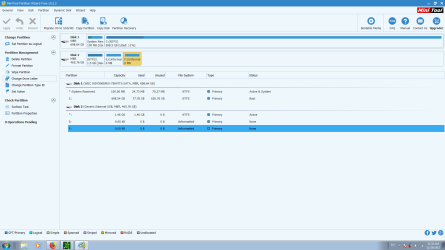
Hopefully this works and helps? I'm even an idiot when it comes to screen shots, and have split monitors, so that made it even more confusing. Thanks for your patience.
 

Attachments

  • partition.png
    partition.png
    39.3 KB · Views: 13

My Computer My Computer

At a glance

Windows 7 Ultimate x64, Serice Pack 1Intel Core i3 M350 2.27 GHz4 GBRealtek
Computer type
Laptop
Computer Manufacturer/Model Number
Toshiba Satellite A665
OS
Windows 7 Ultimate x64, Serice Pack 1
CPU
Intel Core i3 M350 2.27 GHz
Memory
4 GB
Graphics Card(s)
Realtek
Hard Drives
Momentus 7200 4 500 GB
Browser
Mozilla
Don't try to fix it.
Jumanji is the disk guru. Wait for his help.
 

My Computers My Computers

  • At a glance

    Windows 7 HP 64i5 6600K - 800MHz to 4200MHz4+4G GSkill DDR4 3000IG - Intel 530
    Computer type
    PC/Desktop
    Computer Manufacturer/Model Number
    custom build
    OS
    Windows 7 HP 64
    CPU
    i5 6600K - 800MHz to 4200MHz
    Motherboard
    GA-Z170-HD3P
    Memory
    4+4G GSkill DDR4 3000
    Graphics Card(s)
    IG - Intel 530
    Monitor(s) Displays
    Samsung 226BW
    Screen Resolution
    1680x1050
    Hard Drives
    (1) -1 SM951 – 128GB M.2 AHCI PCIe SSD drive for Windows 7 and Lubuntu
    (2) -1 WD SATA 3 - 1T for Data
    (3) -1 WD SATA 3 - 1T for backup
    PSU
    Thermaltake 450W TR2 gold
    Keyboard
    Old and good Chicony mechanical keyboard
    Mouse
    Logitech mX performance - 9 buttons (had to disable some)
    Internet Speed
    500Mb/s
    Browser
    Firefox 64
    Other Info
    TinyWall firewall
  • At a glance

    Windows 7 Proi7-4500U 800MHz to 3.0GHz(4+4)G DDR3 1600IG intel 4400 + NVIDIA GeForce GT 745M
    Computer type
    Laptop
    System Manufacturer/Model Number
    Asus Q550LF
    OS
    Windows 7 Pro
    CPU
    i7-4500U 800MHz to 3.0GHz
    Motherboard
    Asus Q550LF
    Memory
    (4+4)G DDR3 1600
    Graphics Card(s)
    IG intel 4400 + NVIDIA GeForce GT 745M
    Sound Card
    Realtek
    Monitor(s) Displays
    LG Display LP156WF4-SPH1
    Screen Resolution
    1920 x 1080
    Hard Drives
    BX500 120G SSD for Windows and programs +
    1T HDD for data
    Internet Speed
    500 Mb/s
    Browser
    Firefox
    Other Info
    TinyWall firewall

My Computer My Computer

At a glance

Windows 7 Ultimate x64, Serice Pack 1Intel Core i3 M350 2.27 GHz4 GBRealtek
Computer type
Laptop
Computer Manufacturer/Model Number
Toshiba Satellite A665
OS
Windows 7 Ultimate x64, Serice Pack 1
CPU
Intel Core i3 M350 2.27 GHz
Memory
4 GB
Graphics Card(s)
Realtek
Hard Drives
Momentus 7200 4 500 GB
Browser
Mozilla
jumanji stumped ! The HDD looks like a strange out-of-the-world beast :D.

Hi RobertN,

What USB device are you using to connect the old laptop HDD? Is it an enclosure or SATA to USB adapter? Does it work with other HDDs ? Any such interface should be cleared first.

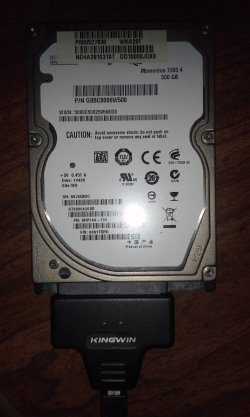
Please read the label on the laptop HDD and post all details like manufacturer, Model Number and capacity. If possible capture a photo-shot and post it.

The first thing I would advise is to run the Manufacturer's Diagnostic/Repair utility and check its health. If it fails the tests, it is dead and there is no point in pursuing further.
 

My Computer My Computer

At a glance

Windows 7 Home Premium 32 bit
OS
Windows 7 Home Premium 32 bit
jumanji stumped ! The HDD looks like a strange out-of-the-world beast :D.

Hi RobertN,

What USB device are you using to connect the old laptop HDD? Is it an enclosure or SATA to USB adapter? Does it work with other HDDs ? Any such interface should be cleared first.

Please read the label on the laptop HDD and post all details like manufacturer, Model Number and capacity. If possible capture a photo-shot and post it.

The first thing I would advise is to run the Manufacturer's Diagnostic/Repair utility and check its health. If it fails the tests, it is dead and there is no point in pursuing further.

I already have a laptop with a newer internal HDD installed. I'm assuming you're referring to the external damaged one then? It's a Momentus 7200.4 500 GB.

The USB device is not an enclosure but a Kingwin USB to SATA Adapter for 2.5 SSD & SATA HDD,

Model #ADP-07.


How could it have just "died?" I'm pretty sure I never made the error of formatting it, and there is data I'd like to recover.


Not sure how to run the manufacturer's diagnostic.

Attached is a pic as you requested. Help would be appreciated. Thank you.
 

Attachments

  • 20171219_233145.jpg
    20171219_233145.jpg
    281.5 KB · Views: 0

My Computer My Computer

At a glance

Windows 7 Ultimate x64, Serice Pack 1Intel Core i3 M350 2.27 GHz4 GBRealtek
Computer type
Laptop
Computer Manufacturer/Model Number
Toshiba Satellite A665
OS
Windows 7 Ultimate x64, Serice Pack 1
CPU
Intel Core i3 M350 2.27 GHz
Memory
4 GB
Graphics Card(s)
Realtek
Hard Drives
Momentus 7200 4 500 GB
Browser
Mozilla
Seagate Momentus!

OK I got the tail of the beast but unfortunately I don't think I shall be able to tame it.

Momentus is a hybrid HDD , part memory chips and rest platters. Currently your HDD is able to read only the memory chips 1.5GB - I was wondering why only 1.5GB was being shown - but not reading the rest that is in the physical platters. This, to me, appears to be an electronic failure - the one that links the memory portion to the platter memory for seamless continuity. ( Electronics may fail anytime. A momentary high power surge can kill it instantaneously. Components can fail anytime)

In this condition no DIY data recovery is possible. But take heart. If the electronic portion is changed, you may perhaps be able to access the HDD as before.

Note: If you feel the drive spinning and there is no clicking sound, the physical mechanical HDD by itself may be OK.

That is my assessment.

You may contact Seagate Technical Support and discuss the issue and they may be able to guide you further and better. If they think your HDD can be restored they will most probably redirect you to their approved Service agency/data recovery partners to do the repairs/recovery depending upon their assessment whether it is a electronics failure or mechanical failure.
 
Last edited:

My Computer My Computer

At a glance

Windows 7 Home Premium 32 bit
OS
Windows 7 Home Premium 32 bit
Seagate Momentus!

OK I got the tail of the beast but unfortunately I don't think I shall be able to tame it.

Momentus is a hybrid HDD , part memory chips and rest platters. Currently your HDD is able to read only the memory chips 1.5GB - I was wondering why only 1.5GB was being shown - but not reading the rest that is in the physical platters. This, to me, appears to be an electronic failure - the one that links the memory portion to the platter memory for seamless continuity. ( Electronics may fail anytime. A momentary high power surge can kill it instantaneously. Components can fail anytime)

In this condition no DIY data recovery is possible. But take heart. If the electronic portion is changed, you may perhaps be able to access the HDD as before.

Note: If you feel the drive spinning and there is no clicking sound, the physical mechanical HDD by itself may be OK.

That is my assessment.

You may contact Seagate Technical Support and discuss the issue and they may be able to guide you further and better. If they think your HDD can be restored they will most probably redirect you to their approved Service agency/data recovery partners to do the repairs/recovery depending upon their assessment whether it is a electronics failure or mechanical failure.

I went to the Seagate website and downloaded their SeaTools diagnostic program, however it only detected my internal Western Digital Drive, not my externally connected Seagate. I've e-mailed tech support and opened a service ticket. Hopefully they get back to me and can help. Thanks.
 

My Computer My Computer

At a glance

Windows 7 Ultimate x64, Serice Pack 1Intel Core i3 M350 2.27 GHz4 GBRealtek
Computer type
Laptop
Computer Manufacturer/Model Number
Toshiba Satellite A665
OS
Windows 7 Ultimate x64, Serice Pack 1
CPU
Intel Core i3 M350 2.27 GHz
Memory
4 GB
Graphics Card(s)
Realtek
Hard Drives
Momentus 7200 4 500 GB
Browser
Mozilla
Back
Top