Can only dual boot Windows 7 with windows 10 using F8 key

mcbgun

New member
Local time
7:41 PM
Messages
19
Hey guys

Bit of a mission with driver signature errors and needing to convert ssd drive to mbr but I got there and have windows 7 installed a new ssd drive.

I have windows 10 on another ssd drive installed already and the only snag at the moment is having to press f8 to avoid the windows boot manager (and choose a boot device) which only shows windows setup and windows 10 as the boot options.

I've read this about bcd editor or something but last thing I want to do is screw up the system at this point.

I have a sabertooth 990fx r2.0 motherboard. Tried looking around for options but am a little stuck.

Advice welcomed!

Many thanks

Marc
 

My Computer My Computer

At a glance

Windows 10 & Windows 7AMD FX8320 Black Edition 8 Core 3.5ghzCorsair Vengeance 8gbSapphire Dual-X R9 280X
Computer type
PC/Desktop
Computer Manufacturer/Model Number
Custom Build
OS
Windows 10 & Windows 7
CPU
AMD FX8320 Black Edition 8 Core 3.5ghz
Motherboard
Asus Sabertooth 990FX R2.0
Memory
Corsair Vengeance 8gb
Graphics Card(s)
Sapphire Dual-X R9 280X
Hard Drives
Samsung 850 Pro - 240gb
Kingston SSDNow V300 - 120GB
Hitachi - 1TB
PSU
Corsair CS750M 750W Hybrid Modular Power Supply
Case
NZXT Phantom 410
Cooling
Standard case fans
Keyboard
Wireless keyboard
Mouse
Wireless mouse
I've used the Easy BCD program many times without any problems. When I had dual boot 7/10 and now dual boot Win 10/Win 10 Insider.

EasyBCD Download
 

My Computer My Computer

At a glance

Windows 10 64 bitIntel i7 6700K16GB Corsair DominatorIntel CPU Graphics
Computer type
PC/Desktop
Computer Manufacturer/Model Number
My Own Build
OS
Windows 10 64 bit
CPU
Intel i7 6700K
Motherboard
ASUS ROG Maximus VIII Hero
Memory
16GB Corsair Dominator
Graphics Card(s)
Intel CPU Graphics
Sound Card
RealTek
Monitor(s) Displays
27" Dell S2719dgf
Screen Resolution
2560X1440
Hard Drives
1 TB Samsung 850 EVO SSD for Win 10 Pro
500GB Samsung 850 EVO SSD for Win 10 Insider
2 TB drive for backup
PSU
EVGA Supernova 750G2
Case
BeQuiet Silent Base 600
Cooling
Deepcool Captain 120EX
Keyboard
Microsoft Wireless 2000
Mouse
Microsoft wireless
Internet Speed
100 MB/sec (Cable)
Antivirus
Microsoft Defender and Malwarebytes
Browser
Edge/Firefox
Other Info
Cakewalk (Sonar) by BandLab and Studio One 4.1 Pro recording studio software. MOTU 896Mk3 Hybrid recording interface, Frontier Tranzport wireless control unit, Behringer X-Touch Control Surface.
Five USB connected optical drives for CD Audio production using Nero BurningROM
I've used the Easy BCD program many times without any problems. When I had dual boot 7/10 and now dual boot Win 10/Win 10 Insider.

EasyBCD Download

Alas whilst I can get a nice looking menu using this with both OS displayed I get the age old Error:0xc0000428 Digital Signature for this file couldn't be verified (windows\system32\winload.efi)

EasyBCD has a pop up which says as i'm booting in EFI mode which means there are limitations.

I honestly don't want to mess up my pc for the sake of hitting F8 after switching on but if there is a simple and safe method of getting me to the holy grail please let me know!!! :)

Cheers!
 

My Computer My Computer

At a glance

Windows 10 & Windows 7AMD FX8320 Black Edition 8 Core 3.5ghzCorsair Vengeance 8gbSapphire Dual-X R9 280X
Computer type
PC/Desktop
Computer Manufacturer/Model Number
Custom Build
OS
Windows 10 & Windows 7
CPU
AMD FX8320 Black Edition 8 Core 3.5ghz
Motherboard
Asus Sabertooth 990FX R2.0
Memory
Corsair Vengeance 8gb
Graphics Card(s)
Sapphire Dual-X R9 280X
Hard Drives
Samsung 850 Pro - 240gb
Kingston SSDNow V300 - 120GB
Hitachi - 1TB
PSU
Corsair CS750M 750W Hybrid Modular Power Supply
Case
NZXT Phantom 410
Cooling
Standard case fans
Keyboard
Wireless keyboard
Mouse
Wireless mouse

My Computer My Computer

At a glance

Windows 7 Ultimate x32 With Sp1 + Vista Ultim...Intel Mobile Core 2 Duo T5750 @ 2.00GHz Merom...2.00GB Dual-Channel DDR2 @ 332MHz (5-5-5-15)Mobile Intel(R) 965 Express Chipset Family
Computer type
Laptop
Computer Manufacturer/Model Number
hp compaq presario c795VU notebook pc
OS
Windows 7 Ultimate x32 With Sp1 + Vista Ultimate x32 with Sp1 & Sp2 !!
CPU
Intel Mobile Core 2 Duo T5750 @ 2.00GHz Merom 65nm Technolog
Motherboard
Hewlett-Packard 30D9 (CPU)
Memory
2.00GB Dual-Channel DDR2 @ 332MHz (5-5-5-15)
Graphics Card(s)
Mobile Intel(R) 965 Express Chipset Family
Sound Card
High Definition Audio Device
Monitor(s) Displays
LP154WX4-TLCB on Mobile Intel 965 Express Chipset Family
Screen Resolution
1280x800 @ 60Hz
Hard Drives
149GB Western Digital WDC WD1600BEVS-60VAT0 ATA Device (SATA)
Keyboard
Standard 101/102-Key or Microsoft Natural PS/2 Key + HP QLB
Mouse
ALPS pointing device
Antivirus
Kaspersky AV 2017(Win 7) & AVG AntiVirus Free 2016 (VISTA)
Browser
google chrome
Please edit your Profile with ALL your hardware specs.

If you have a system that is booting as UEFI, you should use Manage EFI/UEFI boot options & Manage EFI System Partitions & Fix EFI/UEFI boot issues the easy way!

Open disk management and on the View - Top - Disk list. On the partition style you going to find if it is a GPT or MBR.
401817d1511434715-6tb-hdd-disaster-dman.jpg


Expand the columns so we can read them and take a snapshot with the snipping tool of the whole window.
 

My Computers My Computers

  • At a glance

    Windows 7 HP 64i5 6600K - 800MHz to 4200MHz4+4G GSkill DDR4 3000IG - Intel 530
    Computer type
    PC/Desktop
    Computer Manufacturer/Model Number
    custom build
    OS
    Windows 7 HP 64
    CPU
    i5 6600K - 800MHz to 4200MHz
    Motherboard
    GA-Z170-HD3P
    Memory
    4+4G GSkill DDR4 3000
    Graphics Card(s)
    IG - Intel 530
    Monitor(s) Displays
    Samsung 226BW
    Screen Resolution
    1680x1050
    Hard Drives
    (1) -1 SM951 – 128GB M.2 AHCI PCIe SSD drive for Windows 7 and Lubuntu
    (2) -1 WD SATA 3 - 1T for Data
    (3) -1 WD SATA 3 - 1T for backup
    PSU
    Thermaltake 450W TR2 gold
    Keyboard
    Old and good Chicony mechanical keyboard
    Mouse
    Logitech mX performance - 9 buttons (had to disable some)
    Internet Speed
    500Mb/s
    Browser
    Firefox 64
    Other Info
    TinyWall firewall
  • At a glance

    Windows 7 Proi7-4500U 800MHz to 3.0GHz(4+4)G DDR3 1600IG intel 4400 + NVIDIA GeForce GT 745M
    Computer type
    Laptop
    System Manufacturer/Model Number
    Asus Q550LF
    OS
    Windows 7 Pro
    CPU
    i7-4500U 800MHz to 3.0GHz
    Motherboard
    Asus Q550LF
    Memory
    (4+4)G DDR3 1600
    Graphics Card(s)
    IG intel 4400 + NVIDIA GeForce GT 745M
    Sound Card
    Realtek
    Monitor(s) Displays
    LG Display LP156WF4-SPH1
    Screen Resolution
    1920 x 1080
    Hard Drives
    BX500 120G SSD for Windows and programs +
    1T HDD for data
    Internet Speed
    500 Mb/s
    Browser
    Firefox
    Other Info
    TinyWall firewall
Let's slow down and take a step back, did you install each OS while the other drive was unplugged, and not make any changes to the Bios ?

Are both installs UEFI/GPT or Legacy/MBR ?

Can you boot into W10 with both drives hooked up ?

Can you boot into each OS if the other drive is unplugged by the sata power cable ?

Answer each question one at a time so we can proceed.
 
Last edited:

My Computer My Computer

At a glance

Windows 10 Pro x64Intel Core i7 6700KGSkill TridentZ RGB 16GB 3600 16-16-16-36EVGA GTX 980 Ti SC x2
Computer type
PC/Desktop
Computer Manufacturer/Model Number
Skylake Special #666
OS
Windows 10 Pro x64
CPU
Intel Core i7 6700K
Motherboard
Asus Sabertooth Z170 Mark 1
Memory
GSkill TridentZ RGB 16GB 3600 16-16-16-36
Graphics Card(s)
EVGA GTX 980 Ti SC x2
Sound Card
Realtek High Definition
Monitor(s) Displays
AOC G2460PG
Screen Resolution
1920 x 1080 144Hz
Hard Drives
Samsung 860 Pro 256GB, Seagate Barracuda 4TB x2
PSU
EVGA 1000 P2, EVGA White Custom Braided Cables
Case
Corsair Vengeance C70 Gunmetal Black
Cooling
Corsair H100i v2, Corsair ML120 x2, Thermal Grizzly Kryonaut
Keyboard
Logitech G910 Orion Spectrum
Mouse
Logitech G700s
Internet Speed
Verizon Fios Quantum Gateway 75/75
Antivirus
Windows Defender, Malwarebytes Free 3.8.3
Browser
Chrome
Other Info
Corsair SP120 x4, LG Blu-ray Drive, Durabrand HT-395 100 Watt Dolby Digital Amp, Corsair H2100 Wireless 7.1 Headset
To be cont.d....
@ macban
1.EasyBCD has a pop up which says as i'm booting in EFI mode which means there are limitations
Ref : https://neosmart.net/wiki/easybcd/uefi/?utm_source=EasyBCD&utm_medium=software&utm_campaign=EasyBCD%20EFI
Sir, referring above link, there are limitations but EasyBCD itself smartly disables its features which may be destructive/problematic to UEFI environment. It says it is 100% ready for UEFI ! The good news is you can add boot entries for Vista through windows 10 in UEFI using EasyBCD. So, just take care that you do it rightly !
2. I assume that you are using UEFI with MBR partition scheme on both ssds ?
3. I assume that you have disabled 'Secure Boot' ?
4. I assume that you have disabled 'Fast startup' in windows 10 ( & 'Fast Boot' in BIOS if present ! )
5. Manage EFI/UEFI boot options & Manage EFI System Partitions & Fix EFI/UEFI boot issues the easy way!
Sorry, It seems EasyUEFI free addition can't help add new boot entries !
6. Rest for seniors !

Regards,
Vineet Garg.
 
Last edited:

My Computer My Computer

At a glance

Windows 7 Ultimate x32 With Sp1 + Vista Ultim...Intel Mobile Core 2 Duo T5750 @ 2.00GHz Merom...2.00GB Dual-Channel DDR2 @ 332MHz (5-5-5-15)Mobile Intel(R) 965 Express Chipset Family
Computer type
Laptop
Computer Manufacturer/Model Number
hp compaq presario c795VU notebook pc
OS
Windows 7 Ultimate x32 With Sp1 + Vista Ultimate x32 with Sp1 & Sp2 !!
CPU
Intel Mobile Core 2 Duo T5750 @ 2.00GHz Merom 65nm Technolog
Motherboard
Hewlett-Packard 30D9 (CPU)
Memory
2.00GB Dual-Channel DDR2 @ 332MHz (5-5-5-15)
Graphics Card(s)
Mobile Intel(R) 965 Express Chipset Family
Sound Card
High Definition Audio Device
Monitor(s) Displays
LP154WX4-TLCB on Mobile Intel 965 Express Chipset Family
Screen Resolution
1280x800 @ 60Hz
Hard Drives
149GB Western Digital WDC WD1600BEVS-60VAT0 ATA Device (SATA)
Keyboard
Standard 101/102-Key or Microsoft Natural PS/2 Key + HP QLB
Mouse
ALPS pointing device
Antivirus
Kaspersky AV 2017(Win 7) & AVG AntiVirus Free 2016 (VISTA)
Browser
google chrome
Please edit your Profile with ALL your hardware specs.

If you have a system that is booting as UEFI, you should use Manage EFI/UEFI boot options & Manage EFI System Partitions & Fix EFI/UEFI boot issues the easy way!

Open disk management and on the View - Top - Disk list. On the partition style you going to find if it is a GPT or MBR.
401817d1511434715-6tb-hdd-disaster-dman.jpg


Expand the columns so we can read them and take a snapshot with the snipping tool of the whole window.

Apologies for the delay....I have updated my profile with hardware specs and will look at your link in this post over the weekend.

I had converted the SSD drive to MBR before installing windows 7 in any case as I ran into the issue of GPT when trying to install Windows 7 on it originally before posting on the forum.

Many thanks again all for your replies!

Marc
 

My Computer My Computer

At a glance

Windows 10 & Windows 7AMD FX8320 Black Edition 8 Core 3.5ghzCorsair Vengeance 8gbSapphire Dual-X R9 280X
Computer type
PC/Desktop
Computer Manufacturer/Model Number
Custom Build
OS
Windows 10 & Windows 7
CPU
AMD FX8320 Black Edition 8 Core 3.5ghz
Motherboard
Asus Sabertooth 990FX R2.0
Memory
Corsair Vengeance 8gb
Graphics Card(s)
Sapphire Dual-X R9 280X
Hard Drives
Samsung 850 Pro - 240gb
Kingston SSDNow V300 - 120GB
Hitachi - 1TB
PSU
Corsair CS750M 750W Hybrid Modular Power Supply
Case
NZXT Phantom 410
Cooling
Standard case fans
Keyboard
Wireless keyboard
Mouse
Wireless mouse
If you have two separate drives, one for each OS, then in my view, the easiest way to achieve a successful dual boot is to get a SATA power switch, so that you can turn one drive off while the other is on. Then, when you want to boot to the other OS, power down, turn the current drive off and the other one on, then power on. Like magic, you will be in the other OS. That's how my computer is set up, with an additional detail: I have a third hard drive, for my data. It always stays on, so that my data is available in both OSs.

Here's the SATA power switch I use:
https://www.amazon.com/PW4101-Aluminum-Floppy-Control-Protection/dp/B009XPCL6Y

Amazon says it is currently unavailable.

Some of the comments indicated that the newest version of this switch has issues. That's a shame, because the one I have works like a champ.
 

My Computer My Computer

At a glance

Linux Mint 18.2 xfce 64-bit (VMWare host) / W...Haswell4 GB
Computer type
PC/Desktop
Computer Manufacturer/Model Number
Dell
OS
Linux Mint 18.2 xfce 64-bit (VMWare host) / Windows 8.1 Pro 32-bit (VMWare guest)
CPU
Haswell
Memory
4 GB
Monitor(s) Displays
Acer 23"
Screen Resolution
1920 x 1080
Hard Drives
Two hard drives, 1TB each: One for Linux, one for my data.
Keyboard
IBM Model M
Antivirus
Sophos (Linux), Trend Micro (Windows)
Browser
Firefox, Opera
Other Info
I use Samba to share my data drive with the other computers at my house and with my guest session in VMWare Workstation Player.
Waiting for the Disk Management image. Expand the columns so we can read them and take a snapshot with the snipping tool of the whole window.
 

My Computers My Computers

  • At a glance

    Windows 7 HP 64i5 6600K - 800MHz to 4200MHz4+4G GSkill DDR4 3000IG - Intel 530
    Computer type
    PC/Desktop
    Computer Manufacturer/Model Number
    custom build
    OS
    Windows 7 HP 64
    CPU
    i5 6600K - 800MHz to 4200MHz
    Motherboard
    GA-Z170-HD3P
    Memory
    4+4G GSkill DDR4 3000
    Graphics Card(s)
    IG - Intel 530
    Monitor(s) Displays
    Samsung 226BW
    Screen Resolution
    1680x1050
    Hard Drives
    (1) -1 SM951 – 128GB M.2 AHCI PCIe SSD drive for Windows 7 and Lubuntu
    (2) -1 WD SATA 3 - 1T for Data
    (3) -1 WD SATA 3 - 1T for backup
    PSU
    Thermaltake 450W TR2 gold
    Keyboard
    Old and good Chicony mechanical keyboard
    Mouse
    Logitech mX performance - 9 buttons (had to disable some)
    Internet Speed
    500Mb/s
    Browser
    Firefox 64
    Other Info
    TinyWall firewall
  • At a glance

    Windows 7 Proi7-4500U 800MHz to 3.0GHz(4+4)G DDR3 1600IG intel 4400 + NVIDIA GeForce GT 745M
    Computer type
    Laptop
    System Manufacturer/Model Number
    Asus Q550LF
    OS
    Windows 7 Pro
    CPU
    i7-4500U 800MHz to 3.0GHz
    Motherboard
    Asus Q550LF
    Memory
    (4+4)G DDR3 1600
    Graphics Card(s)
    IG intel 4400 + NVIDIA GeForce GT 745M
    Sound Card
    Realtek
    Monitor(s) Displays
    LG Display LP156WF4-SPH1
    Screen Resolution
    1920 x 1080
    Hard Drives
    BX500 120G SSD for Windows and programs +
    1T HDD for data
    Internet Speed
    500 Mb/s
    Browser
    Firefox
    Other Info
    TinyWall firewall
Waiting for the Disk Management image. Expand the columns so we can read them and take a snapshot with the snipping tool of the whole window.

No problem, I'm working today so shall do this as soon as I get in and look forward to your guidance!

Many thanks for all your help folks thus far!!!
 

My Computer My Computer

At a glance

Windows 10 & Windows 7AMD FX8320 Black Edition 8 Core 3.5ghzCorsair Vengeance 8gbSapphire Dual-X R9 280X
Computer type
PC/Desktop
Computer Manufacturer/Model Number
Custom Build
OS
Windows 10 & Windows 7
CPU
AMD FX8320 Black Edition 8 Core 3.5ghz
Motherboard
Asus Sabertooth 990FX R2.0
Memory
Corsair Vengeance 8gb
Graphics Card(s)
Sapphire Dual-X R9 280X
Hard Drives
Samsung 850 Pro - 240gb
Kingston SSDNow V300 - 120GB
Hitachi - 1TB
PSU
Corsair CS750M 750W Hybrid Modular Power Supply
Case
NZXT Phantom 410
Cooling
Standard case fans
Keyboard
Wireless keyboard
Mouse
Wireless mouse
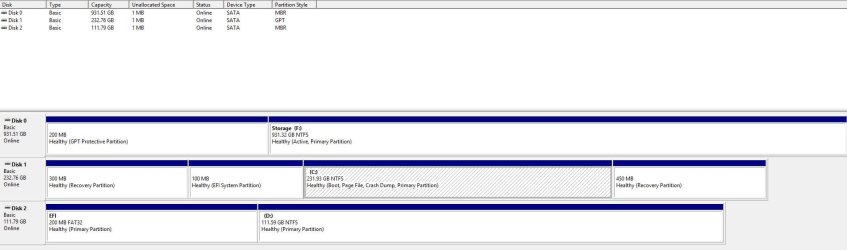
0: = Storage disk for files
1: = Windows 10
2: = Windows 7


See picture below....
 

Attachments

  • DisksJPG.JPG
    DisksJPG.JPG
    83.9 KB · Views: 20

My Computer My Computer

At a glance

Windows 10 & Windows 7AMD FX8320 Black Edition 8 Core 3.5ghzCorsair Vengeance 8gbSapphire Dual-X R9 280X
Computer type
PC/Desktop
Computer Manufacturer/Model Number
Custom Build
OS
Windows 10 & Windows 7
CPU
AMD FX8320 Black Edition 8 Core 3.5ghz
Motherboard
Asus Sabertooth 990FX R2.0
Memory
Corsair Vengeance 8gb
Graphics Card(s)
Sapphire Dual-X R9 280X
Hard Drives
Samsung 850 Pro - 240gb
Kingston SSDNow V300 - 120GB
Hitachi - 1TB
PSU
Corsair CS750M 750W Hybrid Modular Power Supply
Case
NZXT Phantom 410
Cooling
Standard case fans
Keyboard
Wireless keyboard
Mouse
Wireless mouse
Very important to me to understand your system: Why and witch drive did you convert from EFI-GPT to Legacy-MBR (Disk 0 and 2 have signs of a conversion)?

Problems that I see:
Disk 0 (storage) has a active partition. Did it once had Windows installed?
Disk 2 (win7) is MBR but don't have a active partition. Can you boot win 7?
 
Last edited:

My Computers My Computers

  • At a glance

    Windows 7 HP 64i5 6600K - 800MHz to 4200MHz4+4G GSkill DDR4 3000IG - Intel 530
    Computer type
    PC/Desktop
    Computer Manufacturer/Model Number
    custom build
    OS
    Windows 7 HP 64
    CPU
    i5 6600K - 800MHz to 4200MHz
    Motherboard
    GA-Z170-HD3P
    Memory
    4+4G GSkill DDR4 3000
    Graphics Card(s)
    IG - Intel 530
    Monitor(s) Displays
    Samsung 226BW
    Screen Resolution
    1680x1050
    Hard Drives
    (1) -1 SM951 – 128GB M.2 AHCI PCIe SSD drive for Windows 7 and Lubuntu
    (2) -1 WD SATA 3 - 1T for Data
    (3) -1 WD SATA 3 - 1T for backup
    PSU
    Thermaltake 450W TR2 gold
    Keyboard
    Old and good Chicony mechanical keyboard
    Mouse
    Logitech mX performance - 9 buttons (had to disable some)
    Internet Speed
    500Mb/s
    Browser
    Firefox 64
    Other Info
    TinyWall firewall
  • At a glance

    Windows 7 Proi7-4500U 800MHz to 3.0GHz(4+4)G DDR3 1600IG intel 4400 + NVIDIA GeForce GT 745M
    Computer type
    Laptop
    System Manufacturer/Model Number
    Asus Q550LF
    OS
    Windows 7 Pro
    CPU
    i7-4500U 800MHz to 3.0GHz
    Motherboard
    Asus Q550LF
    Memory
    (4+4)G DDR3 1600
    Graphics Card(s)
    IG intel 4400 + NVIDIA GeForce GT 745M
    Sound Card
    Realtek
    Monitor(s) Displays
    LG Display LP156WF4-SPH1
    Screen Resolution
    1920 x 1080
    Hard Drives
    BX500 120G SSD for Windows and programs +
    1T HDD for data
    Internet Speed
    500 Mb/s
    Browser
    Firefox
    Other Info
    TinyWall firewall
Very important to me to understand your system: Why and witch drive did you convert from EFI-GPT to Legacy-MBR (Disk 0 and 2 have signs of a conversion)?

Problems that I see:
Disk 0 (storage) has a active partition. Did it once had Windows installed?
Disk 2 (win7) is MBR but don't have a active partition. Can you boot win 7?

Hey there,

I have used Disk 0 for storage ever since I can remember but I can't remember if it had Windows installed on it before unfortunately....I don't think so but could be wrong...

Disk 2 which is the new hard drive that I bought and converted to MBR. I can boot Windows 7 but only if I press F8....
 

My Computer My Computer

At a glance

Windows 10 & Windows 7AMD FX8320 Black Edition 8 Core 3.5ghzCorsair Vengeance 8gbSapphire Dual-X R9 280X
Computer type
PC/Desktop
Computer Manufacturer/Model Number
Custom Build
OS
Windows 10 & Windows 7
CPU
AMD FX8320 Black Edition 8 Core 3.5ghz
Motherboard
Asus Sabertooth 990FX R2.0
Memory
Corsair Vengeance 8gb
Graphics Card(s)
Sapphire Dual-X R9 280X
Hard Drives
Samsung 850 Pro - 240gb
Kingston SSDNow V300 - 120GB
Hitachi - 1TB
PSU
Corsair CS750M 750W Hybrid Modular Power Supply
Case
NZXT Phantom 410
Cooling
Standard case fans
Keyboard
Wireless keyboard
Mouse
Wireless mouse
On disk 2, did you converted from GPT to MBR before or after installing Win 7? Did you detach disk 0 and 1 before installing win 7?
 

My Computers My Computers

  • At a glance

    Windows 7 HP 64i5 6600K - 800MHz to 4200MHz4+4G GSkill DDR4 3000IG - Intel 530
    Computer type
    PC/Desktop
    Computer Manufacturer/Model Number
    custom build
    OS
    Windows 7 HP 64
    CPU
    i5 6600K - 800MHz to 4200MHz
    Motherboard
    GA-Z170-HD3P
    Memory
    4+4G GSkill DDR4 3000
    Graphics Card(s)
    IG - Intel 530
    Monitor(s) Displays
    Samsung 226BW
    Screen Resolution
    1680x1050
    Hard Drives
    (1) -1 SM951 – 128GB M.2 AHCI PCIe SSD drive for Windows 7 and Lubuntu
    (2) -1 WD SATA 3 - 1T for Data
    (3) -1 WD SATA 3 - 1T for backup
    PSU
    Thermaltake 450W TR2 gold
    Keyboard
    Old and good Chicony mechanical keyboard
    Mouse
    Logitech mX performance - 9 buttons (had to disable some)
    Internet Speed
    500Mb/s
    Browser
    Firefox 64
    Other Info
    TinyWall firewall
  • At a glance

    Windows 7 Proi7-4500U 800MHz to 3.0GHz(4+4)G DDR3 1600IG intel 4400 + NVIDIA GeForce GT 745M
    Computer type
    Laptop
    System Manufacturer/Model Number
    Asus Q550LF
    OS
    Windows 7 Pro
    CPU
    i7-4500U 800MHz to 3.0GHz
    Motherboard
    Asus Q550LF
    Memory
    (4+4)G DDR3 1600
    Graphics Card(s)
    IG intel 4400 + NVIDIA GeForce GT 745M
    Sound Card
    Realtek
    Monitor(s) Displays
    LG Display LP156WF4-SPH1
    Screen Resolution
    1920 x 1080
    Hard Drives
    BX500 120G SSD for Windows and programs +
    1T HDD for data
    Internet Speed
    500 Mb/s
    Browser
    Firefox
    Other Info
    TinyWall firewall
On disk 2, did you converted from GPT to MBR before or after installing Win 7? Did you detach disk 0 and 1 before installing win 7?

Hi,

I converted before installing Win 7.

I did not detach any disks......
 

My Computer My Computer

At a glance

Windows 10 & Windows 7AMD FX8320 Black Edition 8 Core 3.5ghzCorsair Vengeance 8gbSapphire Dual-X R9 280X
Computer type
PC/Desktop
Computer Manufacturer/Model Number
Custom Build
OS
Windows 10 & Windows 7
CPU
AMD FX8320 Black Edition 8 Core 3.5ghz
Motherboard
Asus Sabertooth 990FX R2.0
Memory
Corsair Vengeance 8gb
Graphics Card(s)
Sapphire Dual-X R9 280X
Hard Drives
Samsung 850 Pro - 240gb
Kingston SSDNow V300 - 120GB
Hitachi - 1TB
PSU
Corsair CS750M 750W Hybrid Modular Power Supply
Case
NZXT Phantom 410
Cooling
Standard case fans
Keyboard
Wireless keyboard
Mouse
Wireless mouse

My Computer My Computer

At a glance

W7 home premium 32bit/W7HP 64bit/w10 tp insid...E5300 dual core3gbNvidia Geforce 7100 Nforce 630i
Computer type
PC/Desktop
Computer Manufacturer/Model Number
medionl/Aspire 6930G/acer x55a
OS
W7 home premium 32bit/W7HP 64bit/w10 tp insider ring
CPU
E5300 dual core
Motherboard
medion MS7366
Memory
3gb
Graphics Card(s)
Nvidia Geforce 7100 Nforce 630i
Monitor(s) Displays
avixc
Internet Speed
n (isp resticted to 72)
Antivirus
mse/pands
Browser
palemoon
Other Info
Belkin Fd7050 n USB using Railink RT2870 drivers, more upto date
The big mistake you did was:
- converting disk 0 and disk 2 to MBR. Windows 7 and 10 can be used with GPT.
- Not detaching disk 0 and disk 1 when installing Win 7. As disk 0 (data) has an active partition, I would say that the boot loader of win 7 is on disk 0 not on disk 2.

To find out, disconnect disk 0 and disk 1. If you can't boot, insert and boot from the Win 7 installation disk, go to repair and do a boot repair. Report.
 

My Computers My Computers

  • At a glance

    Windows 7 HP 64i5 6600K - 800MHz to 4200MHz4+4G GSkill DDR4 3000IG - Intel 530
    Computer type
    PC/Desktop
    Computer Manufacturer/Model Number
    custom build
    OS
    Windows 7 HP 64
    CPU
    i5 6600K - 800MHz to 4200MHz
    Motherboard
    GA-Z170-HD3P
    Memory
    4+4G GSkill DDR4 3000
    Graphics Card(s)
    IG - Intel 530
    Monitor(s) Displays
    Samsung 226BW
    Screen Resolution
    1680x1050
    Hard Drives
    (1) -1 SM951 – 128GB M.2 AHCI PCIe SSD drive for Windows 7 and Lubuntu
    (2) -1 WD SATA 3 - 1T for Data
    (3) -1 WD SATA 3 - 1T for backup
    PSU
    Thermaltake 450W TR2 gold
    Keyboard
    Old and good Chicony mechanical keyboard
    Mouse
    Logitech mX performance - 9 buttons (had to disable some)
    Internet Speed
    500Mb/s
    Browser
    Firefox 64
    Other Info
    TinyWall firewall
  • At a glance

    Windows 7 Proi7-4500U 800MHz to 3.0GHz(4+4)G DDR3 1600IG intel 4400 + NVIDIA GeForce GT 745M
    Computer type
    Laptop
    System Manufacturer/Model Number
    Asus Q550LF
    OS
    Windows 7 Pro
    CPU
    i7-4500U 800MHz to 3.0GHz
    Motherboard
    Asus Q550LF
    Memory
    (4+4)G DDR3 1600
    Graphics Card(s)
    IG intel 4400 + NVIDIA GeForce GT 745M
    Sound Card
    Realtek
    Monitor(s) Displays
    LG Display LP156WF4-SPH1
    Screen Resolution
    1920 x 1080
    Hard Drives
    BX500 120G SSD for Windows and programs +
    1T HDD for data
    Internet Speed
    500 Mb/s
    Browser
    Firefox
    Other Info
    TinyWall firewall
The big mistake you did was:
- converting disk 0 and disk 2 to MBR. Windows 7 and 10 can be used with GPT.
- Not detaching disk 0 and disk 1 when installing Win 7. As disk 0 (data) has an active partition, I would say that the boot loader of win 7 is on disk 0 not on disk 2.

To find out, disconnect disk 0 and disk 1. If you can't boot, insert and boot from the Win 7 installation disk, go to repair and do a boot repair. Report.

Bit confused...

I only converted one disk which was the disk I installed Windows 7 on i.e. Disk 2. Originally the disk was GPT but when I tried to install Windows on disk 2 it said I couldn't and when I looked up the solution...it said to convert the disk to MBR.

As for disk 0....I haven't touched that myself and it has only been used for storage....

I'm happy to do as you say but just to be clear...when I press F8 after turning the PC on it brings up the boot menu and all I do is select the disk with windows 7 on it and it boots up fine....

Let me know your thoughts and if nothing has changed I will follow your instructions!
 

My Computer My Computer

At a glance

Windows 10 & Windows 7AMD FX8320 Black Edition 8 Core 3.5ghzCorsair Vengeance 8gbSapphire Dual-X R9 280X
Computer type
PC/Desktop
Computer Manufacturer/Model Number
Custom Build
OS
Windows 10 & Windows 7
CPU
AMD FX8320 Black Edition 8 Core 3.5ghz
Motherboard
Asus Sabertooth 990FX R2.0
Memory
Corsair Vengeance 8gb
Graphics Card(s)
Sapphire Dual-X R9 280X
Hard Drives
Samsung 850 Pro - 240gb
Kingston SSDNow V300 - 120GB
Hitachi - 1TB
PSU
Corsair CS750M 750W Hybrid Modular Power Supply
Case
NZXT Phantom 410
Cooling
Standard case fans
Keyboard
Wireless keyboard
Mouse
Wireless mouse
From the disk management image you posted:
- The only disk that I see that is normal is disk 1 (win 10). It is a UEFI-GPT disk, has a EFI partition with the boot loader, has a OS partition and two recovery partitions (normally is only one - Did you use a disk from another computer?)
- Disk 0 (data) has a GPT protective partition so I believe it once was a GPT disk. (You can see a EFI partition on disk 1 (win 10) and disk 2 (Win7).

Some explanations.
- On a Legacy-MBR, you choose a disk to boot from, BIOS takes the boot sequence to MBR on the disk (fist track on disk) that takes boot sequence to a Boot Loader on a partition (normally C: or System Partition on OEM (Dell, HP, etc)) and this partition is flagged as Active. Master boot record - Wikipedia
- On a UEFI-GPT, you choose a boot loader on the Fat32 EFI partition. This boot loader take the sequence to the OS partition. On a UEFI-GPT disk you can have more than one boot loader and more than one OS partition.

As the data disk is on the fist SATA port, is seems that, when installing Win 7, as you didn't detach disk 0 and disk 1, it has installed the boot loader on disk 0 as it is flagged as Active. In other words, you may have Win 7 boot loader on disk 0 and the remaining OS on disk 2.
When you launch the boot menu (F8) what are the options (please list all them)?
 
Last edited:

My Computers My Computers

  • At a glance

    Windows 7 HP 64i5 6600K - 800MHz to 4200MHz4+4G GSkill DDR4 3000IG - Intel 530
    Computer type
    PC/Desktop
    Computer Manufacturer/Model Number
    custom build
    OS
    Windows 7 HP 64
    CPU
    i5 6600K - 800MHz to 4200MHz
    Motherboard
    GA-Z170-HD3P
    Memory
    4+4G GSkill DDR4 3000
    Graphics Card(s)
    IG - Intel 530
    Monitor(s) Displays
    Samsung 226BW
    Screen Resolution
    1680x1050
    Hard Drives
    (1) -1 SM951 – 128GB M.2 AHCI PCIe SSD drive for Windows 7 and Lubuntu
    (2) -1 WD SATA 3 - 1T for Data
    (3) -1 WD SATA 3 - 1T for backup
    PSU
    Thermaltake 450W TR2 gold
    Keyboard
    Old and good Chicony mechanical keyboard
    Mouse
    Logitech mX performance - 9 buttons (had to disable some)
    Internet Speed
    500Mb/s
    Browser
    Firefox 64
    Other Info
    TinyWall firewall
  • At a glance

    Windows 7 Proi7-4500U 800MHz to 3.0GHz(4+4)G DDR3 1600IG intel 4400 + NVIDIA GeForce GT 745M
    Computer type
    Laptop
    System Manufacturer/Model Number
    Asus Q550LF
    OS
    Windows 7 Pro
    CPU
    i7-4500U 800MHz to 3.0GHz
    Motherboard
    Asus Q550LF
    Memory
    (4+4)G DDR3 1600
    Graphics Card(s)
    IG intel 4400 + NVIDIA GeForce GT 745M
    Sound Card
    Realtek
    Monitor(s) Displays
    LG Display LP156WF4-SPH1
    Screen Resolution
    1920 x 1080
    Hard Drives
    BX500 120G SSD for Windows and programs +
    1T HDD for data
    Internet Speed
    500 Mb/s
    Browser
    Firefox
    Other Info
    TinyWall firewall
Back
Top