Pausing/unpausing/scrubbing audio creates static crackles/pops

glenjj

New member
Member
Local time
2:08 AM
Messages
61
I can't figure this weird little issue out. :cry:
I'm not sure how long this issue has been around on my PC because only recent situation made me aware of it.

I was creating some SFX in audacity and I noticed any time I looped a specific type of audio there was a static pop/crackle at the end/start or during scrubbing, the SFX is a continuous droning bass loop to be used like a server humming etc, and any clip that ends or starts quiet doesn't seem to share this issue.

I have tried updating my audio drivers, and video drivers, didn't fix it.
I tested on speakers and also headphones, and in different jacks, crackles are on both, so it's deff coming from my PC, not faulty speakers.
I tried most things in this help article that applied to my PC (minus updating BIOS drivers):
Fix Audio Static Crackling Popping with Realtek Sound Card

And just for a test, if you play this SFX (no DL, just play in browser), and pause/unpause during it, do you hear any static pops? or is it just my PC? lol
Microsoft OneDrive - Access files anywhere. Create docs with free Office Online.

I dunno what else to try to figure this out :huh:

I'm happy to do any tests or provide screenshots to help diagnose this issue.

Thanks guys

Specs:
Windows 7 pro 64bit
Intel core i7 6700 @ 3.40ghz
ASRock z170 extreme4
32gb
Nvidia gefoce GTX 970 MSI

Realtek High Definition Audio. NVIDIA High Definition Audio. (both are shown in the device manager for sound)

LG ultrawide - 2560 x 1080
Keyboard
logitech G510s
Mouse
logitech g502

Browser
Chrome/firefox

Audio Playback Devices:
Realtek Digital Output (Realtek High Definition Audio)
Speakers (Realtek High Definition Audio) (default)
LG ULTRAWIDE (NVIDIA High Definition Audio)
 

My Computer My Computer

Computer type
PC/Desktop
Computer Manufacturer/Model Number
Custom build
OS
Windows 7 pro 64bit
CPU
Intel core i7 6700 @ 3.40ghz
Motherboard
ASRock z170 extreme4
Memory
32gb
Graphics Card(s)
Nvidia gefoce GTX 970 MSI
Sound Card
Realtek High Definition Audio. NVIDIA High Definition Audio.
Monitor(s) Displays
LG ultrawide
Screen Resolution
2560 x 1080
Hard Drives
2tb
Keyboard
logitech G510s
Mouse
logitech g502
Antivirus
malwarebytes, spybot
Browser
Chrome/firefox
Other Info
Audio Playback Devices:
Realtek Digital Output (Realtek High Definition Audio)
Speakers (Realtek High Definition Audio) (default)
LG ULTRAWIDE (NVIDIA High Definition Audio)
Set up a virtual machine with Linux Mint in the VM. Install Audacity in Linux. Try it in Audacity in Linux, to see if the problem persists there. If this is a Windows or a driver issue, it won't exist in Linux.
 

My Computer My Computer

Computer type
PC/Desktop
Computer Manufacturer/Model Number
Dell
OS
Linux Mint 18.2 xfce 64-bit (VMWare host) / Windows 8.1 Pro 32-bit (VMWare guest)
CPU
Haswell
Memory
4 GB
Monitor(s) Displays
Acer 23"
Screen Resolution
1920 x 1080
Hard Drives
Two hard drives, 1TB each: One for Linux, one for my data.
Keyboard
IBM Model M
Antivirus
Sophos (Linux), Trend Micro (Windows)
Browser
Firefox, Opera
Other Info
I use Samba to share my data drive with the other computers at my house and with my guest session in VMWare Workstation Player.
fireberd is the go to guy for audio here,

I assume the audio you have is the onboard default system, I think this could be at least part of the issue as on-board sound is always a compromise between cost and performance, and the quality would be increased with an additional bespoke Audio card. Other thing to check is the placement of the power cables with relation to the audio components
 

My Computers My Computers

System One System Two

  • Computer type
    PC/Desktop
    Computer Manufacturer/Model Number
    ChillBlast - Custom to my design
    OS
    Windows 11 Pro x64 [Latest Release and Release Preview]
    CPU
    Ryzen 9 5950X, 3.8 - 5.2 MHz
    Motherboard
    Asus Prime X570-Pro
    Memory
    64GB [2 x 32GB] DDR4 3200MHz
    Graphics Card(s)
    4GB NVIDIA GEFORCE GTX 1650 Ti
    Sound Card
    On-board SPDIF to 5.1 System + HDMI [5.1 system]
    Monitor(s) Displays
    32" UHD 32 Bit HDR Monitor + 43" UHD 4K 32Bit HDR TV
    Screen Resolution
    2 x 3840 x 2160 @60Hz
    Hard Drives
    1TB M2 SSD OS, 500GB Fast Access SSD, 2 x 8TB Data + Various Externals from 1TB to 4TB, 10TB NAS
    PSU
    NZXT C750 80 PLUS Gold 750W Modular PSU
    Case
    Workstation Case [Matt Black]
    Cooling
    NZXT Kraken X63 280mm CPU Cooler +2x Quiet Case fans
    Keyboard
    Logitech Wireless MX Keys & K400 + others
    Mouse
    Logitech Wireless MX Master 3S
    Internet Speed
    920 MB Down 50 MB Up
    Antivirus
    BitDefender Total Security Pro
    Browser
    Chrome (always run latest Non-Beta)
    Other Info
    Also run ...
    Laptop - Quad 8GB - Windows 10 Pro x64
    Nexus 7 Android tablet x2
    Samsung 10.2" tablet
    Blackview TAB 8 4G Android Tablet c/w Keyboard
    Wacom Intuos Pro Medium Pen Pad
    Wacom Intuos Pro Small Pen Pad
    Wacom Expresskeys Remote
    Loopdeck+ Graphics Controller
    Shuttle Pro v2 Control
  • Computer type
    Laptop
    System Manufacturer/Model Number
    Dell XPS 17 10750H
    OS
    Windows 11 Pro x64 Latest RP
    CPU
    Intel I7 10750H 5.0GHz
    Motherboard
    Dell XPS
    Memory
    32GB [2x16GB] DDR4 2933 MHz
    Graphics Card(s)
    nVidia GTX1650Ti 4 GB GDDR6
    Sound Card
    Stock [Realtek] 4 Speaker
    Monitor(s) Displays
    17" IPS UHD+ Infinity Edge Touchscreen
    Screen Resolution
    3840 x 2400
    Hard Drives
    2TB M2 NVMe, 4TB External + various 500GB & 1TB External NVMe (also have access to spinner HDD from
    PSU
    Stock
    Case
    Stock XPS Aluminium & Carbon Fibre
    Cooling
    Stock - Active Fan Control
    Keyboard
    Backlit + Various Logitech
    Mouse
    Stock Track Pad + Logitech MX Trackball
    Internet Speed
    72 MB Down 18MB Up
    Browser
    Chrome
    Other Info
    Also run ...
    Laptop - Quad 8GB - Windows 10 Pro x64
    Nexus 7 Android tablet x2
    10.2" tablet
    Sony Z3 Android Smartphone
    Wacom Intuos Pro Medium Pen Pad
    Wacom Intuos Pro Small Pen Pad
    Wacom Expresskeys Remote
    Loopdeck+ Graphics Controller
    Shuttle Pro v2 Control Pad
    10TB NAS
Set up a virtual machine with Linux Mint in the VM. Install Audacity in Linux. Try it in Audacity in Linux, to see if the problem persists there. If this is a Windows or a driver issue, it won't exist in Linux.

Is it safe to do this? I will give it a shot though, just don't wanna go messing around with the registry or stuff of that nature
 

My Computer My Computer

Computer type
PC/Desktop
Computer Manufacturer/Model Number
Custom build
OS
Windows 7 pro 64bit
CPU
Intel core i7 6700 @ 3.40ghz
Motherboard
ASRock z170 extreme4
Memory
32gb
Graphics Card(s)
Nvidia gefoce GTX 970 MSI
Sound Card
Realtek High Definition Audio. NVIDIA High Definition Audio.
Monitor(s) Displays
LG ultrawide
Screen Resolution
2560 x 1080
Hard Drives
2tb
Keyboard
logitech G510s
Mouse
logitech g502
Antivirus
malwarebytes, spybot
Browser
Chrome/firefox
Other Info
Audio Playback Devices:
Realtek Digital Output (Realtek High Definition Audio)
Speakers (Realtek High Definition Audio) (default)
LG ULTRAWIDE (NVIDIA High Definition Audio)
I listened to the sample clip. I wouldn't call it "crackling" just sounds like a momentary dropout. Since it appears, from your post, to be what you are creating in Audacity I would suspect that is where the problem is generated and not really a problem with the PC audio.

Also, don't confuse the HDMI audio with the PC audio (Realtek). If you are not using HDMI audio it has no affect (and in most cases HDMI is generated in the video card separate from the PC audio such as Realtek).

(I have a recording studio using Cakewalk Sonar and Studio One 3).
 

My Computer My Computer

Computer type
PC/Desktop
Computer Manufacturer/Model Number
My Own Build
OS
Windows 10 64 bit
CPU
Intel i7 6700K
Motherboard
ASUS ROG Maximus VIII Hero
Memory
16GB Corsair Dominator
Graphics Card(s)
Intel CPU Graphics
Sound Card
RealTek
Monitor(s) Displays
27" Dell S2719dgf
Screen Resolution
2560X1440
Hard Drives
1 TB Samsung 850 EVO SSD for Win 10 Pro
500GB Samsung 850 EVO SSD for Win 10 Insider
2 TB drive for backup
PSU
EVGA Supernova 750G2
Case
BeQuiet Silent Base 600
Cooling
Deepcool Captain 120EX
Keyboard
Microsoft Wireless 2000
Mouse
Microsoft wireless
Internet Speed
100 MB/sec (Cable)
Antivirus
Microsoft Defender and Malwarebytes
Browser
Edge/Firefox
Other Info
Cakewalk (Sonar) by BandLab and Studio One 4.1 Pro recording studio software. MOTU 896Mk3 Hybrid recording interface, Frontier Tranzport wireless control unit, Behringer X-Touch Control Surface.
Five USB connected optical drives for CD Audio production using Nero BurningROM
I listened to the sample clip. I wouldn't call it "crackling" just sounds like a momentary dropout. Since it appears, from your post, to be what you are creating in Audacity I would suspect that is where the problem is generated and not really a problem with the PC audio.

Also, don't confuse the HDMI audio with the PC audio (Realtek). If you are not using HDMI audio it has no affect (and in most cases HDMI is generated in the video card separate from the PC audio such as Realtek).

(I have a recording studio using Cakewalk Sonar and Studio One 3).


Okay well I did think it could simply be that I made my SFX incorrectly, so I looked at other audio sources, but I still get the pop too, Eg: Forest Ambience Sounds, Sci Fi Insect and Fantasy Creature Sound Effects for Download - Exoplanet - YouTube pausing/unpausing also gives me the popping noises.

Well my audio comes from my speakers being plugged in the normal jack at the back, I dont use HDMI for my audio, unless you mean something else (im obv a noob at audio just FYI lol)
 

My Computer My Computer

Computer type
PC/Desktop
Computer Manufacturer/Model Number
Custom build
OS
Windows 7 pro 64bit
CPU
Intel core i7 6700 @ 3.40ghz
Motherboard
ASRock z170 extreme4
Memory
32gb
Graphics Card(s)
Nvidia gefoce GTX 970 MSI
Sound Card
Realtek High Definition Audio. NVIDIA High Definition Audio.
Monitor(s) Displays
LG ultrawide
Screen Resolution
2560 x 1080
Hard Drives
2tb
Keyboard
logitech G510s
Mouse
logitech g502
Antivirus
malwarebytes, spybot
Browser
Chrome/firefox
Other Info
Audio Playback Devices:
Realtek Digital Output (Realtek High Definition Audio)
Speakers (Realtek High Definition Audio) (default)
LG ULTRAWIDE (NVIDIA High Definition Audio)
I don't get any pops/crackles etc on the YouTube audio so its back to your system.
Your system is similar to mine, ASUS ROG Z170 motherboard and an i7 6700K and Realtek sound.

Download and run the free Resplendence Latency Mon. See what that shows. This program is very "picky" and has lots of data (I actually call it data overload) but it may show what is causing it.

http://www.resplendence.com/latencymon
 

My Computer My Computer

Computer type
PC/Desktop
Computer Manufacturer/Model Number
My Own Build
OS
Windows 10 64 bit
CPU
Intel i7 6700K
Motherboard
ASUS ROG Maximus VIII Hero
Memory
16GB Corsair Dominator
Graphics Card(s)
Intel CPU Graphics
Sound Card
RealTek
Monitor(s) Displays
27" Dell S2719dgf
Screen Resolution
2560X1440
Hard Drives
1 TB Samsung 850 EVO SSD for Win 10 Pro
500GB Samsung 850 EVO SSD for Win 10 Insider
2 TB drive for backup
PSU
EVGA Supernova 750G2
Case
BeQuiet Silent Base 600
Cooling
Deepcool Captain 120EX
Keyboard
Microsoft Wireless 2000
Mouse
Microsoft wireless
Internet Speed
100 MB/sec (Cable)
Antivirus
Microsoft Defender and Malwarebytes
Browser
Edge/Firefox
Other Info
Cakewalk (Sonar) by BandLab and Studio One 4.1 Pro recording studio software. MOTU 896Mk3 Hybrid recording interface, Frontier Tranzport wireless control unit, Behringer X-Touch Control Surface.
Five USB connected optical drives for CD Audio production using Nero BurningROM
One other thought, for testing. Uninstall Realtek in the Device Manager (and the drivers). Then restart the PC and Windows will (should) install the generic High Definition Audio driver. See what happens with this driver, again for testing.
 

My Computer My Computer

Computer type
PC/Desktop
Computer Manufacturer/Model Number
My Own Build
OS
Windows 10 64 bit
CPU
Intel i7 6700K
Motherboard
ASUS ROG Maximus VIII Hero
Memory
16GB Corsair Dominator
Graphics Card(s)
Intel CPU Graphics
Sound Card
RealTek
Monitor(s) Displays
27" Dell S2719dgf
Screen Resolution
2560X1440
Hard Drives
1 TB Samsung 850 EVO SSD for Win 10 Pro
500GB Samsung 850 EVO SSD for Win 10 Insider
2 TB drive for backup
PSU
EVGA Supernova 750G2
Case
BeQuiet Silent Base 600
Cooling
Deepcool Captain 120EX
Keyboard
Microsoft Wireless 2000
Mouse
Microsoft wireless
Internet Speed
100 MB/sec (Cable)
Antivirus
Microsoft Defender and Malwarebytes
Browser
Edge/Firefox
Other Info
Cakewalk (Sonar) by BandLab and Studio One 4.1 Pro recording studio software. MOTU 896Mk3 Hybrid recording interface, Frontier Tranzport wireless control unit, Behringer X-Touch Control Surface.
Five USB connected optical drives for CD Audio production using Nero BurningROM
Is it safe to do this? I will give it a shot though, just don't wanna go messing around with the registry or stuff of that nature

It is perfectly safe. You don't have to touch the registry. And you have so much RAM that it should work very well.
 

My Computer My Computer

Computer type
PC/Desktop
Computer Manufacturer/Model Number
Dell
OS
Linux Mint 18.2 xfce 64-bit (VMWare host) / Windows 8.1 Pro 32-bit (VMWare guest)
CPU
Haswell
Memory
4 GB
Monitor(s) Displays
Acer 23"
Screen Resolution
1920 x 1080
Hard Drives
Two hard drives, 1TB each: One for Linux, one for my data.
Keyboard
IBM Model M
Antivirus
Sophos (Linux), Trend Micro (Windows)
Browser
Firefox, Opera
Other Info
I use Samba to share my data drive with the other computers at my house and with my guest session in VMWare Workstation Player.
One other thought, for testing. Uninstall Realtek in the Device Manager (and the drivers). Then restart the PC and Windows will (should) install the generic High Definition Audio driver. See what happens with this driver, again for testing.

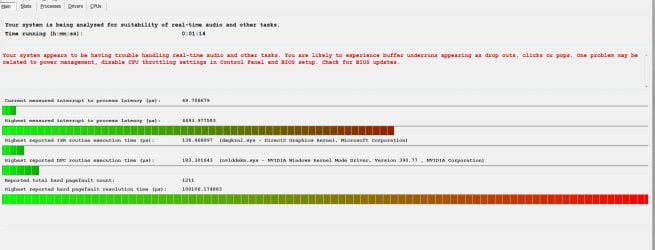
Okay I ran it for a while, seems it found some issues :| and it described exactly the issue I'm having, so that's good.

So what do I do next? the suggestions it gives arent something Im familiar with doing on windows.

And thanks mrjimphelps, I'll look into testing that if this current testing fails, cheers

(edit) oh and heres the report it gave me:
_________________________________________________________________________________________________________

CONCLUSION
_________________________________________________________________________________________________________
Your system appears to be having trouble handling real-time audio and other tasks. You are likely to experience buffer underruns appearing as drop outs, clicks or pops. One problem may be related to power management, disable CPU throttling settings in Control Panel and BIOS setup. Check for BIOS updates.
LatencyMon has been analyzing your system for 7:56:38 (h:mm:ss) on all processors.


_________________________________________________________________________________________________________
SYSTEM INFORMATION
_________________________________________________________________________________________________________
Computer name: GJ-PC
OS version: Windows 7 Service Pack 1, 6.1, build: 7601 (x64)
Hardware: ASRock, Z170 Extreme4
CPU: GenuineIntel Intel(R) Core(TM) i7-6700 CPU @ 3.40GHz
Logical processors: 8
Processor groups: 1
RAM: 32715 MB total


_________________________________________________________________________________________________________
CPU SPEED
_________________________________________________________________________________________________________
Reported CPU speed: 3408 MHz
Measured CPU speed: 1 MHz (approx.)

Note: reported execution times may be calculated based on a fixed reported CPU speed. Disable variable speed settings like Intel Speed Step and AMD Cool N Quiet in the BIOS setup for more accurate results.

WARNING: the CPU speed that was measured is only a fraction of the CPU speed reported. Your CPUs may be throttled back due to variable speed settings and thermal issues. It is suggested that you run a utility which reports your actual CPU frequency and temperature.


_________________________________________________________________________________________________________
MEASURED INTERRUPT TO USER PROCESS LATENCIES
_________________________________________________________________________________________________________
The interrupt to process latency reflects the measured interval that a usermode process needed to respond to a hardware request from the moment the interrupt service routine started execution. This includes the scheduling and execution of a DPC routine, the signaling of an event and the waking up of a usermode thread from an idle wait state in response to that event.

Highest measured interrupt to process latency (µs): 20974.871198
Average measured interrupt to process latency (µs): 2.809035

Highest measured interrupt to DPC latency (µs): 5746.696461
Average measured interrupt to DPC latency (µs): 0.757167


_________________________________________________________________________________________________________
REPORTED ISRs
_________________________________________________________________________________________________________
Interrupt service routines are routines installed by the OS and device drivers that execute in response to a hardware interrupt signal.

Highest ISR routine execution time (µs): 245.477113
Driver with highest ISR routine execution time: dxgkrnl.sys - DirectX Graphics Kernel, Microsoft Corporation

Highest reported total ISR routine time (%): 0.087461
Driver with highest ISR total time: dxgkrnl.sys - DirectX Graphics Kernel, Microsoft Corporation

Total time spent in ISRs (%) 0.100976

ISR count (execution time <250 µs): 33030943
ISR count (execution time 250-500 µs): 0
ISR count (execution time 500-999 µs): 0
ISR count (execution time 1000-1999 µs): 0
ISR count (execution time 2000-3999 µs): 0
ISR count (execution time >=4000 µs): 0


_________________________________________________________________________________________________________
REPORTED DPCs
_________________________________________________________________________________________________________
DPC routines are part of the interrupt servicing dispatch mechanism and disable the possibility for a process to utilize the CPU while it is interrupted until the DPC has finished execution.

Highest DPC routine execution time (µs): 344.558099
Driver with highest DPC routine execution time: tcpip.sys - TCP/IP Driver, Microsoft Corporation

Highest reported total DPC routine time (%): 0.053287
Driver with highest DPC total execution time: iusb3xhc.sys - Intel(R) USB 3.0 eXtensible Host Controller Driver, Intel Corporation

Total time spent in DPCs (%) 0.152404

DPC count (execution time <250 µs): 143351025
DPC count (execution time 250-500 µs): 0
DPC count (execution time 500-999 µs): 56
DPC count (execution time 1000-1999 µs): 0
DPC count (execution time 2000-3999 µs): 0
DPC count (execution time >=4000 µs): 0


_________________________________________________________________________________________________________
REPORTED HARD PAGEFAULTS
_________________________________________________________________________________________________________
Hard pagefaults are events that get triggered by making use of virtual memory that is not resident in RAM but backed by a memory mapped file on disk. The process of resolving the hard pagefault requires reading in the memory from disk while the process is interrupted and blocked from execution.

NOTE: some processes were hit by hard pagefaults. If these were programs producing audio, they are likely to interrupt the audio stream resulting in dropouts, clicks and pops. Check the Processes tab to see which programs were hit.

Process with highest pagefault count: chrome.exe

Total number of hard pagefaults 69531
Hard pagefault count of hardest hit process: 29009
Highest hard pagefault resolution time (µs): 1008762.292840
Total time spent in hard pagefaults (%): 0.063749
Number of processes hit: 67


_________________________________________________________________________________________________________
PER CPU DATA
_________________________________________________________________________________________________________
CPU 0 Interrupt cycle time (s): 1244.068981
CPU 0 ISR highest execution time (µs): 245.477113
CPU 0 ISR total execution time (s): 231.018303
CPU 0 ISR count: 33030943
CPU 0 DPC highest execution time (µs): 307.274648
CPU 0 DPC total execution time (s): 330.280332
CPU 0 DPC count: 137187184
_________________________________________________________________________________________________________
CPU 1 Interrupt cycle time (s): 583.711232
CPU 1 ISR highest execution time (µs): 0.0
CPU 1 ISR total execution time (s): 0.0
CPU 1 ISR count: 0
CPU 1 DPC highest execution time (µs): 253.237676
CPU 1 DPC total execution time (s): 1.947490
CPU 1 DPC count: 640085
_________________________________________________________________________________________________________
CPU 2 Interrupt cycle time (s): 276.701443
CPU 2 ISR highest execution time (µs): 0.0
CPU 2 ISR total execution time (s): 0.0
CPU 2 ISR count: 0
CPU 2 DPC highest execution time (µs): 228.330399
CPU 2 DPC total execution time (s): 2.566825
CPU 2 DPC count: 994198
_________________________________________________________________________________________________________
CPU 3 Interrupt cycle time (s): 728.668220
CPU 3 ISR highest execution time (µs): 0.0
CPU 3 ISR total execution time (s): 0.0
CPU 3 ISR count: 0
CPU 3 DPC highest execution time (µs): 298.473005
CPU 3 DPC total execution time (s): 1.276198
CPU 3 DPC count: 433105
_________________________________________________________________________________________________________
CPU 4 Interrupt cycle time (s): 603.993392
CPU 4 ISR highest execution time (µs): 0.0
CPU 4 ISR total execution time (s): 0.0
CPU 4 ISR count: 0
CPU 4 DPC highest execution time (µs): 297.394366
CPU 4 DPC total execution time (s): 4.021379
CPU 4 DPC count: 1336031
_________________________________________________________________________________________________________
CPU 5 Interrupt cycle time (s): 566.326903
CPU 5 ISR highest execution time (µs): 0.0
CPU 5 ISR total execution time (s): 0.0
CPU 5 ISR count: 0
CPU 5 DPC highest execution time (µs): 344.558099
CPU 5 DPC total execution time (s): 1.098345
CPU 5 DPC count: 285292
_________________________________________________________________________________________________________
CPU 6 Interrupt cycle time (s): 479.584232
CPU 6 ISR highest execution time (µs): 0.0
CPU 6 ISR total execution time (s): 0.0
CPU 6 ISR count: 0
CPU 6 DPC highest execution time (µs): 219.146127
CPU 6 DPC total execution time (s): 5.194454
CPU 6 DPC count: 1549801
_________________________________________________________________________________________________________
CPU 7 Interrupt cycle time (s): 477.691150
CPU 7 ISR highest execution time (µs): 0.0
CPU 7 ISR total execution time (s): 0.0
CPU 7 ISR count: 0
CPU 7 DPC highest execution time (µs): 211.685446
CPU 7 DPC total execution time (s): 2.292005
CPU 7 DPC count: 925385
_________________________________________________________________________________________________________
 

Attachments

  • ok.JPG
    ok.JPG
    132.8 KB · Views: 1
Last edited:

My Computer My Computer

Computer type
PC/Desktop
Computer Manufacturer/Model Number
Custom build
OS
Windows 7 pro 64bit
CPU
Intel core i7 6700 @ 3.40ghz
Motherboard
ASRock z170 extreme4
Memory
32gb
Graphics Card(s)
Nvidia gefoce GTX 970 MSI
Sound Card
Realtek High Definition Audio. NVIDIA High Definition Audio.
Monitor(s) Displays
LG ultrawide
Screen Resolution
2560 x 1080
Hard Drives
2tb
Keyboard
logitech G510s
Mouse
logitech g502
Antivirus
malwarebytes, spybot
Browser
Chrome/firefox
Other Info
Audio Playback Devices:
Realtek Digital Output (Realtek High Definition Audio)
Speakers (Realtek High Definition Audio) (default)
LG ULTRAWIDE (NVIDIA High Definition Audio)
Just stopped by to see how you made out. I'm in a rush this morning so I'll delve into it later. However, the "CPU Throttling" is a stock statement they make on any with problems. Its not a problem on your system.
 

My Computer My Computer

Computer type
PC/Desktop
Computer Manufacturer/Model Number
My Own Build
OS
Windows 10 64 bit
CPU
Intel i7 6700K
Motherboard
ASUS ROG Maximus VIII Hero
Memory
16GB Corsair Dominator
Graphics Card(s)
Intel CPU Graphics
Sound Card
RealTek
Monitor(s) Displays
27" Dell S2719dgf
Screen Resolution
2560X1440
Hard Drives
1 TB Samsung 850 EVO SSD for Win 10 Pro
500GB Samsung 850 EVO SSD for Win 10 Insider
2 TB drive for backup
PSU
EVGA Supernova 750G2
Case
BeQuiet Silent Base 600
Cooling
Deepcool Captain 120EX
Keyboard
Microsoft Wireless 2000
Mouse
Microsoft wireless
Internet Speed
100 MB/sec (Cable)
Antivirus
Microsoft Defender and Malwarebytes
Browser
Edge/Firefox
Other Info
Cakewalk (Sonar) by BandLab and Studio One 4.1 Pro recording studio software. MOTU 896Mk3 Hybrid recording interface, Frontier Tranzport wireless control unit, Behringer X-Touch Control Surface.
Five USB connected optical drives for CD Audio production using Nero BurningROM
I don't see it (that I know) but are you using Wi-Fi? Wi-Fi has been known to cause the problems you have.
 

My Computer My Computer

Computer type
PC/Desktop
Computer Manufacturer/Model Number
My Own Build
OS
Windows 10 64 bit
CPU
Intel i7 6700K
Motherboard
ASUS ROG Maximus VIII Hero
Memory
16GB Corsair Dominator
Graphics Card(s)
Intel CPU Graphics
Sound Card
RealTek
Monitor(s) Displays
27" Dell S2719dgf
Screen Resolution
2560X1440
Hard Drives
1 TB Samsung 850 EVO SSD for Win 10 Pro
500GB Samsung 850 EVO SSD for Win 10 Insider
2 TB drive for backup
PSU
EVGA Supernova 750G2
Case
BeQuiet Silent Base 600
Cooling
Deepcool Captain 120EX
Keyboard
Microsoft Wireless 2000
Mouse
Microsoft wireless
Internet Speed
100 MB/sec (Cable)
Antivirus
Microsoft Defender and Malwarebytes
Browser
Edge/Firefox
Other Info
Cakewalk (Sonar) by BandLab and Studio One 4.1 Pro recording studio software. MOTU 896Mk3 Hybrid recording interface, Frontier Tranzport wireless control unit, Behringer X-Touch Control Surface.
Five USB connected optical drives for CD Audio production using Nero BurningROM
Just stopped by to see how you made out. I'm in a rush this morning so I'll delve into it later. However, the "CPU Throttling" is a stock statement they make on any with problems. Its not a problem on your system.

Okay, but this part made me wonder what's up with my CPU:
Reported CPU speed: 3408 MHz
Measured CPU speed: 1 MHz (approx.)

WARNING: the CPU speed that was measured is only a fraction of the CPU speed reported. Your CPUs may be throttled back due to variable speed settings and thermal issues. It is suggested that you run a utility which reports your actual CPU frequency and temperature.


Is this normal?

I don't see it (that I know) but are you using Wi-Fi? Wi-Fi has been known to cause the problems you have.

I use wifi for my phone, but my PC is always using ethernet cable
 

My Computer My Computer

Computer type
PC/Desktop
Computer Manufacturer/Model Number
Custom build
OS
Windows 7 pro 64bit
CPU
Intel core i7 6700 @ 3.40ghz
Motherboard
ASRock z170 extreme4
Memory
32gb
Graphics Card(s)
Nvidia gefoce GTX 970 MSI
Sound Card
Realtek High Definition Audio. NVIDIA High Definition Audio.
Monitor(s) Displays
LG ultrawide
Screen Resolution
2560 x 1080
Hard Drives
2tb
Keyboard
logitech G510s
Mouse
logitech g502
Antivirus
malwarebytes, spybot
Browser
Chrome/firefox
Other Info
Audio Playback Devices:
Realtek Digital Output (Realtek High Definition Audio)
Speakers (Realtek High Definition Audio) (default)
LG ULTRAWIDE (NVIDIA High Definition Audio)
Look at the statement "the CPU speed that was measured is only a fraction of the CPU speed reported". Its a quirk in the program.

It shows the video as one source. For testing, remove the video card and use the built in Intel video and see if things change. Having two running spyware programs (Malwarebytes and spybot) can also be a potential problem. I have also run into problems with Chrome and the Google updater program causing latency problems (and dropouts). I had to "cleanse" my system of all Google Chrome and Updater entries (which was a mess in the registry).
 

My Computer My Computer

Computer type
PC/Desktop
Computer Manufacturer/Model Number
My Own Build
OS
Windows 10 64 bit
CPU
Intel i7 6700K
Motherboard
ASUS ROG Maximus VIII Hero
Memory
16GB Corsair Dominator
Graphics Card(s)
Intel CPU Graphics
Sound Card
RealTek
Monitor(s) Displays
27" Dell S2719dgf
Screen Resolution
2560X1440
Hard Drives
1 TB Samsung 850 EVO SSD for Win 10 Pro
500GB Samsung 850 EVO SSD for Win 10 Insider
2 TB drive for backup
PSU
EVGA Supernova 750G2
Case
BeQuiet Silent Base 600
Cooling
Deepcool Captain 120EX
Keyboard
Microsoft Wireless 2000
Mouse
Microsoft wireless
Internet Speed
100 MB/sec (Cable)
Antivirus
Microsoft Defender and Malwarebytes
Browser
Edge/Firefox
Other Info
Cakewalk (Sonar) by BandLab and Studio One 4.1 Pro recording studio software. MOTU 896Mk3 Hybrid recording interface, Frontier Tranzport wireless control unit, Behringer X-Touch Control Surface.
Five USB connected optical drives for CD Audio production using Nero BurningROM
When Cleansing, I find Autoruns a useful tool to check (and disable/remove), any unneeded programs running at start, it's frightening to see what runs on a default setup especially if you install things with the defaults set, (always use the advanced option and see what's really going on )
 

My Computers My Computers

System One System Two

  • Computer type
    PC/Desktop
    Computer Manufacturer/Model Number
    ChillBlast - Custom to my design
    OS
    Windows 11 Pro x64 [Latest Release and Release Preview]
    CPU
    Ryzen 9 5950X, 3.8 - 5.2 MHz
    Motherboard
    Asus Prime X570-Pro
    Memory
    64GB [2 x 32GB] DDR4 3200MHz
    Graphics Card(s)
    4GB NVIDIA GEFORCE GTX 1650 Ti
    Sound Card
    On-board SPDIF to 5.1 System + HDMI [5.1 system]
    Monitor(s) Displays
    32" UHD 32 Bit HDR Monitor + 43" UHD 4K 32Bit HDR TV
    Screen Resolution
    2 x 3840 x 2160 @60Hz
    Hard Drives
    1TB M2 SSD OS, 500GB Fast Access SSD, 2 x 8TB Data + Various Externals from 1TB to 4TB, 10TB NAS
    PSU
    NZXT C750 80 PLUS Gold 750W Modular PSU
    Case
    Workstation Case [Matt Black]
    Cooling
    NZXT Kraken X63 280mm CPU Cooler +2x Quiet Case fans
    Keyboard
    Logitech Wireless MX Keys & K400 + others
    Mouse
    Logitech Wireless MX Master 3S
    Internet Speed
    920 MB Down 50 MB Up
    Antivirus
    BitDefender Total Security Pro
    Browser
    Chrome (always run latest Non-Beta)
    Other Info
    Also run ...
    Laptop - Quad 8GB - Windows 10 Pro x64
    Nexus 7 Android tablet x2
    Samsung 10.2" tablet
    Blackview TAB 8 4G Android Tablet c/w Keyboard
    Wacom Intuos Pro Medium Pen Pad
    Wacom Intuos Pro Small Pen Pad
    Wacom Expresskeys Remote
    Loopdeck+ Graphics Controller
    Shuttle Pro v2 Control
  • Computer type
    Laptop
    System Manufacturer/Model Number
    Dell XPS 17 10750H
    OS
    Windows 11 Pro x64 Latest RP
    CPU
    Intel I7 10750H 5.0GHz
    Motherboard
    Dell XPS
    Memory
    32GB [2x16GB] DDR4 2933 MHz
    Graphics Card(s)
    nVidia GTX1650Ti 4 GB GDDR6
    Sound Card
    Stock [Realtek] 4 Speaker
    Monitor(s) Displays
    17" IPS UHD+ Infinity Edge Touchscreen
    Screen Resolution
    3840 x 2400
    Hard Drives
    2TB M2 NVMe, 4TB External + various 500GB & 1TB External NVMe (also have access to spinner HDD from
    PSU
    Stock
    Case
    Stock XPS Aluminium & Carbon Fibre
    Cooling
    Stock - Active Fan Control
    Keyboard
    Backlit + Various Logitech
    Mouse
    Stock Track Pad + Logitech MX Trackball
    Internet Speed
    72 MB Down 18MB Up
    Browser
    Chrome
    Other Info
    Also run ...
    Laptop - Quad 8GB - Windows 10 Pro x64
    Nexus 7 Android tablet x2
    10.2" tablet
    Sony Z3 Android Smartphone
    Wacom Intuos Pro Medium Pen Pad
    Wacom Intuos Pro Small Pen Pad
    Wacom Expresskeys Remote
    Loopdeck+ Graphics Controller
    Shuttle Pro v2 Control Pad
    10TB NAS
Look at the statement "the CPU speed that was measured is only a fraction of the CPU speed reported". Its a quirk in the program.

It shows the video as one source. For testing, remove the video card and use the built in Intel video and see if things change. Having two running spyware programs (Malwarebytes and spybot) can also be a potential problem. I have also run into problems with Chrome and the Google updater program causing latency problems (and dropouts). I had to "cleanse" my system of all Google Chrome and Updater entries (which was a mess in the registry).

I have those 2 spyware programs but i only run them when I open them, they dont run in the BG or at startup.

I was going to test the audio in safe mode only to fine audio doesnt exist in safe mode lol

And do you mean literally remove the card physically?
I'm unfamiliar with cleaning chrome update entries either, i do run CCleaner occasionally to clean things including the registry. Not sure if thats enough in this situation though.

When Cleansing, I find Autoruns a useful tool to check (and disable/remove), any unneeded programs running at start, it's frightening to see what runs on a default setup especially if you install things with the defaults set, (always use the advanced option and see what's really going on )

Is this the same as disabling certain startup programs? which I have done in windows, but this seems more in depth
 

My Computer My Computer

Computer type
PC/Desktop
Computer Manufacturer/Model Number
Custom build
OS
Windows 7 pro 64bit
CPU
Intel core i7 6700 @ 3.40ghz
Motherboard
ASRock z170 extreme4
Memory
32gb
Graphics Card(s)
Nvidia gefoce GTX 970 MSI
Sound Card
Realtek High Definition Audio. NVIDIA High Definition Audio.
Monitor(s) Displays
LG ultrawide
Screen Resolution
2560 x 1080
Hard Drives
2tb
Keyboard
logitech G510s
Mouse
logitech g502
Antivirus
malwarebytes, spybot
Browser
Chrome/firefox
Other Info
Audio Playback Devices:
Realtek Digital Output (Realtek High Definition Audio)
Speakers (Realtek High Definition Audio) (default)
LG ULTRAWIDE (NVIDIA High Definition Audio)
Did you do what I suggested? Uninstall Realtek and the drivers (in the Device Manager). Then reboot and let Windows install the generic/basic function High Definition audio drivers and see if that makes any difference.

The video card was a thought as video was one of the big hits in Latency Mon. Maybe cut it down to 1920X1080 and see if that helps. You have a very high video rate 2560.

In ref to the startup, that is one item that can be tamed. Many programs startup that do not need to be.
Some anti-virus programs are more intrusive than others. I only use the (free) Microsoft Defender (what its called in Win 10) which is not intrusive. I run both Malwarebytes and Defender and they do not interfere.

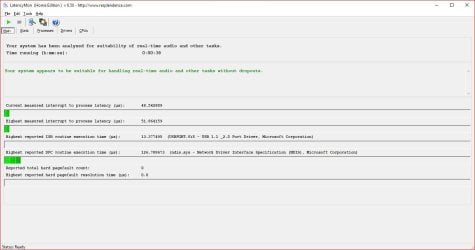
My Latency Mon (short run).
 

Attachments

  • Capture.JPG
    Capture.JPG
    76 KB · Views: 1

My Computer My Computer

Computer type
PC/Desktop
Computer Manufacturer/Model Number
My Own Build
OS
Windows 10 64 bit
CPU
Intel i7 6700K
Motherboard
ASUS ROG Maximus VIII Hero
Memory
16GB Corsair Dominator
Graphics Card(s)
Intel CPU Graphics
Sound Card
RealTek
Monitor(s) Displays
27" Dell S2719dgf
Screen Resolution
2560X1440
Hard Drives
1 TB Samsung 850 EVO SSD for Win 10 Pro
500GB Samsung 850 EVO SSD for Win 10 Insider
2 TB drive for backup
PSU
EVGA Supernova 750G2
Case
BeQuiet Silent Base 600
Cooling
Deepcool Captain 120EX
Keyboard
Microsoft Wireless 2000
Mouse
Microsoft wireless
Internet Speed
100 MB/sec (Cable)
Antivirus
Microsoft Defender and Malwarebytes
Browser
Edge/Firefox
Other Info
Cakewalk (Sonar) by BandLab and Studio One 4.1 Pro recording studio software. MOTU 896Mk3 Hybrid recording interface, Frontier Tranzport wireless control unit, Behringer X-Touch Control Surface.
Five USB connected optical drives for CD Audio production using Nero BurningROM
Did you do what I suggested? Uninstall Realtek and the drivers (in the Device Manager). Then reboot and let Windows install the generic/basic function High Definition audio drivers and see if that makes any difference.

The video card was a thought as video was one of the big hits in Latency Mon. Maybe cut it down to 1920X1080 and see if that helps. You have a very high video rate 2560.

In ref to the startup, that is one item that can be tamed. Many programs startup that do not need to be.
Some anti-virus programs are more intrusive than others. I only use the (free) Microsoft Defender (what its called in Win 10) which is not intrusive. I run both Malwarebytes and Defender and they do not interfere.

My Latency Mon (short run).

Yeah sorry I tested that, im no longer on the realtek driver, clicks/pops still happening

I also tested 1920X1080, still popping.

new test still shows issues
 

Attachments

  • ok.JPG
    ok.JPG
    117.8 KB · Views: 4

My Computer My Computer

Computer type
PC/Desktop
Computer Manufacturer/Model Number
Custom build
OS
Windows 7 pro 64bit
CPU
Intel core i7 6700 @ 3.40ghz
Motherboard
ASRock z170 extreme4
Memory
32gb
Graphics Card(s)
Nvidia gefoce GTX 970 MSI
Sound Card
Realtek High Definition Audio. NVIDIA High Definition Audio.
Monitor(s) Displays
LG ultrawide
Screen Resolution
2560 x 1080
Hard Drives
2tb
Keyboard
logitech G510s
Mouse
logitech g502
Antivirus
malwarebytes, spybot
Browser
Chrome/firefox
Other Info
Audio Playback Devices:
Realtek Digital Output (Realtek High Definition Audio)
Speakers (Realtek High Definition Audio) (default)
LG ULTRAWIDE (NVIDIA High Definition Audio)
Video is shown as the cause in the latest test.
 

My Computer My Computer

Computer type
PC/Desktop
Computer Manufacturer/Model Number
My Own Build
OS
Windows 10 64 bit
CPU
Intel i7 6700K
Motherboard
ASUS ROG Maximus VIII Hero
Memory
16GB Corsair Dominator
Graphics Card(s)
Intel CPU Graphics
Sound Card
RealTek
Monitor(s) Displays
27" Dell S2719dgf
Screen Resolution
2560X1440
Hard Drives
1 TB Samsung 850 EVO SSD for Win 10 Pro
500GB Samsung 850 EVO SSD for Win 10 Insider
2 TB drive for backup
PSU
EVGA Supernova 750G2
Case
BeQuiet Silent Base 600
Cooling
Deepcool Captain 120EX
Keyboard
Microsoft Wireless 2000
Mouse
Microsoft wireless
Internet Speed
100 MB/sec (Cable)
Antivirus
Microsoft Defender and Malwarebytes
Browser
Edge/Firefox
Other Info
Cakewalk (Sonar) by BandLab and Studio One 4.1 Pro recording studio software. MOTU 896Mk3 Hybrid recording interface, Frontier Tranzport wireless control unit, Behringer X-Touch Control Surface.
Five USB connected optical drives for CD Audio production using Nero BurningROM

My Computer My Computer

Computer type
PC/Desktop
Computer Manufacturer/Model Number
Custom build
OS
Windows 7 pro 64bit
CPU
Intel core i7 6700 @ 3.40ghz
Motherboard
ASRock z170 extreme4
Memory
32gb
Graphics Card(s)
Nvidia gefoce GTX 970 MSI
Sound Card
Realtek High Definition Audio. NVIDIA High Definition Audio.
Monitor(s) Displays
LG ultrawide
Screen Resolution
2560 x 1080
Hard Drives
2tb
Keyboard
logitech G510s
Mouse
logitech g502
Antivirus
malwarebytes, spybot
Browser
Chrome/firefox
Other Info
Audio Playback Devices:
Realtek Digital Output (Realtek High Definition Audio)
Speakers (Realtek High Definition Audio) (default)
LG ULTRAWIDE (NVIDIA High Definition Audio)
Back
Top