external hard disk which is not displaying data stored in it

Will see your screenshot tom and we will continue. The chances of recovering the data is fairly good. Hope it will turn out so. Signing off for the day.
 

My Computer My Computer

At a glance

Windows 7 Home Premium 32 bit
OS
Windows 7 Home Premium 32 bit
Hi Jumanji,

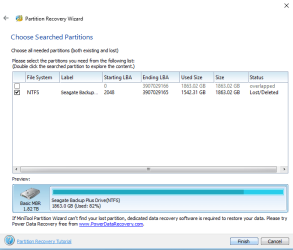
Here is the required screenshot.

And guess what!!! I could see all my folders on double click. :party:

Yayy!!!
 

Attachments

  • sh_4.PNG
    sh_4.PNG
    15.6 KB · Views: 24

My Computer My Computer

At a glance

Windows 7 64 bit
Computer type
Laptop
Computer Manufacturer/Model Number
Acer
OS
Windows 7 64 bit
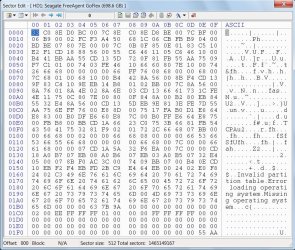
Good. Before proceeding further I need to know what exactly is there on sector 0 and if possible save it before we make any changes in it.. I will take sometime and return.
 

My Computer My Computer

At a glance

Windows 7 Home Premium 32 bit
OS
Windows 7 Home Premium 32 bit
Download the latest version of Bootice from the author's website 【BOOTICE v1.3.3.2: 功能强大的启动维护工具】-å*é€¸è½©

( If you are using 32bit Windows download the X86 version. If you are using 64bit Windows download the x64 version)

Create a folder named bootice in the C: drive and extract the rar file into it. You will have a single BOOTICE*.exe file in it.

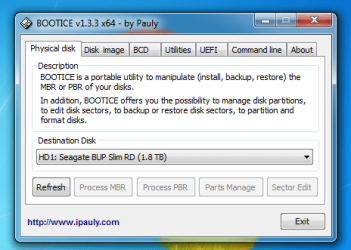
Plugin only your faulty drive and Run bootice. Select your faulty drive in the Destination Disk field and click on the Sector Edit button. Bootice will open the Sector 0 map like the one below.. Take a screenshot.

21-06-2018 09-50-52.jpg

Click on the Backup to file button in the Menu bar, give a file name LBA0 and click on the Backup button to save the 512byte file. By default the file will be saved in the bootice folder . Check it is saved and close bootice.

Post the screenshot.

Using bootice: Lost partitions! Solved - Windows 7 Help Forums

Note: If you find it inconvenient/inapporpriate to do all this in your office with your boss looking over your shoulders :-), you may do it at home later. There is absolutely no need to be in a hurry. I am also slow and may disappear every now and then to do other work.
 

My Computer My Computer

At a glance

Windows 7 Home Premium 32 bit
OS
Windows 7 Home Premium 32 bit
Haha!!

My boss sits in the next cubicle to mine :P

Even he knows how distracted I am due to this Hard Drive issue :P

He might even consider giving me leave for a day or two [stress buster]

Hehe!!


Just followed all the steps

:'(

The 'sector edit' option is greyed out!!!

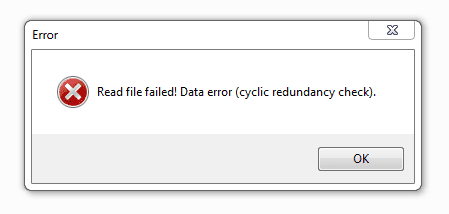
first attachment is an error I get on running bootice, then I click 'Ok' and it pops-up again. On clicking 'OK' again, the second screenshot appears with 'Sector Edit' greyed out
 

Attachments

  • 21.PNG
    21.PNG
    3.1 KB · Views: 17
  • 22.PNG
    22.PNG
    17.8 KB · Views: 16

My Computer My Computer

At a glance

Windows 7 64 bit
Computer type
Laptop
Computer Manufacturer/Model Number
Acer
OS
Windows 7 64 bit
The LED keeps going on and off on my HD.

I believe the cable is a bit loose with this.

As of now, I have placed it somehow so that It is not getting disconnected. but who know what is going on internally...

I have another drive which is WD Elements 1TB. But from the other post you shared, I know not to exchange the cables.

Shall I try n buy another cable first?
 

My Computer My Computer

At a glance

Windows 7 64 bit
Computer type
Laptop
Computer Manufacturer/Model Number
Acer
OS
Windows 7 64 bit
Ok, I did expect that bootice may not show the sector and it may show I/O (CRC ) error. You would have got the same error if you had tried to initialise the drive in Windows Disk Management.

Cable: And yes, get a new cable or borrow a Seagate cable from a friend and see that the drive is on without loosing connection when plugged in. Do not use a WD cable which may be proprietary. Use only a Seagate cable.

Since it appears that Sector zero has some problem, we may not be able to restore the drive.

We shall try data recovery using TestDisk. For that you must have another external disk with adequate space to copy the files ( 1.5 GB of data as shown by PW)

Can you free your 1TB WD elements drive for copying? You should be able to copy atleast the most important files and copy the rest later.

After ensuring that your Seagate drive continuosly remains connected when plugged in and you have a destination drive to copy files, let me know and we shall proceed further.

(When not in use keep your Seagate drive unplugged)
 

My Computer My Computer

At a glance

Windows 7 Home Premium 32 bit
OS
Windows 7 Home Premium 32 bit
Hi,
jumanji : Sir, It seems we can't recover the whole drive but we can recover the partition, Isn't it ? In my case, i just recovered the partition and the other part remained unallocated and the unallocated portion was the first 200GB portion !
 

My Computer My Computer

At a glance

Windows 7 Ultimate x32 With Sp1 + Vista Ultim...Intel Mobile Core 2 Duo T5750 @ 2.00GHz Merom...2.00GB Dual-Channel DDR2 @ 332MHz (5-5-5-15)Mobile Intel(R) 965 Express Chipset Family
Computer type
Laptop
Computer Manufacturer/Model Number
hp compaq presario c795VU notebook pc
OS
Windows 7 Ultimate x32 With Sp1 + Vista Ultimate x32 with Sp1 & Sp2 !!
CPU
Intel Mobile Core 2 Duo T5750 @ 2.00GHz Merom 65nm Technolog
Motherboard
Hewlett-Packard 30D9 (CPU)
Memory
2.00GB Dual-Channel DDR2 @ 332MHz (5-5-5-15)
Graphics Card(s)
Mobile Intel(R) 965 Express Chipset Family
Sound Card
High Definition Audio Device
Monitor(s) Displays
LP154WX4-TLCB on Mobile Intel 965 Express Chipset Family
Screen Resolution
1280x800 @ 60Hz
Hard Drives
149GB Western Digital WDC WD1600BEVS-60VAT0 ATA Device (SATA)
Keyboard
Standard 101/102-Key or Microsoft Natural PS/2 Key + HP QLB
Mouse
ALPS pointing device
Antivirus
Kaspersky AV 2017(Win 7) & AVG AntiVirus Free 2016 (VISTA)
Browser
google chrome
Vineet Garg

I think you used EaseUS to recover the partition by copying it to another drive, isn't it ? In that case your experience should help the OP. ( I had never copied a partition and so I may not be able to do it )

You are welcome to guide the OP, when she is ready. Since the OP has a single partition of 2TB I would think she may need an empty 2TB drive. Isn't it?

I was also thinking of Partition Find and Mount, which says it can find and mount the partition to enable copying. If that works, the OP should be able to select and copy the files to whatever space is available.
 

My Computer My Computer

At a glance

Windows 7 Home Premium 32 bit
OS
Windows 7 Home Premium 32 bit
Hi,
Sir(s), jumanji : Sir, First & foremost i offer regards from the bottom of my heart and seek blessings & guidance.

1) I used partition recovery wizard from ''EaseUS Partition Master Free'' & i didn't use another drive, just recovered the found partition : Free partition manager software to resize partitions - EaseUS Partition Master Free. I think when such softwares offer lost partition choices, they offer exploring and are pretty sure that they can recover them!

2) I will always prefer ''lost partition recovery'' instead of ''lost files recovery'' because in files recovery multiple versions of same file are offered (even simply deleted ones ! )and it needs a lot of patience!

3) I am interested whether the partition offered for exploring & recovery, also allows to copy files while exploring. It would be safer !

4) Sir, i think when we have to recover the data, we should not touch disks much. I fear it will make it harder & harder to recover. When the data is backed up and one wants to repair the disk, diagnostics & repairers are fine ! i think data recovery tools have deeper reach to missing data. They make out partitions out of unallocated space.

5)Sir, I am interested whether the tests/diagnostics she performed , give any signs of irrepairable physical /hardware failure or damage ? In that case she has to change the drive anyway ! ( i don't know much about that )

6)After considering all these, especially the 5th point, i would like to just make a ''Finish'' from here !
https://www.sevenforums.com/attachments/hardware-devices/404286d1529523417-external-hard-disk-not-displaying-data-stored-sh_4.png

Thats all i think !

Thanks & Regards. ...

 
Last edited:

My Computer My Computer

At a glance

Windows 7 Ultimate x32 With Sp1 + Vista Ultim...Intel Mobile Core 2 Duo T5750 @ 2.00GHz Merom...2.00GB Dual-Channel DDR2 @ 332MHz (5-5-5-15)Mobile Intel(R) 965 Express Chipset Family
Computer type
Laptop
Computer Manufacturer/Model Number
hp compaq presario c795VU notebook pc
OS
Windows 7 Ultimate x32 With Sp1 + Vista Ultimate x32 with Sp1 & Sp2 !!
CPU
Intel Mobile Core 2 Duo T5750 @ 2.00GHz Merom 65nm Technolog
Motherboard
Hewlett-Packard 30D9 (CPU)
Memory
2.00GB Dual-Channel DDR2 @ 332MHz (5-5-5-15)
Graphics Card(s)
Mobile Intel(R) 965 Express Chipset Family
Sound Card
High Definition Audio Device
Monitor(s) Displays
LP154WX4-TLCB on Mobile Intel 965 Express Chipset Family
Screen Resolution
1280x800 @ 60Hz
Hard Drives
149GB Western Digital WDC WD1600BEVS-60VAT0 ATA Device (SATA)
Keyboard
Standard 101/102-Key or Microsoft Natural PS/2 Key + HP QLB
Mouse
ALPS pointing device
Antivirus
Kaspersky AV 2017(Win 7) & AVG AntiVirus Free 2016 (VISTA)
Browser
google chrome
Can I use 2 devices?

I can arrange for an external Hard disk from a friend....yet to check the available space in that!

Also, I have 750 GB space in internal drive of my system.

Can we do it that way?

Or shall I move all the contents from my 1TB WD Elements in these scattered spaces and then use that HD instead?
 

My Computer My Computer

At a glance

Windows 7 64 bit
Computer type
Laptop
Computer Manufacturer/Model Number
Acer
OS
Windows 7 64 bit
Leaving about 10% of free space in your internal drive, you can copy as much data as possible into it from your 1tb wd external. ( Always copy. do not move. After confirming that the data has been copied to your internal, delete that data on the WD external ) and we can start with the available space on it.

What about your Seagate drive? Does it remain connected without going on and off? Is that problem resolved?

Meanwhile Vineet Garg has offered to help with the Partition Recovery based on his experience. May be by tomorrow evening. See the previous posts. In that case he may want you to have an empty 2TB drive to copy the complete partition.

So wait till tomorrow evening.
 
Last edited:

My Computer My Computer

At a glance

Windows 7 Home Premium 32 bit
OS
Windows 7 Home Premium 32 bit
Hi jumanji and Vineet Garg, I read the previous message but could not make head or tail of it :(

on the spare space front, I arranged for a Seagate HD with 1TB space.:party:

So I guess we can start whenever you say :D

Cable: yes the drive now stays connected with my cable as well, but in case it creates any issues again, I can use the cable from this new HD I have arranged.
 

My Computer My Computer

At a glance

Windows 7 64 bit
Computer type
Laptop
Computer Manufacturer/Model Number
Acer
OS
Windows 7 64 bit
Vineet Garg


You are welcome to guide the OP, when she is ready. Since the OP has a single partition of 2TB I would think she may need an empty 2TB drive. Isn't it?


I understood that 'OP' refers to me, but what does it stand for?
 

My Computer My Computer

At a glance

Windows 7 64 bit
Computer type
Laptop
Computer Manufacturer/Model Number
Acer
OS
Windows 7 64 bit
I understood that 'OP' refers to me, but what does it stand for?

I don't know, ask him !!
 

My Computer My Computer

At a glance

Windows 7 Ultimate x32 With Sp1 + Vista Ultim...Intel Mobile Core 2 Duo T5750 @ 2.00GHz Merom...2.00GB Dual-Channel DDR2 @ 332MHz (5-5-5-15)Mobile Intel(R) 965 Express Chipset Family
Computer type
Laptop
Computer Manufacturer/Model Number
hp compaq presario c795VU notebook pc
OS
Windows 7 Ultimate x32 With Sp1 + Vista Ultimate x32 with Sp1 & Sp2 !!
CPU
Intel Mobile Core 2 Duo T5750 @ 2.00GHz Merom 65nm Technolog
Motherboard
Hewlett-Packard 30D9 (CPU)
Memory
2.00GB Dual-Channel DDR2 @ 332MHz (5-5-5-15)
Graphics Card(s)
Mobile Intel(R) 965 Express Chipset Family
Sound Card
High Definition Audio Device
Monitor(s) Displays
LP154WX4-TLCB on Mobile Intel 965 Express Chipset Family
Screen Resolution
1280x800 @ 60Hz
Hard Drives
149GB Western Digital WDC WD1600BEVS-60VAT0 ATA Device (SATA)
Keyboard
Standard 101/102-Key or Microsoft Natural PS/2 Key + HP QLB
Mouse
ALPS pointing device
Antivirus
Kaspersky AV 2017(Win 7) & AVG AntiVirus Free 2016 (VISTA)
Browser
google chrome

My Computer My Computer

At a glance

Win 7 HP SP1 64-bit Vista HB SP2 32-bit Linux...Intel(R) Pentium(R) CPU P6200 @ 2.13GHz4.00 GBIntel(R) Graphics Media Accelerator HD
Computer type
Laptop
Computer Manufacturer/Model Number
Fujitsu LIFEBOOK
OS
Win 7 HP SP1 64-bit Vista HB SP2 32-bit Linux Mint 18.3
CPU
Intel(R) Pentium(R) CPU P6200 @ 2.13GHz
Motherboard
FUJITSU FJNBB06
Memory
4.00 GB
Graphics Card(s)
Intel(R) Graphics Media Accelerator HD
Sound Card
[1] Realtek High Definition Audio [2] Intel(R) Display Audio
Screen Resolution
1366 x 768 x 32 bits (4294967296 colors) @ 59 Hz
Hard Drives
TOSHIBA MK5076GSX
Antivirus
AVG FREE
OP- Original Poster

Hi,
Sir(s), jumanji : Sir, First & foremost i offer regards from the bottom of my heart and seek blessings & guidance.

1) I used partition recovery wizard from ''EaseUS Partition Master Free'' & i didn't use another drive, just recovered the found partition : Free partition manager software to resize partitions - EaseUS Partition Master Free. I think when such softwares offer lost partition choices, they offer exploring and are pretty sure that they can recover them!

2) I will always prefer ''lost partition recovery'' instead of ''lost files recovery'' because in files recovery multiple versions of same file are offered (even simply deleted ones ! )and it needs a lot of patience!

3) I am interested whether the partition offered for exploring & recovery, also allows to copy files while exploring. It would be safer !

4) Sir, i think when we have to recover the data, we should not touch disks much. I fear it will make it harder & harder to recover. When the data is backed up and one wants to repair the disk, diagnostics & repairers are fine ! i think data recovery tools have deeper reach to missing data. They make out partitions out of unallocated space.

5)Sir, I am interested whether the tests/diagnostics she performed , give any signs of physical /hardware failure or damage ? In that case she has to change the drive anyway ! ( i don't know much about that )

6)After considering all these, especially the 5th point, i would like to just make a ''Finish'' from here !
https://www.sevenforums.com/attachments/hardware-devices/404286d1529523417-external-hard-disk-not-displaying-data-stored-sh_4.png

Thats all i think !

Thanks & Regards. ...

Hi Vineet Garg

For the partition to be recovered the partition table must be written into sector 0. Bootice showed that it could not read sector 0. So I would consider that Sector 0 is damaged. Scanning the drive, PW found the start sector Volume Boot Record at sector 2048. OP also explored and PW showed the folders. So the partition exists and the data exists. Copying not possible with PW. We have to look for other alternatives. If EaseUs could restore the partition or copy the files found well and good.

So go ahead with EaseUs. When one partition recovery software fails, no harm in trying another. That is what I also do. I haven't used EaseUs anytime so I will also watch how it goes.
 

My Computer My Computer

At a glance

Windows 7 Home Premium 32 bit
OS
Windows 7 Home Premium 32 bit
Hi,

For the partition to be recovered the partition table must be written into sector 0
jumanji : Sir,
1.Is it necessary ? when partition wizard says that it can recover the partition why not to leave to it ? would not it take care of ?? Just a thought.
2.Bootice says that it can't find but i don't think it is said by partition wizard. It says/finds the partition and gives access to explore it and offers to ''Finish'' ??
3. As bootice doesn't find it what EaseUS/Partition Wizard can do about it ? Do you mean to say that EaseUS should find & come out with a partition option which has start sector Volume Boot Record at sector 0 & then there are chances ?
4. It was the only experience & sorry i don't have room for EaseUS on my laptop as of now!

Thanks & Regards. ...
 
Last edited:

My Computer My Computer

At a glance

Windows 7 Ultimate x32 With Sp1 + Vista Ultim...Intel Mobile Core 2 Duo T5750 @ 2.00GHz Merom...2.00GB Dual-Channel DDR2 @ 332MHz (5-5-5-15)Mobile Intel(R) 965 Express Chipset Family
Computer type
Laptop
Computer Manufacturer/Model Number
hp compaq presario c795VU notebook pc
OS
Windows 7 Ultimate x32 With Sp1 + Vista Ultimate x32 with Sp1 & Sp2 !!
CPU
Intel Mobile Core 2 Duo T5750 @ 2.00GHz Merom 65nm Technolog
Motherboard
Hewlett-Packard 30D9 (CPU)
Memory
2.00GB Dual-Channel DDR2 @ 332MHz (5-5-5-15)
Graphics Card(s)
Mobile Intel(R) 965 Express Chipset Family
Sound Card
High Definition Audio Device
Monitor(s) Displays
LP154WX4-TLCB on Mobile Intel 965 Express Chipset Family
Screen Resolution
1280x800 @ 60Hz
Hard Drives
149GB Western Digital WDC WD1600BEVS-60VAT0 ATA Device (SATA)
Keyboard
Standard 101/102-Key or Microsoft Natural PS/2 Key + HP QLB
Mouse
ALPS pointing device
Antivirus
Kaspersky AV 2017(Win 7) & AVG AntiVirus Free 2016 (VISTA)
Browser
google chrome
sheena bansal, before we move on to TestDisk, try Partition found and Mount. Though I haven't used it, it appears to be relatively simple to use. The website contains the documentation. Download from here Partition Find and Mount free partition recovery software


If it finds, mounts the partition and shows all your folders. you can straight away copy them.

If it doesn't work, we shall go to TestDisk.
 

My Computer My Computer

At a glance

Windows 7 Home Premium 32 bit
OS
Windows 7 Home Premium 32 bit
Hi,

For the partition to be recovered the partition table must be written into sector 0
jumanji : Sir,
1.Is it necessary ? when partition wizard says that it can recover the partition why not to leave to it ? would not it take care of ?? Just a thought.
2.Bootice says that it can't find but i don't think it is said by partition wizard. It says/finds the partition and gives access to explore it and offers to ''Finish'' ??
3. As bootice doesn't find it what EaseUS/Partition Wizard can do about it ? Do you mean to say that EaseUS should find & come out with a partition option which has start sector Volume Boot Record at sector 0 & then there are chances ?
4. It was the only experience & sorry i don't have room for EaseUS on my laptop as of now!

Thanks & Regards. ...

Hi Vineet Garg

1. Necessary? - Yes, Partition Table in sector 0 (for MBR drives) is absolutely necessary. It is the address book for the OS to find the the location and open that volume. PW does not say it can recover the partition. It merely finds the start sector and end sector of the partition from the Volume boot record and ready to write the partition table to sector 0. That is what will happen when you press Finish > Apply (If partition table in Sector 0 is missing or corrupted, OS will not find the partition and the partition will not be accessible. First sector of each partition contains the Partition Boot Record which is written when you format that partition. It is the File System. During the Scan PW identifies it so and marks it as the start sector The data in that also indicates the last sector of the partition,, So PW will know the last sector of that partition also.) Then why I did not ask the OP to Finish? The first partition always starts at Sector 2048, In Op's case PW also showed a first partition starting at sector 0as the start point ending at the endpoint of the disk.. A normal drive will not show anything like that. Seeing that I knew there is some problem with sector 0. To confirm that only I asked the OP to run bootice to examine sector 0. Sector cannot be readSector 0 problem confirmed.

2. Bootice does not say it can't find sector 0. It cannot read sector 0. OS also cannot read sector 0 and therefore cannot access the partition. Sector 0 defective. I can ask OP to Finish but I know nothing will happen - experience :-) A valid MFT in the partition is sufficient to show the files. PW is only partitioning program and not a data recovery program to copy the files..

3. "As bootice doesn't find it what EaseUS/Partition Wizard can do about it ?" As I said already Bootice does not say it can't find sector 0. Cannot Read. Simply jumping "Recover partition Recover partition" does not help. We have to try with a data recovery program. I have already advised the OP to try Partition find and mount and then we will TestDisk.

4. Your one experience does not cover all the situations . There is no "one size fits all" in data recovery :-).
 
Last edited:

My Computer My Computer

At a glance

Windows 7 Home Premium 32 bit
OS
Windows 7 Home Premium 32 bit
Back
Top