Laptop shuts off when unplugged & battery stuck at same percentage

Configuration

New member
Local time
4:15 PM
Messages
19
Recently I've ran into the problem that my laptop shuts off randomly whenever its not charging and unplugged.
First my laptop ran smoothly with no problem for an hour or so without charging then suddenly turns off.
Now my laptop won't turn on without being charged and it turns off immediately when unplugging the charger. I've already replaced the battery so that doesn't seem to be the problem, so are there more things I could try to get my laptop working properly again? The battery says its charging aswell but that's not happening as it stays on the same percentage.

193834d1530211226-laptop-turns-off-battery-stuck-same-percentage-battery-percentage.png
 

My Computer My Computer

At a glance

Windows 10 Professional x64
Computer type
Laptop
Computer Manufacturer/Model Number
Dell latitude E6510
OS
Windows 10 Professional x64
Hi Configuration,
Sounds like you may have a charging circuit issue on your MoBo. I have a laptop that won't charge the battery and it won't turn on with charger plugged in, with or without the battery. I'm going over the schematic on the charging circuit to determine what components I need to test/replace.

I noticed you have identical posts on Bleeping Computer, TenForums & windowsphoneinfo! WTH?
 

My Computer My Computer

At a glance

Win 10 x64, Linux Lite, Win 7 x64, BlackArch,...
Computer type
PC/Desktop
Computer Manufacturer/Model Number
HP Desktop & Compaq Laptop
OS
Win 10 x64, Linux Lite, Win 7 x64, BlackArch, & Kali
Hard Drives
Samsung 850 Pro 256Gb,
Hitachi HDD 1Tb,
Crucial MX SSD 250Gb
Segate 3Tb USB 3.0 Ext. Backup HDD
Internet Speed
150Mbps dn, 20Mbps up
Antivirus
Avast Free, Malwarebytes Anti-Exploit & Anti-Ransomware
Browser
Firefox, Chrome, Opera, & VPN
Hi Configuration,
Sounds like you may have a charging circuit issue on your MoBo. I have a laptop that won't charge the battery and it won't turn on with charger plugged in, with or without the battery. I'm going over the schematic on the charging circuit to determine what components I need to test/replace.

I've tried blowing some air into the charging connectors see if there was something stuck there blocking the charge.
Do you know where the charging circuitry is usually located on a motherboard?

I noticed you have identical posts on Bleeping Computer, TenForums & windowsphoneinfo! WTH?

I have posted on Bleeping & Ten forums aswell so I can get more and quick replies from people, that's true yes lol.
 

My Computer My Computer

At a glance

Windows 10 Professional x64
Computer type
Laptop
Computer Manufacturer/Model Number
Dell latitude E6510
OS
Windows 10 Professional x64
I don't have a problem with it, just FYI on the Forum.
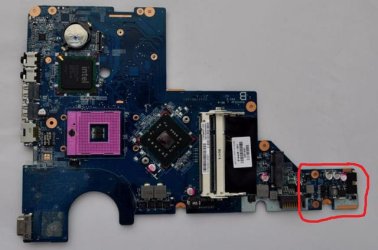
The charging circuitry is usually located close to the external connector on the MoBo. It's a small section. On my laptop I disassembled it's circled in red. Try a little googling on the subject. Here's a pic.
cq56 219wm MoBo.jpg


Here's your MoBo Schematic
View attachment Dell E6510 MoBo Schematic.pdf
 

My Computer My Computer

At a glance

Win 10 x64, Linux Lite, Win 7 x64, BlackArch,...
Computer type
PC/Desktop
Computer Manufacturer/Model Number
HP Desktop & Compaq Laptop
OS
Win 10 x64, Linux Lite, Win 7 x64, BlackArch, & Kali
Hard Drives
Samsung 850 Pro 256Gb,
Hitachi HDD 1Tb,
Crucial MX SSD 250Gb
Segate 3Tb USB 3.0 Ext. Backup HDD
Internet Speed
150Mbps dn, 20Mbps up
Antivirus
Avast Free, Malwarebytes Anti-Exploit & Anti-Ransomware
Browser
Firefox, Chrome, Opera, & VPN
Any luck correcting your issue yet?
 

My Computer My Computer

At a glance

Win 10 x64, Linux Lite, Win 7 x64, BlackArch,...
Computer type
PC/Desktop
Computer Manufacturer/Model Number
HP Desktop & Compaq Laptop
OS
Win 10 x64, Linux Lite, Win 7 x64, BlackArch, & Kali
Hard Drives
Samsung 850 Pro 256Gb,
Hitachi HDD 1Tb,
Crucial MX SSD 250Gb
Segate 3Tb USB 3.0 Ext. Backup HDD
Internet Speed
150Mbps dn, 20Mbps up
Antivirus
Avast Free, Malwarebytes Anti-Exploit & Anti-Ransomware
Browser
Firefox, Chrome, Opera, & VPN
Any luck correcting your issue yet?

Hey, thanks for sending me the MoBo overview of my laptop model. I've decided to just get another laptop but I'll definitely have a look and try fix the laptop now using this, thanks!
 

My Computer My Computer

At a glance

Windows 10 Professional x64
Computer type
Laptop
Computer Manufacturer/Model Number
Dell latitude E6510
OS
Windows 10 Professional x64
Back
Top