I recently purchased and installed a Zeino 128GB SSD (here's the description on Amazon)
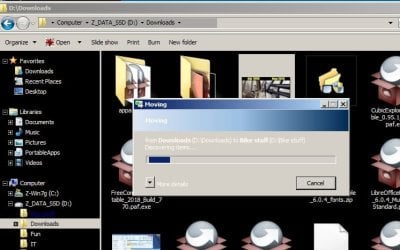
Sometimes, when I simply click on a directory on D: (data) partition,
or even just move files (like small jpegs (from print screens to a few MB in size), from one folder to another, both on that same partition,
there is a long delay, as the system seems to read or reindex the contents or something.
But even the Start menu is slow to "build" a list of items under a program group.
Some operations take about half a minute to one minute to do.
I expected SSDs to be quick for small file copying and even faster for rename/move operation.
But somehow Windows doesn't seem to be managing the SSD properly.
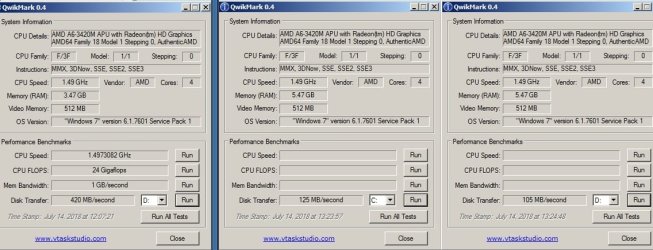
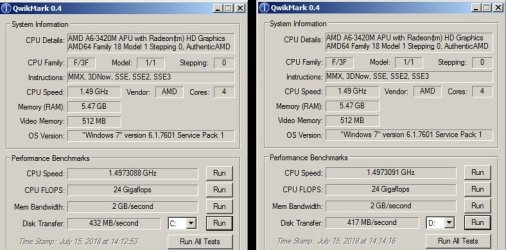
Also, if I put a SATA drive into the other drive bay, copying files from one drive to another happen at under 50MBps, which is not normal. Quickmark tests the SSD as being able to process R/W at 420MBps.
Write-caching: allowed
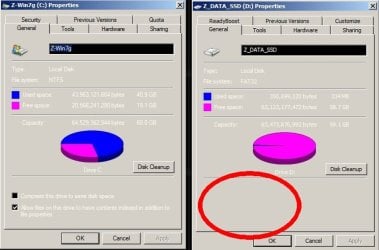
Indexing is enabled on the OS partition for Windows 7, NTFS
but indexing checkbox is not offered as an option on the Data partition, which is FAT
Here are some specs:
Operating System
Windows 7 Home Premium 64-bit SP1
CPU
AMD A6-3420M 48 °C
Llano 32nm Technology
RAM
6.00GB DDR3 @ 674MHz (9-9-9-24)
Motherboard
Gateway SJV70-SB (Socket FS1)
Graphics
Generic PnP Monitor (1600x900@60Hz)
512MB ATI AMD Radeon HD 6520G (Acer Incorporated [ALI]) 46 °C
Storage
698GB TOSHIBA MK7559GSXP ATA Device (SATA ) 36 °C
119GB CHN25SATAS1 128 ATA Device (SATA (SSD)) 45 °C
Optical Drives
Slimtype DVD A DS8A5SH ATA Device
Audio
Realtek High Definition Audio
Sometimes, when I simply click on a directory on D: (data) partition,
or even just move files (like small jpegs (from print screens to a few MB in size), from one folder to another, both on that same partition,
there is a long delay, as the system seems to read or reindex the contents or something.
But even the Start menu is slow to "build" a list of items under a program group.
Some operations take about half a minute to one minute to do.
I expected SSDs to be quick for small file copying and even faster for rename/move operation.
But somehow Windows doesn't seem to be managing the SSD properly.
Also, if I put a SATA drive into the other drive bay, copying files from one drive to another happen at under 50MBps, which is not normal. Quickmark tests the SSD as being able to process R/W at 420MBps.
Write-caching: allowed
Indexing is enabled on the OS partition for Windows 7, NTFS
but indexing checkbox is not offered as an option on the Data partition, which is FAT
Here are some specs:
Operating System
Windows 7 Home Premium 64-bit SP1
CPU
AMD A6-3420M 48 °C
Llano 32nm Technology
RAM
6.00GB DDR3 @ 674MHz (9-9-9-24)
Motherboard
Gateway SJV70-SB (Socket FS1)
Graphics
Generic PnP Monitor (1600x900@60Hz)
512MB ATI AMD Radeon HD 6520G (Acer Incorporated [ALI]) 46 °C
Storage
698GB TOSHIBA MK7559GSXP ATA Device (SATA ) 36 °C
119GB CHN25SATAS1 128 ATA Device (SATA (SSD)) 45 °C
Optical Drives
Slimtype DVD A DS8A5SH ATA Device
Audio
Realtek High Definition Audio
Last edited:
My Computer
At a glance
Microsoft Windows 7 Home Premium 64-bit 7601 ...AMD A6-3420M APU with Radeon HD Graphics6.00 GBAMD Radeon HD 6520G w.512MB (ATI display adap...
- Computer type
- Laptop
- Computer Manufacturer/Model Number
- Gateway NV75S-07h
- OS
- Microsoft Windows 7 Home Premium 64-bit 7601 Multiprocessor Free Service Pack 1
- CPU
- AMD A6-3420M APU with Radeon HD Graphics
- Motherboard
- Gateway SJV70-SB
- Memory
- 6.00 GB
- Graphics Card(s)
- AMD Radeon HD 6520G w.512MB (ATI display adapter (0x9647))
- Sound Card
- (1) AMD High Definition Audio Device (2) Realtek High Defi
- Monitor(s) Displays
- Generic built-in display (Laptop)
- Screen Resolution
- 1600x900
- Hard Drives
- (1) CHN25SATAS1 128 ATA Device
(2) TOSHIBA MK7559GSXP ATA Device
- Internet Speed
- 5mbps
- Antivirus
- Kingsoft
- Browser
- iron, chromium, firefox