Occasional long delays on brand new SSD

Timmi

New member
Local time
2:00 PM
Messages
15
I recently purchased and installed a Zeino 128GB SSD (here's the description on Amazon)

Sometimes, when I simply click on a directory on D: (data) partition,
or even just move files (like small jpegs (from print screens to a few MB in size), from one folder to another, both on that same partition,
there is a long delay, as the system seems to read or reindex the contents or something.

But even the Start menu is slow to "build" a list of items under a program group.

Some operations take about half a minute to one minute to do.
I expected SSDs to be quick for small file copying and even faster for rename/move operation.
But somehow Windows doesn't seem to be managing the SSD properly.

Also, if I put a SATA drive into the other drive bay, copying files from one drive to another happen at under 50MBps, which is not normal. Quickmark tests the SSD as being able to process R/W at 420MBps.

Write-caching: allowed
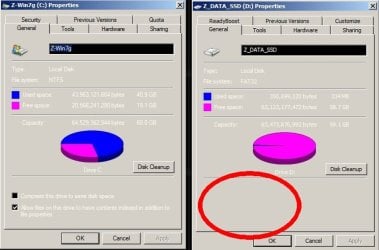
Indexing is enabled on the OS partition for Windows 7, NTFS
but indexing checkbox is not offered as an option on the Data partition, which is FAT

Here are some specs:

Operating System
Windows 7 Home Premium 64-bit SP1
CPU
AMD A6-3420M 48 °C
Llano 32nm Technology
RAM
6.00GB DDR3 @ 674MHz (9-9-9-24)
Motherboard
Gateway SJV70-SB (Socket FS1)
Graphics
Generic PnP Monitor (1600x900@60Hz)
512MB ATI AMD Radeon HD 6520G (Acer Incorporated [ALI]) 46 °C
Storage
698GB TOSHIBA MK7559GSXP ATA Device (SATA ) 36 °C
119GB CHN25SATAS1 128 ATA Device (SATA (SSD)) 45 °C
Optical Drives
Slimtype DVD A DS8A5SH ATA Device
Audio
Realtek High Definition Audio
 
Last edited:

My Computer My Computer

At a glance

Microsoft Windows 7 Home Premium 64-bit 7601 ...AMD A6-3420M APU with Radeon HD Graphics6.00 GBAMD Radeon HD 6520G w.512MB (ATI display adap...
Computer type
Laptop
Computer Manufacturer/Model Number
Gateway NV75S-07h
OS
Microsoft Windows 7 Home Premium 64-bit 7601 Multiprocessor Free Service Pack 1
CPU
AMD A6-3420M APU with Radeon HD Graphics
Motherboard
Gateway SJV70-SB
Memory
6.00 GB
Graphics Card(s)
AMD Radeon HD 6520G w.512MB (ATI display adapter (0x9647))
Sound Card
(1) AMD High Definition Audio Device (2) Realtek High Defi
Monitor(s) Displays
Generic built-in display (Laptop)
Screen Resolution
1600x900
Hard Drives
(1) CHN25SATAS1 128 ATA Device
(2) TOSHIBA MK7559GSXP ATA Device
Internet Speed
5mbps
Antivirus
Kingsoft
Browser
iron, chromium, firefox
On the C: main boot partition, NTFS, indexing checkbox is offered. See picture if you like.

On it's D: data partition, FAT: the indexing checkbox is not present as it was for the ntfs partition in the previous picture. See image here.


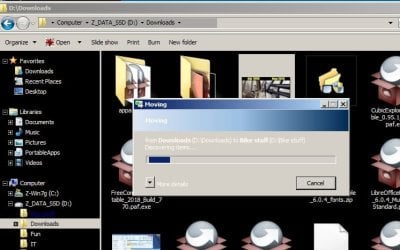
Copying a 48K Jpeg file, it took a while. In this picture here, you can see the progress bar where it displays the location.
 

Attachments

  • indexing C D.jpg
    indexing C D.jpg
    42.5 KB · Views: 25
  • Clipboard 48k.jpg
    Clipboard 48k.jpg
    45.7 KB · Views: 25
Last edited:

My Computer My Computer

At a glance

Microsoft Windows 7 Home Premium 64-bit 7601 ...AMD A6-3420M APU with Radeon HD Graphics6.00 GBAMD Radeon HD 6520G w.512MB (ATI display adap...
Computer type
Laptop
Computer Manufacturer/Model Number
Gateway NV75S-07h
OS
Microsoft Windows 7 Home Premium 64-bit 7601 Multiprocessor Free Service Pack 1
CPU
AMD A6-3420M APU with Radeon HD Graphics
Motherboard
Gateway SJV70-SB
Memory
6.00 GB
Graphics Card(s)
AMD Radeon HD 6520G w.512MB (ATI display adapter (0x9647))
Sound Card
(1) AMD High Definition Audio Device (2) Realtek High Defi
Monitor(s) Displays
Generic built-in display (Laptop)
Screen Resolution
1600x900
Hard Drives
(1) CHN25SATAS1 128 ATA Device
(2) TOSHIBA MK7559GSXP ATA Device
Internet Speed
5mbps
Antivirus
Kingsoft
Browser
iron, chromium, firefox
Please edit your profile with all hardware specs.
The tutorial below [Published by Brink and written by CyberZeus] let's you easily see all of your system information, along with the option of making filling out your system specifications here at Seven Forums easier.
System Info - See Your System Specs - Windows 7 Help Forums

Did you do a clean install or did you clone a HDD into the SSD?
Why did you format the D: drive as FAT32?
Did you partitioned the 128 G SSD into C: and D:? Why?
 

My Computers My Computers

  • At a glance

    Windows 7 HP 64i5 6600K - 800MHz to 4200MHz4+4G GSkill DDR4 3000IG - Intel 530
    Computer type
    PC/Desktop
    Computer Manufacturer/Model Number
    custom build
    OS
    Windows 7 HP 64
    CPU
    i5 6600K - 800MHz to 4200MHz
    Motherboard
    GA-Z170-HD3P
    Memory
    4+4G GSkill DDR4 3000
    Graphics Card(s)
    IG - Intel 530
    Monitor(s) Displays
    Samsung 226BW
    Screen Resolution
    1680x1050
    Hard Drives
    (1) -1 SM951 – 128GB M.2 AHCI PCIe SSD drive for Windows 7 and Lubuntu
    (2) -1 WD SATA 3 - 1T for Data
    (3) -1 WD SATA 3 - 1T for backup
    PSU
    Thermaltake 450W TR2 gold
    Keyboard
    Old and good Chicony mechanical keyboard
    Mouse
    Logitech mX performance - 9 buttons (had to disable some)
    Internet Speed
    500Mb/s
    Browser
    Firefox 64
    Other Info
    TinyWall firewall
  • At a glance

    Windows 7 Proi7-4500U 800MHz to 3.0GHz(4+4)G DDR3 1600IG intel 4400 + NVIDIA GeForce GT 745M
    Computer type
    Laptop
    System Manufacturer/Model Number
    Asus Q550LF
    OS
    Windows 7 Pro
    CPU
    i7-4500U 800MHz to 3.0GHz
    Motherboard
    Asus Q550LF
    Memory
    (4+4)G DDR3 1600
    Graphics Card(s)
    IG intel 4400 + NVIDIA GeForce GT 745M
    Sound Card
    Realtek
    Monitor(s) Displays
    LG Display LP156WF4-SPH1
    Screen Resolution
    1920 x 1080
    Hard Drives
    BX500 120G SSD for Windows and programs +
    1T HDD for data
    Internet Speed
    500 Mb/s
    Browser
    Firefox
    Other Info
    TinyWall firewall
Did you do a clean install or did you clone a HDD into the SSD?
Why did you format the D: drive as FAT32?
Did you partitioned the 128 G SSD into C: and D:? Why?

As I said, I used a set of System Restore discs, that I had created after I bought the computer which originally had Windows 7 on it. They're from the original Windows7 that came with it. Impossible to get Windows install disks from Acer/Gateway without paying a horrendous fee.

FAT was for easier access via Linux, because I wanted to make a dual-boot configuration.
I didn't want to end up in a situation where my Linux could not access my data.
Presently, it's Windows boot only - dual boot is not set up yet, but planned.
I want to use Windows7 for my CAD software, and Linux for when I'm just browsing the web and stuff - as a strategy to keep my Windows sheltered and clean.

Edit: ALSO, I always keep my data on a separate partition, regardless of it's type. If the main partition gets damaged, wiped out, by virus or otherwise, it goes first... the data almost always survives when on another partition. Data will always have to be on a separate one for me. I consider it best-practices. FAT isn't exactly my favourite choice though - it's just always been readable by the other OS when present. My first choice would be Ext4, but Windows doesn't like that.

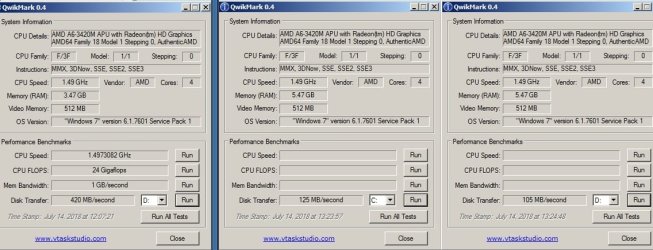
I am starting to wonder if I got a bad SSD. On the portable app Quickmark, it reported 420MB/s transfer rate with 4GB of RAM in there, and after I added an extra 2GB back in, (which still reports same speed at 674MHz), Quickmark is reporting 125MB/s for C-drive and 105MB/s for D-drive as data transfer rates.

Here's an image of the QuickMark results before and after I changed the RAM.

1515989quickmark_disk_transfer_rates_before_and_after.jpg
 

Attachments

  • quickmark disk transfer rates before and after.jpg
    quickmark disk transfer rates before and after.jpg
    89.3 KB · Views: 2
Last edited:

My Computer My Computer

At a glance

Microsoft Windows 7 Home Premium 64-bit 7601 ...AMD A6-3420M APU with Radeon HD Graphics6.00 GBAMD Radeon HD 6520G w.512MB (ATI display adap...
Computer type
Laptop
Computer Manufacturer/Model Number
Gateway NV75S-07h
OS
Microsoft Windows 7 Home Premium 64-bit 7601 Multiprocessor Free Service Pack 1
CPU
AMD A6-3420M APU with Radeon HD Graphics
Motherboard
Gateway SJV70-SB
Memory
6.00 GB
Graphics Card(s)
AMD Radeon HD 6520G w.512MB (ATI display adapter (0x9647))
Sound Card
(1) AMD High Definition Audio Device (2) Realtek High Defi
Monitor(s) Displays
Generic built-in display (Laptop)
Screen Resolution
1600x900
Hard Drives
(1) CHN25SATAS1 128 ATA Device
(2) TOSHIBA MK7559GSXP ATA Device
Internet Speed
5mbps
Antivirus
Kingsoft
Browser
iron, chromium, firefox
- How do you have one SSD and one HDD on a Laptop? Did you replaced the ODD with a HDD caddy?
- Linux can use (read / wright) on a NTFS disk. Don't need to be FAT32.

As your laptop is quite old, it probably has SATA II (300MB/s) that doesn't take use of your drive speed (510MB/s).

My suggestion:
- Copy your data to C: (with explorer)
- Delete the D: partition (with Disk management (C:\Windows\System32\diskmgmt.msc))
- Expand C: partition to 98G (with Disk management)
- Install Linux on the remaining 30G

Trim
Type this cmd
fsutil behavior query DisableDeleteNotify

It will give you one of two results, either a 0 or a 1. A zero indicates that TRIM is enabled correctly, a one means that it is not. If you have a TRIM-compatible SSD, but find that Windows 7 hasn't enabled the command, you can easily do so by running this command:

fsutil behavior set DisableDeleteNotify 0


Test your SSD
AS SSD Benchmark 2.0.6694 Download - TechSpot
 

My Computers My Computers

  • At a glance

    Windows 7 HP 64i5 6600K - 800MHz to 4200MHz4+4G GSkill DDR4 3000IG - Intel 530
    Computer type
    PC/Desktop
    Computer Manufacturer/Model Number
    custom build
    OS
    Windows 7 HP 64
    CPU
    i5 6600K - 800MHz to 4200MHz
    Motherboard
    GA-Z170-HD3P
    Memory
    4+4G GSkill DDR4 3000
    Graphics Card(s)
    IG - Intel 530
    Monitor(s) Displays
    Samsung 226BW
    Screen Resolution
    1680x1050
    Hard Drives
    (1) -1 SM951 – 128GB M.2 AHCI PCIe SSD drive for Windows 7 and Lubuntu
    (2) -1 WD SATA 3 - 1T for Data
    (3) -1 WD SATA 3 - 1T for backup
    PSU
    Thermaltake 450W TR2 gold
    Keyboard
    Old and good Chicony mechanical keyboard
    Mouse
    Logitech mX performance - 9 buttons (had to disable some)
    Internet Speed
    500Mb/s
    Browser
    Firefox 64
    Other Info
    TinyWall firewall
  • At a glance

    Windows 7 Proi7-4500U 800MHz to 3.0GHz(4+4)G DDR3 1600IG intel 4400 + NVIDIA GeForce GT 745M
    Computer type
    Laptop
    System Manufacturer/Model Number
    Asus Q550LF
    OS
    Windows 7 Pro
    CPU
    i7-4500U 800MHz to 3.0GHz
    Motherboard
    Asus Q550LF
    Memory
    (4+4)G DDR3 1600
    Graphics Card(s)
    IG intel 4400 + NVIDIA GeForce GT 745M
    Sound Card
    Realtek
    Monitor(s) Displays
    LG Display LP156WF4-SPH1
    Screen Resolution
    1920 x 1080
    Hard Drives
    BX500 120G SSD for Windows and programs +
    1T HDD for data
    Internet Speed
    500 Mb/s
    Browser
    Firefox
    Other Info
    TinyWall firewall
- How do you have one SSD and one HDD on a Laptop? Did you replaced the ODD with a HDD caddy?
- Linux can use (read / wright) on a NTFS disk. Don't need to be FAT32.

As your laptop is quite old, it probably has SATA II (300MB/s) that doesn't take use of your drive speed (510MB/s).

My suggestion:
- Copy your data to C: (with explorer)
- Delete the D: partition (with Disk management (C:\Windows\System32\diskmgmt.msc))
- Expand C: partition to 98G (with Disk management)
- Install Linux on the remaining 30G

Trim
Type this cmd
fsutil behavior query DisableDeleteNotify

It will give you one of two results, either a 0 or a 1. A zero indicates that TRIM is enabled correctly, a one means that it is not. If you have a TRIM-compatible SSD, but find that Windows 7 hasn't enabled the command, you can easily do so by running this command:

fsutil behavior set DisableDeleteNotify 0


Test your SSD
AS SSD Benchmark 2.0.6694 Download - TechSpot


I must be bad at explaining things, because this is the second time your comments seem to have overlooked a detail(s) given in a previous post.

As mentioned, the SSD was first testing as 420MB/s (see picture link in previous post) in this same laptop. The 510MB/s may be theoretical, the 420MB/s is actual.

How did I get a second drive in there? I added a second drive by connecting it to the second drive connector in the second drive bay. Many laptops have a second connector, for an SSD. Maybe yours does too, and maybe you just didn't think to look. My other (similar) Acer laptop has the same configuration.

Sorry that it's an "old" laptop. I just didn't see enough progress and innovation in the market to justify changing it.

I have had problems accessing an NTFS when said partition is password-protected by Windows in the past. FAT seems to be a reliable way to be sure that no matter what OS you install, it'll be accessible.

If I remove the drive altogether, it's not going to resolve the SSD performance issue.
I'm not asking what to do to get Linux onto there. I know how to do that. Done it lots of times.
My OP is about the degraded drive performance, that seems to be affected by either what RAM I put in there, or by a Windows configuration. With one memory stick, it gives me 420MB/s, with another it gives me a quarter of that. I don't understand what's going on. (OK, longer story: I have a similar Acer laptop, that also has 4GB+2GB. I took the 4GB memory stick from that one, to replace the 2GB stick inthis one. Windows didn't see all the 8GB, but only the first 4GB (I had a separate post/thread on that), but then, the SSD was testing at 420MB/s. After I removed the foreign 4GB stick, and put back in the 2GB stick, to have only 6GB total, the SSD now tests at a quarter of that speed)

Thanks very much about the tip regarding TRIM.
I'll check that out, and report back.
 
Last edited:

My Computer My Computer

At a glance

Microsoft Windows 7 Home Premium 64-bit 7601 ...AMD A6-3420M APU with Radeon HD Graphics6.00 GBAMD Radeon HD 6520G w.512MB (ATI display adap...
Computer type
Laptop
Computer Manufacturer/Model Number
Gateway NV75S-07h
OS
Microsoft Windows 7 Home Premium 64-bit 7601 Multiprocessor Free Service Pack 1
CPU
AMD A6-3420M APU with Radeon HD Graphics
Motherboard
Gateway SJV70-SB
Memory
6.00 GB
Graphics Card(s)
AMD Radeon HD 6520G w.512MB (ATI display adapter (0x9647))
Sound Card
(1) AMD High Definition Audio Device (2) Realtek High Defi
Monitor(s) Displays
Generic built-in display (Laptop)
Screen Resolution
1600x900
Hard Drives
(1) CHN25SATAS1 128 ATA Device
(2) TOSHIBA MK7559GSXP ATA Device
Internet Speed
5mbps
Antivirus
Kingsoft
Browser
iron, chromium, firefox
Result for the Trim query is:
DisableDeleteNotify = 0


SSD Test results on C: (ntfs) and D: (fat)

Results are similar.

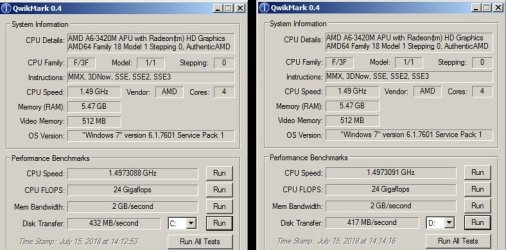
Also, I ran the Quickmark test again, on both partitions, and now I'm getting the same 420MB/s as before.
I know the numbers are influenced by what the test operation is actually doing, and in what block sizes, so let's keep in mind that I don't consider one test or the other to be more, or less, valid than the other. I just find it odd that it's testing at proper speed again.

QUESTION: I noticed that prior tests in Quickmark showed a memory transfer rate of 1GB/s, and now at 2GB/s. Could this be the "balanced power management" setting at work, in the laptop's power management and performance settings? (or maybe just the cache at work)
 

Attachments

  • ssd test result 0.jpg
    ssd test result 0.jpg
    93.5 KB · Views: 0
  • quickmark new.jpg
    quickmark new.jpg
    59.2 KB · Views: 0
Last edited:

My Computer My Computer

At a glance

Microsoft Windows 7 Home Premium 64-bit 7601 ...AMD A6-3420M APU with Radeon HD Graphics6.00 GBAMD Radeon HD 6520G w.512MB (ATI display adap...
Computer type
Laptop
Computer Manufacturer/Model Number
Gateway NV75S-07h
OS
Microsoft Windows 7 Home Premium 64-bit 7601 Multiprocessor Free Service Pack 1
CPU
AMD A6-3420M APU with Radeon HD Graphics
Motherboard
Gateway SJV70-SB
Memory
6.00 GB
Graphics Card(s)
AMD Radeon HD 6520G w.512MB (ATI display adapter (0x9647))
Sound Card
(1) AMD High Definition Audio Device (2) Realtek High Defi
Monitor(s) Displays
Generic built-in display (Laptop)
Screen Resolution
1600x900
Hard Drives
(1) CHN25SATAS1 128 ATA Device
(2) TOSHIBA MK7559GSXP ATA Device
Internet Speed
5mbps
Antivirus
Kingsoft
Browser
iron, chromium, firefox
- I have seen dual HDD bays on some new laptops, not at old ones (don't be offended, my laptop is much older than yours)
- I've asked because, what I do for my friends, is to replace the HDD with a 128G SSD (Windows and programs) and the ODD with a caddy to hold the HDD (Data).
- Using Kari tutorial, I move the C:\user folder to D:\User where C: is the SSD and D: the HDD. User Profiles - Create and Move During Windows 7 Installation - Windows 7 Help Forums
- On my desktop I have a 128G SSD with Windows and programs on C: and Lubuntu on another partition (ext4). Al my data is on the HDD.
393200d1477863836-windows-7-startup-repair-loop-boot-manager-failed-find-os-loader-partition.jpg

393064d1477237723-installing-ssd-dell-xps-8700-a-my_tree.jpg
 

My Computers My Computers

  • At a glance

    Windows 7 HP 64i5 6600K - 800MHz to 4200MHz4+4G GSkill DDR4 3000IG - Intel 530
    Computer type
    PC/Desktop
    Computer Manufacturer/Model Number
    custom build
    OS
    Windows 7 HP 64
    CPU
    i5 6600K - 800MHz to 4200MHz
    Motherboard
    GA-Z170-HD3P
    Memory
    4+4G GSkill DDR4 3000
    Graphics Card(s)
    IG - Intel 530
    Monitor(s) Displays
    Samsung 226BW
    Screen Resolution
    1680x1050
    Hard Drives
    (1) -1 SM951 – 128GB M.2 AHCI PCIe SSD drive for Windows 7 and Lubuntu
    (2) -1 WD SATA 3 - 1T for Data
    (3) -1 WD SATA 3 - 1T for backup
    PSU
    Thermaltake 450W TR2 gold
    Keyboard
    Old and good Chicony mechanical keyboard
    Mouse
    Logitech mX performance - 9 buttons (had to disable some)
    Internet Speed
    500Mb/s
    Browser
    Firefox 64
    Other Info
    TinyWall firewall
  • At a glance

    Windows 7 Proi7-4500U 800MHz to 3.0GHz(4+4)G DDR3 1600IG intel 4400 + NVIDIA GeForce GT 745M
    Computer type
    Laptop
    System Manufacturer/Model Number
    Asus Q550LF
    OS
    Windows 7 Pro
    CPU
    i7-4500U 800MHz to 3.0GHz
    Motherboard
    Asus Q550LF
    Memory
    (4+4)G DDR3 1600
    Graphics Card(s)
    IG intel 4400 + NVIDIA GeForce GT 745M
    Sound Card
    Realtek
    Monitor(s) Displays
    LG Display LP156WF4-SPH1
    Screen Resolution
    1920 x 1080
    Hard Drives
    BX500 120G SSD for Windows and programs +
    1T HDD for data
    Internet Speed
    500 Mb/s
    Browser
    Firefox
    Other Info
    TinyWall firewall
- I have seen dual HDD bays on some new laptops, not at old ones (don't be offended, my laptop is much older than yours)
- I've asked because, what I do for my friends, is to replace the HDD with a 128G SSD (Windows and programs) and the ODD with a caddy to hold the HDD (Data).
- Using Kari tutorial, I move the C:\user folder to D:\User where C: is the SSD and D: the HDD.
- On my desktop I have a 128G SSD with Windows and programs on C: and Lubuntu on another partition (ext4). Al my data is on the HDD.

You sure are confusing me. First you question my judgement of using a separate FAT partition for my data, you advise me to merge my data onto C with the OS.
And now you show me images where you are using FAT, Other, in addition to ntfs, and you've also got your data separate instead of how you advised initially.
What's more, it wasn't clear whether you were talking about one laptop, or a laptop and a desktop, or just a desktop, or what. That post was rather incoherent.

Can we please get back to the topic at hand?

The SSD pauses "getting ready to move file".
If FAT is what is slowing down the SSD, I would like to know that, as that can be changed (if needed). But I'm not going to make changes to satisfy some whims. I partition according to my needs and experience.

Thank you.
 

My Computer My Computer

At a glance

Microsoft Windows 7 Home Premium 64-bit 7601 ...AMD A6-3420M APU with Radeon HD Graphics6.00 GBAMD Radeon HD 6520G w.512MB (ATI display adap...
Computer type
Laptop
Computer Manufacturer/Model Number
Gateway NV75S-07h
OS
Microsoft Windows 7 Home Premium 64-bit 7601 Multiprocessor Free Service Pack 1
CPU
AMD A6-3420M APU with Radeon HD Graphics
Motherboard
Gateway SJV70-SB
Memory
6.00 GB
Graphics Card(s)
AMD Radeon HD 6520G w.512MB (ATI display adapter (0x9647))
Sound Card
(1) AMD High Definition Audio Device (2) Realtek High Defi
Monitor(s) Displays
Generic built-in display (Laptop)
Screen Resolution
1600x900
Hard Drives
(1) CHN25SATAS1 128 ATA Device
(2) TOSHIBA MK7559GSXP ATA Device
Internet Speed
5mbps
Antivirus
Kingsoft
Browser
iron, chromium, firefox
Your laptop is a Legacy - MBR with one SSD and one HDD, and my suggestion is:
- On the SSD, install Win 7 on one NTFS partition (85G) and Linux and swap on the remaining.
- Move C:\users (SSD) to D:\users (HDD) using Kari tutorial.

- You shouldn't have FAT32 for Data. It has limitations on file size and isn't robust as NTFS. And Linux can read / write to NTFS.
- When you transfer \users from the SSD to HDD you'll have the speed of a SSD and the size of a HDD. And all temporary files goes to the HDD so your SSD will last longer as a SSD has limit write / erase life.

That is what I've done on my desktop. The only difference is that my disks are UEFI - GPT and not Legacy - MBR as yours.
On a UEFI - GPT boot able disk you will have a 100M Fat32 partition where all boot loaders will remain. Windows boot loader and Linux (Grub) will be on this partition and not on the OS partition as it does on a Legacy - MBR as yours.
 

My Computers My Computers

  • At a glance

    Windows 7 HP 64i5 6600K - 800MHz to 4200MHz4+4G GSkill DDR4 3000IG - Intel 530
    Computer type
    PC/Desktop
    Computer Manufacturer/Model Number
    custom build
    OS
    Windows 7 HP 64
    CPU
    i5 6600K - 800MHz to 4200MHz
    Motherboard
    GA-Z170-HD3P
    Memory
    4+4G GSkill DDR4 3000
    Graphics Card(s)
    IG - Intel 530
    Monitor(s) Displays
    Samsung 226BW
    Screen Resolution
    1680x1050
    Hard Drives
    (1) -1 SM951 – 128GB M.2 AHCI PCIe SSD drive for Windows 7 and Lubuntu
    (2) -1 WD SATA 3 - 1T for Data
    (3) -1 WD SATA 3 - 1T for backup
    PSU
    Thermaltake 450W TR2 gold
    Keyboard
    Old and good Chicony mechanical keyboard
    Mouse
    Logitech mX performance - 9 buttons (had to disable some)
    Internet Speed
    500Mb/s
    Browser
    Firefox 64
    Other Info
    TinyWall firewall
  • At a glance

    Windows 7 Proi7-4500U 800MHz to 3.0GHz(4+4)G DDR3 1600IG intel 4400 + NVIDIA GeForce GT 745M
    Computer type
    Laptop
    System Manufacturer/Model Number
    Asus Q550LF
    OS
    Windows 7 Pro
    CPU
    i7-4500U 800MHz to 3.0GHz
    Motherboard
    Asus Q550LF
    Memory
    (4+4)G DDR3 1600
    Graphics Card(s)
    IG intel 4400 + NVIDIA GeForce GT 745M
    Sound Card
    Realtek
    Monitor(s) Displays
    LG Display LP156WF4-SPH1
    Screen Resolution
    1920 x 1080
    Hard Drives
    BX500 120G SSD for Windows and programs +
    1T HDD for data
    Internet Speed
    500 Mb/s
    Browser
    Firefox
    Other Info
    TinyWall firewall
OK, do tell me how reconfiguring my computer the way you want it, helps resolve the issue at hand?

And I am not moving \users. I've been using a separate Data partition for data for decades now. I don't want to be slave to some \users structure for my data. I want the data as easily accessible from Windoze and Linux. Not in some Windows' users-sub-sub directory called documents videos etc.
Data gets dumped onto HDD as a backup, and occasionally HDD gets backed up onto an external hard drive.
I also want the freedom to remove the HDD, to either use it in one of my other computers, or put another Data HDD in it's place.
The system has to be able to run independently, should a component fail or be removed.
Your way, if I change my Data drive I have to map everything all over again - I'm not signing up for an eternal system-configuring-as-a-hobby here!

With space on the SSD at a premium, I've decided to put Linux onto my data drives, and use [F12] to select which drive to boot from. This makes it even simpler, and gets me further towards my goal of KISS.
Besides, when the SSD finally fails, I'll be able to get one 4 times the capacity at half the price. Why should I organise everything as if the SSD is the more permanent component? DATA is what's important - not the OS and what's holding it.

FAT32: I don't care about file size. It's never been a problem until now, so why should I care?
And what are these other "limitations" you speak of? Do you even know of any? Why do you think NTFS is "safer"? Will NTFS resolve my issue? AFAIK the NTFS specification isn't even shared by MS - I learned that it's proprietary and that everyone else's implementation of it is best-guess. To me, that doesn't sound much better than FAT.
Also, I've had instances where Linux cannot read NTFS, because the NTFS partition required a password to boot when booting Windows. So I do not feel secure that it will work. I suppose I can test it - put Mint 19 onto the HDD, boot with that, and see if it can access the SSD's data. But even then, WILL NTFS RESOLVE THE SSD LAG ISSUE? I haven't seen that question answered.

And I'm not buying a new laptop just to have UEFI which I do NOT need. Besides, you shouldn't even like UEFI yourself, as some of it's code resides on a FAT partition!
 

My Computer My Computer

At a glance

Microsoft Windows 7 Home Premium 64-bit 7601 ...AMD A6-3420M APU with Radeon HD Graphics6.00 GBAMD Radeon HD 6520G w.512MB (ATI display adap...
Computer type
Laptop
Computer Manufacturer/Model Number
Gateway NV75S-07h
OS
Microsoft Windows 7 Home Premium 64-bit 7601 Multiprocessor Free Service Pack 1
CPU
AMD A6-3420M APU with Radeon HD Graphics
Motherboard
Gateway SJV70-SB
Memory
6.00 GB
Graphics Card(s)
AMD Radeon HD 6520G w.512MB (ATI display adapter (0x9647))
Sound Card
(1) AMD High Definition Audio Device (2) Realtek High Defi
Monitor(s) Displays
Generic built-in display (Laptop)
Screen Resolution
1600x900
Hard Drives
(1) CHN25SATAS1 128 ATA Device
(2) TOSHIBA MK7559GSXP ATA Device
Internet Speed
5mbps
Antivirus
Kingsoft
Browser
iron, chromium, firefox
I don't know if NTFS will resolve your issue.
What I know is that your data will be much more secure on NTFS than on a Fat32.
NTFS - Wikipedia
File Allocation Table - Wikipedia
If you've had instances where Linux cannot read NTFS, because the NTFS partition required a password to boot when booting Windows, it could be that it had the disk encrypted.
Never said to you to buy a new laptop. Yes, UEFI - GPT uses Fat32 to hold the boot loaders because it's universal to all OS.
GUID Partition Table - Wikipedia

I gave you some suggestions that in my opinion will make your system work better and safer.
You seem to know what you want and you're aggressive on your answers. Good luck.
 

My Computers My Computers

  • At a glance

    Windows 7 HP 64i5 6600K - 800MHz to 4200MHz4+4G GSkill DDR4 3000IG - Intel 530
    Computer type
    PC/Desktop
    Computer Manufacturer/Model Number
    custom build
    OS
    Windows 7 HP 64
    CPU
    i5 6600K - 800MHz to 4200MHz
    Motherboard
    GA-Z170-HD3P
    Memory
    4+4G GSkill DDR4 3000
    Graphics Card(s)
    IG - Intel 530
    Monitor(s) Displays
    Samsung 226BW
    Screen Resolution
    1680x1050
    Hard Drives
    (1) -1 SM951 – 128GB M.2 AHCI PCIe SSD drive for Windows 7 and Lubuntu
    (2) -1 WD SATA 3 - 1T for Data
    (3) -1 WD SATA 3 - 1T for backup
    PSU
    Thermaltake 450W TR2 gold
    Keyboard
    Old and good Chicony mechanical keyboard
    Mouse
    Logitech mX performance - 9 buttons (had to disable some)
    Internet Speed
    500Mb/s
    Browser
    Firefox 64
    Other Info
    TinyWall firewall
  • At a glance

    Windows 7 Proi7-4500U 800MHz to 3.0GHz(4+4)G DDR3 1600IG intel 4400 + NVIDIA GeForce GT 745M
    Computer type
    Laptop
    System Manufacturer/Model Number
    Asus Q550LF
    OS
    Windows 7 Pro
    CPU
    i7-4500U 800MHz to 3.0GHz
    Motherboard
    Asus Q550LF
    Memory
    (4+4)G DDR3 1600
    Graphics Card(s)
    IG intel 4400 + NVIDIA GeForce GT 745M
    Sound Card
    Realtek
    Monitor(s) Displays
    LG Display LP156WF4-SPH1
    Screen Resolution
    1920 x 1080
    Hard Drives
    BX500 120G SSD for Windows and programs +
    1T HDD for data
    Internet Speed
    500 Mb/s
    Browser
    Firefox
    Other Info
    TinyWall firewall
- You shouldn't have FAT32 for Data. It has limitations on file size and isn't robust as NTFS. And Linux can read / write to NTFS.

WHY not FAT? it gets backed up anyways, to the other drive. that's what the other one is there for.

There are 2 reasons why I will not move \users to the HDD:
1.first, I need to be able to swap either drive! (so that's a hard limit)
2.second, I want the performance of the swap file(s) being on the SSD. When I run CAD software and it swaps something to disk, I prefer it to be closer to RAM speeds than to HDD speeds - the benefits are immense.

And I really don't care about file size. 4GB is big enough. The largest files I have are a few videos, the largest of which are under 2GB in size.

Will changing FAT to NTFS resolve the issue? Or are you just giving advice on how you prefer to have your computers configured? (because that is what it sounds like, so it begs the question).

If it will resolve it for sure, I'll do it. If it's just that you don't like my config, that's not a solution.
 
Last edited:

My Computer My Computer

At a glance

Microsoft Windows 7 Home Premium 64-bit 7601 ...AMD A6-3420M APU with Radeon HD Graphics6.00 GBAMD Radeon HD 6520G w.512MB (ATI display adap...
Computer type
Laptop
Computer Manufacturer/Model Number
Gateway NV75S-07h
OS
Microsoft Windows 7 Home Premium 64-bit 7601 Multiprocessor Free Service Pack 1
CPU
AMD A6-3420M APU with Radeon HD Graphics
Motherboard
Gateway SJV70-SB
Memory
6.00 GB
Graphics Card(s)
AMD Radeon HD 6520G w.512MB (ATI display adapter (0x9647))
Sound Card
(1) AMD High Definition Audio Device (2) Realtek High Defi
Monitor(s) Displays
Generic built-in display (Laptop)
Screen Resolution
1600x900
Hard Drives
(1) CHN25SATAS1 128 ATA Device
(2) TOSHIBA MK7559GSXP ATA Device
Internet Speed
5mbps
Antivirus
Kingsoft
Browser
iron, chromium, firefox
I don't know if NTFS will resolve your issue.
What I know is that your data will be much more secure on NTFS than on a Fat32.

If you've had instances where Linux cannot read NTFS, because the NTFS partition required a password to boot when booting Windows, it could be that it had the disk encrypted.

Never said to you to buy a new laptop. Yes, UEFI - GPT uses Fat32 to hold the boot loaders because it's universal to all OS.

I gave you some suggestions that in my opinion will make your system work better and safer.
You seem to know what you want and you're aggressive on your answers. Good luck.

Last I heard, FAT manages 2 copies and therefore can be rebuilt. So it's not that dismally-bad.
And I never encrypt my partitions... I'm too paranoid of something happening and then not being able to run data-recovery on it should everything go to hell.

If I seem "aggressive" to you, it's simply because I'm exasperated with you!
You kept on making it a point to mention over and over about how "old" my computer is and how it's not UEFI... you keep on campaigning for "your" preferred configurstion, even if you are admitting you're not even offering a solution in the end. ...and now you complain? This behavior is nothing other than veiled arrogance.
You went on over and over about uefi and guid - it's not even pertinent to this thread! The problem presented here is in a BIOS system. If you're not trying to bash my hardware or convince me to buy new hardware, why do you keep on repeatedly outlining the differences with yours?

This isn't supposed to be a my-harware-is-better-than-yours-snobfest!
It's supposed to be about people being impartial, and helping other people, with useful advice, and not derailing threads into other peripheral and non-pertinent topics.

You have hi-jacked this thread, offering pages of lectures on how you want everyone to do as you do, without even considering for a moment that everyone's needs aren't the same as yours.
You haven't got a clue (!) about the solution, you're just being a militant for your configuration.
Except that now, newcomers to the thread have an extra page of information to sift through that isn't even relevant, all because of you telling me how old my hardware is and pointing out it's not uefi and how I should move \users to hdd.

Please do me a favor, don't ever answer any of my threads in the future.
That should free up some time to get to the solution faster.
 
Last edited:

My Computer My Computer

At a glance

Microsoft Windows 7 Home Premium 64-bit 7601 ...AMD A6-3420M APU with Radeon HD Graphics6.00 GBAMD Radeon HD 6520G w.512MB (ATI display adap...
Computer type
Laptop
Computer Manufacturer/Model Number
Gateway NV75S-07h
OS
Microsoft Windows 7 Home Premium 64-bit 7601 Multiprocessor Free Service Pack 1
CPU
AMD A6-3420M APU with Radeon HD Graphics
Motherboard
Gateway SJV70-SB
Memory
6.00 GB
Graphics Card(s)
AMD Radeon HD 6520G w.512MB (ATI display adapter (0x9647))
Sound Card
(1) AMD High Definition Audio Device (2) Realtek High Defi
Monitor(s) Displays
Generic built-in display (Laptop)
Screen Resolution
1600x900
Hard Drives
(1) CHN25SATAS1 128 ATA Device
(2) TOSHIBA MK7559GSXP ATA Device
Internet Speed
5mbps
Antivirus
Kingsoft
Browser
iron, chromium, firefox
Back
Top