Solved how to make os option menu appear in a dual boot pc?

If you prefer there is a direct Microsoft option which should take you to a server near to you and allows you to choose the format you want.

It defaults to writing a USB stick but you can change this to .ISO if you prefer. When Given the option choose the option to create installer for another machine and choose the .ISO option

Download Windows 10
 

My Computers My Computers

  • At a glance

    Windows 11 Pro x64 [Latest Release and Releas...Ryzen 9 5950X, 3.8 - 5.2 MHz64GB [2 x 32GB] DDR4 3200MHz4GB NVIDIA GEFORCE GTX 1650 Ti
    Computer type
    PC/Desktop
    Computer Manufacturer/Model Number
    ChillBlast - Custom to my design
    OS
    Windows 11 Pro x64 [Latest Release and Release Preview]
    CPU
    Ryzen 9 5950X, 3.8 - 5.2 MHz
    Motherboard
    Asus Prime X570-Pro
    Memory
    64GB [2 x 32GB] DDR4 3200MHz
    Graphics Card(s)
    4GB NVIDIA GEFORCE GTX 1650 Ti
    Sound Card
    On-board SPDIF to 5.1 System + HDMI [5.1 system]
    Monitor(s) Displays
    32" UHD 32 Bit HDR Monitor + 43" UHD 4K 32Bit HDR TV
    Screen Resolution
    2 x 3840 x 2160 @60Hz
    Hard Drives
    1TB M2 SSD OS, 500GB Fast Access SSD, 2 x 8TB Data + Various Externals from 1TB to 4TB, 10TB NAS
    PSU
    NZXT C750 80 PLUS Gold 750W Modular PSU
    Case
    Workstation Case [Matt Black]
    Cooling
    NZXT Kraken X63 280mm CPU Cooler +2x Quiet Case fans
    Keyboard
    Logitech Wireless MX Keys & K400 + others
    Mouse
    Logitech Wireless MX Master 3S
    Internet Speed
    920 MB Down 50 MB Up
    Antivirus
    BitDefender Total Security Pro
    Browser
    Chrome (always run latest Non-Beta)
    Other Info
    Also run ...
    Laptop - Quad 8GB - Windows 10 Pro x64
    Nexus 7 Android tablet x2
    Samsung 10.2" tablet
    Blackview TAB 8 4G Android Tablet c/w Keyboard
    Wacom Intuos Pro Medium Pen Pad
    Wacom Intuos Pro Small Pen Pad
    Wacom Expresskeys Remote
    Loopdeck+ Graphics Controller
    Shuttle Pro v2 Control
  • At a glance

    Windows 11 Pro x64 Latest RPIntel I7 10750H 5.0GHz32GB [2x16GB] DDR4 2933 MHznVidia GTX1650Ti 4 GB GDDR6
    Computer type
    Laptop
    System Manufacturer/Model Number
    Dell XPS 17 10750H
    OS
    Windows 11 Pro x64 Latest RP
    CPU
    Intel I7 10750H 5.0GHz
    Motherboard
    Dell XPS
    Memory
    32GB [2x16GB] DDR4 2933 MHz
    Graphics Card(s)
    nVidia GTX1650Ti 4 GB GDDR6
    Sound Card
    Stock [Realtek] 4 Speaker
    Monitor(s) Displays
    17" IPS UHD+ Infinity Edge Touchscreen
    Screen Resolution
    3840 x 2400
    Hard Drives
    2TB M2 NVMe, 4TB External + various 500GB & 1TB External NVMe (also have access to spinner HDD from
    PSU
    Stock
    Case
    Stock XPS Aluminium & Carbon Fibre
    Cooling
    Stock - Active Fan Control
    Keyboard
    Backlit + Various Logitech
    Mouse
    Stock Track Pad + Logitech MX Trackball
    Internet Speed
    72 MB Down 18MB Up
    Browser
    Chrome
    Other Info
    Also run ...
    Laptop - Quad 8GB - Windows 10 Pro x64
    Nexus 7 Android tablet x2
    10.2" tablet
    Sony Z3 Android Smartphone
    Wacom Intuos Pro Medium Pen Pad
    Wacom Intuos Pro Small Pen Pad
    Wacom Expresskeys Remote
    Loopdeck+ Graphics Controller
    Shuttle Pro v2 Control Pad
    10TB NAS
Hi All,
Greets,
Mam,

1. Regular windows 10 iso includes both Pro and Home editions
Sir says it rightly. Actually when you would use it you will be offered the two choices.

2. My installed win 10 version is 1709 not 1803.
Go with the download. It's the latest version of your edition. That's all.

3.does that mean ill have to install windows 10 all over again ?
No, not at all. I am planning a system image of your present win 10 status. I planned to tell you a little about it today but unfortunately here was a major power failure ! Actually, when troubleshooting, installation media makes sure it works 100%. If anything goes wrong, we would be able to restore the present status within half an hour. Even for that we don't have to do much but the procedure takes time. System image procedure images system exactly and within half an hour you revert to the same status. I will mention it all.

Thanks & Regards. ...
 

My Computer My Computer

At a glance

Windows 7 Ultimate x32 With Sp1 + Vista Ultim...Intel Mobile Core 2 Duo T5750 @ 2.00GHz Merom...2.00GB Dual-Channel DDR2 @ 332MHz (5-5-5-15)Mobile Intel(R) 965 Express Chipset Family
Computer type
Laptop
Computer Manufacturer/Model Number
hp compaq presario c795VU notebook pc
OS
Windows 7 Ultimate x32 With Sp1 + Vista Ultimate x32 with Sp1 & Sp2 !!
CPU
Intel Mobile Core 2 Duo T5750 @ 2.00GHz Merom 65nm Technolog
Motherboard
Hewlett-Packard 30D9 (CPU)
Memory
2.00GB Dual-Channel DDR2 @ 332MHz (5-5-5-15)
Graphics Card(s)
Mobile Intel(R) 965 Express Chipset Family
Sound Card
High Definition Audio Device
Monitor(s) Displays
LP154WX4-TLCB on Mobile Intel 965 Express Chipset Family
Screen Resolution
1280x800 @ 60Hz
Hard Drives
149GB Western Digital WDC WD1600BEVS-60VAT0 ATA Device (SATA)
Keyboard
Standard 101/102-Key or Microsoft Natural PS/2 Key + HP QLB
Mouse
ALPS pointing device
Antivirus
Kaspersky AV 2017(Win 7) & AVG AntiVirus Free 2016 (VISTA)
Browser
google chrome
Hi All,
Greets,
Mam,

1. Regular windows 10 iso includes both Pro and Home editions
Sir says it rightly. Actually when you would use it you will be offered the two choices.

2. My installed win 10 version is 1709 not 1803.
Go with the download. It's the latest version of your edition. That's all.

3.does that mean ill have to install windows 10 all over again ?
No, not at all. I am planning a system image of your present win 10 status. I planned to tell you a little about it today but unfortunately here was a major power failure ! Actually, when troubleshooting, installation media makes sure it works 100%. If anything goes wrong, we would be able to restore the present status within half an hour. Even for that we don't have to do much but the procedure takes time. System image procedure images system exactly and within half an hour you revert to the same status. I will mention it all.

Thanks & Regards. ...


Thank you .
I am downloading it now but it will take time .. internet service here has been very slow lately due to political turmoil.
Hopefully it'll be done tomorrow..


Thanks alot for your explanation and forgive my lack of knowledge in technology.
 

My Computer My Computer

At a glance

Windows 7 ultimate ×64Core-i7 770016GB DDR4 2400Geforce GTX 1070
Computer type
PC/Desktop
Computer Manufacturer/Model Number
Costum built
OS
Windows 7 ultimate ×64
CPU
Core-i7 7700
Motherboard
ASUS STRIX H270F GAMING
Memory
16GB DDR4 2400
Graphics Card(s)
Geforce GTX 1070
Hard Drives
Terra ...
If you prefer there is a direct Microsoft option which should take you to a server near to you and allows you to choose the format you want.

It defaults to writing a USB stick but you can change this to .ISO if you prefer. When Given the option choose the option to create installer for another machine and choose the .ISO option

Download Windows 10


Thank you i checked it, no options were given regarding iso or usb but it doenloads fine directly.
Thanks
 

My Computer My Computer

At a glance

Windows 7 ultimate ×64Core-i7 770016GB DDR4 2400Geforce GTX 1070
Computer type
PC/Desktop
Computer Manufacturer/Model Number
Costum built
OS
Windows 7 ultimate ×64
CPU
Core-i7 7700
Motherboard
ASUS STRIX H270F GAMING
Memory
16GB DDR4 2400
Graphics Card(s)
Geforce GTX 1070
Hard Drives
Terra ...
Hi All,
Greets,
Mam,

1. What's the exact name of the downloaded iso ? (SHA-1 changes as the version & edition changes). We need to check its integrity as there :
how to make os option menu appear in a dual boot pc? - Page 4 - Windows 7 Help Forums

2.should take you to a server near to you ( by sir Barman58 )
That seems to be the best part !

3. Creating & restoring System Image(s) is a very powerful troubleshooting tool. It solves 90% of all the possible problems. ( It can't undo BIOS changes). It takes your system to the exact state when the one was created within no time & effort ! Whenever one feels that his system is doing well, he should create a system image ! This way you may never need installing the OS again & again & doing all the toil to make it workable. Whenever you feel your system is not doing good, Pick a stable system image from the past and restore it.
Being a part of BackUp, its still a bit different than just backing up files. To say it more promptly : By default it actually backs up all the material ,'system & other files', that occupies space on the system crucial partitions. As it does so, Mam, It is advisable that all the files of personal interest/use, are moved from 'Win 10 C:' to the other partition on the same drive. It will make the whole process fast and resource effective. I mean the files that occupies space in the default folders of ' Documents, Downloads, Desktop, etc.'. All these folders land in C: and so increase the process times & space requirements. Don't touch system files :you would be always knowing what are the files of your personal interest & use ! For eg. the 4GB+ download, you made just now, would by default land in 'Downloads' which occupies space on C: and so increase the size of System Image by 4gb and so increases the procedure time.

Here it tells :Create System Image in Windows 10 | Windows 10 Tutorials

[[ Let it go the way it goes, You have to just edit :
Select the location you want to save your system image to ( step 4 )
There you have to select a non system crucial partition of windows 7 drive ( Miscellaneous files). Make a note of it. That's it. ]]

Let us know.

Thanks & Regards. ...
 
Last edited:

My Computer My Computer

At a glance

Windows 7 Ultimate x32 With Sp1 + Vista Ultim...Intel Mobile Core 2 Duo T5750 @ 2.00GHz Merom...2.00GB Dual-Channel DDR2 @ 332MHz (5-5-5-15)Mobile Intel(R) 965 Express Chipset Family
Computer type
Laptop
Computer Manufacturer/Model Number
hp compaq presario c795VU notebook pc
OS
Windows 7 Ultimate x32 With Sp1 + Vista Ultimate x32 with Sp1 & Sp2 !!
CPU
Intel Mobile Core 2 Duo T5750 @ 2.00GHz Merom 65nm Technolog
Motherboard
Hewlett-Packard 30D9 (CPU)
Memory
2.00GB Dual-Channel DDR2 @ 332MHz (5-5-5-15)
Graphics Card(s)
Mobile Intel(R) 965 Express Chipset Family
Sound Card
High Definition Audio Device
Monitor(s) Displays
LP154WX4-TLCB on Mobile Intel 965 Express Chipset Family
Screen Resolution
1280x800 @ 60Hz
Hard Drives
149GB Western Digital WDC WD1600BEVS-60VAT0 ATA Device (SATA)
Keyboard
Standard 101/102-Key or Microsoft Natural PS/2 Key + HP QLB
Mouse
ALPS pointing device
Antivirus
Kaspersky AV 2017(Win 7) & AVG AntiVirus Free 2016 (VISTA)
Browser
google chrome
Hi All,
Greets,
Mam,

1. What's the exact name of the downloaded iso ? (SHA-1 changes as the version & edition changes). We need to check its integrity as there :
how to make os option menu appear in a dual boot pc? - Page 4 - Windows 7 Help Forums

2.should take you to a server near to you ( by sir Barman58 )
That seems to be the best part !

3. Creating & restoring System Image(s) is a very powerful troubleshooting tool. It solves 90% of all the possible problems. ( It can't undo BIOS changes). It takes your system to the exact state when the one was created within no time & effort ! Whenever one feels that his system is doing well, he should create a system image ! This way you may never need installing the OS again & again & doing all the toil to make it workable. Whenever you feel your system is not doing good, Pick a stable system image from the past and restore it.
Being a part of BackUp, its still a bit different than just backing up files. To say it more promptly : By default it actually backs up all the material ,'system & other files', that occupies space on the system crucial partitions. As it does so, Mam, It is advisable that all the files of personal interest/use, are moved from 'Win 10 C:' to the other partition on the same drive. It will make the whole process fast and resource effective. I mean the files that occupies space in the default folders of ' Documents, Downloads, Desktop, etc.'. All these folders land in C: and so increase the process times & space requirements. Don't touch system files :you would be always knowing what are the files of your personal interest & use ! For eg. the 4GB+ download, you made just now, would by default land in 'Downloads' which occupies space on C: and so increase the size of System Image by 4gb and so increases the procedure time.

Here it tells :Create System Image in Windows 10 | Windows 10 Tutorials

[[ Let it go the way it goes, You have to just edit :
Select the location you want to save your system image to ( step 4 )
There you have to select a non system crucial partition of windows 7 drive ( Miscellaneous files). Make a note of it. That's it. ]]

Let us know.

Thanks & Regards. ...


Hello again,
1. I am still downloading unfortunately. As my download failed 3 times due to servicec errors.

2. I suppose i can make the system image before the download right? So ill work on it until the download is finished and report back to you.


Thanks.
 

My Computer My Computer

At a glance

Windows 7 ultimate ×64Core-i7 770016GB DDR4 2400Geforce GTX 1070
Computer type
PC/Desktop
Computer Manufacturer/Model Number
Costum built
OS
Windows 7 ultimate ×64
CPU
Core-i7 7700
Motherboard
ASUS STRIX H270F GAMING
Memory
16GB DDR4 2400
Graphics Card(s)
Geforce GTX 1070
Hard Drives
Terra ...
Hi,
Mam,

1) I suppose i can make the system image before the download right?
Rightly.

I am still downloading unfortunately. As my download failed 3 times due to servicec errors.

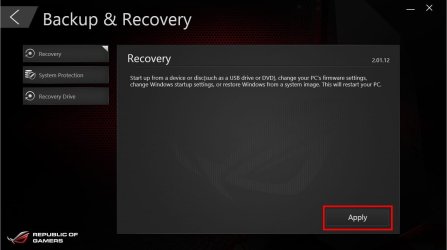
2) Did you ever make a recovery drive ? You were saying some CD or DVD, you also said that it is working and you used last month ? What's that ? How big is that ? What you used it for ? Can you reach system image restore from it ? Make sure you boot from it and reach to the listing of system image restore functionality ? Be careful ! Don't do anything !

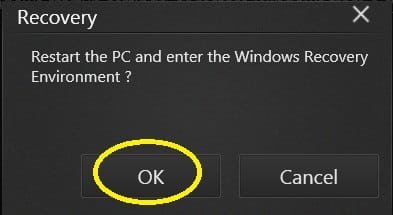
If it's a recovery drive , after booting into it > (a). select the 'Recovery' menu item and press 'APPLY'.

(a).jpg

(b). It will ask you to restart the pc and after restart you would find 'system image restore' functionality listed ! That's it !

(b).jpg


3) When you just insert it & not boot into it, how it looks in disk management ? (The two old views !)

Let us know.

Thanks & Regards. ...
 
Last edited:

My Computer My Computer

At a glance

Windows 7 Ultimate x32 With Sp1 + Vista Ultim...Intel Mobile Core 2 Duo T5750 @ 2.00GHz Merom...2.00GB Dual-Channel DDR2 @ 332MHz (5-5-5-15)Mobile Intel(R) 965 Express Chipset Family
Computer type
Laptop
Computer Manufacturer/Model Number
hp compaq presario c795VU notebook pc
OS
Windows 7 Ultimate x32 With Sp1 + Vista Ultimate x32 with Sp1 & Sp2 !!
CPU
Intel Mobile Core 2 Duo T5750 @ 2.00GHz Merom 65nm Technolog
Motherboard
Hewlett-Packard 30D9 (CPU)
Memory
2.00GB Dual-Channel DDR2 @ 332MHz (5-5-5-15)
Graphics Card(s)
Mobile Intel(R) 965 Express Chipset Family
Sound Card
High Definition Audio Device
Monitor(s) Displays
LP154WX4-TLCB on Mobile Intel 965 Express Chipset Family
Screen Resolution
1280x800 @ 60Hz
Hard Drives
149GB Western Digital WDC WD1600BEVS-60VAT0 ATA Device (SATA)
Keyboard
Standard 101/102-Key or Microsoft Natural PS/2 Key + HP QLB
Mouse
ALPS pointing device
Antivirus
Kaspersky AV 2017(Win 7) & AVG AntiVirus Free 2016 (VISTA)
Browser
google chrome
Hi,
Mam,

1) I suppose i can make the system image before the download right?
Rightly.

I am still downloading unfortunately. As my download failed 3 times due to servicec errors.

2) Did you ever make a recovery drive ? You were saying some CD or DVD, you also said that it is working and you used last month ? What's that ? How big is that ? What you used it for ? Can you reach system image restore from it ? Make sure you boot from it and reach to the listing of system image restore functionality ? Be careful ! Don't do anything !

If it's a recovery drive , after booting into it > (a). select the 'Recovery' menu item and press 'APPLY'.

View attachment 404525

(b). It will ask you to restart the pc and after restart you would find 'system image restore' functionality listed ! That's it !

View attachment 404526


3) When you just insert it & not boot into it, how it looks in disk management ? (The two old views !)

Let us know.

Thanks & Regards. ...


Hello,

No i dont have a recovery dvd. I have a win 10 installation dvd . I have never made a recovery before not on a dvd nor on my hdd.


And i have now all the 4 programs downloaded including win 10.iso and i will report to you tomorrow about the rest of your guidance steps.


Thank you so much.
 

My Computer My Computer

At a glance

Windows 7 ultimate ×64Core-i7 770016GB DDR4 2400Geforce GTX 1070
Computer type
PC/Desktop
Computer Manufacturer/Model Number
Costum built
OS
Windows 7 ultimate ×64
CPU
Core-i7 7700
Motherboard
ASUS STRIX H270F GAMING
Memory
16GB DDR4 2400
Graphics Card(s)
Geforce GTX 1070
Hard Drives
Terra ...
Hi All,
Greets,
Mam,

1. What's the exact name of the downloaded iso ? (SHA-1 changes as the version & edition changes). We need to check its integrity as there :
how to make os option menu appear in a dual boot pc? - Page 4 - Windows 7 Help Forums

2.should take you to a server near to you ( by sir Barman58 )
That seems to be the best part !

3. Creating & restoring System Image(s) is a very powerful troubleshooting tool. It solves 90% of all the possible problems. ( It can't undo BIOS changes). It takes your system to the exact state when the one was created within no time & effort ! Whenever one feels that his system is doing well, he should create a system image ! This way you may never need installing the OS again & again & doing all the toil to make it workable. Whenever you feel your system is not doing good, Pick a stable system image from the past and restore it.
Being a part of BackUp, its still a bit different than just backing up files. To say it more promptly : By default it actually backs up all the material ,'system & other files', that occupies space on the system crucial partitions. As it does so, Mam, It is advisable that all the files of personal interest/use, are moved from 'Win 10 C:' to the other partition on the same drive. It will make the whole process fast and resource effective. I mean the files that occupies space in the default folders of ' Documents, Downloads, Desktop, etc.'. All these folders land in C: and so increase the process times & space requirements. Don't touch system files :you would be always knowing what are the files of your personal interest & use ! For eg. the 4GB+ download, you made just now, would by default land in 'Downloads' which occupies space on C: and so increase the size of System Image by 4gb and so increases the procedure time.

Here it tells :Create System Image in Windows 10 | Windows 10 Tutorials

[[ Let it go the way it goes, You have to just edit :
Select the location you want to save your system image to ( step 4 )
There you have to select a non system crucial partition of windows 7 drive ( Miscellaneous files). Make a note of it. That's it. ]]

Let us know.

Thanks & Regards. ...


Hello mr. Vineet Garg
Have a nice day.


Just to report.
1. I downloaded the 3 softwares you requested and win 10.iso
2. I compared the SHA-1 of the downloaded iso with the one in the website and they are identical.
3. I made a windows image back up as instructed.
4. I have a 16 gb flash usb drive availble for use.


Is that correct for now?


Thanks in advance.
 

My Computer My Computer

At a glance

Windows 7 ultimate ×64Core-i7 770016GB DDR4 2400Geforce GTX 1070
Computer type
PC/Desktop
Computer Manufacturer/Model Number
Costum built
OS
Windows 7 ultimate ×64
CPU
Core-i7 7700
Motherboard
ASUS STRIX H270F GAMING
Memory
16GB DDR4 2400
Graphics Card(s)
Geforce GTX 1070
Hard Drives
Terra ...
Hi,
Mam,

1.Well done! Just place a copy of downloaded win 10 iso to 'win 7's non system crucial partition ( Miscellaneous )' as well.

2. Now we are going to prepare win 10 installation media on the pen drive using Rufus. Insert the pen drive & Backup/copy all the pen drive data,etc to a safe place as Rufus deletes all that ! Here we go :
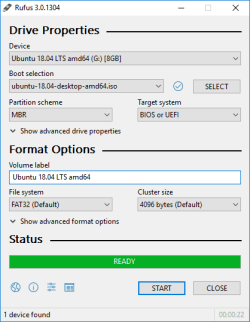
(1) Place the Rufus portable executable in a folder (2) As you launch it, it asks for checking for the latest version > turn it down! ( we have recently downloaded the app and it's new, stable & enough )

rufus_en.png

This image is just for reference. Need not follow it or get confused! Follow instructions as below only :

(3) Select the pen drive in the 'Device' menu, (4)click 'SELECT', browse to the win 10 iso and double click it (somethings change & iso name will appear in the 'Boot selection' window), (5) Choose 'Partition scheme' as GPT & 'Target system' as UEFI ( it may be chosen automatically but make sure ! ) (6) need not change any thing else, (7) press 'START' ( copying iso files, finally READY ) (8) close the rufus window, it's done!
 
Last edited:

My Computer My Computer

At a glance

Windows 7 Ultimate x32 With Sp1 + Vista Ultim...Intel Mobile Core 2 Duo T5750 @ 2.00GHz Merom...2.00GB Dual-Channel DDR2 @ 332MHz (5-5-5-15)Mobile Intel(R) 965 Express Chipset Family
Computer type
Laptop
Computer Manufacturer/Model Number
hp compaq presario c795VU notebook pc
OS
Windows 7 Ultimate x32 With Sp1 + Vista Ultimate x32 with Sp1 & Sp2 !!
CPU
Intel Mobile Core 2 Duo T5750 @ 2.00GHz Merom 65nm Technolog
Motherboard
Hewlett-Packard 30D9 (CPU)
Memory
2.00GB Dual-Channel DDR2 @ 332MHz (5-5-5-15)
Graphics Card(s)
Mobile Intel(R) 965 Express Chipset Family
Sound Card
High Definition Audio Device
Monitor(s) Displays
LP154WX4-TLCB on Mobile Intel 965 Express Chipset Family
Screen Resolution
1280x800 @ 60Hz
Hard Drives
149GB Western Digital WDC WD1600BEVS-60VAT0 ATA Device (SATA)
Keyboard
Standard 101/102-Key or Microsoft Natural PS/2 Key + HP QLB
Mouse
ALPS pointing device
Antivirus
Kaspersky AV 2017(Win 7) & AVG AntiVirus Free 2016 (VISTA)
Browser
google chrome
Mam,
Now that we have installation media, we would plug out all other external media (CD/DVDs, External hard disks, Pen drives but the one!) & try to boot into the pen drive using one time boot menu (pressing F8). There we will check whether we can make it if we need/decide to restore the system image.
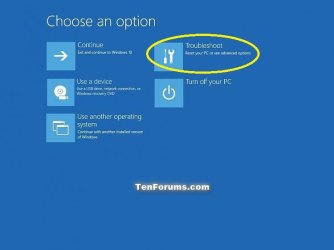
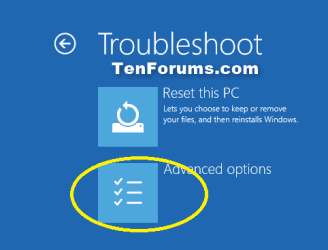
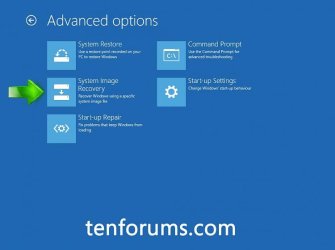
This part has two sections mainly. First section will be to go for the 'Repair Your computer' instead of 'Install now' & reach the 'Advanced Options' screen. The Second section would be to access 'System Image Rescovery' functionality, choose the image, verify its info and
finally come out with 'Cancel'
Here we go :

First Section :
Unplug all the external media but the one & follow :
Boot to Advanced Startup Options in Windows 10 | Windows 10 Tutorials
And then :

Startup Options 1 .jpg

Startup Options 2 .png

('Reset this PC' may not be available)

Advanced Options .jpg

('Start-up Settings' may not be available )

Second section :

Troubleshoot Windows 10 failure to boot using Recovery Environment | Windows 10 Tutorials
Here :
Step 1 : Click on System Image Recovery : OK
Step 2 : On the Choose an account to continue screen click the name of the account you will use to restore the image : Choose the same Admin a/c , the one used to make the system image.
Step 3 : Enter the password for the chosen account : OK
Step 4 : Select a system image backup : By default the Use the latest available system image (recommended) option is selected : Check & verify the date, time,etc. And press 'Next >'
Step 5 :At this point you will be asked if you would like to Choose additional restore options : Nothing to do here! press 'Next>'
Step 6 :Check your image choice is correct and click Cancel : Click Cancel

That's it!

Let us know that you reached there.

Thanks & Regards. ...
 
Last edited:

My Computer My Computer

At a glance

Windows 7 Ultimate x32 With Sp1 + Vista Ultim...Intel Mobile Core 2 Duo T5750 @ 2.00GHz Merom...2.00GB Dual-Channel DDR2 @ 332MHz (5-5-5-15)Mobile Intel(R) 965 Express Chipset Family
Computer type
Laptop
Computer Manufacturer/Model Number
hp compaq presario c795VU notebook pc
OS
Windows 7 Ultimate x32 With Sp1 + Vista Ultimate x32 with Sp1 & Sp2 !!
CPU
Intel Mobile Core 2 Duo T5750 @ 2.00GHz Merom 65nm Technolog
Motherboard
Hewlett-Packard 30D9 (CPU)
Memory
2.00GB Dual-Channel DDR2 @ 332MHz (5-5-5-15)
Graphics Card(s)
Mobile Intel(R) 965 Express Chipset Family
Sound Card
High Definition Audio Device
Monitor(s) Displays
LP154WX4-TLCB on Mobile Intel 965 Express Chipset Family
Screen Resolution
1280x800 @ 60Hz
Hard Drives
149GB Western Digital WDC WD1600BEVS-60VAT0 ATA Device (SATA)
Keyboard
Standard 101/102-Key or Microsoft Natural PS/2 Key + HP QLB
Mouse
ALPS pointing device
Antivirus
Kaspersky AV 2017(Win 7) & AVG AntiVirus Free 2016 (VISTA)
Browser
google chrome
Hi ,

I assume that you made there. Though we have prepared for extreme conditions, we know they are rare & there are always some quick things to do before finally reverting to a past system image , depending upon the problem.

EasyBCD is a very handy utility for changing/editing/troubleshooting boot options without using command line. So, here we would use it to add boot menu entry for windows 7 in the windows boot manager. But, before making any changes, we would backup the present configuration/settings so that we can revert back to it if needed! So, close all apps, eject all the external media, install EasyBCD in windows 10 & launch it.
Note : Whenever you launch EasyBCD on a UEFI system ( as her win 10 ), it will pop up warning box. But there is nothing to fear. Just click 'OK' & proceed.

1. Backing up the configuration :

EasyBCD Backup.JPG

As shown in the image :
(1) Click 'BCD Backup/Repair' in the left pane.
(2) choose the location,name for the backup & make a note of it.
Don't change the extension & let it have .bcd as extension.
(3) Click 'Backup Settings'
That's the backup.

2. Add Boot Menu Entry :

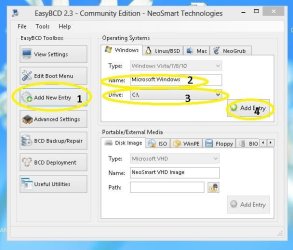
EasyBCD Add Entry.JPG

As shown in the image :
(1) Click 'Add New Entry' on the left pane.
(2) Change the name at least as 'Windows 7'
(3) Select the drive letter for main windows 7 partition as it shows in the disk management of win 10!
(4) Click 'Add Entry'
(5) close EasyBCD
That's it!

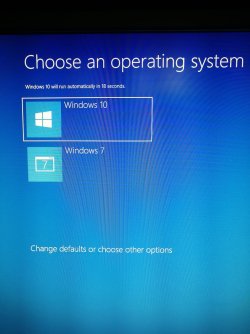
Now restart the computer and look for the dual boot menu. Boot one by one into windows 10 & windows 7 and make sure everything is fine.
Get me a snapshot of the dual boot menu.

Let us know.

Thanks & Regards. ...
 
Last edited:

My Computer My Computer

At a glance

Windows 7 Ultimate x32 With Sp1 + Vista Ultim...Intel Mobile Core 2 Duo T5750 @ 2.00GHz Merom...2.00GB Dual-Channel DDR2 @ 332MHz (5-5-5-15)Mobile Intel(R) 965 Express Chipset Family
Computer type
Laptop
Computer Manufacturer/Model Number
hp compaq presario c795VU notebook pc
OS
Windows 7 Ultimate x32 With Sp1 + Vista Ultimate x32 with Sp1 & Sp2 !!
CPU
Intel Mobile Core 2 Duo T5750 @ 2.00GHz Merom 65nm Technolog
Motherboard
Hewlett-Packard 30D9 (CPU)
Memory
2.00GB Dual-Channel DDR2 @ 332MHz (5-5-5-15)
Graphics Card(s)
Mobile Intel(R) 965 Express Chipset Family
Sound Card
High Definition Audio Device
Monitor(s) Displays
LP154WX4-TLCB on Mobile Intel 965 Express Chipset Family
Screen Resolution
1280x800 @ 60Hz
Hard Drives
149GB Western Digital WDC WD1600BEVS-60VAT0 ATA Device (SATA)
Keyboard
Standard 101/102-Key or Microsoft Natural PS/2 Key + HP QLB
Mouse
ALPS pointing device
Antivirus
Kaspersky AV 2017(Win 7) & AVG AntiVirus Free 2016 (VISTA)
Browser
google chrome
Mam,
Now that we have installation media, we would plug out all other external media (CD/DVDs, External hard disks, Pen drives but the one!) & try to boot into the pen drive using one time boot menu (pressing F8). There we will check whether we can make it if we need/decide to restore the system image.
This part has two sections mainly. First section will be to go for the 'Repair Your computer' instead of 'Install now' & reach the 'Advanced Options' screen. The Second section would be to access 'System Image Rescovery' functionality, choose the image, verify its info and
finally come out with 'Cancel'
Here we go :

First Section :
Unplug all the external media but the one & follow :
Boot to Advanced Startup Options in Windows 10 | Windows 10 Tutorials
And then :

View attachment 404541

View attachment 404542

('Reset this PC' may not be available)

View attachment 404543

('Start-up Settings' may not be available )

Second section :

Troubleshoot Windows 10 failure to boot using Recovery Environment | Windows 10 Tutorials
Here :
Step 1 : Click on System Image Recovery : OK
Step 2 : On the Choose an account to continue screen click the name of the account you will use to restore the image : Choose the same Admin a/c , the one used to make the system image.
Step 3 : Enter the password for the chosen account : OK
Step 4 : Select a system image backup : By default the Use the latest available system image (recommended) option is selected : Check & verify the date, time,etc. And press 'Next >'
Step 5 :At this point you will be asked if you would like to Choose additional restore options : Nothing to do here! press 'Next>'
Step 6 :Check your image choice is correct and click Cancel : Click Cancel

That's it!

Let us know that you reached there.

Thanks & Regards. ...


Hello mr. Vinnet
There is a little misunderstanding here.
When i do this should i do it from my installed win10 on my hdd? Like the tutorial on the link you gave me?
Or should i do it from the pen drive as instructed at first? If so .. i did it from the pen drive and checked:
It doesnt show me an option of the account name. However it does go to the final step as you said. And finally i canceled it.


So i am done here right?
 

My Computer My Computer

At a glance

Windows 7 ultimate ×64Core-i7 770016GB DDR4 2400Geforce GTX 1070
Computer type
PC/Desktop
Computer Manufacturer/Model Number
Costum built
OS
Windows 7 ultimate ×64
CPU
Core-i7 7700
Motherboard
ASUS STRIX H270F GAMING
Memory
16GB DDR4 2400
Graphics Card(s)
Geforce GTX 1070
Hard Drives
Terra ...
Hi ,

I assume that you made there. Though we have prepared for extreme conditions, we know they are rare & there are always some quick things to do before finally reverting to a past system image , depending upon the problem.

EasyBCD is a very handy utility for changing/editing/troubleshooting boot options without using command line. So, here we would use it to add boot menu entry for windows 7 in the windows boot manager. But, before making any changes, we would backup the present configuration/settings so that we can revert back to it if needed! So, close all apps, eject all the external media, install EasyBCD in windows 10 & launch it.
Note : Whenever you launch EasyBCD on a UEFI system ( as her win 10 ), it will pop up warning box. But there is nothing to fear. Just click 'OK' & proceed.

1. Backing up the configuration :

View attachment 404552

As shown in the image :
(1) Click 'BCD Backup/Repair' in the left pane.
(2) choose the location,name for the backup & make a note of it.
Don't change the extension & let it have .bcd as extension.
(3) Click 'Backup Settings'
That's the backup.

2. Add Boot Menu Entry :

View attachment 404554

As shown in the image :
(1) Click 'Add New Entry' on the left pane.
(2) Change the name at least as 'Windows 7'
(3) Select the drive letter for main windows 7 partition as it shows in the disk management of win 10!
(4) Click 'Add Entry'
(5) close EasyBCD
That's it!

Now restart the computer and look for the dual boot menu. Boot one by one into windows 10 & windows 7 and make sure everything is fine.
Get me a snapshot of the dual boot menu.

Let us know.

Thanks & Regards. ...


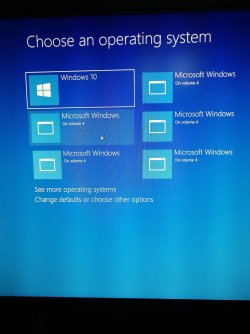
I made a mistake in eadybcd.
I thought i should press on add new entry before i choose the name . So the result was mant boot options hhhhhh and they are all the same?
How can i undo that?
 

Attachments

  • IMG_20180720_164308-1488x1984.jpg
    IMG_20180720_164308-1488x1984.jpg
    318.9 KB · Views: 0

My Computer My Computer

At a glance

Windows 7 ultimate ×64Core-i7 770016GB DDR4 2400Geforce GTX 1070
Computer type
PC/Desktop
Computer Manufacturer/Model Number
Costum built
OS
Windows 7 ultimate ×64
CPU
Core-i7 7700
Motherboard
ASUS STRIX H270F GAMING
Memory
16GB DDR4 2400
Graphics Card(s)
Geforce GTX 1070
Hard Drives
Terra ...
Hi ,

I assume that you made there. Though we have prepared for extreme conditions, we know they are rare & there are always some quick things to do before finally reverting to a past system image , depending upon the problem.

EasyBCD is a very handy utility for changing/editing/troubleshooting boot options without using command line. So, here we would use it to add boot menu entry for windows 7 in the windows boot manager. But, before making any changes, we would backup the present configuration/settings so that we can revert back to it if needed! So, close all apps, eject all the external media, install EasyBCD in windows 10 & launch it.
Note : Whenever you launch EasyBCD on a UEFI system ( as her win 10 ), it will pop up warning box. But there is nothing to fear. Just click 'OK' & proceed.

1. Backing up the configuration :

View attachment 404552

As shown in the image :
(1) Click 'BCD Backup/Repair' in the left pane.
(2) choose the location,name for the backup & make a note of it.
Don't change the extension & let it have .bcd as extension.
(3) Click 'Backup Settings'
That's the backup.

2. Add Boot Menu Entry :

View attachment 404554

As shown in the image :
(1) Click 'Add New Entry' on the left pane.
(2) Change the name at least as 'Windows 7'
(3) Select the drive letter for main windows 7 partition as it shows in the disk management of win 10!
(4) Click 'Add Entry'
(5) close EasyBCD
That's it!

Now restart the computer and look for the dual boot menu. Boot one by one into windows 10 & windows 7 and make sure everything is fine.
Get me a snapshot of the dual boot menu.

Let us know.

Thanks & Regards. ...


Hello , i could fix it using msconfig and deleting extra boot entries. Now its perfect


Many many thanks mr.Vineet for your help.


I have just 2 last questions:
1. The iso on my pen drive. Would i need it again? Bacause i thought i maight need this32gb drive for other uses and i ll specify another one for it.
2. Are the programs installed on win 7 executable in win 10? Or i should install them on win 10 as well?
 

Attachments

  • IMG_20180720_165640-1488x1984.jpg
    IMG_20180720_165640-1488x1984.jpg
    406.1 KB · Views: 1

My Computer My Computer

At a glance

Windows 7 ultimate ×64Core-i7 770016GB DDR4 2400Geforce GTX 1070
Computer type
PC/Desktop
Computer Manufacturer/Model Number
Costum built
OS
Windows 7 ultimate ×64
CPU
Core-i7 7700
Motherboard
ASUS STRIX H270F GAMING
Memory
16GB DDR4 2400
Graphics Card(s)
Geforce GTX 1070
Hard Drives
Terra ...
Hi Mam,
Cheers,
Its achieved, well done, Brilliant!
I will be posting tomorrow for some small clarifications.

Thanks & Regards. ...
 

My Computer My Computer

At a glance

Windows 7 Ultimate x32 With Sp1 + Vista Ultim...Intel Mobile Core 2 Duo T5750 @ 2.00GHz Merom...2.00GB Dual-Channel DDR2 @ 332MHz (5-5-5-15)Mobile Intel(R) 965 Express Chipset Family
Computer type
Laptop
Computer Manufacturer/Model Number
hp compaq presario c795VU notebook pc
OS
Windows 7 Ultimate x32 With Sp1 + Vista Ultimate x32 with Sp1 & Sp2 !!
CPU
Intel Mobile Core 2 Duo T5750 @ 2.00GHz Merom 65nm Technolog
Motherboard
Hewlett-Packard 30D9 (CPU)
Memory
2.00GB Dual-Channel DDR2 @ 332MHz (5-5-5-15)
Graphics Card(s)
Mobile Intel(R) 965 Express Chipset Family
Sound Card
High Definition Audio Device
Monitor(s) Displays
LP154WX4-TLCB on Mobile Intel 965 Express Chipset Family
Screen Resolution
1280x800 @ 60Hz
Hard Drives
149GB Western Digital WDC WD1600BEVS-60VAT0 ATA Device (SATA)
Keyboard
Standard 101/102-Key or Microsoft Natural PS/2 Key + HP QLB
Mouse
ALPS pointing device
Antivirus
Kaspersky AV 2017(Win 7) & AVG AntiVirus Free 2016 (VISTA)
Browser
google chrome
Hello Mam,

1.The iso on my pen drive. Would i need it again? Because i thought i might need this 32 gb drive for other uses and i ll specify another one for it

To say truly, its your choice whether you dedicate a pen drive at all!

You have come to know that there are multiple ways to access 'System Image Recovery' functionality. Boot to Advanced Startup Options in Windows 10 | Windows 10 Tutorials

But actually most are only the ways to access it from internal hard disk. If something goes wrong on hard disk, you may have to boot into an external media to access the functionality & That's what we prepared for. Obviously, That is not going to happen all the time & most of the time it will be just enough to use your internal hard disk for the purpose!

You said that you have windows 10 installation DVD. Keep it safe. That's also an external media just that its written on a DVD instead of a pen drive. Try to make there with it.

One more option is to make a system repair disk & keep it safe for such situation(s) :
Create System Repair Disc in Windows 10 | Windows 10 Tutorials

One more option is to make a recovery drive & keep it safe. but that would again be dedicating a pen drive. Besides, if you want to make best use of it, you would need a pen drive as big as 32 to 64 GB. Create Recovery Drive in Windows 10 | Windows 10 Tutorials
(The creation process & size of a recovery drive may be different depending upon the OEM. I have one with a USB 3.0 32 GB pen drive and kept it safely )

And If needed to make a pen drive installation media, you will need the ISO, a pen drive of at least 8 gb capacity, Rufus & a working windows system ( windows 7 or above )
.
2. Are the programs installed on win 7 executable in win 10? Or i should install them on win 10 as well?
Windows 10 & windows 7 are independent of each other. So, the programs needed in windows 10 should be installed in windows 10. Don't try to access windows 7 partition from within win 10.

3. should i do it from the pen drive as instructed at first? If so .. i did it from the pen drive and checked:
It doesnt show me an option of the account name. However it does go to the final step as you said. And finally i canceled it
.
Sounds logical!

4. Can you get us two standard disk management views ? Boot into win 10 & win 7 from multiboot options one by one & get us standard disk management views. That will help to separate win 7 & win 10 system crucial parts from each other.

5. Its of my own interest, So, Optional : will you revert to the condition ?
https://www.sevenforums.com/attachments/installation-setup/404367d1530307527t-how-make-os-option-menu-appear-dual-boot-pc-img_20180629_235522.jpg
And try to boot into win7 from the multiboot. It should boot.

6. Always keep win 7 & win 10 system images on different partitions as they get mixed !
( In the future consider Macrium Reflect Free for time & space efficiency and great flexibilities 3 Free Norton Ghost Alternatives to Create a Full Windows Image Backup • Raymond.CC )

7. You have to be clear that we managed to get the two boot entries into the one menu but its just for a nice looking menu & a little ease! The win 10 & win 7 still resides on their original disks. So, if we take out the respective disk, we would not be able to boot into the OS.

8. Be clear that the system image we made, was prior to the establishment of a dual boot menu and if you restore it you would lose that! What you have to do is again install & launch EasyBCD on windows 10 & add the entry.
In fact take note what ever you do/did on win 10 after the system image, you would need to do that again if you make the system image restore. Its not a headache but the principle !

9. We are still half way! If you go to boot from the other disk, you won't find that dual boot menu there. It has been done only for the windows boot manager that resides on win 10 disk.

10. I made a mistake in eadybcd.
I thought i should press on add new entry before i choose the name . So the result was mant boot options hhhhhh and they are all the same?
How can i undo that?

By just restoring EasyBCD backup or deleting the boot entries from within EasyBCD. ( I mean to say EasyBCD is a powerful utility. So, just explore all the options there without messing with your system )

Thanks & Regards. ...
 
Last edited:

My Computer My Computer

At a glance

Windows 7 Ultimate x32 With Sp1 + Vista Ultim...Intel Mobile Core 2 Duo T5750 @ 2.00GHz Merom...2.00GB Dual-Channel DDR2 @ 332MHz (5-5-5-15)Mobile Intel(R) 965 Express Chipset Family
Computer type
Laptop
Computer Manufacturer/Model Number
hp compaq presario c795VU notebook pc
OS
Windows 7 Ultimate x32 With Sp1 + Vista Ultimate x32 with Sp1 & Sp2 !!
CPU
Intel Mobile Core 2 Duo T5750 @ 2.00GHz Merom 65nm Technolog
Motherboard
Hewlett-Packard 30D9 (CPU)
Memory
2.00GB Dual-Channel DDR2 @ 332MHz (5-5-5-15)
Graphics Card(s)
Mobile Intel(R) 965 Express Chipset Family
Sound Card
High Definition Audio Device
Monitor(s) Displays
LP154WX4-TLCB on Mobile Intel 965 Express Chipset Family
Screen Resolution
1280x800 @ 60Hz
Hard Drives
149GB Western Digital WDC WD1600BEVS-60VAT0 ATA Device (SATA)
Keyboard
Standard 101/102-Key or Microsoft Natural PS/2 Key + HP QLB
Mouse
ALPS pointing device
Antivirus
Kaspersky AV 2017(Win 7) & AVG AntiVirus Free 2016 (VISTA)
Browser
google chrome
Hello Mam,

1.The iso on my pen drive. Would i need it again? Because i thought i might need this 32 gb drive for other uses and i ll specify another one for it

To say truly, its your choice whether you dedicate a pen drive at all!

You have come to know that there are multiple ways to access 'System Image Recovery' functionality. Boot to Advanced Startup Options in Windows 10 | Windows 10 Tutorials

But actually most are only the ways to access it from internal hard disk. If something goes wrong on hard disk, you may have to boot into an external media to access the functionality & That's what we prepared for. Obviously, That is not going to happen all the time & most of the time it will be just enough to use your internal hard disk for the purpose!

You said that you have windows 10 installation DVD. Keep it safe. That's also an external media just that its written on a DVD instead of a pen drive. Try to make there with it.

One more option is to make a system repair disk & keep it safe for such situation(s) :
Create System Repair Disc in Windows 10 | Windows 10 Tutorials

One more option is to make a recovery drive & keep it safe. but that would again be dedicating a pen drive. Besides, if you want to make best use of it, you would need a pen drive as big as 32 to 64 GB. Create Recovery Drive in Windows 10 | Windows 10 Tutorials
(The creation process & size of a recovery drive may be different depending upon the OEM. I have one with a USB 3.0 32 GB pen drive and kept it safely )

And If needed to make a pen drive installation media, you will need the ISO, a pen drive of at least 8 gb capacity, Rufus & a working windows system ( windows 7 or above )
.
2. Are the programs installed on win 7 executable in win 10? Or i should install them on win 10 as well?
Windows 10 & windows 7 are independent of each other. So, the programs needed in windows 10 should be installed in windows 10. Don't try to access windows 7 partition from within win 10.

3. should i do it from the pen drive as instructed at first? If so .. i did it from the pen drive and checked:
It doesnt show me an option of the account name. However it does go to the final step as you said. And finally i canceled it
.
Sounds logical!

4. Can you get us two standard disk management views ? Boot into win 10 & win 7 from multiboot options one by one & get us standard disk management views. That will help to separate win 7 & win 10 system crucial parts from each other.

5. Its of my own interest, So, Optional : will you revert to the condition ?
https://www.sevenforums.com/attachm...u-appear-dual-boot-pc-img_20180629_235522.jpg
And try to boot into win7 from the multiboot. It should boot.

6. Always keep win 7 & win 10 system images on different partitions as they get mixed !
( In the future consider Macrium Reflect Free for time & space efficiency and great flexibilities 3 Free Norton Ghost Alternatives to Create a Full Windows Image Backup • Raymond.CC )

7. You have to be clear that we managed to get the two boot entries into the one menu but its just for a nice looking menu & a little ease! The win 10 & win 7 still resides on their original disks. So, if we take out the respective disk, we would not be able to boot into the OS.

8. Be clear that the system image we made, was prior to the establishment of a dual boot menu and if you restore it you would lose that! What you have to do is again install & launch EasyBCD on windows 10 & add the entry.
In fact take note what ever you do/did on win 10 after the system image, you would need to do that again if you make the system image restore. Its not a headache but the principle !

9. We are still half way! If you go to boot from the other disk, you won't find that dual boot menu there. It has been done only for the windows boot manager that resides on win 10 disk.

10. I made a mistake in eadybcd.
I thought i should press on add new entry before i choose the name . So the result was mant boot options hhhhhh and they are all the same?
How can i undo that?

By just restoring EasyBCD backup or deleting the boot entries from within EasyBCD. ( I mean to say EasyBCD is a powerful utility. So, just explore all the options there without messing with your system )

Thanks & Regards. ...


Thanks for the informative reply mr.Vineet.


1. I could boot into both win7 or 10 through multiboot menu F8.

2. The requested snaps for my disk management for each os are attached bellow.
 

Attachments

  • disk management 7.JPG
    disk management 7.JPG
    183.1 KB · Views: 2
  • Capture10.PNG
    Capture10.PNG
    25.2 KB · Views: 2

My Computer My Computer

At a glance

Windows 7 ultimate ×64Core-i7 770016GB DDR4 2400Geforce GTX 1070
Computer type
PC/Desktop
Computer Manufacturer/Model Number
Costum built
OS
Windows 7 ultimate ×64
CPU
Core-i7 7700
Motherboard
ASUS STRIX H270F GAMING
Memory
16GB DDR4 2400
Graphics Card(s)
Geforce GTX 1070
Hard Drives
Terra ...

My Computer My Computer

At a glance

Windows 7 ultimate ×64Core-i7 770016GB DDR4 2400Geforce GTX 1070
Computer type
PC/Desktop
Computer Manufacturer/Model Number
Costum built
OS
Windows 7 ultimate ×64
CPU
Core-i7 7700
Motherboard
ASUS STRIX H270F GAMING
Memory
16GB DDR4 2400
Graphics Card(s)
Geforce GTX 1070
Hard Drives
Terra ...
Hi,
Mam,

1. I could boot into both win7 or 10 through multiboot menu F8.
It places multiple boot options for you but it's called one time boot menu. Multiboot menu is actually what we established on win 10 disk.

2. Now, We would take cover that system crucial parts are not accessible from each other :
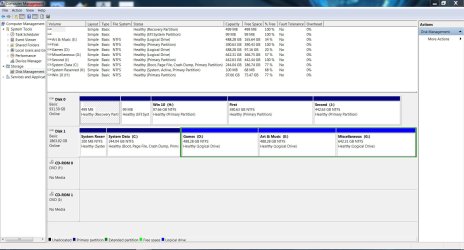
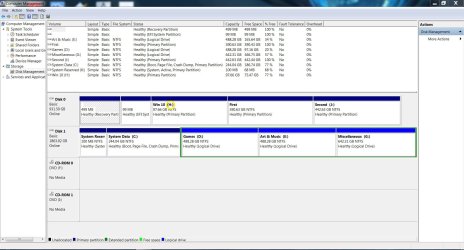
(a) As you said Its from within windows 7 :

disk management 7 (1).JPG

Remove drive letters for yellow entries :
Drive Letter - Add, Change, or Remove in Windows - Windows 7 Help Forums
(Option 1)

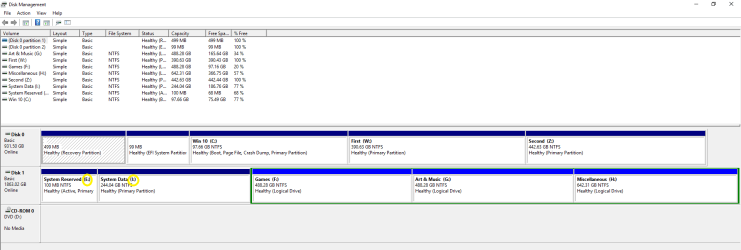
(b) from within windows 10 :

Capture10 (1).PNG

Remove drive letters for yellow entries :
Remove Drive Letter in Windows 10 | Windows 10 Tutorials
(Option 1)

3. I think you know that the partition 'First' on win 10 disk is already not accessible from win7.

4. Hello ..
For this i re-did it. I changed priority for win 7 to be first.
When i turn on my pc , it goes directly to win 7 without the dual menu.
So i suppose it works as you expected.


Be clear about it there is difference in changing boot priority and disabling a drive from booting options.

5. You can also have a metro style ( win 8 & win 10 ) boot loader for the win 7 disk with the help of EasyBCD.

( You may have/had problems with making large downloads for various reasons! Its time to switch to a dedicated downloader program as Free Download Manager 5.1.37 64 bit Free Download Manager for Windows and Mac OS X | Download )

Thanks & Regards. ...
 
Last edited:

My Computer My Computer

At a glance

Windows 7 Ultimate x32 With Sp1 + Vista Ultim...Intel Mobile Core 2 Duo T5750 @ 2.00GHz Merom...2.00GB Dual-Channel DDR2 @ 332MHz (5-5-5-15)Mobile Intel(R) 965 Express Chipset Family
Computer type
Laptop
Computer Manufacturer/Model Number
hp compaq presario c795VU notebook pc
OS
Windows 7 Ultimate x32 With Sp1 + Vista Ultimate x32 with Sp1 & Sp2 !!
CPU
Intel Mobile Core 2 Duo T5750 @ 2.00GHz Merom 65nm Technolog
Motherboard
Hewlett-Packard 30D9 (CPU)
Memory
2.00GB Dual-Channel DDR2 @ 332MHz (5-5-5-15)
Graphics Card(s)
Mobile Intel(R) 965 Express Chipset Family
Sound Card
High Definition Audio Device
Monitor(s) Displays
LP154WX4-TLCB on Mobile Intel 965 Express Chipset Family
Screen Resolution
1280x800 @ 60Hz
Hard Drives
149GB Western Digital WDC WD1600BEVS-60VAT0 ATA Device (SATA)
Keyboard
Standard 101/102-Key or Microsoft Natural PS/2 Key + HP QLB
Mouse
ALPS pointing device
Antivirus
Kaspersky AV 2017(Win 7) & AVG AntiVirus Free 2016 (VISTA)
Browser
google chrome
Back
Top