how to remove old xp from a xp,7 dual boot pc?

vkash

New member
Local time
3:59 AM
Messages
7
Friends i have triple boot of windows xp sp2 ,windows xp sp3 and windows 7. I want to remove old windows xps from my computer they are just space eaters but there is a problem that is I install windows xp sp3 first then xp sp2 and then 7. so boot data files are in C. Should i delete/format xp sp3 and xp sp2 drives and then make some start up repairs will it enough and my pc will of single OS(windows 7).
Another bad way of doing this is to format all windows drives and then reinstall window 7. But many of my softwares are updated and doing so will require to update them once again(through internet) which i don't want to do.
 

My Computer My Computer

At a glance

windows 7 ultimate 32 bit
OS
windows 7 ultimate 32 bit
Please post back a screenshot of your full Disk Management drive map as seen from Win7. Maximize the window so that all listings columns and full map is shown, use Snipping Tool in Start Menu. We will give you the exact steps.

To remove preceding partitions XP's use free Partition Wizard bootable CD to delete both XP partitions, mark Win7 Active, click on its HD to highlight it, from PW CD Disk tab select Rebuild MBR, Apply all steps. This may preclude the need to use Win7 DVD Repair console or Repair CD to Startup Repair - Run 3 Separate Times to rewrite the System Files to Win7.
 
Please post back a screenshot of your full Disk Management drive map as seen from Win7. Maximize the window so that all listings columns and full map is shown, use Snipping Tool in Start Menu. We will give you the exact steps.

To remove preceding partitions XP's use free Partition Wizard bootable CD to delete both XP partitions, mark Win7 Active, click on its HD to highlight it, from PW CD Disk tab select Rebuild MBR, Apply all steps. This may preclude the need to use Win7 DVD Repair console or Repair CD to Startup Repair - Run 3 Separate Times to rewrite the System Files to Win7.
will this tutorial's first option will fully fix my issue(not second one).
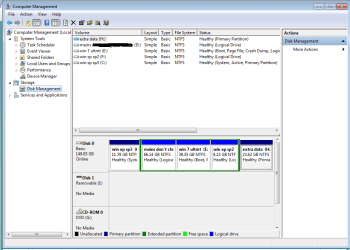
uploaded a snip of disk management.
 

Attachments

  • Capture.PNG
    Capture.PNG
    25 KB · Views: 137

My Computer My Computer

At a glance

windows 7 ultimate 32 bit
OS
windows 7 ultimate 32 bit
The problem is that Win7 is on an Extended Logical partition which cannot host boot files, so you'd either need to create a Primary boot partition to write the boot files onto after deleting C, or delete the other two Logical subpartitions D and F in order to convert E to a Primary partition which can be marked Active and Rebuild MBR or run Startup Repair x3 to write the boot files onto.

This can all be done with free Partition Wizard bootable CD. Partition Wizard Use the Bootable CD

However I would strongly consider a clean reinstall since you apparently installed Win7 from the XP desktop, something which should never be done. Always boot the installer so that Win7 will see itself as C when you are booted into it, something which cannot be done if you're installing from XP while it is holding C.

I'd move the data off the HD, boot the Win7 installer, use Custom Drive Options to delete all partitions and Clean Install Windows 7.

If you can live with Win7 on E and want to create the boot partition out of a part of deleted C's Unallocated space, or convert the Logical to Primary while resizing Win7 and D to your liking, we can give you the steps. Think it over and tell us what you want to do.
 
The problem is that Win7 is on an Extended Logical partition which cannot host boot files, so you'd either need to create a Primary boot partition to write the boot files onto after deleting C, or delete the other two Logical subpartitions D and F in order to convert E to a Primary partition which can be marked Active and Rebuild MBR or run Startup Repair x3 to write the boot files onto.
I will never delete these drives all of my data is in D
This can all be done with free Partition Wizard bootable CD. Partition Wizard Use the Bootable CD
clean reinstall this is what i am thinking to do(without deleting D).I will delete all partition containing OS and install windows 7. Not a good way of solving but this is only way that is remaining.
first i will try triple start up repair. Unfortunately i have no extra hard disk or large USB to make backup so their s little risk.
If you can live with Win7 on E and want to create the boot partition out of a part of deleted C's Unallocated space, or convert the Logical to Primary while resizing Win7 and D to your liking, we can give you the steps. Think it over and tell us what you want to do.
[/quote]
Let me see what is that. give me those steps.
 
Last edited:

My Computer My Computer

At a glance

windows 7 ultimate 32 bit
OS
windows 7 ultimate 32 bit
Gregrocker has given really good advice.

I realise you don't want to lose your data on your D partition so why don't you invest in an external drive and move your data onto it, and then carry out a clean install as suggested?

Without wanting to be over-critical, your present disk management layout is a mess and as you are wanting to ditch Windows XP, now's the chance to bite the bullet and clean things up.

With a clean install, you can wipe the drive and create fresh partitions as you require. You can have up to four basic partitions on your hard drive, and then create logical partitions within one of the basic partitions (ideally, the last one on your hard drive).


You also mention that re-downloading software is going to be a problem, which is another good reason for investing in external storage space as you can then save any downloads to it for future use. However, a full system image backup would solve even that problem.

An external hard drive has the added advantage of being the perfect vehicle for system image and data backups and they (external drives) are reasonably cheap these days.
 
Last edited:

My Computer My Computer

At a glance

Windows 7 Ultimate SP1 64-BitIntel Core i7 870 @ 2.93GHz8Gb Dual-Channel DDR3 @ 664MHznVidia GeForce GTX 460 1024MB dedicated RAM
Computer Manufacturer/Model Number
HP Pavilion Elite 495UK
OS
Windows 7 Ultimate SP1 64-Bit
CPU
Intel Core i7 870 @ 2.93GHz
Motherboard
MSI 2A9C (CPU1)
Memory
8Gb Dual-Channel DDR3 @ 664MHz
Graphics Card(s)
nVidia GeForce GTX 460 1024MB dedicated RAM
Sound Card
Realtek HD Audio
Monitor(s) Displays
HP2310i
Screen Resolution
1920 x 1080
Hard Drives
1x1954GB Hitachi HDS22020ALA 330 (RAID), 1x1954GB Hitachi External for backup and storage
PSU
460W
Case
HP Elite
Cooling
Air cooled
Keyboard
Logitech K750 solar-powered keyboard
Mouse
Logitech Wireless M180 mouse
Internet Speed
2Mb
Other Info
Pure Avanti Flow Internet Radio with iPod Dock, 64Gb iPod, HP USB Speakers, Sony MDR-V500 Headphones, Sony Vaio F-Series Laptop
Gregrocker has given really good advice.

I realise you don't want to lose your data on your D partition so why don't you invest in an external drive and move your data onto it, and then carry out a clean install as suggested?

Without wanting to be over-critical, your present disk management layout is a mess and as you are wanting to ditch Windows XP, now's the chance to bite the bullet and clean things up.

With a clean install, you can wipe the drive and create fresh partitions as you require. You can have up to four basic partitions on your hard drive, and then create logical partitions within one of the basic partitions (ideally, the last one on your hard drive).


You also mention that re-downloading software is going to be a problem, which is another good reason for investing in external storage space as you can then save any downloads to it for future use. However, a full system image backup would solve even that problem.

An external hard drive has the added advantage of being the perfect vehicle for system image and data backups and they (external drives) are reasonably cheap these days.
what is cost of 160GB and 80 GB hard disk price in INDIA?
what is difference in external hard disk and hard disk that is inside CPU?
 
Last edited:

My Computer My Computer

At a glance

windows 7 ultimate 32 bit
OS
windows 7 ultimate 32 bit
Check this link for details on Western Digital hard drives (internal and external): Western Digital Hard Drives, Network Drives, Media Players

Whatever currency they use for their pricing you'll just need to find the India/UK/US exchange rate and do the conversion using simple maths.

Google is your friend. ;)
 

My Computer My Computer

At a glance

Windows 7 Ultimate SP1 64-BitIntel Core i7 870 @ 2.93GHz8Gb Dual-Channel DDR3 @ 664MHznVidia GeForce GTX 460 1024MB dedicated RAM
Computer Manufacturer/Model Number
HP Pavilion Elite 495UK
OS
Windows 7 Ultimate SP1 64-Bit
CPU
Intel Core i7 870 @ 2.93GHz
Motherboard
MSI 2A9C (CPU1)
Memory
8Gb Dual-Channel DDR3 @ 664MHz
Graphics Card(s)
nVidia GeForce GTX 460 1024MB dedicated RAM
Sound Card
Realtek HD Audio
Monitor(s) Displays
HP2310i
Screen Resolution
1920 x 1080
Hard Drives
1x1954GB Hitachi HDS22020ALA 330 (RAID), 1x1954GB Hitachi External for backup and storage
PSU
460W
Case
HP Elite
Cooling
Air cooled
Keyboard
Logitech K750 solar-powered keyboard
Mouse
Logitech Wireless M180 mouse
Internet Speed
2Mb
Other Info
Pure Avanti Flow Internet Radio with iPod Dock, 64Gb iPod, HP USB Speakers, Sony MDR-V500 Headphones, Sony Vaio F-Series Laptop
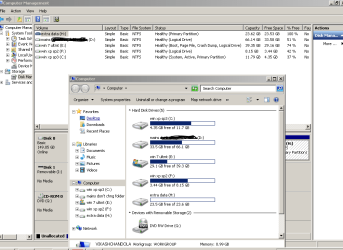
Why H is marked as primary partition. see the snip below.
I have installed(now that is removed) xubuntu 11.04 on this partition using wubi. Is this responsible for it to be primary rather than logical partition.
 

Attachments

  • Capture new.PNG
    Capture new.PNG
    29.3 KB · Views: 18

My Computer My Computer

At a glance

windows 7 ultimate 32 bit
OS
windows 7 ultimate 32 bit
However I would strongly consider a clean reinstall since you apparently installed Win7 from the XP desktop, something which should never be done. Always boot the installer so that Win7 will see itself as C when you are booted into it, something which cannot be done if you're installing from XP while it is holding C.

I'd move the data off the HD, boot the Win7 installer, use Custom Drive Options to delete all partitions and Clean Install Windows 7.

Greg has given you the best way to go.
If you had installed to HD's & not partitions, we could have given you a very easy way to go.
 

My Computer My Computer

At a glance

ME/XP/Vista/Win7
OS
ME/XP/Vista/Win7
I don't know why H is Primary. You are allowed 3 Primary in addition to the Logical Extended.

What I would do if you need to keep D is to delete all other partitions using Partition Wizard bootable CD, then Resize D by dragging it's left and right borders to place and size it where you want.

Then reinstall Win7 to the space where you deleted C, creating and formatting a New partition there using the booted installer.

If you prefer not to reinstall Win7, leave E in place and Resize it along with D as you wish, leaving 200mb space at the first of the HD where C was. Format this 200mb Primary and mark Active using PW CD. Then boot the Win7 DVD Repair console or Repair CD to run Startup Repair - Run 3 Separate Times

This will write the System boot files to the new 200mb System Reserved partition, also placing the Repair Console on the F8 Advanced Boot Options

Since you need to back up your files before any major partitioning operation, you should do so to external HD, another internal HD, over the network or to Windows Skydrive which allows 20gb storage with each Live ID. If you do this, then your best choice of all is to boot the Win7 DVD to delete all partitions and clean reinstall Win7 to a new partition you create. Clean Install Windows 7
 
Hello vkash, welcome to Seven Forums!


If you want to remove the XP SP 3 on the C: partition any way, use Option Three of this first tutorial to do a complete wipe of the C: partition using the Partition Wizard boot disk.
Then boot the Windows 7 installation media and first use Option Two #1 of this tutorial to mark the 'old' C: partition you just wiped as the Active partition, then run the 3 separate startup repairs using the method outlined in this tutorial to (re)create the "System" boot files the 'old' C: partition.
That way you don't have to move or lose any of your data and Windows 7 will still be useable and the XP SP3 will be gone all at the same time and be sure to post back with any further questions you may have and to keep us informed.


If you need to format the 'old' C: first before it can be made active, use Step Two #1 of this tutorial at the link below to get some ideas on how to format it while still in diskpart.
 

My Computer My Computer

At a glance

W 7 64-bit UltimateIntel Q9550 Yorkfield8GB Dominator 8500C5DATI : XFX 5870
Computer Manufacturer/Model Number
* BFK Customs *
OS
W 7 64-bit Ultimate
CPU
Intel Q9550 Yorkfield
Motherboard
ASUS P5Q Pro
Memory
8GB Dominator 8500C5D
Graphics Card(s)
ATI : XFX 5870
Sound Card
Realtek HD Audio 7-1
Monitor(s) Displays
1x 47" LCD HDMI & 3x 26" LCD HDMI
Screen Resolution
1920x1080P & 1920x1200
Hard Drives
1x 80GB Intel X25-M G2 SSD : 1x 500GB & 1x 640GB WD Caviar Black(s)
PSU
Corsair 620HX
Case
Cooler Master RC-690
Cooling
Tuniq Tower 120, 2x 140mm and 3x 120mm case fans
Keyboard
Microsoft 500
Mouse
Razer Diamondback 3G
Internet Speed
14 Mb/s
Other Info
1x Koutech 3Gb/s SATA HDD Hot Swap Rack
Back
Top