Windows 7 very slow, unresponsive and hangs

bobesin

New member
Local time
10:35 AM
Messages
24
Hello people, I've decided to make this thread because I honestly don't know what to do anymore. Here's the thing; my desktop pc started responding very slow, it started hanging and was overall very laggy and slow. So after defragmenting the hdd, fixing the registry with Ccleaner, cleaning up cache and all that good stuff it still didn't do any good. So I got pissed off and decided to reinstall windows completely. I wiped off my hdd, did a fresh install of win 7. First boot was okay after reinstalling but then it started lagging again and I updated all the drivers, it did nothing to increase performance. I tried enabling clean boot and there was some increase in performance at the start but it very quickly got back as it was even with the clean boot. I installed Ccleaner again and did everything again, it doesn't help. The weird thing is that for instance when I try to open a folder it opens instantly, but when I want to select all by dragging my mouse with left-click it hangs and the blue square stays there for a bit then the folder becomes unresponsive. Games that my pc could run perfectly started having fps drops and hanging. Also there are problems with loading webpages. I would search up something/open up a webpage and it would first try to load the page for good minute or two, then the background of the webpage shows and it loads very very slowly. Downloading stuff is an issue too for example the file I'm downloading is 8 MBs in size and it first needs a minute or so to start the download when I press the download button, then it downloads the whole size almost instantly and stays at 8 MBs (or whatever the size of the file is I downloaded, 8 MBs is just an example) and it would stay like that for another few minutes and then it actually finishes downloading. Also watching Youtube videos is frustrating because it loads up just a little then it starts buffering for few minutes then it loads for like maybe 30 seconds of the clip then buffers again. My internet speed is solid enough, download speed is 92.51 mbps, upload speed is 7.54 mbps and ping is 7 (speedtest.net). Here is the list of everything I did to try to get rid of the problem:

1. Cleaning the registry (with Ccleaner)
2. Defragmenting the hard drive.
3. Cleaning the hardware for dust.
4. Deleting unnecessary programs.
5. Reinstalling Windows 7.
6. Updating all the drivers.
7. Installing all the updates from Windows Update in control panel
8. Searching for viruses/malware with Avira and Malwarebytes and it comes up as clean.
9. Doing "chkdsk" in cmd for bad sectors and there are none.
10. Enabling clean boot.
11. Modifying my GPU control panel to increase performance.
12. Enabling performance boost in the Power option in control panel.
13. Running "Hard Disk Sentinel" to see if the hard disk is failing and it comes up with no issues.

These are my specs:
OS Name Microsoft Windows 7 Home Premium
Version 6.1.7601 Service Pack 1 Build 7601
Other OS Description Not Available
OS Manufacturer Microsoft Corporation
System Name BOBESIN-PC
System Manufacturer MSI
System Model MS-7592
System Type x64-based PC
Processor Pentium(R) Dual-Core CPU E6600 @ 3.06GHz, 3066 Mhz, 2 Core(s), 2 Logical Processor(s)
BIOS Version/Date American Megatrends Inc. V26.6, 2.3.2011
SMBIOS Version 2.5
Windows Directory C:\Windows
System Directory C:\Windows\system32
Boot Device \Device\HarddiskVolume1
Locale United States
Hardware Abstraction Layer Version = "6.1.7601.24387"
User Name BobeSin-PC\Bobe Sin
Time Zone Central Europe Standard Time
Installed Physical Memory (RAM) 8,00 GB
Total Physical Memory 8,00 GB
Available Physical Memory 5,71 GB
Total Virtual Memory 16,0 GB
Available Virtual Memory 13,5 GB
Page File Space 8,00 GB
Page File C:\pagefile.sys
Graphic Card: NVIDIA Geforce GTX 560 Ti

Honestly I don't know what can I do anymore. I'm thinking of throwing this piece of crap in the trash or breaking it out of frustration. The problem is I'm very short on money so that would do more harm than good because I need a computer.
This is basically my last option. Is there anything you can do to help me with this problem please? If you manage to help me and you find yourself in Belgrade, Serbia man I will take you to a bar and we will get drunk and laugh I promise you that!
Thank you in advance!
 

My Computer My Computer

Computer type
PC/Desktop
Computer Manufacturer/Model Number
custom build
OS
Belgrade
CPU
Pentium Dual Core E6600 @3.06GHz
Motherboard
MSI MS-7592
Memory
8GB
Graphics Card(s)
Nvidia Geforce GTX 560 Ti
Hard Drives
SAMSUNG HD1035SJ
Antivirus
Avira
Browser
Google Chrome
I know it's a fresh install but have you tried a clean boot to see if there's something running in the background that's hogging resources?
 

My Computer My Computer

Computer type
Laptop
Computer Manufacturer/Model Number
Dell M6500 Precision Work Station
OS
Windows 7 Pro SP1 64 bit
Memory
8 GB
Screen Resolution
1920x
Internet Speed
30 Mbps
Antivirus
Norton Security
Browser
IE 11
I know it's a fresh install but have you tried a clean boot to see if there's something running in the background that's hogging resources?

Hey. Check the number 10, I already said that I did that. My pc does a clean boot every time I turn it on.
 

My Computer My Computer

Computer type
PC/Desktop
Computer Manufacturer/Model Number
custom build
OS
Belgrade
CPU
Pentium Dual Core E6600 @3.06GHz
Motherboard
MSI MS-7592
Memory
8GB
Graphics Card(s)
Nvidia Geforce GTX 560 Ti
Hard Drives
SAMSUNG HD1035SJ
Antivirus
Avira
Browser
Google Chrome
Sorry, I overlooked that.

I don't generally recommend starting up with a clean boot every time a computer is started. There are some things in Services that are beneficial. Most things in Startup aren't really necessary.

If you look in Task Scheduler, Local, Task Scheduler Library, are there tasks in there that don't need to be running. I found out just recently that things there were running but don't show up in Applications or Processes in Task Manager. The latter is also a good place to look for resource hogs.
 

My Computer My Computer

Computer type
Laptop
Computer Manufacturer/Model Number
Dell M6500 Precision Work Station
OS
Windows 7 Pro SP1 64 bit
Memory
8 GB
Screen Resolution
1920x
Internet Speed
30 Mbps
Antivirus
Norton Security
Browser
IE 11
Well I just excluded all the Microsoft services and turned off all the rest. Im not very computer savvy, but I'll try to check it out tomorrow since it's 03:40 AM here and I'm tired. I'll do it then reply to you with the results. Thanks!
 

My Computer My Computer

Computer type
PC/Desktop
Computer Manufacturer/Model Number
custom build
OS
Belgrade
CPU
Pentium Dual Core E6600 @3.06GHz
Motherboard
MSI MS-7592
Memory
8GB
Graphics Card(s)
Nvidia Geforce GTX 560 Ti
Hard Drives
SAMSUNG HD1035SJ
Antivirus
Avira
Browser
Google Chrome
Welcome to the Forum.

Try to uninstall Malwarebytes. It's a memory resident program and can be conflicting with Avira.
Is the CPU heat sink dust free? Do you have a hardware monitor? https://openhardwaremonitor.org/files/openhardwaremonitor-v0.8.0-beta.zip
Extract the OpenHardwareMonitor folder to C:\Program Files (x86) and run OpenHardwareMonitor.exe. Under options set to Run on windows startup.
402593d1517403227-matching-new-ram-monitor.jpg


Open Device manager. Is there any yellow alert of missing driver?

Open a CMD windows as admin and type:
sfc /scannow

Schedule a memory test: %windir%\system32\MdSched.exe

Run %windir%\system32\dxdiag.exe
 

My Computers My Computers

System One System Two

  • Computer type
    PC/Desktop
    Computer Manufacturer/Model Number
    custom build
    OS
    Windows 7 HP 64
    CPU
    i5 6600K - 800MHz to 4200MHz
    Motherboard
    GA-Z170-HD3P
    Memory
    4+4G GSkill DDR4 3000
    Graphics Card(s)
    IG - Intel 530
    Monitor(s) Displays
    Samsung 226BW
    Screen Resolution
    1680x1050
    Hard Drives
    (1) -1 SM951 – 128GB M.2 AHCI PCIe SSD drive for Windows 7 and Lubuntu
    (2) -1 WD SATA 3 - 1T for Data
    (3) -1 WD SATA 3 - 1T for backup
    PSU
    Thermaltake 450W TR2 gold
    Keyboard
    Old and good Chicony mechanical keyboard
    Mouse
    Logitech mX performance - 9 buttons (had to disable some)
    Internet Speed
    500Mb/s
    Browser
    Firefox 64
    Other Info
    TinyWall firewall
  • Computer type
    Laptop
    System Manufacturer/Model Number
    Asus Q550LF
    OS
    Windows 7 Pro
    CPU
    i7-4500U 800MHz to 3.0GHz
    Motherboard
    Asus Q550LF
    Memory
    (4+4)G DDR3 1600
    Graphics Card(s)
    IG intel 4400 + NVIDIA GeForce GT 745M
    Sound Card
    Realtek
    Monitor(s) Displays
    LG Display LP156WF4-SPH1
    Screen Resolution
    1920 x 1080
    Hard Drives
    BX500 120G SSD for Windows and programs +
    1T HDD for data
    Internet Speed
    500 Mb/s
    Browser
    Firefox
    Other Info
    TinyWall firewall
Sorry, I overlooked that.

I don't generally recommend starting up with a clean boot every time a computer is started. There are some things in Services that are beneficial. Most things in Startup aren't really necessary.

If you look in Task Scheduler, Local, Task Scheduler Library, are there tasks in there that don't need to be running. I found out just recently that things there were running but don't show up in Applications or Processes in Task Manager. The latter is also a good place to look for resource hogs.

Did you also disable all Startup items?
 

My Computer My Computer

Computer type
Laptop
Computer Manufacturer/Model Number
Dell M6500 Precision Work Station
OS
Windows 7 Pro SP1 64 bit
Memory
8 GB
Screen Resolution
1920x
Internet Speed
30 Mbps
Antivirus
Norton Security
Browser
IE 11
Welcome to the Forum.

Try to uninstall Malwarebytes. It's a memory resident program and can be conflicting with Avira.
Is the CPU heat sink dust free? Do you have a hardware monitor? https://openhardwaremonitor.org/files/openhardwaremonitor-v0.8.0-beta.zip
Extract the OpenHardwareMonitor folder to C:\Program Files (x86) and run OpenHardwareMonitor.exe. Under options set to Run on windows startup.
402593d1517403227-matching-new-ram-monitor.jpg


Open Device manager. Is there any yellow alert of missing driver?

Open a CMD windows as admin and type:
sfc /scannow

Schedule a memory test: %windir%\system32\MdSched.exe

Run %windir%\system32\dxdiag.exe

Thank you for the welcome! Alright, I've downloaded the program and made it run on startup. What is exactly that software and what does it do?

Device Manager shows no yellow alerts.

sfc /scannow shows nothing of interest, see:
2upr2pd.png


I've ran the memory check and there are no problems.

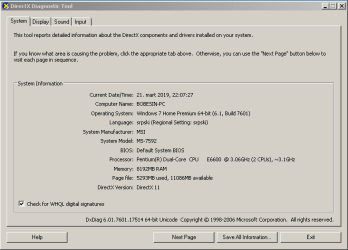
Dxdiag shows this:
2rf34fa.png


Uninstalled both Avira and Malwarebytes out of frustration, only Ccleaner remains.
 

Attachments

My Computer My Computer

Computer type
PC/Desktop
Computer Manufacturer/Model Number
custom build
OS
Belgrade
CPU
Pentium Dual Core E6600 @3.06GHz
Motherboard
MSI MS-7592
Memory
8GB
Graphics Card(s)
Nvidia Geforce GTX 560 Ti
Hard Drives
SAMSUNG HD1035SJ
Antivirus
Avira
Browser
Google Chrome
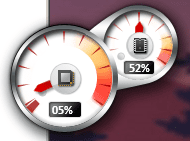
You can set Open hardware monitor to show CPU temperature near the clock and on the gadget. See mine on the image I attached.

Did you run the 64 bit DXDiag?
 

My Computers My Computers

System One System Two

  • Computer type
    PC/Desktop
    Computer Manufacturer/Model Number
    custom build
    OS
    Windows 7 HP 64
    CPU
    i5 6600K - 800MHz to 4200MHz
    Motherboard
    GA-Z170-HD3P
    Memory
    4+4G GSkill DDR4 3000
    Graphics Card(s)
    IG - Intel 530
    Monitor(s) Displays
    Samsung 226BW
    Screen Resolution
    1680x1050
    Hard Drives
    (1) -1 SM951 – 128GB M.2 AHCI PCIe SSD drive for Windows 7 and Lubuntu
    (2) -1 WD SATA 3 - 1T for Data
    (3) -1 WD SATA 3 - 1T for backup
    PSU
    Thermaltake 450W TR2 gold
    Keyboard
    Old and good Chicony mechanical keyboard
    Mouse
    Logitech mX performance - 9 buttons (had to disable some)
    Internet Speed
    500Mb/s
    Browser
    Firefox 64
    Other Info
    TinyWall firewall
  • Computer type
    Laptop
    System Manufacturer/Model Number
    Asus Q550LF
    OS
    Windows 7 Pro
    CPU
    i7-4500U 800MHz to 3.0GHz
    Motherboard
    Asus Q550LF
    Memory
    (4+4)G DDR3 1600
    Graphics Card(s)
    IG intel 4400 + NVIDIA GeForce GT 745M
    Sound Card
    Realtek
    Monitor(s) Displays
    LG Display LP156WF4-SPH1
    Screen Resolution
    1920 x 1080
    Hard Drives
    BX500 120G SSD for Windows and programs +
    1T HDD for data
    Internet Speed
    500 Mb/s
    Browser
    Firefox
    Other Info
    TinyWall firewall
You can set Open hardware monitor to show CPU temperature near the clock and on the gadget. See mine on the image I attached.

Did you run the 64 bit DXDiag?

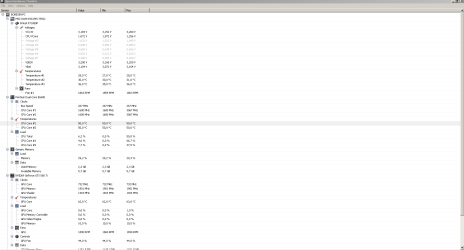
Uhh there is no option to see the CPU temperature...and in the gadgets option when I press right-click on desktop it only shows CPU Meter, here is the picture in the attachments. I did run the 64 bit DXDiag and it showed on the bottom left corner something loading and nothing else, here is the picture of that as well.
 

Attachments

  • 1.PNG
    1.PNG
    10.4 KB · Views: 61
  • 2.PNG
    2.PNG
    8.2 KB · Views: 62

My Computer My Computer

Computer type
PC/Desktop
Computer Manufacturer/Model Number
custom build
OS
Belgrade
CPU
Pentium Dual Core E6600 @3.06GHz
Motherboard
MSI MS-7592
Memory
8GB
Graphics Card(s)
Nvidia Geforce GTX 560 Ti
Hard Drives
SAMSUNG HD1035SJ
Antivirus
Avira
Browser
Google Chrome
This is my openhardwaremonitor configuration file.
openhardwaremonitor configuration file
Rename the openhardwaremonitor.config.txt to openhardwaremonitor.config
Shut down openhardwaremonitor and replace the openhardwaremonitor.config on the folder by this one.

Restart openhardwaremonitor
 
Last edited:

My Computers My Computers

System One System Two

  • Computer type
    PC/Desktop
    Computer Manufacturer/Model Number
    custom build
    OS
    Windows 7 HP 64
    CPU
    i5 6600K - 800MHz to 4200MHz
    Motherboard
    GA-Z170-HD3P
    Memory
    4+4G GSkill DDR4 3000
    Graphics Card(s)
    IG - Intel 530
    Monitor(s) Displays
    Samsung 226BW
    Screen Resolution
    1680x1050
    Hard Drives
    (1) -1 SM951 – 128GB M.2 AHCI PCIe SSD drive for Windows 7 and Lubuntu
    (2) -1 WD SATA 3 - 1T for Data
    (3) -1 WD SATA 3 - 1T for backup
    PSU
    Thermaltake 450W TR2 gold
    Keyboard
    Old and good Chicony mechanical keyboard
    Mouse
    Logitech mX performance - 9 buttons (had to disable some)
    Internet Speed
    500Mb/s
    Browser
    Firefox 64
    Other Info
    TinyWall firewall
  • Computer type
    Laptop
    System Manufacturer/Model Number
    Asus Q550LF
    OS
    Windows 7 Pro
    CPU
    i7-4500U 800MHz to 3.0GHz
    Motherboard
    Asus Q550LF
    Memory
    (4+4)G DDR3 1600
    Graphics Card(s)
    IG intel 4400 + NVIDIA GeForce GT 745M
    Sound Card
    Realtek
    Monitor(s) Displays
    LG Display LP156WF4-SPH1
    Screen Resolution
    1920 x 1080
    Hard Drives
    BX500 120G SSD for Windows and programs +
    1T HDD for data
    Internet Speed
    500 Mb/s
    Browser
    Firefox
    Other Info
    TinyWall firewall

Attachments

  • 1.PNG
    1.PNG
    17.9 KB · Views: 4

My Computer My Computer

Computer type
PC/Desktop
Computer Manufacturer/Model Number
custom build
OS
Belgrade
CPU
Pentium Dual Core E6600 @3.06GHz
Motherboard
MSI MS-7592
Memory
8GB
Graphics Card(s)
Nvidia Geforce GTX 560 Ti
Hard Drives
SAMSUNG HD1035SJ
Antivirus
Avira
Browser
Google Chrome
So you guys just gave up? At least just say "I have no idea what's wrong" instead of just stopping replying.
 

My Computer My Computer

Computer type
PC/Desktop
Computer Manufacturer/Model Number
custom build
OS
Belgrade
CPU
Pentium Dual Core E6600 @3.06GHz
Motherboard
MSI MS-7592
Memory
8GB
Graphics Card(s)
Nvidia Geforce GTX 560 Ti
Hard Drives
SAMSUNG HD1035SJ
Antivirus
Avira
Browser
Google Chrome
Did you uninstall Malwarebytes as I suggested on post #6?
 

My Computers My Computers

System One System Two

  • Computer type
    PC/Desktop
    Computer Manufacturer/Model Number
    custom build
    OS
    Windows 7 HP 64
    CPU
    i5 6600K - 800MHz to 4200MHz
    Motherboard
    GA-Z170-HD3P
    Memory
    4+4G GSkill DDR4 3000
    Graphics Card(s)
    IG - Intel 530
    Monitor(s) Displays
    Samsung 226BW
    Screen Resolution
    1680x1050
    Hard Drives
    (1) -1 SM951 – 128GB M.2 AHCI PCIe SSD drive for Windows 7 and Lubuntu
    (2) -1 WD SATA 3 - 1T for Data
    (3) -1 WD SATA 3 - 1T for backup
    PSU
    Thermaltake 450W TR2 gold
    Keyboard
    Old and good Chicony mechanical keyboard
    Mouse
    Logitech mX performance - 9 buttons (had to disable some)
    Internet Speed
    500Mb/s
    Browser
    Firefox 64
    Other Info
    TinyWall firewall
  • Computer type
    Laptop
    System Manufacturer/Model Number
    Asus Q550LF
    OS
    Windows 7 Pro
    CPU
    i7-4500U 800MHz to 3.0GHz
    Motherboard
    Asus Q550LF
    Memory
    (4+4)G DDR3 1600
    Graphics Card(s)
    IG intel 4400 + NVIDIA GeForce GT 745M
    Sound Card
    Realtek
    Monitor(s) Displays
    LG Display LP156WF4-SPH1
    Screen Resolution
    1920 x 1080
    Hard Drives
    BX500 120G SSD for Windows and programs +
    1T HDD for data
    Internet Speed
    500 Mb/s
    Browser
    Firefox
    Other Info
    TinyWall firewall

My Computer My Computer

Computer type
PC/Desktop
Computer Manufacturer/Model Number
custom build
OS
Belgrade
CPU
Pentium Dual Core E6600 @3.06GHz
Motherboard
MSI MS-7592
Memory
8GB
Graphics Card(s)
Nvidia Geforce GTX 560 Ti
Hard Drives
SAMSUNG HD1035SJ
Antivirus
Avira
Browser
Google Chrome
I answered that question. Yes I did uninstall both Malwarebytes and Avira.

Yes you did.

Open services (%windir%\system32\services.msc) and set Win update to Manual.
Open Control Panel\All Control Panel Items\Windows Update\Change settings and set Never check for updates and un mark Give me recommended updates.

Then manually Check for updates. Does it run forever?
 

My Computers My Computers

System One System Two

  • Computer type
    PC/Desktop
    Computer Manufacturer/Model Number
    custom build
    OS
    Windows 7 HP 64
    CPU
    i5 6600K - 800MHz to 4200MHz
    Motherboard
    GA-Z170-HD3P
    Memory
    4+4G GSkill DDR4 3000
    Graphics Card(s)
    IG - Intel 530
    Monitor(s) Displays
    Samsung 226BW
    Screen Resolution
    1680x1050
    Hard Drives
    (1) -1 SM951 – 128GB M.2 AHCI PCIe SSD drive for Windows 7 and Lubuntu
    (2) -1 WD SATA 3 - 1T for Data
    (3) -1 WD SATA 3 - 1T for backup
    PSU
    Thermaltake 450W TR2 gold
    Keyboard
    Old and good Chicony mechanical keyboard
    Mouse
    Logitech mX performance - 9 buttons (had to disable some)
    Internet Speed
    500Mb/s
    Browser
    Firefox 64
    Other Info
    TinyWall firewall
  • Computer type
    Laptop
    System Manufacturer/Model Number
    Asus Q550LF
    OS
    Windows 7 Pro
    CPU
    i7-4500U 800MHz to 3.0GHz
    Motherboard
    Asus Q550LF
    Memory
    (4+4)G DDR3 1600
    Graphics Card(s)
    IG intel 4400 + NVIDIA GeForce GT 745M
    Sound Card
    Realtek
    Monitor(s) Displays
    LG Display LP156WF4-SPH1
    Screen Resolution
    1920 x 1080
    Hard Drives
    BX500 120G SSD for Windows and programs +
    1T HDD for data
    Internet Speed
    500 Mb/s
    Browser
    Firefox
    Other Info
    TinyWall firewall
Yeah bro it searches forever, I did everything that you said. What's next?
 

My Computer My Computer

Computer type
PC/Desktop
Computer Manufacturer/Model Number
custom build
OS
Belgrade
CPU
Pentium Dual Core E6600 @3.06GHz
Motherboard
MSI MS-7592
Memory
8GB
Graphics Card(s)
Nvidia Geforce GTX 560 Ti
Hard Drives
SAMSUNG HD1035SJ
Antivirus
Avira
Browser
Google Chrome
WU bugs and fixes aren't my specialty
Try this:
On a recent installation, you must have first to install KB3020369.
Windows update fix KB3172605

My recommendation to avoid telemetry and other trash, leave Services - Windows Update - Manual. On WU page set it to Never check and monthly install the Security ONLY updates. Run WU manually to find updates for Office etc and decide witch one to install.

Monthly install the SECURITY ONLY updates. Windows 7 SP1 update history

Read my post MS releases SP2 for Windows 7

Updates SHA-2 support kB4474419, KB4490628
 

My Computers My Computers

System One System Two

  • Computer type
    PC/Desktop
    Computer Manufacturer/Model Number
    custom build
    OS
    Windows 7 HP 64
    CPU
    i5 6600K - 800MHz to 4200MHz
    Motherboard
    GA-Z170-HD3P
    Memory
    4+4G GSkill DDR4 3000
    Graphics Card(s)
    IG - Intel 530
    Monitor(s) Displays
    Samsung 226BW
    Screen Resolution
    1680x1050
    Hard Drives
    (1) -1 SM951 – 128GB M.2 AHCI PCIe SSD drive for Windows 7 and Lubuntu
    (2) -1 WD SATA 3 - 1T for Data
    (3) -1 WD SATA 3 - 1T for backup
    PSU
    Thermaltake 450W TR2 gold
    Keyboard
    Old and good Chicony mechanical keyboard
    Mouse
    Logitech mX performance - 9 buttons (had to disable some)
    Internet Speed
    500Mb/s
    Browser
    Firefox 64
    Other Info
    TinyWall firewall
  • Computer type
    Laptop
    System Manufacturer/Model Number
    Asus Q550LF
    OS
    Windows 7 Pro
    CPU
    i7-4500U 800MHz to 3.0GHz
    Motherboard
    Asus Q550LF
    Memory
    (4+4)G DDR3 1600
    Graphics Card(s)
    IG intel 4400 + NVIDIA GeForce GT 745M
    Sound Card
    Realtek
    Monitor(s) Displays
    LG Display LP156WF4-SPH1
    Screen Resolution
    1920 x 1080
    Hard Drives
    BX500 120G SSD for Windows and programs +
    1T HDD for data
    Internet Speed
    500 Mb/s
    Browser
    Firefox
    Other Info
    TinyWall firewall
WU bugs and fixes aren't my specialty
Try this:
On a recent installation, you must have first to install KB3020369.
Windows update fix KB3172605

My recommendation to avoid telemetry and other trash, leave Services - Windows Update - Manual. On WU page set it to Never check and monthly install the Security ONLY updates. Run WU manually to find updates for Office etc and decide witch one to install.

Monthly install the SECURITY ONLY updates. Windows 7 SP1 update history

Read my post MS releases SP2 for Windows 7

Updates SHA-2 support kB4474419, KB4490628

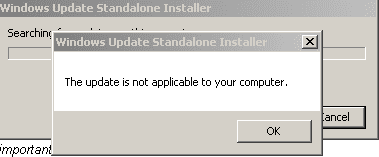
Hey man, I did and when I tried to install "Windows6.1-KB3020369-x64" it says this. What should I do?
 

Attachments

  • Capture.PNG
    Capture.PNG
    2.8 KB · Views: 26

My Computer My Computer

Computer type
PC/Desktop
Computer Manufacturer/Model Number
custom build
OS
Belgrade
CPU
Pentium Dual Core E6600 @3.06GHz
Motherboard
MSI MS-7592
Memory
8GB
Graphics Card(s)
Nvidia Geforce GTX 560 Ti
Hard Drives
SAMSUNG HD1035SJ
Antivirus
Avira
Browser
Google Chrome

My Computers My Computers

System One System Two

  • Computer type
    PC/Desktop
    Computer Manufacturer/Model Number
    custom build
    OS
    Windows 7 HP 64
    CPU
    i5 6600K - 800MHz to 4200MHz
    Motherboard
    GA-Z170-HD3P
    Memory
    4+4G GSkill DDR4 3000
    Graphics Card(s)
    IG - Intel 530
    Monitor(s) Displays
    Samsung 226BW
    Screen Resolution
    1680x1050
    Hard Drives
    (1) -1 SM951 – 128GB M.2 AHCI PCIe SSD drive for Windows 7 and Lubuntu
    (2) -1 WD SATA 3 - 1T for Data
    (3) -1 WD SATA 3 - 1T for backup
    PSU
    Thermaltake 450W TR2 gold
    Keyboard
    Old and good Chicony mechanical keyboard
    Mouse
    Logitech mX performance - 9 buttons (had to disable some)
    Internet Speed
    500Mb/s
    Browser
    Firefox 64
    Other Info
    TinyWall firewall
  • Computer type
    Laptop
    System Manufacturer/Model Number
    Asus Q550LF
    OS
    Windows 7 Pro
    CPU
    i7-4500U 800MHz to 3.0GHz
    Motherboard
    Asus Q550LF
    Memory
    (4+4)G DDR3 1600
    Graphics Card(s)
    IG intel 4400 + NVIDIA GeForce GT 745M
    Sound Card
    Realtek
    Monitor(s) Displays
    LG Display LP156WF4-SPH1
    Screen Resolution
    1920 x 1080
    Hard Drives
    BX500 120G SSD for Windows and programs +
    1T HDD for data
    Internet Speed
    500 Mb/s
    Browser
    Firefox
    Other Info
    TinyWall firewall
Back
Top