Boot problem on cloned dual-boot SSD

johnhoh
Ok, I’ll try Macrium. Since my Win7 works fine, I would use Macrium to clone only the XP partition, right? If so, I could install Macrium on the SSD under Win7 (drive C:), plug in the original HDD via the SATA-USB adapter (the old XP partition would then appear as drive G:), then clone from G: to D:. Does this sound like the right plan? Or should I do it another way?
 

My Computer My Computer

Computer type
Laptop
Computer Manufacturer/Model Number
MSI
OS
Windows 7 Ultimate x64, Windows XP Professional SP3
CPU
AMD Athlon II P320 dual core 2.1GHz
Motherboard
MSI laptop CR630-228us
Memory
4GB
Graphics Card(s)
Built-in ATI Mobillity Radeon HD4270
Hard Drives
Western Digital WD3200BEVT internal 2.5" SATA HDD 320GB (original)
Western Digital WDS500G2B0A internal 2.5" SATA SSD 500GB (new)
Antivirus
Avast
Browser
Mozilla Firefox
No not just the xp partition, the whole disk. I would put your machine back to its original configuration with the HDD as primary and sole drive, boot into win7, download and install macrium, shutdown, connect the SSD however you can (preferably sata but if you have to use the sata-usb adapter I believe macrium will still work - just have not done that myself), then power up and boot the HDD into win7 so it detects your SSD as a secondary drive, then use macrium to clone your ENTIRE HDD onto the SSD (deleting the existing SSD partitions first, which macrium allows you to do). As soon as the clone is done press "close" on macrium, shut down, remove the original HDD and install the SSD in its place as primary sata, then boot the SSD and see if it can load XP, then reboot and see if it boots win7. Do not reconnect the old HDD.
 

My Computer My Computer

Computer type
PC/Desktop
Computer Manufacturer/Model Number
diy
OS
Win7 pro x64
CPU
stock i7 7700k
Motherboard
Gigabyte Z270N-WIFI mini-ITX
Memory
Corsair Vengeance LPX 16GB (2x8GB) DDR4 @ 3200MHz
Graphics Card(s)
integrated Intel HD 630
Sound Card
onboard Realtek ALC1220
Monitor(s) Displays
two vertically mounted samsung 55" 4k un55mu8000
Screen Resolution
1920x1280
Hard Drives
256GB Samsung EVO 960 M.2 pci-e NVMe SSD
PSU
SilverStone Nightjar ST45NF 450Watt Fanless
Case
No case. Motherboard is mounted directly onto power supply
Cooling
Evercool low profile 815EP with Panaflow 12L fan at 7v
Keyboard
Ortek MCK-86 mini
Mouse
Belkin 5-button USB
Internet Speed
spectrum 400mbps
Wow, ok. I’ll try this today and report back.
 

My Computer My Computer

Computer type
Laptop
Computer Manufacturer/Model Number
MSI
OS
Windows 7 Ultimate x64, Windows XP Professional SP3
CPU
AMD Athlon II P320 dual core 2.1GHz
Motherboard
MSI laptop CR630-228us
Memory
4GB
Graphics Card(s)
Built-in ATI Mobillity Radeon HD4270
Hard Drives
Western Digital WD3200BEVT internal 2.5" SATA HDD 320GB (original)
Western Digital WDS500G2B0A internal 2.5" SATA SSD 500GB (new)
Antivirus
Avast
Browser
Mozilla Firefox
For the utmost in reliability, I generally image and restore rather than direct cloning, but that's just my personal preference. Nevertheless, to add to johnhoh's advice I would recommend cloning with the partitions exactly the same size as they are on the old disk. You can always move/resize partitions later if you can get it working, but since we haven't been able to identify what's going on with your system it makes sense to limit the number of variables that could trip up the process.
 

My Computer My Computer

Computer type
PC/Desktop
Computer Manufacturer/Model Number
Dell Optiplex 7050
OS
Windows 7/8.1/10 multiboot
CPU
Intel Core i7-7700
Motherboard
Dell, Intel Q270 chipset
Memory
48GB (2x16GB Crucial DDR4-3200 + 2x8GB Hynix DDR4-2400)
Graphics Card(s)
Intel HD630 + AMD Radeon R7 450 PCIe
Monitor(s) Displays
Asus VC279 (27")
Screen Resolution
1920x1080
Hard Drives
Toshiba M.2 NVMe (256GB),
Samsung 960 Evo (500GB),
WD Red Plus 80EFBX (8TB)
dg1261
I don’t have enough disk space to do an image and restore, so I am doing a direct clone. But I did what you suggested, keeping all partitions the same sizes and offsets. I note that the XP partition alignment is not on a 1MB boundary (it says “XP (CHS)”. So I will need to move it anyway once I get it to boot.

The cloning is in process now. We’ll see what happens.
 

My Computer My Computer

Computer type
Laptop
Computer Manufacturer/Model Number
MSI
OS
Windows 7 Ultimate x64, Windows XP Professional SP3
CPU
AMD Athlon II P320 dual core 2.1GHz
Motherboard
MSI laptop CR630-228us
Memory
4GB
Graphics Card(s)
Built-in ATI Mobillity Radeon HD4270
Hard Drives
Western Digital WD3200BEVT internal 2.5" SATA HDD 320GB (original)
Western Digital WDS500G2B0A internal 2.5" SATA SSD 500GB (new)
Antivirus
Avast
Browser
Mozilla Firefox
The cloning process with Macrium Reflect 7 is done. Here are some screenshots of the progress window (the three pictures are the same window, each one is looking at a different portion of the progress scrolled down from the top):

macrium_clone1.png

macrium_clone2.png

macrium_clone3.png


This is all done with the original HDD installed in the laptop as the souorce, booted on Win7. The target SSD was plugged in with the SATA-USB adapter, with the partitions on it deleted prior to starting Macrium. All partitions were cloned with the same size and locations.

After cloning, I removed the HDD and installed the SSD in its place. I then attempted to boot XP first. It failed again in exactly the same manner as before. I then rebooted into Win7 with success. Here's the regedit screenshot showing the Win7's MountedDevices. No surprises here.

registry_win7_dosdevices_macrium.png


Looking at XP's system hive, it is apparent that Macrium didn't touch anything in it, as it still contains all the old DiskIDs:

registry_xp_dosdevices_macrium.png


I edited XP's DosDevices\C and DosDevices\D entries to match Win7's entries as follows:

registry_xp_dosdevices_macrium2.png


An attempt to reboot into XP again failed in the same way.

So using Macrium didn't result in anything different. It looks like XP bailed earlier in the boot process, before it had even looked at the DosDevices entries. What could it be?

Any more ideas?
 

My Computer My Computer

Computer type
Laptop
Computer Manufacturer/Model Number
MSI
OS
Windows 7 Ultimate x64, Windows XP Professional SP3
CPU
AMD Athlon II P320 dual core 2.1GHz
Motherboard
MSI laptop CR630-228us
Memory
4GB
Graphics Card(s)
Built-in ATI Mobillity Radeon HD4270
Hard Drives
Western Digital WD3200BEVT internal 2.5" SATA HDD 320GB (original)
Western Digital WDS500G2B0A internal 2.5" SATA SSD 500GB (new)
Antivirus
Avast
Browser
Mozilla Firefox
It seems not to like the hardware. You could try coaxing it with one of the "adjust to new hardware" modules.

Manual adaptation O&O Software

You can get it on giveaway, if you don't already have similar.

O&O diskImage 12 GIVEAWAY
Register: (the registration page is in German - don't worry about that)

Registrieren Sie sich hier fur Ihre kostenlose Vollversion von O&O DiskImage 12

They send an email. Click the link in the email they sent you and you will receive another email with your license key

Download English version of the program:
Download Archive

Install it on win7.

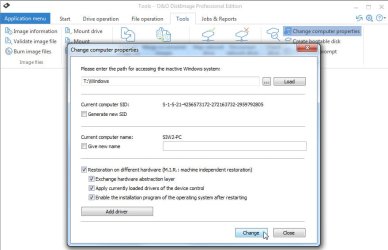
Tools>Computer Properties. Browse to xp windows folder (D:\Windows) . Click load. Tick boxes as below

O&O-newhardware.jpg
 

My Computers My Computers

System One System Two

  • Computer type
    PC/Desktop
    OS
    7 X64
    CPU
    i5 8400
    Motherboard
    gigabyte b365m ds3h
    Memory
    2x8gb 3200mhz
    Hard Drives
    various
    PSU
    pure power 11 400w cm
    Case
    Coolermaster
    Cooling
    cryorig m9i
  • Computer type
    PC/Desktop
    OS
    7x64
    CPU
    g5400
    Motherboard
    ga b365m ds3h
    Memory
    8gb ddr4 2400
    PSU
    xfx pro 450w
Thanks SIW2. I’ll try that when I get back to my laptop later tonight.
 

My Computer My Computer

Computer type
Laptop
Computer Manufacturer/Model Number
MSI
OS
Windows 7 Ultimate x64, Windows XP Professional SP3
CPU
AMD Athlon II P320 dual core 2.1GHz
Motherboard
MSI laptop CR630-228us
Memory
4GB
Graphics Card(s)
Built-in ATI Mobillity Radeon HD4270
Hard Drives
Western Digital WD3200BEVT internal 2.5" SATA HDD 320GB (original)
Western Digital WDS500G2B0A internal 2.5" SATA SSD 500GB (new)
Antivirus
Avast
Browser
Mozilla Firefox
@SIW2
I downloaded and installed O&O DiskImage and registered the software as you instructed. For some reason the software doesn't accept the serial number that they sent me via email, so I ran it in trial software mode. I did exactly as you described, then attempted to reboot into XP. The boot splash screen appears as before, but instead of resetting to POST, I now get a BSOD.

XP_bluescreen.jpg


Argh. Not sure what to do now. The only hardware change from a working dual-boot Win7/XP setup is the disk drive...
 

My Computer My Computer

Computer type
Laptop
Computer Manufacturer/Model Number
MSI
OS
Windows 7 Ultimate x64, Windows XP Professional SP3
CPU
AMD Athlon II P320 dual core 2.1GHz
Motherboard
MSI laptop CR630-228us
Memory
4GB
Graphics Card(s)
Built-in ATI Mobillity Radeon HD4270
Hard Drives
Western Digital WD3200BEVT internal 2.5" SATA HDD 320GB (original)
Western Digital WDS500G2B0A internal 2.5" SATA SSD 500GB (new)
Antivirus
Avast
Browser
Mozilla Firefox

My Computers My Computers

System One System Two

  • Computer type
    PC/Desktop
    OS
    7 X64
    CPU
    i5 8400
    Motherboard
    gigabyte b365m ds3h
    Memory
    2x8gb 3200mhz
    Hard Drives
    various
    PSU
    pure power 11 400w cm
    Case
    Coolermaster
    Cooling
    cryorig m9i
  • Computer type
    PC/Desktop
    OS
    7x64
    CPU
    g5400
    Motherboard
    ga b365m ds3h
    Memory
    8gb ddr4 2400
    PSU
    xfx pro 450w
@SIW2
Are you suggesting I use the WD SSD Dashboard while booted XP on the the old HDD (with the SSD plugged in as a 2nd drive)?

As for virtual machine, I have several legacy (but important) apps on this XP partition that wants to "see" real hardware, they won't work in a VM environment, and won't work under Win7 native either. I already have Windows XP mode on the Win7 partition, and XP under VMware on another computer running Linux.
 

My Computer My Computer

Computer type
Laptop
Computer Manufacturer/Model Number
MSI
OS
Windows 7 Ultimate x64, Windows XP Professional SP3
CPU
AMD Athlon II P320 dual core 2.1GHz
Motherboard
MSI laptop CR630-228us
Memory
4GB
Graphics Card(s)
Built-in ATI Mobillity Radeon HD4270
Hard Drives
Western Digital WD3200BEVT internal 2.5" SATA HDD 320GB (original)
Western Digital WDS500G2B0A internal 2.5" SATA SSD 500GB (new)
Antivirus
Avast
Browser
Mozilla Firefox
Not clear from the link:

WD SSD Dashboard for Windows XP 32 bit - WD SSD Drives & Software - WD Community

Steven4:

I just purchased a WD Blue SSD 250GB and installed in in a Windows XP machine (it has to run XP)

He says he installed the disk in an XP machine he doesn't say he installed XP onto the disk.


Trancer responds:
an older version of the app able to support the OS does not exist.


cdleighton responds:

Windows XP works very well as Virtual Machine under the free VirtualBox (from Oracle).
 

My Computers My Computers

System One System Two

  • Computer type
    PC/Desktop
    OS
    7 X64
    CPU
    i5 8400
    Motherboard
    gigabyte b365m ds3h
    Memory
    2x8gb 3200mhz
    Hard Drives
    various
    PSU
    pure power 11 400w cm
    Case
    Coolermaster
    Cooling
    cryorig m9i
  • Computer type
    PC/Desktop
    OS
    7x64
    CPU
    g5400
    Motherboard
    ga b365m ds3h
    Memory
    8gb ddr4 2400
    PSU
    xfx pro 450w
Can you clean install xp onto that new disk?
 

My Computers My Computers

System One System Two

  • Computer type
    PC/Desktop
    OS
    7 X64
    CPU
    i5 8400
    Motherboard
    gigabyte b365m ds3h
    Memory
    2x8gb 3200mhz
    Hard Drives
    various
    PSU
    pure power 11 400w cm
    Case
    Coolermaster
    Cooling
    cryorig m9i
  • Computer type
    PC/Desktop
    OS
    7x64
    CPU
    g5400
    Motherboard
    ga b365m ds3h
    Memory
    8gb ddr4 2400
    PSU
    xfx pro 450w
I just realized that one thing I haven't yet tried, is to boot XP on my old HDD, and then see if it would "see" the SSD plugged in as an external drive. It would be another useful datapoint, and establish whether XP could perform I/O on the SSD (despite having to go through a SATA-USB adapter). This laptop only has one internal SATA port so I can't connect the SSD as a second internal SATA drive. It does have an external combo USB/eSATA connector, but I don't have the proper cables to connect a raw SATA drive to an eSATA port.


With regards to your link above to "Integration of Intel's AHCI/RAID drivers...", I'll have a look.
 

My Computer My Computer

Computer type
Laptop
Computer Manufacturer/Model Number
MSI
OS
Windows 7 Ultimate x64, Windows XP Professional SP3
CPU
AMD Athlon II P320 dual core 2.1GHz
Motherboard
MSI laptop CR630-228us
Memory
4GB
Graphics Card(s)
Built-in ATI Mobillity Radeon HD4270
Hard Drives
Western Digital WD3200BEVT internal 2.5" SATA HDD 320GB (original)
Western Digital WDS500G2B0A internal 2.5" SATA SSD 500GB (new)
Antivirus
Avast
Browser
Mozilla Firefox
I just realized that one thing I haven't yet tried, is to boot XP on my old HDD, and then see if it would "see" the SSD plugged in as an external drive. It would be another useful datapoint, and establish whether XP could perform I/O on the SSD (despite having to go through a SATA-USB adapter).
Just tried this and XP had no problem with the SSD as an external disk. It can access both the Win7 and XP partitions on it (now appears as G: and H:) just fine. So there is nothing intrinsically incompatible between XP and this particular SSD.

So back to square one: What’s the problem with booting XP on this SSD?
 

My Computer My Computer

Computer type
Laptop
Computer Manufacturer/Model Number
MSI
OS
Windows 7 Ultimate x64, Windows XP Professional SP3
CPU
AMD Athlon II P320 dual core 2.1GHz
Motherboard
MSI laptop CR630-228us
Memory
4GB
Graphics Card(s)
Built-in ATI Mobillity Radeon HD4270
Hard Drives
Western Digital WD3200BEVT internal 2.5" SATA HDD 320GB (original)
Western Digital WDS500G2B0A internal 2.5" SATA SSD 500GB (new)
Antivirus
Avast
Browser
Mozilla Firefox
Something that comes to mind is that maybe this is not a clone problem at all. Since the disks are exact copies of each other, what is the only thing different in your two environments? SSD vs HDD. Does xp need a special driver for your ssd? Is there a generic driver that will work with both xp on hdd as well as xp on ssd? Looking around I also saw some people who tried and failed to install xp on an ssd, period. Another guy could only get it to boot with the bios in IDE mode. Just some things to think about.
 

My Computer My Computer

Computer type
PC/Desktop
Computer Manufacturer/Model Number
diy
OS
Win7 pro x64
CPU
stock i7 7700k
Motherboard
Gigabyte Z270N-WIFI mini-ITX
Memory
Corsair Vengeance LPX 16GB (2x8GB) DDR4 @ 3200MHz
Graphics Card(s)
integrated Intel HD 630
Sound Card
onboard Realtek ALC1220
Monitor(s) Displays
two vertically mounted samsung 55" 4k un55mu8000
Screen Resolution
1920x1280
Hard Drives
256GB Samsung EVO 960 M.2 pci-e NVMe SSD
PSU
SilverStone Nightjar ST45NF 450Watt Fanless
Case
No case. Motherboard is mounted directly onto power supply
Cooling
Evercool low profile 815EP with Panaflow 12L fan at 7v
Keyboard
Ortek MCK-86 mini
Mouse
Belkin 5-button USB
Internet Speed
spectrum 400mbps
The SSD is a SATA drive just like the HDD, and shouldn’t require a special driver. Indeed, as I have shown above, XP was able to mount the filesystems on the SSD when it’s the second disk, so there is no problem with read/write functionality. The question is, what’s getting hosed on the SSD when booting XP that doesn’t happen on the HDD? The data is cloned from the HDD, so all drivers are the same.
 

My Computer My Computer

Computer type
Laptop
Computer Manufacturer/Model Number
MSI
OS
Windows 7 Ultimate x64, Windows XP Professional SP3
CPU
AMD Athlon II P320 dual core 2.1GHz
Motherboard
MSI laptop CR630-228us
Memory
4GB
Graphics Card(s)
Built-in ATI Mobillity Radeon HD4270
Hard Drives
Western Digital WD3200BEVT internal 2.5" SATA HDD 320GB (original)
Western Digital WDS500G2B0A internal 2.5" SATA SSD 500GB (new)
Antivirus
Avast
Browser
Mozilla Firefox
The SSD is a SATA drive just like the HDD, and shouldn’t require a special driver.
Agreed. My laptop multi-boots 7/10/XP on a SSD without any problems. I'm using truly independent OS partitions, not a Microsoft-style BCD-tangled multi-boot ... though I don't think that matters (other than a truly independent OS being easier to troubleshoot).

Yet, I can sympathize with johnhoh's skepticism because you've tried directly cloning partitions without resizing, so there's not much left in the way of uncontrolled variables. I can think of only three that haven't been definitively ruled out yet by your tests:

  1. HDD vs SSD (johnhoh's argument) ... it shouldn't matter, but we're past the point of assuming anything by now. I don't know if you have a spare HDD laying around, but if so it might be helpful to try cloning from HDD to HDD -- if nothing else, just to rule out this particular SSD as being an issue. (That is, assuming HDD-to-HDD also fails, which I expect it would.)

  2. Choice of cloning program ... as I've mentioned earlier, IME image/restore tends to be slightly more robust than direct cloning, but you said you can't do that. I believe you've tried the direct cloning with Macrium Reflect, though, which IME has been one of the more reliable programs I've come across, so I'd be surprised if something else could do this if Macrium can't.

  3. This is kind of a long shot, but some motherboards initialize HDDs (and SSDs) with different geometry (240 tracks/cylinder instead of the more common 255 tracks/cylinder). I'm not sure about 7, but I know this could cause problems with XP. It might be helpful to use a diagnostic tool to determine the geometry the SSD has been initialized at.

To expand on that last point, those "tracks" or "heads" per cylinder numbers are all fictitious (and have been since the advent of IDE controllers some 25 years ago), but even though they're made-up numbers they've been known to trip up the retro bootloader in earlier OSes like 98, 2000, and XP. Some laptops -- notably, Compaq, IBM and Lenovo -- used 240 heads as the default while Dell and most others used 255 heads. Using the wrong geometry would cause the boot process to fail.

It's worth noting that a difference here could affect direct cloning because your target disk is external. The internal disk's geometry is set by the motherboard, but the external disk's geometry is determined by the USB-to-SATA translator. An internal source disk could be seen as having 240 heads while an external USB disk might be seen as having 255 heads. Cloning in such a scenario could result in boot failures.

In contrast, this issue does not affect the image/restore technique because by the time the image is restored the target disk will be installed *internally* in the same place the source disk was, so will be seen with the same geometry. An image contains no geometry info and the geometry of the restoration is determined at the time the image is restored.

(This is one reason why I argue that image/restore is more reliable than direct cloning -- the USB-to-SATA translation blinds the cloning tool to the geometry of the target disk.)

I've been assuming MSI is one of the "others" and thus defaults to 255 heads, so my reasoning might be a shot in the dark ... but again, we're past the point of assuming anything so it might be worth checking out.

I'm (on vacation at the moment and) not at my computer where I can check right now, but perhaps someone else can recommend a suitable diagnostic tool to determine what geometry is in use by the SSD. Off the top of my head, I think Cliff Greiner's Test Disk is one such tool. Install the source disk and check the geometry, then install the target disk and compare results.

 

My Computer My Computer

Computer type
PC/Desktop
Computer Manufacturer/Model Number
Dell Optiplex 7050
OS
Windows 7/8.1/10 multiboot
CPU
Intel Core i7-7700
Motherboard
Dell, Intel Q270 chipset
Memory
48GB (2x16GB Crucial DDR4-3200 + 2x8GB Hynix DDR4-2400)
Graphics Card(s)
Intel HD630 + AMD Radeon R7 450 PCIe
Monitor(s) Displays
Asus VC279 (27")
Screen Resolution
1920x1080
Hard Drives
Toshiba M.2 NVMe (256GB),
Samsung 960 Evo (500GB),
WD Red Plus 80EFBX (8TB)
dg1261
The idea of test-cloning from HDD to HDD is an interesting one. I'll see if I could locate another suitable HDD to do this.

On your 3rd point about disk geometry, the fdisk program that comes with cygwin displays this info. The following two screenshots show that it's 255 heads and 63 sectors per track for both the HDD and SSD, viewed in two scenarios:

a. Booted Win7 on the HDD (/dev/sda), with the SSD (/dev/sdb) as an external drive:
fdisk_output_boothdd.png


b. Booted Win7 on the SSD (/dev/sda), with the HDD (/dev/sdb) as an external drive:
fdisk_output_bootssd.png
 

My Computer My Computer

Computer type
Laptop
Computer Manufacturer/Model Number
MSI
OS
Windows 7 Ultimate x64, Windows XP Professional SP3
CPU
AMD Athlon II P320 dual core 2.1GHz
Motherboard
MSI laptop CR630-228us
Memory
4GB
Graphics Card(s)
Built-in ATI Mobillity Radeon HD4270
Hard Drives
Western Digital WD3200BEVT internal 2.5" SATA HDD 320GB (original)
Western Digital WDS500G2B0A internal 2.5" SATA SSD 500GB (new)
Antivirus
Avast
Browser
Mozilla Firefox
Oh. Doh. I missed that in post #34.

Too many margaritas on the beach, I guess!
 

My Computer My Computer

Computer type
PC/Desktop
Computer Manufacturer/Model Number
Dell Optiplex 7050
OS
Windows 7/8.1/10 multiboot
CPU
Intel Core i7-7700
Motherboard
Dell, Intel Q270 chipset
Memory
48GB (2x16GB Crucial DDR4-3200 + 2x8GB Hynix DDR4-2400)
Graphics Card(s)
Intel HD630 + AMD Radeon R7 450 PCIe
Monitor(s) Displays
Asus VC279 (27")
Screen Resolution
1920x1080
Hard Drives
Toshiba M.2 NVMe (256GB),
Samsung 960 Evo (500GB),
WD Red Plus 80EFBX (8TB)
Back
Top