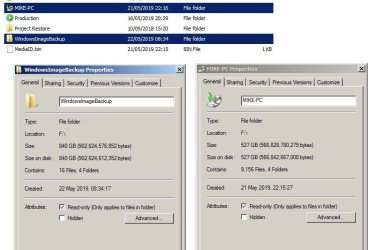
G guineaman New member Local time 5:27 AM Messages 4 May 22, 2019 #1 Hi, Windows backup created two massive directories: (One Folder "WindowsImageBackup" 800gb and one runable thing called "MIKE-PC" 600gb Do I need these both to restore, or is one an image and one a local restore program? Thanks Michael. Attachments Backups.jpg 49.1 KB · Views: 1 My Computer My Computer At a glance Windows 7 Home Premium x64Computer typePC/DesktopOSWindows 7 Home Premium x64
Hi, Windows backup created two massive directories: (One Folder "WindowsImageBackup" 800gb and one runable thing called "MIKE-PC" 600gb Do I need these both to restore, or is one an image and one a local restore program? Thanks Michael.
Paul Black I WANT TO BELIEVE! Guru Gold Member VIP Local time 11:27 PM Messages 3,823 Location Planet Earth VGhlIFgtRmlsZXM= May 22, 2019 #2 Hi guineaman, Welcome to SevenForums! guineaman said: Windows backup created two massive directories: (One Folder "WindowsImageBackup" 800gb and one runable thing called "MIKE-PC" 600gb. Click to expand... WOW, they are certainly huge backups! Have you got a lot of videos, music or pictures on your HDD? My Computer My Computer At a glance Win 7 HP SP1 64-bit Vista HB SP2 32-bit Linux...Intel(R) Pentium(R) CPU P6200 @ 2.13GHz4.00 GBIntel(R) Graphics Media Accelerator HDComputer typeLaptopComputer Manufacturer/Model NumberFujitsu LIFEBOOKOSWin 7 HP SP1 64-bit Vista HB SP2 32-bit Linux Mint 18.3CPUIntel(R) Pentium(R) CPU P6200 @ 2.13GHzMotherboardFUJITSU FJNBB06Memory4.00 GBGraphics Card(s)Intel(R) Graphics Media Accelerator HDSound Card[1] Realtek High Definition Audio [2] Intel(R) Display AudioScreen Resolution1366 x 768 x 32 bits (4294967296 colors) @ 59 HzHard DrivesTOSHIBA MK5076GSXAntivirusAVG FREE
Hi guineaman, Welcome to SevenForums! guineaman said: Windows backup created two massive directories: (One Folder "WindowsImageBackup" 800gb and one runable thing called "MIKE-PC" 600gb. Click to expand... WOW, they are certainly huge backups! Have you got a lot of videos, music or pictures on your HDD?
G guineaman New member Thread Starter Local time 5:27 AM Messages 4 May 22, 2019 #3 Hi , Yes I do, but its all on a 1TB HDD. Do I need both those files to restore then? Or are they two different types of the same backup? If I need both just confused that they are bigger than the entire C drive together. My Computer My Computer At a glance Windows 7 Home Premium x64Computer typePC/DesktopOSWindows 7 Home Premium x64
Hi , Yes I do, but its all on a 1TB HDD. Do I need both those files to restore then? Or are they two different types of the same backup? If I need both just confused that they are bigger than the entire C drive together.
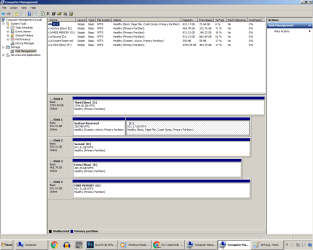
Paul Black I WANT TO BELIEVE! Guru Gold Member VIP Local time 11:27 PM Messages 3,823 Location Planet Earth VGhlIFgtRmlsZXM= May 22, 2019 #4 Hi guineaman, guineaman said: ... just confused that they are bigger than the entire C drive together. Click to expand... What parameters did you include in the backup? Is the backup created using Windows backup? Disk Management Can you post a screenshot of the Disk Management please => Click Start => right-click Computer => click Manage => click Disk Management. My Computer My Computer At a glance Win 7 HP SP1 64-bit Vista HB SP2 32-bit Linux...Intel(R) Pentium(R) CPU P6200 @ 2.13GHz4.00 GBIntel(R) Graphics Media Accelerator HDComputer typeLaptopComputer Manufacturer/Model NumberFujitsu LIFEBOOKOSWin 7 HP SP1 64-bit Vista HB SP2 32-bit Linux Mint 18.3CPUIntel(R) Pentium(R) CPU P6200 @ 2.13GHzMotherboardFUJITSU FJNBB06Memory4.00 GBGraphics Card(s)Intel(R) Graphics Media Accelerator HDSound Card[1] Realtek High Definition Audio [2] Intel(R) Display AudioScreen Resolution1366 x 768 x 32 bits (4294967296 colors) @ 59 HzHard DrivesTOSHIBA MK5076GSXAntivirusAVG FREE
Hi guineaman, guineaman said: ... just confused that they are bigger than the entire C drive together. Click to expand... What parameters did you include in the backup? Is the backup created using Windows backup? Disk Management Can you post a screenshot of the Disk Management please => Click Start => right-click Computer => click Manage => click Disk Management.
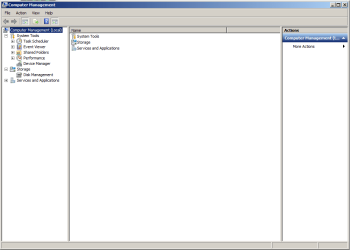
G guineaman New member Thread Starter Local time 5:27 AM Messages 4 May 22, 2019 #5 Yep Windows Backup, I asked it to create Image. Attachments dhf.png 13.7 KB · Views: 1 My Computer My Computer At a glance Windows 7 Home Premium x64Computer typePC/DesktopOSWindows 7 Home Premium x64
Paul Black I WANT TO BELIEVE! Guru Gold Member VIP Local time 11:27 PM Messages 3,823 Location Planet Earth VGhlIFgtRmlsZXM= May 22, 2019 #6 Hi guineaman, You posted a screenshot of the Computer Management! Disk Management Can you post a screenshot of the Disk Management please => Click Start => right-click Computer => click Manage => click Disk Management. My Computer My Computer At a glance Win 7 HP SP1 64-bit Vista HB SP2 32-bit Linux...Intel(R) Pentium(R) CPU P6200 @ 2.13GHz4.00 GBIntel(R) Graphics Media Accelerator HDComputer typeLaptopComputer Manufacturer/Model NumberFujitsu LIFEBOOKOSWin 7 HP SP1 64-bit Vista HB SP2 32-bit Linux Mint 18.3CPUIntel(R) Pentium(R) CPU P6200 @ 2.13GHzMotherboardFUJITSU FJNBB06Memory4.00 GBGraphics Card(s)Intel(R) Graphics Media Accelerator HDSound Card[1] Realtek High Definition Audio [2] Intel(R) Display AudioScreen Resolution1366 x 768 x 32 bits (4294967296 colors) @ 59 HzHard DrivesTOSHIBA MK5076GSXAntivirusAVG FREE
Hi guineaman, You posted a screenshot of the Computer Management! Disk Management Can you post a screenshot of the Disk Management please => Click Start => right-click Computer => click Manage => click Disk Management.
G guineaman New member Thread Starter Local time 5:27 AM Messages 4 May 22, 2019 #7 soz :} Attachments dhf.png 38.7 KB · Views: 2 My Computer My Computer At a glance Windows 7 Home Premium x64Computer typePC/DesktopOSWindows 7 Home Premium x64