Solved Transfer folders/ files between user accounts

hgw53t

New member
Local time
3:59 AM
Messages
26
I am trying to transfer my Downloads Folder FROM my Administrator Account TO my Standard User Account using the same personal computer. I'd like to find a quick and easy way to do this.

I am trying to be able to use the Standard Account as much as possible for security... and other reasons AND because Microsoft is discontinuing all support as of Jan, 2020. :cool:
 

My Computer My Computer

Computer type
Laptop
Computer Manufacturer/Model Number
Toshiba
OS
Windows 7 Home Premium 32-bit
Memory
4-GB physical memory
Hard Drives
SSD 110-GB
Antivirus
Avast
Browser
I.E. 11 and Mozilla Firefox
why not just drag and drop the download folder content to the standard user account? do that in windows explorer standard account should be under c: then user then find the user you want to put file too
 

My Computer My Computer

Computer type
PC/Desktop
Computer Manufacturer/Model Number
dell xps 9000
OS
win 10
I did try that. I cannot seem to copy & paste. It seems to me that I would have to bring up both accounts at the same time to do that. I'd like to know the procedure to do that, please.
 

My Computer My Computer

Computer type
Laptop
Computer Manufacturer/Model Number
Toshiba
OS
Windows 7 Home Premium 32-bit
Memory
4-GB physical memory
Hard Drives
SSD 110-GB
Antivirus
Avast
Browser
I.E. 11 and Mozilla Firefox
You don't have to copy and paste. Drag n drop.
 

My Computer My Computer

Computer type
PC/Desktop
Computer Manufacturer/Model Number
HP p6-2020t
OS
Win 7 Ult 64-bit
CPU
G620 2.6GHZ Pentium R
Memory
6 GB
Monitor(s) Displays
25" HPLV2311
Screen Resolution
1920 x 1200
Hard Drives
1 SATA, 1 exterior SATA
Case
HP
Cooling
PSU
Antivirus
Glasswire
Browser
Waterfox; Firefox; Chrome for work
Other Info
Firewall--Glasswire
Similar specs in Gateway DX4200
Verizon FIOS Wired network

1 other Win7 computer-- has SSD
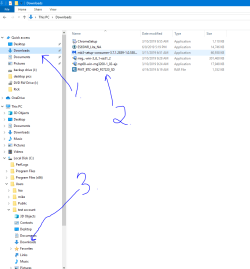
open windows exployer then 1. open downloads 2. click and hold drag to 3 tell us why you cant drag and drop file
 

Attachments

  • account downloads.PNG
    account downloads.PNG
    25.4 KB · Views: 0

My Computer My Computer

Computer type
PC/Desktop
Computer Manufacturer/Model Number
dell xps 9000
OS
win 10
Thanks VERY much for reply. I just tried that using Admin Account. It will not let me drag and drop any files in downloads to the left pane as is shown in your attachment
Note: What I see in the Standard Account under Downloads in the left pane (when I click on it) is an empty folder. That is what puzzles me.
 

My Computer My Computer

Computer type
Laptop
Computer Manufacturer/Model Number
Toshiba
OS
Windows 7 Home Premium 32-bit
Memory
4-GB physical memory
Hard Drives
SSD 110-GB
Antivirus
Avast
Browser
I.E. 11 and Mozilla Firefox
Does it give an error or message?

Also make sure folders are shared
 

My Computer My Computer

Computer type
PC/Desktop
Computer Manufacturer/Model Number
dell xps 9000
OS
win 10
No error or messages. Now I need to find out how to share folders. Have any info on where to start?
 

My Computer My Computer

Computer type
Laptop
Computer Manufacturer/Model Number
Toshiba
OS
Windows 7 Home Premium 32-bit
Memory
4-GB physical memory
Hard Drives
SSD 110-GB
Antivirus
Avast
Browser
I.E. 11 and Mozilla Firefox

My Computer My Computer

Computer type
PC/Desktop
Computer Manufacturer/Model Number
dell xps 9000
OS
win 10
The folder's have special permission set the simple way as administrator copy files to a blank folder outside user profiles then login as standard user and move them
 

My Computer My Computer

Computer type
PC/Desktop
OS
win 8 32 bit
here is one way How to Share a Folder in Windows 7 and Windows Vista - dummies

me personally do not use a standard account. I know lots of people think using a standard account is more safe but my opinion it isn't only thing I would not use is the built in administrator account that's just so if have problems with an account you can use it to se if the same problem exist their.

another way to share folders How to Add a Shared Folder in Windows 7: 5 Steps (with Pictures)


I checked the Wiki How Link & followed the process. I was able to transfer the Folder. The only thing is now is that it is hard to find in my Standard User Acct. Somehow, I need to move it into the left navigation pane. In fact my (C) Drive is not listed in the left pane either.

Thanks for all the help!
 
Last edited:

My Computer My Computer

Computer type
Laptop
Computer Manufacturer/Model Number
Toshiba
OS
Windows 7 Home Premium 32-bit
Memory
4-GB physical memory
Hard Drives
SSD 110-GB
Antivirus
Avast
Browser
I.E. 11 and Mozilla Firefox
might help if you can post a screen shot of windows explorer.
 

My Computer My Computer

Computer type
PC/Desktop
Computer Manufacturer/Model Number
dell xps 9000
OS
win 10
Back
Top