Solved Safe mode startup shows a CLASSPNP.SYS error and haults

loninappleton

New member
Member
VIP
Local time
5:20 AM
Messages
892
I hasve troublesome HD since it got shut down during a power out. So I'm trying to manually recover things from it since it won't boot.

When installed as D: my primary C: HD gave this aerror when running in Safe mode.

Windows\system32\drivers\CLASSPNP.sys

Since there's no boot for the D: I cannot run SFC system scan scannow on it.

What causes the hault at this line of startup?

I unplugged the D: after shut down and my C: boots normally.


An update. I found another way in to this "D" drive attached to another PC. Currently I have set to run the disk repair routine on it which seems to be running ok. Disk repair is found in properties options.
 

My Computer My Computer

At a glance

Windows 7 x64 UltimateAMD Athlon II x3 4502 GB
Computer type
PC/Desktop
Computer Manufacturer/Model Number
custom
OS
Windows 7 x64 Ultimate
CPU
AMD Athlon II x3 450
Motherboard
MSI 880GM
Memory
2 GB
Hard Drives
various
Browser
Firefox, Opera
Hi loninappleton,

I have troublesome HD since it got shut down during a power out. So I'm trying to manually recover things from it since it won't boot.

I cannot run SFC system scan scannow on it.

[1] Have you got an installation DVD/USB?
[2] You can recover your data etc using a Linux Live CD.

I hope this helps!
 

My Computer My Computer

At a glance

Win 7 HP SP1 64-bit Vista HB SP2 32-bit Linux...Intel(R) Pentium(R) CPU P6200 @ 2.13GHz4.00 GBIntel(R) Graphics Media Accelerator HD
Computer type
Laptop
Computer Manufacturer/Model Number
Fujitsu LIFEBOOK
OS
Win 7 HP SP1 64-bit Vista HB SP2 32-bit Linux Mint 18.3
CPU
Intel(R) Pentium(R) CPU P6200 @ 2.13GHz
Motherboard
FUJITSU FJNBB06
Memory
4.00 GB
Graphics Card(s)
Intel(R) Graphics Media Accelerator HD
Sound Card
[1] Realtek High Definition Audio [2] Intel(R) Display Audio
Screen Resolution
1366 x 768 x 32 bits (4294967296 colors) @ 59 Hz
Hard Drives
TOSHIBA MK5076GSX
Antivirus
AVG FREE
Yes this Win7 is an old rig and I have the installer and a thumb drive plus DVD Win7 Repair
which I've used plenty on this (attempted to refresh fixboot and bootrec but it would hang as a boot drive.) As stated this all began with a power out during a disk to disk clone operation.


Please say more about the Linux Live CD. I have not used one of those in many years-- just never
adapted to the Linux language and all the permissions and such.


Right now I'm running a scan and repair routine (long) on it to see if that does any good
as noted in a related question.
 

My Computer My Computer

At a glance

Windows 7 x64 UltimateAMD Athlon II x3 4502 GB
Computer type
PC/Desktop
Computer Manufacturer/Model Number
custom
OS
Windows 7 x64 Ultimate
CPU
AMD Athlon II x3 450
Motherboard
MSI 880GM
Memory
2 GB
Hard Drives
various
Browser
Firefox, Opera
Hi loninappleton,

[1] Please say more about the Linux Live CD. I have not used one of those in many years-- just neveradapted to the Linux language and all the permissions and such.

[2] Right now I'm running a scan and repair routine (long) on it to see if that does any good
as noted in a related question.

[1]

Win 7 System Recovery Options - Linux LIVE DVD Or USB

You can create a Linux Live DVD or USB [this means that the Linux OS runs directly from the DVD or USB and not the HDD because it doesn't need installation]. This will read the HDD information which is inaccessible through Windows directly from the controller and is often a better solution in these types of situations. Another advantage of this is that you will have less activity on your HDD while you are trying to access it to retrieve [look at] the files.

Download the Linux ISO [I have used Linux Mint for this example] from here => Linux Mint.

Now burn the ISO [you can't just copy and paste it because it won't work] to a DVD or USB and boot it.

Nothing will be installed to your HDD unless you specifically tell it to. You can now retrieve [look at] the contents of the HDD from within Linux. When you have finished and want to go back into Windows, just remove the DVD or USB, then Shutdown and Restart the computer.

[2] Using your installation DVD/USB. you could try [if possible] a Repair Install!

Repair Install - Overview

A repair install differs from a clean install in the fact that it ONLY replaces the corrupted OS with a new fresh copy. This means that ALL your User Accounts, Folders, Files, Documents, Pictures, Music, Videos, Data Files, Icons, and any installed programs are left intact. It does however, delete ALL the Window updates, and could possibly affect, sounds, services, visual effect settings and device drivers by re-setting them to default [unusual though]. You cannot do a repair install at boot, in Safe Mode, using a system repair disk, or using an integrated Windows update disk. Basically, this process can ONLY be performed from within the LIVE OS.

I hope this helps!
 

My Computer My Computer

At a glance

Win 7 HP SP1 64-bit Vista HB SP2 32-bit Linux...Intel(R) Pentium(R) CPU P6200 @ 2.13GHz4.00 GBIntel(R) Graphics Media Accelerator HD
Computer type
Laptop
Computer Manufacturer/Model Number
Fujitsu LIFEBOOK
OS
Win 7 HP SP1 64-bit Vista HB SP2 32-bit Linux Mint 18.3
CPU
Intel(R) Pentium(R) CPU P6200 @ 2.13GHz
Motherboard
FUJITSU FJNBB06
Memory
4.00 GB
Graphics Card(s)
Intel(R) Graphics Media Accelerator HD
Sound Card
[1] Realtek High Definition Audio [2] Intel(R) Display Audio
Screen Resolution
1366 x 768 x 32 bits (4294967296 colors) @ 59 Hz
Hard Drives
TOSHIBA MK5076GSX
Antivirus
AVG FREE
OK I'll review this in detail. But since it is Linux I will need a step by step on the procedures.


I've also had good success with Everything.exe from Voidtools. But nothing is real consistent with this.
 

My Computer My Computer

At a glance

Windows 7 x64 UltimateAMD Athlon II x3 4502 GB
Computer type
PC/Desktop
Computer Manufacturer/Model Number
custom
OS
Windows 7 x64 Ultimate
CPU
AMD Athlon II x3 450
Motherboard
MSI 880GM
Memory
2 GB
Hard Drives
various
Browser
Firefox, Opera
I see where you mentioned Repair Install. That hasn't worked for me since XP but I'll see your instructions on it.
 

My Computer My Computer

At a glance

Windows 7 x64 UltimateAMD Athlon II x3 4502 GB
Computer type
PC/Desktop
Computer Manufacturer/Model Number
custom
OS
Windows 7 x64 Ultimate
CPU
AMD Athlon II x3 450
Motherboard
MSI 880GM
Memory
2 GB
Hard Drives
various
Browser
Firefox, Opera
Hi loninappleton,

OK I'll review this in detail. But since it is Linux I will need a step by step on the procedures.

It is really quite simple.

Download the Linux Live CD ISO, burn it to a DVD/USB, boot it, browse to the HDD, copy your files etc to an external HDD.

I hope this helps!
 

My Computer My Computer

At a glance

Win 7 HP SP1 64-bit Vista HB SP2 32-bit Linux...Intel(R) Pentium(R) CPU P6200 @ 2.13GHz4.00 GBIntel(R) Graphics Media Accelerator HD
Computer type
Laptop
Computer Manufacturer/Model Number
Fujitsu LIFEBOOK
OS
Win 7 HP SP1 64-bit Vista HB SP2 32-bit Linux Mint 18.3
CPU
Intel(R) Pentium(R) CPU P6200 @ 2.13GHz
Motherboard
FUJITSU FJNBB06
Memory
4.00 GB
Graphics Card(s)
Intel(R) Graphics Media Accelerator HD
Sound Card
[1] Realtek High Definition Audio [2] Intel(R) Display Audio
Screen Resolution
1366 x 768 x 32 bits (4294967296 colors) @ 59 Hz
Hard Drives
TOSHIBA MK5076GSX
Antivirus
AVG FREE
Hi loninappleton,

I see where you mentioned Repair Install. That hasn't worked for me since XP but I'll see your instructions on it.

Repair Install - With Installation DVD/USB

Insert the DVD/USB and boot the computer. When AutoPlay appears, click Run setup.exe.
The process is the same as if you were doing a clean install, with the exception of when you get to the Which type of installation do you want screen, you MUST click Upgrade.

I hope this helps!
 
Last edited:

My Computer My Computer

At a glance

Win 7 HP SP1 64-bit Vista HB SP2 32-bit Linux...Intel(R) Pentium(R) CPU P6200 @ 2.13GHz4.00 GBIntel(R) Graphics Media Accelerator HD
Computer type
Laptop
Computer Manufacturer/Model Number
Fujitsu LIFEBOOK
OS
Win 7 HP SP1 64-bit Vista HB SP2 32-bit Linux Mint 18.3
CPU
Intel(R) Pentium(R) CPU P6200 @ 2.13GHz
Motherboard
FUJITSU FJNBB06
Memory
4.00 GB
Graphics Card(s)
Intel(R) Graphics Media Accelerator HD
Sound Card
[1] Realtek High Definition Audio [2] Intel(R) Display Audio
Screen Resolution
1366 x 768 x 32 bits (4294967296 colors) @ 59 Hz
Hard Drives
TOSHIBA MK5076GSX
Antivirus
AVG FREE
Ok. I'll see how the Live disk runs.
 

My Computer My Computer

At a glance

Windows 7 x64 UltimateAMD Athlon II x3 4502 GB
Computer type
PC/Desktop
Computer Manufacturer/Model Number
custom
OS
Windows 7 x64 Ultimate
CPU
AMD Athlon II x3 450
Motherboard
MSI 880GM
Memory
2 GB
Hard Drives
various
Browser
Firefox, Opera
Once I have my things backed up I can try the repair install. From above, the Repair install only runs
from the Win7 DVD you say. That's the full Windows installer. I have the Win7 mounted to a USB as well.
I'll try it if there's a step by step someplace but I freeze when doing this thinking it'll wipe my data.
Simply put I'll be doing this on a scarifice disk after securing all folders on it elsewhere.
 

My Computer My Computer

At a glance

Windows 7 x64 UltimateAMD Athlon II x3 4502 GB
Computer type
PC/Desktop
Computer Manufacturer/Model Number
custom
OS
Windows 7 x64 Ultimate
CPU
AMD Athlon II x3 450
Motherboard
MSI 880GM
Memory
2 GB
Hard Drives
various
Browser
Firefox, Opera

My Computer My Computer

At a glance

Win 7 HP SP1 64-bit Vista HB SP2 32-bit Linux...Intel(R) Pentium(R) CPU P6200 @ 2.13GHz4.00 GBIntel(R) Graphics Media Accelerator HD
Computer type
Laptop
Computer Manufacturer/Model Number
Fujitsu LIFEBOOK
OS
Win 7 HP SP1 64-bit Vista HB SP2 32-bit Linux Mint 18.3
CPU
Intel(R) Pentium(R) CPU P6200 @ 2.13GHz
Motherboard
FUJITSU FJNBB06
Memory
4.00 GB
Graphics Card(s)
Intel(R) Graphics Media Accelerator HD
Sound Card
[1] Realtek High Definition Audio [2] Intel(R) Display Audio
Screen Resolution
1366 x 768 x 32 bits (4294967296 colors) @ 59 Hz
Hard Drives
TOSHIBA MK5076GSX
Antivirus
AVG FREE

My Computer My Computer

At a glance

Win 7 HP SP1 64-bit Vista HB SP2 32-bit Linux...Intel(R) Pentium(R) CPU P6200 @ 2.13GHz4.00 GBIntel(R) Graphics Media Accelerator HD
Computer type
Laptop
Computer Manufacturer/Model Number
Fujitsu LIFEBOOK
OS
Win 7 HP SP1 64-bit Vista HB SP2 32-bit Linux Mint 18.3
CPU
Intel(R) Pentium(R) CPU P6200 @ 2.13GHz
Motherboard
FUJITSU FJNBB06
Memory
4.00 GB
Graphics Card(s)
Intel(R) Graphics Media Accelerator HD
Sound Card
[1] Realtek High Definition Audio [2] Intel(R) Display Audio
Screen Resolution
1366 x 768 x 32 bits (4294967296 colors) @ 59 Hz
Hard Drives
TOSHIBA MK5076GSX
Antivirus
AVG FREE
I'm pretty sure scannow was run on all of that since I tried the repair routine any number of times.


What I want to do if possible is re-install a good Win7 on the problem drive. Like in the old days with XP. But I've never seen a way to work that. The term slipstreaming had come up in all the lookups I did. Nlite, progograms like that.


I did d/l the ISO for Mint but haven't burned it yet. Other things pressing today.
 

My Computer My Computer

At a glance

Windows 7 x64 UltimateAMD Athlon II x3 4502 GB
Computer type
PC/Desktop
Computer Manufacturer/Model Number
custom
OS
Windows 7 x64 Ultimate
CPU
AMD Athlon II x3 450
Motherboard
MSI 880GM
Memory
2 GB
Hard Drives
various
Browser
Firefox, Opera
Hi loninappleton,

I'm pretty sure scannow was run on all of that since I tried the repair routine any number of times.

Do you mean a Repair Install?
 

My Computer My Computer

At a glance

Win 7 HP SP1 64-bit Vista HB SP2 32-bit Linux...Intel(R) Pentium(R) CPU P6200 @ 2.13GHz4.00 GBIntel(R) Graphics Media Accelerator HD
Computer type
Laptop
Computer Manufacturer/Model Number
Fujitsu LIFEBOOK
OS
Win 7 HP SP1 64-bit Vista HB SP2 32-bit Linux Mint 18.3
CPU
Intel(R) Pentium(R) CPU P6200 @ 2.13GHz
Motherboard
FUJITSU FJNBB06
Memory
4.00 GB
Graphics Card(s)
Intel(R) Graphics Media Accelerator HD
Sound Card
[1] Realtek High Definition Audio [2] Intel(R) Display Audio
Screen Resolution
1366 x 768 x 32 bits (4294967296 colors) @ 59 Hz
Hard Drives
TOSHIBA MK5076GSX
Antivirus
AVG FREE
Yes.


Over the years I've botched that up plenty times and had to retreive my info from the last good backup.


Also making partitions and keeping the OS separate was always too confusing for me.
 

My Computer My Computer

At a glance

Windows 7 x64 UltimateAMD Athlon II x3 4502 GB
Computer type
PC/Desktop
Computer Manufacturer/Model Number
custom
OS
Windows 7 x64 Ultimate
CPU
AMD Athlon II x3 450
Motherboard
MSI 880GM
Memory
2 GB
Hard Drives
various
Browser
Firefox, Opera

My Computer My Computer

At a glance

Win 7 HP SP1 64-bit Vista HB SP2 32-bit Linux...Intel(R) Pentium(R) CPU P6200 @ 2.13GHz4.00 GBIntel(R) Graphics Media Accelerator HD
Computer type
Laptop
Computer Manufacturer/Model Number
Fujitsu LIFEBOOK
OS
Win 7 HP SP1 64-bit Vista HB SP2 32-bit Linux Mint 18.3
CPU
Intel(R) Pentium(R) CPU P6200 @ 2.13GHz
Motherboard
FUJITSU FJNBB06
Memory
4.00 GB
Graphics Card(s)
Intel(R) Graphics Media Accelerator HD
Sound Card
[1] Realtek High Definition Audio [2] Intel(R) Display Audio
Screen Resolution
1366 x 768 x 32 bits (4294967296 colors) @ 59 Hz
Hard Drives
TOSHIBA MK5076GSX
Antivirus
AVG FREE
I am not dragging my feet but I have a backup going of what I could salvage.

Also made the Linux Mint disk.

That's all I can do for now.

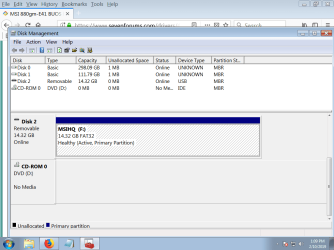
I will make the screen shot you request but what Step 5 are we talking about?
My lookup of what I could find on the hault point has to do with being on the
wrong computer. I have seen the routine to delete drivers in Disk Management and
let the HD do a 'discovery' process as if the HD were a fresh install. But I may be muddying the water.

I'm retrieving some things as I mentioned earlier. What I'd like to put in my
howto files is any Repair Install available for Win7 that I haven't mastered.

I appreciate your patience. I will mark solved when this Linux Routine shows the Desktop folder which was the original issue so we don't drag it out too long.
 

My Computer My Computer

At a glance

Windows 7 x64 UltimateAMD Athlon II x3 4502 GB
Computer type
PC/Desktop
Computer Manufacturer/Model Number
custom
OS
Windows 7 x64 Ultimate
CPU
AMD Athlon II x3 450
Motherboard
MSI 880GM
Memory
2 GB
Hard Drives
various
Browser
Firefox, Opera
Hi loninappleton,

I will make the screen shot you request but what Step 5 are we talking about?

As per the link I posted . . .

5. This step is the most important. Maximize the Disk Management window so it fills your entire screen. Resize the window components so the status and sizes of the partitions are clearly shown.

My lookup of what I could find on the hault point has to do with being on the wrong computer. I have seen the routine to delete drivers in Disk Management and let the HD do a 'discovery' process as if the HD were a fresh install. But I may be muddying the water.

I don't understand the first part!

You don't need to delete anything!

Posting a screenshot of the Disk Management is ONLY to see the current structure that you have at present. I have asked you to do this because you said that previously you have had problems with an install because of the different partitions!

I'm retrieving some things as I mentioned earlier. What I'd like to put in my howto files is any Repair Install available for Win7 that I haven't mastered.

See [2] in my Post #5.

I will mark solved when this Linux Routine shows the Desktop folder which was the original issue so we don't drag it out too long.

Booting the Linux Live DVD will allow you to goto your folders on the OD drive and allow you to copy ALL your important [and want to keep] files to an external HDD!

I hope this helps!
 

My Computer My Computer

At a glance

Win 7 HP SP1 64-bit Vista HB SP2 32-bit Linux...Intel(R) Pentium(R) CPU P6200 @ 2.13GHz4.00 GBIntel(R) Graphics Media Accelerator HD
Computer type
Laptop
Computer Manufacturer/Model Number
Fujitsu LIFEBOOK
OS
Win 7 HP SP1 64-bit Vista HB SP2 32-bit Linux Mint 18.3
CPU
Intel(R) Pentium(R) CPU P6200 @ 2.13GHz
Motherboard
FUJITSU FJNBB06
Memory
4.00 GB
Graphics Card(s)
Intel(R) Graphics Media Accelerator HD
Sound Card
[1] Realtek High Definition Audio [2] Intel(R) Display Audio
Screen Resolution
1366 x 768 x 32 bits (4294967296 colors) @ 59 Hz
Hard Drives
TOSHIBA MK5076GSX
Antivirus
AVG FREE
Some progress. I made the live DVD of Linux Mint. That is running on my test box with the
HD that cannot boot only.


Screen shot means I have to replug some things again. I can fully open and expand to screen shot as
you point out.


As to the hault point, when I ran and was _able_ to run Safe Mode Startup (which still failed)
the boot up files stopped at a specific point. It could not get past that. My other observation was through all this that it got as far as 'preparing the desktop' long wait whie the throbber spins
and then a blue screen with a not genuine message. I wondered if transferring that dll or whatever thefile name was from my working system to the System 32 folder would make the repair.


I was thinking back on what I saw from these failed startups. Two HD Repair disk messages have shown and to select one after the POST. Running the Repair disk shows that one of these is empty and the other contained the only partiton-- the one of the complete disk. Selecting either of these
failed. It's one of those black screens that doesn't tell you much.


I'll see if I can get that screen shot in attached here to not delay. I do all this pretty slowly....


I have what I could screen shot. I looked under all the tabs and options and did not see see Post a Screen Capture Image so I used Paint in the usual way. Also I opened up the side bar. You can see that no paths exist. That's enough for today. Will watch for replies.
 

Attachments

  • disk management list.png
    disk management list.png
    30.3 KB · Views: 0

My Computer My Computer

At a glance

Windows 7 x64 UltimateAMD Athlon II x3 4502 GB
Computer type
PC/Desktop
Computer Manufacturer/Model Number
custom
OS
Windows 7 x64 Ultimate
CPU
AMD Athlon II x3 450
Motherboard
MSI 880GM
Memory
2 GB
Hard Drives
various
Browser
Firefox, Opera
Fooey. That one doesn't look right. I'll keep at it.
 

My Computer My Computer

At a glance

Windows 7 x64 UltimateAMD Athlon II x3 4502 GB
Computer type
PC/Desktop
Computer Manufacturer/Model Number
custom
OS
Windows 7 x64 Ultimate
CPU
AMD Athlon II x3 450
Motherboard
MSI 880GM
Memory
2 GB
Hard Drives
various
Browser
Firefox, Opera
Back
Top