- Local time
- 6:42 AM
- Messages
- 36
OK Guys the USB Stick works on a newer Laptop (Acer Aspire 5732Z with Win 7 Home Premium 64 Bit and 4Gb RAM but not on my older Tower ! ( Win 7 64 Bit, 4Gb RAM. Having checked the manual i'm suspecting it could be because the USB Stick is formatted as NTFS and i suspect that the motherboard only recognizes FAT 32/16. So When i burned the software to the USB Stick it only gave me the option to format as NTFS ! So i'm now thinking i should try software that uses FAT 32. However i'm getting frustrated with the whole process as I've not even started to diagnose my true problem on why the computer wont boot ! I appreciate the help you have all provided but this whole USB direction is starting to seem like a huge waste of my time when maybe i should be using CD or even floppy based media ??? Yea i know. My rig is old. 12 years i think.
So I hope someone with a little spare time and expert knowledge can guide me through what i need to do rather than have you tried this or that or can you try this. Also please make your posts detailed as possible as sometimes i don't understand what it is you require of me or wish me to do or how to do it !!! I'm quite old, like my PC, and my knowledge base is rather out of date !!!
Thank you all for your Time and your Patience
PS. I've reformatted and burned the ISO to my USB stick using USB7ice and its using FAT32 now rather than NTFS. Am off to try it and hopefully it works. In the meantime you could tell me what my next steps are, presuming the USB works and i can boot into the software. What programs do you need me to run and what information do you require of me to collect ! ????
So I hope someone with a little spare time and expert knowledge can guide me through what i need to do rather than have you tried this or that or can you try this. Also please make your posts detailed as possible as sometimes i don't understand what it is you require of me or wish me to do or how to do it !!! I'm quite old, like my PC, and my knowledge base is rather out of date !!!
Thank you all for your Time and your Patience
PS. I've reformatted and burned the ISO to my USB stick using USB7ice and its using FAT32 now rather than NTFS. Am off to try it and hopefully it works. In the meantime you could tell me what my next steps are, presuming the USB works and i can boot into the software. What programs do you need me to run and what information do you require of me to collect ! ????
Last edited:
My Computer
At a glance
Win 7 64 BitIntel Q66004GbR9 270
- Computer type
- PC/Desktop
- Computer Manufacturer/Model Number
- Custom Build
- OS
- Win 7 64 Bit
- CPU
- Intel Q6600
- Motherboard
- Asus P5Q-E
- Memory
- 4Gb
- Graphics Card(s)
- R9 270
- Hard Drives
- 250 Gb Sata SSD
500Gb Sata SSD
xxx Gb HD

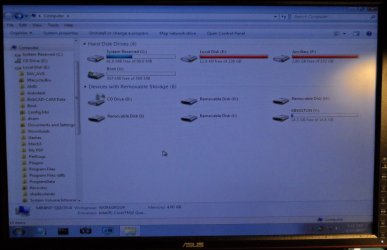

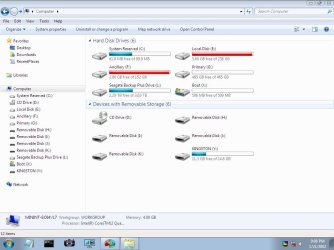
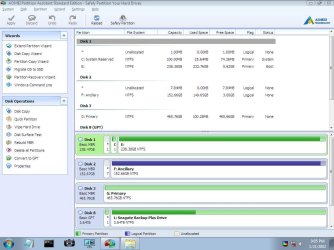
 Duh My Bad. I do want to start focusing on restoring the drive so i can boot to win 7 as normal. Rather than back up my files and format and re-install. I think this is a case of my c drive being reassigned as e so it wont boot and a new drive 100 MB in size is now called c but i don't know how to go about fixing it.
 rive 'which contains windows' it will fix itself and rename itself back to the C drive and if so what happens to the info in the C: drive ?