Win7 64Bit Wont Boot. Restarts after balls morph into windows logo.

OK Guys the USB Stick works on a newer Laptop (Acer Aspire 5732Z with Win 7 Home Premium 64 Bit and 4Gb RAM but not on my older Tower ! ( Win 7 64 Bit, 4Gb RAM. Having checked the manual i'm suspecting it could be because the USB Stick is formatted as NTFS and i suspect that the motherboard only recognizes FAT 32/16. So When i burned the software to the USB Stick it only gave me the option to format as NTFS ! So i'm now thinking i should try software that uses FAT 32. However i'm getting frustrated with the whole process as I've not even started to diagnose my true problem on why the computer wont boot ! I appreciate the help you have all provided but this whole USB direction is starting to seem like a huge waste of my time when maybe i should be using CD or even floppy based media ??? Yea i know. My rig is old. 12 years i think.

So I hope someone with a little spare time and expert knowledge can guide me through what i need to do rather than have you tried this or that or can you try this. Also please make your posts detailed as possible as sometimes i don't understand what it is you require of me or wish me to do or how to do it !!! I'm quite old, like my PC, and my knowledge base is rather out of date !!!

Thank you all for your Time and your Patience

PS. I've reformatted and burned the ISO to my USB stick using USB7ice and its using FAT32 now rather than NTFS. Am off to try it and hopefully it works. In the meantime you could tell me what my next steps are, presuming the USB works and i can boot into the software. What programs do you need me to run and what information do you require of me to collect ! ????
 
Last edited:

My Computer My Computer

At a glance

Win 7 64 BitIntel Q66004GbR9 270
Computer type
PC/Desktop
Computer Manufacturer/Model Number
Custom Build
OS
Win 7 64 Bit
CPU
Intel Q6600
Motherboard
Asus P5Q-E
Memory
4Gb
Graphics Card(s)
R9 270
Hard Drives
250 Gb Sata SSD
500Gb Sata SSD
xxx Gb HD
i suspect that the motherboard only recognizes FAT 32/16

What makes you think that? I have an old 775 socket machine and it doesn't have that problem.

Use usb7ice that I linked earlier to create fat32 usb bootable stick. Alternatively, convert the current stick using aomei free converter.

Otherwise you could burn the iso file to cd. The built in MS tools will work.
 

My Computers My Computers

  • At a glance

    7 X64i5 84002x8gb 3200mhz
    Computer type
    PC/Desktop
    OS
    7 X64
    CPU
    i5 8400
    Motherboard
    gigabyte b365m ds3h
    Memory
    2x8gb 3200mhz
    Hard Drives
    various
    PSU
    pure power 11 400w cm
    Case
    Coolermaster
    Cooling
    cryorig m9i
  • At a glance

    7x64g54008gb ddr4 2400
    Computer type
    PC/Desktop
    OS
    7x64
    CPU
    g5400
    Motherboard
    ga b365m ds3h
    Memory
    8gb ddr4 2400
    PSU
    xfx pro 450w
I cant say for certain whether or not the Motherboard only supports FAT32/16 or not BUT I've just been home and the USB Stick BOOTED ! So i can now access the tools on the ISO. I have the manual and on page 3-4 it NOTES that 'This function can support devices such as a USB flash disk or a floppy disk with FAT 32/16 format and single partition only' However this is specifically referring to the ASUS EZ Flash Utility. All i can say is that i tried ever which way to boot from USB with the NTFS Formatted USB and after reformatting burning using FAT32 it now works. Perhaps i did something wrong before, i'm not sure, I don't think I've changed anything but this time it worked. SO Anyway i took some photos and they are all under 2 MB Jpegs but for whatever reason seven forums cant currently handle the request.

This page isn’t working
www.sevenforums.com is currently unable to handle this request.
HTTP ERROR 500 :/ Sigh.

NB. Although files were jpeg they were recognised as paint.net images. Appending each filename with .jpg has fixed the upload issue allowing me to upload the attached jpegs below.

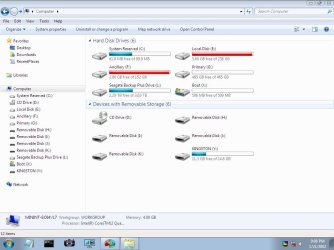
I've had a little poke about with the new tools on the USB and took a couple of photos and my main C Drive is now E and is totally FULL. Only a few KB free space. Meanwhile my C drive is 100 MB of which 60 is MB is in use but it is shown as system reserved ! Meanwhile i have an X Drive under My Computer which is bootable but i don't have an x drive :/
 

Attachments

  • SAM_3622.jpg.JPG
    SAM_3622.jpg.JPG
    838.2 KB · Views: 1
  • SAM_3620.JPG
    SAM_3620.JPG
    1.1 MB · Views: 3
Last edited:

My Computer My Computer

At a glance

Win 7 64 BitIntel Q66004GbR9 270
Computer type
PC/Desktop
Computer Manufacturer/Model Number
Custom Build
OS
Win 7 64 Bit
CPU
Intel Q6600
Motherboard
Asus P5Q-E
Memory
4Gb
Graphics Card(s)
R9 270
Hard Drives
250 Gb Sata SSD
500Gb Sata SSD
xxx Gb HD
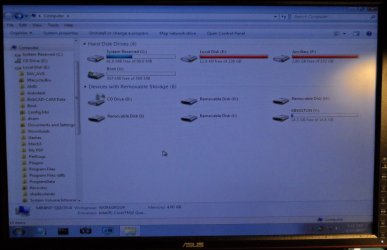
Tht is normal. Winpe assigns drive letter X to itself ( that is a drive created in random access memory and does not affect your hard disk). Other drives are enumerated as they are found. Therefore drive lettering is different in winpe.


If your windows partition is full, you can try deleting/moving any personal/downloaded data you don't need. If you have room on the usb stick, you could move stuff onto there if you don't want to delete it.

You can take screenshots with the little camera icon on the taskbar. You can save them to the usb before uploading them.
 

My Computers My Computers

  • At a glance

    7 X64i5 84002x8gb 3200mhz
    Computer type
    PC/Desktop
    OS
    7 X64
    CPU
    i5 8400
    Motherboard
    gigabyte b365m ds3h
    Memory
    2x8gb 3200mhz
    Hard Drives
    various
    PSU
    pure power 11 400w cm
    Case
    Coolermaster
    Cooling
    cryorig m9i
  • At a glance

    7x64g54008gb ddr4 2400
    Computer type
    PC/Desktop
    OS
    7x64
    CPU
    g5400
    Motherboard
    ga b365m ds3h
    Memory
    8gb ddr4 2400
    PSU
    xfx pro 450w
Umm Thanks, I've always been able to backup files on the drive as I can easily access it via DOS. What im hoping to achieve is to restore its boot functionality without wiping or formatting the drive ! I'm hoping that i haven't just spent days getting a USB drive to operate to take screenshots of my drives etc AND i can see how screenies will be clearer than the 'photos' I've been taking :) Duh My Bad. I do want to start focusing on restoring the drive so i can boot to win 7 as normal. Rather than back up my files and format and re-install. I think this is a case of my c drive being reassigned as e so it wont boot and a new drive 100 MB in size is now called c but i don't know how to go about fixing it.
 

My Computer My Computer

At a glance

Win 7 64 BitIntel Q66004GbR9 270
Computer type
PC/Desktop
Computer Manufacturer/Model Number
Custom Build
OS
Win 7 64 Bit
CPU
Intel Q6600
Motherboard
Asus P5Q-E
Memory
4Gb
Graphics Card(s)
R9 270
Hard Drives
250 Gb Sata SSD
500Gb Sata SSD
xxx Gb HD
It's time to buy another disk.

You need at least 10G free space on partition E: (your C: drive) to load system files as the virtual memory.
 

My Computers My Computers

  • At a glance

    Windows 7 HP 64i5 6600K - 800MHz to 4200MHz4+4G GSkill DDR4 3000IG - Intel 530
    Computer type
    PC/Desktop
    Computer Manufacturer/Model Number
    custom build
    OS
    Windows 7 HP 64
    CPU
    i5 6600K - 800MHz to 4200MHz
    Motherboard
    GA-Z170-HD3P
    Memory
    4+4G GSkill DDR4 3000
    Graphics Card(s)
    IG - Intel 530
    Monitor(s) Displays
    Samsung 226BW
    Screen Resolution
    1680x1050
    Hard Drives
    (1) -1 SM951 – 128GB M.2 AHCI PCIe SSD drive for Windows 7 and Lubuntu
    (2) -1 WD SATA 3 - 1T for Data
    (3) -1 WD SATA 3 - 1T for backup
    PSU
    Thermaltake 450W TR2 gold
    Keyboard
    Old and good Chicony mechanical keyboard
    Mouse
    Logitech mX performance - 9 buttons (had to disable some)
    Internet Speed
    500Mb/s
    Browser
    Firefox 64
    Other Info
    TinyWall firewall
  • At a glance

    Windows 7 Proi7-4500U 800MHz to 3.0GHz(4+4)G DDR3 1600IG intel 4400 + NVIDIA GeForce GT 745M
    Computer type
    Laptop
    System Manufacturer/Model Number
    Asus Q550LF
    OS
    Windows 7 Pro
    CPU
    i7-4500U 800MHz to 3.0GHz
    Motherboard
    Asus Q550LF
    Memory
    (4+4)G DDR3 1600
    Graphics Card(s)
    IG intel 4400 + NVIDIA GeForce GT 745M
    Sound Card
    Realtek
    Monitor(s) Displays
    LG Display LP156WF4-SPH1
    Screen Resolution
    1920 x 1080
    Hard Drives
    BX500 120G SSD for Windows and programs +
    1T HDD for data
    Internet Speed
    500 Mb/s
    Browser
    Firefox
    Other Info
    TinyWall firewall
I'm just going to pop home and will backup or delete some files. Did you mean 10 Giga Byte ? or Mega Byte. I've been meaning to clone the drive onto a larger drive but never got round to it. If i can recover from the current issue i will then clone it but first i will clear some drive space ! What is my next task after freeing some drive space ?
 

My Computer My Computer

At a glance

Win 7 64 BitIntel Q66004GbR9 270
Computer type
PC/Desktop
Computer Manufacturer/Model Number
Custom Build
OS
Win 7 64 Bit
CPU
Intel Q6600
Motherboard
Asus P5Q-E
Memory
4Gb
Graphics Card(s)
R9 270
Hard Drives
250 Gb Sata SSD
500Gb Sata SSD
xxx Gb HD
I believe its the Win 7 Drive Reassign Issue where your C drive becomes your E or F drive
The first thing I would try is unplug ALL external devices (including the USB stick) and see if Windows starts normally.
If not, go back into the BIOS and check if the device where Windows is installed on is the boot drive.

Secondly, your boot drive is super super full! That is a mistake (not done on purpose) most of computer users do because you save day by day stuff on the main drive.

So if after playing a bit in BIOS you aren't able to boot the computer, your next step would be loading the USB stick back and "manually" deleting files or copying (avoid moving) them to the USB stick.
Bare in mind that the FAT32 file system has a 4GB size limit so you may not be able to copy files bigger that 4GB.

took some photos and they are all under 2 MB Jpegs
Never do this mistake so do always upload smaller size pictures.
For this purpose I use Image Resizer, it's quick, light, fast, excellent, just right click on a picture and choose resize: ImageResizer for Windows XP & Windows Vista/Windows 7 (both 32-bit/64-bit) | AVIRAJ AJGEKAR'S BLOG...
 

My Computer My Computer

At a glance

Windows 7 Ultimate x64Intel i5-6600K 3.50GHzCorsair DDR4 2x8GBMSI GeForce GTX1070 Gaming X
Computer type
PC/Desktop
Computer Manufacturer/Model Number
Custom build
OS
Windows 7 Ultimate x64
CPU
Intel i5-6600K 3.50GHz
Motherboard
Asus Pro Z170 Gaming
Memory
Corsair DDR4 2x8GB
Graphics Card(s)
MSI GeForce GTX1070 Gaming X
Sound Card
On board Realtek
Monitor(s) Displays
Dell SP2309W
Screen Resolution
1920x1080
Hard Drives
OS Samsung 850 EVO 500GB SATA III SSD
2x Hitachi Deskstar 1GB SATA data drives
1x Western Digital Caviar Black 1TB SATA data drive
PSU
Corsair HX650W
Case
CoolerMaster CM 690 III
Cooling
Coolermaster Hyper 212 EVO 1x200mm 1x140mm 2x120mm case fan
Keyboard
Logitech usb keyboard
Mouse
Logitech G500 $27 bargain :)
Internet Speed
ADSL2
Antivirus
Microsoft Security Essential, MalwareBytes
Browser
SRWare Iron, Internet Explorer
Other Info
Very happy with this buid.
I struggled a lot to find all compatible parts since I wanted an Intel 1151 based motherboard so to be able to install Windows 7.
I chose this case because it has amazing air flow, it's sturdy and looks good.
The case included 1x 200mm front and 1x 120mm back fans, I added 1x 200mm on the top and 1x120 bottom fans and modded the panels with black stockings for women s
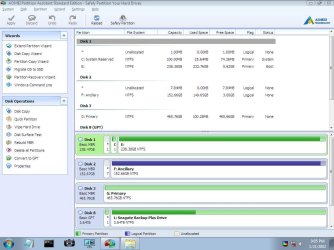
Is your boot disk (disk 1 on the image) a SSD?
If you buy a first grade HDD, you can move the C:\Users (where all your data is) to D:\Users (the new HDD).
My suggestion is a WD Gold enterprise disk. Don't put your data on cheap disk.
WD Gold
 

My Computers My Computers

  • At a glance

    Windows 7 HP 64i5 6600K - 800MHz to 4200MHz4+4G GSkill DDR4 3000IG - Intel 530
    Computer type
    PC/Desktop
    Computer Manufacturer/Model Number
    custom build
    OS
    Windows 7 HP 64
    CPU
    i5 6600K - 800MHz to 4200MHz
    Motherboard
    GA-Z170-HD3P
    Memory
    4+4G GSkill DDR4 3000
    Graphics Card(s)
    IG - Intel 530
    Monitor(s) Displays
    Samsung 226BW
    Screen Resolution
    1680x1050
    Hard Drives
    (1) -1 SM951 – 128GB M.2 AHCI PCIe SSD drive for Windows 7 and Lubuntu
    (2) -1 WD SATA 3 - 1T for Data
    (3) -1 WD SATA 3 - 1T for backup
    PSU
    Thermaltake 450W TR2 gold
    Keyboard
    Old and good Chicony mechanical keyboard
    Mouse
    Logitech mX performance - 9 buttons (had to disable some)
    Internet Speed
    500Mb/s
    Browser
    Firefox 64
    Other Info
    TinyWall firewall
  • At a glance

    Windows 7 Proi7-4500U 800MHz to 3.0GHz(4+4)G DDR3 1600IG intel 4400 + NVIDIA GeForce GT 745M
    Computer type
    Laptop
    System Manufacturer/Model Number
    Asus Q550LF
    OS
    Windows 7 Pro
    CPU
    i7-4500U 800MHz to 3.0GHz
    Motherboard
    Asus Q550LF
    Memory
    (4+4)G DDR3 1600
    Graphics Card(s)
    IG intel 4400 + NVIDIA GeForce GT 745M
    Sound Card
    Realtek
    Monitor(s) Displays
    LG Display LP156WF4-SPH1
    Screen Resolution
    1920 x 1080
    Hard Drives
    BX500 120G SSD for Windows and programs +
    1T HDD for data
    Internet Speed
    500 Mb/s
    Browser
    Firefox
    Other Info
    TinyWall firewall
Never do this mistake so do always upload smaller size pictures.
For this purpose I use Image Resizer, it's quick, light, fast, excellent, just right click on a picture and choose resize: ImageResizer for Windows XP & Windows Vista/Windows 7 (both 32-bit/64-bit) | AVIRAJ AJGEKAR'S BLOG...

That's palliative.
What is the meaning of having a high resolution camera if you degrade the image just to copy them to a disk?
My camera makes images that are 34M (raw) or 14M jpg. I bought a large disk.
 

My Computers My Computers

  • At a glance

    Windows 7 HP 64i5 6600K - 800MHz to 4200MHz4+4G GSkill DDR4 3000IG - Intel 530
    Computer type
    PC/Desktop
    Computer Manufacturer/Model Number
    custom build
    OS
    Windows 7 HP 64
    CPU
    i5 6600K - 800MHz to 4200MHz
    Motherboard
    GA-Z170-HD3P
    Memory
    4+4G GSkill DDR4 3000
    Graphics Card(s)
    IG - Intel 530
    Monitor(s) Displays
    Samsung 226BW
    Screen Resolution
    1680x1050
    Hard Drives
    (1) -1 SM951 – 128GB M.2 AHCI PCIe SSD drive for Windows 7 and Lubuntu
    (2) -1 WD SATA 3 - 1T for Data
    (3) -1 WD SATA 3 - 1T for backup
    PSU
    Thermaltake 450W TR2 gold
    Keyboard
    Old and good Chicony mechanical keyboard
    Mouse
    Logitech mX performance - 9 buttons (had to disable some)
    Internet Speed
    500Mb/s
    Browser
    Firefox 64
    Other Info
    TinyWall firewall
  • At a glance

    Windows 7 Proi7-4500U 800MHz to 3.0GHz(4+4)G DDR3 1600IG intel 4400 + NVIDIA GeForce GT 745M
    Computer type
    Laptop
    System Manufacturer/Model Number
    Asus Q550LF
    OS
    Windows 7 Pro
    CPU
    i7-4500U 800MHz to 3.0GHz
    Motherboard
    Asus Q550LF
    Memory
    (4+4)G DDR3 1600
    Graphics Card(s)
    IG intel 4400 + NVIDIA GeForce GT 745M
    Sound Card
    Realtek
    Monitor(s) Displays
    LG Display LP156WF4-SPH1
    Screen Resolution
    1920 x 1080
    Hard Drives
    BX500 120G SSD for Windows and programs +
    1T HDD for data
    Internet Speed
    500 Mb/s
    Browser
    Firefox
    Other Info
    TinyWall firewall
The letters you see apply only in winpe and do not affect anything on your hard drive.

You can't boot because there isn't enough space on the windows partition.

Umm Thanks, I've always been able to backup files on the drive as I can easily access it via DOS. What im hoping to achieve is to restore its boot functionality without wiping or formatting the drive ! I'm hoping that i haven't just spent days getting a USB drive to operate to take screenshots of my drives etc AND i can see how screenies will be clearer than the 'photos' I've been taking :) Duh My Bad. I do want to start focusing on restoring the drive so i can boot to win 7 as normal. Rather than back up my files and format and re-install. I think this is a case of my c drive being reassigned as e so it wont boot and a new drive 100 MB in size is now called c but i don't know how to go about fixing it.
 
Last edited:

My Computers My Computers

  • At a glance

    7 X64i5 84002x8gb 3200mhz
    Computer type
    PC/Desktop
    OS
    7 X64
    CPU
    i5 8400
    Motherboard
    gigabyte b365m ds3h
    Memory
    2x8gb 3200mhz
    Hard Drives
    various
    PSU
    pure power 11 400w cm
    Case
    Coolermaster
    Cooling
    cryorig m9i
  • At a glance

    7x64g54008gb ddr4 2400
    Computer type
    PC/Desktop
    OS
    7x64
    CPU
    g5400
    Motherboard
    ga b365m ds3h
    Memory
    8gb ddr4 2400
    PSU
    xfx pro 450w
OK so if i delete/back up some files from my E:Drive 'which contains windows' it will fix itself and rename itself back to the C drive and if so what happens to the info in the C: drive ?
 

My Computer My Computer

At a glance

Win 7 64 BitIntel Q66004GbR9 270
Computer type
PC/Desktop
Computer Manufacturer/Model Number
Custom Build
OS
Win 7 64 Bit
CPU
Intel Q6600
Motherboard
Asus P5Q-E
Memory
4Gb
Graphics Card(s)
R9 270
Hard Drives
250 Gb Sata SSD
500Gb Sata SSD
xxx Gb HD

My Computer My Computer

At a glance

Windows 7 Ultimate x64Intel i5-6600K 3.50GHzCorsair DDR4 2x8GBMSI GeForce GTX1070 Gaming X
Computer type
PC/Desktop
Computer Manufacturer/Model Number
Custom build
OS
Windows 7 Ultimate x64
CPU
Intel i5-6600K 3.50GHz
Motherboard
Asus Pro Z170 Gaming
Memory
Corsair DDR4 2x8GB
Graphics Card(s)
MSI GeForce GTX1070 Gaming X
Sound Card
On board Realtek
Monitor(s) Displays
Dell SP2309W
Screen Resolution
1920x1080
Hard Drives
OS Samsung 850 EVO 500GB SATA III SSD
2x Hitachi Deskstar 1GB SATA data drives
1x Western Digital Caviar Black 1TB SATA data drive
PSU
Corsair HX650W
Case
CoolerMaster CM 690 III
Cooling
Coolermaster Hyper 212 EVO 1x200mm 1x140mm 2x120mm case fan
Keyboard
Logitech usb keyboard
Mouse
Logitech G500 $27 bargain :)
Internet Speed
ADSL2
Antivirus
Microsoft Security Essential, MalwareBytes
Browser
SRWare Iron, Internet Explorer
Other Info
Very happy with this buid.
I struggled a lot to find all compatible parts since I wanted an Intel 1151 based motherboard so to be able to install Windows 7.
I chose this case because it has amazing air flow, it's sturdy and looks good.
The case included 1x 200mm front and 1x 120mm back fans, I added 1x 200mm on the top and 1x120 bottom fans and modded the panels with black stockings for women s
Umm well i have a 240gb ssd which was my C drive with windows etc on it. Now this is called E. However i still have a C: with a boot folder or something on it so if in the future i have to rename the e drive back to c what happens ? whats on the 'ghost' c drive currently ? :/ Do they automatically merge ? I want to be careful and not loose any data if i can as it may prove crucial to the operation of installed software and the viewing / retrival of files or the operation of ancillary components connected to my PC. As its so old it will be a real pain to recover drivers etc. Maybe impossible. I don't understand what has occurred here ? Because my SSD is full the PC made a NEW C : ??? If so where is it ?
 

My Computer My Computer

At a glance

Win 7 64 BitIntel Q66004GbR9 270
Computer type
PC/Desktop
Computer Manufacturer/Model Number
Custom Build
OS
Win 7 64 Bit
CPU
Intel Q6600
Motherboard
Asus P5Q-E
Memory
4Gb
Graphics Card(s)
R9 270
Hard Drives
250 Gb Sata SSD
500Gb Sata SSD
xxx Gb HD
1. The drive letters you see from boot media have nothing to do with the drive letters allocated by your installed operating system.

They are completely independent.


2. Windows cannot boot with only a few mb of disk space.

You need to delete stuff from your windows partition (which is shown as E from booted media).


3.The little 100 mb partition contains the boot critical files. You haven't seen it before because by default your windows installation does not allocate a drive letter to it.
 
Last edited:

My Computers My Computers

  • At a glance

    7 X64i5 84002x8gb 3200mhz
    Computer type
    PC/Desktop
    OS
    7 X64
    CPU
    i5 8400
    Motherboard
    gigabyte b365m ds3h
    Memory
    2x8gb 3200mhz
    Hard Drives
    various
    PSU
    pure power 11 400w cm
    Case
    Coolermaster
    Cooling
    cryorig m9i
  • At a glance

    7x64g54008gb ddr4 2400
    Computer type
    PC/Desktop
    OS
    7x64
    CPU
    g5400
    Motherboard
    ga b365m ds3h
    Memory
    8gb ddr4 2400
    PSU
    xfx pro 450w
OK Guys I've freed up some space on my E Drive and added a G drive that's twice the capacity. If all that's preventing me from booting is storage space, i was actually down to only a few KiloByte left on the E Drive then i'm thinking about just copying it in its entirety to the G drive which I've already named Primary in preparation and which has also had a full Format. Using the tools on the USB drive how straight forward is it to copy the E drive or clone it onto the G drive. I did this once before many years ago using software that was DOS based and came on 6 floppy disks. It might have been called A-Open but i was playing with lots of softwarez back then and my memory isn't what it used to be unfortunately. Please be patient with me as although i can seem slow, well i guess I am slow, i am not however stupid. Just getting old :(
 

Attachments

  • Computer.jpg.jpg
    Computer.jpg.jpg
    73.2 KB · Views: 0
  • Part.jpg.jpg
    Part.jpg.jpg
    91.4 KB · Views: 0

My Computer My Computer

At a glance

Win 7 64 BitIntel Q66004GbR9 270
Computer type
PC/Desktop
Computer Manufacturer/Model Number
Custom Build
OS
Win 7 64 Bit
CPU
Intel Q6600
Motherboard
Asus P5Q-E
Memory
4Gb
Graphics Card(s)
R9 270
Hard Drives
250 Gb Sata SSD
500Gb Sata SSD
xxx Gb HD
OK Guys I've freed up some space on my E Drive
That's NOT enough! Windows allocates temporary tasks (files) in the RAM but also in the boot drive (by default) and the size can increase depending on what programs you're using. I see you're working on a 3D application so that could easily eat that poor 5GB of empty space.
You need to leave at least 20-30% free space on that drive.
and added a G drive that's twice the capacity
That was NOT the right moment to do that because you still need to restore Windows' drive letter and by adding more drives Windows keeps on generating more letters so you add mess over mess.
I suggested you to unplug everything but the USB key (and of course the boot drive) if you're using it because in this way we can see if Windows restores the right drive's letter.
3/4 of what you wrote in this latest post is unhelpful because it's not really easy to understand you then you add a lot of feeling and not problem related information so if you want help, you should follow "step by step" the suggestions otherwise you end up formatting you hard drive or even worse going to a PC repair shop.
 

My Computer My Computer

At a glance

Windows 7 Ultimate x64Intel i5-6600K 3.50GHzCorsair DDR4 2x8GBMSI GeForce GTX1070 Gaming X
Computer type
PC/Desktop
Computer Manufacturer/Model Number
Custom build
OS
Windows 7 Ultimate x64
CPU
Intel i5-6600K 3.50GHz
Motherboard
Asus Pro Z170 Gaming
Memory
Corsair DDR4 2x8GB
Graphics Card(s)
MSI GeForce GTX1070 Gaming X
Sound Card
On board Realtek
Monitor(s) Displays
Dell SP2309W
Screen Resolution
1920x1080
Hard Drives
OS Samsung 850 EVO 500GB SATA III SSD
2x Hitachi Deskstar 1GB SATA data drives
1x Western Digital Caviar Black 1TB SATA data drive
PSU
Corsair HX650W
Case
CoolerMaster CM 690 III
Cooling
Coolermaster Hyper 212 EVO 1x200mm 1x140mm 2x120mm case fan
Keyboard
Logitech usb keyboard
Mouse
Logitech G500 $27 bargain :)
Internet Speed
ADSL2
Antivirus
Microsoft Security Essential, MalwareBytes
Browser
SRWare Iron, Internet Explorer
Other Info
Very happy with this buid.
I struggled a lot to find all compatible parts since I wanted an Intel 1151 based motherboard so to be able to install Windows 7.
I chose this case because it has amazing air flow, it's sturdy and looks good.
The case included 1x 200mm front and 1x 120mm back fans, I added 1x 200mm on the top and 1x120 bottom fans and modded the panels with black stockings for women s
The best you can do is to clone the drive to the new one.
On the SIW2 drive you're using there are some softwares to clone the drive to the new one.
 

My Computers My Computers

  • At a glance

    Windows 7 HP 64i5 6600K - 800MHz to 4200MHz4+4G GSkill DDR4 3000IG - Intel 530
    Computer type
    PC/Desktop
    Computer Manufacturer/Model Number
    custom build
    OS
    Windows 7 HP 64
    CPU
    i5 6600K - 800MHz to 4200MHz
    Motherboard
    GA-Z170-HD3P
    Memory
    4+4G GSkill DDR4 3000
    Graphics Card(s)
    IG - Intel 530
    Monitor(s) Displays
    Samsung 226BW
    Screen Resolution
    1680x1050
    Hard Drives
    (1) -1 SM951 – 128GB M.2 AHCI PCIe SSD drive for Windows 7 and Lubuntu
    (2) -1 WD SATA 3 - 1T for Data
    (3) -1 WD SATA 3 - 1T for backup
    PSU
    Thermaltake 450W TR2 gold
    Keyboard
    Old and good Chicony mechanical keyboard
    Mouse
    Logitech mX performance - 9 buttons (had to disable some)
    Internet Speed
    500Mb/s
    Browser
    Firefox 64
    Other Info
    TinyWall firewall
  • At a glance

    Windows 7 Proi7-4500U 800MHz to 3.0GHz(4+4)G DDR3 1600IG intel 4400 + NVIDIA GeForce GT 745M
    Computer type
    Laptop
    System Manufacturer/Model Number
    Asus Q550LF
    OS
    Windows 7 Pro
    CPU
    i7-4500U 800MHz to 3.0GHz
    Motherboard
    Asus Q550LF
    Memory
    (4+4)G DDR3 1600
    Graphics Card(s)
    IG intel 4400 + NVIDIA GeForce GT 745M
    Sound Card
    Realtek
    Monitor(s) Displays
    LG Display LP156WF4-SPH1
    Screen Resolution
    1920 x 1080
    Hard Drives
    BX500 120G SSD for Windows and programs +
    1T HDD for data
    Internet Speed
    500 Mb/s
    Browser
    Firefox
    Other Info
    TinyWall firewall
1.

Cloning the Disk

G is another hard disk you have added.(Disk3 in your above screenshot)

Aomei backupper free version has a disk clone function. There is a shortcut to it on the desktop of the boot media.

Clone a Hard Drive or SSD with AOMEI Free Disk Cloning Software

Just use the default settings - you don't need to clone all sectors.

The free version doesn't change the partition sizes, so the cloned partitions will be the same size.

2.

Making the cloned windows partition bigger.

After you have done the clone, you could use Aomei partition assistant to extend the second partition to the right. ( I would be tempted to also create a third partition of about 150 gb on the right, but it not necessary )

Resize is the description aomei uses (extend) the second partition ( the cloned windows partition) to the right. You can extend it all the way if you like [Do not change the starting position of the second partition].


If you prefer, you can use windows disk management to extend the cloned windows partition. That is probably easier for you to use.
 
Last edited:

My Computers My Computers

  • At a glance

    7 X64i5 84002x8gb 3200mhz
    Computer type
    PC/Desktop
    OS
    7 X64
    CPU
    i5 8400
    Motherboard
    gigabyte b365m ds3h
    Memory
    2x8gb 3200mhz
    Hard Drives
    various
    PSU
    pure power 11 400w cm
    Case
    Coolermaster
    Cooling
    cryorig m9i
  • At a glance

    7x64g54008gb ddr4 2400
    Computer type
    PC/Desktop
    OS
    7x64
    CPU
    g5400
    Motherboard
    ga b365m ds3h
    Memory
    8gb ddr4 2400
    PSU
    xfx pro 450w
Umm OK who do i listen too ? I can easily unplug the other drives but then what ? Also I guess i can remove more from the E drive. I only got rid of downloads and some videos but i think there's a lot sitting in the temp folder which should not effect anything. Anything i remove now will be copied to the backup first. FYI the PC was running OK if a little sluggish with less than a gig free space for a long time but i accept that this is not an ideal scenario. With all other drives unplugged and another 5-10 Gig freed up what is my next step ? Meanwhile Megahertz can you explain what steps it takes to clone a drive as I've never used this software before. If its just a case of click clone then source/destination then i'm golden but otherwise id prefer some further guidance !
 

My Computer My Computer

At a glance

Win 7 64 BitIntel Q66004GbR9 270
Computer type
PC/Desktop
Computer Manufacturer/Model Number
Custom Build
OS
Win 7 64 Bit
CPU
Intel Q6600
Motherboard
Asus P5Q-E
Memory
4Gb
Graphics Card(s)
R9 270
Hard Drives
250 Gb Sata SSD
500Gb Sata SSD
xxx Gb HD
Back
Top