Update your Win 7 installation media

So i have successfully been able to boot into the installer with usb3 port functionality (off a bootable usb created from an ISO generated from either wkellers script that is using usb3 drivers provided from SIW2, or SIW2's installer and stock files provided at the beginning of this thread) but i am still having trouble with the finalization of the installer.
I am able to complete the first phase of the installer and reboot into the second phase, but during the second phase is where i am having problems. At first i encountered a BSOD, this was caused by the iaStorA.sys driver. Upon removal of said driver, i am now encountering a "Windows could not configure one or more system components" error, which upon reboot continues to display.
Any suggestions would much be appreciated. :-)
 

My Computer My Computer

Computer type
PC/Desktop
Computer Manufacturer/Model Number
Custom, Thinkpad x220, Optiplex GX620
OS
Windows 7 Ultimate x64, Debian 10, OpenBSD 6
CPU
Ryzen 3700X, Intel i5-2520M, Pentium D 945
Motherboard
MSI Meg x570 Ace
Memory
16GB DDR4, 8GB DDR3, 4GB DDR2
Graphics Card(s)
RTX 2060
Hard Drives
256gb WD Nvme,
256gb Liteon NGFF ssd,
2x120gb Sandisk 2.5 ssd,
2x 4TB WD Red,
Antivirus
my common sense
Browser
Firefox, sometimes Icecat
What machine are you tying to install on?
 

My Computers My Computers

System One System Two

  • Computer type
    PC/Desktop
    OS
    7 X64
    CPU
    i5 8400
    Motherboard
    gigabyte b365m ds3h
    Memory
    2x8gb 3200mhz
    Hard Drives
    various
    PSU
    pure power 11 400w cm
    Case
    Coolermaster
    Cooling
    cryorig m9i
  • Computer type
    PC/Desktop
    OS
    7x64
    CPU
    g5400
    Motherboard
    ga b365m ds3h
    Memory
    8gb ddr4 2400
    PSU
    xfx pro 450w
I get this to create a iso and burn to usb. It installs on my asrock b450m-hdv r4.0 with a ryzen 5 3400g and when it gets to the screen for user name and computer name it will not recognize my usb keyboard and dongle for my mouse. so I assume it is USB related. do you have any suggestions ?

Update it will not see any Hard Drives or M.2 on my MSI z370-a pro I3-8100
 

My Computer My Computer

Computer type
PC/Desktop
Computer Manufacturer/Model Number
custom build and a Ideapad 130-15ast
OS
Windows 7 pro
CPU
I3-8100
Motherboard
MSI Z370-A Pro
Memory
16GB PC2400
Graphics Card(s)
GTX970
Sound Card
Motherboard
Monitor(s) Displays
22"
Screen Resolution
1080p
Hard Drives
128 Patriot M.2 (will not accept Windows 7 install yet)
240 PNY SSD
1TB WD 7200
PSU
500w Raidmax 80+
Case
Rosewill ATX Mid Tower Gaming
Cooling
Stock
Keyboard
Logitech
Mouse
Logitech
Internet Speed
25Mb
Antivirus
Zone Alarm
Browser
Chrome
Last edited:

My Computers My Computers

System One System Two

  • Computer type
    PC/Desktop
    OS
    7 X64
    CPU
    i5 8400
    Motherboard
    gigabyte b365m ds3h
    Memory
    2x8gb 3200mhz
    Hard Drives
    various
    PSU
    pure power 11 400w cm
    Case
    Coolermaster
    Cooling
    cryorig m9i
  • Computer type
    PC/Desktop
    OS
    7x64
    CPU
    g5400
    Motherboard
    ga b365m ds3h
    Memory
    8gb ddr4 2400
    PSU
    xfx pro 450w
1.
when it gets to the screen for user name and computer name

I am surprised you got that far with an amd G cpu.


2.
not see any Hard Drives or M.2 on my MSI z370-a pro I3-8100

You probably need the MS nvme updates integrated into the installation media.
 

My Computers My Computers

System One System Two

  • Computer type
    PC/Desktop
    OS
    7 X64
    CPU
    i5 8400
    Motherboard
    gigabyte b365m ds3h
    Memory
    2x8gb 3200mhz
    Hard Drives
    various
    PSU
    pure power 11 400w cm
    Case
    Coolermaster
    Cooling
    cryorig m9i
  • Computer type
    PC/Desktop
    OS
    7x64
    CPU
    g5400
    Motherboard
    ga b365m ds3h
    Memory
    8gb ddr4 2400
    PSU
    xfx pro 450w
I downloaded this "UPDATES-MS-Nvme-Win7x64.zip" and it was a file with .7z on the end... just like in the other slipstreaming thread, I could not get that to run with or without admin privileges. so I thought this was a bad file and did not include this in the burn. so what do I do with the file inside the zip?


also I have some lan drivers that are a setup file how would I add them since they are a .exe?
 

My Computer My Computer

Computer type
PC/Desktop
Computer Manufacturer/Model Number
custom build and a Ideapad 130-15ast
OS
Windows 7 pro
CPU
I3-8100
Motherboard
MSI Z370-A Pro
Memory
16GB PC2400
Graphics Card(s)
GTX970
Sound Card
Motherboard
Monitor(s) Displays
22"
Screen Resolution
1080p
Hard Drives
128 Patriot M.2 (will not accept Windows 7 install yet)
240 PNY SSD
1TB WD 7200
PSU
500w Raidmax 80+
Case
Rosewill ATX Mid Tower Gaming
Cooling
Stock
Keyboard
Logitech
Mouse
Logitech
Internet Speed
25Mb
Antivirus
Zone Alarm
Browser
Chrome
Ok re burned the installation media and now both pc's ar sitting at the username and computer name screens with no input device (mouse/keyboard) working in either, they worked all the way up till now. any help here...
 

My Computer My Computer

Computer type
PC/Desktop
Computer Manufacturer/Model Number
custom build and a Ideapad 130-15ast
OS
Windows 7 pro
CPU
I3-8100
Motherboard
MSI Z370-A Pro
Memory
16GB PC2400
Graphics Card(s)
GTX970
Sound Card
Motherboard
Monitor(s) Displays
22"
Screen Resolution
1080p
Hard Drives
128 Patriot M.2 (will not accept Windows 7 install yet)
240 PNY SSD
1TB WD 7200
PSU
500w Raidmax 80+
Case
Rosewill ATX Mid Tower Gaming
Cooling
Stock
Keyboard
Logitech
Mouse
Logitech
Internet Speed
25Mb
Antivirus
Zone Alarm
Browser
Chrome

My Computers My Computers

System One System Two

  • Computer type
    PC/Desktop
    OS
    7 X64
    CPU
    i5 8400
    Motherboard
    gigabyte b365m ds3h
    Memory
    2x8gb 3200mhz
    Hard Drives
    various
    PSU
    pure power 11 400w cm
    Case
    Coolermaster
    Cooling
    cryorig m9i
  • Computer type
    PC/Desktop
    OS
    7x64
    CPU
    g5400
    Motherboard
    ga b365m ds3h
    Memory
    8gb ddr4 2400
    PSU
    xfx pro 450w
Do the mobos have usb2 or ps2 ports.

Otherwise probably simplest is a usb3 add in card


Yes both have usb 2 and that does not work, they both have ps2 ports. I am going to look at goodwill or salvation army today for a old ps2 mouse/keyboard... hopefully that will work and I can get the usb ports working from in os. will update later today.. thanks for all the help


btw how do I open or use a .7z file :huh:
 

My Computer My Computer

Computer type
PC/Desktop
Computer Manufacturer/Model Number
custom build and a Ideapad 130-15ast
OS
Windows 7 pro
CPU
I3-8100
Motherboard
MSI Z370-A Pro
Memory
16GB PC2400
Graphics Card(s)
GTX970
Sound Card
Motherboard
Monitor(s) Displays
22"
Screen Resolution
1080p
Hard Drives
128 Patriot M.2 (will not accept Windows 7 install yet)
240 PNY SSD
1TB WD 7200
PSU
500w Raidmax 80+
Case
Rosewill ATX Mid Tower Gaming
Cooling
Stock
Keyboard
Logitech
Mouse
Logitech
Internet Speed
25Mb
Antivirus
Zone Alarm
Browser
Chrome

My Computers My Computers

System One System Two

  • Computer type
    PC/Desktop
    OS
    7 X64
    CPU
    i5 8400
    Motherboard
    gigabyte b365m ds3h
    Memory
    2x8gb 3200mhz
    Hard Drives
    various
    PSU
    pure power 11 400w cm
    Case
    Coolermaster
    Cooling
    cryorig m9i
  • Computer type
    PC/Desktop
    OS
    7x64
    CPU
    g5400
    Motherboard
    ga b365m ds3h
    Memory
    8gb ddr4 2400
    PSU
    xfx pro 450w

My Computer My Computer

Computer type
Laptop
Computer Manufacturer/Model Number
Fujitsu LIFEBOOK
OS
Win 7 HP SP1 64-bit Vista HB SP2 32-bit Linux Mint 18.3
CPU
Intel(R) Pentium(R) CPU P6200 @ 2.13GHz
Motherboard
FUJITSU FJNBB06
Memory
4.00 GB
Graphics Card(s)
Intel(R) Graphics Media Accelerator HD
Sound Card
[1] Realtek High Definition Audio [2] Intel(R) Display Audio
Screen Resolution
1366 x 768 x 32 bits (4294967296 colors) @ 59 Hz
Hard Drives
TOSHIBA MK5076GSX
Antivirus
AVG FREE
Update * not sure exactly what change in bios worked for the Intel rig but it is up and running...


will play around with AMD bios now.
 

My Computer My Computer

Computer type
PC/Desktop
Computer Manufacturer/Model Number
custom build and a Ideapad 130-15ast
OS
Windows 7 pro
CPU
I3-8100
Motherboard
MSI Z370-A Pro
Memory
16GB PC2400
Graphics Card(s)
GTX970
Sound Card
Motherboard
Monitor(s) Displays
22"
Screen Resolution
1080p
Hard Drives
128 Patriot M.2 (will not accept Windows 7 install yet)
240 PNY SSD
1TB WD 7200
PSU
500w Raidmax 80+
Case
Rosewill ATX Mid Tower Gaming
Cooling
Stock
Keyboard
Logitech
Mouse
Logitech
Internet Speed
25Mb
Antivirus
Zone Alarm
Browser
Chrome

My Computers My Computers

System One System Two

  • Computer type
    PC/Desktop
    OS
    7 X64
    CPU
    i5 8400
    Motherboard
    gigabyte b365m ds3h
    Memory
    2x8gb 3200mhz
    Hard Drives
    various
    PSU
    pure power 11 400w cm
    Case
    Coolermaster
    Cooling
    cryorig m9i
  • Computer type
    PC/Desktop
    OS
    7x64
    CPU
    g5400
    Motherboard
    ga b365m ds3h
    Memory
    8gb ddr4 2400
    PSU
    xfx pro 450w
Shroomer
It seems canonkong has some modded drivers for 3400g processor and win7

Well that is interesting to say the least, but i really don't think my 3400G was causing the problem. I base this on the fact that the install hangs at the supply name and computer name with a blinking cursor that is just waiting for my input...am i wrong in assuming that it would continue from there if i could input the info?
 

My Computer My Computer

Computer type
PC/Desktop
Computer Manufacturer/Model Number
custom build and a Ideapad 130-15ast
OS
Windows 7 pro
CPU
I3-8100
Motherboard
MSI Z370-A Pro
Memory
16GB PC2400
Graphics Card(s)
GTX970
Sound Card
Motherboard
Monitor(s) Displays
22"
Screen Resolution
1080p
Hard Drives
128 Patriot M.2 (will not accept Windows 7 install yet)
240 PNY SSD
1TB WD 7200
PSU
500w Raidmax 80+
Case
Rosewill ATX Mid Tower Gaming
Cooling
Stock
Keyboard
Logitech
Mouse
Logitech
Internet Speed
25Mb
Antivirus
Zone Alarm
Browser
Chrome
First of all, thank you SIW2 for the wonderful guide and utility! I'm building a new machine which I hope to run Win7 Pro on, but I'm running into the USB3.0 problem with modern processors (in this case, Ryzen 7 2nd gen). After trying several USB3.0 driver injection methods, yours was the first one which got me through the first part of the installer.

I'm now running into a subsequent problem and I was hoping someone here can point me in the right direction. Specifically, my KB/mouse come on for the first part of the installer, but by the time it reboots and is asking for the computer name, my KB/mouse are unresponsive again.

For reference, this is my new build: System Builder - Ryzen 7 2700X 3.7 GHz 8-Core, Radeon RX 560 - 896 4 GB, Core V1 Mini ITX Desktop - PCPartPicker

The machine I'm building the install media from is running Win7 Home Premium, if that matters. When I ran the updater script, I skipped using the nvme drivers, but I did opt for the SIMPLIX install (across all four images, not just professional). After doing this, I ran the SPLIT-WIM script as suggested by the main script when it ended. I copied the resulting installation media folder contents onto a blank flash drive which is my boot media. I then installed Win7 Pro to the SSD (the HDD is currently disconnected as it was causing unrelated problems prior to this and I want to make sure the SSD works consistently first).

Currently when I try to boot from the SSD, it goes to the "preparing for first use" screen, then asks for the computer name, by which point my KB/mouse have stopped responding. Alternately, when I boot from the flash drive again, the drivers there still work and I have KB/mouse control, but of course it asks only to install or repair. I noticed I have some options here, but I'm not sure which if any I should use:

  • I can see an option to load drivers manually in repair mode, but would doing so load the drivers for the already-installed OS, or just the currently-running installer? If the former, what INF file(s) should I point it to? Does the specific driver for USB 3.0 sit somewhere in the 7UPDATE package?
  • I can open a command prompt, which definitely seems useful. Is there a way I can manually install the USB 3.0 driver(s) I'm missing using the command prompt offered by the installer?
To be honest I'm a little confused as to why it'll work when booting from the flash drive only. I wonder if the driver(s) didn't bind to install.wim properly? Should I not have run the split-wim script (I made a backup un-split copy before running it, if that would work better)? Or what else could I have done wrong?

Unfortunately my mobo has no PS/2 port nor any USB ports that aren't 3.0, so that won't be an option. (I've also tried mounting the SSD on my old machine and installing from there, but when I put it back in the new machine, it went directly into BIOS unless I told it to override and attempt SSD boot, at which point it showed a black screen indefinitely until shutdown. Evidently the hardware is too different, which is unsurprising as the old machine's parts are from 2010-2012.)

Thank you all in advance. I'm trying to get this done ASAP as some of the parts have a 15-day return policy and in the unfortunate event I can't use them, I need to find out quickly.
 

My Computer My Computer

Computer type
PC/Desktop
OS
Win7 Pro x64
CPU
AMD Ryzen 7 2700X
Motherboard
Gigabyte Aorus B450 I Pro Wifi
Memory
32GB (Corsair Vengeance)
Graphics Card(s)
Radeon RX 560 4GB (Gigabyte)
Sound Card
Realtek (onboard)
Hard Drives
WD SSD 500GB / WD HDD 1TB
Browser
Firefox (Main), Opera (Alt)
Other Info
TP-Link Archer T3U Wireless NIC (onboard wifi wasn't Win7 compatible)

My Computers My Computers

System One System Two

  • Computer type
    PC/Desktop
    OS
    7 X64
    CPU
    i5 8400
    Motherboard
    gigabyte b365m ds3h
    Memory
    2x8gb 3200mhz
    Hard Drives
    various
    PSU
    pure power 11 400w cm
    Case
    Coolermaster
    Cooling
    cryorig m9i
  • Computer type
    PC/Desktop
    OS
    7x64
    CPU
    g5400
    Motherboard
    ga b365m ds3h
    Memory
    8gb ddr4 2400
    PSU
    xfx pro 450w
B450 I AORUS PRO WIFI (rev. 1.0) | Motherboard - GIGABYTE Global


-dl-driver

2 x USB 2.0/1.1 ports available through the internal USB header

Can you link those to anything? Maybe needs to be enabled in bios
Nothing I have available at present. The case has 3.0 ports on the outside so I'd probably have to look into buying some external hardware to hook up to that header, assuming that's even possible. The mobo manual refers to an optional USB bracket ("please contact the local dealer"), though I don't know where it could possibly hook up. I guess I'd be willing to have a couple USB2.0 ports dangling around for the couple hours it'll take to get USB3.0 all working, assuming that's something I can buy.

Unless there's something else I could plug into that header? I can't think of anything, unless I shut off the current machine and steal the cord for its front USB2.0 ports (and I don't think that's long enough to reach into the other case, even if I could do that).

EDIT: Looking at that driver page, I don't see anything in there which mentions USB in the driver list. That portion of the page seems to focus on RAID (which I'm not planning on using) and AHCI (which I don't believe I need, given that the mobo detects the SSD just fine?). There's also a "USB Installation Tool," but that's under Utility, so probably something that needs to be run after the OS is fully installed?
 
Last edited:

My Computer My Computer

Computer type
PC/Desktop
OS
Win7 Pro x64
CPU
AMD Ryzen 7 2700X
Motherboard
Gigabyte Aorus B450 I Pro Wifi
Memory
32GB (Corsair Vengeance)
Graphics Card(s)
Radeon RX 560 4GB (Gigabyte)
Sound Card
Realtek (onboard)
Hard Drives
WD SSD 500GB / WD HDD 1TB
Browser
Firefox (Main), Opera (Alt)
Other Info
TP-Link Archer T3U Wireless NIC (onboard wifi wasn't Win7 compatible)
I apologize for the double-post, but for some reason the edit button is gone from my previous one.

I did find some listings for USB 2.0 ports which seem like they might connect to that header. They come in the form of an expansion bracket (which I guess I should've assumed; sorry). I don't have any bracket space to spare in this case (seeing as the GPU helpfully covers up both ports), but again I don't mind connecting them temporarily if I can eventually get the 3.0 ports working.

I do have one concern with this method. One of the pages I researched for the USB problem mentions ports failing to work for CPU-based ports rather than chipset ports (How To Get Ryzen Working on Windows 7 x64). I don't know enough about this stuff to tell whether that header counts as a chipset based port or a CPU based port. Would you know and/or is there a way I could tell?

If there's a solution based on loading another driver from the installer or tweaking the injector, that'd still be ideal if it's possible (just so I don't end up buying a USB2.0 bracket which ends up going unused after this install).
 

My Computer My Computer

Computer type
PC/Desktop
OS
Win7 Pro x64
CPU
AMD Ryzen 7 2700X
Motherboard
Gigabyte Aorus B450 I Pro Wifi
Memory
32GB (Corsair Vengeance)
Graphics Card(s)
Radeon RX 560 4GB (Gigabyte)
Sound Card
Realtek (onboard)
Hard Drives
WD SSD 500GB / WD HDD 1TB
Browser
Firefox (Main), Opera (Alt)
Other Info
TP-Link Archer T3U Wireless NIC (onboard wifi wasn't Win7 compatible)

My Computers My Computers

System One System Two

  • Computer type
    PC/Desktop
    OS
    7 X64
    CPU
    i5 8400
    Motherboard
    gigabyte b365m ds3h
    Memory
    2x8gb 3200mhz
    Hard Drives
    various
    PSU
    pure power 11 400w cm
    Case
    Coolermaster
    Cooling
    cryorig m9i
  • Computer type
    PC/Desktop
    OS
    7x64
    CPU
    g5400
    Motherboard
    ga b365m ds3h
    Memory
    8gb ddr4 2400
    PSU
    xfx pro 450w
Otherwise, you could try and integrate drivers using winpe.

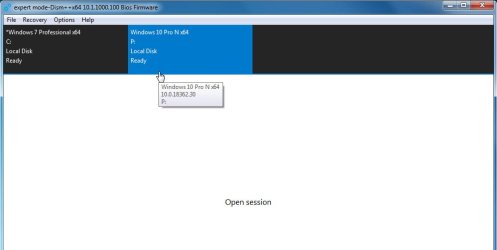
Dism++ will run in winpe. View attachment Dism++10.1.1000.100.zip

1. Click the target windows partition at the top to highlight it in blue

2.jpg


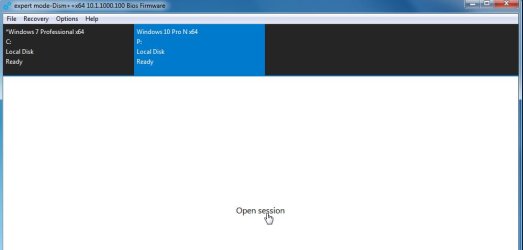
2. Click Open Session

3.jpg

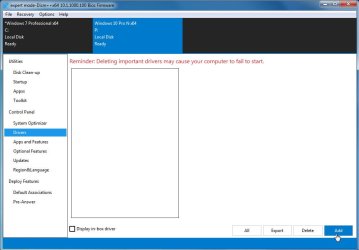
3. Click Drivers in left pane

4.jpg

4. Click ADD and browse to the driver FOLDER
 
Last edited:

My Computers My Computers

System One System Two

  • Computer type
    PC/Desktop
    OS
    7 X64
    CPU
    i5 8400
    Motherboard
    gigabyte b365m ds3h
    Memory
    2x8gb 3200mhz
    Hard Drives
    various
    PSU
    pure power 11 400w cm
    Case
    Coolermaster
    Cooling
    cryorig m9i
  • Computer type
    PC/Desktop
    OS
    7x64
    CPU
    g5400
    Motherboard
    ga b365m ds3h
    Memory
    8gb ddr4 2400
    PSU
    xfx pro 450w
Back
Top