Update your Win 7 installation media

It doesn't read that way to me.
The "universal" usb3 drivers work for most systems. There might be some systems where they don't.
That is why there are the " " around the word universal.
 

My Computers My Computers

System One System Two

  • Computer type
    PC/Desktop
    OS
    7 X64
    CPU
    i5 8400
    Motherboard
    gigabyte b365m ds3h
    Memory
    2x8gb 3200mhz
    Hard Drives
    various
    PSU
    pure power 11 400w cm
    Case
    Coolermaster
    Cooling
    cryorig m9i
  • Computer type
    PC/Desktop
    OS
    7x64
    CPU
    g5400
    Motherboard
    ga b365m ds3h
    Memory
    8gb ddr4 2400
    PSU
    xfx pro 450w
Hi all :)

I'm quite impressed of all the great work done here !!!

I'm desperately trying to install win7 home premium on an nvme 250GB.
The 2 present devices will be the USB key and the nvme disk on the motherboard.

My simple question is what are the rufus options ( as i don't catch all of them ) for the install to be simple and fluent ?
( provided it detects my nvme disk x)) )

Thanks in advance and also thanks a bunch for all the great work !!!!

regards.
 

My Computer My Computer

Computer type
PC/Desktop
OS
win7 64
I answer to myself....

Use simply the base options, boot in UEFI, lauch win installer and the NVME disk is finally detected 8-D

Thanks a lot and have a nice day !
 

My Computer My Computer

Computer type
PC/Desktop
OS
win7 64
Did you split the install.wim to fit on fat32 ?

:-)
 

My Computers My Computers

System One System Two

  • Computer type
    PC/Desktop
    OS
    7 X64
    CPU
    i5 8400
    Motherboard
    gigabyte b365m ds3h
    Memory
    2x8gb 3200mhz
    Hard Drives
    various
    PSU
    pure power 11 400w cm
    Case
    Coolermaster
    Cooling
    cryorig m9i
  • Computer type
    PC/Desktop
    OS
    7x64
    CPU
    g5400
    Motherboard
    ga b365m ds3h
    Memory
    8gb ddr4 2400
    PSU
    xfx pro 450w
Nope i didn't :)

the key was formatted with ntfs and the final image was close to 5GB
 

My Computer My Computer

Computer type
PC/Desktop
OS
win7 64
If you used Rufus and left the program choices as default, you should have no problem with it. You can use 7zip to extract the win7_iso contents to a folder and run setup.exe for repair install. Need to have your 25 character product key, and choose Upgrade, automatic.
Repair Install to Fix Windows 7 Without Reformatting by Britec ...


My Computer My Computer

Computer type
PC/Desktop
Computer Manufacturer/Model Number
HP Desktop & Compaq Laptop
OS
Win 10 x64, Linux Lite, Win 7 x64, BlackArch, & Kali
Hard Drives
Samsung 850 Pro 256Gb,
Hitachi HDD 1Tb,
Crucial MX SSD 250Gb
Segate 3Tb USB 3.0 Ext. Backup HDD
Internet Speed
150Mbps dn, 20Mbps up
Antivirus
Avast Free, Malwarebytes Anti-Exploit & Anti-Ransomware
Browser
Firefox, Chrome, Opera, & VPN
Hi Snick !

Yes, rufus seems to be a very good and simple to use software :)
What i expected from the rufus made key was to boot on the key and be able to install seven on my NVME disk.

All ran like a charm :) and i retrieved my old seven botting in seconds on the flash disk....
 

My Computer My Computer

Computer type
PC/Desktop
OS
win7 64
Update to simplix

Just to let you know simplix has been updated to Version 20.3.12. I don't believe your script will use this file.
 

My Computer My Computer

Computer type
PC/Desktop
OS
windows 10 64 bit
It will use whatever updatepack is placed in the 7UPv50 folder.

See first post.

If you use the downloader linked on the first post, it will download the latest updatepack

For clarity, I have changed the description to say it will download the latest.
 

My Computers My Computers

System One System Two

  • Computer type
    PC/Desktop
    OS
    7 X64
    CPU
    i5 8400
    Motherboard
    gigabyte b365m ds3h
    Memory
    2x8gb 3200mhz
    Hard Drives
    various
    PSU
    pure power 11 400w cm
    Case
    Coolermaster
    Cooling
    cryorig m9i
  • Computer type
    PC/Desktop
    OS
    7x64
    CPU
    g5400
    Motherboard
    ga b365m ds3h
    Memory
    8gb ddr4 2400
    PSU
    xfx pro 450w
This is a superb package especially since it puts the NVMe and USB 3.0 drivers in, but I tried to slipstream updates using the latest Simplex pack UpdatePack7R2-20.3.12.exe and when installing Windows 7 (x64), no updates were installed and it said 119 important updates were needed.

Is there an alternative way, avoiding using the Simplex pack?

If I just throw all the .msu files into this folder:

C:\7UPv50\UPDATES\Installx64

Then run 7UPDATERv50.cmd, will that slipstream them?
 

My Computer My Computer

Computer type
PC/Desktop
OS
Windows 10 x64
If I just throw all the .msu files into this folder:

C:\7UPv50\UPDATES\Installx64

Then run 7UPDATERv50.cmd, will that slipstream them?

Any msu or cabs in that folder will be integrated into install.wim
 

My Computers My Computers

System One System Two

  • Computer type
    PC/Desktop
    OS
    7 X64
    CPU
    i5 8400
    Motherboard
    gigabyte b365m ds3h
    Memory
    2x8gb 3200mhz
    Hard Drives
    various
    PSU
    pure power 11 400w cm
    Case
    Coolermaster
    Cooling
    cryorig m9i
  • Computer type
    PC/Desktop
    OS
    7x64
    CPU
    g5400
    Motherboard
    ga b365m ds3h
    Memory
    8gb ddr4 2400
    PSU
    xfx pro 450w
OK cheers.

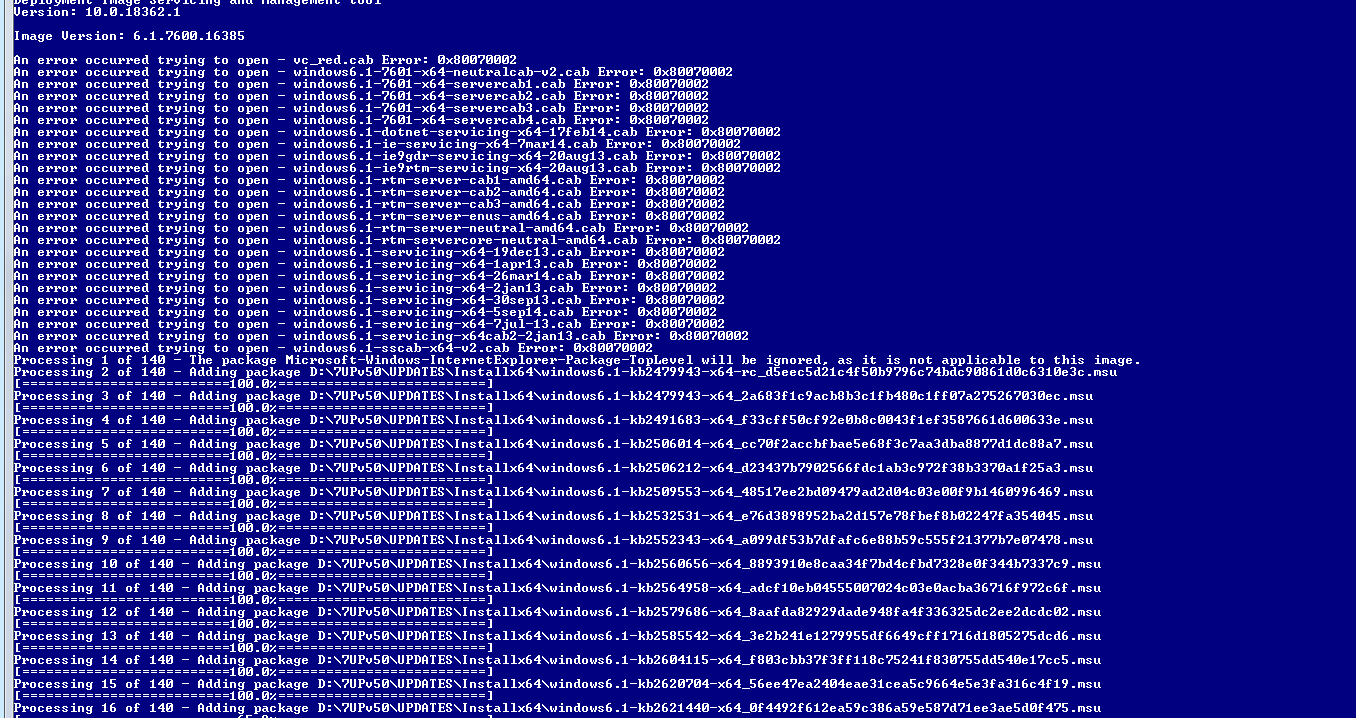
"An error occurred trying to open..." every .cab file I added :cry:

I had right clicked the .exe hotfixes and dragged out the cab files, is there another file that should be dragged out as well?

wbueVKm.png


It's easy enough to install these with a batch file on first boot but it's bugging me why they won't integrate.

Maybe it's because the cab file names have "6.1" and that dot is getting treated as an extension :huh:

A guy on TenForums replied to someone else having the problem, saying this:

Therefore, this won't work: DISM /online /add-package /package-path:c:\downloads\package1.cab
But THIS one works: DISM /online /add-package /package-path:"c:\downloads\package1.cab"


I'll try it with renamed cab files so there's no 6.1 in the name.
 

My Computer My Computer

Computer type
PC/Desktop
OS
Windows 10 x64
I tested the script for adding langpacks which are cabs.
%DISM% /Image:MOUNT /ADD-PACKAGE /PACKAGEPATH:"%TP%\LANGPACKS\Boot%wimarch%" /IgnoreCheck

It is earlier in this thread


Command in the script for updates is the same:
%DISM% /Image:MOUNT /ADD-PACKAGE /PACKAGEPATH:"%TP%\UPDATES\Install%wimarch%" /IgnoreCheck

I don't know what your issue is.
 

My Computers My Computers

System One System Two

  • Computer type
    PC/Desktop
    OS
    7 X64
    CPU
    i5 8400
    Motherboard
    gigabyte b365m ds3h
    Memory
    2x8gb 3200mhz
    Hard Drives
    various
    PSU
    pure power 11 400w cm
    Case
    Coolermaster
    Cooling
    cryorig m9i
  • Computer type
    PC/Desktop
    OS
    7x64
    CPU
    g5400
    Motherboard
    ga b365m ds3h
    Memory
    8gb ddr4 2400
    PSU
    xfx pro 450w

My Computers My Computers

System One System Two

  • Computer type
    PC/Desktop
    OS
    7 X64
    CPU
    i5 8400
    Motherboard
    gigabyte b365m ds3h
    Memory
    2x8gb 3200mhz
    Hard Drives
    various
    PSU
    pure power 11 400w cm
    Case
    Coolermaster
    Cooling
    cryorig m9i
  • Computer type
    PC/Desktop
    OS
    7x64
    CPU
    g5400
    Motherboard
    ga b365m ds3h
    Memory
    8gb ddr4 2400
    PSU
    xfx pro 450w

My Computers My Computers

System One System Two

  • Computer type
    PC/Desktop
    OS
    7 X64
    CPU
    i5 8400
    Motherboard
    gigabyte b365m ds3h
    Memory
    2x8gb 3200mhz
    Hard Drives
    various
    PSU
    pure power 11 400w cm
    Case
    Coolermaster
    Cooling
    cryorig m9i
  • Computer type
    PC/Desktop
    OS
    7x64
    CPU
    g5400
    Motherboard
    ga b365m ds3h
    Memory
    8gb ddr4 2400
    PSU
    xfx pro 450w
I've seen an error recently where every rar file I open says it's corrupt. I can drag the supposedly corrupt rar into VMware and it isn't corrupt. Maybe I should just do the entire procedure inside a VM lol. Something funky is going on.

You could try coverting msu to cab and see if that makes a difference
View attachment 411423

OK cheers I will try this. :cool:

EDIT: That is creating a cab file inside a cab file.

It converted:
windows6.1-7601-x64-neutralcab_9f743bfbc48e6e7ee89260b3349eaf36eb425c4c.exe

To:
windows6.1-7601-x64-neutralcab_9f743bfbc48e6e7ee89260b3349eaf36eb425c4c.cab

When that's double clicked, it contains this:
windows6.1-7601-x64-neutralcab-v2.cab

I originally opened the exe hotfixes with 7-Zip and dragged the cab files out. Most of them only contained one cab file. It's only the exe hotfixes I am having a problem with, the msu files are integrating.
 

My Computer My Computer

Computer type
PC/Desktop
OS
Windows 10 x64
exe2cab works fine here. It is how I got the langpack cab from the exe
 

My Computers My Computers

System One System Two

  • Computer type
    PC/Desktop
    OS
    7 X64
    CPU
    i5 8400
    Motherboard
    gigabyte b365m ds3h
    Memory
    2x8gb 3200mhz
    Hard Drives
    various
    PSU
    pure power 11 400w cm
    Case
    Coolermaster
    Cooling
    cryorig m9i
  • Computer type
    PC/Desktop
    OS
    7x64
    CPU
    g5400
    Motherboard
    ga b365m ds3h
    Memory
    8gb ddr4 2400
    PSU
    xfx pro 450w
Guys I have a simple request, please can two more .cmd files be added to cover:

WIM-MOUNT.cmd
WIM-UNMOUNT.cmd (commit)

It would be cool if the package included these.

I sometimes add my own files to the mounted image (like a few items on the desktop or whatever) and I guess I can do that in the middle of 7UPDATERv50.cmd doing it's stuff - but it would be good if the above two cmd files were there so they can be run manually if and when needed.

I would try to write the cmd files myself but there's so many variables in the 7UPDATERv50.cmd, I'm not even going to dare to attempt it :p

Or the commands could be posted here (for use with the 7UPv50\BIN folder) if anyone knows them.

Cheers.
 

My Computer My Computer

Computer type
PC/Desktop
OS
Windows 10 x64
That is why the user is asked to press any key to unmount. That is the point at which an enthusiast can make any additions etc to mounted image.


OR you can use the IMPORT folder. That is what it there for.

To add something.exe to the desktop:

Inside IMPORT folder create:

Users\Default\Desktop\something.exe

The contents of the IMPORT folder are automatically copied to the mounted install.wim image


OR you could use dism++ if you want to mount\unmount manually. It is in BIN\x64\tools folder
 
Last edited:

My Computers My Computers

System One System Two

  • Computer type
    PC/Desktop
    OS
    7 X64
    CPU
    i5 8400
    Motherboard
    gigabyte b365m ds3h
    Memory
    2x8gb 3200mhz
    Hard Drives
    various
    PSU
    pure power 11 400w cm
    Case
    Coolermaster
    Cooling
    cryorig m9i
  • Computer type
    PC/Desktop
    OS
    7x64
    CPU
    g5400
    Motherboard
    ga b365m ds3h
    Memory
    8gb ddr4 2400
    PSU
    xfx pro 450w
SIW2 that's handy. It's just I am trying to avoid unpacking and re-adding the drivers already included etc.

I could make another copy of the package and take out the drivers that get unpacked. I'd rather just click a cmd file than use DISM++ :-)
 

My Computer My Computer

Computer type
PC/Desktop
OS
Windows 10 x64
Back
Top