Update your Win 7 installation media

Makc1968 who tried few day ago did also boot on WinPE to do this. Is that mandatory ?

The partition that has been sysprepped needs to be captured from outside.

The capture can be done from windows installed on another disk/partition. Or it can be done from winpe.
 

My Computers My Computers

System One System Two

  • Computer type
    PC/Desktop
    OS
    7 X64
    CPU
    i5 8400
    Motherboard
    gigabyte b365m ds3h
    Memory
    2x8gb 3200mhz
    Hard Drives
    various
    PSU
    pure power 11 400w cm
    Case
    Coolermaster
    Cooling
    cryorig m9i
  • Computer type
    PC/Desktop
    OS
    7x64
    CPU
    g5400
    Motherboard
    ga b365m ds3h
    Memory
    8gb ddr4 2400
    PSU
    xfx pro 450w
1. Create another partition

2. Install the updated win7 to that new partition.

3. Boot into that new partition.

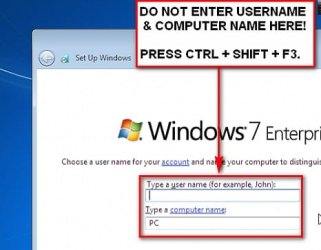
4. When the first oobe box appears asking for username and pc name:

go-into-sysprep.jpg


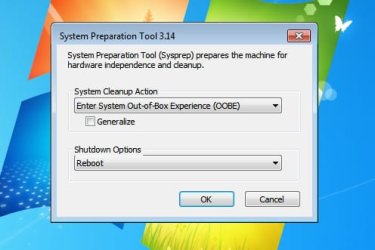
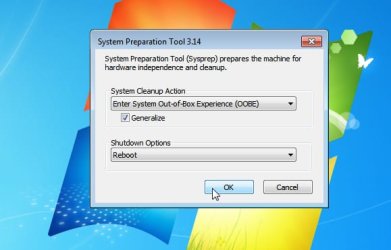
4. The pc will reboot into what is called "audit mode". The sysprep ( System Preparation) window will be on the desktop. You don't need to do anything with that window yet. Just leave it on the desktop.

generalize1.jpg

5. Now you can make customizations. You could install programs, etc. But in this case, the customization we want is to clean up and reduce the size.

6. To do that:
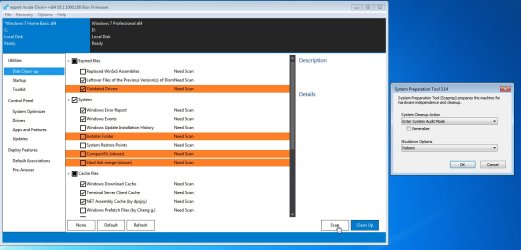
Start up Dism++ which you could have on another partition, or on usb stick.

7. Click Disk Cleanup in the left pane, then Scan

generalize2.jpg
 
Last edited:

My Computers My Computers

System One System Two

  • Computer type
    PC/Desktop
    OS
    7 X64
    CPU
    i5 8400
    Motherboard
    gigabyte b365m ds3h
    Memory
    2x8gb 3200mhz
    Hard Drives
    various
    PSU
    pure power 11 400w cm
    Case
    Coolermaster
    Cooling
    cryorig m9i
  • Computer type
    PC/Desktop
    OS
    7x64
    CPU
    g5400
    Motherboard
    ga b365m ds3h
    Memory
    8gb ddr4 2400
    PSU
    xfx pro 450w
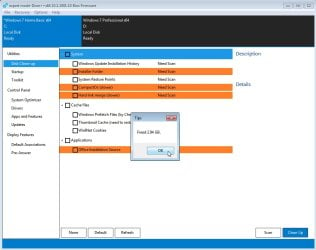
8. Click Cleanup

generalize7.jpg


9. Then close dism++. You can reboot to make sure everything is settled. It will reboot and still be in audit mode, with the syprep window still open on the desktop.


10. Click the Generalize box and either select reboot or shutdown. Do not boot back into that partition.

generalize8.jpg

11.Either boot into another operating system on a different disk/partition - OR boot into winpe.

12. From that other operating system (or winpe ) capture the new partition into a new install.wim file.
 
Last edited:

My Computers My Computers

System One System Two

  • Computer type
    PC/Desktop
    OS
    7 X64
    CPU
    i5 8400
    Motherboard
    gigabyte b365m ds3h
    Memory
    2x8gb 3200mhz
    Hard Drives
    various
    PSU
    pure power 11 400w cm
    Case
    Coolermaster
    Cooling
    cryorig m9i
  • Computer type
    PC/Desktop
    OS
    7x64
    CPU
    g5400
    Motherboard
    ga b365m ds3h
    Memory
    8gb ddr4 2400
    PSU
    xfx pro 450w
Last edited:

My Computers My Computers

System One System Two

  • Computer type
    PC/Desktop
    OS
    7 X64
    CPU
    i5 8400
    Motherboard
    gigabyte b365m ds3h
    Memory
    2x8gb 3200mhz
    Hard Drives
    various
    PSU
    pure power 11 400w cm
    Case
    Coolermaster
    Cooling
    cryorig m9i
  • Computer type
    PC/Desktop
    OS
    7x64
    CPU
    g5400
    Motherboard
    ga b365m ds3h
    Memory
    8gb ddr4 2400
    PSU
    xfx pro 450w
Interesting ,
I just checked Dism++ docs. This tool seems full of potentials.
I just got a Dell Precision M4800 with Win10 Pro x64 already on it.
To be honest , I never played with Win7 or newer in 64 bits before (only Win7 x86 in VM) or UEFI. So I'll still have a lot of old habits to loose and a lot of thing to learn.

I plan to get rid of Win10 , if I manage to get a stable Win7 Pro x64 on it.

So if considering to remove part of the OS ( Print services , Speech Recognition , etc ... ) would that be at the same stage with DISM++ or can it done before , when applying updates ?


By the way , only one thing in Simplix reallly bother me and it's related to the Dell Precision M4800 (Haswell with eDisplayPort bridge):

In the updated KB3125574 (Convenience Rollup for SP1) , are discarded few update for various reason.
Most are really specific (Windows Management Framework 3.0) , but may be really important like this one:
2750841 An IPv6 readiness update is available for Windows 7 and for Windows Server 2008 R2
which has been integrated in Simplix package.
Another that deals with BOSD (the Black one) is a mystery. I can't find any obsolescense info about it
2923766 Black screen when you plug in a monitor on a computer or open a lid of a laptop that is running in Windows

This patch no longer available for Windows7 , but has been kept and integrated in Windows 8 rollups.

only info on https://support.microsoft.com are :

Black screen when you plug in a monitor on a computer or open a lid of a laptop that is running in Windows

Symptoms
Assume that you have a computer that is running Windows RT 8.1, Windows 8.1, Windows Server 2012 R2,
Window 7 Service Pack 1 (SP1), or Windows Server 2008 R2 SP1. The computer is installed with Intel
Shark Bay platform GPU model that uses Embedded DisplayPort (eDP). In this situation, you encounter
one of the following issues:

On a desktop, you plug out an external display device, such as a monitor, and then plug in the same
or another monitor, it shows a black screen.
On a laptop, you close the lid of the laptop,and then open it, it shows a black screen.

Cause
This issue occurs because the system does not send a DxgkDdiCommitVidPn call when a display device
is unplugged or a laptop lid is closed.

Resolution
To resolve this issue in Windows 8.1 and Windows Server 2012 R2, install update 2919355.
To resolve this issue in Windows 7 and Windows Server 2008 R2, install the hotfix that is described in this article.


File Information
The files that apply to a specific product, milestone (RTM,SPn), and service branch (LDR, GDR)
can be identified by examining the file version numbers as shown in the following table:

Version Product Milestone Service branch
6.1.760 1.18xxx Windows 7 and Windows Server 2008 R2 SP1 GDR
6.1.760 1.22xxx Windows 7 and Windows Server 2008 R2 SP1 LDR
6.1.760 1.17xxx Windows 7 and Windows Server 2008 R2 SP1 GDR
GDR service branches contain only those fixes that are widely released to address widespread,
critical issues. LDR service branches contain hotfixes in addition to widely released fixes.


For all supported x86-based versions of Windows 7

File name File version File size Date Time Platform
Cdd.dll 6.1.7601.18391 107,520 12-Feb-2014 02:02 x86
Dxgkrnl.sys 6.1.7601.18391 730,048 12-Feb-2014 02:09 x86
Dxgmms1.sys 6.1.7601.18391 219,072 12-Feb-2014 02:09 x86
Lddmcore.ptxml Not applicable 1,151 13-Jul-2009 20:32 Not applicable
Cdd.dll ²6.1.7601.22596 107,520 12-Feb-2014 02:08 x86
Dxgkrnl.sys 6.1.7601.22596 730,560 12-Feb-2014 02:14 x86
Dxgmms1.sys 6.1.7601.22596 219,072 12-Feb-2014 02:14 x86
Lddmcore.ptxml Not applicable 1,151 13-Jul-2009 20:32 Not applicable

For all supported x64-based versions of Windows 7 and of Windows Server 2008 R2

File name File version File size Date Time Platform
Cdd.dll 6.1.7601.17554 144,384 03-Feb-2011 11:25 x64
Dxgkrnl.sys 6.1.7601.18391 985,536 12-Feb-2014 02:40 x64
Dxgmms1.sys 6.1.7601.18391 265,152 12-Feb-2014 02:40 x64
Lddmcore.ptxml Not applicable 1,151 08-Jul-2010 18:22 Not applicable
Cdd.dll 6.1.7601.17514 144,384 20-Nov-2010 12:55 x64
Dxgkrnl.sys 6.1.7601.22596 986,560 12-Feb-2014 02:40 x64
Dxgmms1.sys 6.1.7601.22596 265,152 12-Feb-2014 02:40 x64
Lddmcore.ptxml Not applicable 1,151 13-Jul-2009 20:25 Not applicable
Does somebody may have info about this patch or could verify on freshly patched OS x64 if the file have been updated since ?
 

My Computer My Computer

Computer type
Laptop
Computer Manufacturer/Model Number
Dell Inspiron 9400 / Precision M4800
OS
WinXP x86 Pro - Win7 Ultimate x86 / Win10 Pro x64
CPU
Dual Core T5500 / i7 4810MQ
Memory
4GB / 24GB
Graphics Card(s)
Intel 945ME / intel HD 4600 - NVIDIA Quadro K1100M
Monitor(s) Displays
Iiyama prolite 22'' - 27''
So if considering to remove part of the OS ( Print services , Speech Recognition , etc ... ) would that be at the same stage with DISM++ or can it done before , when applying updates ?

What are you going to use to remove parts of the OS?
You can disable features (turn on or off) with dism++, but is not a tool for removing parts of the OS.


In the updated KB3125574 (Convenience Rollup for SP1) , are discarded few update for various reason.
Most are really specific (Windows Management Framework 3.0) , but may be really important like this one:
Quote:
2750841 An IPv6 readiness update is available for Windows 7 and for Windows Server 2008 R2
which has been integrated in Simplix package.
Another that deals with BOSD (the Black one) is a mystery. I can't find any obsolescense info about it
2923766 Black screen when you plug in a monitor on a computer or open a lid of a laptop that is running in Windows

I don't know about any of that, maybe ask Simplix. Maybe 2923766 was included in a later update
 

My Computers My Computers

System One System Two

  • Computer type
    PC/Desktop
    OS
    7 X64
    CPU
    i5 8400
    Motherboard
    gigabyte b365m ds3h
    Memory
    2x8gb 3200mhz
    Hard Drives
    various
    PSU
    pure power 11 400w cm
    Case
    Coolermaster
    Cooling
    cryorig m9i
  • Computer type
    PC/Desktop
    OS
    7x64
    CPU
    g5400
    Motherboard
    ga b365m ds3h
    Memory
    8gb ddr4 2400
    PSU
    xfx pro 450w
What are you going to use to remove parts of the OS?
You can disable features (turn on or off) with dism++, but is not a tool for removing parts of the OS.

Speech support (440 Mo), Natural Language (1,12 Go), Tablet PC (392 Mo).
In XP, with NLite, I removed Printing Service , Fax & modem , Windows Media Player , Lot of useless things like Accessibility ... that I don't even remember. It was almost 8 or 7 Year ago and I still use this tuned OS.

I don't know about any of that, maybe ask Simplix. Maybe 2923766 was included in a later update

Hum ; Honestly ? I really doubt about my skills in russian tongue :sarc:

Is that so complicated to get the file version , size and creation date of Cdd.dll Dxgkrnl.sys Dxgmms1.sys Lddmcore.ptxml ?
 

My Computer My Computer

Computer type
Laptop
Computer Manufacturer/Model Number
Dell Inspiron 9400 / Precision M4800
OS
WinXP x86 Pro - Win7 Ultimate x86 / Win10 Pro x64
CPU
Dual Core T5500 / i7 4810MQ
Memory
4GB / 24GB
Graphics Card(s)
Intel 945ME / intel HD 4600 - NVIDIA Quadro K1100M
Monitor(s) Displays
Iiyama prolite 22'' - 27''
Is that so complicated to get the file version , size and creation date of Cdd.dll

Latest simplix pack cdd.dll version 6.1.7601.24546

So it is more recent. Maybe it incorporates what was done in that version you speak of. I don't know. I have not heard of that issue before.
 
Last edited:

My Computers My Computers

System One System Two

  • Computer type
    PC/Desktop
    OS
    7 X64
    CPU
    i5 8400
    Motherboard
    gigabyte b365m ds3h
    Memory
    2x8gb 3200mhz
    Hard Drives
    various
    PSU
    pure power 11 400w cm
    Case
    Coolermaster
    Cooling
    cryorig m9i
  • Computer type
    PC/Desktop
    OS
    7x64
    CPU
    g5400
    Motherboard
    ga b365m ds3h
    Memory
    8gb ddr4 2400
    PSU
    xfx pro 450w
Latest simplix pack cdd.dll version 6.1.7601.24546

So it is more recent. Maybe it incorporates what was done in that version you speak of. I don't know. I have not heard of that issue before.

Yes , by another update.

found these records in 'the convience update' cvs-file-list :

"Cdd.dll","6.1.7601.23403","107,520","25-Mar-2016","18:26","x86","None","Not applicable",
"Dxgkrnl.sys","6.1.7601.23403","730,344","25-Mar-2016","18:39","x86","None","Not applicable",
"Dxgmms1.sys","6.1.7601.23403","218,856","25-Mar-2016","18:39","x86","None","Not applicable",
"Lddmcore.ptxml","Not applicable","1,151","25-Mar-2016","14:44","Not applicable","None","Not applicable"
[...]
"Cdd.dll","6.1.7601.23403","144,384","25-Mar-2016","18:55","x64","None","Not applicable",
"Dxgkrnl.sys","6.1.7601.23403","986,344","25-Mar-2016","19:09","x64","None","Not applicable",
"Dxgmms1.sys","6.1.7601.23403","264,936","25-Mar-2016","19:09","x64","None","Not applicable",
"Lddmcore.ptxml","Not applicable","1,151","25-Mar-2016","14:43","Not applicable","None","Not applicable",

which means there were already updated for another matter in this same rollup , so, all should be fine.
And that's why you never heard about that before.
If you're curious about why I care so much of this matter : check this thread on M4800 on Spiceworks Forum. This model is a notorious plague. (As all the previous victims , I discovered that after I bying it)
sorry for the disturbance :o (M$ catalog.update website is so archaic)

 

My Computer My Computer

Computer type
Laptop
Computer Manufacturer/Model Number
Dell Inspiron 9400 / Precision M4800
OS
WinXP x86 Pro - Win7 Ultimate x86 / Win10 Pro x64
CPU
Dual Core T5500 / i7 4810MQ
Memory
4GB / 24GB
Graphics Card(s)
Intel 945ME / intel HD 4600 - NVIDIA Quadro K1100M
Monitor(s) Displays
Iiyama prolite 22'' - 27''
Oh.

(As all the previous victims , I discovered that after I bying it)

:(
 

My Computers My Computers

System One System Two

  • Computer type
    PC/Desktop
    OS
    7 X64
    CPU
    i5 8400
    Motherboard
    gigabyte b365m ds3h
    Memory
    2x8gb 3200mhz
    Hard Drives
    various
    PSU
    pure power 11 400w cm
    Case
    Coolermaster
    Cooling
    cryorig m9i
  • Computer type
    PC/Desktop
    OS
    7x64
    CPU
    g5400
    Motherboard
    ga b365m ds3h
    Memory
    8gb ddr4 2400
    PSU
    xfx pro 450w
Back into the main matter reducing the install.wim.

While looking information on sysprep on docs.M$ , I wondered if , as 'generalize' option removes of specific hardware/platform entries , it was possible to do that into a VM .

Even more powerful : on a VM into a RAM-Drive ?
 

My Computer My Computer

Computer type
Laptop
Computer Manufacturer/Model Number
Dell Inspiron 9400 / Precision M4800
OS
WinXP x86 Pro - Win7 Ultimate x86 / Win10 Pro x64
CPU
Dual Core T5500 / i7 4810MQ
Memory
4GB / 24GB
Graphics Card(s)
Intel 945ME / intel HD 4600 - NVIDIA Quadro K1100M
Monitor(s) Displays
Iiyama prolite 22'' - 27''
This driver folder contains the modded Ryzen APU's Video display and motherboard/usb drivers on the 300/400/500 series motherboards

EDIT: UPDATE the DRIVER. 2020.02.15
Graphics driver update to 20.2.1, fixed the Vulkan API problem.

This driver support win7, win8.1.

B20 Driver package download link that can be integrated into the WIN7/8.1 original image: Ryzen_APU_iCafe_B20_win7_Win8.1_SHA256.7z — Yandex.Disk
(When using this driver package in WIN7, the image or system must integrate the SHA256 patch:https://www.microsoft.com/en-us/download/details.aspx?id=46148)

PASSWORD:xiaofengmod

canonkong
 

My Computers My Computers

System One System Two

  • Computer type
    PC/Desktop
    OS
    7 X64
    CPU
    i5 8400
    Motherboard
    gigabyte b365m ds3h
    Memory
    2x8gb 3200mhz
    Hard Drives
    various
    PSU
    pure power 11 400w cm
    Case
    Coolermaster
    Cooling
    cryorig m9i
  • Computer type
    PC/Desktop
    OS
    7x64
    CPU
    g5400
    Motherboard
    ga b365m ds3h
    Memory
    8gb ddr4 2400
    PSU
    xfx pro 450w

My Computers My Computers

System One System Two

  • Computer type
    PC/Desktop
    OS
    7 X64
    CPU
    i5 8400
    Motherboard
    gigabyte b365m ds3h
    Memory
    2x8gb 3200mhz
    Hard Drives
    various
    PSU
    pure power 11 400w cm
    Case
    Coolermaster
    Cooling
    cryorig m9i
  • Computer type
    PC/Desktop
    OS
    7x64
    CPU
    g5400
    Motherboard
    ga b365m ds3h
    Memory
    8gb ddr4 2400
    PSU
    xfx pro 450w

My Computer My Computer

Computer type
PC/Desktop
Computer Manufacturer/Model Number
custom
OS
windows 7 Pro 64 Bit
CPU
i5 4670K
Motherboard
Asus Max Hero 1150 socket
Memory
16GB DDR3@933mhz
Graphics Card(s)
Radeon R9 390 8192mb
Monitor(s) Displays
Dell U2415 x3
Screen Resolution
1920 (5760) x 1200 x3
Hard Drives
System: Kingston 128GB SSD

Installing to Samsung 860 EVO 500GB
WD Black 2 TB & 1 TB
PSU
Corsair CX750M
Cooling
Hyper 312
Internet Speed
50mbps
Rare bug fixed, if a cumulative update installation failed, notification about the end of support might be displayed.
Added taskbar notification so progress can be monitored when program minimized.
Additional mechanism searches for replaced updates on a running system.
Improved dialing on Windows Home Server 2011 and Windows Thin PC systems.
Improved detection of required reboots on a running system.

They appear to be improvements to the program when installing on a running system. As far as I can tell, if you used the previous February pack to update a normal consumer wim file, you haven't missed anything.
 
Last edited:

My Computers My Computers

System One System Two

  • Computer type
    PC/Desktop
    OS
    7 X64
    CPU
    i5 8400
    Motherboard
    gigabyte b365m ds3h
    Memory
    2x8gb 3200mhz
    Hard Drives
    various
    PSU
    pure power 11 400w cm
    Case
    Coolermaster
    Cooling
    cryorig m9i
  • Computer type
    PC/Desktop
    OS
    7x64
    CPU
    g5400
    Motherboard
    ga b365m ds3h
    Memory
    8gb ddr4 2400
    PSU
    xfx pro 450w
Thanks for the info. I'll keep it on disc until the next install. Thank you.
 

My Computer My Computer

Computer type
PC/Desktop
Computer Manufacturer/Model Number
custom
OS
windows 7 Pro 64 Bit
CPU
i5 4670K
Motherboard
Asus Max Hero 1150 socket
Memory
16GB DDR3@933mhz
Graphics Card(s)
Radeon R9 390 8192mb
Monitor(s) Displays
Dell U2415 x3
Screen Resolution
1920 (5760) x 1200 x3
Hard Drives
System: Kingston 128GB SSD

Installing to Samsung 860 EVO 500GB
WD Black 2 TB & 1 TB
PSU
Corsair CX750M
Cooling
Hyper 312
Internet Speed
50mbps

My Computers My Computers

System One System Two

  • Computer type
    PC/Desktop
    OS
    7 X64
    CPU
    i5 8400
    Motherboard
    gigabyte b365m ds3h
    Memory
    2x8gb 3200mhz
    Hard Drives
    various
    PSU
    pure power 11 400w cm
    Case
    Coolermaster
    Cooling
    cryorig m9i
  • Computer type
    PC/Desktop
    OS
    7x64
    CPU
    g5400
    Motherboard
    ga b365m ds3h
    Memory
    8gb ddr4 2400
    PSU
    xfx pro 450w
There isn't any need to change the intel usb drivers. 5.0.5.55 are widely compatible and you had them working on your vm previously.

Glad you got it all working in the end.

Actually, not.

When using the ISO to install in Win7-VM including your provided USB3 drivers, Device Manager in the resulting Win7-VM showed the "other device", which was one of the two related devices (i.e. either USB3 root hub or USB3 XHCI controller). I had to manually "update drivers" (pointing to your very \Drivers folder) for that item in order to get "other" to go away and the two USB3 devices to show up properly.

The "help" from VMWare that appears when you specify support for USB3 in the Win7-VM provides a URL link to the Intel download site for the version of USB3 driver they want you to use, presumably fully compatible with how they represent the USB3 hardware in Win7-VM. That Intel driver page shows the driver version is 5.0.4.43v2 for Window 7, dated May 2017. And that is the one I dowloaded from the Intel site and substituted for the 5.0.5.55 that you provided.

And this time, when I used the resulting ISO (with 5.0.4.43 present) sure enough there was no "other" in Device Manager of Win7-VM. Instead, both USB3 devices (root hub and XHCI) correctly appeared, properly installed.

So, for whatever reason or explanation, using your 5.0.5.55 didn't work in Win7-VM, whereas 5.0.4.43 did. And the same result for the true physical Win7 install I did on my Z170 machine.

Anyway, I will stick with 5.0.4.43v2 in my install media.

Actually, dsperber, you're right
here is why :

iusb3hcs.inf "Intel(R) USB 3.0 Host Controller Switch"
iusb3hub.inf "Intel(R) USB 3.0 Root Hub" & "Intel(R) USB 3.1 Root Hub"
Provider=%INTEL%
DriverVer=05/11/2017,5.0.5.55
CatalogFile=<file>.cat

[Manufacturer]
%STDDEV%=HCSwitch_PCIF,NTAMD64

[HCSwitch_PCIF.NTAMD64]
<hardware_ID's>

[SourceDisksNames]
Provider=%INTEL%
DriverVer=05/11/2017,5.0.4.43
CatalogFile=<file>.cat

[Manufacturer]
%STDDEV%=HCSwitch_PCIF,NTAMD64.6.1,NTAMD64.6.2

[HCSwitch_PCIF.NTAMD64.6.1]
<hardware_ID's>

[HCSwitch_PCIF.NTAMD64.6.2]

[SourceDisksNames]
The only difference here, in iusb3hcs.inf & iusb3hub.inf, is that the canonkong driver 5.0.5.55 extends the filter to accept all $Windows NT$ OS instead of Windows 7/Server 2008 R2 (6.1) , discarding Windows 8/Server 2008 R2 (6.2).


In iusb3xhc.inf , it's like in iusb3hcs.inf & iusb3hub.inf, but afterwards, that becomes more folkloric because the hardware_ID's are quite different (that the least I could say :D... Surprise !!! ).

iusb3xhc.inf
IUsb3XhcDeviceDesc01 = "Intel(R) USB 3.0 eXtensible Host Controller"
IUsb3XhcDeviceDesc02 = "Intel(R) USB 3.1 eXtensible Host Controller"

Provider=Intel(R) Corporation
CatalogFile=iusb3xhc.cat
DriverVer=05/11/2017,5.0.5.55
...
[Manufacturer]
Intel(R) Corporation = Intel, NTAMD64

[Intel]

[Intel.NTAMD64]
%IUsb3XhcDeviceDesc02% = IUsb3XhcModel, PCI\VEN_8086&DEV_A36D
%IUsb3XhcDeviceDesc02% = IUsb3XhcModel, PCI\VEN_8086&DEV_A36D&CC_0C03
%IUsb3XhcDeviceDesc02% = IUsb3XhcModel, PCI\VEN_8086&DEV_A36D&CC_0C0330
%IUsb3XhcDeviceDesc02% = IUsb3XhcModel, PCI\VEN_8086&DEV_9DED
%IUsb3XhcDeviceDesc02% = IUsb3XhcModel, PCI\VEN_8086&DEV_31A8

%IUsb3XhcDeviceDesc02% = IUsb3XhcModel, PCI\VEN_8086&DEV_1E31&REV_00
%IUsb3XhcDeviceDesc02% = IUsb3XhcModel, PCI\VEN_8086&DEV_1E31&REV_01
%IUsb3XhcDeviceDesc02% = IUsb3XhcModel, PCI\VEN_8086&DEV_1E31&REV_02
%IUsb3XhcDeviceDesc02% = IUsb3XhcModel, PCI\VEN_8086&DEV_1E31&REV_03
%IUsb3XhcDeviceDesc02% = IUsb3XhcModel, PCI\VEN_8086&DEV_1E31&REV_04
In canonkong driver v5.0.5.55 , the device's vendor-defined identifiers are only :
for IUsb3XhcDeviceDesc02 = "Intel(R) USB 3.1 eXtensible Host Controller" : A36D , 9DED , 31A8 , 1E31
for IUsb3XhcDeviceDesc01 = "Intel(R) USB 3.0 eXtensible Host Controller" : none

Provider=Intel(R) Corporation
CatalogFile=iusb3xhc.cat
DriverVer=05/11/2017,5.0.4.43
...
[Manufacturer]
Intel(R) Corporation = Intel, NTAMD64.6.1, NTAMD64.6.2

[Intel.NTAMD64.6.2]


[Intel]


[Intel.NTAMD64.6.1]
%IUsb3XhcDeviceDesc01% = IUsb3XhcModel, PCI\VEN_8086&DEV_8C31&REV_00
%IUsb3XhcDeviceDesc01% = IUsb3XhcModel, PCI\VEN_8086&DEV_8C31&REV_01
%IUsb3XhcDeviceDesc01% = IUsb3XhcModel, PCI\VEN_8086&DEV_8C31&REV_02
%IUsb3XhcDeviceDesc01% = IUsb3XhcModel, PCI\VEN_8086&DEV_8C31&REV_03
%IUsb3XhcDeviceDesc01% = IUsb3XhcModel, PCI\VEN_8086&DEV_8C31&REV_04
%IUsb3XhcDeviceDesc01% = IUsb3XhcModel, PCI\VEN_8086&DEV_8C31&REV_05
%IUsb3XhcDeviceDesc01% = IUsb3XhcModel, PCI\VEN_8086&DEV_8CB1&REV_00
%IUsb3XhcDeviceDesc01% = IUsb3XhcModelServer, PCI\VEN_8086&DEV_8D31


%IUsb3XhcDeviceDesc01% = IUsb3XhcModel, PCI\VEN_8086&DEV_9C31&REV_00
%IUsb3XhcDeviceDesc01% = IUsb3XhcModel, PCI\VEN_8086&DEV_9C31&REV_01
%IUsb3XhcDeviceDesc01% = IUsb3XhcModel, PCI\VEN_8086&DEV_9C31&REV_02
%IUsb3XhcDeviceDesc01% = IUsb3XhcModel, PCI\VEN_8086&DEV_9C31&REV_03
%IUsb3XhcDeviceDesc01% = IUsb3XhcModel, PCI\VEN_8086&DEV_9C31&REV_04

%IUsb3XhcDeviceDesc01% = IUsb3XhcModel, PCI\VEN_8086&DEV_9CB1&REV_00
%IUsb3XhcDeviceDesc01% = IUsb3XhcModel, PCI\VEN_8086&DEV_9CB1&REV_01
%IUsb3XhcDeviceDesc01% = IUsb3XhcModel, PCI\VEN_8086&DEV_9CB1&REV_02
%IUsb3XhcDeviceDesc01% = IUsb3XhcModel, PCI\VEN_8086&DEV_9CB1&REV_03

%IUsb3XhcDeviceDesc01% = IUsb3XhcModel, PCI\VEN_8086&DEV_A12F&REV_00
%IUsb3XhcDeviceDesc01% = IUsb3XhcModel, PCI\VEN_8086&DEV_A12F&REV_10
%IUsb3XhcDeviceDesc01% = IUsb3XhcModel, PCI\VEN_8086&DEV_A12F&REV_20
%IUsb3XhcDeviceDesc01% = IUsb3XhcModel, PCI\VEN_8086&DEV_A12F&REV_30
%IUsb3XhcDeviceDesc01% = IUsb3XhcModel, PCI\VEN_8086&DEV_A12F&REV_31
%IUsb3XhcDeviceDesc01% = IUsb3XhcModel, PCI\VEN_8086&DEV_A22F
%IUsb3XhcDeviceDesc01% = IUsb3XhcModel, PCI\VEN_8086&DEV_A1AF

%IUsb3XhcDeviceDesc01% = IUsb3XhcModel, PCI\VEN_8086&DEV_9D2F&REV_00
%IUsb3XhcDeviceDesc01% = IUsb3XhcModel, PCI\VEN_8086&DEV_9D2F&REV_01
%IUsb3XhcDeviceDesc01% = IUsb3XhcModel, PCI\VEN_8086&DEV_9D2F&REV_09
%IUsb3XhcDeviceDesc01% = IUsb3XhcModel, PCI\VEN_8086&DEV_9D2F&REV_10
%IUsb3XhcDeviceDesc01% = IUsb3XhcModel, PCI\VEN_8086&DEV_9D2F&REV_11
%IUsb3XhcDeviceDesc01% = IUsb3XhcModel, PCI\VEN_8086&DEV_9D2F&REV_20
%IUsb3XhcDeviceDesc01% = IUsb3XhcModel, PCI\VEN_8086&DEV_9D2F&REV_21
%IUsb3XhcDeviceDesc01% = IUsb3XhcModel, PCI\VEN_8086&DEV_A2AF

%IUsb3XhcDeviceDesc01% = IUsb3XhcModel, PCI\VEN_8086&DEV_0F35
%IUsb3XhcDeviceDesc01% = IUsb3XhcModel, PCI\VEN_8086&DEV_22B5


%IUsb3XhcDeviceDesc02% = IUsb3XhcModel, PCI\VEN_8086&DEV_15B5
%IUsb3XhcDeviceDesc02% = IUsb3XhcModel, PCI\VEN_8086&DEV_15B6
%IUsb3XhcDeviceDesc02% = IUsb3XhcModel, PCI\VEN_8086&DEV_15C1
%IUsb3XhcDeviceDesc02% = IUsb3XhcModel, PCI\VEN_8086&DEV_15DB
%IUsb3XhcDeviceDesc02% = IUsb3XhcModel, PCI\VEN_8086&DEV_15D4
in original from intel :
for IUsb3XhcDeviceDesc01 = "Intel(R) USB 3.0 eXtensible Host Controller" : 8C31, 8CB1, 8D31, 9C31, 9CB1, A12F, A22F, A1AF, 9D2F, A2AF, 0F35, 22B5.
for IUsb3XhcDeviceDesc02 = "Intel(R) USB 3.1 eXtensible Host Controller" : 15B5, 15B6, 15C1, 15DB, 15D4

Moreover, the device's vendor-defined identifiers for IUsb3XhcDeviceDesc02 = "Intel(R) USB 3.1 eXtensible Host Controller" are not the same between the 2 drivers :
the chinese v5.0.5.55 : A36D , 9DED , 31A8 , 1E31
the original from intel : 15B5, 15B6, 15C1, 15DB, 15D4
These are not designed to detect the same devices.
Even the 'Server' entries (for DEV_8D31) refers to specific settings that are not used but still defined in the canonkong' iusb3xhc.inf

I had a look at canonkong thread on winraid forum , but he do not say much in details about why he removes all kind of <hardware_ID's> entries and why he has to specialize them so much for the new chipsets . The other files in his drivers'pack are also 5 years older than Intel's ones.

All posts are about new gaming motherboard and even if a lot of people find his drivers 'miraculous'; for some others, all went not so smoothly.

There isn't any need to change the intel usb drivers. 5.0.5.55 are widely compatible and you had them working on your vm previously.

Glad you got it all working in the end.
These are not widely compatible.
May be a note to the owners of these wondrous chipsets and providing the latest unmodified Intel's drivers to the others, with more modest motherboard, would be wiser?

reference : "Manufacturer section docs.m$"
and "Identifiers for PCI Devices Docs.M$"
 

My Computer My Computer

Computer type
Laptop
Computer Manufacturer/Model Number
Dell Inspiron 9400 / Precision M4800
OS
WinXP x86 Pro - Win7 Ultimate x86 / Win10 Pro x64
CPU
Dual Core T5500 / i7 4810MQ
Memory
4GB / 24GB
Graphics Card(s)
Intel 945ME / intel HD 4600 - NVIDIA Quadro K1100M
Monitor(s) Displays
Iiyama prolite 22'' - 27''
They worked. Dsperber post says so.

I had to manually "update drivers" (pointing to your very \Drivers folder) for that item in order to get "other" to go away and the two USB3 devices to show up properly.

The drivers he pointed to in the \Drivers folder were 5.0.5.55. Therefore they worked, according to his own post.

The reason for this is that they were not included in the install.wim due to a change in the function of the updatepack. Therefore he needed to browse to them.


That is not to say they will work for every system - they work for most. That is the reason for the the inverted commas "universal"
 

My Computers My Computers

System One System Two

  • Computer type
    PC/Desktop
    OS
    7 X64
    CPU
    i5 8400
    Motherboard
    gigabyte b365m ds3h
    Memory
    2x8gb 3200mhz
    Hard Drives
    various
    PSU
    pure power 11 400w cm
    Case
    Coolermaster
    Cooling
    cryorig m9i
  • Computer type
    PC/Desktop
    OS
    7x64
    CPU
    g5400
    Motherboard
    ga b365m ds3h
    Memory
    8gb ddr4 2400
    PSU
    xfx pro 450w
He had to force-install them.
The SYS file, even outdated, is still a valid driver. Even forced, the least you can expect is that it works.

The problem of the copy in install.wim taken apart, that's not what I read in his older post too.

Ok. Almost there, but some new "minor" mysteries that don't diminish the success.

First, I have now been successful in building a bootable USB drive that when used to install Win7 on my P70 actually does have a functional mouse and keyboard. That means the USB3 drivers must now be present, whereas they weren't before.

So what did I change or re-do differently? Well the experiment yesterday was (in the interests of speed to produce the result) when I only selected one Windows version (Pro) from the 4-version installation folder from expanding the MS ISO that I have. That was the one which apparently did not carry across the USB3 drivers present in 7UP.

Today I examined the USB3 and NVMe drivers provided in 7UP, and decided to replace what was there for Intel USB and Samsung NVMe with what I currently have in my working Win7 Pro systems. Turns out the Intel USB driver provided with 7UP is DriverVer=05/11/2017,5.0.5.55. In contrast, my own working up-to-date Win7 systems use an Intel USB driver DriverVer=05/11/2017,5.0.4.43. Don't ask me to explain this different driver versions with the same date, but just to see if it made any difference I replaced the provided 7UP driver files with my own.

So today I re-ran the complete 7UP process, this time for all four versions ("*"), and this time with the replaced USB3 driver. And from the resulting finished folder I created an ISO using CREATE-ISO. And then I used RUFUS to build two different bootable USB drives for the following target systems: (1) GPT and UEFI (no CSM), and (2) MBR and BIOS or UEFI (CSM). I tried both of these on my P70, and they both worked (first setting the BIOS in the P70 for each test to be compatible with the USB format).

As to why it worked today and not yesterday, I can't be sure. Was it the somewhat different USB3 drivers? Was it the 4-version build rather than the 1-version build, given that I was starting with an installation folder produced from the 4-version MS ISO? I don't know. All I know is that today I was able to start the install and have a working mouse and cursor at that first screen, whereas yesterday I didn't.

Now as to my second test, installing Win7 in VMWare Win7-VM using the ISO, it still appears that there are no USB3 drivers installed even though my VM definition provides USB3 capability. I'm puzzled, because Device Manager still shows the USB3 controller (based on Hardware ID) without a driver. So why didn't it get installed, assuming it was on the installation ISO same as it was on the bootable USB drive. I don't know the answer yet, but I'm going to ignore this mystery for now.

As far as including the two WA files (for DotNET 4.8 and VCREDIST), that seems to have eliminated only the one Windows Update (from yesterday) for DotNET. There are still the other seven updates which still were retrieved when I ran check for Windows Update. Once again, I'm going to ignore this, assuming perhaps SIMPLIX will maybe address this.

Bottom line: I have now produced a usable ISO and bootable USB drive, which DOES include USB3 drivers (and probably also NVMe drivers).
 

My Computer My Computer

Computer type
Laptop
Computer Manufacturer/Model Number
Dell Inspiron 9400 / Precision M4800
OS
WinXP x86 Pro - Win7 Ultimate x86 / Win10 Pro x64
CPU
Dual Core T5500 / i7 4810MQ
Memory
4GB / 24GB
Graphics Card(s)
Intel 945ME / intel HD 4600 - NVIDIA Quadro K1100M
Monitor(s) Displays
Iiyama prolite 22'' - 27''
Back
Top