Can I disable/hide the keyboard icon?

eyo

New member
Member
Local time
1:16 PM
Messages
39
When adding a new keyboard layout to an existing language, a keyboard icon shows up in the taskbar, like so:
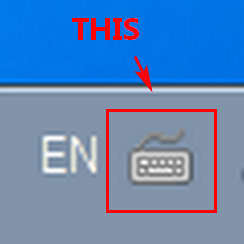

kNSsniz.png


Clicking on it lets one switch between keyboards of the same language and I don't need that. (But I do need to switch between different languages, by clicking on EN to the left.)


Is there a way to hide or disable that keyboard icon?
 

My Computer My Computer

At a glance

Windows 7 64bit
OS
Windows 7 64bit
Hi Eyo,

RIGHT click on any system icon, select turn system icons on/off
in the window that appears, scroll to keyboard change to
Hide.


Roy
 

My Computer My Computer

At a glance

W7 home premium 32bit/W7HP 64bit/w10 tp insid...E5300 dual core3gbNvidia Geforce 7100 Nforce 630i
Computer type
PC/Desktop
Computer Manufacturer/Model Number
medionl/Aspire 6930G/acer x55a
OS
W7 home premium 32bit/W7HP 64bit/w10 tp insider ring
CPU
E5300 dual core
Motherboard
medion MS7366
Memory
3gb
Graphics Card(s)
Nvidia Geforce 7100 Nforce 630i
Monitor(s) Displays
avixc
Internet Speed
n (isp resticted to 72)
Antivirus
mse/pands
Browser
palemoon
Other Info
Belkin Fd7050 n USB using Railink RT2870 drivers, more upto date
RIGHT click on any system icon
Hmmm, which icon, for example?


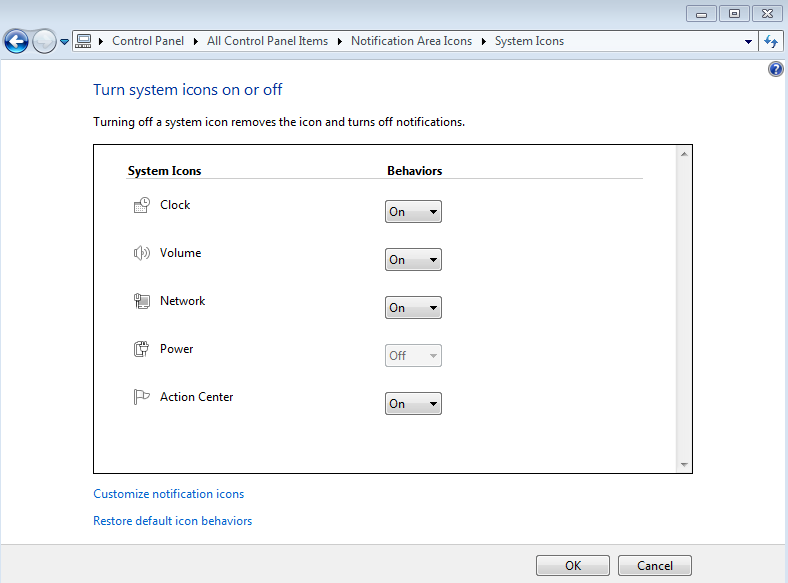
I can get to the "Turn system icons on or off" settings through the notification area settings ("Customize..."), but then I just get this, no keyboard settings:


AvJvxdE.png
 

My Computer My Computer

At a glance

Windows 7 64bit
OS
Windows 7 64bit
Hi

Can you get to it via
Control Panel
>> Notifications Icon settings

or
language and input ... language bar untick show additional icons

or
as its showing as a keyboard
in device manager is there a Keyboard GUI with options

Roy
 
Last edited:

My Computer My Computer

At a glance

W7 home premium 32bit/W7HP 64bit/w10 tp insid...E5300 dual core3gbNvidia Geforce 7100 Nforce 630i
Computer type
PC/Desktop
Computer Manufacturer/Model Number
medionl/Aspire 6930G/acer x55a
OS
W7 home premium 32bit/W7HP 64bit/w10 tp insider ring
CPU
E5300 dual core
Motherboard
medion MS7366
Memory
3gb
Graphics Card(s)
Nvidia Geforce 7100 Nforce 630i
Monitor(s) Displays
avixc
Internet Speed
n (isp resticted to 72)
Antivirus
mse/pands
Browser
palemoon
Other Info
Belkin Fd7050 n USB using Railink RT2870 drivers, more upto date
I tried all those places and there's no setting that affects it.


You can try it easily to see what it looks like (don't worry, it's reversible). You go into "Text Services and Input Langauges" and add another keyboard. Say, if you're using English (United Kingdom), you can add a US layout by checking "Show More..." and selecting US.
This will now give you the keyboard icon in the language bar on the taskbar. And if you have multiple different languages, you'll also get EN to the left of it.
 

My Computer My Computer

At a glance

Windows 7 64bit
OS
Windows 7 64bit
Hi Eyo,

Know what you mean tried it anyway,
I DO NOT get the keyboard icon ONLY EN.
(and in the tutorials i do NOT see it either)

So it leads me to think about your physical keyboards, current and previous
What were/are they
touchpad/PS2/touchscreen/gaming etc
have to ask no proper specs!!!
And do you have any language packs installed??

Can you run the tool from here, ignore the title it will give me loads of info
Blue Screen of Death (BSOD) Posting Instructions


Roy
 

My Computer My Computer

At a glance

W7 home premium 32bit/W7HP 64bit/w10 tp insid...E5300 dual core3gbNvidia Geforce 7100 Nforce 630i
Computer type
PC/Desktop
Computer Manufacturer/Model Number
medionl/Aspire 6930G/acer x55a
OS
W7 home premium 32bit/W7HP 64bit/w10 tp insider ring
CPU
E5300 dual core
Motherboard
medion MS7366
Memory
3gb
Graphics Card(s)
Nvidia Geforce 7100 Nforce 630i
Monitor(s) Displays
avixc
Internet Speed
n (isp resticted to 72)
Antivirus
mse/pands
Browser
palemoon
Other Info
Belkin Fd7050 n USB using Railink RT2870 drivers, more upto date
I DO NOT get the keyboard icon ONLY EN.
That's weird. Did you add another keyboard under the same language or did you add another separate language? If you're only getting EN it seems you did the latter.


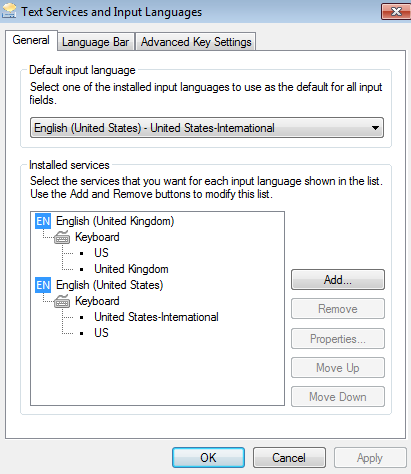
Pic is an example of a setting that produces the EN + the keyboard icon:


cvU8Fxm.png


I could even reproduce this in a VM, so I don't think it's related to hardware.
 

My Computer My Computer

At a glance

Windows 7 64bit
OS
Windows 7 64bit
Hi Eyo,

had en-uk added en-us
so the former.

can you answer my other questions and post BSOD

If your OS and VM(clone?) then you would get identical results


Roy
 

My Computer My Computer

At a glance

W7 home premium 32bit/W7HP 64bit/w10 tp insid...E5300 dual core3gbNvidia Geforce 7100 Nforce 630i
Computer type
PC/Desktop
Computer Manufacturer/Model Number
medionl/Aspire 6930G/acer x55a
OS
W7 home premium 32bit/W7HP 64bit/w10 tp insider ring
CPU
E5300 dual core
Motherboard
medion MS7366
Memory
3gb
Graphics Card(s)
Nvidia Geforce 7100 Nforce 630i
Monitor(s) Displays
avixc
Internet Speed
n (isp resticted to 72)
Antivirus
mse/pands
Browser
palemoon
Other Info
Belkin Fd7050 n USB using Railink RT2870 drivers, more upto date
Back
Top