Solved Nvme Driver

Thank you! After weeks of agony with supports from Gigabyte, Microsoft, Sandisk, and Western Digital (now owned by Sandisk) I'm finally able to detect and initialize the PCIe NVMe with the hotfix!

"PCI Device" Error PCI/VEN_15B7&DEV_5009
MB: Gigabyte 990FXA-UD3 Rev3.0 (since 2012)
OS: Windows 7 Pro x64
GFX: 7870 XT 2GB
NVMe: SN550 (Data, Cache/Scratch/Proj) Not used for OS

Even though there's a PCIe 2.0 limitation of the board would hinder the potential of the drive I wanted to use this now and put forth into a newer build at a later time.


Keep this going as there are many still out there running Win7 and needing NVMe support through PCIe
 

My Computer My Computer

At a glance

Windows 7 Pro x64AMD FX 8310GSkills 16GB DD3 1600Sapphire 7870 XT 2GB
Computer type
PC/Desktop
Computer Manufacturer/Model Number
Custom Build
OS
Windows 7 Pro x64
CPU
AMD FX 8310
Motherboard
Gigabyte 990FXA UD3 Rev3
Memory
GSkills 16GB DD3 1600
Graphics Card(s)
Sapphire 7870 XT 2GB
Hard Drives
850 EVO 120GB
850 PRO 256GB
840 EVO 240GB
Browser
Firefox
Thank you SIW2!

It works on Windows 7 x64.
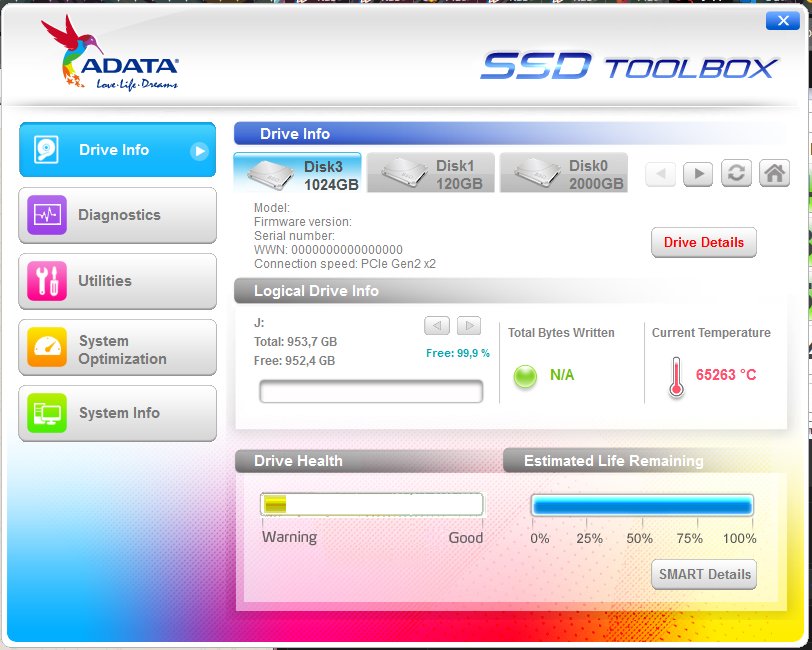
But SSD can't be detected by ADATA toolbox or CrystalDiskInfo:


Screenshot-12.png

Screenshot-6.png


Is there any update that could fix it?
 

My Computer My Computer

At a glance

Windows 7 Professional x64Xeon E3 1281 v3Kingston HyperX Fury 8GBx3 DDR3 1866MHzEVGA Nvida GeForce GT 740 2GB OC
Computer type
PC/Desktop
Computer Manufacturer/Model Number
Custom
OS
Windows 7 Professional x64
CPU
Xeon E3 1281 v3
Motherboard
GA H97 D3H
Memory
Kingston HyperX Fury 8GBx3 DDR3 1866MHz
Graphics Card(s)
EVGA Nvida GeForce GT 740 2GB OC
Hard Drives
SSD ADATA SX6000 PRO 1TB
SSD SAMSUNG 840 EVO 120GB
HDD SEAGATE BARRACUDA 2TB
HDD SEAGATE SKYHAWK 4TB
Hi SIW2!,

Thank you from the 2 msu, I ran both. My Asrock Z87 M/B BIOS now can detect my ADATA XPG SX8200 Pro on a PCIE adapter in its boot priority. HOWEVER, my NVIDIA 1060 GPU is NOT detected anymore. The integrated GPU on the M/B works fine. Could you help me with this problem? Thanks and regards.
 

My Computer My Computer

At a glance

Windows 7 x64Intel I5 4670KCorsair 2 X 4GBEVGA Nvidia GTX 1060 6GB
Computer type
PC/Desktop
OS
Windows 7 x64
CPU
Intel I5 4670K
Motherboard
Asrock Z87 Extreme6
Memory
Corsair 2 X 4GB
Graphics Card(s)
EVGA Nvidia GTX 1060 6GB
PSU
Seasonic 450W 80Plus Gold
Hi SIW2!,

Thank you from the 2 msu, I ran both. My Asrock Z87 M/B BIOS now can detect my ADATA XPG SX8200 Pro on a PCIE adapter in its boot priority. HOWEVER, my NVIDIA 1060 GPU is NOT detected anymore. The integrated GPU on the M/B works fine. Could you help me with this problem? Thanks and regards.

Try to allow both on BIOS.
But it could be a limitation of x87 Intel Chipset's.
 

My Computer My Computer

At a glance

Windows 7 Professional x64Xeon E3 1281 v3Kingston HyperX Fury 8GBx3 DDR3 1866MHzEVGA Nvida GeForce GT 740 2GB OC
Computer type
PC/Desktop
Computer Manufacturer/Model Number
Custom
OS
Windows 7 Professional x64
CPU
Xeon E3 1281 v3
Motherboard
GA H97 D3H
Memory
Kingston HyperX Fury 8GBx3 DDR3 1866MHz
Graphics Card(s)
EVGA Nvida GeForce GT 740 2GB OC
Hard Drives
SSD ADATA SX6000 PRO 1TB
SSD SAMSUNG 840 EVO 120GB
HDD SEAGATE BARRACUDA 2TB
HDD SEAGATE SKYHAWK 4TB
Last edited:

My Computer My Computer

At a glance

Windows 7 x64Intel I5 4670KCorsair 2 X 4GBEVGA Nvidia GTX 1060 6GB
Computer type
PC/Desktop
OS
Windows 7 x64
CPU
Intel I5 4670K
Motherboard
Asrock Z87 Extreme6
Memory
Corsair 2 X 4GB
Graphics Card(s)
EVGA Nvidia GTX 1060 6GB
PSU
Seasonic 450W 80Plus Gold
ASRock > Z87 Extreme6
I have also installed/tried 2 recent MB BIOS update (beta) for NVME support but have not update my EVGA 1060 BIOS.

Update:
VGA Bios Collection | TechPowerUp

I've just check, seems my GPU already have the latest BIOS

You need to allow it on AsRock Bios Setup.
Maybe ther is a option to use both connectors. Otherwise, try to change your VGA to the second PCIe x16 slot available.

Here is a lot of info that you can enjoy to solve the issue: http://forum.asrock.com/forum_posts...bling-nvme-raid-mode-disables-pcie3-slot-more
 

My Computer My Computer

At a glance

Windows 7 Professional x64Xeon E3 1281 v3Kingston HyperX Fury 8GBx3 DDR3 1866MHzEVGA Nvida GeForce GT 740 2GB OC
Computer type
PC/Desktop
Computer Manufacturer/Model Number
Custom
OS
Windows 7 Professional x64
CPU
Xeon E3 1281 v3
Motherboard
GA H97 D3H
Memory
Kingston HyperX Fury 8GBx3 DDR3 1866MHz
Graphics Card(s)
EVGA Nvida GeForce GT 740 2GB OC
Hard Drives
SSD ADATA SX6000 PRO 1TB
SSD SAMSUNG 840 EVO 120GB
HDD SEAGATE BARRACUDA 2TB
HDD SEAGATE SKYHAWK 4TB

My Computer My Computer

At a glance

Windows 7 x64Intel I5 4670KCorsair 2 X 4GBEVGA Nvidia GTX 1060 6GB
Computer type
PC/Desktop
OS
Windows 7 x64
CPU
Intel I5 4670K
Motherboard
Asrock Z87 Extreme6
Memory
Corsair 2 X 4GB
Graphics Card(s)
EVGA Nvidia GTX 1060 6GB
PSU
Seasonic 450W 80Plus Gold


SIW2 registered to say THANKS, you're a beautiful person ~


went over to microsoft's to get the hotfix, but there's a note that more or less says "update no longer available, please install WIN10"


Are these guys for real LOL


anyway, now nvme m.2 with pcie adater is visible and usable
on Win7 x64 sp1
suck on it MS :p
 

My Computer My Computer

At a glance

Windows 7 Ultimate x64 sp1
Computer type
PC/Desktop
OS
Windows 7 Ultimate x64 sp1
:-)

Those updates are needed for nvme support. Depending on which nvme disk you have, installing those two updates and then integrating the relevant oem driver might extract slightly better speed.
 

My Computers My Computers

  • At a glance

    7 X64i5 84002x8gb 3200mhz
    Computer type
    PC/Desktop
    OS
    7 X64
    CPU
    i5 8400
    Motherboard
    gigabyte b365m ds3h
    Memory
    2x8gb 3200mhz
    Hard Drives
    various
    PSU
    pure power 11 400w cm
    Case
    Coolermaster
    Cooling
    cryorig m9i
  • At a glance

    7x64g54008gb ddr4 2400
    Computer type
    PC/Desktop
    OS
    7x64
    CPU
    g5400
    Motherboard
    ga b365m ds3h
    Memory
    8gb ddr4 2400
    PSU
    xfx pro 450w
hello SIW2


the drive is
"Crucial P1 1TB 3D NAND NVMe PCIe M.2"

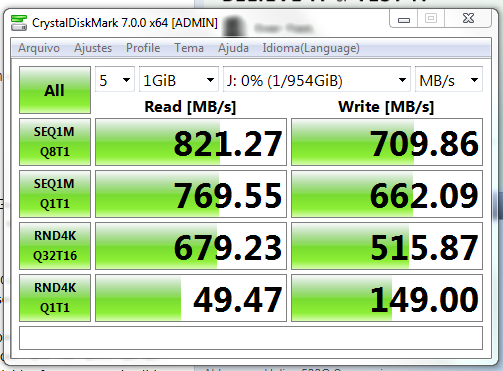
I'm getting around 2.94 Gb/s, with the adapter "GLOTRENDS M.2 PCIE NVME Adapter Card for PC/2U Hight Server, PCIE GEN3 Full Speed (PA05)" pretty good
no heatsink


I plan to upgrade soon but it's amazing that M$ wants to shove win10 down our throats like this, the drivers and updates are available here, but not on the official M$ site


anyway more power to you ~
 

My Computer My Computer

At a glance

Windows 7 Ultimate x64 sp1
Computer type
PC/Desktop
OS
Windows 7 Ultimate x64 sp1
:-)
 

My Computers My Computers

  • At a glance

    7 X64i5 84002x8gb 3200mhz
    Computer type
    PC/Desktop
    OS
    7 X64
    CPU
    i5 8400
    Motherboard
    gigabyte b365m ds3h
    Memory
    2x8gb 3200mhz
    Hard Drives
    various
    PSU
    pure power 11 400w cm
    Case
    Coolermaster
    Cooling
    cryorig m9i
  • At a glance

    7x64g54008gb ddr4 2400
    Computer type
    PC/Desktop
    OS
    7x64
    CPU
    g5400
    Motherboard
    ga b365m ds3h
    Memory
    8gb ddr4 2400
    PSU
    xfx pro 450w
Hi SIW2!,

Thank you from the 2 msu, I ran both. My Asrock Z87 M/B BIOS now can detect my ADATA XPG SX8200 Pro on a PCIE adapter in its boot priority. HOWEVER, my NVIDIA 1060 GPU is NOT detected anymore. The integrated GPU on the M/B works fine. Could you help me with this problem? Thanks and regards.

I'll answer my own question,
After I change the ORICO pcie adapter with NO NAME brand adapter, my GPU can be detected and the SSD is working fine. So, something wrong with the first adapter (2 years warranty)

Thanks again SIW2.
 

My Computer My Computer

At a glance

Windows 7 x64Intel I5 4670KCorsair 2 X 4GBEVGA Nvidia GTX 1060 6GB
Computer type
PC/Desktop
OS
Windows 7 x64
CPU
Intel I5 4670K
Motherboard
Asrock Z87 Extreme6
Memory
Corsair 2 X 4GB
Graphics Card(s)
EVGA Nvidia GTX 1060 6GB
PSU
Seasonic 450W 80Plus Gold
Thank you SIW2!

It works on Windows 7 x64.
But SSD can't be detected by ADATA toolbox or CrystalDiskInfo:


Screenshot-12.png

Screenshot-6.png


Is there any update that could fix it?

Same here, in other forum said we have to use win 10
 

My Computer My Computer

At a glance

Windows 7 x64Intel I5 4670KCorsair 2 X 4GBEVGA Nvidia GTX 1060 6GB
Computer type
PC/Desktop
OS
Windows 7 x64
CPU
Intel I5 4670K
Motherboard
Asrock Z87 Extreme6
Memory
Corsair 2 X 4GB
Graphics Card(s)
EVGA Nvidia GTX 1060 6GB
PSU
Seasonic 450W 80Plus Gold
NVMe driver doesn't work for me on Win7 Ultimate x64

Nvme-Win7x64.zip
Nvme-Win7x86.zip

I followed the thread and installed the two x64 nvme drivers but nothing happened. The system still cannot see the nvme SSD in either explorer or device manager or disk management.

My system is Dell Latitude E7450, Win7 Ultimate x64 with newly purchased West Digital PC SN520 NVMe SSD (PCIe Gen3x2). I inserted the SSD onto the WWAN PCIe port because I read that it does support PCIe NVMe. I just want to use it as secondary disk, not a bootable one.

Please help! I'm about to return it if still not working!
 

My Computer My Computer

At a glance

Windows 7 Ultimate x64
Computer type
Laptop
Computer Manufacturer/Model Number
Dell Latitude 7450
OS
Windows 7 Ultimate x64
does bios see it?
 

My Computers My Computers

  • At a glance

    7 X64i5 84002x8gb 3200mhz
    Computer type
    PC/Desktop
    OS
    7 X64
    CPU
    i5 8400
    Motherboard
    gigabyte b365m ds3h
    Memory
    2x8gb 3200mhz
    Hard Drives
    various
    PSU
    pure power 11 400w cm
    Case
    Coolermaster
    Cooling
    cryorig m9i
  • At a glance

    7x64g54008gb ddr4 2400
    Computer type
    PC/Desktop
    OS
    7x64
    CPU
    g5400
    Motherboard
    ga b365m ds3h
    Memory
    8gb ddr4 2400
    PSU
    xfx pro 450w
It depends what you mean by post install.

If you already have win7 installed on a regular disk and wish to add an nvme device to your machine, then you can just integrate the msu files into the already installed win7 so that it can see the nvme drive.
hi,where i put the msu?

Windows6.1-KB2990941-v3-x64.msu
Windows6.1-KB3087873-v2-x64.msu

thanks
 

My Computer My Computer

At a glance

Windows 7 Ultimate x64amd fx-815016 gb 1600gfx 1050 ti
Computer type
PC/Desktop
Computer Manufacturer/Model Number
custom build
OS
Windows 7 Ultimate x64
CPU
amd fx-8150
Motherboard
GA-990FXA-UD7
Memory
16 gb 1600
Graphics Card(s)
gfx 1050 ti
Hard Drives
corsair
Antivirus
nod32
ok it works
services window update was disable
thanks alot :)
 

My Computer My Computer

At a glance

Windows 7 Ultimate x64amd fx-815016 gb 1600gfx 1050 ti
Computer type
PC/Desktop
Computer Manufacturer/Model Number
custom build
OS
Windows 7 Ultimate x64
CPU
amd fx-8150
Motherboard
GA-990FXA-UD7
Memory
16 gb 1600
Graphics Card(s)
gfx 1050 ti
Hard Drives
corsair
Antivirus
nod32
I would like to install Win7 onto an nvme device. I have the Win7 installation ISO extracted to a bootable flash drive. I realize I will need to integrate the MS nvme drivers into the installation media. Can someone please point me to a cookbook instructing how to accomplish this? Thanks.


I believe I have the latest MS driver downloaded from a link in this thread: NVMe 1.5 x64.7z
 

My Computer My Computer

At a glance

Windows 7 Ultimate x64
Computer type
PC/Desktop
OS
Windows 7 Ultimate x64
SIW2 thank you fror the drivers..............!

Yes. I suspect they are trying to make things awkward for win 7 users - with the intention of pushing them onto win10.

I have done a thing to :update Win7 installation media.

If you are updating installation media:
Those hotfixes need to be put in the UPDATES\Bootx64 and UPDATES\Installx64 folders before you begin.
You can also include any drivers in the DRIVERS\Bootx64 and DRIVERS\Installx64 folder

(Same for x86 folders if you are updating 32 bit media)

SIW2 thank you for the drivers /hotfixes was looking ages to get my pci/nvme working again thanx..............!
 

My Computer My Computer

At a glance

windows 7 64
Computer type
PC/Desktop
OS
windows 7 64
thanks a lot, only one thing if someone is having problems like me... i had to reboot each time i install a fix, and then all ok

thanks again, you saved me
 

My Computer My Computer

At a glance

windows 7 64
Computer type
PC/Desktop
OS
windows 7 64
Back
Top