
Solved System won't boot from new SSD after cloning OS

javic

New member
Member
Local time
2:03 AM
Messages
19
I followed the tutorial "SSD - Install and Transfer the Operating System" to install a Samsung EVO 860 SSD. I chose to keep the 100 MB boot partition (B:) just to minimize changes.

I cloned the OS to the SSD using Samsung's Data Migration software, then changed the BIOS HD boot order. My system was already configured for AHCI so I didn't need to do that. I then rebooted and the SSD's OS partition became my C: drive. Everything seemed fine except for one thing: the 100 MB boot partition B: was still on my old HDD. Samsung Data Migration created a 100 MB partition on the SSD but it was empty.

To address this issue, I decided to restore a system image to the SSD. (I had earlier created one of the proper size for just this purpose.) To avoid potentially overwriting the wrong drive, I unplugged all my HDDs leaving only the SSD, and went through the restore process using my Windows installation disk. Upon rebooting, I now had B: and C: on my SSD.

I then plugged my HDDs back in. But now the system won't boot from the SSD. Instead, it's back to booting from the old HDD.

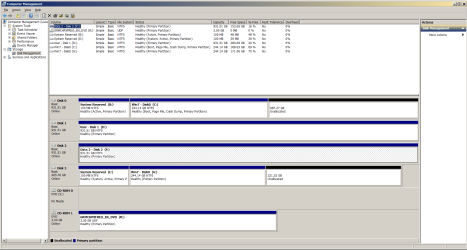
I've attached a pic of Disk Management. Disk 0 is the HDD where I previously had Windows installed. Disk 3 is the SSD I'd like to boot from. The system boots from Disk 0 even though it appears after Disk 3 in the BIOS boot order.

How can I boot from the SSD without unplugging my old HDD? (Eventually, I want to reformat it and use it for data.)
 

Attachments
  • DiskMgmt.png
    DiskMgmt.png
    42.5 KB · Views: 6

My Computer My Computer

At a glance

Windows 7 Home Premium 64 bitIntel i5 quad core8 GBNvidia GeForce GTS 250
Computer type
PC/Desktop
Computer Manufacturer/Model Number
custom
OS
Windows 7 Home Premium 64 bit
CPU
Intel i5 quad core
Motherboard
Gigabyte P55A-UD3
Memory
8 GB
Graphics Card(s)
Nvidia GeForce GTS 250
Sound Card
SoundBlaster Audigy 2 ZS
Screen Resolution
1920x1200
Antivirus
Kaspersky
at cmd prompt type:

bcdboot g:\windows
then press enter

restart and you will have two boot menu entries

boot into the disk 3 win7, (if it gets stuck at preparing desktop, you will have to fix the os letter to the new device )

[ Best to fix the letter first ( see next post) ]


To remove the entry for the other os, type msconfig in start box. Click the boot tab and delete the entry for the other os.
 
Last edited:

My Computers My Computers

  • At a glance

    7 X64i5 84002x8gb 3200mhz
    Computer type
    PC/Desktop
    OS
    7 X64
    CPU
    i5 8400
    Motherboard
    gigabyte b365m ds3h
    Memory
    2x8gb 3200mhz
    Hard Drives
    various
    PSU
    pure power 11 400w cm
    Case
    Coolermaster
    Cooling
    cryorig m9i
  • At a glance

    7x64g54008gb ddr4 2400
    Computer type
    PC/Desktop
    OS
    7x64
    CPU
    g5400
    Motherboard
    ga b365m ds3h
    Memory
    8gb ddr4 2400
    PSU
    xfx pro 450w
SIW2

Always enjoy learning from your posts.
:thumbsup:
 

My Computer My Computer

At a glance

Win 10 x64, Linux Lite, Win 7 x64, BlackArch,...
Computer type
PC/Desktop
Computer Manufacturer/Model Number
HP Desktop & Compaq Laptop
OS
Win 10 x64, Linux Lite, Win 7 x64, BlackArch, & Kali
Hard Drives
Samsung 850 Pro 256Gb,
Hitachi HDD 1Tb,
Crucial MX SSD 250Gb
Segate 3Tb USB 3.0 Ext. Backup HDD
Internet Speed
150Mbps dn, 20Mbps up
Antivirus
Avast Free, Malwarebytes Anti-Exploit & Anti-Ransomware
Browser
Firefox, Chrome, Opera, & VPN

My Computers My Computers

  • At a glance

    7 X64i5 84002x8gb 3200mhz
    Computer type
    PC/Desktop
    OS
    7 X64
    CPU
    i5 8400
    Motherboard
    gigabyte b365m ds3h
    Memory
    2x8gb 3200mhz
    Hard Drives
    various
    PSU
    pure power 11 400w cm
    Case
    Coolermaster
    Cooling
    cryorig m9i
  • At a glance

    7x64g54008gb ddr4 2400
    Computer type
    PC/Desktop
    OS
    7x64
    CPU
    g5400
    Motherboard
    ga b365m ds3h
    Memory
    8gb ddr4 2400
    PSU
    xfx pro 450w
Yea, SIW2 I remember you posting same on another thread.
I was going there and you preempted my continued post, so I deleted it.
OPs screenshot was pretty clear as to the issue.
Thanks again for sharing your knowledge & handy tools!
You Rock!

Snick
 

My Computer My Computer

At a glance

Win 10 x64, Linux Lite, Win 7 x64, BlackArch,...
Computer type
PC/Desktop
Computer Manufacturer/Model Number
HP Desktop & Compaq Laptop
OS
Win 10 x64, Linux Lite, Win 7 x64, BlackArch, & Kali
Hard Drives
Samsung 850 Pro 256Gb,
Hitachi HDD 1Tb,
Crucial MX SSD 250Gb
Segate 3Tb USB 3.0 Ext. Backup HDD
Internet Speed
150Mbps dn, 20Mbps up
Antivirus
Avast Free, Malwarebytes Anti-Exploit & Anti-Ransomware
Browser
Firefox, Chrome, Opera, & VPN
Thank you all for the rapid and thorough response. As it turns out, I found another solution: destroy the old HDD :-). Seriously, while waiting for an answer to my original post (which I didn't expect so quickly), I decided to restore another older system image (containing a bare-bones Win7 installation) to the old HDD so I could resize it to fit the SSD and then squirrel it away again for future use. Apparently, during this process my old HDD died (it was 10 years old anyway) and my system now won't boot even from a repair disk while that HDD is connected. Removing that HDD allows Windows to boot properly from the SSD. I'll buy a new drive for the extra data space I need--they're cheap enough these days.

For future reference though, I did have one follow-up question. When you say "fix the os letter to the new device", do you mean assign B: and C: to the respective partitions on the SSD? Is that what the "NT6Repair" utility is for? This is the first time I've performed this "OS transfer" operation, so I'd like to make sure I understand the process for future use.
 

My Computer My Computer

At a glance

Windows 7 Home Premium 64 bitIntel i5 quad core8 GBNvidia GeForce GTS 250
Computer type
PC/Desktop
Computer Manufacturer/Model Number
custom
OS
Windows 7 Home Premium 64 bit
CPU
Intel i5 quad core
Motherboard
Gigabyte P55A-UD3
Memory
8 GB
Graphics Card(s)
Nvidia GeForce GTS 250
Sound Card
SoundBlaster Audigy 2 ZS
Screen Resolution
1920x1200
Antivirus
Kaspersky
I decided to restore another older system image (containing a bare-bones Win7 installation) to the old HDD

What did you use to do that ? Whatever you used seems to have fixed the bcd entry on the system partition.
 

My Computers My Computers

  • At a glance

    7 X64i5 84002x8gb 3200mhz
    Computer type
    PC/Desktop
    OS
    7 X64
    CPU
    i5 8400
    Motherboard
    gigabyte b365m ds3h
    Memory
    2x8gb 3200mhz
    Hard Drives
    various
    PSU
    pure power 11 400w cm
    Case
    Coolermaster
    Cooling
    cryorig m9i
  • At a glance

    7x64g54008gb ddr4 2400
    Computer type
    PC/Desktop
    OS
    7x64
    CPU
    g5400
    Motherboard
    ga b365m ds3h
    Memory
    8gb ddr4 2400
    PSU
    xfx pro 450w
I used my Windows installation disk and did a normal system image restore. FWIW restoring the older image worked, and I was able to shrink it and save it again. It's when I then tried to restore to the latest image (the one cloned to the SSD) that things went bad. (Windows system restore told me it couldn't find a hard drive on my computer even though the HDD I wanted to restore to was the only one connected.)
 

My Computer My Computer

At a glance

Windows 7 Home Premium 64 bitIntel i5 quad core8 GBNvidia GeForce GTS 250
Computer type
PC/Desktop
Computer Manufacturer/Model Number
custom
OS
Windows 7 Home Premium 64 bit
CPU
Intel i5 quad core
Motherboard
Gigabyte P55A-UD3
Memory
8 GB
Graphics Card(s)
Nvidia GeForce GTS 250
Sound Card
SoundBlaster Audigy 2 ZS
Screen Resolution
1920x1200
Antivirus
Kaspersky
Whatever you used seems to have fixed the bcd entry on the system partition.

Maybe. But I was also able to boot from the SSD previously just by disconnecting the old HDD. It was only when I had both the old HDD and the new SSD connected (both with Win7 installations) that I ran into problems.
 

My Computer My Computer

At a glance

Windows 7 Home Premium 64 bitIntel i5 quad core8 GBNvidia GeForce GTS 250
Computer type
PC/Desktop
Computer Manufacturer/Model Number
custom
OS
Windows 7 Home Premium 64 bit
CPU
Intel i5 quad core
Motherboard
Gigabyte P55A-UD3
Memory
8 GB
Graphics Card(s)
Nvidia GeForce GTS 250
Sound Card
SoundBlaster Audigy 2 ZS
Screen Resolution
1920x1200
Antivirus
Kaspersky
Booting from a HD is controlled by the BIOS. The rule of thumb is that the bios will boot the first drive it comes to, from port 0 (zero) on the motherboard, to port 1, etc.
So if you have two bootable drives connected to the same motherboard, the one on the lowest numbered SATA port will be the one that the bios will try to boot from.
The port numbers will usually be printed close to the actual ports, somewhere on the motherboard.*


* So, always put the drive you want to boot from on SATA port #0 (zero).


Just for safety, I never have two bootable drives connected to the motherboard when booting up my system.


Cheers Mate!
TM :cool:
 

My Computer My Computer

At a glance

Win 7 Pro, SP1, x86, Win-11/Pro/64AMD8GB CrucialVarious
Computer type
PC/Desktop
Computer Manufacturer/Model Number
Various
OS
Win 7 Pro, SP1, x86, Win-11/Pro/64
CPU
AMD
Motherboard
Various
Memory
8GB Crucial
Graphics Card(s)
Various
Sound Card
OnBoard
Monitor(s) Displays
Acer 21.5"
Hard Drives
Crucial SSD, 500 GB
PSU
OEM
Case
SFF Slim Line Case
Cooling
OEM
Keyboard
eMachines
Mouse
Logitech Wireless
Internet Speed
varies
Antivirus
Windows Defender/Super Anti-Spyware
Browser
Firefox
Re. boot drives and SATA port numbers: I suspected that was the case but wasn't certain. Thanks for the detail. Even though I now have only one bootable drive, I'll probably move it to port 0 as you suggest. (I have the user manual for my MB which shows the port nos. if they're not on the board itself.)

Thanks again to everyone who responded. I learned a lot from this experience.
 

My Computer My Computer

At a glance

Windows 7 Home Premium 64 bitIntel i5 quad core8 GBNvidia GeForce GTS 250
Computer type
PC/Desktop
Computer Manufacturer/Model Number
custom
OS
Windows 7 Home Premium 64 bit
CPU
Intel i5 quad core
Motherboard
Gigabyte P55A-UD3
Memory
8 GB
Graphics Card(s)
Nvidia GeForce GTS 250
Sound Card
SoundBlaster Audigy 2 ZS
Screen Resolution
1920x1200
Antivirus
Kaspersky
javic
This should help you understand bios, boot order and sata connections.

I agree withTechnoMage2016 regarding the order. Your sata connections are, in my case there are 4 of them, usually marked in different colors. Usually, the color that has the most ports are the Primary SATA controller ports (usually black). The color that has even number of ports (usually 2) are RAID-capable (if your motherboard supports it, and I've seen yellow and red), and the secondary SATA controller ports are usually red in color.

You can also change the boot order in the Bios as TM suggested. I triple boot Win10, Win 7 & Linux Lite so I have to run it a bit different. Linux requires GRUB Bootloader, which I place on the Linux partition and point Win Boot to that.

Also consider that windows wants to boot from C drive, as your screenshot of disk management showed. When you disconnect all but one of the drives, windows seeks a bootable drive, auto assigns C and tries to boot. When you reconnect the other drives, if you leave them in the same order in the bios, and sata connections on your mobo, the first drive in the boot order is the drive attempted to boot from, and of course it is assigned the drive letter C.

If you disconnect all but one of the drives windows will try to boot from that and if you peruse disk management again, it will show C drive.
 

My Computer My Computer

At a glance

Win 10 x64, Linux Lite, Win 7 x64, BlackArch,...
Computer type
PC/Desktop
Computer Manufacturer/Model Number
HP Desktop & Compaq Laptop
OS
Win 10 x64, Linux Lite, Win 7 x64, BlackArch, & Kali
Hard Drives
Samsung 850 Pro 256Gb,
Hitachi HDD 1Tb,
Crucial MX SSD 250Gb
Segate 3Tb USB 3.0 Ext. Backup HDD
Internet Speed
150Mbps dn, 20Mbps up
Antivirus
Avast Free, Malwarebytes Anti-Exploit & Anti-Ransomware
Browser
Firefox, Chrome, Opera, & VPN
Re. boot drives and SATA port numbers: I suspected that was the case but wasn't certain. Thanks for the detail. Even though I now have only one bootable drive, I'll probably move it to port 0 as you suggest. (I have the user manual for my MB which shows the port nos. if they're not on the board itself.)

Thanks again to everyone who responded. I learned a lot from this experience.
javic

Look closely at disk3 partition1 in your screenshot on first post.
 

My Computers My Computers

  • At a glance

    7 X64i5 84002x8gb 3200mhz
    Computer type
    PC/Desktop
    OS
    7 X64
    CPU
    i5 8400
    Motherboard
    gigabyte b365m ds3h
    Memory
    2x8gb 3200mhz
    Hard Drives
    various
    PSU
    pure power 11 400w cm
    Case
    Coolermaster
    Cooling
    cryorig m9i
  • At a glance

    7x64g54008gb ddr4 2400
    Computer type
    PC/Desktop
    OS
    7x64
    CPU
    g5400
    Motherboard
    ga b365m ds3h
    Memory
    8gb ddr4 2400
    PSU
    xfx pro 450w
Back
Top