How to recover lost partition from hard disk

Hart07

New member
Local time
3:36 PM
Messages
6
Hello everybody I made a mistake on windows disk manager, I have a ssd disk where I got my os windows 7 pro 64 bits and got a second hard disk a seagate barracuda 2to where I got also windows 7 pro 64 bits installed on a partition and one other partition where are my datas named datas.
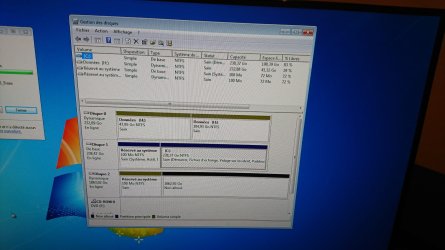
I made a mistake cause in windows disk manager I deleted("on the seagate) the partition where windows 7 was installed cause wanted to keep only the partition named '' datas '' but after I saw my partition datas doesn't show on windows disk manager, see only 1partition system reserved 100mo and unlocated space ( 1862, 92go)
My disk (seagate 2to) is named disk 2, on windows disk manager and listed as dynamic disk.
I tried to use mini tool partition revovery.
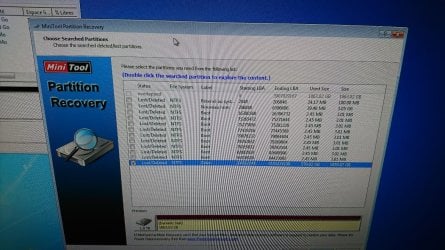
I launch the mini tool, select the seagate, choose scan full disk and choose Quick scan.
5 minutes later I see my lost partitions and see my datas partition
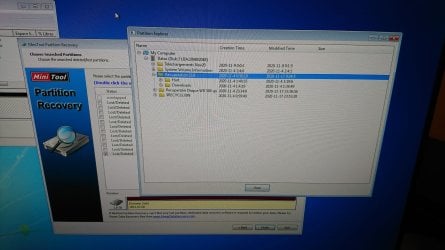
If I open explorer (in mini too partition revovery) I can see all my folders with files inside this lost partition named datas.
I close the explorer and select datas partition and click on finish button in mini tool partition revovery but nothing happens?
Why?
Thks for your help
 

My Computer My Computer

Computer type
PC/Desktop
Computer Manufacturer/Model Number
Custom build
OS
Windows 7 pro 64 bits
CPU
Intel i7 4000 series k
Motherboard
Asrock x79 extrême 6
Memory
16 go
Graphics Card(s)
Sapphire rx 570
Hard Drives
Ssd ocz vertex 256go
Seagate barracuda 2to
Wdigital 500go
Antivirus
Avira
Browser
Chrome
Post screenshots
 

My Computers My Computers

System One System Two

  • Computer type
    PC/Desktop
    OS
    7 X64
    CPU
    i5 8400
    Motherboard
    gigabyte b365m ds3h
    Memory
    2x8gb 3200mhz
    Hard Drives
    various
    PSU
    pure power 11 400w cm
    Case
    Coolermaster
    Cooling
    cryorig m9i
  • Computer type
    PC/Desktop
    OS
    7x64
    CPU
    g5400
    Motherboard
    ga b365m ds3h
    Memory
    8gb ddr4 2400
    PSU
    xfx pro 450w
These are pictures from mini tool partition revovery
 

Attachments

  • DSC_0224_copy_1496x842.jpg
    DSC_0224_copy_1496x842.jpg
    241.9 KB · Views: 2
  • DSC_0225_copy_2133x1200.jpg
    DSC_0225_copy_2133x1200.jpg
    338 KB · Views: 1
Last edited:

My Computer My Computer

Computer type
PC/Desktop
Computer Manufacturer/Model Number
Custom build
OS
Windows 7 pro 64 bits
CPU
Intel i7 4000 series k
Motherboard
Asrock x79 extrême 6
Memory
16 go
Graphics Card(s)
Sapphire rx 570
Hard Drives
Ssd ocz vertex 256go
Seagate barracuda 2to
Wdigital 500go
Antivirus
Avira
Browser
Chrome
This is my windows disk manager where you can be able to see the disk 2 (seagate barracuda 2to)
 

Attachments

  • DSC_0222_copy_2133x1200.jpg
    DSC_0222_copy_2133x1200.jpg
    292.4 KB · Views: 3

My Computer My Computer

Computer type
PC/Desktop
Computer Manufacturer/Model Number
Custom build
OS
Windows 7 pro 64 bits
CPU
Intel i7 4000 series k
Motherboard
Asrock x79 extrême 6
Memory
16 go
Graphics Card(s)
Sapphire rx 570
Hard Drives
Ssd ocz vertex 256go
Seagate barracuda 2to
Wdigital 500go
Antivirus
Avira
Browser
Chrome

My Computer My Computer

Computer type
PC/Desktop
Computer Manufacturer/Model Number
Custom build
OS
Windows 7 pro 64 bits
CPU
Intel i7 4000 series k
Motherboard
Asrock x79 extrême 6
Memory
16 go
Graphics Card(s)
Sapphire rx 570
Hard Drives
Ssd ocz vertex 256go
Seagate barracuda 2to
Wdigital 500go
Antivirus
Avira
Browser
Chrome

My Computers My Computers

System One System Two

  • Computer type
    PC/Desktop
    OS
    7 X64
    CPU
    i5 8400
    Motherboard
    gigabyte b365m ds3h
    Memory
    2x8gb 3200mhz
    Hard Drives
    various
    PSU
    pure power 11 400w cm
    Case
    Coolermaster
    Cooling
    cryorig m9i
  • Computer type
    PC/Desktop
    OS
    7x64
    CPU
    g5400
    Motherboard
    ga b365m ds3h
    Memory
    8gb ddr4 2400
    PSU
    xfx pro 450w

My Computer My Computer

Computer type
PC/Desktop
Computer Manufacturer/Model Number
Custom build
OS
Windows 7 pro 64 bits
CPU
Intel i7 4000 series k
Motherboard
Asrock x79 extrême 6
Memory
16 go
Graphics Card(s)
Sapphire rx 570
Hard Drives
Ssd ocz vertex 256go
Seagate barracuda 2to
Wdigital 500go
Antivirus
Avira
Browser
Chrome
I use and recommend TestDisk :-)
it can handle all file systems etc. But It has no smooth GUI interface, but there is a good step by step guide to follow

TestDisk Step By Step - CGSecurity
 

My Computer My Computer

Computer type
PC/Desktop
Computer Manufacturer/Model Number
AsusX53, Aspire E1-572. AsusUX32A, HP Pro3130mt+3010mt, HP Proliant ML150G3, 3xCustom, i3, i5, i7
OS
Linux:Debian, Kali.. 2xWin8.1,2x,1x7Pro, Retro:1x2003server.1xXPpro, 1xW2k,1x98SE,1x95,1x3.11
CPU
cpu's intel 8088 up to intel i7 gen9.. dual xenon on server
Motherboard
a lot of them :-)
Memory
oldest 1024KB newest 64GB
Graphics Card(s)
mostly internals i don't game
Sound Card
old retro=soundblaster.. newer ones internal
Monitor(s) Displays
smalest 12" largest 26"
Internet Speed
100/100
Antivirus
NortonInternetSecurity, MS, Avast, (not on the same computer
Browser
IE8, IE9. IE11, Firefox
Other Info
I can't fit all info on all my computers in these fields :-D
I can't answer why Mini Tool Partition Recovery does that since I've never used it. But in the future if you want to take a screenshot do the following instead of using a camera.

Go to the the Start orb and in the search box begin by typing in, snipping tool. Now you can take a screenshot based on what you select. You can save the image as a png, gif, jpg or mht.

Ever wanted to know what the Print Screen button did on a keyboard? It does exactly that. Press the Print Screen key, go into your favorite paint program, go to File and select paste. Now the screen grab is in you paint program.
 

My Computer My Computer

Computer type
PC/Desktop
OS
Windows 7 Ultimate x64
I will try disk genius but if you have others soft in mind
Need to work on dynamic disk
 

My Computer My Computer

Computer type
PC/Desktop
Computer Manufacturer/Model Number
Custom build
OS
Windows 7 pro 64 bits
CPU
Intel i7 4000 series k
Motherboard
Asrock x79 extrême 6
Memory
16 go
Graphics Card(s)
Sapphire rx 570
Hard Drives
Ssd ocz vertex 256go
Seagate barracuda 2to
Wdigital 500go
Antivirus
Avira
Browser
Chrome

My Computer My Computer

Computer type
Laptop
Computer Manufacturer/Model Number
Dell Precision 15 7550 Workstation
OS
Windows 10 22H2 Pro
CPU
Intel(R) Xeon W-10885M
Motherboard
Dell
Memory
2x 32 GB DDR4 ECC memory (128 GB max)
Graphics Card(s)
Intel onboard GPU 1080p - Quadro RTX 5000 Max-Q GPU 4K
Hard Drives
1TB Samsung 9100 Pro main M2 SSD
2x 2TB Samsung 9100 Pro temp storage M2 SSD (6 TB max)
Mouse
Logitech MX-25 Bluetooth
Internet Speed
slow
Antivirus
MS
Browser
Pale Moon 34.x.x - x64 AVX2 build
"...I can't answer why Mini Tool Partition Recovery does that since I've never used it..." F22 Simpilot
I cannot remember what right now, did MTPR remove some functionality over time? Forcing users to purchase a version?
 

My Computer My Computer

Computer type
PC/Desktop
Computer Manufacturer/Model Number
Antec desktop; Acer Aspire laptops
OS
Windows 7 Professional 64-bit
CPU
Desktop i5; Acers i5 & i7
Memory
desktop 16GB; 1 Acer 8GB & 1 Acer 16GB
Hard Drives
1TB split into 2 equal partitions [OS and data] usable by RJS
Internet Speed
AT&T DSL
Browser
FF, GChrome, msIE
Other Info
Windows 7 Firewall, Emsisoft AM/AV, MSE [scan-only], SpywareBlaster, Ruiware/BillP combine
I have no idea.
 

My Computer My Computer

Computer type
PC/Desktop
OS
Windows 7 Ultimate x64
Back
Top