Back up file be deleted?

tjessop

New member
Local time
7:06 PM
Messages
39
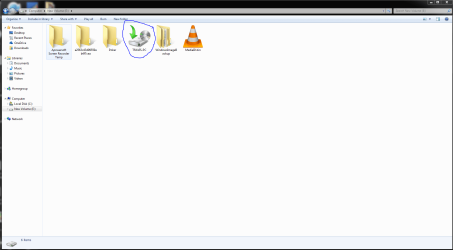
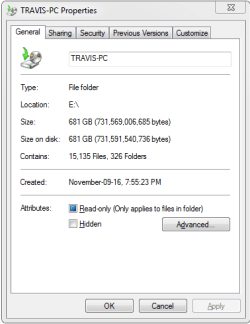
Unfortunately my SSD is getting full and I was looking to move some programs over to my other hard drive and noticed it was completely full. Looks like I have a User back up saved that is taking up most, if not all the space. I have no idea how it got there and I'm curious if its is necessary or can I delete it? Not sure if this is just a copy and there is another back up stored else where. I linked some pictures to make sure to show the exact file. Any suggestions much appreciated, thank you very much, happy new year!
 

Attachments
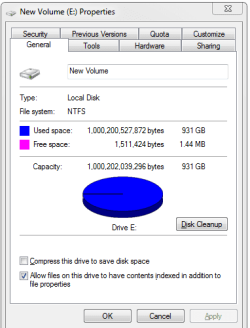
  • 1.PNG
    1.PNG
    10.3 KB · Views: 13
  • 1.1.PNG
    1.1.PNG
    41.2 KB · Views: 3

My Computer My Computer

At a glance

window 7 64 biti716 gbnivia
Computer type
PC/Desktop
Computer Manufacturer/Model Number
custom build
OS
window 7 64 bit
CPU
i7
Motherboard
asus
Memory
16 gb
Graphics Card(s)
nivia
Hard Drives
128 ssd, 1T hard drive
Antivirus
none
Browser
chrome
What is the format of the image file?
 

My Computer My Computer

At a glance

Windows 7 Pro SP1 64 bit8 GB
Computer type
Laptop
Computer Manufacturer/Model Number
Dell M6500 Precision Work Station
OS
Windows 7 Pro SP1 64 bit
Memory
8 GB
Screen Resolution
1920x
Internet Speed
30 Mbps
Antivirus
Norton Security
Browser
IE 11

Attachments

  • 123.PNG
    123.PNG
    8.9 KB · Views: 14

My Computer My Computer

At a glance

window 7 64 biti716 gbnivia
Computer type
PC/Desktop
Computer Manufacturer/Model Number
custom build
OS
window 7 64 bit
CPU
i7
Motherboard
asus
Memory
16 gb
Graphics Card(s)
nivia
Hard Drives
128 ssd, 1T hard drive
Antivirus
none
Browser
chrome
get treesize free and open drive or any folder (rt mouse) to see the space hog files and folders sorted by size.
Then offload to x TB drive.
 

My Computers My Computers

  • At a glance

    Windows 7 Ultimate x64 (Live long and prosper)i7-4770S 3.1 GHz 8 core16 GBIntel HD 4600
    Computer type
    PC/Desktop
    Computer Manufacturer/Model Number
    ASUS
    OS
    Windows 7 Ultimate x64 (Live long and prosper)
    CPU
    i7-4770S 3.1 GHz 8 core
    Motherboard
    ASUSTek M11AD
    Memory
    16 GB
    Graphics Card(s)
    Intel HD 4600
    Sound Card
    Realtek
    Monitor(s) Displays
    Hitachi 56" VGA , LG 28" HDMI
    Screen Resolution
    1920 x 1080 x 32 bits @ 60 Hz
    Hard Drives
    2TB 3TB 4TB 8TB
    WD Toshiba Seagate
    PSU
    ASUS 450W
    Case
    ASUS
    Cooling
    quiet turbine
    Keyboard
    Logitech wireless
    Mouse
    Logitech wireless
    Internet Speed
    380 /10 Mbps
    Antivirus
    none, no slugware but use VT,startup process & reg scanners
    Browser
    FF
  • Antivirus
    none except Autorun monitors
This any help?

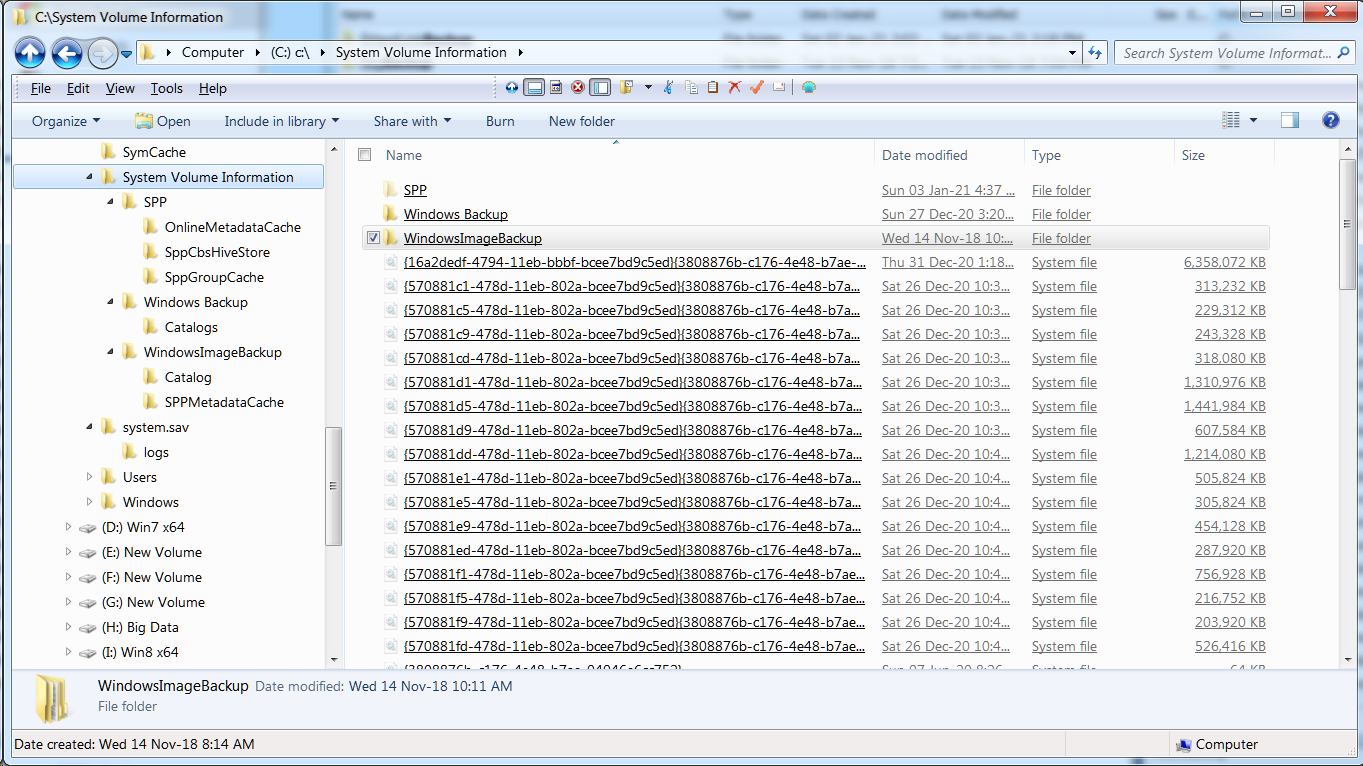
I wanted to know the extension of the files in the WindowsBackup folder. I assume these are what's using the space.

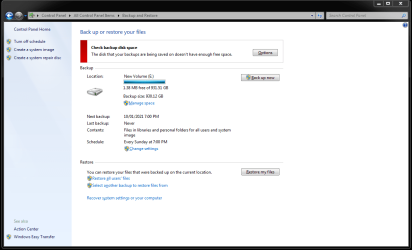
If you go to Control Panel, Backup and Restore, do you have any backups there and is there a frequency set for the backups? If you do, is the backup to the disk which is full?
 

My Computer My Computer

At a glance

Windows 7 Pro SP1 64 bit8 GB
Computer type
Laptop
Computer Manufacturer/Model Number
Dell M6500 Precision Work Station
OS
Windows 7 Pro SP1 64 bit
Memory
8 GB
Screen Resolution
1920x
Internet Speed
30 Mbps
Antivirus
Norton Security
Browser
IE 11
Win7 uses a backup catalog and separate longfilenames without extensions


sLFPn.png
 

My Computers My Computers

  • At a glance

    Windows 7 Ultimate x64 (Live long and prosper)i7-4770S 3.1 GHz 8 core16 GBIntel HD 4600
    Computer type
    PC/Desktop
    Computer Manufacturer/Model Number
    ASUS
    OS
    Windows 7 Ultimate x64 (Live long and prosper)
    CPU
    i7-4770S 3.1 GHz 8 core
    Motherboard
    ASUSTek M11AD
    Memory
    16 GB
    Graphics Card(s)
    Intel HD 4600
    Sound Card
    Realtek
    Monitor(s) Displays
    Hitachi 56" VGA , LG 28" HDMI
    Screen Resolution
    1920 x 1080 x 32 bits @ 60 Hz
    Hard Drives
    2TB 3TB 4TB 8TB
    WD Toshiba Seagate
    PSU
    ASUS 450W
    Case
    ASUS
    Cooling
    quiet turbine
    Keyboard
    Logitech wireless
    Mouse
    Logitech wireless
    Internet Speed
    380 /10 Mbps
    Antivirus
    none, no slugware but use VT,startup process & reg scanners
    Browser
    FF
  • Antivirus
    none except Autorun monitors
However, if he has a backup, it should be identified there. He said he didn't do a backup and doesn't know how it got there. Just trying to figure out where the backup came from. In the end, I'd say he could delete it and, if he wants, create another backup later.
 

My Computer My Computer

At a glance

Windows 7 Pro SP1 64 bit8 GB
Computer type
Laptop
Computer Manufacturer/Model Number
Dell M6500 Precision Work Station
OS
Windows 7 Pro SP1 64 bit
Memory
8 GB
Screen Resolution
1920x
Internet Speed
30 Mbps
Antivirus
Norton Security
Browser
IE 11
I wanted to know the extension of the files in the WindowsBackup folder. I assume these are what's using the space.

If you go to Control Panel, Backup and Restore, do you have any backups there and is there a frequency set for the backups? If you do, is the backup to the disk which is full?

Thanks a lot for the replies, sorry I was in camp on shift working the last week. I took a screen shot of the Back up and restore, looks like it has never even done a back up? Not too sure whats going on here but i do appreciate the advice, thanks a lot guys!
 

Attachments

  • backup.PNG
    backup.PNG
    37.2 KB · Views: 1

My Computer My Computer

At a glance

window 7 64 biti716 gbnivia
Computer type
PC/Desktop
Computer Manufacturer/Model Number
custom build
OS
window 7 64 bit
CPU
i7
Motherboard
asus
Memory
16 gb
Graphics Card(s)
nivia
Hard Drives
128 ssd, 1T hard drive
Antivirus
none
Browser
chrome
I also want to mention, it MAY have gotten moved there some how, but I do not recall. I thought windows defaults it to C drive or something. I didn't know a backup could take up so much hard drive space. anyways thanks again for all the help, i might just go ahead and delete it.
 

My Computer My Computer

At a glance

window 7 64 biti716 gbnivia
Computer type
PC/Desktop
Computer Manufacturer/Model Number
custom build
OS
window 7 64 bit
CPU
i7
Motherboard
asus
Memory
16 gb
Graphics Card(s)
nivia
Hard Drives
128 ssd, 1T hard drive
Antivirus
none
Browser
chrome
hi tjessop- If a backup is incremental, it will keep adding new files to the disk, at the frequency specified for the backup. Depending on the program creating the backup, it may remove some of the incremental backups if a disc becomes full. However, I think you would have gotten a message at sometime that the disk was full.

One thing you never told me is the extension of the files in the backup. Just trying to identify what created the backup. Perhaps a screenshot?
 

My Computer My Computer

At a glance

Windows 7 Pro SP1 64 bit8 GB
Computer type
Laptop
Computer Manufacturer/Model Number
Dell M6500 Precision Work Station
OS
Windows 7 Pro SP1 64 bit
Memory
8 GB
Screen Resolution
1920x
Internet Speed
30 Mbps
Antivirus
Norton Security
Browser
IE 11
Back
Top