Solved imap.gmail.com has disconnected

tyler4402

New member
Member
Local time
5:48 PM
Messages
83
Location
Palatine of Lancashire England
OperatingSystem Windows7 Professional 64-bit SP1BIOS Brand Award SoftwareInternational Inc. Version F3 Power Unit ATX 750w Specification Intel Core i3CPU 550 @ 3.20GMemory Type DDR3 - Size 8192 GbChannels # Dual
DRAM Frequency 666.7 MH
Motherboard ManufacturerGigabyte Technology Co. LtdModel H55M-S2H (Socket 1156)

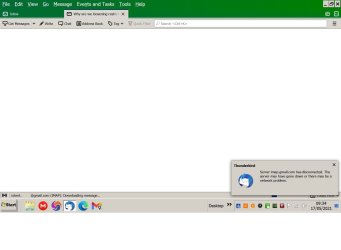
Hi, I have had this problem for about 18 months and I cannot sort it by myself, the problem is when ThunderBird is downloading emails, I click on the mail to open the message and I get the message " imap.gmail.com has disconnected from the server" when I return about 20 mins later the mail is there, and will open
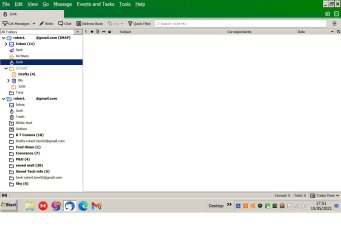
Somehow I have managed to get a duplicate account in the Legend as the usable account has an envelope by the account inbox and the inbox receives emails, and the folders I have made to save mail have mail in them which I do not want to lose.

The inactive account which I an nervous of deleting in case I lose my saved mail folders has a Blue folder next to the account name and the inbox does not work.

I have checked the account settings and they (seem) Ok

Account name > my email address
Server imap.gmail.com
Port 993
Security SSL/TLS
Authentication OAth 2
Outgoing Server SMTP.gmail.com
Port 465
Username > email address
Auth 2
Connection SSL/TLS
If anyone can help to repair this fault I'll be most grateful, regards Robert
 

Attachments
  • Server imap.jpg
    Server imap.jpg
    125.3 KB · Views: 1
  • Legend.jpg
    Legend.jpg
    170.8 KB · Views: 0
  • waiting to download mail.jpg
    waiting to download mail.jpg
    280.6 KB · Views: 1

My Computer

Computer type
PC/Desktop
Computer Manufacturer/Model Number
Local built machine
OS
Windows7 Pro SP1 64 bit
CPU
Intel i3 550
Motherboard
Gigabyte GAH55M-S2H
Memory
Slot A0' 4096Mb x Slot A2' 4096Mb Kingston ddr3
Graphics Card(s)
Palit Ge Force GTS450
Sound Card
Realtek HD Audio
Monitor(s) Displays
Samsung SyncMaster [Monitor] (22.0"vis, s/n H9XQ
Screen Resolution
1680 X 1050
Hard Drives
1 x 256 Gb SSD Win7 op system
1 x 500 Gb Storage drive
1 x Tb Gb Photo storage drive
PSU
ATX 750w
Case
Local shop supplied
Cooling
Artic Cooling Freezer7 Pro
Keyboard
Dell
Mouse
M' Soft Intli mouse
Internet Speed
34 down and 12 up
Antivirus
Avast free + Comodo free firewall
Browser
Chrome
Other Info
Power Unit 750 w
Brother B & W laser printer

My Computers

System One System Two

Hi Townsbg, my grateful thanks for your quick reply, and sorry about missing the version number, I had to re-write the post and missed it the second time round, I do try to keep all my apps updated and my TBird v is 78.10.2 and I do have a PW for the app, I will read the info you have sent and try to understand it then let you know how I get on, many thanks Robert
 

My Computer

Computer type
PC/Desktop
Computer Manufacturer/Model Number
Local built machine
OS
Windows7 Pro SP1 64 bit
CPU
Intel i3 550
Motherboard
Gigabyte GAH55M-S2H
Memory
Slot A0' 4096Mb x Slot A2' 4096Mb Kingston ddr3
Graphics Card(s)
Palit Ge Force GTS450
Sound Card
Realtek HD Audio
Monitor(s) Displays
Samsung SyncMaster [Monitor] (22.0"vis, s/n H9XQ
Screen Resolution
1680 X 1050
Hard Drives
1 x 256 Gb SSD Win7 op system
1 x 500 Gb Storage drive
1 x Tb Gb Photo storage drive
PSU
ATX 750w
Case
Local shop supplied
Cooling
Artic Cooling Freezer7 Pro
Keyboard
Dell
Mouse
M' Soft Intli mouse
Internet Speed
34 down and 12 up
Antivirus
Avast free + Comodo free firewall
Browser
Chrome
Other Info
Power Unit 750 w
Brother B & W laser printer

Hi again, I have had a look at the links you advised and cannot find anything specific to my problem, the link showed how to setup the account but if I go through that again I'll probably end up with a third account, and I dare not remove the duff duplicate one I accidentally made in case it removes my saved mail folders, and having checked all the parameters in TBird they seem ok, I have tried changing the server settings to "STARTTLS and the port to 143" but that only makes the inbox tab buffer continuously.
As I stated I have had this prob a long time and it's getting worse, I get the feeling it's something to do with synchronizing the gmail to TBird but the parameters in gmail also seem ok, so I don't know what to try next, any ideas very welcome, regards Robert
 

My Computer

Computer type
PC/Desktop
Computer Manufacturer/Model Number
Local built machine
OS
Windows7 Pro SP1 64 bit
CPU
Intel i3 550
Motherboard
Gigabyte GAH55M-S2H
Memory
Slot A0' 4096Mb x Slot A2' 4096Mb Kingston ddr3
Graphics Card(s)
Palit Ge Force GTS450
Sound Card
Realtek HD Audio
Monitor(s) Displays
Samsung SyncMaster [Monitor] (22.0"vis, s/n H9XQ
Screen Resolution
1680 X 1050
Hard Drives
1 x 256 Gb SSD Win7 op system
1 x 500 Gb Storage drive
1 x Tb Gb Photo storage drive
PSU
ATX 750w
Case
Local shop supplied
Cooling
Artic Cooling Freezer7 Pro
Keyboard
Dell
Mouse
M' Soft Intli mouse
Internet Speed
34 down and 12 up
Antivirus
Avast free + Comodo free firewall
Browser
Chrome
Other Info
Power Unit 750 w
Brother B & W laser printer
If the server is disconnecting there really isn't much you can do as long as it is configured as per the instructions. I would contact their support. I don't have any other suggestions other than to try another client. It wouldn't surprise me if they stopped supporting 7 even though I didn't read anything about it. I'm not running 7 anymore so I can't test except on a virtual machine. Maybe I'll be able to do that tomorrow.
 

My Computers

System One System Two

Hi again Townsbg, thanks for your advice, I just feel that TBird and Google should sync or talk to each other better and yes all seems in the right order as I have pop disconnected and imap enabled in gmail, unless there is something wrong with the password? evidently from the txt link you sent me I should enter my google password when setting up TBird but it's so long ago I don't know what pw I entered and I don't really know how to check which pw I used, and by "try another client" do you mean forget google and make another email address like @Yahoo @bing, or something like that? Regards Robert
 

My Computer

Computer type
PC/Desktop
Computer Manufacturer/Model Number
Local built machine
OS
Windows7 Pro SP1 64 bit
CPU
Intel i3 550
Motherboard
Gigabyte GAH55M-S2H
Memory
Slot A0' 4096Mb x Slot A2' 4096Mb Kingston ddr3
Graphics Card(s)
Palit Ge Force GTS450
Sound Card
Realtek HD Audio
Monitor(s) Displays
Samsung SyncMaster [Monitor] (22.0"vis, s/n H9XQ
Screen Resolution
1680 X 1050
Hard Drives
1 x 256 Gb SSD Win7 op system
1 x 500 Gb Storage drive
1 x Tb Gb Photo storage drive
PSU
ATX 750w
Case
Local shop supplied
Cooling
Artic Cooling Freezer7 Pro
Keyboard
Dell
Mouse
M' Soft Intli mouse
Internet Speed
34 down and 12 up
Antivirus
Avast free + Comodo free firewall
Browser
Chrome
Other Info
Power Unit 750 w
Brother B & W laser printer
If you have 2 factor authentication (ie a temporary code from your phone or push notification to the google app) then you have to generate an app password from your security settings rather than enter in your actual password. My link shows how to do that. Have you tried another client?
 

My Computers

System One System Two

I did test it on my 2008 r2 virtual machine and it does work so you should be able to use Windows 7. So I would say make sure that your password is right, generate an app password if you use 2fa, and then, if all else fails, remove and re-add your account. Other than contacting Google I don't know what else to tell you. There is only so much you can do for a server disconnect without working with their support to investigate it on the server end.
 

My Computers

System One System Two

Getting Gmail to work in Thunderbird is a bit of a pain. I do have at least three Gmail accounts in Thunderbird and they do work. You may need to go into your Gmail settings at the Gmail website and turn off less secure Apps or some stupid thing. Also, if I can remember right you needed to accept some policy pop up box in Thunderbird when you first configure a Gmail address. Or you had to sign into Gmail via a pop up box in Thunderbird. I don't remember.

Looks like you have Avast installed and that can and will muck up things. Is there some sort of email scanning turned on in Avast? Don't ever let an anti-virus software intercept secure connections (HTTPS).
 

My Computer

Computer type
PC/Desktop
OS
Windows 7 Ultimate x64
My thanks to you both for your help, Hi Townsgb, I am not sure how to check my PW which I suppose is in TBird but I can't find where the PW's are to check that it is the correct gmail pw, and it's probably not, as I always thought that TB had to have a different pw to gmail, and no I don't have 2fa

Hi F22, As suggested I have now turned "off " the Avast mail shield, I have ok'd TBird in the Avast AV settings and also in my Comodo Firewall, it's odd because gmail, Avast, and Como have all worked ok with each other for over ten years.
In the second .JPG picture you will notice a duplicate email account which does not work, I would like to remove it but I am fearful of losing my saved mail folders which contain important emails I don't want to lose, I do also have another gmail PW although I have never used it, and it would be nice to have it available in TB if I can get it working, regards Robert
 

My Computer

Computer type
PC/Desktop
Computer Manufacturer/Model Number
Local built machine
OS
Windows7 Pro SP1 64 bit
CPU
Intel i3 550
Motherboard
Gigabyte GAH55M-S2H
Memory
Slot A0' 4096Mb x Slot A2' 4096Mb Kingston ddr3
Graphics Card(s)
Palit Ge Force GTS450
Sound Card
Realtek HD Audio
Monitor(s) Displays
Samsung SyncMaster [Monitor] (22.0"vis, s/n H9XQ
Screen Resolution
1680 X 1050
Hard Drives
1 x 256 Gb SSD Win7 op system
1 x 500 Gb Storage drive
1 x Tb Gb Photo storage drive
PSU
ATX 750w
Case
Local shop supplied
Cooling
Artic Cooling Freezer7 Pro
Keyboard
Dell
Mouse
M' Soft Intli mouse
Internet Speed
34 down and 12 up
Antivirus
Avast free + Comodo free firewall
Browser
Chrome
Other Info
Power Unit 750 w
Brother B & W laser printer
Getting Gmail to work in Thunderbird is a bit of a pain. I do have at least three Gmail accounts in Thunderbird and they do work. You may need to go into your Gmail settings at the Gmail website and turn off less secure Apps or some stupid thing. Also, if I can remember right you needed to accept some policy pop up box in Thunderbird when you first configure a Gmail address. Or you had to sign into Gmail via a pop up box in Thunderbird. I don't remember.

Looks like you have Avast installed and that can and will muck up things. Is there some sort of email scanning turned on in Avast? Don't ever let an anti-virus software intercept secure connections (HTTPS).
I entered in my email as part of the configuration process and then app password. Then thunderbird popped up a gmail login screen. I had to enter in my password, then the 2fa, and finally allow access. I was pretty simple and I didn't even need to enter in the address or ports.

My thanks to you both for your help, Hi Townsgb, I am not sure how to check my PW which I suppose is in TBird but I can't find where the PW's are to check that it is the correct gmail pw, and it's probably not, as I always thought that TB had to have a different pw to gmail, and no I don't have 2fa

Hi F22, As suggested I have now turned "off " the Avast mail shield, I have ok'd TBird in the Avast AV settings and also in my Comodo Firewall, it's odd because gmail, Avast, and Como have all worked ok with each other for over ten years.
In the second .JPG picture you will notice a duplicate email account which does not work, I would like to remove it but I am fearful of losing my saved mail folders which contain important emails I don't want to lose, I do also have another gmail PW although I have never used it, and it would be nice to have it available in TB if I can get it working, regards Robert
I couldn't find where to change the password. You might have to remove the account and start over. I don't know if that'll delete the archive. Personally I've never used thunderbird before so I don't know much about it. If you don't want to risk deleting the archive you might want to try their support forum. Mozilla Support I don't think I can help any more.
 

My Computers

System One System Two

Many thanks for your input guys, whenever I have used the 7 forum I have received some very good help and when you get nearer to 80 than 70 you sometimes need a guiding hand on your shoulder and thankfully since you suggested that I take off the mail check in Avast the last couple of emails have arrived and opened as they should so I am very pleased to say that I think stopping the mail scan has been a success, and as the folders I made for saved mail belong to the active account I think it should be safe to delete the duplicate account, so thanks again. Kind regards Robert
 

My Computer

Computer type
PC/Desktop
Computer Manufacturer/Model Number
Local built machine
OS
Windows7 Pro SP1 64 bit
CPU
Intel i3 550
Motherboard
Gigabyte GAH55M-S2H
Memory
Slot A0' 4096Mb x Slot A2' 4096Mb Kingston ddr3
Graphics Card(s)
Palit Ge Force GTS450
Sound Card
Realtek HD Audio
Monitor(s) Displays
Samsung SyncMaster [Monitor] (22.0"vis, s/n H9XQ
Screen Resolution
1680 X 1050
Hard Drives
1 x 256 Gb SSD Win7 op system
1 x 500 Gb Storage drive
1 x Tb Gb Photo storage drive
PSU
ATX 750w
Case
Local shop supplied
Cooling
Artic Cooling Freezer7 Pro
Keyboard
Dell
Mouse
M' Soft Intli mouse
Internet Speed
34 down and 12 up
Antivirus
Avast free + Comodo free firewall
Browser
Chrome
Other Info
Power Unit 750 w
Brother B & W laser printer
Good to hear.

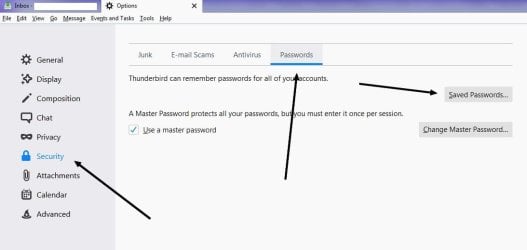
As for your passwords, go to the top to Tools | Options and Bob's your uncle... or aunt. LOL (See attached images).


If the Tools option isn't there, right click the top there and enable all the menu bars. Why Mozilla et al like to hide these menu bars makes no sense at all. I like my options in front of my face for easy access thank you very much creative geniuses.


Now about security. I do things vastly different, and with security comes cumbersomeness. The first thing I do is run Thunderbird (and my browsers) in something called a sandbox using software called Sandboxie. If you're not computer savvy I don't recommend you mess with it. But if you want to learn then go for it.


The other thing I do is don't allow the parsing of HTML in emails and don't allow the loading of images. Doing these two things will greatly help you in the security department, but like I said, there will be cumbersomeness. For one, without the parsing of HTML and images your emails will be in text format and unless your computer savvy with links and what have you it may not be very pleasing to the eyes and hard to discern things. Parsing HTML and loading images can and will get your contracts list jacked or malware installed on your computer. It doesn't even have to be in the form of an attachment. An image can be sent that is only 1x1 pixels in size which is invisible to your eye called a canary token. Once you load that image in your email it'll make a call back to some server which will rat out your IP address among some other things. Now a spammer or bad actor can see that you read the email and send more. The same principal applies to text messages (SMS). If you load that text message, bad things can happen and the sender will get a read receipt. Now they send more. So just don't load a spam text and delete it straight away. When they see your IP via an invisible image in email, it could allow him/her to check that for open ports and vulnerabilities. Now they can infect your router or modem and turn your router or modem into a "zombie bot net", i.e. their own little personal stepping stone for nefarious activity. This is true for lot of people. I run a few websites and see infected routers/modems hit my site all the time. Yet peo;e seem to focus on Windows and software updates never thinking about the router or modem. And Samba (NetBIOS) can be a real rude awaking...

This is not something you may want to do, i.e not parse HTML and not load images. But I present it here for you to understand and for others that may come across this thread. If I were to leave parsing of HTML and images in place I'd opt for Sandboxie to help keep nefarious code at bay. I'm sure the uBlock Origin add-on for Thunderbird can help. Releases . gorhill/uBlock . GitHub

Biggest rule of thumb is DON'T trust but verify. Meaning you know that email is REALLY legit and REALLY from a legit source. That's why you should set up special folder rules so that if email comes from the real PayPal, eBay, Amazon, your bank, etc, they'll all go to those folders. If it's a phish email (an email that looks like PayPal et al) then it won't go into those folders and you now have a better opportunity to scrutinize the email.

Thunderbird Mail Filtering | Tiger Technologies Support

It's been a while since I've had to create a filter since I already have things set up, but I think you have to right click your email there on the left and create folders like, eBay, Amazon, etc and then create the filters so those emails received drop into those email folders.

Tip: if you suspect a fake PayPal email, forward it to [email protected]. How to report a suspicious email to PayPal
 

Attachments

  • 2.jpg
    2.jpg
    35.6 KB · Views: 0
  • 1.jpg
    1.jpg
    63.5 KB · Views: 0

My Computer

Computer type
PC/Desktop
OS
Windows 7 Ultimate x64
Good to hear.

As for your passwords, go to the top to Tools | Options and Bob's your uncle... or aunt. LOL (See attached images).


If the Tools option isn't there, right click the top there and enable all the menu bars. Why Mozilla et al like to hide these menu bars makes no sense at all. I like my options in front of my face for easy access thank you very much creative geniuses.


Now about security. I do things vastly different, and with security comes cumbersomeness. The first thing I do is run Thunderbird (and my browsers) in something called a sandbox using software called Sandboxie. If you're not computer savvy I don't recommend you mess with it. But if you want to learn then go for it.


The other thing I do is don't allow the parsing of HTML in emails and don't allow the loading of images. Doing these two things will greatly help you in the security department, but like I said, there will be cumbersomeness. For one, without the parsing of HTML and images your emails will be in text format and unless your computer savvy with links and what have you it may not be very pleasing to the eyes and hard to discern things. Parsing HTML and loading images can and will get your contracts list jacked or malware installed on your computer. It doesn't even have to be in the form of an attachment. An image can be sent that is only 1x1 pixels in size which is invisible to your eye called a canary token. Once you load that image in your email it'll make a call back to some server which will rat out your IP address among some other things. Now a spammer or bad actor can see that you read the email and send more. The same principal applies to text messages (SMS). If you load that text message, bad things can happen and the sender will get a read receipt. Now they send more. So just don't load a spam text and delete it straight away. When they see your IP via an invisible image in email, it could allow him/her to check that for open ports and vulnerabilities. Now they can infect your router or modem and turn your router or modem into a "zombie bot net", i.e. their own little personal stepping stone for nefarious activity. This is true for lot of people. I run a few websites and see infected routers/modems hit my site all the time. Yet peo;e seem to focus on Windows and software updates never thinking about the router or modem. And Samba (NetBIOS) can be a real rude awaking...

This is not something you may want to do, i.e not parse HTML and not load images. But I present it here for you to understand and for others that may come across this thread. If I were to leave parsing of HTML and images in place I'd opt for Sandboxie to help keep nefarious code at bay. I'm sure the uBlock Origin add-on for Thunderbird can help. Releases . gorhill/uBlock . GitHub

Biggest rule of thumb is DON'T trust but verify. Meaning you know that email is REALLY legit and REALLY from a legit source. That's why you should set up special folder rules so that if email comes from the real PayPal, eBay, Amazon, your bank, etc, they'll all go to those folders. If it's a phish email (an email that looks like PayPal et al) then it won't go into those folders and you now have a better opportunity to scrutinize the email.

Thunderbird Mail Filtering | Tiger Technologies Support

It's been a while since I've had to create a filter since I already have things set up, but I think you have to right click your email there on the left and create folders like, eBay, Amazon, etc and then create the filters so those emails received drop into those email folders.

Tip: if you suspect a fake PayPal email, forward it to [email protected]. How to report a suspicious email to PayPal

I'd give you rep for this post but the forum won't let me.:rolleyes::rolleyes::rolleyes::rolleyes::rolleyes::rolleyes:
 

My Computers

System One System Two

Many thanks, I don't understand it all yet so I have saved the links for later, your instructions led me to the PW's and my account PW was just a load of letters and numbers, so I turned my attention the the duplicate account and found a box with the email address displayed so I changed it to my second account address, and entered the imap parameters port etc, when prompted for a PW I entered my Google PW which when finalizing/logging in, the account the PW was rejected, so I clicked forgotten PW and made another (I tried making several different PW's) all were rejected, so today I am going to change the account address to something quite different and see if that works, Regards Robert
 

My Computer

Computer type
PC/Desktop
Computer Manufacturer/Model Number
Local built machine
OS
Windows7 Pro SP1 64 bit
CPU
Intel i3 550
Motherboard
Gigabyte GAH55M-S2H
Memory
Slot A0' 4096Mb x Slot A2' 4096Mb Kingston ddr3
Graphics Card(s)
Palit Ge Force GTS450
Sound Card
Realtek HD Audio
Monitor(s) Displays
Samsung SyncMaster [Monitor] (22.0"vis, s/n H9XQ
Screen Resolution
1680 X 1050
Hard Drives
1 x 256 Gb SSD Win7 op system
1 x 500 Gb Storage drive
1 x Tb Gb Photo storage drive
PSU
ATX 750w
Case
Local shop supplied
Cooling
Artic Cooling Freezer7 Pro
Keyboard
Dell
Mouse
M' Soft Intli mouse
Internet Speed
34 down and 12 up
Antivirus
Avast free + Comodo free firewall
Browser
Chrome
Other Info
Power Unit 750 w
Brother B & W laser printer
Back
Top