Update your Win 7 installation media

Hello,
Before finding this amazing tool, I was trying to install Windows 7 Ultimate on a ore i5-10400 Coffee Lake
I used the gigabyte tool and such, and Rufus to load my USB.
Everything was fine until I got to the installation screen, with no mouse or keyboard.
- - -
Using the Windows 7 Image Updater, release v2020.08.07, I updated my ISO image and loaded it into my USB using Rufus.
Now, at the installation screen, I have mouse and keyboard control (yippee!), and start the installation on my partition.
The installation goes fine until all the files are installed and then the installation process reboots.
The problem for me is that the installation starts all over again and and does not pick up where it left off.
It won't let me proceed with setting up my name, time, etc. and goes right back to the partition where I want to install Windows 7 Ultimate.
I am going through the 100+ pages of posts but so far have not seen anything like this problem, and will continue.
Forgive me for bringing this up, but if someone has a solution I would appreciate that.
Sorry if I missed any information, so please ask and I will reply.
 

My Computers My Computers

System One System Two

  • OS
    Windows 7 Ultimate
  • Computer type
    PC/Desktop
What is the hardware - motherboard particularly

The installation goes fine until all the files are installed and then the installation process reboots.
The problem for me is that the installation starts all over again and and does not pick up where it left off.
It won't let me proceed with setting up my name, time, etc. and goes right back to the partition where I want to install Windows 7 Ultimate.

Not clear exactly what you are describing. Can you show us pics or a video from your phone, if necessary.

The installation goes fine until all the files are installed and then the installation process reboots.

Do you mean the image is applied to the target, then setup goes for the first reboot from winpe to the disk?

Did you remember to unplug the installation media - usb stick or whatever it is - at that point?

It won't let me proceed with setting up my name, time, etc.

Do you get to the oobe screen and then cannot input with keyboard? Or do you not even get that far?
 

My Computers My Computers

System One System Two

  • Computer type
    PC/Desktop
    OS
    7 X64
    CPU
    i5 8400
    Motherboard
    gigabyte b365m ds3h
    Memory
    2x8gb 3200mhz
    Hard Drives
    various
    PSU
    pure power 11 400w cm
    Case
    Coolermaster
    Cooling
    cryorig m9i
  • Computer type
    PC/Desktop
    OS
    7x64
    CPU
    g5400
    Motherboard
    ga b365m ds3h
    Memory
    8gb ddr4 2400
    PSU
    xfx pro 450w
I apologize for the delay.

I was working away at my problem.

I Googled "Windows install keeps looping" and the solution is that when the install goes through its processes:
Copying Windows files
Getting files ready for installation
Installing features
Installing updates
Finishing up

It then reboots, and my solution was to yank out the USB during the reboot, when the screen does dark.

I had set my BIOS boot order for my installation ssd to be 2nd in line, and when the reboot occurred I had my desired prompt screens for entering my user name and the time zone, etc.

I've been at this all day.

Now that I have the answer, I will get some rest and hit this later and recreate everything and note all of my BIOS changes I made, plus add more info on the beast I got Windows 7 Ultimate installed on.

The guys at the shop, who put this desktop PC together told me it couldn't be done, and I am sitting here looking at a fresh install of windows 7 on a creature that they had installed windows 10 on.

I apologize for the rush of this post, but feel free to comment on anything, etc.

I truly thank your kindness for showing interest. I know you guys get busy a lot.

Give me about 12 hours or so to get back to this to make more sense of things and also I do not think my problem has anything to do with this amazing update tool, but rather my own ignorance in setting up the BIOS for allowing Windows 7.

I hope this is not a digression from the update tool.

Thank you SIW2. Really thanks. I hope my attachment is here with the PC's specs FYI
 

Attachments

My Computers My Computers

System One System Two

  • OS
    Windows 7 Ultimate
  • Computer type
    PC/Desktop
MyWindowSeven

Good progress !!

Your quoted specs of interest to me:

CPU
Intel Core i5 10400 @ 2.90GHz
Comet Lake 14nm Technology

Graphics

16MB NVIDIA Standard VGA Graphics Adapter (Gigabyte)

An i5-10400 CPU on Win 7 is very interesting (and in an ASUS, generally regarded as a difficult host, as it were).
A standard NVIDIA graphics adapter ... yet your machine booted and installed Win7

I'm very interested to follow your progress here if you care to.

Eg: do you achieve the full resolution of your monitor with the NVIDIA ? Which graphics driver ? Touchpad works ok ? WiFi, bluetooth, audio ?

I've done this on an i5-8265U and eventually achieved it on an i5-Gen9 laptop for a colleague. Not yet tried a Gen10 machine.

Very interesting to me.
 

My Computer My Computer

Computer type
Laptop
Computer Manufacturer/Model Number
HP 250 G7
OS
Windows 7 Pro x64
CPU
Intel i5-8265U
Motherboard
Intel Coffee Lake
Memory
8gb
Graphics Card(s)
Intel Iris Plus 655
Sound Card
Realtek HDA
Monitor(s) Displays
Generic
Screen Resolution
1366 x 768
Hard Drives
Crucial P5 NVMe 1Tb internal
WD's 4Tb, 3Tb, 2 x 2Tb external
Mouse
Logi wireless
Internet Speed
45 Mbps
Antivirus
AVG
Browser
Firefox 88, Pale Moon 29, Brave 129
Other Info
Combination of i5-8265U with Crucial P5 achieves Crystal Bench scores > 5000

Iris Plus GPU (Whiskey Lake) driver from BioStar

HP 250 G7 is a budget machine
ian50

I am not surprised win7 installs on the machine. The question is what kind of graphics is he getting? And network drivers, though the card could likely be changed if necessary, or use a dongle.

If you are just on standard vga, you could try these made by canonkong to see if they support 11th gen igpu
password: xiaofengmod
SMXDIY_Win64_15.45.27.5068_Beta_4.0_signature.7z — Yandex.Disk

These are for i225v net card, if that is what you have View attachment i225v-WIN7MOD.zip


Install Windows 7 and 8.1 onto Intel 8th, 9th, 10th(inc refresh) and 11th generation | Page 5 | NTLite Forums
 
Last edited:

My Computers My Computers

System One System Two

  • Computer type
    PC/Desktop
    OS
    7 X64
    CPU
    i5 8400
    Motherboard
    gigabyte b365m ds3h
    Memory
    2x8gb 3200mhz
    Hard Drives
    various
    PSU
    pure power 11 400w cm
    Case
    Coolermaster
    Cooling
    cryorig m9i
  • Computer type
    PC/Desktop
    OS
    7x64
    CPU
    g5400
    Motherboard
    ga b365m ds3h
    Memory
    8gb ddr4 2400
    PSU
    xfx pro 450w
SIW2

Yes, thank you. I'd caught up with the NTLite threads (I prefer using the freeware section of NTLite for editing WIM's). Having a live thread here is very useful for detail, I find.

As you correctly say, graphics, wifi/bluetooth, touchpad, audio are interesting issues. That MWS (thread opener) had his machine boot off Win7 installation says (to me) his BIOS had CSM available. Again, keeping this in view (ie. not as yet only UEFI class 3 with no CSM) is a useful detail.

This whole topic is at a very dynamic period for me.
 

My Computer My Computer

Computer type
Laptop
Computer Manufacturer/Model Number
HP 250 G7
OS
Windows 7 Pro x64
CPU
Intel i5-8265U
Motherboard
Intel Coffee Lake
Memory
8gb
Graphics Card(s)
Intel Iris Plus 655
Sound Card
Realtek HDA
Monitor(s) Displays
Generic
Screen Resolution
1366 x 768
Hard Drives
Crucial P5 NVMe 1Tb internal
WD's 4Tb, 3Tb, 2 x 2Tb external
Mouse
Logi wireless
Internet Speed
45 Mbps
Antivirus
AVG
Browser
Firefox 88, Pale Moon 29, Brave 129
Other Info
Combination of i5-8265U with Crucial P5 achieves Crystal Bench scores > 5000

Iris Plus GPU (Whiskey Lake) driver from BioStar

HP 250 G7 is a budget machine
You should be ok for csm on most desktop mobos if you are self building. Canonkong suggests gigabyte and msi are easiest, though asus intel machines seem ok - asus can be tricky with amd. Not asrock, he says.

The oem prebuilts Dell. etc with their own oem components probably dont have csm support on recent machines. It is not impossible to get around that, but I doubt many people would bother.

Newest laptops almost certainly no csm.
 

My Computers My Computers

System One System Two

  • Computer type
    PC/Desktop
    OS
    7 X64
    CPU
    i5 8400
    Motherboard
    gigabyte b365m ds3h
    Memory
    2x8gb 3200mhz
    Hard Drives
    various
    PSU
    pure power 11 400w cm
    Case
    Coolermaster
    Cooling
    cryorig m9i
  • Computer type
    PC/Desktop
    OS
    7x64
    CPU
    g5400
    Motherboard
    ga b365m ds3h
    Memory
    8gb ddr4 2400
    PSU
    xfx pro 450w
ian50Hey! Got a nap. For a few hours I'll be re-installing a fresh install over the one I had success with. I want to whittle down where I had gone wrong.

Bad OS ISO install software
Bad packaging into the USB (wrong boxes checked etc.
Bad BIOS Settings

This Desktop PC came with Windows 10 installed and the SSD card is like I've never seen before. It looks like a 1/3 smaller version of a RAM card, and plugs into the motherboard the same way (no SATA Data or Power cable plugging needed)

It's reads: Kingston PCIe NVMe, Series M.2 / 500GB about 1"w x 3"l and 3mm thick

Anyway, my initial success came by removing this strange SSD wafer (1 retainer screw and a tight space) and plugging in an old Western Digital 480GB GREEN SATA SSD I had lying around, using the SATA Cables: Power and Data, respectively.

Reason is I am paranoid about things I am new to: so I removed that possibility.

Then I tried the install and got the repeat install without the install moving into the setup page.

So then I went into the BIOS and made these changes; TUF GAMING B460M PLUS BIOS version 1003

Advanced Tab > Platform Misc. Config > PCI Express Native Power Management - Changed to enabled

Advanced Tab > USB Config > Legacy USB support - Changed to enabled

Boot Tab > CSM (Compatability Support Module) > Launch CSM - changed to enabled

Boot Tab > CSM (Compatability Support Module) > Boot Device Control - UEFI Only

Boot Tab > CSM (Compatability Support Module) > Boot from Network Devices - Legacy Only

Boot Tab > CSM (Compatability Support Module) > Boot from storage devices - Legacy Only

Boot Tab > CSM (Compatability Support Module) > Boot from PCI-E/PCI Expansion Devices - Legacy only

NOTE: Choices of the last 5 are UEFI or Legacy or Ignore

Boot Tab > CSM (Compatability Support Module) > Secure Boot > Disabled by deleting the keys

Boot Tab > CSM (Compatability Support Module) > Secure Boot > OS Type - Windows UEFI Mode ("Windows Other" the only other option)

Note: Secure Boot State greyed out showing "Setup"

Boot Tab > CSM (Compatability Support Module) > Boot Configuration > Fast Boot - changed to disabled

Boot Tab > CSM (Compatability Support Module) > Boot Configuration > Setup Mode - EZ Mode
- - -

After that, no more repeating of the install, and rebooting into install and instead rebooting into the setup user screen.
- - - -

It works!

So... now that I have my BIOS cooperating with Windows 7, and since the install is fresh, without the accessories, I will now try creating bootable USB installs several ways, and TRY to make one not work, and note the ones that DO work.

Using the 7 Image Update tool and rufus, and on another test basis using Gigabyte Tool and Rufus.

Also I am playing with 2 WIndows 7 Iso Files:

One is "Windows 7 SP1 Ultimate 6in1 OEM en-US JAN 2021 {Gen2}, and the other one is, "Windows 7 Ultimate with SP1 X64 Genuine ISO Untouched"

Once I settle on understanding the process and making documentation for future models and generations of motherboards (if I can afford them by then), then I'll let y'all know the updated Speccy specs with another text file.

Take care, and feel free to comment or ask questions.
 

My Computers My Computers

System One System Two

  • OS
    Windows 7 Ultimate
  • Computer type
    PC/Desktop
HiMy windows 7 setup boots up and mouse and keyboard works but when i click install it says that there is a missing driver
My specs
asus b360-plus
i5 9400f
rtx 2070
 

My Computer My Computer

Computer type
PC/Desktop
OS
Dual Boot Windows 7 Ultimate x64, Windows 10 Pro x64
CPU
i5-9400f
Motherboard
Asus B360-Plus
Memory
16GB 2666Mhz
Graphics Card(s)
Zotac Gaming RTX 2070 Mini
Monitor(s) Displays
2
Screen Resolution
1920x1080
Hard Drives
Internal: 256GB NVMe, 1TB HDD
External: Seagate 2TB
Keyboard
Epomaker SK64
Mouse
Glorious Model O
Internet Speed
Ping: 2 ms, Down: 192 mbps, Up: 19 mbps
Browser
Chrome
Are you trying to install to nvme disk?
 

My Computers My Computers

System One System Two

  • Computer type
    PC/Desktop
    OS
    7 X64
    CPU
    i5 8400
    Motherboard
    gigabyte b365m ds3h
    Memory
    2x8gb 3200mhz
    Hard Drives
    various
    PSU
    pure power 11 400w cm
    Case
    Coolermaster
    Cooling
    cryorig m9i
  • Computer type
    PC/Desktop
    OS
    7x64
    CPU
    g5400
    Motherboard
    ga b365m ds3h
    Memory
    8gb ddr4 2400
    PSU
    xfx pro 450w
My windows 7 setup boots up and mouse and keyboard works but when i click install it says that there is a missing driver
My specs
asus b360-plus
i5 9400f
rtx 2070
It appears you have a 9th generation Intel system.
The Windows 7 install media doesn't have native support for such new hardware, so certain drivers, etc. need to be integrated into it.
SIW2 is the person to help you, so I'll leave you with him.
 

My Computer My Computer

Computer type
PC/Desktop
Computer Manufacturer/Model Number
Dell OptiPlex 9020
OS
Windows 7 Professional SP1 64-bit
CPU
Intel Core i7-4790 3.60 GHz
Memory
32 GB DDR3-1600 MHz
Graphics Card(s)
Integrated Intel HD Graphics 4600
Monitor(s) Displays
Viewsonic 32" LCD
Hard Drives
Kingston SATA 3 240 GB SSD
Internet Speed
Spectrum Internet 1000 Mbps

My Computer My Computer

Computer type
PC/Desktop
OS
Dual Boot Windows 7 Ultimate x64, Windows 10 Pro x64
CPU
i5-9400f
Motherboard
Asus B360-Plus
Memory
16GB 2666Mhz
Graphics Card(s)
Zotac Gaming RTX 2070 Mini
Monitor(s) Displays
2
Screen Resolution
1920x1080
Hard Drives
Internal: 256GB NVMe, 1TB HDD
External: Seagate 2TB
Keyboard
Epomaker SK64
Mouse
Glorious Model O
Internet Speed
Ping: 2 ms, Down: 192 mbps, Up: 19 mbps
Browser
Chrome
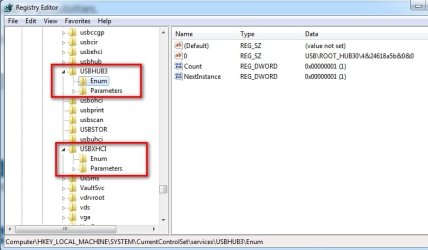
there are a couple of possibilties.

1. boot the media and check in regedit if the usb3 and xhci have enumerated

regedit-usb3.jpg

2. Check in the distribution sources folder that hwcompat.txt contains the line
stornvme.inf:
PCI\CC_010802
 

My Computers My Computers

System One System Two

  • Computer type
    PC/Desktop
    OS
    7 X64
    CPU
    i5 8400
    Motherboard
    gigabyte b365m ds3h
    Memory
    2x8gb 3200mhz
    Hard Drives
    various
    PSU
    pure power 11 400w cm
    Case
    Coolermaster
    Cooling
    cryorig m9i
  • Computer type
    PC/Desktop
    OS
    7x64
    CPU
    g5400
    Motherboard
    ga b365m ds3h
    Memory
    8gb ddr4 2400
    PSU
    xfx pro 450w
there are a couple of possibilties.

1. boot the media and check in regedit if the usb3 and xhci have enumerated

View attachment 419939

2. Check in the distribution sources folder that hwcompat.txt contains the line
stornvme.inf:
PCI\CC_010802

usb3 and xhci have enum but there isnt a pci\cc_010802 in hwcompat.txt
 

My Computer My Computer

Computer type
PC/Desktop
OS
Dual Boot Windows 7 Ultimate x64, Windows 10 Pro x64
CPU
i5-9400f
Motherboard
Asus B360-Plus
Memory
16GB 2666Mhz
Graphics Card(s)
Zotac Gaming RTX 2070 Mini
Monitor(s) Displays
2
Screen Resolution
1920x1080
Hard Drives
Internal: 256GB NVMe, 1TB HDD
External: Seagate 2TB
Keyboard
Epomaker SK64
Mouse
Glorious Model O
Internet Speed
Ping: 2 ms, Down: 192 mbps, Up: 19 mbps
Browser
Chrome
Something went wrong at your end.

copy the boot .wim image 2 sources folder to the distribution, overwriting the current distribution sources folder.
 

My Computers My Computers

System One System Two

  • Computer type
    PC/Desktop
    OS
    7 X64
    CPU
    i5 8400
    Motherboard
    gigabyte b365m ds3h
    Memory
    2x8gb 3200mhz
    Hard Drives
    various
    PSU
    pure power 11 400w cm
    Case
    Coolermaster
    Cooling
    cryorig m9i
  • Computer type
    PC/Desktop
    OS
    7x64
    CPU
    g5400
    Motherboard
    ga b365m ds3h
    Memory
    8gb ddr4 2400
    PSU
    xfx pro 450w
Something went wrong at your end.

copy the boot .wim image 2 sources folder to the distribution, overwriting the current distribution sources folder.
sorry, i'm new to this but i don't understand what i'm supposed to do
 

My Computer My Computer

Computer type
PC/Desktop
OS
Dual Boot Windows 7 Ultimate x64, Windows 10 Pro x64
CPU
i5-9400f
Motherboard
Asus B360-Plus
Memory
16GB 2666Mhz
Graphics Card(s)
Zotac Gaming RTX 2070 Mini
Monitor(s) Displays
2
Screen Resolution
1920x1080
Hard Drives
Internal: 256GB NVMe, 1TB HDD
External: Seagate 2TB
Keyboard
Epomaker SK64
Mouse
Glorious Model O
Internet Speed
Ping: 2 ms, Down: 192 mbps, Up: 19 mbps
Browser
Chrome
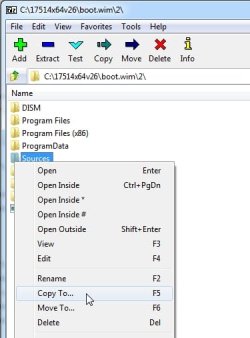
Open boot.wim with 7-zip

7-zip-image2.jpg

Dble Click image 2 to look inside

RT clikc the sources folder and select copy to

7-zip-image2-1.jpg


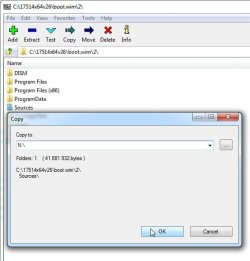
Copy the sources folder to the distribution, which presumably is on your usb stick. In this case example , the usb stick is N:\

7-zip-image2-2.jpg

It will ask if you want to overwrite the already existing sources folder and contents on N:\ , say Yes to all
 

My Computers My Computers

System One System Two

  • Computer type
    PC/Desktop
    OS
    7 X64
    CPU
    i5 8400
    Motherboard
    gigabyte b365m ds3h
    Memory
    2x8gb 3200mhz
    Hard Drives
    various
    PSU
    pure power 11 400w cm
    Case
    Coolermaster
    Cooling
    cryorig m9i
  • Computer type
    PC/Desktop
    OS
    7x64
    CPU
    g5400
    Motherboard
    ga b365m ds3h
    Memory
    8gb ddr4 2400
    PSU
    xfx pro 450w
Open boot.wim with 7-zip

View attachment 419942

Dble Click image 2 to look inside

RT clikc the sources folder and select copy to

View attachment 419941


Copy the sources folder to the distribution, which presumably is on your usb stick. In this case example , the usb stick is N:\

View attachment 419940

It will ask if you want to overwrite the already existing sources folder and contents on N:\ , say Yes to all
It worked. Writing this from Windows 7 Ultimate. Thank you so much for the tool and help!
 

My Computer My Computer

Computer type
PC/Desktop
OS
Dual Boot Windows 7 Ultimate x64, Windows 10 Pro x64
CPU
i5-9400f
Motherboard
Asus B360-Plus
Memory
16GB 2666Mhz
Graphics Card(s)
Zotac Gaming RTX 2070 Mini
Monitor(s) Displays
2
Screen Resolution
1920x1080
Hard Drives
Internal: 256GB NVMe, 1TB HDD
External: Seagate 2TB
Keyboard
Epomaker SK64
Mouse
Glorious Model O
Internet Speed
Ping: 2 ms, Down: 192 mbps, Up: 19 mbps
Browser
Chrome
well done :D
 

My Computers My Computers

System One System Two

  • Computer type
    PC/Desktop
    OS
    7 X64
    CPU
    i5 8400
    Motherboard
    gigabyte b365m ds3h
    Memory
    2x8gb 3200mhz
    Hard Drives
    various
    PSU
    pure power 11 400w cm
    Case
    Coolermaster
    Cooling
    cryorig m9i
  • Computer type
    PC/Desktop
    OS
    7x64
    CPU
    g5400
    Motherboard
    ga b365m ds3h
    Memory
    8gb ddr4 2400
    PSU
    xfx pro 450w
Hi. I want to dualboot Windows 10 with 7 and I was very close to installing into an unallocated space and I got this message (not error):
Code:
The partitions on the disk selected for installation are not in the recommended order. For additional information about installing to GPT disks go to the Microsoft website (www.microsoft.com) and search for GPT. Do you want to proceed with installation?
(I'm installing on a GPT disk.) Can I continue or do I have to wipe my SSD? I don't want my Windows 10 installation to be corrupted/inaccessible.
 
Last edited:

My Computers My Computers

System One System Two

  • Computer type
    PC/Desktop
    Computer Manufacturer/Model Number
    Custom
    OS
    Windows 7 Professional x64
    CPU
    AMD Ryzen 5 3600
    Motherboard
    MSI B450 Tomahawk MAX
    Memory
    16 GB Corsair kit 2x
    Graphics Card(s)
    NVidia GTX 1660
    Hard Drives
    Seagate ST2000DM008 HDD
    SPCC M.2 NVMe SSD
  • Computer type
    PC/Desktop
Back
Top