Vega 11 (Ryzen 5 APU) Drivers

DylanD

New member
Local time
10:35 PM
Messages
4
Forgive me if I post both here and the GPUs category, not sure which would be more appropriate.

I'm running the Ryzen 5 2400G APU on Windows 7 64bit currently, and haven't found any luck with finding some video drivers to make the integrated graphics work. Anyone know of some Windows 7 compatible drivers that could get this working?
 

My Computers My Computers

  • At a glance

    Windows 7 Pro x64Ryzen 5 2400G16 GB RAMVega 11 Integrated Graphics
    Computer type
    PC/Desktop
    Computer Manufacturer/Model Number
    Custom build
    OS
    Windows 7 Pro x64
    CPU
    Ryzen 5 2400G
    Motherboard
    ASUS Prime B450M-A II
    Memory
    16 GB RAM
    Graphics Card(s)
    Vega 11 Integrated Graphics
    Hard Drives
    1x WD Blue 2TB HDD
    Browser
    Pale Moon
  • Computer type
    PC/Desktop

My Computers My Computers

  • At a glance

    7 X64i5 84002x8gb 3200mhz
    Computer type
    PC/Desktop
    OS
    7 X64
    CPU
    i5 8400
    Motherboard
    gigabyte b365m ds3h
    Memory
    2x8gb 3200mhz
    Hard Drives
    various
    PSU
    pure power 11 400w cm
    Case
    Coolermaster
    Cooling
    cryorig m9i
  • At a glance

    7x64g54008gb ddr4 2400
    Computer type
    PC/Desktop
    OS
    7x64
    CPU
    g5400
    Motherboard
    ga b365m ds3h
    Memory
    8gb ddr4 2400
    PSU
    xfx pro 450w
Thanks for the help, I've been trying to get this working by the way. I've been using your 7Updater scripts from this link to attempt to slipstream the modded APU drivers into a windows ISO. Could you maybe give me some steps on how I'd go about integrating the modded drivers into an ISO using 7Updater? Or anything else I could use if that would be easier? Any attempts I've made by has resulted in the script giving me a 'The driver package could not be installed' error.

Thanks for any help you may be able to provide.
 

My Computers My Computers

  • At a glance

    Windows 7 Pro x64Ryzen 5 2400G16 GB RAMVega 11 Integrated Graphics
    Computer type
    PC/Desktop
    Computer Manufacturer/Model Number
    Custom build
    OS
    Windows 7 Pro x64
    CPU
    Ryzen 5 2400G
    Motherboard
    ASUS Prime B450M-A II
    Memory
    16 GB RAM
    Graphics Card(s)
    Vega 11 Integrated Graphics
    Hard Drives
    1x WD Blue 2TB HDD
    Browser
    Pale Moon
  • Computer type
    PC/Desktop
Do what canonkong suggests

Use dism++ http://gh.api.99988866.xyz/github.c...s/download/v10.1.1002.1/Dism++10.1.1002.1.zip

to integrate these
https://www.microsoft.com/en-us/download/details.aspx?id=46148
AMD_AM4_X399_TRX40_Drivers_B12_Win7_8.1_SHA256.7z — Яндекс.Диск
Radeon-Software-Adrenalin-2020-21.5.2-Win7-64Bit.7z — Яндекс.Диск

into install.wim

then you could use win10 iso and replace sources\install.wim/esd with your updated win7 install.wim

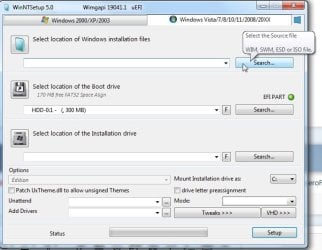
Or you could boot up win10/11 pe of some kind and run winntsetup which will apply the win7 image
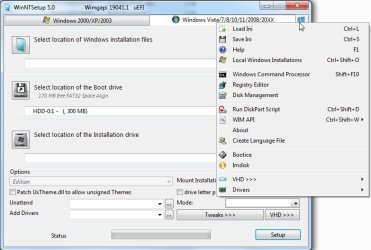
onto a partition and create the bootfiles for you. Pop winntestup and your win7 install.wim on the same usb you are booting your 10/11 pe from and you can run it from there. I would put bootice on there as well in case you want to do some partitioning.
https://mega.nz/folder/zWIXgaqT#rdX_-WE7dH0iAcIt3qqUZQ/file/SOBUwLDJ

winntsetup-slect-source.jpg

click the little blue icon top rt to get a menu and bootice should be there. I think it is already included in the latest version.

winntsetup-bootice.jpg
 
Last edited:

My Computers My Computers

  • At a glance

    7 X64i5 84002x8gb 3200mhz
    Computer type
    PC/Desktop
    OS
    7 X64
    CPU
    i5 8400
    Motherboard
    gigabyte b365m ds3h
    Memory
    2x8gb 3200mhz
    Hard Drives
    various
    PSU
    pure power 11 400w cm
    Case
    Coolermaster
    Cooling
    cryorig m9i
  • At a glance

    7x64g54008gb ddr4 2400
    Computer type
    PC/Desktop
    OS
    7x64
    CPU
    g5400
    Motherboard
    ga b365m ds3h
    Memory
    8gb ddr4 2400
    PSU
    xfx pro 450w
Currently stuck in DISM++. I can add most of the drivers without a hitch, but when I add the Radeon Adrenalin folder, a couple of them give errors. See image. I tried adding the folders individually to see what specific files were refusing to cooperate and it appears only the 'Packages/Drivers/Display' folder is the one that won't work.


err.png
 

Attachments

My Computers My Computers

  • At a glance

    Windows 7 Pro x64Ryzen 5 2400G16 GB RAMVega 11 Integrated Graphics
    Computer type
    PC/Desktop
    Computer Manufacturer/Model Number
    Custom build
    OS
    Windows 7 Pro x64
    CPU
    Ryzen 5 2400G
    Motherboard
    ASUS Prime B450M-A II
    Memory
    16 GB RAM
    Graphics Card(s)
    Vega 11 Integrated Graphics
    Hard Drives
    1x WD Blue 2TB HDD
    Browser
    Pale Moon
  • Computer type
    PC/Desktop

My Computers My Computers

  • At a glance

    7 X64i5 84002x8gb 3200mhz
    Computer type
    PC/Desktop
    OS
    7 X64
    CPU
    i5 8400
    Motherboard
    gigabyte b365m ds3h
    Memory
    2x8gb 3200mhz
    Hard Drives
    various
    PSU
    pure power 11 400w cm
    Case
    Coolermaster
    Cooling
    cryorig m9i
  • At a glance

    7x64g54008gb ddr4 2400
    Computer type
    PC/Desktop
    OS
    7x64
    CPU
    g5400
    Motherboard
    ga b365m ds3h
    Memory
    8gb ddr4 2400
    PSU
    xfx pro 450w
Does it support 5700G now?
 

My Computer My Computer

At a glance

Windows 10 x64
Computer type
PC/Desktop
OS
Windows 10 x64
Back
Top