Windows 7 on B550 With Ryzen 5 CPU

It doesn't seem to work. When I boot from the USB stick, a blue Windows logo appears very briefly then seems to crash and the whole screen is black with a white flashing line on the top left (like the cmd prompt). Can't type anything though. Have tried all the USB ports on the laptop and it's the same result. Maybe I need a different iso?

Edit: Nevermind! after waiting about a minute or so it loaded up. Looked like it crashed though. Works flawlessly, am looking at my drive now and moving files as I write this

- - - Updated - - -

As expected, it will take quite a long time to backup gigabytes of files to an external drive, but it works which is what matters. So if anyone is in my position (I'm positive I won't be the last person on Windows 7 with a discontinued motherboard) then follow the advice kindly provided by SWI2 and you shouldn't have a problem. When booting from the USB stick, if it looks like it's crashed, it hasn't, just wait a bit.

There's only one thing left, downgrading to Windows 10. How is the best way to go about this? From what I researched, LTSC version is has the least bloat and garbage, so I would prefer something like this. Would it be as simple as downloading a Windows 10 iso onto this USB drive, booting from that drive, then the Windows 10 installation should offer an option to completely wipe the drive and install Windows 10? I have read some posts about some compatibility issues with software like photoshop/gaming with LTSC but I'm not sure.
 

My Computers My Computers

  • At a glance

    Windows 7 Ultimate x64AMD Ryzen 5 5600 3.5 GHz 6-Core Processor
    Computer type
    PC/Desktop
    OS
    Windows 7 Ultimate x64
    CPU
    AMD Ryzen 5 5600 3.5 GHz 6-Core Processor
    Motherboard
    MSI B550-A PRO ATX AM4 Motherboard
  • Computer type
    PC/Desktop
after waiting about a minute or so it loaded up.

yes it is big and can take a while to load unless on a reasonably powerful pc.

Would it be as simple as downloading a Windows 10 iso onto this USB drive, booting from that drive, then the Windows 10

Not exactly. Because you have already created the bootable usb stick, I would suggest look inside the sources folder on the usb.
Rename boot.wim to something sensible like 1904v3.wim

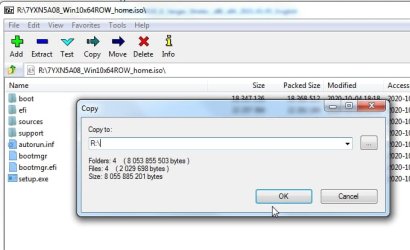
Then just extract the contents of the win10 iso file onto the usb stick using 7-zip.

https://7-zip.org/a/7z2107-x64.exe

https://7-zip.org/a/7z2107.exe

Highlight the contents of the win10 iso and then rt click and select copy to, Like this: ( in the example below replace R:\ with the letter of your usb stick )

7-zip-copy-iso-contents.jpg


That is so the 1904v30.wim is still in the sources folder and the other stuff like the Uprograms folder will still be on the usb stick.
So you can add an entry to select booting either windows setup or the 1904v30.wim .
I can show you how to add the boot entry for that later.
It will be a multi purpose usb media.
 
Last edited:

My Computers My Computers

  • At a glance

    7 X64i5 84002x8gb 3200mhz
    Computer type
    PC/Desktop
    OS
    7 X64
    CPU
    i5 8400
    Motherboard
    gigabyte b365m ds3h
    Memory
    2x8gb 3200mhz
    Hard Drives
    various
    PSU
    pure power 11 400w cm
    Case
    Coolermaster
    Cooling
    cryorig m9i
  • At a glance

    7x64g54008gb ddr4 2400
    Computer type
    PC/Desktop
    OS
    7x64
    CPU
    g5400
    Motherboard
    ga b365m ds3h
    Memory
    8gb ddr4 2400
    PSU
    xfx pro 450w
Okay, It'll be 3 - 4 days until my motherboard arrives then I can proceed, otherwise I've backed up what I needed to and am ready to wipe the drive. What Windows 10 iso do you think is appropriate and where should I get it? I don't see it on the usb unless I'm mistaken. I am considering LTSC for gaming and with the hopes it'll be a bit more similar to Win7 by not installing stuff like cortana, but don't really know enough about Windows 10 to make a decision
 

My Computers My Computers

  • At a glance

    Windows 7 Ultimate x64AMD Ryzen 5 5600 3.5 GHz 6-Core Processor
    Computer type
    PC/Desktop
    OS
    Windows 7 Ultimate x64
    CPU
    AMD Ryzen 5 5600 3.5 GHz 6-Core Processor
    Motherboard
    MSI B550-A PRO ATX AM4 Motherboard
  • Computer type
    PC/Desktop
What Windows 10 iso do you think is appropriate and where should I get it?

I tried to like win10, but I prefer win7.

I am not the best person to ask about ltsc etc.

You can d/l the iso files from here:

TechBench by WZT (v4.1.1)
 

My Computers My Computers

  • At a glance

    7 X64i5 84002x8gb 3200mhz
    Computer type
    PC/Desktop
    OS
    7 X64
    CPU
    i5 8400
    Motherboard
    gigabyte b365m ds3h
    Memory
    2x8gb 3200mhz
    Hard Drives
    various
    PSU
    pure power 11 400w cm
    Case
    Coolermaster
    Cooling
    cryorig m9i
  • At a glance

    7x64g54008gb ddr4 2400
    Computer type
    PC/Desktop
    OS
    7x64
    CPU
    g5400
    Motherboard
    ga b365m ds3h
    Memory
    8gb ddr4 2400
    PSU
    xfx pro 450w
I tried to like win10, but I prefer win7.

I am not the best person to ask about ltsc etc.

You can d/l the iso files from here:

TechBench by WZT (v4.1.1)

I think TechBench provides Win 10 with install.wim that is bigger than 4G.
I would download from MCT that provides Win 10 with install.esd that is smaller than 4G.

- - - Updated - - -

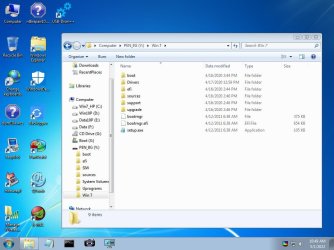
I have created a USB boot able with SIW2 excellent tools.
I have created a Win 7 folder where I extracted a Win 7 iso.
To install Win 7 (or Win 10) I boot the USB boot able with SIW2 tools, open Explorer and on the Win 7 folder I run setup.
 

Attachments

  • Siw_tool.jpg
    Siw_tool.jpg
    77.7 KB · Views: 0

My Computers My Computers

  • At a glance

    Windows 7 HP 64i5 6600K - 800MHz to 4200MHz4+4G GSkill DDR4 3000IG - Intel 530
    Computer type
    PC/Desktop
    Computer Manufacturer/Model Number
    custom build
    OS
    Windows 7 HP 64
    CPU
    i5 6600K - 800MHz to 4200MHz
    Motherboard
    GA-Z170-HD3P
    Memory
    4+4G GSkill DDR4 3000
    Graphics Card(s)
    IG - Intel 530
    Monitor(s) Displays
    Samsung 226BW
    Screen Resolution
    1680x1050
    Hard Drives
    (1) -1 SM951 – 128GB M.2 AHCI PCIe SSD drive for Windows 7 and Lubuntu
    (2) -1 WD SATA 3 - 1T for Data
    (3) -1 WD SATA 3 - 1T for backup
    PSU
    Thermaltake 450W TR2 gold
    Keyboard
    Old and good Chicony mechanical keyboard
    Mouse
    Logitech mX performance - 9 buttons (had to disable some)
    Internet Speed
    500Mb/s
    Browser
    Firefox 64
    Other Info
    TinyWall firewall
  • At a glance

    Windows 7 Proi7-4500U 800MHz to 3.0GHz(4+4)G DDR3 1600IG intel 4400 + NVIDIA GeForce GT 745M
    Computer type
    Laptop
    System Manufacturer/Model Number
    Asus Q550LF
    OS
    Windows 7 Pro
    CPU
    i7-4500U 800MHz to 3.0GHz
    Motherboard
    Asus Q550LF
    Memory
    (4+4)G DDR3 1600
    Graphics Card(s)
    IG intel 4400 + NVIDIA GeForce GT 745M
    Sound Card
    Realtek
    Monitor(s) Displays
    LG Display LP156WF4-SPH1
    Screen Resolution
    1920 x 1080
    Hard Drives
    BX500 120G SSD for Windows and programs +
    1T HDD for data
    Internet Speed
    500 Mb/s
    Browser
    Firefox
    Other Info
    TinyWall firewall
I tried to like win10, but I prefer win7.

I feel the same way, but will just bite the bullet if it might mean less headaches in the future for me compatibility wise


I think TechBench provides Win 10 with install.wim that is bigger than 4G.
I would download from MCT that provides Win 10 with install.esd that is smaller than 4G.

- - - Updated - -
I have created a USB boot able with SIW2 excellent tools.
I have created a Win 7 folder where I extracted a Win 7 iso.
To install Win 7 (or Win 10) I boot the USB boot able with SIW2 tools, open Explorer and on the Win 7 folder I run setup.

Thanks mate, so basically I would download the Win10 iso from MCT, extract the iso to the bootable USB, then boot my PC via the bootable USB and run the Win10 setup pointing to my main PC SSD drive as the source for the OS. Is this correct? Also sorry I'm talking about Win10 here, I'm just a bit conflicted at the moment whether to double down with Win7 or just go to Win10
 

My Computers My Computers

  • At a glance

    Windows 7 Ultimate x64AMD Ryzen 5 5600 3.5 GHz 6-Core Processor
    Computer type
    PC/Desktop
    OS
    Windows 7 Ultimate x64
    CPU
    AMD Ryzen 5 5600 3.5 GHz 6-Core Processor
    Motherboard
    MSI B550-A PRO ATX AM4 Motherboard
  • Computer type
    PC/Desktop
Get a 8G USB drive
Open a CMD window as administrator and type:

diskpart
list disk (it will list all drives. Identify the USB drive number)
select disk n (replace n by the USB drive number obtained with list disk)
clean
convert mbr
create part primary
select part 1
format fs=fat32 quick
assign
active
exit (to exit diskpart)

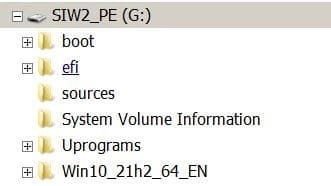
On Win 7 computer use 7Zip to extract all files and folders from the 17514x64v30.iso file to the USB drive.
On Win 10 computer , mount the iso file and copy all files and folders to the USB drive.

Create a Win 10 folder on the USB drive.
On Win 7 computer use 7Zip to extract all files and folders from the Win 10 iso file to the Win 10 folder on the USB drive.
On Win 10 computer , mount the iso file and copy all files and folders to the USB drive.

Siw2_tools.JPG

Boot from SIW2 tools.
Open Explorer
Browse to Win 10 folder
Run Setup to install win 10
 

My Computers My Computers

  • At a glance

    Windows 7 HP 64i5 6600K - 800MHz to 4200MHz4+4G GSkill DDR4 3000IG - Intel 530
    Computer type
    PC/Desktop
    Computer Manufacturer/Model Number
    custom build
    OS
    Windows 7 HP 64
    CPU
    i5 6600K - 800MHz to 4200MHz
    Motherboard
    GA-Z170-HD3P
    Memory
    4+4G GSkill DDR4 3000
    Graphics Card(s)
    IG - Intel 530
    Monitor(s) Displays
    Samsung 226BW
    Screen Resolution
    1680x1050
    Hard Drives
    (1) -1 SM951 – 128GB M.2 AHCI PCIe SSD drive for Windows 7 and Lubuntu
    (2) -1 WD SATA 3 - 1T for Data
    (3) -1 WD SATA 3 - 1T for backup
    PSU
    Thermaltake 450W TR2 gold
    Keyboard
    Old and good Chicony mechanical keyboard
    Mouse
    Logitech mX performance - 9 buttons (had to disable some)
    Internet Speed
    500Mb/s
    Browser
    Firefox 64
    Other Info
    TinyWall firewall
  • At a glance

    Windows 7 Proi7-4500U 800MHz to 3.0GHz(4+4)G DDR3 1600IG intel 4400 + NVIDIA GeForce GT 745M
    Computer type
    Laptop
    System Manufacturer/Model Number
    Asus Q550LF
    OS
    Windows 7 Pro
    CPU
    i7-4500U 800MHz to 3.0GHz
    Motherboard
    Asus Q550LF
    Memory
    (4+4)G DDR3 1600
    Graphics Card(s)
    IG intel 4400 + NVIDIA GeForce GT 745M
    Sound Card
    Realtek
    Monitor(s) Displays
    LG Display LP156WF4-SPH1
    Screen Resolution
    1920 x 1080
    Hard Drives
    BX500 120G SSD for Windows and programs +
    1T HDD for data
    Internet Speed
    500 Mb/s
    Browser
    Firefox
    Other Info
    TinyWall firewall
Hey mate, all good with formatting the drive to SIW2 tools. I can't use the Windows MCT though, I get an error code 0x80072F8F - 0x20000. I've tried using an ISO instead, but can't copy the large install.wim file like you mentioned earlier. So I'm currently going to try entering 'Dism /Split-Image /ImageFile:D:\sources\install.wim /SWMFile:E:\sources\install.' into the CMD prompt
As advised here; Install Windows from a USB Flash Drive | Microsoft Docs
 

My Computers My Computers

  • At a glance

    Windows 7 Ultimate x64AMD Ryzen 5 5600 3.5 GHz 6-Core Processor
    Computer type
    PC/Desktop
    OS
    Windows 7 Ultimate x64
    CPU
    AMD Ryzen 5 5600 3.5 GHz 6-Core Processor
    Motherboard
    MSI B550-A PRO ATX AM4 Motherboard
  • Computer type
    PC/Desktop
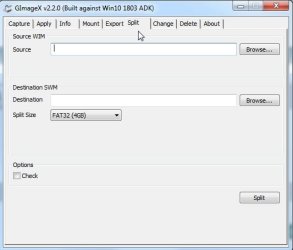
It is easier with something like gimagex. Works fine on win7.

https://www.autoitconsulting.com/files/gimagex/gimagex.zip

gimagex-split.jpg

A useful tool for working with wim files ( and a lot else ) is dism++, but oddly it doesnt include a split feature . It is attached to my sig at the bottom of my posts.
 

My Computers My Computers

  • At a glance

    7 X64i5 84002x8gb 3200mhz
    Computer type
    PC/Desktop
    OS
    7 X64
    CPU
    i5 8400
    Motherboard
    gigabyte b365m ds3h
    Memory
    2x8gb 3200mhz
    Hard Drives
    various
    PSU
    pure power 11 400w cm
    Case
    Coolermaster
    Cooling
    cryorig m9i
  • At a glance

    7x64g54008gb ddr4 2400
    Computer type
    PC/Desktop
    OS
    7x64
    CPU
    g5400
    Motherboard
    ga b365m ds3h
    Memory
    8gb ddr4 2400
    PSU
    xfx pro 450w
If I use Usb7ice to copy the Windows 10 iso to the USB drive, wouldn't I be able to boot from that and install Windows 10 to a drive of my choice? If that wouldn't work I'll use gimagex, thanks SIW2
 

My Computers My Computers

  • At a glance

    Windows 7 Ultimate x64AMD Ryzen 5 5600 3.5 GHz 6-Core Processor
    Computer type
    PC/Desktop
    OS
    Windows 7 Ultimate x64
    CPU
    AMD Ryzen 5 5600 3.5 GHz 6-Core Processor
    Motherboard
    MSI B550-A PRO ATX AM4 Motherboard
  • Computer type
    PC/Desktop
If I use Usb7ice to copy the Windows 10 iso to the USB drive

The limitation is the fat32 filesystem on the usb stick which can only support max file size of 4gb. Many motherboards expect fat32 for efi boot.

splitting wims is easy.
 

My Computers My Computers

  • At a glance

    7 X64i5 84002x8gb 3200mhz
    Computer type
    PC/Desktop
    OS
    7 X64
    CPU
    i5 8400
    Motherboard
    gigabyte b365m ds3h
    Memory
    2x8gb 3200mhz
    Hard Drives
    various
    PSU
    pure power 11 400w cm
    Case
    Coolermaster
    Cooling
    cryorig m9i
  • At a glance

    7x64g54008gb ddr4 2400
    Computer type
    PC/Desktop
    OS
    7x64
    CPU
    g5400
    Motherboard
    ga b365m ds3h
    Memory
    8gb ddr4 2400
    PSU
    xfx pro 450w
Yep all good, made it into being able to boot into SIW2 on my newly built PC. However if I try boot in UEFI mode it never loads, it only works when I change to CSM in the bios. The issue is that I can't install onto the drive I want after loading up with CSM, because "The selected disk has an MBR partition table. On EFI systems, Windows can only be installed to GPT disks."

Any ideas? Googled it and it said to reboot in UEFI mode

Should I press delete or format on the drive and then try install? (This is in the Windows 10 installer by the way)
 

My Computers My Computers

  • At a glance

    Windows 7 Ultimate x64AMD Ryzen 5 5600 3.5 GHz 6-Core Processor
    Computer type
    PC/Desktop
    OS
    Windows 7 Ultimate x64
    CPU
    AMD Ryzen 5 5600 3.5 GHz 6-Core Processor
    Motherboard
    MSI B550-A PRO ATX AM4 Motherboard
  • Computer type
    PC/Desktop
win7 natively needs csm ( there is a workaround).

Most mobos can have csm support in efi mode. Mine does.

If you have a weird mobo that only has csm support in bios mode, you could use efiseven, or you can boot win10 media.


1. on your existing usb stick sources folder , rename boot.wim to boot7.wim

2. Copy the contents of the 1904v3.iso file onto the usb stick using 7-zip. You can skip copying the Uprograms folder because you already have it on there.

1904v3.iso


If you like, you add entry for boot7.wim as well so you would get a menu to select either.
 

My Computers My Computers

  • At a glance

    7 X64i5 84002x8gb 3200mhz
    Computer type
    PC/Desktop
    OS
    7 X64
    CPU
    i5 8400
    Motherboard
    gigabyte b365m ds3h
    Memory
    2x8gb 3200mhz
    Hard Drives
    various
    PSU
    pure power 11 400w cm
    Case
    Coolermaster
    Cooling
    cryorig m9i
  • At a glance

    7x64g54008gb ddr4 2400
    Computer type
    PC/Desktop
    OS
    7x64
    CPU
    g5400
    Motherboard
    ga b365m ds3h
    Memory
    8gb ddr4 2400
    PSU
    xfx pro 450w

My Computers My Computers

  • At a glance

    Windows 7 Ultimate x64AMD Ryzen 5 5600 3.5 GHz 6-Core Processor
    Computer type
    PC/Desktop
    OS
    Windows 7 Ultimate x64
    CPU
    AMD Ryzen 5 5600 3.5 GHz 6-Core Processor
    Motherboard
    MSI B550-A PRO ATX AM4 Motherboard
  • Computer type
    PC/Desktop
The issue is that I can't install onto the drive I want after loading up with CSM, because "The selected disk has an MBR partition table. On EFI systems, Windows can only be installed to GPT disks."

That indicates you are booted in efi mode using csm. The problem therefore is that disk is mbr partition style.

If you are using windows setup to install, it requires gpt partition style disk in efi mode, or mbr partition style if booted in bios mode.

If there is nothing on the disk you want, you can delete all the partitions and the windows setup will then do what it wants.

If there is stuff on the disk you really want, then you could convert it to gpt using diskgenius which is already in the boot media.
 
Last edited:

My Computers My Computers

  • At a glance

    7 X64i5 84002x8gb 3200mhz
    Computer type
    PC/Desktop
    OS
    7 X64
    CPU
    i5 8400
    Motherboard
    gigabyte b365m ds3h
    Memory
    2x8gb 3200mhz
    Hard Drives
    various
    PSU
    pure power 11 400w cm
    Case
    Coolermaster
    Cooling
    cryorig m9i
  • At a glance

    7x64g54008gb ddr4 2400
    Computer type
    PC/Desktop
    OS
    7x64
    CPU
    g5400
    Motherboard
    ga b365m ds3h
    Memory
    8gb ddr4 2400
    PSU
    xfx pro 450w
That indicates you are booted in efi mode using csm. The problem therefore is that disk is mbr partition style.

If there is nothing on the disk you want, you can delete all the partitions and the windows setup will then do what it wants.

If there is stuff on the disk you really want, then you could convert it to gpt using diskgenius which is already in the boot media.
Yeah I had backed everything up the other day, when you helped me move the drive into my laptop, boot into the USB drive and backup everything on an external HDD. So I'm just going to wipe this one clean and install the new OS. Should I just click the delete option on the relevant partitions, or do it manually via the cmd prompt, or it doesn't matter?
 

My Computers My Computers

  • At a glance

    Windows 7 Ultimate x64AMD Ryzen 5 5600 3.5 GHz 6-Core Processor
    Computer type
    PC/Desktop
    OS
    Windows 7 Ultimate x64
    CPU
    AMD Ryzen 5 5600 3.5 GHz 6-Core Processor
    Motherboard
    MSI B550-A PRO ATX AM4 Motherboard
  • Computer type
    PC/Desktop
You can just click them and delete
 

My Computers My Computers

  • At a glance

    7 X64i5 84002x8gb 3200mhz
    Computer type
    PC/Desktop
    OS
    7 X64
    CPU
    i5 8400
    Motherboard
    gigabyte b365m ds3h
    Memory
    2x8gb 3200mhz
    Hard Drives
    various
    PSU
    pure power 11 400w cm
    Case
    Coolermaster
    Cooling
    cryorig m9i
  • At a glance

    7x64g54008gb ddr4 2400
    Computer type
    PC/Desktop
    OS
    7x64
    CPU
    g5400
    Motherboard
    ga b365m ds3h
    Memory
    8gb ddr4 2400
    PSU
    xfx pro 450w
Yeah that worked fine, have tried installing Windows twice now and it's failed both times. Not sure whether something went wrong when splitting the .wim, but I don't think so. I made the destination folder the relevant sources folder and it was split into two .swm files.

At the end the installation gets cancelled - 'Setup cannot continue due to a corrupted installation file' - I used a Windows 10 multi-edition ISO, English International version. Not sure if that's relevant. Any idea how to troubleshoot this?

Found this as a potential solution - 'To zero the beginning of the drive, i used Univeral Boot CD, dropped into Parted Magic, opened a terminal and ran

dd if=/dev/zero of=/dev/sda bs=1M count=1'

Is there any tool in the USB bootable that is like 'Parted Magic' ?
 

My Computers My Computers

  • At a glance

    Windows 7 Ultimate x64AMD Ryzen 5 5600 3.5 GHz 6-Core Processor
    Computer type
    PC/Desktop
    OS
    Windows 7 Ultimate x64
    CPU
    AMD Ryzen 5 5600 3.5 GHz 6-Core Processor
    Motherboard
    MSI B550-A PRO ATX AM4 Motherboard
  • Computer type
    PC/Desktop
It doesnt include dd, but you could try applying the image using winntsetup.

If you can get the install.wim somewhere it can be seen from the booted media, you can point winntetup at it.

winntsetup-slect-source.jpg
 

My Computers My Computers

  • At a glance

    7 X64i5 84002x8gb 3200mhz
    Computer type
    PC/Desktop
    OS
    7 X64
    CPU
    i5 8400
    Motherboard
    gigabyte b365m ds3h
    Memory
    2x8gb 3200mhz
    Hard Drives
    various
    PSU
    pure power 11 400w cm
    Case
    Coolermaster
    Cooling
    cryorig m9i
  • At a glance

    7x64g54008gb ddr4 2400
    Computer type
    PC/Desktop
    OS
    7x64
    CPU
    g5400
    Motherboard
    ga b365m ds3h
    Memory
    8gb ddr4 2400
    PSU
    xfx pro 450w
I'll put install.wim on an external SSD, connect it to my PC, then try using winntsetup on it

Just want to make sure that for Boot drive I put the USB bootable and for installation drive I put the SSD I want to install the OS on? Seems like common sense but just want to be sure
 

My Computers My Computers

  • At a glance

    Windows 7 Ultimate x64AMD Ryzen 5 5600 3.5 GHz 6-Core Processor
    Computer type
    PC/Desktop
    OS
    Windows 7 Ultimate x64
    CPU
    AMD Ryzen 5 5600 3.5 GHz 6-Core Processor
    Motherboard
    MSI B550-A PRO ATX AM4 Motherboard
  • Computer type
    PC/Desktop
Back
Top