Windows 7 on B550 With Ryzen 5 CPU

Cranium

New member
Member
Local time
1:52 AM
Messages
20
Hi,

I will try to keep this brief. Basically, my old motherboard and CPU have died. I am looking to replace them with the AMD Ryzen 5 5600 3.5 GHz 6-Core Processor and the MSI B550-A PRO ATX AM4 Motherboard. My main drive is using Windows 7 Ultimate x64. My understanding from browsing this forum and others is that once I install my motherboard and CPU I might not be able to boot into Windows 7.

I have not bought these parts yet, but am wondering if I will have this problem and how, and if, I can fix it in advance. I don't mind upgrading to Windows 10 at this point, as much as I love Windows 7. I can't afford to lose the data on my main drive though. I don't have a secondary PC I can use or anything like that to back up the data and then clean install, so I need to at least be able to log in and perform backups.

Sorry, I am confused and a little overwhelmed by all the content here and don't want to make a mistake. Would I need Canonkings drivers? Or do I run files to alter a Windows 7 installation .iso? Where do I start?

Any and all advice is very welcome, thanks in advance
 

My Computers My Computers

System One System Two

  • Computer type
    PC/Desktop
    OS
    Windows 7 Ultimate x64
    CPU
    AMD Ryzen 5 5600 3.5 GHz 6-Core Processor
    Motherboard
    MSI B550-A PRO ATX AM4 Motherboard
  • Computer type
    PC/Desktop
What machine are you using to post here, if your previous one has died?

You dont need a secondary pc - you just need another hard drive to store the backup image. Almost anything will do for that. In the Uk you can get a 500gb spinning hard drive for about five quid from cex.

It would be a good idea to make an image backup onto a separate HD first. Then you can put that backup hd away for safekeeping.

Lots of free programs can make image backups.

One way would be to upgrade from win7 to win10 on the current machine . (That might be tricky if your mobo has died ).Then transfer the upgraded hd to the new machine.

If you prefer to use win7 on your new machine, it can be done with a bit of fiddling around.

It should be possible to do both:

1. make a backup image of current win7 system

2. Upgrade to win 10

3. transfer upgraded hd to new machine

4. create spare partition on the new machine

5. restore the win 7 image to spare partition - use something with an "adjust to new hardware" module

6. Run dism++ from within your win10 ( or from bootable media ) , point it at win7 partition and use dism++ to install canonkong drivers into win7 on the spare partition.
 

My Computers My Computers

System One System Two

  • Computer type
    PC/Desktop
    OS
    7 X64
    CPU
    i5 8400
    Motherboard
    gigabyte b365m ds3h
    Memory
    2x8gb 3200mhz
    Hard Drives
    various
    PSU
    pure power 11 400w cm
    Case
    Coolermaster
    Cooling
    cryorig m9i
  • Computer type
    PC/Desktop
    OS
    7x64
    CPU
    g5400
    Motherboard
    ga b365m ds3h
    Memory
    8gb ddr4 2400
    PSU
    xfx pro 450w
The issue is I can't actually load up my PC without the replacement motherboard and CPU. So I'm confused about how I could create a backup image? I have an external HDD and a laptop, but unsure how those two could get the data from the drive of a PC that won't boot right now. A spare blank internal HD or SSD isn't an option I have right now, I can't afford a new one and the three that I have have data on them and are in the current PC. Sorry in advance if I misunderstood your post

Edit: Actually I probably could afford an internal HDD if my external HDD isn't good enough. Still unsure how to use that to make a backup image on one PC that has windows 7 with an incompatible motherboard and CPU. I'm posting from a laptop right now. At this point I'm fine with either using Windows 7 or Windows 10 with the new hardware, as long as I don't have to completely wipe the main drive, OR if I can at least get in, backup some things, then wipe the drive with a clean install. So even if I could get into Windows 7, and it's a buggy mess, if I could at least rip some stuff and put it on an external HDD that's good enough
 

My Computers My Computers

System One System Two

  • Computer type
    PC/Desktop
    OS
    Windows 7 Ultimate x64
    CPU
    AMD Ryzen 5 5600 3.5 GHz 6-Core Processor
    Motherboard
    MSI B550-A PRO ATX AM4 Motherboard
  • Computer type
    PC/Desktop
You dont need to boot into the win7 to make an image of it.

As long as you can attach the win7 hd so the laptop can see it.

Then any imaging program can be run from within the os your laptop is using and told to make a backup of the attached win7 system.

Or you could run the imaging program from bootable media - e.g. a bootable usb plugged into your laptop. It should be able to see the win 7 hd that you attached to your laptop.

Then you tell the imaging program to backup the win7 os. You also have to tell it where to store the backup image ( which is a large file and can be stored anywhere that has the space )

How puny is your laptop ? If it not too feeble,

You can borrow a thing I made which can be extracted to create bootable usb.

1904v3.iso

Extract the iso to usb stick using usb7ice (attached ), just accept the default fat32 setting and select efi
 

Attachments

My Computers My Computers

System One System Two

  • Computer type
    PC/Desktop
    OS
    7 X64
    CPU
    i5 8400
    Motherboard
    gigabyte b365m ds3h
    Memory
    2x8gb 3200mhz
    Hard Drives
    various
    PSU
    pure power 11 400w cm
    Case
    Coolermaster
    Cooling
    cryorig m9i
  • Computer type
    PC/Desktop
    OS
    7x64
    CPU
    g5400
    Motherboard
    ga b365m ds3h
    Memory
    8gb ddr4 2400
    PSU
    xfx pro 450w
I don't think it can attach to this laptop. It's a chromebook. I have a couple of other laptops, I'll have to look at them to see whether it can attach. What should I be looking for? just a SATA port internally? Windows 7 is on an internal SSD
 

My Computers My Computers

System One System Two

  • Computer type
    PC/Desktop
    OS
    Windows 7 Ultimate x64
    CPU
    AMD Ryzen 5 5600 3.5 GHz 6-Core Processor
    Motherboard
    MSI B550-A PRO ATX AM4 Motherboard
  • Computer type
    PC/Desktop
just a SATA port internally?

That is easiest. But you will need to be able to boot into something else to make an image of it. You will also need something attached that you can store the image on.

If the laptop is puny, you could use a smaller and less demanding boot media I made

here's a couple:
17514x64v30.iso

or this one is 32 bit and runs on lower spec machines:

17514x86.iso
 

My Computers My Computers

System One System Two

  • Computer type
    PC/Desktop
    OS
    7 X64
    CPU
    i5 8400
    Motherboard
    gigabyte b365m ds3h
    Memory
    2x8gb 3200mhz
    Hard Drives
    various
    PSU
    pure power 11 400w cm
    Case
    Coolermaster
    Cooling
    cryorig m9i
  • Computer type
    PC/Desktop
    OS
    7x64
    CPU
    g5400
    Motherboard
    ga b365m ds3h
    Memory
    8gb ddr4 2400
    PSU
    xfx pro 450w
This is the beefiest laptop I have - Lenovo Laptop ThinkPad E560 (20EV002FUS) Intel Core i5 6th Gen 6200U (2.30GHz) 4GB Memory 500GB HDD Intel HD Graphics 520 15.6" Windows 7 Professional 64-Bit (Downgrade From Windows 10 Pro) - Newegg.com

Nothing special, but I think it has a SATA port from what I understand. So theoretically I can do this. I'll open the laptop to see for myself then go over your posts again cause I'm still a little unclear about it all. So far you've been a massive help to me, thank you so much


Edit: The laptop is installing Windows 7 updates so I can't actually open it up right now. From what I've seen online though, it can only have one drive. I'm thinking this may work for me though, if I put in the PC SSD with Windows 7 on it, could the laptop boot from it? Or will it crash due to motherboard/BIOS? If I could boot the drive from the laptop I can just back things up onto an external HDD and wipe this one clean
 

My Computers My Computers

System One System Two

  • Computer type
    PC/Desktop
    OS
    Windows 7 Ultimate x64
    CPU
    AMD Ryzen 5 5600 3.5 GHz 6-Core Processor
    Motherboard
    MSI B550-A PRO ATX AM4 Motherboard
  • Computer type
    PC/Desktop
You need to be able to see

1. The source disk ( that you make an image of )

2. The destination disk ( where you store the image file)

If one of those is usb attached, it will be limited by the usb transfer speed, so it could take a while to make the image.

You also need to be able to boot into something to run the imaging program. Which is what the boot media is for. The boot media I posted all have some imaging programs in them already.

1. Extract the boot media iso file to usb stick using usb7ice (posted earlier)

2. attach the win7 source hd/ssd to the internal sata connector

3. Attach the destination disk to the laptop somehow - usb will do if that is the only option.

3. Plug in the bootable usb media you made in step1

4. Turn on the laptop and keep pressing the one time boot menu key ( often f12 but check the manual in case yours is different)

5. The one time boot menu should pop up and select the usb stick with the bootable media.

6. There is a small os on the usb stick which will load into ram and present you with a desktop. If you can see the source and destination disk, you are in business.
 

My Computers My Computers

System One System Two

  • Computer type
    PC/Desktop
    OS
    7 X64
    CPU
    i5 8400
    Motherboard
    gigabyte b365m ds3h
    Memory
    2x8gb 3200mhz
    Hard Drives
    various
    PSU
    pure power 11 400w cm
    Case
    Coolermaster
    Cooling
    cryorig m9i
  • Computer type
    PC/Desktop
    OS
    7x64
    CPU
    g5400
    Motherboard
    ga b365m ds3h
    Memory
    8gb ddr4 2400
    PSU
    xfx pro 450w
So could I transfer my PC SSD to the laptop, boot into it, connect an external HDD as the destination, then maybe use another external HDD or thumb drive as the thing I boot into?
 

My Computers My Computers

System One System Two

  • Computer type
    PC/Desktop
    OS
    Windows 7 Ultimate x64
    CPU
    AMD Ryzen 5 5600 3.5 GHz 6-Core Processor
    Motherboard
    MSI B550-A PRO ATX AM4 Motherboard
  • Computer type
    PC/Desktop
So could I transfer my PC SSD to the laptop, boot into it

NO dont boot into it. That laptop hardware is different from your dead pc. You could run into difficulties.

See my previous post.

Your laptop has 4gb ram so you could use any of the boot media iso files I posted.

This one is biggest and probably the best
1904v3.iso

or this which is a bit less demanding
17514x64v30.iso


From memory, Aomei backupper is in there and some other stuff.
 

My Computers My Computers

System One System Two

  • Computer type
    PC/Desktop
    OS
    7 X64
    CPU
    i5 8400
    Motherboard
    gigabyte b365m ds3h
    Memory
    2x8gb 3200mhz
    Hard Drives
    various
    PSU
    pure power 11 400w cm
    Case
    Coolermaster
    Cooling
    cryorig m9i
  • Computer type
    PC/Desktop
    OS
    7x64
    CPU
    g5400
    Motherboard
    ga b365m ds3h
    Memory
    8gb ddr4 2400
    PSU
    xfx pro 450w
Okay I think I'm understanding now. I'm fatigued which is making it harder to understanding, so I'll sleep after this post.

From what I understand though:

I begin by extracting 1904v3.iso (boot media) to a USB stick using usb7ice, step 2 is where I get stuck. I can't connect the source win7 SSD to the laptop (it only allows for one drive). But basically, I need to find a PC or something that will allow my SSD to connect to it. The destination disk, which is where the win7 backup image will be written, can be an external HDD or SSD via USB connection if that's the only way. Then I put in the USB stick with the boot media on it, and go into the boot menu of the laptop (or other device) and force it to boot into the OS on the USB stick. After that I can look at making a backup of the main drive (or in my case I might only need to drag and drop files from and to the external drive if that's possible, rather than make an entire backup image of the win7 drive)

Is this all correct? I will reply in a few hours. Thanks again for helping me. If you have any ideas on what I can use instead of the laptop it would help. I can only think of trying to find a friend with a PC or laptop that allows for more than one drive.
 

My Computers My Computers

System One System Two

  • Computer type
    PC/Desktop
    OS
    Windows 7 Ultimate x64
    CPU
    AMD Ryzen 5 5600 3.5 GHz 6-Core Processor
    Motherboard
    MSI B550-A PRO ATX AM4 Motherboard
  • Computer type
    PC/Desktop
I can't connect the source win7 SSD to the laptop (it only allows for one drive).

Take the existing laptop disk out temporaraily. Put the dead pc win 7 ssd in.

OR if you have at least 3 usb ports on the laptop and you dont mind buying one of those usb to sata adapter things . They can be quite handy.

In which case you could attach all 3 via usb on your laptop - the source ssd via the adapter below, and the detination disk via usb, and the bootable usb.


iitrust USB 3.0 to SATA Adapter Cable for 2.5" SSD HDD Drives - SATA to USB 3.0 External Converter and Cable,USB 3.0 - SATA III converter: Amazon.co.uk: Computers & Accessories

On a separate note:
What are you planning to do about the windows license on the new ryzen machine? Your laptop will have slp ( offline ) activation, but your dead desktop would almost certainly have used online activation. You would need a license you can transfer.
 

My Computers My Computers

System One System Two

  • Computer type
    PC/Desktop
    OS
    7 X64
    CPU
    i5 8400
    Motherboard
    gigabyte b365m ds3h
    Memory
    2x8gb 3200mhz
    Hard Drives
    various
    PSU
    pure power 11 400w cm
    Case
    Coolermaster
    Cooling
    cryorig m9i
  • Computer type
    PC/Desktop
    OS
    7x64
    CPU
    g5400
    Motherboard
    ga b365m ds3h
    Memory
    8gb ddr4 2400
    PSU
    xfx pro 450w
So I could put my win7 SSD in the laptop (but not boot), plug in the external HDD as destination drive, and then boot from the USB stick in order to complete this? Otherwise the SATA adapter might be a good investment.

Honestly I'm not sure about the license. I don't have a valid one in the Win7 drive I don't think. I might not make a backup image of Windows 7 if I can avoid it. If I can get into the drive and just transfer some files from there to the external HDD then I might just wipe it clean and get Windows 10. That is, if it's even possible to do that when using a bootable USB?
 

My Computers My Computers

System One System Two

  • Computer type
    PC/Desktop
    OS
    Windows 7 Ultimate x64
    CPU
    AMD Ryzen 5 5600 3.5 GHz 6-Core Processor
    Motherboard
    MSI B550-A PRO ATX AM4 Motherboard
  • Computer type
    PC/Desktop
So I could put my win7 SSD in the laptop (but not boot), plug in the external HDD as destination drive, and then boot from the USB stick in order to complete this?

by george you've got it :-)

If there is a valid license on the win7 partition you can find it thus:

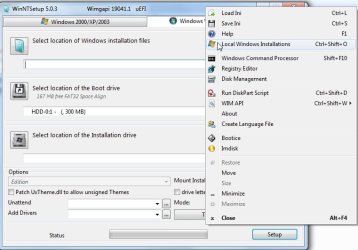
in the boot media start winntsetup. ( it is under the start menu in the "Install" folder ).

Rt click in the top pane , select "Local windows installations" and it will display the license keys of all installed os.

then click the Save button and it will save them to a txt file which you can put on the usb stick.
 

Attachments

  • wintsetup.jpg
    wintsetup.jpg
    50.9 KB · Views: 0
Last edited:

My Computers My Computers

System One System Two

  • Computer type
    PC/Desktop
    OS
    7 X64
    CPU
    i5 8400
    Motherboard
    gigabyte b365m ds3h
    Memory
    2x8gb 3200mhz
    Hard Drives
    various
    PSU
    pure power 11 400w cm
    Case
    Coolermaster
    Cooling
    cryorig m9i
  • Computer type
    PC/Desktop
    OS
    7x64
    CPU
    g5400
    Motherboard
    ga b365m ds3h
    Memory
    8gb ddr4 2400
    PSU
    xfx pro 450w
The best way to do the drive backup is to connect the to a SATA to USB caddy or cable. Then connect it to your laptop and generate a drive image and save on your laptop or on another external drive.


What is the size of the desktop drive and the laptop drive?
 

My Computers My Computers

System One System Two

  • Computer type
    PC/Desktop
    Computer Manufacturer/Model Number
    custom build
    OS
    Windows 7 HP 64
    CPU
    i5 6600K - 800MHz to 4200MHz
    Motherboard
    GA-Z170-HD3P
    Memory
    4+4G GSkill DDR4 3000
    Graphics Card(s)
    IG - Intel 530
    Monitor(s) Displays
    Samsung 226BW
    Screen Resolution
    1680x1050
    Hard Drives
    (1) -1 SM951 – 128GB M.2 AHCI PCIe SSD drive for Windows 7 and Lubuntu
    (2) -1 WD SATA 3 - 1T for Data
    (3) -1 WD SATA 3 - 1T for backup
    PSU
    Thermaltake 450W TR2 gold
    Keyboard
    Old and good Chicony mechanical keyboard
    Mouse
    Logitech mX performance - 9 buttons (had to disable some)
    Internet Speed
    500Mb/s
    Browser
    Firefox 64
    Other Info
    TinyWall firewall
  • Computer type
    Laptop
    System Manufacturer/Model Number
    Asus Q550LF
    OS
    Windows 7 Pro
    CPU
    i7-4500U 800MHz to 3.0GHz
    Motherboard
    Asus Q550LF
    Memory
    (4+4)G DDR3 1600
    Graphics Card(s)
    IG intel 4400 + NVIDIA GeForce GT 745M
    Sound Card
    Realtek
    Monitor(s) Displays
    LG Display LP156WF4-SPH1
    Screen Resolution
    1920 x 1080
    Hard Drives
    BX500 120G SSD for Windows and programs +
    1T HDD for data
    Internet Speed
    500 Mb/s
    Browser
    Firefox
    Other Info
    TinyWall firewall
the dead pc disk is an ssd.

He has an external disk

He has made a bootable usb with my media on it.

He doesn't have an adapter, so the easiest way is to put the ssd into the laptop.

boot from the usb stick , then image /transfer/copy whatever he wants from the ssd to the external disk
 

My Computers My Computers

System One System Two

  • Computer type
    PC/Desktop
    OS
    7 X64
    CPU
    i5 8400
    Motherboard
    gigabyte b365m ds3h
    Memory
    2x8gb 3200mhz
    Hard Drives
    various
    PSU
    pure power 11 400w cm
    Case
    Coolermaster
    Cooling
    cryorig m9i
  • Computer type
    PC/Desktop
    OS
    7x64
    CPU
    g5400
    Motherboard
    ga b365m ds3h
    Memory
    8gb ddr4 2400
    PSU
    xfx pro 450w

My Computers My Computers

System One System Two

  • Computer type
    PC/Desktop
    Computer Manufacturer/Model Number
    custom build
    OS
    Windows 7 HP 64
    CPU
    i5 6600K - 800MHz to 4200MHz
    Motherboard
    GA-Z170-HD3P
    Memory
    4+4G GSkill DDR4 3000
    Graphics Card(s)
    IG - Intel 530
    Monitor(s) Displays
    Samsung 226BW
    Screen Resolution
    1680x1050
    Hard Drives
    (1) -1 SM951 – 128GB M.2 AHCI PCIe SSD drive for Windows 7 and Lubuntu
    (2) -1 WD SATA 3 - 1T for Data
    (3) -1 WD SATA 3 - 1T for backup
    PSU
    Thermaltake 450W TR2 gold
    Keyboard
    Old and good Chicony mechanical keyboard
    Mouse
    Logitech mX performance - 9 buttons (had to disable some)
    Internet Speed
    500Mb/s
    Browser
    Firefox 64
    Other Info
    TinyWall firewall
  • Computer type
    Laptop
    System Manufacturer/Model Number
    Asus Q550LF
    OS
    Windows 7 Pro
    CPU
    i7-4500U 800MHz to 3.0GHz
    Motherboard
    Asus Q550LF
    Memory
    (4+4)G DDR3 1600
    Graphics Card(s)
    IG intel 4400 + NVIDIA GeForce GT 745M
    Sound Card
    Realtek
    Monitor(s) Displays
    LG Display LP156WF4-SPH1
    Screen Resolution
    1920 x 1080
    Hard Drives
    BX500 120G SSD for Windows and programs +
    1T HDD for data
    Internet Speed
    500 Mb/s
    Browser
    Firefox
    Other Info
    TinyWall firewall
the dead pc disk is an ssd.

He has an external disk

He has made a bootable usb with my media on it.

He doesn't have an adapter, so the easiest way is to put the ssd into the laptop.

boot from the usb stick , then image /transfer/copy whatever he wants from the ssd to the external disk

This is what I'll be doing a little bit later today. I won't mark the topic as solved yet just in case, but It's been made pretty clear to me what I need to do now. Thanks so much SIW2 you've been incredibly helpful. Thanks to you also Megahertz07 for your input. I'll message back here a little later after I've finished the process or if I've run into an issue

- - - Updated - - -

SIW2, when using Usb7Ice there is no efi option that I can see. There's fat32 which I've selected, and for boot manager there's either Standard (BCD) and Grub4Dos (if detected). Do I just use fat32 and standard (BCD) and click copy iso to usb drive?
 

My Computers My Computers

System One System Two

  • Computer type
    PC/Desktop
    OS
    Windows 7 Ultimate x64
    CPU
    AMD Ryzen 5 5600 3.5 GHz 6-Core Processor
    Motherboard
    MSI B550-A PRO ATX AM4 Motherboard
  • Computer type
    PC/Desktop
Do I just use fat32 and standard (BCD) and click copy iso to usb drive?

yes. That will work for both bios and efi boot.
 

My Computers My Computers

System One System Two

  • Computer type
    PC/Desktop
    OS
    7 X64
    CPU
    i5 8400
    Motherboard
    gigabyte b365m ds3h
    Memory
    2x8gb 3200mhz
    Hard Drives
    various
    PSU
    pure power 11 400w cm
    Case
    Coolermaster
    Cooling
    cryorig m9i
  • Computer type
    PC/Desktop
    OS
    7x64
    CPU
    g5400
    Motherboard
    ga b365m ds3h
    Memory
    8gb ddr4 2400
    PSU
    xfx pro 450w
SIW2

Wish you had a guide, how to use

17514x86.iso
17514x64v30.iso

I have realized the tools powerful. So far I tried only what I know or I could guess. many functions still NOT explored. need a guide.
 

My Computers My Computers

System One System Two

  • Computer type
    PC/Desktop
    Computer Manufacturer/Model Number
    HP Elite 800 G5
    OS
    Windows 7 Pro 64-bit
    CPU
    I7-9700
    Memory
    32 GB
  • Computer type
    Laptop
    System Manufacturer/Model Number
    ASUS UX305C
    OS
    Windows 7 Pro 64-bit
Back
Top