Solved need help installing drivers for RADEON VEGA 3

greatkingddd

New member
Local time
5:45 AM
Messages
16
I'm trying to get radeon vega 3 display driver on windows 7 64 bits, I have AMD Ryzen 3 3200U with Vega mobile graphics but I can't do it, the stupid Standard VGA Graphics Adapter keeps reinstalling when I try to remove it, and trying this Install Radeon vega 3 graphics in window 7 | AMD graphic driver install in window 7|Asrock A320 R4.0 - YouTube says "The driver selected for this device does not support this version of windows."
I've also tried this Forum - [Solution] Win 7/Win8.1 x64 Ryzen APU Video driver. and when i run the installer exe it says its installing it but nothing happens, the driver stays the same, and then it gives error 205 which is "Radeon Software Installation Completed Successfully but Windows May Have Reverted Your Driver Version During the Process" I followed these instructions and it still doesn't work. https://www.amd.com/en/support/kb/faq/gpu-kb205 trying to manually install the win-raid drivers gives the same driver doesn't support this version of windows error.
What else can I try???????
 

My Computers My Computers

System One System Two

  • Computer type
    Laptop
    Computer Manufacturer/Model Number
    Asus
    OS
    GLORIOUS WINDOWS 7
    CPU
    AMD Ryzen 3200U
    Motherboard
    asus
    Memory
    ??
    Graphics Card(s)
    RADEON VEGA 3
    Hard Drives
    kingston something
    Antivirus
    no
    Browser
    CHROME
  • Computer type
    PC/Desktop
Which version of the driver are you trying to install? Have you checked to see if the vga hardware ID is compatible with the driver?

For instance, if you were using this driver-

AMD Radeon Vega 3 Driver v.19.7.5 for Windows 7 64-bit free download

you can click on the list of compatible devices to check if yours is compatible.

- - - Updated - - -

Which version of the driver are you trying to install? Have you checked to see if the vga hardware ID is compatible with the driver?

For instance, if you were using this driver-

AMD Radeon Vega 3 Driver v.19.7.5 for Windows 7 64-bit free download

you can click on the list of compatible devices to check if yours is compatible.
 

My Computer My Computer

Computer type
Laptop
Computer Manufacturer/Model Number
Dell M6500 Precision Work Station
OS
Windows 7 Pro SP1 64 bit
Memory
8 GB
Screen Resolution
1920x
Internet Speed
30 Mbps
Antivirus
Norton Security
Browser
IE 11
Which version of the driver are you trying to install? Have you checked to see if the vga hardware ID is compatible with the driver?

For instance, if you were using this driver-

AMD Radeon Vega 3 Driver v.19.7.5 for Windows 7 64-bit free download

you can click on the list of compatible devices to check if yours is compatible.

- - - Updated - - -

Which version of the driver are you trying to install? Have you checked to see if the vga hardware ID is compatible with the driver?

For instance, if you were using this driver-

AMD Radeon Vega 3 Driver v.19.7.5 for Windows 7 64-bit free download

you can click on the list of compatible devices to check if yours is compatible.
i googled the hardware id for the vga driver (PCI\VEN_1002&DEV_15D8&SUBSYS_18211043&REV_C4) and this website says it should be compatible but in the list of compatible ids it doesnt show mine. there are other ids and i googled them too, i couldnt find anything for windows 7, only 10. is there anything else i can try?
 

My Computers My Computers

System One System Two

  • Computer type
    Laptop
    Computer Manufacturer/Model Number
    Asus
    OS
    GLORIOUS WINDOWS 7
    CPU
    AMD Ryzen 3200U
    Motherboard
    asus
    Memory
    ??
    Graphics Card(s)
    RADEON VEGA 3
    Hard Drives
    kingston something
    Antivirus
    no
    Browser
    CHROME
  • Computer type
    PC/Desktop
I looked around a little bit and the only Win 7 driver I could find is the 19.7.5.

Have you gone to the ASUS support website and looked for drivers for your model? The latter isn't shown in your post.
 

My Computer My Computer

Computer type
Laptop
Computer Manufacturer/Model Number
Dell M6500 Precision Work Station
OS
Windows 7 Pro SP1 64 bit
Memory
8 GB
Screen Resolution
1920x
Internet Speed
30 Mbps
Antivirus
Norton Security
Browser
IE 11
Found one that worked, installed it and after reboot I'm stuck on the "Starting Windows" screen. I hear the startup sound and I can log in if I type my password, but the screen is frozen with the animation still playing.
 

My Computers My Computers

System One System Two

  • Computer type
    Laptop
    Computer Manufacturer/Model Number
    Asus
    OS
    GLORIOUS WINDOWS 7
    CPU
    AMD Ryzen 3200U
    Motherboard
    asus
    Memory
    ??
    Graphics Card(s)
    RADEON VEGA 3
    Hard Drives
    kingston something
    Antivirus
    no
    Browser
    CHROME
  • Computer type
    PC/Desktop
Did that come from the ASUS support site?

If you have a system restore point, you could run it. Elsewise, you can uninstall the driver from Safe Mode.
 

My Computer My Computer

Computer type
Laptop
Computer Manufacturer/Model Number
Dell M6500 Precision Work Station
OS
Windows 7 Pro SP1 64 bit
Memory
8 GB
Screen Resolution
1920x
Internet Speed
30 Mbps
Antivirus
Norton Security
Browser
IE 11

My Computer My Computer

Computer type
PC/Desktop
Computer Manufacturer/Model Number
medionl/Aspire 6930G/acer x55a
OS
W7 home premium 32bit/W7HP 64bit/w10 tp insider ring
CPU
E5300 dual core
Motherboard
medion MS7366
Memory
3gb
Graphics Card(s)
Nvidia Geforce 7100 Nforce 630i
Monitor(s) Displays
avixc
Internet Speed
n (isp resticted to 72)
Antivirus
mse/pands
Browser
palemoon
Other Info
Belkin Fd7050 n USB using Railink RT2870 drivers, more upto date
Did that come from the ASUS support site?

If you have a system restore point, you could run it. Elsewise, you can uninstall the driver from Safe Mode.

I got it from that win-raid site. I had a system restore point, but I have no way of loading it. Safe mode doesn't work either, the last thing loaded is CLASSPNP.sys
 

My Computers My Computers

System One System Two

  • Computer type
    Laptop
    Computer Manufacturer/Model Number
    Asus
    OS
    GLORIOUS WINDOWS 7
    CPU
    AMD Ryzen 3200U
    Motherboard
    asus
    Memory
    ??
    Graphics Card(s)
    RADEON VEGA 3
    Hard Drives
    kingston something
    Antivirus
    no
    Browser
    CHROME
  • Computer type
    PC/Desktop
Is your system still not booting?
 

My Computer My Computer

Computer type
Laptop
Computer Manufacturer/Model Number
Dell M6500 Precision Work Station
OS
Windows 7 Pro SP1 64 bit
Memory
8 GB
Screen Resolution
1920x
Internet Speed
30 Mbps
Antivirus
Norton Security
Browser
IE 11
Is your system still not booting?
Nope, I even tried disabling the vga driver with this:
Code:
set Services=HKLM\SYSTEM\CurrentControlSet\Servicesreg.exe add "%Services%\Vga" /f /t REG_DWORD /v "Start" /d 4reg.exe add "%Services%\VgaSave" /f /t REG_DWORD /v "Start" /d 4bcdedit.exe /set {default} bootlog yesbcdedit.exe /set {default} bootstatuspolicy IgnoreAllFailuresbcdedit.exe /set {default} novesa on
and the screen still shows, but its stuck. So maybe its not a problem with the graphics driver.
 

My Computers My Computers

System One System Two

  • Computer type
    Laptop
    Computer Manufacturer/Model Number
    Asus
    OS
    GLORIOUS WINDOWS 7
    CPU
    AMD Ryzen 3200U
    Motherboard
    asus
    Memory
    ??
    Graphics Card(s)
    RADEON VEGA 3
    Hard Drives
    kingston something
    Antivirus
    no
    Browser
    CHROME
  • Computer type
    PC/Desktop
How are you able to do that if you can't get to Safe Mode or Windows?
 

My Computer My Computer

Computer type
Laptop
Computer Manufacturer/Model Number
Dell M6500 Precision Work Station
OS
Windows 7 Pro SP1 64 bit
Memory
8 GB
Screen Resolution
1920x
Internet Speed
30 Mbps
Antivirus
Norton Security
Browser
IE 11
How are you able to do that if you can't get to Safe Mode or Windows?
i did that from windows 10.
I got it working now, the driver is installed but my screen resolution is stuck at 1024x768.
 

My Computers My Computers

System One System Two

  • Computer type
    Laptop
    Computer Manufacturer/Model Number
    Asus
    OS
    GLORIOUS WINDOWS 7
    CPU
    AMD Ryzen 3200U
    Motherboard
    asus
    Memory
    ??
    Graphics Card(s)
    RADEON VEGA 3
    Hard Drives
    kingston something
    Antivirus
    no
    Browser
    CHROME
  • Computer type
    PC/Desktop
lets cange the defaut then

from regedit
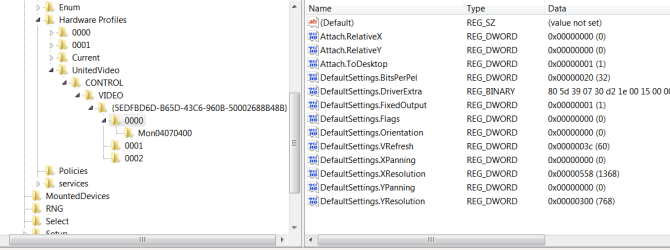
HKEY_CURRENT_CONFIG/System/CurrentControlSet/Control/VIDEO.

change your x and y default values, screenshot shows my defaults as 1368 768

Double-click the "DefaultSettings.XResolution" heading, and select the "Decimal" radio button in the dialog box. Type the horizontal resolution of your choice in the "Value data:" text box; for example, "1152" (without quotes) to set a width resolution of 1152 screen pixels.

same for y axisvids.PNG
 

My Computer My Computer

Computer type
PC/Desktop
Computer Manufacturer/Model Number
medionl/Aspire 6930G/acer x55a
OS
W7 home premium 32bit/W7HP 64bit/w10 tp insider ring
CPU
E5300 dual core
Motherboard
medion MS7366
Memory
3gb
Graphics Card(s)
Nvidia Geforce 7100 Nforce 630i
Monitor(s) Displays
avixc
Internet Speed
n (isp resticted to 72)
Antivirus
mse/pands
Browser
palemoon
Other Info
Belkin Fd7050 n USB using Railink RT2870 drivers, more upto date
its stuck at starting windows again, i'll try that when i can get it working again
 

My Computers My Computers

System One System Two

  • Computer type
    Laptop
    Computer Manufacturer/Model Number
    Asus
    OS
    GLORIOUS WINDOWS 7
    CPU
    AMD Ryzen 3200U
    Motherboard
    asus
    Memory
    ??
    Graphics Card(s)
    RADEON VEGA 3
    Hard Drives
    kingston something
    Antivirus
    no
    Browser
    CHROME
  • Computer type
    PC/Desktop
I still think you're better off going to the ASUS website for the driver. Sometimes the vendors modify manufacturer drivers to suit the equipment behavior. I have a Dell workstation with a FX 3800 GPU installed. It overheats frequently resulting in a BSOD. The pro's at Dell told me they had to modify the driver to use that card. I can't even update the driver to a later NVIDIA one.
 

My Computer My Computer

Computer type
Laptop
Computer Manufacturer/Model Number
Dell M6500 Precision Work Station
OS
Windows 7 Pro SP1 64 bit
Memory
8 GB
Screen Resolution
1920x
Internet Speed
30 Mbps
Antivirus
Norton Security
Browser
IE 11
I still think you're better off going to the ASUS website for the driver. Sometimes the vendors modify manufacturer drivers to suit the equipment behavior. I have a Dell workstation with a FX 3800 GPU installed. It overheats frequently resulting in a BSOD. The pro's at Dell told me they had to modify the driver to use that card. I can't even update the driver to a later NVIDIA one.

I don't think they have a driver for windows 7 i already looked at the website for my laptop and there's only drivers for windows 10 and 11
 

My Computers My Computers

System One System Two

  • Computer type
    Laptop
    Computer Manufacturer/Model Number
    Asus
    OS
    GLORIOUS WINDOWS 7
    CPU
    AMD Ryzen 3200U
    Motherboard
    asus
    Memory
    ??
    Graphics Card(s)
    RADEON VEGA 3
    Hard Drives
    kingston something
    Antivirus
    no
    Browser
    CHROME
  • Computer type
    PC/Desktop
What is the model number?
 

My Computer My Computer

Computer type
Laptop
Computer Manufacturer/Model Number
Dell M6500 Precision Work Station
OS
Windows 7 Pro SP1 64 bit
Memory
8 GB
Screen Resolution
1920x
Internet Speed
30 Mbps
Antivirus
Norton Security
Browser
IE 11
X512da_f512da
 

My Computers My Computers

System One System Two

  • Computer type
    Laptop
    Computer Manufacturer/Model Number
    Asus
    OS
    GLORIOUS WINDOWS 7
    CPU
    AMD Ryzen 3200U
    Motherboard
    asus
    Memory
    ??
    Graphics Card(s)
    RADEON VEGA 3
    Hard Drives
    kingston something
    Antivirus
    no
    Browser
    CHROME
  • Computer type
    PC/Desktop
From what I can see, this system only came with Win 10. Did you uninstall it and install Win 7?
 

My Computer My Computer

Computer type
Laptop
Computer Manufacturer/Model Number
Dell M6500 Precision Work Station
OS
Windows 7 Pro SP1 64 bit
Memory
8 GB
Screen Resolution
1920x
Internet Speed
30 Mbps
Antivirus
Norton Security
Browser
IE 11
From what I can see, this system only came with Win 10. Did you uninstall it and install Win 7?
I have windows 10 and 7 installed on it now. also im using flashboot pro which fixes the starting windows problem relating to vga or something. i think that might have something to do with it
 

My Computers My Computers

System One System Two

  • Computer type
    Laptop
    Computer Manufacturer/Model Number
    Asus
    OS
    GLORIOUS WINDOWS 7
    CPU
    AMD Ryzen 3200U
    Motherboard
    asus
    Memory
    ??
    Graphics Card(s)
    RADEON VEGA 3
    Hard Drives
    kingston something
    Antivirus
    no
    Browser
    CHROME
  • Computer type
    PC/Desktop
Back
Top