Hello All,
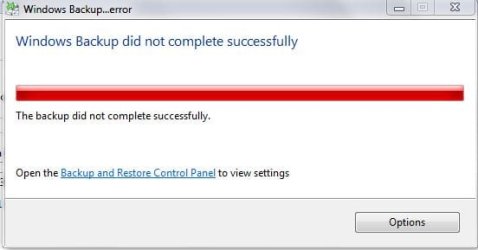
I tried to create a System Image of my Computer onto a new / unused External Hard Drive by selecting Create a System Image from the Back Up and Restore section of the Windows Control Panel but that failed after about 15 minutes - that happened twice - Screenshot attached of error message.
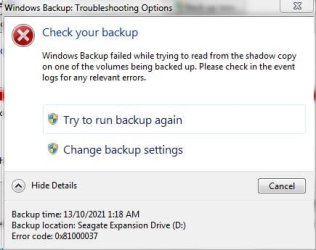
I then tried creating a Full Back Up which seemed to be working but failed after about 9 hours - Error message and other details Screenshots attached.
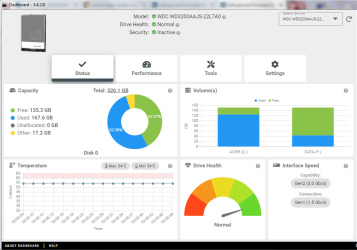
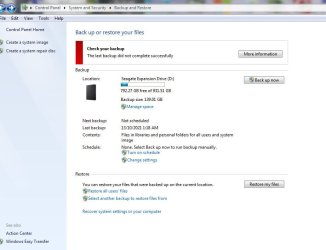
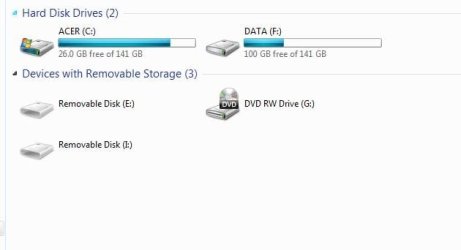
I am also attaching Screenshots of the details of what was Backed Up / put onto the External Hard Drive and also the sizes of used space on my Computer`s Hard Drives.
The Back Up details seem to show that a large portion of the Data that is on my Computer has been backed up although I am sure that the Full Back Up failing means that it would not be useful as a Back Up to use for recovering my Computer as I think that even just a single file missing can cause a Computer to seriously malfunction ?
Please excuse my lack of knowledge / Computing terminology when I describe details such as these.
The Screenshot with details on why the Full Back Up failed [mentioning a Shadow Copy] states look at the Event Log for details of what caused the problem.
I did manage to open the Event Log but the details about events on the 12th October from approx. 16:09 hours to 13th of October approx. 01:18 hours [when the Full Back Up was running] mean absolutely nothing to me and I do not know how to create a File that could be uploaded to the Forum for Members to view - the events from that time period are a very small portion of what seems to be a VERY large File amount of events wise.
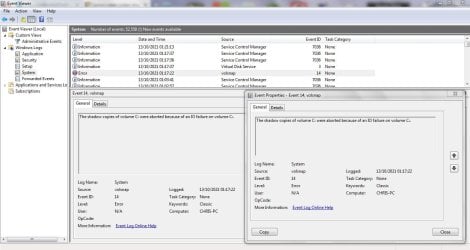
EDIT: I did find an event details in the Event Log which seem to be related time wise and because a Shadow copies are mentioned related to the Full Back Up failing [after over 9 hours] the event details were worded as follows:
Quote: The Shadow Copies of volume C: were aborted because of an IO failure on volume C:
I have attached a Screenshot of the details below.
I don`t know whether that suggests anything specific can be done to resolve the problem with the Full Back Up failing ?
I should add that I would need Step by Step instructions on how to do anything that You can suggest please as I am not at all experienced in Computing / carrying out complicated Computer processes.
I would really like to be able to resolve this because my Computer is vital for my lifestyle as I am Housebound and I really need to be able to create a Full Back Up / System Image to use if the Computer ever seriously malfunctions.
I have already had a few Blue Screen of Death shutdowns that I have received help for on the Forum and my Computer is very old so I need to try and resolve the problem of not being able to create a System Image / Full Back Up.
I do have another External Hard Drive which has been used for incremental Back Ups during the last few years - I connect it to my Computer and select Back Up from the Control Panel display and the Software backs up any additional Data that has been added or changed since the External Hard Drive was previously connected - I see it as just Updating each time that I connect the External Hard Drive to my Computer.
However I have never really been convinced that this process was producing a Full Back Up that could be used to restore my Computer in the event of a serious malfunction so I wanted to create a new System Image / Full Back Up on a new / unused External Hard Drive - this problem then occurred.
Thanks to Members for reading this - any help would be really appreciated.
Chris
P.S: Sorry that the attachments did not attach in the order that I tried to put them in - I tried to attach them in the order that I wrote about but it did not work - I even came back and edited them out and reattached them but that still did not work - hopefully my descriptions of the attachments will be clear enough to make them relatable to my written descriptions ?
I tried to create a System Image of my Computer onto a new / unused External Hard Drive by selecting Create a System Image from the Back Up and Restore section of the Windows Control Panel but that failed after about 15 minutes - that happened twice - Screenshot attached of error message.
I then tried creating a Full Back Up which seemed to be working but failed after about 9 hours - Error message and other details Screenshots attached.
I am also attaching Screenshots of the details of what was Backed Up / put onto the External Hard Drive and also the sizes of used space on my Computer`s Hard Drives.
The Back Up details seem to show that a large portion of the Data that is on my Computer has been backed up although I am sure that the Full Back Up failing means that it would not be useful as a Back Up to use for recovering my Computer as I think that even just a single file missing can cause a Computer to seriously malfunction ?
Please excuse my lack of knowledge / Computing terminology when I describe details such as these.
The Screenshot with details on why the Full Back Up failed [mentioning a Shadow Copy] states look at the Event Log for details of what caused the problem.
I did manage to open the Event Log but the details about events on the 12th October from approx. 16:09 hours to 13th of October approx. 01:18 hours [when the Full Back Up was running] mean absolutely nothing to me and I do not know how to create a File that could be uploaded to the Forum for Members to view - the events from that time period are a very small portion of what seems to be a VERY large File amount of events wise.
EDIT: I did find an event details in the Event Log which seem to be related time wise and because a Shadow copies are mentioned related to the Full Back Up failing [after over 9 hours] the event details were worded as follows:
Quote: The Shadow Copies of volume C: were aborted because of an IO failure on volume C:
I have attached a Screenshot of the details below.
I don`t know whether that suggests anything specific can be done to resolve the problem with the Full Back Up failing ?
I should add that I would need Step by Step instructions on how to do anything that You can suggest please as I am not at all experienced in Computing / carrying out complicated Computer processes.
I would really like to be able to resolve this because my Computer is vital for my lifestyle as I am Housebound and I really need to be able to create a Full Back Up / System Image to use if the Computer ever seriously malfunctions.
I have already had a few Blue Screen of Death shutdowns that I have received help for on the Forum and my Computer is very old so I need to try and resolve the problem of not being able to create a System Image / Full Back Up.
I do have another External Hard Drive which has been used for incremental Back Ups during the last few years - I connect it to my Computer and select Back Up from the Control Panel display and the Software backs up any additional Data that has been added or changed since the External Hard Drive was previously connected - I see it as just Updating each time that I connect the External Hard Drive to my Computer.
However I have never really been convinced that this process was producing a Full Back Up that could be used to restore my Computer in the event of a serious malfunction so I wanted to create a new System Image / Full Back Up on a new / unused External Hard Drive - this problem then occurred.
Thanks to Members for reading this - any help would be really appreciated.
Chris
P.S: Sorry that the attachments did not attach in the order that I tried to put them in - I tried to attach them in the order that I wrote about but it did not work - I even came back and edited them out and reattached them but that still did not work - hopefully my descriptions of the attachments will be clear enough to make them relatable to my written descriptions ?
Attachments
-
 WINDOWS BACK UP FAILED - SCREENSHOT - DETAILS STATED RE. SHADOW COPY READ PROBLEM .JPG21.7 KB · Views: 4
 -
 WINDOWS BACK UP FAILED RE. SHADOW COPY READ PROBLEM - SCREENSHOT .JPG27.9 KB · Views: 4
 -
 WINDOWS BACK UP DID NOT COMPLETE - SCREENSHOT - DETAILS STATED RE. SHADOW COPY READ PROBLEM .JPG56.1 KB · Views: 0
 -
 SEAGATE 1TB EXTERNAL HARD DRIVE BACK UP DETAILS - WINDOWS BACK UP DID NOT COMPLETE - SEE SCREENS.JPG38.7 KB · Views: 5
 -
 WINDOWS - ACER HARD DRIVE FREE SPACE AMOUNTS TO COMPARE WITH PARTIAL BACK UP DETAILS.JPG20.4 KB · Views: 5
 -
 WINDOWS EVENT LOG VIEWER - EVENT ON 13 OCTOBER AT 01-17-22 - SCREENSHOT OF PART OF EVENT LOG AND.JPG101.8 KB · Views: 0
Last edited:
My Computer
At a glance
WINDOWS 7 HOME PREMIUM
- Computer type
- PC/Desktop
- Computer Manufacturer/Model Number
- ACER 3800
- OS
- WINDOWS 7 HOME PREMIUM
- Keyboard
- LOGITECH WIRELESS
- Mouse
- LOGITECH WIRELESS
- Internet Speed
- 2.5Mbps
- Antivirus
- AVAST 2025 FREE VERSION
- Browser
- FIREFOX OR GOOGLE CHROME