Cannot create system image or full back up - error re. Shadow copy

CHRISX

New member
Member
VIP
Local time
9:57 AM
Messages
117
Location
LONDON UK
Hello All,

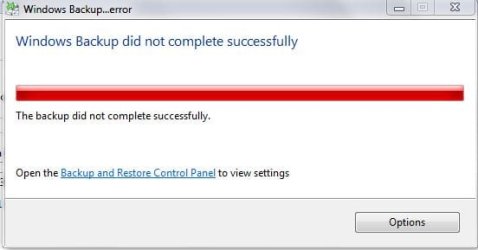
I tried to create a System Image of my Computer onto a new / unused External Hard Drive by selecting Create a System Image from the Back Up and Restore section of the Windows Control Panel but that failed after about 15 minutes - that happened twice - Screenshot attached of error message.

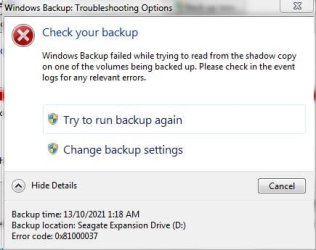
I then tried creating a Full Back Up which seemed to be working but failed after about 9 hours - Error message and other details Screenshots attached.

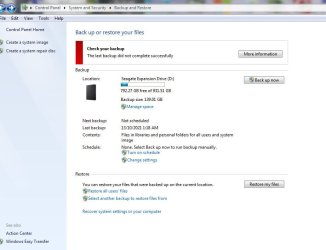
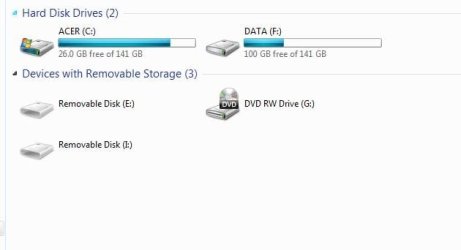
I am also attaching Screenshots of the details of what was Backed Up / put onto the External Hard Drive and also the sizes of used space on my Computer`s Hard Drives.

The Back Up details seem to show that a large portion of the Data that is on my Computer has been backed up although I am sure that the Full Back Up failing means that it would not be useful as a Back Up to use for recovering my Computer as I think that even just a single file missing can cause a Computer to seriously malfunction ?

Please excuse my lack of knowledge / Computing terminology when I describe details such as these.

The Screenshot with details on why the Full Back Up failed [mentioning a Shadow Copy] states look at the Event Log for details of what caused the problem.

I did manage to open the Event Log but the details about events on the 12th October from approx. 16:09 hours to 13th of October approx. 01:18 hours [when the Full Back Up was running] mean absolutely nothing to me and I do not know how to create a File that could be uploaded to the Forum for Members to view - the events from that time period are a very small portion of what seems to be a VERY large File amount of events wise.

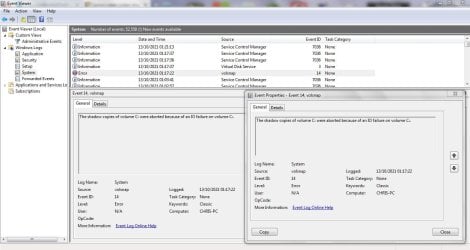
EDIT: I did find an event details in the Event Log which seem to be related time wise and because a Shadow copies are mentioned related to the Full Back Up failing [after over 9 hours] the event details were worded as follows:

Quote: The Shadow Copies of volume C: were aborted because of an IO failure on volume C:

I have attached a Screenshot of the details below.

I don`t know whether that suggests anything specific can be done to resolve the problem with the Full Back Up failing ?


I should add that I would need Step by Step instructions on how to do anything that You can suggest please as I am not at all experienced in Computing / carrying out complicated Computer processes.


I would really like to be able to resolve this because my Computer is vital for my lifestyle as I am Housebound and I really need to be able to create a Full Back Up / System Image to use if the Computer ever seriously malfunctions.

I have already had a few Blue Screen of Death shutdowns that I have received help for on the Forum and my Computer is very old so I need to try and resolve the problem of not being able to create a System Image / Full Back Up.

I do have another External Hard Drive which has been used for incremental Back Ups during the last few years - I connect it to my Computer and select Back Up from the Control Panel display and the Software backs up any additional Data that has been added or changed since the External Hard Drive was previously connected - I see it as just Updating each time that I connect the External Hard Drive to my Computer.

However I have never really been convinced that this process was producing a Full Back Up that could be used to restore my Computer in the event of a serious malfunction so I wanted to create a new System Image / Full Back Up on a new / unused External Hard Drive - this problem then occurred.

Thanks to Members for reading this - any help would be really appreciated.

Chris

P.S: Sorry that the attachments did not attach in the order that I tried to put them in - I tried to attach them in the order that I wrote about but it did not work - I even came back and edited them out and reattached them but that still did not work - hopefully my descriptions of the attachments will be clear enough to make them relatable to my written descriptions ?
 

Attachments

  • WINDOWS BACK UP FAILED - SCREENSHOT - DETAILS STATED RE. SHADOW COPY READ PROBLEM .JPG
    WINDOWS BACK UP FAILED - SCREENSHOT - DETAILS STATED RE. SHADOW COPY READ PROBLEM .JPG
    28.6 KB · Views: 4
  • WINDOWS BACK UP FAILED RE. SHADOW COPY READ PROBLEM - SCREENSHOT  .JPG
    WINDOWS BACK UP FAILED RE. SHADOW COPY READ PROBLEM - SCREENSHOT .JPG
    34.9 KB · Views: 4
  • WINDOWS BACK UP DID NOT COMPLETE - SCREENSHOT - DETAILS STATED RE. SHADOW COPY READ PROBLEM .JPG
    WINDOWS BACK UP DID NOT COMPLETE - SCREENSHOT - DETAILS STATED RE. SHADOW COPY READ PROBLEM .JPG
    74.5 KB · Views: 0
  • SEAGATE 1TB EXTERNAL HARD DRIVE BACK UP DETAILS - WINDOWS BACK UP DID NOT COMPLETE - SEE SCREENS.JPG
    SEAGATE 1TB EXTERNAL HARD DRIVE BACK UP DETAILS - WINDOWS BACK UP DID NOT COMPLETE - SEE SCREENS.JPG
    49.9 KB · Views: 5
  • WINDOWS - ACER HARD DRIVE FREE SPACE AMOUNTS TO COMPARE WITH PARTIAL BACK UP DETAILS.JPG
    WINDOWS - ACER HARD DRIVE FREE SPACE AMOUNTS TO COMPARE WITH PARTIAL BACK UP DETAILS.JPG
    25.7 KB · Views: 5
  • WINDOWS EVENT LOG VIEWER - EVENT ON 13 OCTOBER AT 01-17-22 - SCREENSHOT OF PART OF EVENT LOG AND.JPG
    WINDOWS EVENT LOG VIEWER - EVENT ON 13 OCTOBER AT 01-17-22 - SCREENSHOT OF PART OF EVENT LOG AND.JPG
    138.8 KB · Views: 0
Last edited:

My Computer

Computer type
PC/Desktop
Computer Manufacturer/Model Number
ACER 3800
OS
WINDOWS 7 HOME PREMIUM
Keyboard
LOGITECH WIRELESS
Mouse
LOGITECH WIRELESS
Internet Speed
2.5Mbps
Antivirus
AVAST 2025 FREE VERSION
Browser
FIREFOX OR GOOGLE CHROME
A system image would be needed to restore the operating system.

The "backup" is for files.

According to your screenshot, your expansion drive "D:" already contains at least one system image , taking up 117gb of space.

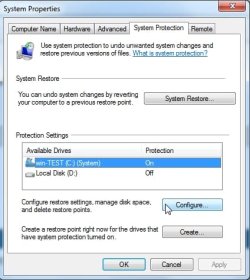
In the start search box, type

system protection

click the icon that pops up called create a restore point

highlight C and click configure

configure1.jpg

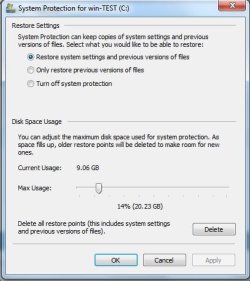
see if what the current and max usage are.

configure2.jpg

- - - Updated - - -

EDIT:

According to your post Blue screen of death - no downloads or changes to computer recently

There is a problem with the disk. https://www.sevenforums.com/attachm...-screenshot-short-test-failing-10-percent.jpg

Looks like You need a new disk. You could try the fast fix in seatools and see what it says.

Fortunately you have a system image though we dont know old it is. That could be restored to the new disk.

I would suggest an ssd - 500gb from a decent brand such as samsung/crucial is about £40 - but large ones
arent cheap. Your current WD disk is small so a 500gb replacement disk should be fine.
 

My Computers

System One System Two

  • Computer type
    PC/Desktop
    OS
    7 X64
    CPU
    i5 8400
    Motherboard
    gigabyte b365m ds3h
    Memory
    2x8gb 3200mhz
    Hard Drives
    various
    PSU
    pure power 11 400w cm
    Case
    Coolermaster
    Cooling
    cryorig m9i
  • Computer type
    PC/Desktop
    OS
    7x64
    CPU
    g5400
    Motherboard
    ga b365m ds3h
    Memory
    8gb ddr4 2400
    PSU
    xfx pro 450w
A system image would be needed to restore the operating system.

The "backup" is for files.

According to your screenshot, your expansion drive "D:" already contains at least one system image , taking up 117gb of space.

In the start search box, type

system protection

click the icon that pops up called create a restore point

highlight C and click configure

View attachment 420378

see if what the current and max usage are.

View attachment 420377
Hello SIW2,

Thanks for your reply,

The details on the Screenshot about the space used on my new / previously unused External Hard Drive are from the attempted Full Back Up that I tried to create on Tuesday 12th October - the System Image details are from that attempt - I obviously don`t know whether that IS a full System Image because the Full Back Up failed after about 9 hours.

I had initially tried to use the Back Up and Restore section of the Windows Control Panel to select - Create a System Image - but that failed twice after about 15 minutes - the Screenshot of the Error message for that is the one with the continuous Red progress line and Error code.

I have recently edited my original message above to add some details that I found in the Windows Event Log File - I don`t know whether You have seen that information ?

I looked at the System Protection information that You asked for:

Current usage: 242MB - Maximum usage: 7.05GB - Screenshot attached

The new / previously unused External Hard Drive that I tried to create the System Image and the Full Back Up onto is a Seagate External Hard Drive 1TB capacity.

When I tried using the SeaTools software there were no results displayed - the Forum Member who suggested scanning my Computer with it wrote that there would be results after the scan but it did not produce any - I tried another type of scan which kept failing at 10% - again there were no result details.

I have not seen a Repair facility on the SeaTools onscreen display but I will look again - I might have to ask more about that because I don`t want to just launch any program / Fix that might cause more problems for me.

Thanks for your interest and help I really appreciate it.

Chris
 

Attachments

  • WINDOWS SYSTEM PROTECTION DETAILS SCREENSHOT.JPG
    WINDOWS SYSTEM PROTECTION DETAILS SCREENSHOT.JPG
    42 KB · Views: 4

My Computer

Computer type
PC/Desktop
Computer Manufacturer/Model Number
ACER 3800
OS
WINDOWS 7 HOME PREMIUM
Keyboard
LOGITECH WIRELESS
Mouse
LOGITECH WIRELESS
Internet Speed
2.5Mbps
Antivirus
AVAST 2025 FREE VERSION
Browser
FIREFOX OR GOOGLE CHROME

My Computers

System One System Two

  • Computer type
    PC/Desktop
    OS
    7 X64
    CPU
    i5 8400
    Motherboard
    gigabyte b365m ds3h
    Memory
    2x8gb 3200mhz
    Hard Drives
    various
    PSU
    pure power 11 400w cm
    Case
    Coolermaster
    Cooling
    cryorig m9i
  • Computer type
    PC/Desktop
    OS
    7x64
    CPU
    g5400
    Motherboard
    ga b365m ds3h
    Memory
    8gb ddr4 2400
    PSU
    xfx pro 450w
I would suggest either the crucial bx 500 or the samsung 870 qvo. Perhaps someone can get you an early Christmas present.

For example

Crucial BX500 480 GB CT480BX500SSD1-Up to 540 MB/s (Internal SSD, 3D NAND, SATA, 2.5 Inch), Black - Crucial
Hello again SIW2,

Are You stating that because the SeaTools Hard Drive scanning program did not seem to work on my Computer - one scan just showing a `Fail` of something during the scan and a `Short Test` scan failing at 10% that my Computer`s INTERNAL Hard Drive needs to be replaced ?

When I was being helped on that previous thread - a Blue Screen of Death shutdown problem Dump Files etc. related to a shutdown were analysed by one of the Forum BSOD Expert Members - He did not find a Hard Drive problem.

I also recently ran CheckDisk and SFC /scannow - the SFC /scannow produced CBS.Log files which only showed a few corrupted files which were not automatically repairable - a Forum Member informed me that they were related to a Bluetooth program although I have never connected a Bluetooth device to my Computer.

Just in case it You or other Members might be interested in looking at those results I am attaching the System File Checker results file - although there are 11 pages it is very easy to see which files are identified as corrupted - there are not that many - they stand out on some of the pages - starting on page 2 - then page 6 and a couple of other pages.
Chris
 

Attachments

My Computer

Computer type
PC/Desktop
Computer Manufacturer/Model Number
ACER 3800
OS
WINDOWS 7 HOME PREMIUM
Keyboard
LOGITECH WIRELESS
Mouse
LOGITECH WIRELESS
Internet Speed
2.5Mbps
Antivirus
AVAST 2025 FREE VERSION
Browser
FIREFOX OR GOOGLE CHROME
Are You stating that because the SeaTools Hard Drive scanning program did not seem to work on my Computer - one scan just showing a `Fail` of something during the scan and a `Short Test` scan failing at 10% that my Computer`s INTERNAL Hard Drive needs to be replaced ?

You could also have a look with WD disk tool.
Software and Firmware Downloads | WD Support

If your internal disk is faulty you need to change it.


They also have a dashboard version which includes ssd stuff.
Software and Firmware Downloads | WD Support
 

My Computers

System One System Two

  • Computer type
    PC/Desktop
    OS
    7 X64
    CPU
    i5 8400
    Motherboard
    gigabyte b365m ds3h
    Memory
    2x8gb 3200mhz
    Hard Drives
    various
    PSU
    pure power 11 400w cm
    Case
    Coolermaster
    Cooling
    cryorig m9i
  • Computer type
    PC/Desktop
    OS
    7x64
    CPU
    g5400
    Motherboard
    ga b365m ds3h
    Memory
    8gb ddr4 2400
    PSU
    xfx pro 450w
You could also have a look with WD disk tool.
Software and Firmware Downloads | WD Support

If your internal disk is faulty you need to change it.


They also have a dashboard version which includes ssd stuff.
Software and Firmware Downloads | WD Support

Hello again SIW2,

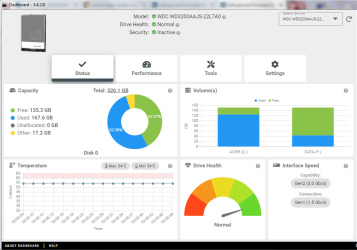
Thank You very much for the link to the Western Digital Hard Drive scanner I downloaded and ran it.

I have attached a Screenshot of the Status results display - does this confirm that the Hard Drive does not need to be replaced ?

When I was previously trying to find out by online searches why the SeaTools Hard Drive scanner did not seem to be working correctly on my Computer I read quite a few comments that stated it did not work on Western Digital Hard Drives - perhaps that is the case on my Computer ?

Thanks again for your help.

Chris

P.S: When You asked about the System Protection properties if that was to check whether a System Image had been created [?] I think that I should have had the External Hard Drive connected to my Computer ?

If that was what You wanted to check please let me know and I will connect the External Hard Drive and look at the details in System Protection again.

Sorry if I should have realised this previously.

Chris
 

Attachments

  • image_2021-10-14_191644.png
    image_2021-10-14_191644.png
    150.9 KB · Views: 0
Last edited:

My Computer

Computer type
PC/Desktop
Computer Manufacturer/Model Number
ACER 3800
OS
WINDOWS 7 HOME PREMIUM
Keyboard
LOGITECH WIRELESS
Mouse
LOGITECH WIRELESS
Internet Speed
2.5Mbps
Antivirus
AVAST 2025 FREE VERSION
Browser
FIREFOX OR GOOGLE CHROME
That looks ok so far. Can you get it to run a test so you are certain all is well ? Cant remember where it is - under the tools tab probably.

If you get the all clear from test, then your problems are software related. In that case I would just bite the bullet and do a clean reinstall to get rid of all the issues - easy for me to say as I have done it hundreds of times. Back up the activation first with dism++
 

My Computers

System One System Two

  • Computer type
    PC/Desktop
    OS
    7 X64
    CPU
    i5 8400
    Motherboard
    gigabyte b365m ds3h
    Memory
    2x8gb 3200mhz
    Hard Drives
    various
    PSU
    pure power 11 400w cm
    Case
    Coolermaster
    Cooling
    cryorig m9i
  • Computer type
    PC/Desktop
    OS
    7x64
    CPU
    g5400
    Motherboard
    ga b365m ds3h
    Memory
    8gb ddr4 2400
    PSU
    xfx pro 450w
That looks ok so far. Can you get it to run a test so you are certain all is well ? Cant remember where it is - under the tools tab probably.

If you get the all clear from test, then your problems are software related. In that case I would just bite the bullet and do a clean reinstall to get rid of all the issues - easy for me to say as I have done it hundreds of times. Back up the activation first with dism++

Hello SIW2,

I ran the SMART Short Diagnostic Test and the SMART Extended Diagnostic Test - they both gave the result:

Quote: One or more errors - Error Code 7

However I cannot find any where on the Dashboard where Error Code 7 is explained - I will do a Google search for that tomorrow afternoon as I am now being called for Dinner and have an appointment tomorrow morning.

JUST IN CASE YOU DID NOT SEE MY EDIT IN MY PREVIOUS MESSAGE:

When You asked about the System Protection properties if that was to check whether a System Image had been created [?] I think that I should have had the External Hard Drive connected to my Computer ?

If that was what You wanted to check please let me know and I will connect the External Hard Drive and look at the details in System Protection again.​

Sorry if I should have realised this previously.
Chris

- - - Updated - - -
 

My Computer

Computer type
PC/Desktop
Computer Manufacturer/Model Number
ACER 3800
OS
WINDOWS 7 HOME PREMIUM
Keyboard
LOGITECH WIRELESS
Mouse
LOGITECH WIRELESS
Internet Speed
2.5Mbps
Antivirus
AVAST 2025 FREE VERSION
Browser
FIREFOX OR GOOGLE CHROME
Hello SIW2,

I ran the SMART Short Diagnostic Test and the SMART Extended Diagnostic Test - they both gave the result:

Quote: One or more errors - Error Code 7

However I cannot find any where on the Dashboard where Error Code 7 is explained - I will do a Google search for that tomorrow afternoon as I am now being called for Dinner and have an appointment tomorrow morning.

JUST IN CASE YOU DID NOT SEE MY EDIT IN MY PREVIOUS MESSAGE:

When You asked about the System Protection properties if that was to check whether a System Image had been created [?] I think that I should have had the External Hard Drive connected to my Computer ?

If that was what You wanted to check please let me know and I will connect the External Hard Drive and look at the details in System Protection again.​

Sorry if I should have realised this previously.
Chris

- - - Updated - - -

No. was just checking there is enough shadow storage on C which is where the io error is coming from.

The smart test error might be a concern.
WD hdd failed in smart-test with status code = 07 | Tom's Hardware Forum
 

My Computers

System One System Two

  • Computer type
    PC/Desktop
    OS
    7 X64
    CPU
    i5 8400
    Motherboard
    gigabyte b365m ds3h
    Memory
    2x8gb 3200mhz
    Hard Drives
    various
    PSU
    pure power 11 400w cm
    Case
    Coolermaster
    Cooling
    cryorig m9i
  • Computer type
    PC/Desktop
    OS
    7x64
    CPU
    g5400
    Motherboard
    ga b365m ds3h
    Memory
    8gb ddr4 2400
    PSU
    xfx pro 450w
No. was just checking there is enough shadow storage on C which is where the io error is coming from.
The smart test error might be a concern.
WD hdd failed in smart-test with status code = 07 | Tom's Hardware Forum
Hello SIW2,

Thanks for finding that referrence to the Western Digital Dashboard Error Code 7

I looked at one of the recommended Hard Drive Disk Scanner downloads but it was for a 64 bit system.

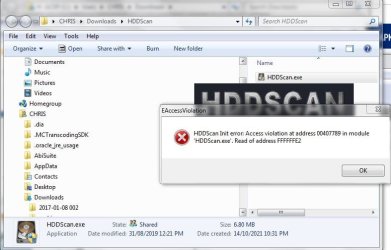
After searching to try and ensure that it was a Safe / recommended by other Computing websites program I downloaded the other recommendation which was the HDDScan Hard Drive Disk Scanner - unfortunately after extracting the Zip File to get the HDDScan.exe file and clicking on it to Run as Administrator I immediately received the Error message in the Screenshot attached.

I definitely followed the instructions related to the Scanner download - extract from the Zip file and then Run.

The download was from the Softpedia website which I believe from past experience and online research is a Trusted / Safe website from where to obtain Safe / Tested downloads.

I will look online again tomorrow afternoon for further information on the Western Digital Dashboard Error Code 7.

Could I ask You a favour - please don`t be offended:

Just in case this Hard Drive Disk error is something not directly related to my Computer`s Full Back Up failure problem would it be possible to go back to my first message on this thread to try and look further into the first error message about the Shadow Copy as it directly identified that being involved in the problem of the Full Back Up [including a System Image] not being completed.

I would really appreciate help in trying to either confirm or discount a Shadow Copy problem - whatever that is ?

Thanks again for your interest and for trying to help me with this.

Chris

P.S: The HDDScan.exe Error message Screenshot is attached below my next message which was automatically added to my reply to You SIW2.

- - - Updated - - -

SORRY THAT MY NEXT MESSAGE HAS BEEN AUTOMATICALLY ADDED TO MY LAST REPLY TO MEMBER SIW2:


Hello SIW2 / All Members,


As the first Error message that I received after the Full Back Up of my Computer failed mentioned a problem with a Shadow Copy - Screenshot attached - I wondered if these steps listed below are relevant to my problem - I found them on another thread within the Forum Back Up and Restore section:

To check / fix the Volume Shadow Copy service:
1. Click Start/Run: services.msc
2. Find: "Volume Shadow Copy"
3. Right-click, and adjust properties, set it to Automatic (Delayed start).
4. While still in that window start the service manually
5. Run backup again.

I know that Members might state `Just try it` but I want to be carrying out unnecessary alterations in case I cause more problems than I already have.

Here is the other thread where the suggestion above was found by me Today:

Backing up system image, error 0x81000037


Thanks for looking at this.

Chris
 

Attachments

  • WINDOWS - ACER HARD DRIVE SCAN - HDDScan - ERROR MESSAGE IMMEDIATELY ON TRYING TO RUN IT - SCREE.JPG
    WINDOWS - ACER HARD DRIVE SCAN - HDDScan - ERROR MESSAGE IMMEDIATELY ON TRYING TO RUN IT - SCREE.JPG
    66.8 KB · Views: 0

My Computer

Computer type
PC/Desktop
Computer Manufacturer/Model Number
ACER 3800
OS
WINDOWS 7 HOME PREMIUM
Keyboard
LOGITECH WIRELESS
Mouse
LOGITECH WIRELESS
Internet Speed
2.5Mbps
Antivirus
AVAST 2025 FREE VERSION
Browser
FIREFOX OR GOOGLE CHROME
Much as you dont want it to be a problem with the hd, it is looking like that is the issue.

Both the the seagate and the wd hd tools have told you there is a problem, and that is consistent with the i/o error
The Shadow Copies of volume C: were aborted because of an IO failure on volume C:

If you must, you could scan for bad sectors with diskgenius https://www.diskgenius.com/download.php

Rt click the disk and select verify or repair bad sectors
 

My Computers

System One System Two

  • Computer type
    PC/Desktop
    OS
    7 X64
    CPU
    i5 8400
    Motherboard
    gigabyte b365m ds3h
    Memory
    2x8gb 3200mhz
    Hard Drives
    various
    PSU
    pure power 11 400w cm
    Case
    Coolermaster
    Cooling
    cryorig m9i
  • Computer type
    PC/Desktop
    OS
    7x64
    CPU
    g5400
    Motherboard
    ga b365m ds3h
    Memory
    8gb ddr4 2400
    PSU
    xfx pro 450w
Much as you dont want it to be a problem with the hd, it is looking like that is the issue.

Both the the seagate and the wd hd tools have told you there is a problem, and that is consistent with the i/o error


If you must, you could scan for bad sectors with diskgenius https://www.diskgenius.com/download.php

Rt click the disk and select verify or repair bad sectors
Hello again SIW2,

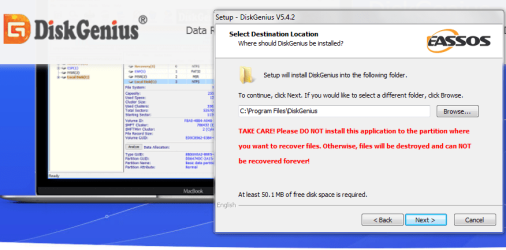
I downloaded the DiskGenius software but as I was about to click to Install it I received an onscreen display with a Red text Warning message - Screenshot attached.
I obviously have not installed DiskGenius until I asked You / other Members about this Warning message.

I am having some really `Bad Luck` tonight with these Hard Drive Disk Scanning programs.

Chris

P.S: I know that You are probably correct about the I/O problem being a Disk problem so please don`t be offended by me still asking about this:

I just wanted to check did You see my previous message about the details about the Shadow Copy settings change details which were found on another Forum Back Up and Restore thread - that message from me was automatically added to my previous reply to you and I was writing it while you were replying to me - because it was automatically added to a previous message I just wanted to ask if you had seen it ?

My Regards, Chris
 

Attachments

  • image_2021-10-15_001214.png
    image_2021-10-15_001214.png
    130.4 KB · Views: 0

My Computer

Computer type
PC/Desktop
Computer Manufacturer/Model Number
ACER 3800
OS
WINDOWS 7 HOME PREMIUM
Keyboard
LOGITECH WIRELESS
Mouse
LOGITECH WIRELESS
Internet Speed
2.5Mbps
Antivirus
AVAST 2025 FREE VERSION
Browser
FIREFOX OR GOOGLE CHROME
If using a program for file recovery or data recovery it is not a good idea to install it to the partition you want to recover data from.

You are not doing data recovery. That message is not relevant
 

My Computers

System One System Two

  • Computer type
    PC/Desktop
    OS
    7 X64
    CPU
    i5 8400
    Motherboard
    gigabyte b365m ds3h
    Memory
    2x8gb 3200mhz
    Hard Drives
    various
    PSU
    pure power 11 400w cm
    Case
    Coolermaster
    Cooling
    cryorig m9i
  • Computer type
    PC/Desktop
    OS
    7x64
    CPU
    g5400
    Motherboard
    ga b365m ds3h
    Memory
    8gb ddr4 2400
    PSU
    xfx pro 450w
If using a program for file recovery or data recovery it is not a good idea to install it to the partition you want to recover data from.

You are not doing data recovery. That message is not relevant
Hello SIW2,

Thank You very much for explaining that to me.

I have now ran the DiskGenius Disk Verify facility for both the C Drive and the F Drive on my Computer and I was hoping to be able to attach not only Screenshots but also the Results Logs to this message.

However although I did save the Disk verification results logs I now cannot find them on my Computer - I had thought that the File titles would either start with DiskGenius or DG or dg but I cannot find anything in lists of files starting with D of d - I will look again to see if I can find and upload the results files to the Forum.

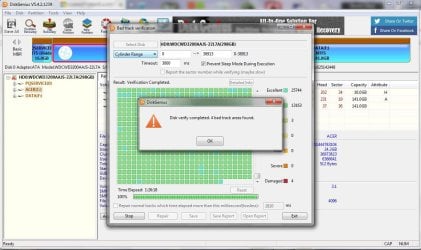
I watched the Disk Verification process for both of the Drives where thousands of Hard Drive `Cylinders` were scanned - the results were that there were `4 bad track areas` found on each Drive.

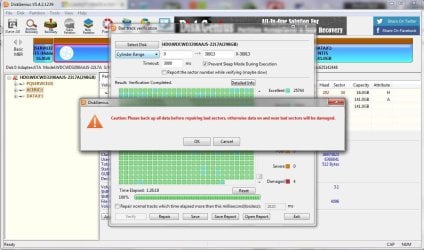
Unfortunately I could not use the `Repair` facility because a Red text Warning was displayed which stated users should NOT use the Repair facility without Backing Up because there could be further problems after the Repair process was carried out.

I am attaching Screenshots of the result of the Disk verification process for my Computer`s C Drive and the Red text Warning message when I tried to use the `Repair` facility to rectify the 4 bad track areas.

Exactly the same situation occurred for my Computer`s F Drive after the Disk verification process - the same Red text Warning message about using the Repair facility was displayed.

As my problem is NOT being able to carry out a Full Back Up / System Image that rules out using the DiskGenius Disk Repair facility - I cannot risk further damaging my Computer.

My Life cannot run without a Computer because I am Housebound due to a Life changing severe Back problem and Knee problems so I need Internet access to do online Food / Grocery shopping and Banking / Bill payment etc.

Thanks again for your interest and for trying to help me.

Chris
 

Attachments

  • WINDOWS - ACER COMPUTER HARD DRIVE C DISKGENIUS VERIFY SCAN - SCREENSHOT SHOWS 4 BAD TRACK AREAS.JPG
    WINDOWS - ACER COMPUTER HARD DRIVE C DISKGENIUS VERIFY SCAN - SCREENSHOT SHOWS 4 BAD TRACK AREAS.JPG
    157.3 KB · Views: 1
  • WINDOWS - ACER COMPUTER HARD DRIVE C DISKGENIUS AFTER VERIFY SCAN - SCREENSHOT OF WARNING MESSAG.JPG
    WINDOWS - ACER COMPUTER HARD DRIVE C DISKGENIUS AFTER VERIFY SCAN - SCREENSHOT OF WARNING MESSAG.JPG
    158 KB · Views: 2
Last edited:

My Computer

Computer type
PC/Desktop
Computer Manufacturer/Model Number
ACER 3800
OS
WINDOWS 7 HOME PREMIUM
Keyboard
LOGITECH WIRELESS
Mouse
LOGITECH WIRELESS
Internet Speed
2.5Mbps
Antivirus
AVAST 2025 FREE VERSION
Browser
FIREFOX OR GOOGLE CHROME
That is not a good sign.
It is going to cause you grief.

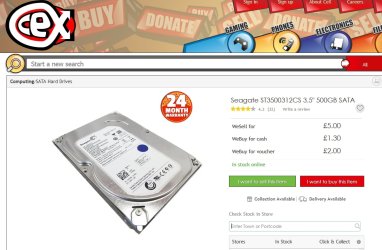
One thing you might try is a used disk from cex. They are very cheap, and come with a guarantee. Of course they are used so you never know how many years are left in them.

500gb mechanical disk for £5. I think it is an extra £1.95 if you want it posted.

There is probably a branch in your area, perhaps somebody could pick one up for you as an alternative to posting.
CeX (UK): - Buy, Sell, Donate

cex-500gb-disk.jpg

- - - Updated - - -

There is a whole list of them here:

CeX (UK) : Stock search]lots of disks here

- - - Updated - - -

Whereabouts in the UK are you?

- - - Updated - - -

Once you have transferred everything to a new disk, you can try repairing the old one. The problem with that is the disk controller is supposed to do that automatically. Obviously, it isnt - so even if a repair can be effected, I wouldnt rely on it.
 

My Computers

System One System Two

  • Computer type
    PC/Desktop
    OS
    7 X64
    CPU
    i5 8400
    Motherboard
    gigabyte b365m ds3h
    Memory
    2x8gb 3200mhz
    Hard Drives
    various
    PSU
    pure power 11 400w cm
    Case
    Coolermaster
    Cooling
    cryorig m9i
  • Computer type
    PC/Desktop
    OS
    7x64
    CPU
    g5400
    Motherboard
    ga b365m ds3h
    Memory
    8gb ddr4 2400
    PSU
    xfx pro 450w
That is not a good sign.
It is going to cause you grief.

One thing you might try is a used disk from cex. They are very cheap, and come with a guarantee. Of course they are used so you never know how many years are left in them.

500gb mechanical disk for £5. I think it is an extra £1.95 if you want it posted.

There is probably a branch in your area, perhaps somebody could pick one up for you as an alternative to posting.
CeX (UK): - Buy, Sell, Donate

View attachment 420396

- - - Updated - - -

There is a whole list of them here:

CeX (UK) : Stock search]lots of disks here

- - - Updated - - -

Whereabouts in the UK are you?

- - - Updated - - -

Once you have transferred everything to a new disk, you can try repairing the old one. The problem with that is the disk controller is supposed to do that automatically. Obviously, it isnt - so even if a repair can be effected, I wouldnt rely on it.

Hello SIW2,

If these are `Idiot questions / Idiot comments` Please excuse me - they are just the thoughts of someone who knows almost nothing about Computing:

Having ran the DiskGenius and watched it scanning the C Drive and the F Drive on my Computer I noted that it scanned almost 8000 Cylinders within the Drives and found only 8 Bad track areas - 4 on each Drive.

And although the scanning process onscreen display was scrolling down quite fast I did see that the Bad track areas were not grouped together - I am surprised that so few defects can cause so much damage on a Computer Hard Drive that it needs definite replacement.

I realise that You have my best interests in mind regarding trying to advise me to act before the Computer`s Hard Drive fails - but do `4 Bad track areas` spread out in each of my Computer`s Drives really signify a badly damaged / ready to fail Hard Drive ?

Please excuse my questioning this - I hope that you will not be offended - as well as obviously trying to solve problems when I post a thread on the Forum I hope to learn from communicating with Computer Experts such as yourself.

It would not be the money that would put me off replacing my Computer`s Hard Drive [I would want to buy a new / unused one] it is what I perceive as the massive amount of very technical tasks that I would have to carry out without any errors to get my personal Data Backed Up - I already have that problem - so it is not lost and then have to try and put it back onto a new Hard Drive.

I have previously been given a massive list of tasks that would have to be performed if a new Hard Drive was fitted by me to my Computer - the word `Daunting` does not express the feeling I had when I looked at it.

Another thing that would put me off is that I have been told previously that when a new Hard Drive is fitted to a Computer there can be problems to solve because there would be no Windows Operating System on the Computer for the new Drive to use ?

I mention the details in the next paragraph only to preempt Members stating that I could move some Files or Folders to try and achieve some of the processes required when installing a new Computer Hard Drive:

I already have an unresolvable problem [for Me] on my Computer where I cannot move most Files because when I put them onto my Computer I gave the files very long descriptive Titles / `Names` - when I tried to move some earlier this year I could not because the `File Paths were too long` - that problem applies to THOUSANDS of Files on my Computer which is why I could not previously even attempt to solve the problem.

Thanks again for your patience and for your help I really appreciate it.

Chris

P.S: I live in South East London.
 
Last edited:

My Computer

Computer type
PC/Desktop
Computer Manufacturer/Model Number
ACER 3800
OS
WINDOWS 7 HOME PREMIUM
Keyboard
LOGITECH WIRELESS
Mouse
LOGITECH WIRELESS
Internet Speed
2.5Mbps
Antivirus
AVAST 2025 FREE VERSION
Browser
FIREFOX OR GOOGLE CHROME
really signify a badly damaged / ready to fail Hard Drive ?

I dont boil my cabbages twice.

I have previously been given a massive list of tasks that would have to be performed if a new Hard Drive was fitted by me to my Computer

The usual way is to use one of the many free programs that will migrate from one disk to another. Just a few clicks of the mouse.

Diskgenius has that function.

I cannot move most Files because when I put them onto my Computer I gave the files very long descriptive Titles / `Names` - when I tried to move some earlier this year I could not because the `File Paths were too long` - that problem applies to THOUSANDS of Files on my Computer

I dont know anything about that - you would need to ask somebody else who has experience of it..
 
Last edited:

My Computers

System One System Two

  • Computer type
    PC/Desktop
    OS
    7 X64
    CPU
    i5 8400
    Motherboard
    gigabyte b365m ds3h
    Memory
    2x8gb 3200mhz
    Hard Drives
    various
    PSU
    pure power 11 400w cm
    Case
    Coolermaster
    Cooling
    cryorig m9i
  • Computer type
    PC/Desktop
    OS
    7x64
    CPU
    g5400
    Motherboard
    ga b365m ds3h
    Memory
    8gb ddr4 2400
    PSU
    xfx pro 450w
I dont boil my cabbages twice.

Does that mean that You don`t repeat or explain further if you think that someone should have understood something that you wrote previously ?


The usual way is to use one of the many free programs that will migrate from one disk to another. Just a few clicks of the mouse.

Diskgenius has that function.


I dont know anything about that - you would need to ask somebody else who has experience of it..
I explained about not being able to move Thousands of Files because I had given them very long descriptive `Names` which then created very long File Paths because that now prevents Manual moving of Files AND Programs / Software from moving Files.

Chris
 

My Computer

Computer type
PC/Desktop
Computer Manufacturer/Model Number
ACER 3800
OS
WINDOWS 7 HOME PREMIUM
Keyboard
LOGITECH WIRELESS
Mouse
LOGITECH WIRELESS
Internet Speed
2.5Mbps
Antivirus
AVAST 2025 FREE VERSION
Browser
FIREFOX OR GOOGLE CHROME
Back
Top