Solved Mozilla Thunderbird profiles and editing

loninappleton

New member
Member
VIP
Local time
7:11 AM
Messages
892
I'm lost in trying to save a simple edit tested in the Mozilla Thunderbird email program. It seems so easy to damage something with the multiple locations and I don't see a save option to simply edit the default without going through some make process and change that..

The necessary edit is to get my email off the ISP automatically to the program when it opens.
An instruction was given from a third pary search to delete a profile line for use with my POP3
setup.

deleting the line in the default Profile of:

global-messages-db.sqlite

... seemed to solve the problem of getting new messages after I had already set that option in the program.

I tried to fix this on a backup HD myself and had to do some repair as a result of not knowing
what I was doing. Mozilla instructions on this are either roundabout or _old._ . One search
brought up a tip from 2006. I can't follow the profiles logic at all. Please do not simply redirect to
the Mozilla stuff.

I know the instruction of getting to the Profile: START > %appdata%\Thunderbird\Profiles

But there is a profiles manager under another sub menu which I can't handle.

Frankly I don't know how this problem emerged after years of use. I should be able to
use the Thunderbird program check box option and have done with it but that was insufficient.

- - - Updated - - -

I started to think about how this was not a problem before and wondered if reinstalling v.78 rather than 91
would revert any changes made to the new and improved T-bird.

Also I tried using Mozbackup-- a trusted program I used for years on both Firefox and T-bird to
do these Profile backups. Mozbackup only effects T-bird profiles. Attempting to test run Mozbackup
on T-bird 91 current version, the old program reports that the profile is damaged. Well that coupld mean
anything since Mozbackaup has not be uptaded for a long time.

But I remember that in using Mozbackup on old versions of T-bird I would selec out everything
in the advanced setting. I just didn't and don't need snoops and whatnot and it still ran fine
without this download to desk problem. Of note: an sql entry was in that removed group. I don't
understand any sql aside from the name series query language.

That's where I am now. On my test HD I may try a new setup with v 78. All the new stuff in v.91 changes
screen presentation and such and may be targeted to toward Win10 but I've seen no functional difference
and I have no spam or virus problems and haven't even in email that I recall.

- - - Updated - - -

Onward...

For all the global sqlite fans out there I see that 1.) It is not the problem and 2.) the global command was not removed by Mozbackup either.

I had one remaining backup HD that had not been cloned for about a year. This turned out to be a good thing b/c Thunderbird 78.5 is on it. The program box is ticked for automatically download messages from server and keep them
on the server which is my usual settings.

If I can I want to reinstall 78.5 over v.91 and retain the Profile since that apparently does not
change much and I can go back to using Mozbackup rather than a replacement free tool I was
using.

On the other sacrifice HD with T-bird 91 I thought of moving the default Profile from 78.5 to 91 but I think that would
be asking for new trouble.

I don't know how easy it is to just overwrite 78.5 to the 91 folder but people most be able to
migrate base programs and keep their profiles else why have them stored in this obscure way?

- - - Updated - - -

Still not solved but apparently this problem has been around for a long time:

1584861 - Automatic download of emails fails with Thunderbird 68.x, but manual download still works (pop) - Fix in comment #15

But that's why I brought the problem in Sevenforums: for someone not Mozzilla with eyes on it.
 

My Computer

Computer type
PC/Desktop
Computer Manufacturer/Model Number
custom
OS
Windows 7 x64 Ultimate
CPU
AMD Athlon II x3 450
Motherboard
MSI 880GM
Memory
2 GB
Hard Drives
various
Browser
Firefox, Opera
Try the latest version of portable Thunderbird and tell me if the issue still persists. Mozilla Thunderbird Portable (email) | PortableApps.com It doesn't install, it's portable. So you could have more than one email client for certain things if you wish. I do...

The global-messages-db.sqlite file is a database file. It contains your emails messages and other things. It can be opened with a program called DB Browser. BUT! Don't mess with something you know nothing about. Always make backups, and backups of backups...

Quick navigation to global-messages-db.sqlite can be had in Everythig.exe from voidtools. Downloads - voidtools
 

My Computer

Computer type
PC/Desktop
OS
Windows 7 Ultimate x64
thanks for answering.

I have been making do without a gigantic inconvenience and will try the upgrade-- no harm that can occur for what I have.

I remain confused as to why the older version 78 seemed to perform with no glitches.

--> The specific thing I see on load of the program is the message "done" at the bottom left of the
inbox. That should appear after the activity of downloading whatever new mail there is without
having to use "Get Mail" as a separate command. Is there anything I can inspect in settings?

I don't know if this is a unique problem in POP mail accounts. I am ignorant on telecomms at the
system level-- I never got it, So I depend on some screen shots made a while ago which I can
simply rote copy if a new install is needed. That's why I wondered about reinstall of the old version.

I can look at the profile if you suggest that. But the whole profile routine seems cumbersome for
the casual user.


Yes, the Everything tool is a boon to searching for obscure files. I've used it for a while.. :-)

- - - Updated - - -

I have downloaded the update. Will apply it shortly.

- - - Updated - - -

What I did was send a message to my account to myself from webmail on a separate PC to test.
I then I did then did the restart.

There was no change-- In other words the Done message appears again with no action showing to check for new mail.
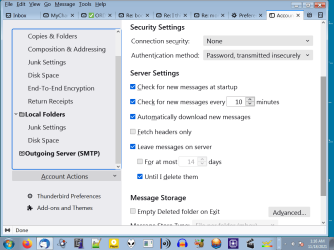
I have made a screen shot of the relevant Account Settings since I don't know what else could have any effect.
There may be other things to tweak, I just don't know any.

- - - Updated - - -

Wait. Is Portable Thunderbird different from the Update option in the Program?
If I do portable, will my T-bird stuff restart without having to set up from scratch?

I may have botched the instruction. 91.3.1 whatevs is installed as the shown current version.
 

Attachments

  • tbird.png
    tbird.png
    113.5 KB · Views: 1

My Computer

Computer type
PC/Desktop
Computer Manufacturer/Model Number
custom
OS
Windows 7 x64 Ultimate
CPU
AMD Athlon II x3 450
Motherboard
MSI 880GM
Memory
2 GB
Hard Drives
various
Browser
Firefox, Opera
A) Who's the email provider?

B) Portable Thunderbird is just another instance of Thunderbird you can run to rule out any issues you're having with the installed version of Thunderbird. They should be able to coexist with one another. In portable Thunderbird just add your account information/server settings and see if the problem still exits.

If the issue still existes in portable Thunderbird, then I suspect you should use IMAP rather than POP if it's available via the email provider. See here under PURPOSE for an understanding between the two.
 

My Computer

Computer type
PC/Desktop
OS
Windows 7 Ultimate x64
If you say that is the only answer, I'll try that on a backup HD. I know from other install experiences that
I have had the experience of pulling all messages off the server. That means my webmail will show empty and
the Thunderbird main will be empty too.

I'm not saying I'll try it right away. I've just been living with the status quo.
 

My Computer

Computer type
PC/Desktop
Computer Manufacturer/Model Number
custom
OS
Windows 7 x64 Ultimate
CPU
AMD Athlon II x3 450
Motherboard
MSI 880GM
Memory
2 GB
Hard Drives
various
Browser
Firefox, Opera
I have made my fresh backup.
And I like to document this in case others have problems.

Just asking for thunderbird portable download I saw I was not being directed to Mozilla as such:

Mozilla Thunderbird Portable (email) | PortableApps.com

I know Mozilla dropped T-bird in favor of Seamonkey or some such years ago.
Down the google list Mozilla was not much to be found but the usual File Hippos, CNET and such

Ok for that.

Looking at the options I selected to work on what the site called Thudirbird Stable. I like the
word stable. And this will be installed to a freshly backed up HD.

I was surprised to see the stable version offered was T-bird 78. T-bird 78 is the one that works
properly on that old arvhived backup I mentioned earlier. So I am back on 78.

Will see how the install goes.

Also a question. I know installs put in a lot of extra stuff making a simple copy difficult.
But is there a way to simply copy the program folder and the profile stored elsewhere onto a new
install?

- - - Updated - - -

I have duplicated settings to the best I can from my regular T-bird Account settings.

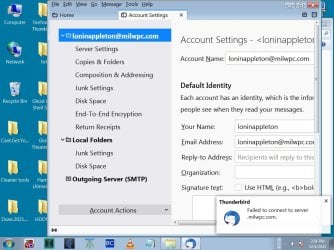
Ther error received is failure to connect to server

I can't do any more. If there is not a simple fix after this I'm going to close the topic. It's too frustrating. It's not fun
to work on where the 'everything you know is wrong ' message pops up.

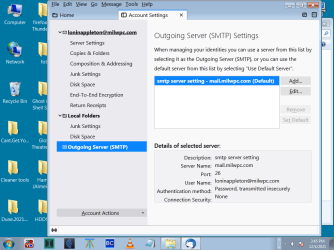
The attached screen shot shows settings on the T-bird Portable 78 which installed to the desktop. Maybe I wasn't watching closely enough for it to be installed in Programs.

The screen shot is for outgoing server settings. Everything is duplicated from the Thuderbird main install including the change to SMTP outgoing port 26 where default is shown to be port 25. This had to be a recommendation from the ISP.
I have a hand note in my printed sheets which I have saved for having to duplicate settings.

For now I'm returning to my primary HD and setup. There's no rush to answer. I'm done with this for now.

- - - Updated - - -

is there a screen shot problem? I don't get it.

- - - Updated - - -

I will fix this screen shot mess. May have been something I did.....

- - - Updated - - -

another try at screen shot. Not material to this but I moved the Portable Thunderbird to Program Folder
As to the other previous question, my provider is ATT through Milwaukee PC. It's always been that way,
it still works. They select POP as preferred I don't see any point in debating with them about it. It's been years
since I messed with any of this.

- - - Updated - - -

Last thing on this.
I made a screen shot of the error message. It should be nothing and I typed the smtp default entry several times to make sure but the milwpc,com has a period after it. I don't know if that is a data error or just the conclusion of the
message with a period.
 

Attachments

  • t-bird outgoing saturday 2 33 pm.png
    t-bird outgoing saturday 2 33 pm.png
    2.2 KB · Views: 3
  • thunderbird smtp  3 46.png
    thunderbird smtp 3 46.png
    123.7 KB · Views: 0
  • failure to connect to server.jpg
    failure to connect to server.jpg
    208.3 KB · Views: 0

My Computer

Computer type
PC/Desktop
Computer Manufacturer/Model Number
custom
OS
Windows 7 x64 Ultimate
CPU
AMD Athlon II x3 450
Motherboard
MSI 880GM
Memory
2 GB
Hard Drives
various
Browser
Firefox, Opera
First and foremost, Mozilla has NOT dropped Thunderbird at all. Thunderbird — Make Email Easier. — Thunderbird Though, to be technical, Mozilla is a subsidy on the whole Thunderbird client.

Now please try to understand something. The link I gave you to portable Apps is Thunderbird (the latest). It's just a Thunderbird that runs WITHOUT installation. You can place it anywhere on your computer, on a USB stick, on optical media, SD card, you name it. It's portable. No, the portable Apps website IS NOT affiliated with Mozilla. All they do is take the main installer and make it portable. If you browse the portable Apps website there are lots of niffy applications that all (or at least most I believe) can run without installation. Meaning you can run them from a USB drive or what ever with no dependency on the computer. Keep in mind there are security considerations if you run a portable App on someone else's computer. You can do it, but depending on what it is, like a browser or email client like Thunderbird, I'd shy away from that.

Now I'm saying all this because I'm confused at what you said here:


5yjytyt.jpg


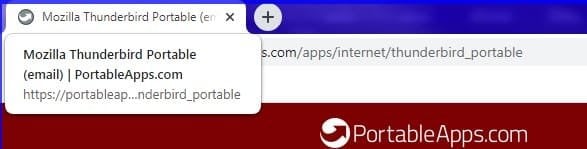
I'm thinking you might be a little confused as to the title that's displayed for the link that says, "Mozilla Thunderbird Portable (email) | portableapps.com

If that's the case I'll explain this as best I can. The link is to portableapps.com. What this website forum (sevenforums running vBulletin) does is pulls the webpage title from the link and displays that title. So what you're seeing is a web grab from here:

rfdhgbdhgd.jpg

To be more technical, it's a meta property withen the head section of the HTML document at the portableapps.com website as shown here:
Code:
<meta property="og:type" content="article" /><meta property="og:title" content="Mozilla Thunderbird Portable (email) | PortableApps.com" />


I don't like forum software that takes links and parses them to show names like that for security reasons. I have a forum much like this one and it doesn't do that, and I'll NEVER add that ability.

So that's where I'm thinking you thought portableapps was Mozzila the horse's mouth so to speak. No, it's for portable Thunderbird. It is the legit Thunderbird, just made portable. Like I said, you can literally have any number of portable Thunderbird's running for different accounts if you wish. There are no installation dependencies tied to the registry and what have you.

I wanted you to run portable Thunderbird (which would by default be the latest) and add your account Info. in there to rule out any shenanigans with your current installed version of Thunderbird you already have installed. Make sense?

The goal here is if you can connect to your email server in portable Thunderbird, then we can assume it's your old version of Thunderbird. Though, you should update your current installed version of Thunderbird for security reasons.


Now, I checked some nerdy things out with your email provider. All looks good on their end. To be specific, their email ports are open and the MX (Mail Exchanger) record is published. They are also not on an email blacklist.

Please try the instructions given here: MPC Email Settings & Help | Milwaukee PC

Instead of no encryption, use encryption.


Code:
Secured (SSL) Configuration     
 Incoming Mail Server:     mail.milwaukeepc.com
 Outgoing Mail Server:     mail.milwaukeepc.com
 Server Requires Authentication:     Yes
Incoming Port (POP / SSL):     995
Incoming Port (IMAP / SSL):     993
Outgoing Port (SMTP / SSL):     465


Toward the middle of the page they tell you how to configure Thunderbird, but without the use of encryption. I have no idea why they'd have you do that. Ports 993 and 465 should work. And the above steps will, or at least should work in Thunderbird.

I have around seven email accounts in Thunderbird, and two in portable Thunderbird myself. So no stranger am I setting stuff like this up.
 

My Computer

Computer type
PC/Desktop
OS
Windows 7 Ultimate x64
You make a very detailed reply. And I'll go through it. I just think it's all more than needed. I can go to
another PC on my homenet, open the T-bird folder on the desktop which I had never previously used (b/c of the
worry about recovery of the stored mails I mentioned.) It loaded fine, downloaded a lot of messages and then
when I sent a test to myself, closed the program and reopened it, it got the test and displayed it without
any action by me.

Yes, I made a foolish error perhaps in finding something not directly from Mozilla. I think that may
have to do the way ranking goes or my poor search abilities. IOW what I see at the top of page one at Google
may be different than yours-- almost assuredly.

I know you are trying. At this end I'm out of ideas given how the program works fine on other
elements of my setup. So no ISP interference or any of that is needed.

I looked at profiles as well and used the app data location to get out one 'extra' profile stored there. No idea
what's in them but some _patch_ from a working copy seems to have to solve the problem. My usual question
at this point is What do other people do? I have nothing special on this homenet of three PCs in a workgroup.

Anyway thanks for your patience. Some days I drink too much tea and my fuse gets pretty short.

This may never get resolved. That's the way I see it. Just a "cold case" as the cops say.

:-/

- - - Updated - - -

This may be progress.
Admittedly I do not did not know how to use troubleshooting mode for Thunderbird. But since I'm on a scratch disk
I tried some things with that.

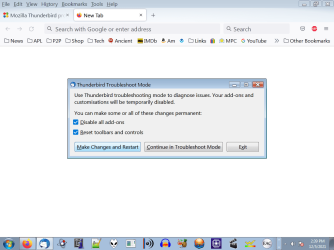
So far I am still testing. But in Troubleshoot mode there is an option to turn off preferences and another box.
I can screen shot that for any persons needing to see the operation.

When those two boxes are unchecked, I reloaded T-bird. successfully. I sent a message to me, shut down, then
restart and the message downloaded from server at startup. This without having to hit the Get Mail tab which is the point of my original request. What I don't know is what the two check boxes control. I had no special preferences
or such that this Thunderbird Troubleshoot "safe" mode changes.

I'll run this HD for a few days then if without incident, just save what I have to a fresh backup. More news as it develops.

Nowhere had I seen this option to run Troubleshoot for this particular problem. But we'll see if it's stable or if "everything I know is wrong" again.

- - - Updated - - -

I'm ready to mark this solved. If anyone mentioned Troubleshooting in Thunderbird earlier I missed it.
But I'll still read through the longer entries again from the top.

To summarize, this problem was solved by going to Thunderbird > Help tab > Troubleshoot > select the two check boxes
and restart the program. This seems to set those options to off and saved. I could not see any changes in the preferences at all since I didn't have anything special customized.

thanks to all who responded.

- - - Updated - - -

I'm ready to mark this solved. If anyone mentioned Troubleshooting in Thunderbird earlier I missed it.
But I'll still read through the longer entries again from the top.

To summarize, this problem was solved by going to Thunderbird > Help tab > Troubleshoot > select the two check boxes
and restart the program. This seems to set those options to off and saved. I could not see any changes in the preferences at all since I didn't have anything special customized.

thanks to all who responded.

- - - Updated - - -

Back to unsolved. This is really disappointing. What workd on one HD failed on my primary. The only solution to this
that I see is to clone the working whole HD onto this primary to solve the issue. What stops me from doing it
immediately is using that back backup makes more noise.

I'll come back to this or try simply moving the Thunderbird program folder.

At this point it can't hurt much. But I'm giving it a rest to think about it.

- - - Updated - - -

I tried simply moving the Mozilla Thunderbird Program folder to the problem PC.
No change. What is the case here over and over is Get Mail appears in the main screen greyed out. But it
can be clicked on to get mail off the server. It looks as though whatever the problem is it is unique to the
problem HD, setup, profiles and whatever else gets installed. And today I noticed that some setting is being saved where
the previous open tabs come back at a fresh restart of Thunderbird. I can't explain it any better.

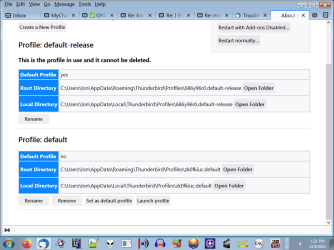
I went into the More Troubleshooting Information option. Here I was able to finally see Profiles which has just
been a problem for me to understand.

I don't know if one or the other should be deleted for the program to function correctly and I made a picture of that.

And I'll read your previous notes. Also a reminder that my attempt to use the Portable version to, as you say, test would not connect to server-- a completely different problem.

- - - Updated - - -

This is too much. I got into some repetition loop where the only thing that happens is a setup screen
reappears over and over. Warnings appear about insecure account and sends me back to this setup stuff and
asks to retest. If I commit to a save after it has detected the account, it just repeats the blank setup screen.

- - - Updated - - -

I tried the Portable program and it gave the same error as above. Once all the setup info was put in again I don't know where it went. As you say it does not install. More than I can handle.

But I am reading the notes above. I'm thinking the only thing to do is wipe it and start with a fresh download and
transcribe from my settings. But those settings I have printed give the Warning error, so it's a circular problem
somewhere.

- - - Updated - - -

A) Who's the email provider?

B) Portable Thunderbird is just another instance of Thunderbird you can run to rule out any issues you're having with the installed version of Thunderbird. They should be able to coexist with one another. In portable Thunderbird just add your account information/server settings and see if the problem still exits.

If the issue still existes in portable Thunderbird, then I suspect you should use IMAP rather than POP if it's available via the email provider. See here under PURPOSE for an understanding between the two.
I have never understood that IMAP was an option. I do not want to call them on it but it is something to try maybe.

- - - Updated - - -

First and foremost, Mozilla has NOT dropped Thunderbird at all. Thunderbird — Make Email Easier. — Thunderbird Though, to be technical, Mozilla is a subsidy on the whole Thunderbird client.

Now please try to understand something. The link I gave you to portable Apps is Thunderbird (the latest). It's just a Thunderbird that runs WITHOUT installation. You can place it anywhere on your computer, on a USB stick, on optical media, SD card, you name it. It's portable. No, the portable Apps website IS NOT affiliated with Mozilla. All they do is take the main installer and make it portable. If you browse the portable Apps website there are lots of niffy applications that all (or at least most I believe) can run without installation. Meaning you can run them from a USB drive or what ever with no dependency on the computer. Keep in mind there are security considerations if you run a portable App on someone else's computer. You can do it, but depending on what it is, like a browser or email client like Thunderbird, I'd shy away from that.

Now I'm saying all this because I'm confused at what you said here:


View attachment 420587


I'm thinking you might be a little confused as to the title that's displayed for the link that says, "Mozilla Thunderbird Portable (email) | portableapps.com

If that's the case I'll explain this as best I can. The link is to portableapps.com. What this website forum (sevenforums running vBulletin) does is pulls the webpage title from the link and displays that title. So what you're seeing is a web grab from here:

View attachment 420588

To be more technical, it's a meta property withen the head section of the HTML document at the portableapps.com website as shown here:
Code:
<meta property="og:type" content="article" /><meta property="og:title" content="Mozilla Thunderbird Portable (email) | PortableApps.com" />


I don't like forum software that takes links and parses them to show names like that for security reasons. I have a forum much like this one and it doesn't do that, and I'll NEVER add that ability.

So that's where I'm thinking you thought portableapps was Mozzila the horse's mouth so to speak. No, it's for portable Thunderbird. It is the legit Thunderbird, just made portable. Like I said, you can literally have any number of portable Thunderbird's running for different accounts if you wish. There are no installation dependencies tied to the registry and what have you.

I wanted you to run portable Thunderbird (which would by default be the latest) and add your account Info. in there to rule out any shenanigans with your current installed version of Thunderbird you already have installed. Make sense?

The goal here is if you can connect to your email server in portable Thunderbird, then we can assume it's your old version of Thunderbird. Though, you should update your current installed version of Thunderbird for security reasons.


Now, I checked some nerdy things out with your email provider. All looks good on their end. To be specific, their email ports are open and the MX (Mail Exchanger) record is published. They are also not on an email blacklist.

Please try the instructions given here: MPC Email Settings & Help | Milwaukee PC

Instead of no encryption, use encryption.


Code:
Secured (SSL) Configuration     
 Incoming Mail Server:     mail.milwaukeepc.com
 Outgoing Mail Server:     mail.milwaukeepc.com
 Server Requires Authentication:     Yes
Incoming Port (POP / SSL):     995
Incoming Port (IMAP / SSL):     993
Outgoing Port (SMTP / SSL):     465


Toward the middle of the page they tell you how to configure Thunderbird, but without the use of encryption. I have no idea why they'd have you do that. Ports 993 and 465 should work. And the above steps will, or at least should work in Thunderbird.

I have around seven email accounts in Thunderbird, and two in portable Thunderbird myself. So no stranger am I setting stuff like this up.
Ok You've spent a lot of time on my fumbling around in the dark.
I see that the ingoing and outgoing ports are both different. Why would the old ones, the ones I have recorded as 110 and SMTP 26 still work on other setups?

I can review the MPC How to. But with your caution about the sqlite entry deletion, it may be just better to do a wipe of the program; try that or else do a clone backup to catch everything needed. I don't get a lot of mail. I can fool around with this. But it feels like a cold case dilemma.

- - - Updated - - -

I tried the instruction at MPC. Filling in the boxes did not go well again. What I was looking at as incoming and outgoing ports in your notes above was for secure connections. The MPC pages just
give the usual Port 110 incoming and SMTP 26 outgoing. I had a problem redoing entries that
looked to have different descriptions as secure insecure, authentications etc. and this produced
an inability to login even though I was following what description you gave. The further along this goes the worse it gets. Other civilains are not going through this. Whatever it is is broken on this
HD.

- - - Updated - - -

I still think a wipe is only answer. But before that I am trying a workaround.
I marked the Mozilla Thunderbird folder as Mozilla ThunderbirdBAK

and I'll try a new download and install from scratch. Nothing should get damaged, but that original Thunderbird
will now not login at all, just loops back to input settings.

- - - Updated - - -

Another dead end. I did a fresh download I am given the same screens to fill in as usual and the error this time was of duplicate account. Perhaps it is that sqlbit, but the problem existed before that. Recall that I ran troublshoot on the
other HD and the problem went away. It seems insoluable and I am spinning my wheels here for nothing.

Last thing today is I'll move the Mozilla folder again so I at least have something.

- - - Updated - - -

I'm back on the HD that works. Coincidentally I have a new (used) 2Tb Seagate HD on order to arrive soon. As you've
mentioned I crave backup as much as you. So I will not wipe the problem HD yet. I'll first do a fresh round of backup to the
new arrival which will give _that_ a good test.

As we speak there are just too many variables for Lon to control and fix on the problem we are discussing for so long.
The Thunderbird on the problem drive is pooched.

- - - Updated - - -

Today I manned up and did a new install on the problem HD. But I did it even on a separate PC I have on the
homenet.

A couple of things I noticed as odd on the previous one-- unaccountable-- such as EN-GB English.

I used Revo Uninstaller to remove the program
Then I used the Everything file program to show anything else that said thunderbird and
deleted all of it.

Then I downloaded the current 91.4 Thunderbird

Also I did a visual inspection of the working install again:

As I recall from the hand copied Notes I made from your link to MilwPC, Encrypted Password
was not shown. This may have been another error in redoing all the notes I had. I mentioned earlier
a couple of terms looked different across all this.

Server Settings

Authentication method Encrypted Password
Connection Security None

SMPTP

Authentication Method Encrypted Password
Connection Security None


I will connect this HD to it's normal primary use and see if the Get Messages at startup works again.....

- - - Updated - - -

Remarked solved. So far ok.
 

Attachments

  • thunderbird troubleshoot dropdown box.png
    thunderbird troubleshoot dropdown box.png
    88.3 KB · Views: 0
  • thunderbird profiles troubleshooting info.png
    thunderbird profiles troubleshooting info.png
    92.6 KB · Views: 0

My Computer

Computer type
PC/Desktop
Computer Manufacturer/Model Number
custom
OS
Windows 7 x64 Ultimate
CPU
AMD Athlon II x3 450
Motherboard
MSI 880GM
Memory
2 GB
Hard Drives
various
Browser
Firefox, Opera
Back
Top