How to re-enumerate display devices?

DomDiStroia

New member
Local time
6:26 AM
Messages
28
How to re-enumerate display devices? For example: re-enumerate Acer monitor as display device 1, and Sony television as display device 2.
 

My Computer My Computer

Computer type
PC/Desktop
Computer Manufacturer/Model Number
Gateway DX4300
OS
Windows 7 Home Premium, 64 bit
CPU
AMD Phenom II x4 820 (chip: Deneb; clock rate: ~2.8 GHz)
Motherboard
Gateway RS780 (chipset: AMD 780G; southbridge: AMD SP5100)
Memory
DDR2-800, 8 GB (4 GB Crucial + 4 GB Transcend)
Graphics Card(s)
ATI Radeon HD4350 (clock rate: <650 MHz; VRAM: DDR2, 512 MB)
Sound Card
Realtek ALC888S (on board); peak filters: Equalizer APO
Monitor(s) Displays
LCD panels: VA; Acer S271HL; Sony BRAVIA KDL-48W600B (S-PVA)
Screen Resolution
1920x1080, progressive scan; vertical refresh rate: ~60 Hz
Hard Drives
HDDs, SSHD (3.5", 7200 RPM): 3x WD Blue WD10EZEX, 1 TB; 2x WD Ultrastar (1x DC HC310, 4 TB + 1x HUH721212ALE604, 12 TB); 1x WD Gold WD4002FYYZ, 4 TB; 1x Seagate Firecuda ST1000DX002, 1 TB (NAND: 8 GB); HDD (2.5", 5400 RPM): 1x Seagate ST2000LM007, 2
PSU
Thermaltake SP-750PCBUS; surge suppression: CyberPower 625VA
Case
gloss black, open chassis, external PSU, lateral orientation
Cooling
steel rack; fans (mm): PSU/case: 3x ~100+; CPU: 80; GPU: ~50
Keyboard
CoolerMaster Storm QuickFireXT SGK-4030-GKCM1 (brown switch)
Mouse
Microsoft optical, USB; Acctown optical, USB, wireless
Internet Speed
up: 20 Mbps; down: ~250 Mbps; modem/router: Hitron CODA-4582
Antivirus
avast
Browser
Waterfox, Waterfox Classic
Other Info
desktop speakers: harman/kardon HK195; A/VR (via TechCraft 22-AWG TRS-to-RCA cable): Sony STR-DE598; bookshelf loudspeakers (passive; via Pyle 12-AWG cables): 2x Polk Audio (1x RTi6 + 1x TSx220B) + 1x Klipsch Reference R-15M + 1x Boston Acoustics CS26 II; subwoofers (active; via Philips coaxial cables): 1x JBL PSW-1200 + 1x BIC RtR RtR-12S; document printer (via USB 2.0): OKI B410d

Very simple. It's in the registry. You'll need to delete two keys. The instructions are here. The provided registry file will automatically delete those two keys. I looked at the reg file as of this post.

Do backup the original though. For your convenience, I created a batch file that will do just that. Just place the batch file on the desktop and double click. The result will be the configuration and connectivity registry files.

To import back into the registry just double click on both back up registry .reg files. You'll get a warning about importing. Just click ok.

View attachment Backup_Display_position.bat


Note: it says, "It may be possible to work around this by forcing Windows to re-detect monitors."

Theoretically it should work, but it may depend on the port you use first. I'm not sure. What I would do is make sure all monitors are unplugged except your # 1 monitor, then remove the registry keys with that file and then start adding monitors back one by one in the order you want them. A reboot may be necessary.

I can also give you instructions on how to do this via a live boot environment if required. That way you'll won't be in the OS while monkeying with the registry.
 

My Computer My Computer

Computer type
PC/Desktop
OS
Windows 7 Ultimate x64
Very simple. It's in the registry. You'll need to delete two keys. The instructions are here. The provided registry file will automatically delete those two keys. I looked at the reg file as of this post.

Do backup the original though. For your convenience, I created a batch file that will do just that. Just place the batch file on the desktop and double click. The result will be the configuration and connectivity registry files.

To import back into the registry just double click on both back up registry .reg files. You'll get a warning about importing. Just click ok.

View attachment 420711
Note: it says, "It may be possible to work around this by forcing Windows to re-detect monitors."

Theoretically it should work, but it may depend on the port you use first. I'm not sure. What I would do is make sure all monitors are unplugged except your # 1 monitor, then remove the registry keys with that file and then start adding monitors back one by one in the order you want them. A reboot may be necessary.
I can also give you instructions on how to do this via a live boot environment if required. That way you'll won't be in the OS while monkeying with the registry.

Okay. Thanks for the links, and the comprehensive answer.

Should I delete the registry keys that are related to the active monitor (an Acer S271HL)? If so, how would this affect the current GUI (e.g.: loss of high resolution, et al.)?
 

My Computer My Computer

Computer type
PC/Desktop
Computer Manufacturer/Model Number
Gateway DX4300
OS
Windows 7 Home Premium, 64 bit
CPU
AMD Phenom II x4 820 (chip: Deneb; clock rate: ~2.8 GHz)
Motherboard
Gateway RS780 (chipset: AMD 780G; southbridge: AMD SP5100)
Memory
DDR2-800, 8 GB (4 GB Crucial + 4 GB Transcend)
Graphics Card(s)
ATI Radeon HD4350 (clock rate: <650 MHz; VRAM: DDR2, 512 MB)
Sound Card
Realtek ALC888S (on board); peak filters: Equalizer APO
Monitor(s) Displays
LCD panels: VA; Acer S271HL; Sony BRAVIA KDL-48W600B (S-PVA)
Screen Resolution
1920x1080, progressive scan; vertical refresh rate: ~60 Hz
Hard Drives
HDDs, SSHD (3.5", 7200 RPM): 3x WD Blue WD10EZEX, 1 TB; 2x WD Ultrastar (1x DC HC310, 4 TB + 1x HUH721212ALE604, 12 TB); 1x WD Gold WD4002FYYZ, 4 TB; 1x Seagate Firecuda ST1000DX002, 1 TB (NAND: 8 GB); HDD (2.5", 5400 RPM): 1x Seagate ST2000LM007, 2
PSU
Thermaltake SP-750PCBUS; surge suppression: CyberPower 625VA
Case
gloss black, open chassis, external PSU, lateral orientation
Cooling
steel rack; fans (mm): PSU/case: 3x ~100+; CPU: 80; GPU: ~50
Keyboard
CoolerMaster Storm QuickFireXT SGK-4030-GKCM1 (brown switch)
Mouse
Microsoft optical, USB; Acctown optical, USB, wireless
Internet Speed
up: 20 Mbps; down: ~250 Mbps; modem/router: Hitron CODA-4582
Antivirus
avast
Browser
Waterfox, Waterfox Classic
Other Info
desktop speakers: harman/kardon HK195; A/VR (via TechCraft 22-AWG TRS-to-RCA cable): Sony STR-DE598; bookshelf loudspeakers (passive; via Pyle 12-AWG cables): 2x Polk Audio (1x RTi6 + 1x TSx220B) + 1x Klipsch Reference R-15M + 1x Boston Acoustics CS26 II; subwoofers (active; via Philips coaxial cables): 1x JBL PSW-1200 + 1x BIC RtR RtR-12S; document printer (via USB 2.0): OKI B410d
I really don't know how this will affect anything other than renumbering the monitors like you want. This is why I'd create a system restore point and/or backup the registry prior to executing the registry file. I created that batch file that will backup the two registry entries outlined in that link from displaylink.com

There are only two registry keys here.

These are the ONLY two keys being deleted.

Code:
HKEY_LOCAL_MACHINE\System\CurrentControlSet\Control\GraphicsDrivers\Configuration
HKEY_LOCAL_MACHINE\System\CurrentControlSet\Control\GraphicsDrivers\Connectivity

Also, it says this:

fdbgddr.jpg


You'll notice it doesn't say anything about deleting anything else.

- - - Updated - - -

Let me reiterate what I said previously just in case.


Boris said:
What I would do is make sure all monitors are unplugged except your # 1 monitor, then remove the registry keys with that file and then start adding monitors back one by one in the order you want them. A reboot may be necessary.
 
Last edited:

My Computer My Computer

Computer type
PC/Desktop
OS
Windows 7 Ultimate x64
I realy don't know how this will affect anything other than renumbering the monitors like you want. This is why I'd create a system restore point and/or backup the registry prior to executing the registry file. I created that batch file that will backup the two registry entries outlined in that link from displaylink.com

There are only two registry keys here.

These are the ONLY two keys being deleted.

Code:
HKEY_LOCAL_MACHINE\System\CurrentControlSet\Control\GraphicsDrivers\Configuration
HKEY_LOCAL_MACHINE\System\CurrentControlSet\Control\GraphicsDrivers\Connectivity

Also, it says this:

View attachment 420765


You'll notice it doesn't say anything about deleting anything else.

- - - Updated - - -

Let me reiterate what I said previously just in case.


Okay, thanks.

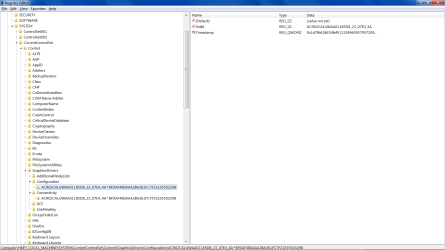
I was referring to the sub keys that apply to the active monitor (an Acer S271HL):

HKEY_LOCAL_MACHINE\SYSTEM\CurrentControlSet\Control\GraphicsDrivers\Configuration\ACR02CALUWAA01185D8_23_07E4_4A^BFDAF4B0AAA2BA361FC7F21E35503298

HKEY_LOCAL_MACHINE\SYSTEM\CurrentControlSet\Control\GraphicsDrivers\Connectivity\ACR02CALUWAA01185D8_23_07E4_4A^BFDAF4B0AAA2BA361FC7F21E35503298
 

Attachments

  • 2022_01_07_15_54_311.png
    2022_01_07_15_54_311.png
    47.8 KB · Views: 1

My Computer My Computer

Computer type
PC/Desktop
Computer Manufacturer/Model Number
Gateway DX4300
OS
Windows 7 Home Premium, 64 bit
CPU
AMD Phenom II x4 820 (chip: Deneb; clock rate: ~2.8 GHz)
Motherboard
Gateway RS780 (chipset: AMD 780G; southbridge: AMD SP5100)
Memory
DDR2-800, 8 GB (4 GB Crucial + 4 GB Transcend)
Graphics Card(s)
ATI Radeon HD4350 (clock rate: <650 MHz; VRAM: DDR2, 512 MB)
Sound Card
Realtek ALC888S (on board); peak filters: Equalizer APO
Monitor(s) Displays
LCD panels: VA; Acer S271HL; Sony BRAVIA KDL-48W600B (S-PVA)
Screen Resolution
1920x1080, progressive scan; vertical refresh rate: ~60 Hz
Hard Drives
HDDs, SSHD (3.5", 7200 RPM): 3x WD Blue WD10EZEX, 1 TB; 2x WD Ultrastar (1x DC HC310, 4 TB + 1x HUH721212ALE604, 12 TB); 1x WD Gold WD4002FYYZ, 4 TB; 1x Seagate Firecuda ST1000DX002, 1 TB (NAND: 8 GB); HDD (2.5", 5400 RPM): 1x Seagate ST2000LM007, 2
PSU
Thermaltake SP-750PCBUS; surge suppression: CyberPower 625VA
Case
gloss black, open chassis, external PSU, lateral orientation
Cooling
steel rack; fans (mm): PSU/case: 3x ~100+; CPU: 80; GPU: ~50
Keyboard
CoolerMaster Storm QuickFireXT SGK-4030-GKCM1 (brown switch)
Mouse
Microsoft optical, USB; Acctown optical, USB, wireless
Internet Speed
up: 20 Mbps; down: ~250 Mbps; modem/router: Hitron CODA-4582
Antivirus
avast
Browser
Waterfox, Waterfox Classic
Other Info
desktop speakers: harman/kardon HK195; A/VR (via TechCraft 22-AWG TRS-to-RCA cable): Sony STR-DE598; bookshelf loudspeakers (passive; via Pyle 12-AWG cables): 2x Polk Audio (1x RTi6 + 1x TSx220B) + 1x Klipsch Reference R-15M + 1x Boston Acoustics CS26 II; subwoofers (active; via Philips coaxial cables): 1x JBL PSW-1200 + 1x BIC RtR RtR-12S; document printer (via USB 2.0): OKI B410d
maybe im being dumb here
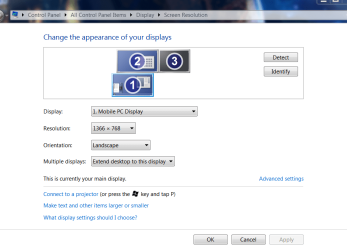
Once a secondary moniter is plugged in, which i do every weekend, from my personalization GUI i can change it so that either/or screen/monitor becomes the primary plus other settings ....... screenshot on its way

apoligies its from screen resolution (right click on desktop)
scrrenshot shows that my primary is my laptop screen but as i said if i hit the dropdown arrow i can change them
see the line >>>this is currently my main display<<<

note
this is from inside windows NOT my graphics GUI i assume the option is also available there...

going to have to this myself shortly my monitor is on its way out
 

Attachments

  • view.PNG
    view.PNG
    38.8 KB · Views: 0

My Computer My Computer

Computer type
PC/Desktop
Computer Manufacturer/Model Number
medionl/Aspire 6930G/acer x55a
OS
W7 home premium 32bit/W7HP 64bit/w10 tp insider ring
CPU
E5300 dual core
Motherboard
medion MS7366
Memory
3gb
Graphics Card(s)
Nvidia Geforce 7100 Nforce 630i
Monitor(s) Displays
avixc
Internet Speed
n (isp resticted to 72)
Antivirus
mse/pands
Browser
palemoon
Other Info
Belkin Fd7050 n USB using Railink RT2870 drivers, more upto date
Okay, thanks.

I was referring to the sub keys that apply to the active monitor (an Acer S271HL):

HKEY_LOCAL_MACHINE\SYSTEM\CurrentControlSet\Control\GraphicsDrivers\Configuration\ACR02CALUWAA01185D8_23_07E4_4A^BFDAF4B0AAA2BA361FC7F21E35503298

HKEY_LOCAL_MACHINE\SYSTEM\CurrentControlSet\Control\GraphicsDrivers\Connectivity\ACR02CALUWAA01185D8_23_07E4_4A^BFDAF4B0AAA2BA361FC7F21E35503298

When you run the reg file downloaded from that website, there's no need to worry about subkeys. In fact, don't even browse the registry looking for trouble. I'm going to tell you why.

See these last two parts of the keys?

\Configuration

\Connectivity

Everything after that is included in the reg file provided by the downloded link there and my batch file takes care of all subkeys after those two paths as well. Don't believe me? Run my backup batch file I uploaded. Now look inside the two backup reg files that were created using Notepad ++ or Windows Notepad. EVERYTHING is there up to and including subkeys.

So again, don't even look in the registry. All you have to do is delete these keys via the reg file provided at that website (read the website please). But before you do, run my batch file to backup those keys. If there's a foul up ( I warned about system restore, remember?) then as an extra backup, double click on both the backups my batch file created. Here's what's in the batch file.


Code:
@echo off
reg export HKLM\SYSTEM\CurrentControlSet\Control\GraphicsDrivers\Configuration Backup_Configuration.reg
reg export HKLM\SYSTEM\CurrentControlSet\Control\GraphicsDrivers\Connectivity Backup_Connectivity.reg
exit

That's it. In the two files created, Backup_Configuration.reg and Backup_Connectivity.reg open those suckers and look. You should see a ton of crap in those two reg files that were backed up.

Same applies to the reg file in the link above. It will delete ALL keys and subkeys related to \Configuration and \Connectivity.


Again, there is no need once so ever to browse the registry unless you want to know what those reg files do. Which is fine, but peering around in the registry and messing around with it for this issue is not needed.

So, yeah, ALL subkeys are included in that reg file provided at that website and via my batch file. May not look like it, but they are.

- - - Updated - - -

I think torchwood has a good point despite the linked website Info. I gave. If you go to Control Panel\All Control Panel Items\Display\Screen Resolution you can drag monitor icons around. Give that a try. You can find the Display option by right clicking the desktop and selecting Personalize. Look left at the bottom.
 

My Computer My Computer

Computer type
PC/Desktop
OS
Windows 7 Ultimate x64
Back
Top