USB mass storage device works intermittently

SoulWriter

New member
Local time
8:08 AM
Messages
35
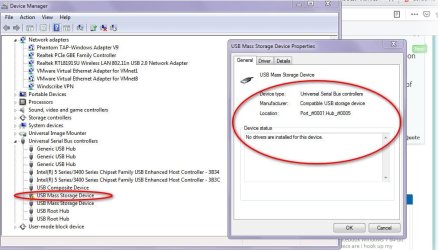
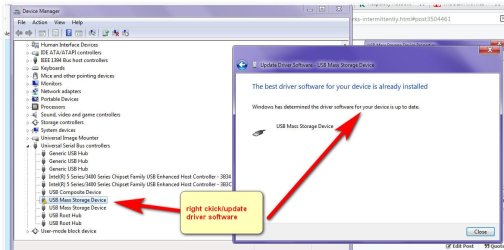
My camera, an external disk or USB stick won't run on windows 7 64 bitUSB mass storage device has a yellow triangle with an ! in itRight clicking it says "No drivers are installed for this device. "but when i click update driver it says "windows has determined your driver software up to date" ??

How can it be up to date if no drivers installed?i cannot disable or uninstall or scan for hardware changes. it just hangs and device manager goes to not responding and has to be stopped with task managerIn safe mode I can scan for hardware changes uninstall and reinstall but it does not last long till it goes back to the error.

I did chkdsk and scannow, no issues
 

My Computers My Computers

  • At a glance

    win 7 64 bit
    Computer type
    PC/Desktop
    OS
    win 7 64 bit
  • Computer type
    PC/Desktop
How are you trying to connect the camera? If bluetooth, you need to pair it with the system but you will need a bluetooth adapter. How are you connecting the external drive?
 

My Computer My Computer

At a glance

Windows 7 Pro SP1 64 bit8 GB
Computer type
Laptop
Computer Manufacturer/Model Number
Dell M6500 Precision Work Station
OS
Windows 7 Pro SP1 64 bit
Memory
8 GB
Screen Resolution
1920x
Internet Speed
30 Mbps
Antivirus
Norton Security
Browser
IE 11
How are you trying to connect the camera? If bluetooth, you need to pair it with the system but you will need a bluetooth adapter. How are you connecting the external drive?
USB of course for camera and ext disk. why would i get a USB error with bluetooth connection?Or need a bluetooth adaptor for usb connection?
 

My Computers My Computers

  • At a glance

    win 7 64 bit
    Computer type
    PC/Desktop
    OS
    win 7 64 bit
  • Computer type
    PC/Desktop
You wouldn't get a bluetooth error when connecting to the USB. That's why I asked about what connection you're using for it.

Would you go to Control Panel, Device Manager, Universal Serial Bus controllers and post a screenshot of the controllers?
 

My Computer My Computer

At a glance

Windows 7 Pro SP1 64 bit8 GB
Computer type
Laptop
Computer Manufacturer/Model Number
Dell M6500 Precision Work Station
OS
Windows 7 Pro SP1 64 bit
Memory
8 GB
Screen Resolution
1920x
Internet Speed
30 Mbps
Antivirus
Norton Security
Browser
IE 11
You wouldn't get a bluetooth error when connecting to the USB. That's why I asked about what connection you're using for it.

Would you go to Control Panel, Device Manager, Universal Serial Bus controllers and post a screenshot of the controllers?

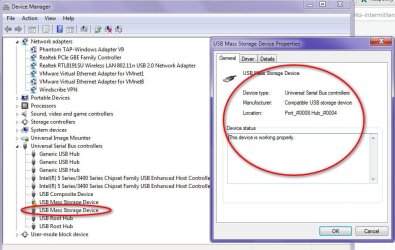
Ok thanks. Here are the screenshots. when I right click the one one with the yellow triangle and click
update driver software it says the most recent drivers are installed

How can it say no "drivers" and "the most recent drivers are installed"

When i right click and click
disable/uninstall or scan for hardware changes it hangs except in safe mode.

sometimes i get the camera connected but it vanishes from explorer after i open andbefore it is completely open
There are two USB ports on the front of the PC and regardless of whic h i plugthe disk/camera into it says "location Port_#0001.Hub_#0005" How can they both be Port_#0001.Hub_#0005?

The disk is connected now but not available. i got a message to say "windows does not recognise the USB device 2 or similar words
 

Attachments

  • UBS mass storage.jpg
    UBS mass storage.jpg
    82.9 KB · Views: 1
  • USB mas storage2.jpg
    USB mas storage2.jpg
    75.7 KB · Views: 0
  • USB mass storage 3.jpg
    USB mass storage 3.jpg
    80.8 KB · Views: 1
Last edited:

My Computers My Computers

  • At a glance

    win 7 64 bit
    Computer type
    PC/Desktop
    OS
    win 7 64 bit
  • Computer type
    PC/Desktop
I can see myself getting in trouble here with the little knowledge I have but you wouldn't see that MSC unless you have something connected. What is connected to that hub and the other one? I don't know what your mobo is but 5 or 6 years ago, there were certain mobos with 6 (I think) hubs and hubs 5 and 6 didn't work correctly. Have you tried connecting the devices to different ports?
 

My Computer My Computer

At a glance

Windows 7 Pro SP1 64 bit8 GB
Computer type
Laptop
Computer Manufacturer/Model Number
Dell M6500 Precision Work Station
OS
Windows 7 Pro SP1 64 bit
Memory
8 GB
Screen Resolution
1920x
Internet Speed
30 Mbps
Antivirus
Norton Security
Browser
IE 11
my computer ony did this few months ago
plugged into another usb at the back both the camera and ext disk say usb not recognised. disk spins and lights the led
 

My Computers My Computers

  • At a glance

    win 7 64 bit
    Computer type
    PC/Desktop
    OS
    win 7 64 bit
  • Computer type
    PC/Desktop
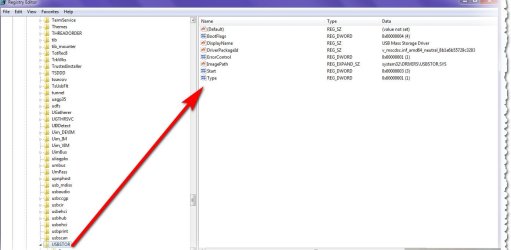
It sounds like there may be a power issue with your USB ports. However, run regedit. Go here-
HKEY_LOCAL_MACHINE\SYSTEM\CurrentControlSet\Services\USBSTOR
Provide a screen shot which shows all the values.
 

My Computer My Computer

At a glance

Windows 7 Pro SP1 64 bit8 GB
Computer type
Laptop
Computer Manufacturer/Model Number
Dell M6500 Precision Work Station
OS
Windows 7 Pro SP1 64 bit
Memory
8 GB
Screen Resolution
1920x
Internet Speed
30 Mbps
Antivirus
Norton Security
Browser
IE 11
It sounds like there may be a power issue with your USB ports. However, run regedit. Go here- HKEY_LOCAL_MACHINE\SYSTEM\CurrentControlSet\Services\USBSTOR Provide a screen shot which shows all the values.

My drivers seems to be becoming corrupt. They are OK for a few mins after reboot then not working
 

Attachments

  • USB mass storage 4.jpg
    USB mass storage 4.jpg
    68.6 KB · Views: 1
Last edited:

My Computers My Computers

  • At a glance

    win 7 64 bit
    Computer type
    PC/Desktop
    OS
    win 7 64 bit
  • Computer type
    PC/Desktop
Nothing wrong in the registry.

In Device Manager, USB.......................controllers, right click the problematic controller. Is the device enabled? If not, select Enable Device and reboot. Insert, say, the flash drive. Does it work?
 

My Computer My Computer

At a glance

Windows 7 Pro SP1 64 bit8 GB
Computer type
Laptop
Computer Manufacturer/Model Number
Dell M6500 Precision Work Station
OS
Windows 7 Pro SP1 64 bit
Memory
8 GB
Screen Resolution
1920x
Internet Speed
30 Mbps
Antivirus
Norton Security
Browser
IE 11
Nothing wrong in the registry.

In Device Manager, USB.......................controllers, right click the problematic controller. Is the device enabled? If not, select Enable Device and reboot. Insert, say, the flash drive. Does it work?
it is enabled. Always it works for a while after reboot. In safe mode it usually works. Must be something in 'full' mode interfering

Could USBSTORE.sys in system 32 be replaced?
 

My Computers My Computers

  • At a glance

    win 7 64 bit
    Computer type
    PC/Desktop
    OS
    win 7 64 bit
  • Computer type
    PC/Desktop
I'm on the threshold of getting into deep doo-doo but, open Power Options in Control Panel. For your power plan, select change settings and then advanced settings. In the USB section, make sure the option to allow the device to power off is disabled.
 

My Computer My Computer

At a glance

Windows 7 Pro SP1 64 bit8 GB
Computer type
Laptop
Computer Manufacturer/Model Number
Dell M6500 Precision Work Station
OS
Windows 7 Pro SP1 64 bit
Memory
8 GB
Screen Resolution
1920x
Internet Speed
30 Mbps
Antivirus
Norton Security
Browser
IE 11
I'm on the threshold of getting into deep doo-doo but, open Power Options in Control Panel. For your power plan, select change settings and then advanced settings. In the USB section, make sure the option to allow the device to power off is disabled.
Already done that. I'll see how it goes. I don't know why it would matter now though. i have this PC over ten years. Unless PSU is failing
 

My Computers My Computers

  • At a glance

    win 7 64 bit
    Computer type
    PC/Desktop
    OS
    win 7 64 bit
  • Computer type
    PC/Desktop
Well, you said that your devices work for some time and then they stop working. It could be they're powering off if that setting was enabled. I alluded to the possibility of a power issue earlier but didn't want to suggest the PSU because the devices were working for some time.
 

My Computer My Computer

At a glance

Windows 7 Pro SP1 64 bit8 GB
Computer type
Laptop
Computer Manufacturer/Model Number
Dell M6500 Precision Work Station
OS
Windows 7 Pro SP1 64 bit
Memory
8 GB
Screen Resolution
1920x
Internet Speed
30 Mbps
Antivirus
Norton Security
Browser
IE 11
Well, you said that your devices work for some time and then they stop working. It could be they're powering off if that setting was enabled. I alluded to the possibility of a power issue earlier but didn't want to suggest the PSU because the devices were working for some time.
They seem to be working much better since i made that last change as you described "In the USB section, make sure the option to allow the device to power off is disabled."

I occasionally have to reboot getting error "you cannot connect this as it still has driver in memory" or similar words from when i used it last apparently

But most devices are picked up and let go when i remove them. My camera usually appears when i attach as I did just now. When i started this thread i was having to get photos to PC by bluetooth.

Thanks for your help pointing me on the power direction. I suppose the PSU could be dying.
 

My Computers My Computers

  • At a glance

    win 7 64 bit
    Computer type
    PC/Desktop
    OS
    win 7 64 bit
  • Computer type
    PC/Desktop

My Computer My Computer

At a glance

Windows 7 Pro SP1 64 bit8 GB
Computer type
Laptop
Computer Manufacturer/Model Number
Dell M6500 Precision Work Station
OS
Windows 7 Pro SP1 64 bit
Memory
8 GB
Screen Resolution
1920x
Internet Speed
30 Mbps
Antivirus
Norton Security
Browser
IE 11
You're welcome. Took us a long time to get around to what seems to have done the trick. I don't think your PSU is failing.

Seems you got the error message described here with a fix-

Recovering from USB device driver is still in memory / USB Composite Device has error (Code 38) - darrenjrobinson - Bespoke Identity and Access Management Solutions


Thanks for that. Still going OK I just attached phone to copy a photo and it picked it up and let it go when i disconnected
 

My Computers My Computers

  • At a glance

    win 7 64 bit
    Computer type
    PC/Desktop
    OS
    win 7 64 bit
  • Computer type
    PC/Desktop
Good to hear!
 

My Computer My Computer

At a glance

Windows 7 Pro SP1 64 bit8 GB
Computer type
Laptop
Computer Manufacturer/Model Number
Dell M6500 Precision Work Station
OS
Windows 7 Pro SP1 64 bit
Memory
8 GB
Screen Resolution
1920x
Internet Speed
30 Mbps
Antivirus
Norton Security
Browser
IE 11
Back
Top