Solved Driver issue USB Mass Storage Device

April Raine

New member
Member
Local time
1:06 AM
Messages
78
Win 7 64 bit Usb mass storage device says no drivers are installed. But there are drivers installed and they are up to date. A reboot helps but only for short time then the yellow exclamanation mark is back see screen record UsbMassStorage - vidme

I have USBSTOR.SYS at C:\Windows\System32\drivers\USBSTOR.SYS 89.5kb dated 9 3 2016

I followed
How to Repair Corrupt USB Mass Storage or CD/DVD Drivers - TechSpot Forums

If one or more of these files are missing

" Navigate to C:\Windows\System32\DriverStore\FileRepository
Scroll down. Find the folder name that starts with usbstor.inf_
You may see more then one folder with name starting usbstor.inf_. IF YOU DO: you want the folder with the most recent date
Open the folder. There's a copy of the 3 files you need. Copy each one to its correct location as shown above
Jump to the instructions below to delete the INFCACHE.1 file"

Copied UsbStorSys and pasted it to C:\Windows\System32\drivers overwriting the one that was there. Not sure if it work as i got 'you need permission' but it went ahead eventually

But I still have the exclamation mark inDevice Manager/UsB Mass Storage Devixce and camera or other USB will not be detected until i reboot and soon after the error returns. I also get messasges that a unknown USB has malfunctioned or similar wording
 

My Computer

Computer type
PC/Desktop
Computer Manufacturer/Model Number
Medion
OS
win 7 home premium 64 bit
Motherboard
ms 7616
Memory
16GB
Hard Drives
Two 1 TB
Hello April now can you do this please
Now before we can help we do need to know what is in your machine so please do this System Info - See Your System Specs
or either enter the specs of your system in your forum profile the specs will appear when we click on that little box bottom left of the post screen it is for me the preferable option as it is easy. As you may appreciate it is very hard when you don’t know what one is working with for example a diesel or petrol engine.
*(pretyped to save time)

As you were asked for permission I am assuming you are logged in as the admin? Plus I am again assuming you have done a sfc and chkdsk if not worth a try in safe mode.
SFC /SCANNOW Command - System File Checker
Disk Check < if necessary include the /f switch and if this does not make any improvement then just run this switch instead /r in the command line as per Option2
Run these in safe mode and the sfc often best run for two to three runs – you can leave out the /r switch in ckdsk if you feel it not necessary

I also have to ask how old is this machine and if it is one you have had for a while what have you added or installed since those storage devices last worked?
 

My Computer

Computer type
PC/Desktop
Computer Manufacturer/Model Number
Own build (new) Desk1 / Asus ROG Win 7 / Desk2 1st build
OS
Desk1 7 Home Prem / Desk2 10 Pro / Main lap Asus ROG 10 Pro 2 laptop Toshiba 7 Pro Asus P2520 7 & 10
CPU
Desk1 i5 3750K / Laptop i7 GTX 860M / Desk2 i5 2500
Motherboard
Desk1 Asus P877-V / Desk2 Gigabyte H67 UD3H / Laptop ?
Memory
Desk1 8GB (1866) / Desk2 16GB (1333) / Laptop 8Gb DDR3
Graphics Card(s)
Desk 1& 2NVidia GTX 650 & Laptops on board Intel
Sound Card
Desk 1 & 2 -XONAR DG Realtek High Def audio Laptop
Monitor(s) Displays
Desk 1 Benq HD 2450 / Desk2 Philips 24" / Laptop 17.5"
Screen Resolution
1920x1080 D1 & D2 & Laptop 1
Hard Drives
Desk1 Samsung 120GB 830 SSD
Asus ROG 256GB 850 Pro SSD
Desk2 Samsung 840 256 SSD
Toshiba 120GB EVO
PSU
Desk 1 Corsair HX 1050/ Laptop ? / Desk 2 Corsair HX 650
Case
Desk 1 Cooler HAF XM ? Toshiba laptop / Desk2 Coolermaster
Cooling
Fans on all Desk1 -2 Desk2 - all Coolermasters 5 Laptop ?
Keyboard
Desk 1 MS Sidewinder X6 Desk 2 MS Sidewinder X 4
Mouse
Desk 1&2 - Gigabyte MS 900 gamer - laptop - Logitec wireless
Internet Speed
ADSL2+
Other Info
One other Desktop (tester) and spare Toshba laptop both with SSD's
Running Kaspersky 2016 ISS on all machines config'd identically
Logitec audio stereo systems on each machine (x3)
Canon MG5250MFC
Router/modem TP-Link running WPA2SK
Per instructions in referenced post, did you check for usbstor.inf in C:\Windows\inf ? All cases like this i've seen to date turned out the usbstor.INF file that has gone missing
 

My Computer

Computer type
PC/Desktop
Computer Manufacturer/Model Number
Dell Optiplex 360 and Optiplex 755
OS
Desk 1: Win 7 Pro x32; Desk 2: Windows 10 x64
Hard Drives
500GB Crucial SSD in both Desktops
Other Info
Buffalo 6TB NAS, Raid 1
Did not you try to uninstall the driver and use another free software to help you scan your computer, maybe it will help you. Because not every time, the Microsoft will recommend you the latest or the right driver for you. And obviously, it is the problem of usb mass storage device driver. So try to use another way to get drivers first. Wish it can help you.
 

My Computer

Computer type
PC/Desktop
Computer Manufacturer/Model Number
Dell Vostro 470
OS
Windows 7 Ultimate (64 bit)
CPU
Intel(R) Core(TM) i5-3450
Motherboard
Dell 0NW73C
I agree but I would rather know what that machine has in it so we can link the manufacturers site and it has now been a week since I first answered the posted thread.
So until we hear back there is not much we can do:(
 

My Computer

Computer type
PC/Desktop
Computer Manufacturer/Model Number
Own build (new) Desk1 / Asus ROG Win 7 / Desk2 1st build
OS
Desk1 7 Home Prem / Desk2 10 Pro / Main lap Asus ROG 10 Pro 2 laptop Toshiba 7 Pro Asus P2520 7 & 10
CPU
Desk1 i5 3750K / Laptop i7 GTX 860M / Desk2 i5 2500
Motherboard
Desk1 Asus P877-V / Desk2 Gigabyte H67 UD3H / Laptop ?
Memory
Desk1 8GB (1866) / Desk2 16GB (1333) / Laptop 8Gb DDR3
Graphics Card(s)
Desk 1& 2NVidia GTX 650 & Laptops on board Intel
Sound Card
Desk 1 & 2 -XONAR DG Realtek High Def audio Laptop
Monitor(s) Displays
Desk 1 Benq HD 2450 / Desk2 Philips 24" / Laptop 17.5"
Screen Resolution
1920x1080 D1 & D2 & Laptop 1
Hard Drives
Desk1 Samsung 120GB 830 SSD
Asus ROG 256GB 850 Pro SSD
Desk2 Samsung 840 256 SSD
Toshiba 120GB EVO
PSU
Desk 1 Corsair HX 1050/ Laptop ? / Desk 2 Corsair HX 650
Case
Desk 1 Cooler HAF XM ? Toshiba laptop / Desk2 Coolermaster
Cooling
Fans on all Desk1 -2 Desk2 - all Coolermasters 5 Laptop ?
Keyboard
Desk 1 MS Sidewinder X6 Desk 2 MS Sidewinder X 4
Mouse
Desk 1&2 - Gigabyte MS 900 gamer - laptop - Logitec wireless
Internet Speed
ADSL2+
Other Info
One other Desktop (tester) and spare Toshba laptop both with SSD's
Running Kaspersky 2016 ISS on all machines config'd identically
Logitec audio stereo systems on each machine (x3)
Canon MG5250MFC
Router/modem TP-Link running WPA2SK
Per instructions in referenced post, did you check for usbstor.inf in C:\Windows\inf ? All cases like this i've seen to date turned out the usbstor.INF file that has gone missing
Yes i did check and I have the usbstor.inf in C:\Windows\inf
 

My Computer

Computer type
PC/Desktop
Computer Manufacturer/Model Number
Medion
OS
win 7 home premium 64 bit
Motherboard
ms 7616
Memory
16GB
Hard Drives
Two 1 TB
Hello April now can you do this please
Now before we can help we do need to know what is in your machine so please do this System Info - See Your System Specs
or either enter the specs of your system in your forum profile the specs will appear when we click on that little box bottom left of the post screen it is for me the preferable option as it is easy. As you may appreciate it is very hard when you don’t know what one is working with for example a diesel or petrol engine.
*(pretyped to save time)

As you were asked for permission I am assuming you are logged in as the admin? Plus I am again assuming you have done a sfc and chkdsk if not worth a try in safe mode.
SFC /SCANNOW Command - System File Checker
Disk Check < if necessary include the /f switch and if this does not make any improvement then just run this switch instead /r in the command line as per Option2
Run these in safe mode and the sfc often best run for two to three runs – you can leave out the /r switch in ckdsk if you feel it not necessary

I also have to ask how old is this machine and if it is one you have had for a while what have you added or installed since those storage devices last worked?
MEDION(R) AKOYA(R) E4355 D (MD 8341) I hasve it 6 years. Not sure when the work properly. Did sfc scannow and disk check
 

My Computer

Computer type
PC/Desktop
Computer Manufacturer/Model Number
Medion
OS
win 7 home premium 64 bit
Motherboard
ms 7616
Memory
16GB
Hard Drives
Two 1 TB
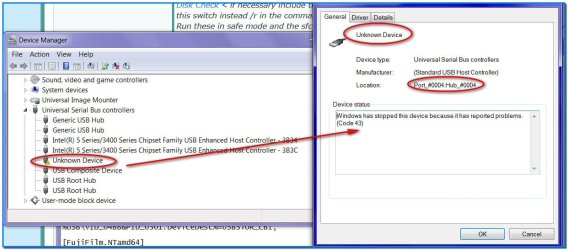
The problem is a bit different now I have an unknown usb device in my device manager which has been stopped because it cause problem. I uninstalled and then scanned for hardware changed but the drivers would not reinstall. The only thing that was connected today was my printer si I assumed it was the printer. I updated and installed the new printer drivers but I still have this issue. It fixes with a reboot for a short time then i get message something like and unknown device has been disabled

If this issue prevails i.e after it happens and before it is fixed with reboot any camera or USB reader plugged into USB will not be recognised. I have to reboot to fix the error and then the camera will be recognised.Rebooting is not convemient. i have a virtual windows running inside this so have to reboot two. How can i find what the unknown device is? It says consul with device manufacturer but i do not know the device
 

Attachments

  • unknown.jpg
    unknown.jpg
    92.5 KB · Views: 2
Last edited:

My Computer

Computer type
PC/Desktop
Computer Manufacturer/Model Number
Medion
OS
win 7 home premium 64 bit
Motherboard
ms 7616
Memory
16GB
Hard Drives
Two 1 TB
Ok now I cannot find any driver support for this machine as the site is an Audi outlet and from memory the brand Medion is their own, and it would be anyone's guess where it was actually made or who made it, in nay case probably in China somewhere.

Also being six years old and it is throwing that code 43 error I am thinking it may be wear and tear on that particular USB port. One thing you can do is to get a very bright light example one of those small cheap LED torches (I find them perfect for this) and look into each port for signs of any damage or wear and tear.

Going on from my first comment the only way to find what the motherboard actually is is to run the HW Info program. You can do this if you want to it takes very little time to install this excellent program and find what components you actually have inside the machine because as I said the Medion site is hopeless.
The choice is yours of course.
Using HW Info
PART A:
You can test the volts on the PSU with HW Info HWiNFO - Download < download the right bit version and close the right hand window select Sensors and scroll down to the power section where you will see what the volts are doing see my pic. In my pic the section (Nuvoton) with VBATT as a dead give away you are in the section for the rail voltages. There are other section titles and one that pops up often is ITE (sometimes the usual one for Gigabyte boards)
Now the voltage on the different rails have to be within 5% =+/- of what is required or the machine will not work properly if at all.
Limits +/- (minimum - correct - maximum)
12v1 = 11.4 - 12 - 12.6v
12v2 = 11.4 - 12- 12.6v
5v = 4.75 – 5 - 5.25v
3.3v = 3.135 – 3 – 3.465v
-12v = -10.80 - -12 - -13.20v
+5VSB = 4.75 – 5 - 5.25v
The Power good signal voltage at pin 8 on the 24 pin plug (grey cable) should be the same as the 5v rail reading/s
See this for the rail voltage info
PSUs 101: A Detailed Look Into Power Supplies (Section 2.)
The original right hand window shows the machine running and is handy for that but for looking at the components in some detail close it and use the main left hand side panel
FOR OTHER COMPONENTS
PART B:
Open each small square with + in it on the section the components are in and then click on the individual component/s (it will highlight in blue) - in the right hand side will appear all sorts of details including brands speeds and other essential info that particular device. See pic for example.

Use PART B: and see my pic for where to look

Edit: I meant to add we can also find out info on what the USB ports are or type.
 

Attachments

  • MB 1.PNG
    MB 1.PNG
    34 KB · Views: 1

My Computer

Computer type
PC/Desktop
Computer Manufacturer/Model Number
Own build (new) Desk1 / Asus ROG Win 7 / Desk2 1st build
OS
Desk1 7 Home Prem / Desk2 10 Pro / Main lap Asus ROG 10 Pro 2 laptop Toshiba 7 Pro Asus P2520 7 & 10
CPU
Desk1 i5 3750K / Laptop i7 GTX 860M / Desk2 i5 2500
Motherboard
Desk1 Asus P877-V / Desk2 Gigabyte H67 UD3H / Laptop ?
Memory
Desk1 8GB (1866) / Desk2 16GB (1333) / Laptop 8Gb DDR3
Graphics Card(s)
Desk 1& 2NVidia GTX 650 & Laptops on board Intel
Sound Card
Desk 1 & 2 -XONAR DG Realtek High Def audio Laptop
Monitor(s) Displays
Desk 1 Benq HD 2450 / Desk2 Philips 24" / Laptop 17.5"
Screen Resolution
1920x1080 D1 & D2 & Laptop 1
Hard Drives
Desk1 Samsung 120GB 830 SSD
Asus ROG 256GB 850 Pro SSD
Desk2 Samsung 840 256 SSD
Toshiba 120GB EVO
PSU
Desk 1 Corsair HX 1050/ Laptop ? / Desk 2 Corsair HX 650
Case
Desk 1 Cooler HAF XM ? Toshiba laptop / Desk2 Coolermaster
Cooling
Fans on all Desk1 -2 Desk2 - all Coolermasters 5 Laptop ?
Keyboard
Desk 1 MS Sidewinder X6 Desk 2 MS Sidewinder X 4
Mouse
Desk 1&2 - Gigabyte MS 900 gamer - laptop - Logitec wireless
Internet Speed
ADSL2+
Other Info
One other Desktop (tester) and spare Toshba laptop both with SSD's
Running Kaspersky 2016 ISS on all machines config'd identically
Logitec audio stereo systems on each machine (x3)
Canon MG5250MFC
Router/modem TP-Link running WPA2SK
An Audi outlet? MEDION® AKOYA® E4355 D (MD 8341) is the pc it has a picture of it. Anyway i fixed it. Can be marked solved . I know the motherboard - Medion MS-7616

Thanks all
 

My Computer

Computer type
PC/Desktop
Computer Manufacturer/Model Number
Medion
OS
win 7 home premium 64 bit
Motherboard
ms 7616
Memory
16GB
Hard Drives
Two 1 TB
An Audi outlet?

Yep it is the brand that retails through Aldi if I typed Audi it was my typo error;)

Anyway as long as it is fixed:)
 

My Computer

Computer type
PC/Desktop
Computer Manufacturer/Model Number
Own build (new) Desk1 / Asus ROG Win 7 / Desk2 1st build
OS
Desk1 7 Home Prem / Desk2 10 Pro / Main lap Asus ROG 10 Pro 2 laptop Toshiba 7 Pro Asus P2520 7 & 10
CPU
Desk1 i5 3750K / Laptop i7 GTX 860M / Desk2 i5 2500
Motherboard
Desk1 Asus P877-V / Desk2 Gigabyte H67 UD3H / Laptop ?
Memory
Desk1 8GB (1866) / Desk2 16GB (1333) / Laptop 8Gb DDR3
Graphics Card(s)
Desk 1& 2NVidia GTX 650 & Laptops on board Intel
Sound Card
Desk 1 & 2 -XONAR DG Realtek High Def audio Laptop
Monitor(s) Displays
Desk 1 Benq HD 2450 / Desk2 Philips 24" / Laptop 17.5"
Screen Resolution
1920x1080 D1 & D2 & Laptop 1
Hard Drives
Desk1 Samsung 120GB 830 SSD
Asus ROG 256GB 850 Pro SSD
Desk2 Samsung 840 256 SSD
Toshiba 120GB EVO
PSU
Desk 1 Corsair HX 1050/ Laptop ? / Desk 2 Corsair HX 650
Case
Desk 1 Cooler HAF XM ? Toshiba laptop / Desk2 Coolermaster
Cooling
Fans on all Desk1 -2 Desk2 - all Coolermasters 5 Laptop ?
Keyboard
Desk 1 MS Sidewinder X6 Desk 2 MS Sidewinder X 4
Mouse
Desk 1&2 - Gigabyte MS 900 gamer - laptop - Logitec wireless
Internet Speed
ADSL2+
Other Info
One other Desktop (tester) and spare Toshba laptop both with SSD's
Running Kaspersky 2016 ISS on all machines config'd identically
Logitec audio stereo systems on each machine (x3)
Canon MG5250MFC
Router/modem TP-Link running WPA2SK
Back
Top