Solved Help, Cloned drive not booting!!

How do I boot the USB in efi mode? Sorry, this all a bit technical!!

- - - Updated - - -

What about the EasyBCD program on the usb? Would that do the trick?
 

My Computers My Computers

System One System Two

  • Computer type
    PC/Desktop
    Computer Manufacturer/Model Number
    Viglen
    OS
    Windows 7 Pro
    CPU
    i5
    Memory
    12Gig
  • Computer type
    PC/Desktop
How do I boot the USB in efi mode? Sorry, this all a bit technical!!

- - - Updated - - -

What about the EasyBCD program on the usb? Would that do the trick?

Easybcd doesnt work well across modes.
-----------------------------------------------------------------------


When you select to boot your pc from usb stick, you should have two options.

One is efi mode

the other is bios mode.

they will say something like

lexar jumpdrive 1.0
and
UEFI: lexar jumdrive 1.0 partition 1

or it might say

lexar jumdrive jumpdrive 1.0
and
windows boot manager lexar jumpdrive 1.0

the descriptions will be slightly different depending on your bios/firmware, but there should be two obviously different entries.
--------------------------------------------------------------------------------------


Are you using the one time boot menu to select your usb stick?

There will be a key to press at post to bring up the onetime menu, on my machine it is F12, on HP machines it is usually F9.

Usually tap the F key immediately after the beep , or just startup the machine and keep tapping the key until it pops up

 

My Computers My Computers

System One System Two

  • Computer type
    PC/Desktop
    OS
    7 X64
    CPU
    i5 8400
    Motherboard
    gigabyte b365m ds3h
    Memory
    2x8gb 3200mhz
    Hard Drives
    various
    PSU
    pure power 11 400w cm
    Case
    Coolermaster
    Cooling
    cryorig m9i
  • Computer type
    PC/Desktop
    OS
    7x64
    CPU
    g5400
    Motherboard
    ga b365m ds3h
    Memory
    8gb ddr4 2400
    PSU
    xfx pro 450w
OK, Eufi is enabled on the USB. Do I just got to Command prompt and use the BCDBOOT commands?

- - - Updated - - -

I replaced the bcdboot in the System 32 folder, but it wasexactly the same. Not running the program?
Dave

- - - Updated - - -

Hi guys, I really appreciate everybodys help and advice on here (especially SIW2), but I desperately need to resolve this issue as I work from home on my computer and my original drive won't boot now either! I feel that I am almost there, but not quite! Bcdboot is not working on my drive. Any other advice or solutions welcome. Thanks

- - - Updated - - -

Just an idea. I have a Windows 10 laptop with a Hard Drive caddy, so I can connect the non booting drive to the laptop. Is there a way to rewrite the boot sector via the laptop/caddy or use bcdboot from the laptop? I also appear to have created some other partitions!

Partitions.PNG
 

My Computers My Computers

System One System Two

  • Computer type
    PC/Desktop
    Computer Manufacturer/Model Number
    Viglen
    OS
    Windows 7 Pro
    CPU
    i5
    Memory
    12Gig
  • Computer type
    PC/Desktop
Looks like there are 2 disks.

HD0 adata nominally 500gb disk. The partition layout suggests it is mbr style.

HD1 skhynix nominally 500gb disk. Gpt disk.

Which is the windows partition on HD1 the skhynix? Most likely the partition lettered F in your screenshot.

If so, it should be bcdboot F:\windows /s z: /f all
 

My Computers My Computers

System One System Two

  • Computer type
    PC/Desktop
    OS
    7 X64
    CPU
    i5 8400
    Motherboard
    gigabyte b365m ds3h
    Memory
    2x8gb 3200mhz
    Hard Drives
    various
    PSU
    pure power 11 400w cm
    Case
    Coolermaster
    Cooling
    cryorig m9i
  • Computer type
    PC/Desktop
    OS
    7x64
    CPU
    g5400
    Motherboard
    ga b365m ds3h
    Memory
    8gb ddr4 2400
    PSU
    xfx pro 450w
This is with it connected to my laptop, so the first drive is the laptop drive. The problem is that bcdboot won't work? Can I run it from my laptop and write to the disk partition? Thanks

- - - Updated - - -

Just tried it from the laptop and get the following
C:\Users\New>bcdboot F:\windows /s z: /f allFailure when attempting to copy boot files.
 

My Computers My Computers

System One System Two

  • Computer type
    PC/Desktop
    Computer Manufacturer/Model Number
    Viglen
    OS
    Windows 7 Pro
    CPU
    i5
    Memory
    12Gig
  • Computer type
    PC/Desktop
have you run sfc ?
SFC /SCANNOW Command - System File Checker

You will be running it offline:

sfc /scannow /offbootdir=<Windows_Drive_Letter>:\ /offwindir=<Windows_Drive_Letter>:\windows

sfc /scannow /offbootdir=F:\ /offwindir=F:\windows
 

My Computers My Computers

System One System Two

  • Computer type
    PC/Desktop
    OS
    7 X64
    CPU
    i5 8400
    Motherboard
    gigabyte b365m ds3h
    Memory
    2x8gb 3200mhz
    Hard Drives
    various
    PSU
    pure power 11 400w cm
    Case
    Coolermaster
    Cooling
    cryorig m9i
  • Computer type
    PC/Desktop
    OS
    7x64
    CPU
    g5400
    Motherboard
    ga b365m ds3h
    Memory
    8gb ddr4 2400
    PSU
    xfx pro 450w
How do i run it on the SK Hynix drive whilst it's plugged into the laptop?

- - - Updated - - -

It says........You must be an administrator running a console session in order touse the sfc utility.....I give up...nothing works!!
 

My Computers My Computers

System One System Two

  • Computer type
    PC/Desktop
    Computer Manufacturer/Model Number
    Viglen
    OS
    Windows 7 Pro
    CPU
    i5
    Memory
    12Gig
  • Computer type
    PC/Desktop
assuming the windows partition on the skhyinx is showing as F

sfc /scannow /offbootdir=F:\ /offwindir=F:\windows

yes, you need to use an administrator cmd for sfc and for bcdboot

type cmd in start search. When the black cmd box pops up, rt click it and select "run as administrator"
 

My Computers My Computers

System One System Two

  • Computer type
    PC/Desktop
    OS
    7 X64
    CPU
    i5 8400
    Motherboard
    gigabyte b365m ds3h
    Memory
    2x8gb 3200mhz
    Hard Drives
    various
    PSU
    pure power 11 400w cm
    Case
    Coolermaster
    Cooling
    cryorig m9i
  • Computer type
    PC/Desktop
    OS
    7x64
    CPU
    g5400
    Motherboard
    ga b365m ds3h
    Memory
    8gb ddr4 2400
    PSU
    xfx pro 450w
That's what I put in ...and that was the message...you need to be an administrator running a console session?

- - - Updated - - -

Phew...it's scanning now. Says it will take some time.
 

My Computers My Computers

System One System Two

  • Computer type
    PC/Desktop
    Computer Manufacturer/Model Number
    Viglen
    OS
    Windows 7 Pro
    CPU
    i5
    Memory
    12Gig
  • Computer type
    PC/Desktop
yes you need to run cmd as administrator.

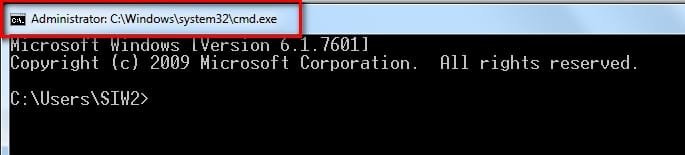
does it say administrator at the top of the cmd window

admin-cmd.jpg

it can take a few minutes.
 

My Computers My Computers

System One System Two

  • Computer type
    PC/Desktop
    OS
    7 X64
    CPU
    i5 8400
    Motherboard
    gigabyte b365m ds3h
    Memory
    2x8gb 3200mhz
    Hard Drives
    various
    PSU
    pure power 11 400w cm
    Case
    Coolermaster
    Cooling
    cryorig m9i
  • Computer type
    PC/Desktop
    OS
    7x64
    CPU
    g5400
    Motherboard
    ga b365m ds3h
    Memory
    8gb ddr4 2400
    PSU
    xfx pro 450w
It says....Windows Resource Protection found corrupt files and successfully repaired them.
Should I try BCDBOOT again now?

- - - Updated - - -

It says.....boot files successfully created. Should it now boot up?
 

My Computers My Computers

System One System Two

  • Computer type
    PC/Desktop
    Computer Manufacturer/Model Number
    Viglen
    OS
    Windows 7 Pro
    CPU
    i5
    Memory
    12Gig
  • Computer type
    PC/Desktop
yes.
 

My Computers My Computers

System One System Two

  • Computer type
    PC/Desktop
    OS
    7 X64
    CPU
    i5 8400
    Motherboard
    gigabyte b365m ds3h
    Memory
    2x8gb 3200mhz
    Hard Drives
    various
    PSU
    pure power 11 400w cm
    Case
    Coolermaster
    Cooling
    cryorig m9i
  • Computer type
    PC/Desktop
    OS
    7x64
    CPU
    g5400
    Motherboard
    ga b365m ds3h
    Memory
    8gb ddr4 2400
    PSU
    xfx pro 450w
Fingers crossed...I'll give it a try...

- - - Updated - - -

It's running a disc scan and replacing invalid security id s. Is that normal?
 

My Computers My Computers

System One System Two

  • Computer type
    PC/Desktop
    Computer Manufacturer/Model Number
    Viglen
    OS
    Windows 7 Pro
    CPU
    i5
    Memory
    12Gig
  • Computer type
    PC/Desktop
It is probabaly repairing the filesystem.
 

My Computers My Computers

System One System Two

  • Computer type
    PC/Desktop
    OS
    7 X64
    CPU
    i5 8400
    Motherboard
    gigabyte b365m ds3h
    Memory
    2x8gb 3200mhz
    Hard Drives
    various
    PSU
    pure power 11 400w cm
    Case
    Coolermaster
    Cooling
    cryorig m9i
  • Computer type
    PC/Desktop
    OS
    7x64
    CPU
    g5400
    Motherboard
    ga b365m ds3h
    Memory
    8gb ddr4 2400
    PSU
    xfx pro 450w
I'll keep you posted. Thank you very much for all of your help and patience, I really appreciate it. You are a legend mate.

- - - Updated - - -

Hi SIW2, so after repeiring thousands of files it said it was starting Windows. It now has a dark purplish colour screen with a cursor arrow that I can move about, but no Windows screen? Any ideas? Thanks
 

My Computers My Computers

System One System Two

  • Computer type
    PC/Desktop
    Computer Manufacturer/Model Number
    Viglen
    OS
    Windows 7 Pro
    CPU
    i5
    Memory
    12Gig
  • Computer type
    PC/Desktop
You can try the fix os letter by pointing it at F:\windows, or whatever the letter is for the windows partition is on the cloned disk.
Give that a try, but it sounds like there was quite a lot of corruption of the filesystem.

So if it still doesn't start up properly after doing the fix os letter , I think you should abandon trying to get the clone to work.

Hopefully windows on the source disk hasn't been damaged.
 

My Computers My Computers

System One System Two

  • Computer type
    PC/Desktop
    OS
    7 X64
    CPU
    i5 8400
    Motherboard
    gigabyte b365m ds3h
    Memory
    2x8gb 3200mhz
    Hard Drives
    various
    PSU
    pure power 11 400w cm
    Case
    Coolermaster
    Cooling
    cryorig m9i
  • Computer type
    PC/Desktop
    OS
    7x64
    CPU
    g5400
    Motherboard
    ga b365m ds3h
    Memory
    8gb ddr4 2400
    PSU
    xfx pro 450w
I managedto get the original ssd working (following your instructions, so I re-cloned the SK Hynix. It still won't boot, saying that System32/winloaf.efi is corrupt. I have tried copying this file from the working drive, but I can't paste it as it says I dn't haveadmin permissions? How do I get admin permissions? Thanks
 

My Computers My Computers

System One System Two

  • Computer type
    PC/Desktop
    Computer Manufacturer/Model Number
    Viglen
    OS
    Windows 7 Pro
    CPU
    i5
    Memory
    12Gig
  • Computer type
    PC/Desktop
you can do it from booted media which runs as system account.

or you can try dism++ file explorer

Dism++fileexplorer.jpg

- - - Updated - - -

If your original ssd is working fine, a much better idea is to use diskgenius to to do os migration

run diskgenius on your working windows 7 , click os migration, when it says select system, click on your current working windows ( which you are currently in ) and point it at the other disk when it says select target

It is the best tool for doing this job.
 

My Computers My Computers

System One System Two

  • Computer type
    PC/Desktop
    OS
    7 X64
    CPU
    i5 8400
    Motherboard
    gigabyte b365m ds3h
    Memory
    2x8gb 3200mhz
    Hard Drives
    various
    PSU
    pure power 11 400w cm
    Case
    Coolermaster
    Cooling
    cryorig m9i
  • Computer type
    PC/Desktop
    OS
    7x64
    CPU
    g5400
    Motherboard
    ga b365m ds3h
    Memory
    8gb ddr4 2400
    PSU
    xfx pro 450w
Thanks again
Dave

- - - Updated - - -

Thanks to everybody who helped me with this issue. It's now sorted. Special thanks to SIW2, who was brilliant. Nice one mate.
 

My Computers My Computers

System One System Two

  • Computer type
    PC/Desktop
    Computer Manufacturer/Model Number
    Viglen
    OS
    Windows 7 Pro
    CPU
    i5
    Memory
    12Gig
  • Computer type
    PC/Desktop
:D:D
 

My Computers My Computers

System One System Two

  • Computer type
    PC/Desktop
    OS
    7 X64
    CPU
    i5 8400
    Motherboard
    gigabyte b365m ds3h
    Memory
    2x8gb 3200mhz
    Hard Drives
    various
    PSU
    pure power 11 400w cm
    Case
    Coolermaster
    Cooling
    cryorig m9i
  • Computer type
    PC/Desktop
    OS
    7x64
    CPU
    g5400
    Motherboard
    ga b365m ds3h
    Memory
    8gb ddr4 2400
    PSU
    xfx pro 450w
Back
Top