Solved Automated Services "Profiler" for Windows 7 ?

mulambo

New member
Member
VIP
Local time
2:39 PM
Messages
110
I've noticed that recently, by creating an account for gaming only, the same services I disabled for that account (like network or maintenance services which weren't necessary for gaming purposes) were also disabled on the other account, therefore making the newer account pretty much useless to me.
So I wondered if there is any software that allows me to simply choose a "profile" for services like, for example : 1. full (all services enabled) 2. gaming (only gaming-related services enabled) 3. custom (only specific services enabled) 4. etc.
I tried a software called Wise Game Booster (I think I mentioned it before), but it doesn't do what I ask, it just allows me to close a certain amount of services (not all services I need to close) in order to guarantee a better performance for gaming (that sometimes is noticeable, sometimes really not). It's good because it allows a certain degree of automation, but I'm looking for something that, for example, makes me switch between one and the other "profile" more simply (meaning less clicks)
Anyone has a clue about what I'm looking for or even something close to it?
 

My Computer

Computer type
PC/Desktop
OS
Windows 7, 64bit pro
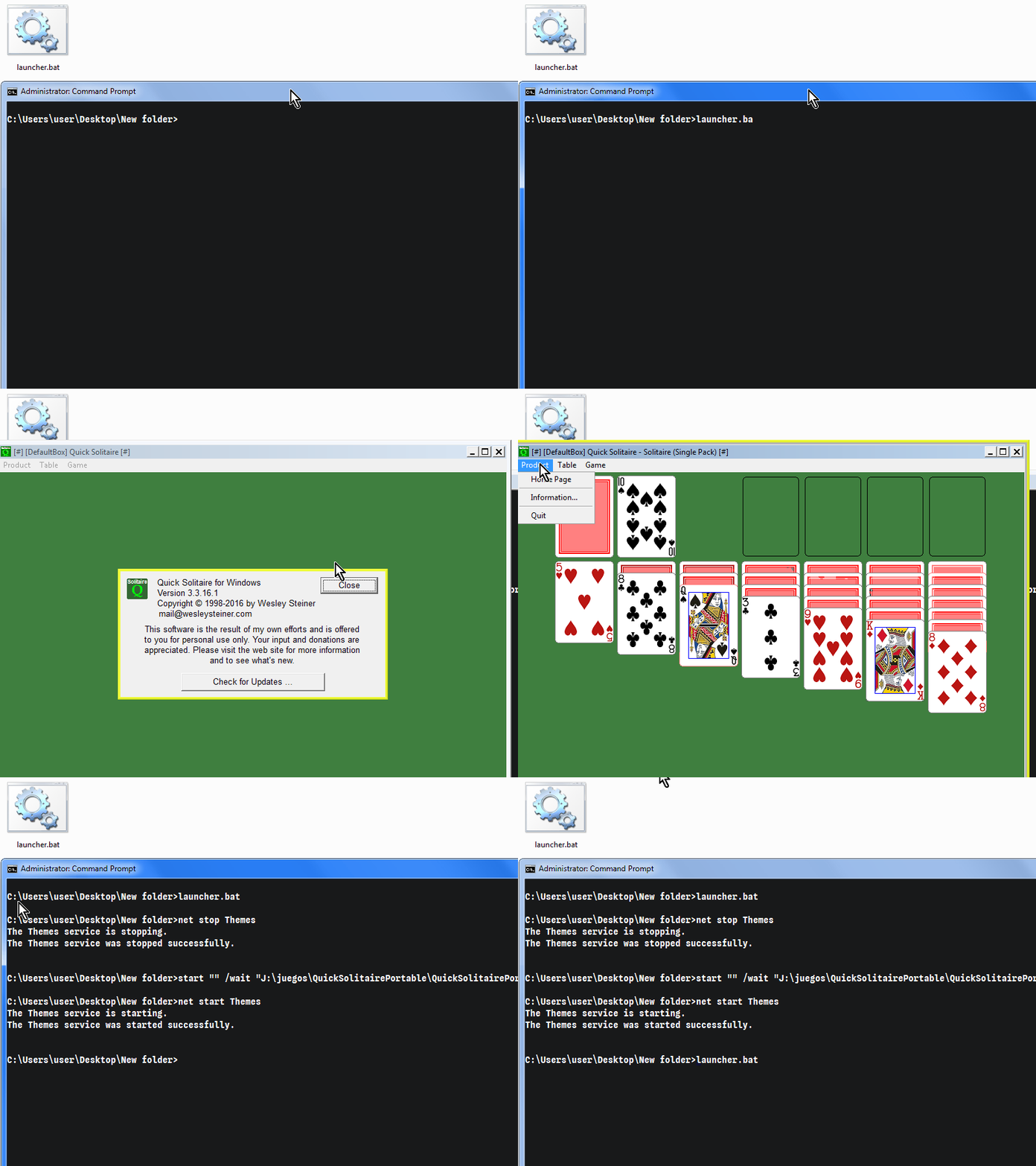
An easy way would be a batch file:

launcher.bat

Code:
net stop ServiceName1
net stop ServiceName2

start "" /wait "D:\full\path\to\game.exe"

net start ServiceName1
net start ServiceName2


vn8JMA9.gif


The downside would be that you have to run the batch as an admin, which wouldn't be a problem if you were using sandboxie plus for all your gaming and external program needs.
 

My Computers

System One System Two

  • Computer type
    PC/Desktop
    OS
    Windows 7 Ultimate 64-bit SP1
    CPU
    Intel Core 2 Quad Q6700 @ 2.66GHz
    Motherboard
    ECS MCP73PVT-SM
    Memory
    4.00GB Single-Channel DDR2 @ 399MHz
    Graphics Card(s)
    2047MB NVIDIA GeForce GT 710 (ASUStek Computer Inc)
    Sound Card
    Realtek High Definition Audio
    Monitor(s) Displays
    HP 21kd
    Screen Resolution
    1920x1080@60Hz
    Hard Drives
    149GB Western Digital WDC WD1600AABS-61PRA0 ATA Device (SATA )
    4000GB Seagate ST4000DM004-2U9104 ATA Device (SATA )
    931GB TOSHIBA External USB 3.0 USB Device (USB (SATA) )
    Antivirus
    None. Don't Need it.
    Browser
    Librewolf Portable
    Other Info
    It's a very old system.
  • Computer type
    PC/Desktop
That is interesting, is there a way to make a text list from the active processes of the system?
 

My Computer

Computer type
PC/Desktop
OS
Windows 7, 64bit pro

My Computers

System One System Two

  • Computer type
    PC/Desktop
    OS
    Windows 7 Ultimate 64-bit SP1
    CPU
    Intel Core 2 Quad Q6700 @ 2.66GHz
    Motherboard
    ECS MCP73PVT-SM
    Memory
    4.00GB Single-Channel DDR2 @ 399MHz
    Graphics Card(s)
    2047MB NVIDIA GeForce GT 710 (ASUStek Computer Inc)
    Sound Card
    Realtek High Definition Audio
    Monitor(s) Displays
    HP 21kd
    Screen Resolution
    1920x1080@60Hz
    Hard Drives
    149GB Western Digital WDC WD1600AABS-61PRA0 ATA Device (SATA )
    4000GB Seagate ST4000DM004-2U9104 ATA Device (SATA )
    931GB TOSHIBA External USB 3.0 USB Device (USB (SATA) )
    Antivirus
    None. Don't Need it.
    Browser
    Librewolf Portable
    Other Info
    It's a very old system.
  • Computer type
    PC/Desktop
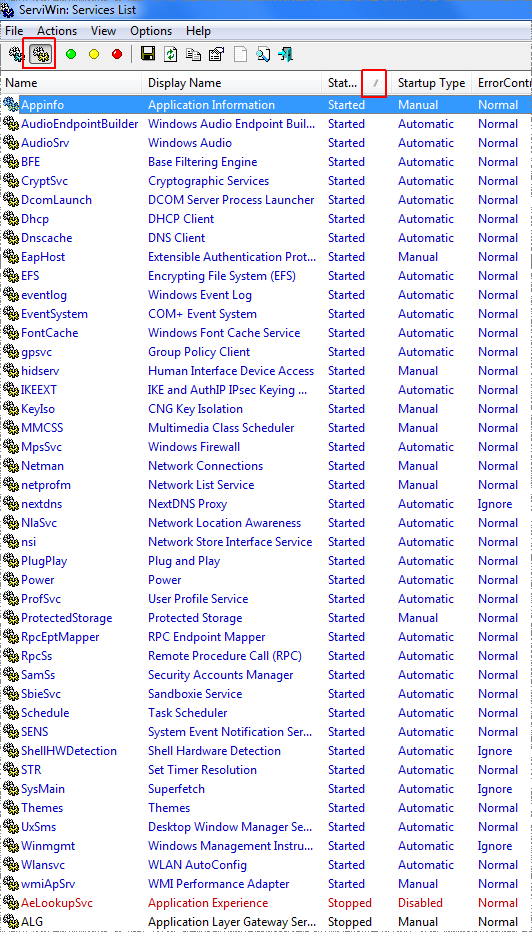
So, in the batch file I can refer to the value under "Name" column like:

Code:
net stop Appinfo
net stop AudioEndpointBuilder

etc. ?
 

My Computer

Computer type
PC/Desktop
OS
Windows 7, 64bit pro
So, in the batch file I can refer to the value under "Name" column like:

Code:
net stop Appinfo
net stop AudioEndpointBuilder

etc. ?

Yep, just make sure to run it as an admin. Make a link of the .bat, and in properties you can set it to run as admin.
 

My Computers

System One System Two

  • Computer type
    PC/Desktop
    OS
    Windows 7 Ultimate 64-bit SP1
    CPU
    Intel Core 2 Quad Q6700 @ 2.66GHz
    Motherboard
    ECS MCP73PVT-SM
    Memory
    4.00GB Single-Channel DDR2 @ 399MHz
    Graphics Card(s)
    2047MB NVIDIA GeForce GT 710 (ASUStek Computer Inc)
    Sound Card
    Realtek High Definition Audio
    Monitor(s) Displays
    HP 21kd
    Screen Resolution
    1920x1080@60Hz
    Hard Drives
    149GB Western Digital WDC WD1600AABS-61PRA0 ATA Device (SATA )
    4000GB Seagate ST4000DM004-2U9104 ATA Device (SATA )
    931GB TOSHIBA External USB 3.0 USB Device (USB (SATA) )
    Antivirus
    None. Don't Need it.
    Browser
    Librewolf Portable
    Other Info
    It's a very old system.
  • Computer type
    PC/Desktop
Yep, just make sure to run it as an admin. Make a link of the .bat, and in properties you can set it to run as admin.
I just tried it and unfortunely, some services (even with Admin rights) ask me to choose Y/N confirm when some services depend on other services or a group of services, which makes it complex
 

My Computer

Computer type
PC/Desktop
OS
Windows 7, 64bit pro
I just tried it and unfortunely, some services (even with Admin rights) ask me to choose Y/N confirm when some services depend on other services or a group of services, which makes it complex

Just stop the dependant service first. And beware that some services are very important and should not be closed.


-----
upd: And apparently there is an undocumented parameter '/y' that will bypass the prompt. Just add it to the end of the command.

Code:
net stop ServiceName /y

command line - Pipe "y" into net stop on windows - Super User
 

My Computers

System One System Two

  • Computer type
    PC/Desktop
    OS
    Windows 7 Ultimate 64-bit SP1
    CPU
    Intel Core 2 Quad Q6700 @ 2.66GHz
    Motherboard
    ECS MCP73PVT-SM
    Memory
    4.00GB Single-Channel DDR2 @ 399MHz
    Graphics Card(s)
    2047MB NVIDIA GeForce GT 710 (ASUStek Computer Inc)
    Sound Card
    Realtek High Definition Audio
    Monitor(s) Displays
    HP 21kd
    Screen Resolution
    1920x1080@60Hz
    Hard Drives
    149GB Western Digital WDC WD1600AABS-61PRA0 ATA Device (SATA )
    4000GB Seagate ST4000DM004-2U9104 ATA Device (SATA )
    931GB TOSHIBA External USB 3.0 USB Device (USB (SATA) )
    Antivirus
    None. Don't Need it.
    Browser
    Librewolf Portable
    Other Info
    It's a very old system.
  • Computer type
    PC/Desktop
Yep, I tried it and it bypasses the confirm, but it's still pretty slow (maybe I just expected it be as fast as WGB makes it all look like). Problem half-solved, somehow (can't actually make such selection on the thread)... unless there's another way to make each account load only specific settings from services.msc, like having a different services "layout" for each account that doesn't affect the layout of any other account, if that makes sens... anyway thank you.
 

My Computer

Computer type
PC/Desktop
OS
Windows 7, 64bit pro
Yep, I tried it and it bypasses the confirm, but it's still pretty slow (maybe I just expected it be as fast as WGB makes it all look like). Problem half-solved, somehow (can't actually make such selection on the thread)... unless there's another way to make each account load only specific settings from services.msc, like having a different services "layout" for each account that doesn't affect the layout of any other account, if that makes sens... anyway thank you.

You can make a Task in the gaming profile with Task Scheduler. That execute at login a crafted batch with all the services you want to stop. Just asign the task admin rights.

And in your main account execute also a task with the services you want to start.
 

My Computers

System One System Two

  • Computer type
    PC/Desktop
    OS
    Windows 7 Ultimate 64-bit SP1
    CPU
    Intel Core 2 Quad Q6700 @ 2.66GHz
    Motherboard
    ECS MCP73PVT-SM
    Memory
    4.00GB Single-Channel DDR2 @ 399MHz
    Graphics Card(s)
    2047MB NVIDIA GeForce GT 710 (ASUStek Computer Inc)
    Sound Card
    Realtek High Definition Audio
    Monitor(s) Displays
    HP 21kd
    Screen Resolution
    1920x1080@60Hz
    Hard Drives
    149GB Western Digital WDC WD1600AABS-61PRA0 ATA Device (SATA )
    4000GB Seagate ST4000DM004-2U9104 ATA Device (SATA )
    931GB TOSHIBA External USB 3.0 USB Device (USB (SATA) )
    Antivirus
    None. Don't Need it.
    Browser
    Librewolf Portable
    Other Info
    It's a very old system.
  • Computer type
    PC/Desktop
You can make a Task in the gaming profile with Task Scheduler. That execute at login a crafted batch with all the services you want to stop. Just asign the task admin rights.

And in your main account execute also a task with the services you want to start.
I've thought about that too for the gaming account and it could surely work with the start batch on the normal account, but it requires the services to load them first, then close them after, on the gaming account (which means double the time of not loading them all at all on login, which is ideally what I was looking for), while probably will not synchronize correctly with other services on the normal account... just saying..

maybe it's something to do with they type of account, as the gaming account was set as administrator type, so maybe any change to services also affects all other accounts?
 

My Computer

Computer type
PC/Desktop
OS
Windows 7, 64bit pro
I've thought about that too for the gaming account and it could surely work with the start batch on the normal account, but it requires the services to load them first, then close them after, on the gaming account (which means double the time of not loading them all at all on login, which is ideally what I was looking for), while probably will not synchronize correctly with other services on the normal account... just saying..

maybe it's something to do with they type of account, as the gaming account was set as administrator type, so maybe any change to services also affects all other accounts?

Yep, it's a problem if the service isn't load yet. You can add a delay of any amount of time at a task. But that means more delay. I'm out of easy ideas. The other thing I would try would be an AutoIt script that monitor if a service is running and close it.
 

My Computers

System One System Two

  • Computer type
    PC/Desktop
    OS
    Windows 7 Ultimate 64-bit SP1
    CPU
    Intel Core 2 Quad Q6700 @ 2.66GHz
    Motherboard
    ECS MCP73PVT-SM
    Memory
    4.00GB Single-Channel DDR2 @ 399MHz
    Graphics Card(s)
    2047MB NVIDIA GeForce GT 710 (ASUStek Computer Inc)
    Sound Card
    Realtek High Definition Audio
    Monitor(s) Displays
    HP 21kd
    Screen Resolution
    1920x1080@60Hz
    Hard Drives
    149GB Western Digital WDC WD1600AABS-61PRA0 ATA Device (SATA )
    4000GB Seagate ST4000DM004-2U9104 ATA Device (SATA )
    931GB TOSHIBA External USB 3.0 USB Device (USB (SATA) )
    Antivirus
    None. Don't Need it.
    Browser
    Librewolf Portable
    Other Info
    It's a very old system.
  • Computer type
    PC/Desktop
Well, today I woke up and I realized I was stupid: I could have just disabled all services on all accounts and place the batch file as automated execution only on those accounts which needed those services. D'oh. I guess problem solved. Thanks for the inspiration, I couldn't have figured it out without it (still a bit too risky as work-around, though, as I don't know the system will work in the same it worked before, but I guess I'll give it a shot).
 

My Computer

Computer type
PC/Desktop
OS
Windows 7, 64bit pro
Back
Top