Solved Cloning Win 7 to a second larger drive

netrate

New member
Member
VIP
Local time
5:36 PM
Messages
174
I have 240 gig SSD boot drive and I want to clone the OS to newer 500 gig SSD boot drive. I am going to use Macrium Reflect.

1) How should I format the 500gig before hand?
2) Is there a link for the steps I need to use? I want to think it is simple, but I am sure there are some steps I need to consider first.
 

My Computer My Computer

Computer type
PC/Desktop
OS
Win 7 dual boot with win 10
Motherboard
Gigabyte GA-970A-d3
Memory
16gig
Graphics Card(s)
GTX
Monitor(s) Displays
3
Hard Drives
500 gig ssd Samsung
You dont need to format the new drive as it will be done on clone
 

My Computer My Computer

Computer type
PC/Desktop
OS
win 8 32 bit
Someone can correct me if the following is not necessary with Macrium Reflect...check the following after the clone is finished.

If the clone drive is larger than original drive that you replaced, then you’ll need to use the Disk Management to expand the volume to make the available additional space usable.
 

My Computers My Computers

System One System Two

  • Computer type
    PC/Desktop
    Computer Manufacturer/Model Number
    Custom build
    OS
    Windows 7 Home Premium 64-bits
    CPU
    AMD FX-8350
    Motherboard
    Gigabyte GA-990FXA-UD3 (AM3+)
    Memory
    GSKILL Ripjaw-X PC3 12800 8GB (2x4GB)
    Graphics Card(s)
    ASUS ROG STRIX GTX 1060 6GB
    Sound Card
    Integrated
    Monitor(s) Displays
    Asus VE228H (21.5-in)
    Screen Resolution
    1920x1080 60Hz
    Hard Drives
    SAMSUNG 870 EVO 2.5 Inch SATA SSD (1TB)
    SAMSUNG 870 EVO 2.5 Inch SATA SSD (1TB)
    SAMSUNG 870 EVO 2.5 Inch SATA SSD (1TB)
    PSU
    Corsair RM750x (750 watts)
    Case
    Corsair Carbide Series 200R
    Cooling
    Corsair Hydro Series H60 (CWCH60)
    Keyboard
    Logitech Elite
    Mouse
    Logitech M510 Wireless Mouse
    Internet Speed
    Comcast Gigabit Extra (1200Mbps down / 35Mbps up)
    Antivirus
    Malwarebytes
    Browser
    Firefox, Edge, Chrome
    Other Info
    ASUS DRW-24B1ST DVD-RW (24X) optical drive
    Seagate Expansion Desk (5TB) external SATA/USB HDD
    Comcast XB8 Internet Gateway
  • Computer type
    PC/Desktop
    System Manufacturer/Model Number
    Custom
    OS
    Windows 7 Pro (64-bit)
    CPU
    AMD Phenom II 960T X4
    Motherboard
    ASUS M4N82 Deluxe
    Memory
    Corsair XMS2 DDR2-800 8GB (4x2GB)
    Graphics Card(s)
    ASUS ENGTX560 DCII OC/2DI/1GD5 1GB
    Monitor(s) Displays
    Samsung 930B 19-inch LCD
    Screen Resolution
    1280x1024
    Hard Drives
    Samsung SSD 870 EVO 1000 GB (Windows 10)
    Seagate ST1000DM003 1000 GB (Windows 7)
    PSU
    Antec TruePower (new) TP-650
    Case
    Antec Three Hundred
    Cooling
    AMD stock cooler from FX8350
    Mouse
    Logitech M100
    Internet Speed
    Xfinity Gigabit Extra 1200/35 Mbps
MisterEd,
Thanks for the info, is this true?
 

My Computer My Computer

Computer type
PC/Desktop
OS
Win 7 dual boot with win 10
Motherboard
Gigabyte GA-970A-d3
Memory
16gig
Graphics Card(s)
GTX
Monitor(s) Displays
3
Hard Drives
500 gig ssd Samsung
MisterEd,
Thanks for the info, is this true?
I use a paid program called Acronis True Image. I just replaced the two 512GB SSDs in my laptop with 1TB SSDs. When I cloned the two SSDs the result was each new SSD having their size automatically expanded to 1TB.

I don't know about Macrium Reflect because I haven't used it to clone drives. I know that some programs automatically resize the drive while some don't. It really is no big deal since all you have to do is check This PC to see if the clone has the same size as the original. If the clone's size has not been resized then just open Disk Management and use its tools to extend the size to use all available space.

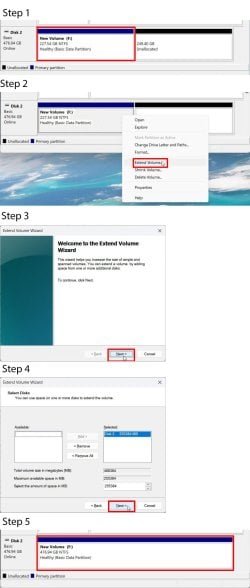
If the drive clone was not extended to fill the whole available space it will be obvious if you look in Disk Management.

1. Here is an example of a 240GB drive that was not extended to fill the whole available space.

2. Right-click on existing 240GB partition and select Extend Volume.

3. Click Next

4. The default is to extend to use all available space. To do this click Next.

5. The result is the original 240GB partition is now using the full capacity of the 500GB drive.
 

Attachments

  • drive.jpg
    drive.jpg
    156.4 KB · Views: 0
Last edited:

My Computers My Computers

System One System Two

  • Computer type
    PC/Desktop
    Computer Manufacturer/Model Number
    Custom build
    OS
    Windows 7 Home Premium 64-bits
    CPU
    AMD FX-8350
    Motherboard
    Gigabyte GA-990FXA-UD3 (AM3+)
    Memory
    GSKILL Ripjaw-X PC3 12800 8GB (2x4GB)
    Graphics Card(s)
    ASUS ROG STRIX GTX 1060 6GB
    Sound Card
    Integrated
    Monitor(s) Displays
    Asus VE228H (21.5-in)
    Screen Resolution
    1920x1080 60Hz
    Hard Drives
    SAMSUNG 870 EVO 2.5 Inch SATA SSD (1TB)
    SAMSUNG 870 EVO 2.5 Inch SATA SSD (1TB)
    SAMSUNG 870 EVO 2.5 Inch SATA SSD (1TB)
    PSU
    Corsair RM750x (750 watts)
    Case
    Corsair Carbide Series 200R
    Cooling
    Corsair Hydro Series H60 (CWCH60)
    Keyboard
    Logitech Elite
    Mouse
    Logitech M510 Wireless Mouse
    Internet Speed
    Comcast Gigabit Extra (1200Mbps down / 35Mbps up)
    Antivirus
    Malwarebytes
    Browser
    Firefox, Edge, Chrome
    Other Info
    ASUS DRW-24B1ST DVD-RW (24X) optical drive
    Seagate Expansion Desk (5TB) external SATA/USB HDD
    Comcast XB8 Internet Gateway
  • Computer type
    PC/Desktop
    System Manufacturer/Model Number
    Custom
    OS
    Windows 7 Pro (64-bit)
    CPU
    AMD Phenom II 960T X4
    Motherboard
    ASUS M4N82 Deluxe
    Memory
    Corsair XMS2 DDR2-800 8GB (4x2GB)
    Graphics Card(s)
    ASUS ENGTX560 DCII OC/2DI/1GD5 1GB
    Monitor(s) Displays
    Samsung 930B 19-inch LCD
    Screen Resolution
    1280x1024
    Hard Drives
    Samsung SSD 870 EVO 1000 GB (Windows 10)
    Seagate ST1000DM003 1000 GB (Windows 7)
    PSU
    Antec TruePower (new) TP-650
    Case
    Antec Three Hundred
    Cooling
    AMD stock cooler from FX8350
    Mouse
    Logitech M100
    Internet Speed
    Xfinity Gigabit Extra 1200/35 Mbps
What make is the SSD as samsung has a clone software free and its better than MR many other disk makers offer free cloning software
 

My Computer My Computer

Computer type
PC/Desktop
OS
win 8 32 bit
What make is the SSD as samsung has a clone software free and its better than MR many other disk makers offer free cloning software
Yeah I'm gonna disagree here. Macrium Reflect Free is pretty useful for Cloning.
 

My Computer My Computer

Computer type
PC/Desktop
Computer Manufacturer/Model Number
Custom Build
OS
Win7 Pro 64/Win10 Pro 64
CPU
Various
Motherboard
Various
It is a Samsung 500gig EVO 60

- - - Updated - - -

I cloned the 240 gig drive to the 500 today and this is what happened:

240 gigs was cloned and it automatically partitioned the rest of the drive to cover the remaining gig's. That isn't what I wanted to happen. I wanted to have the 240 cloned and the rest of the drive left as storage without the partition. Was there a selection I missed when Cloning that I and I should try again?
 

My Computer My Computer

Computer type
PC/Desktop
OS
Win 7 dual boot with win 10
Motherboard
Gigabyte GA-970A-d3
Memory
16gig
Graphics Card(s)
GTX
Monitor(s) Displays
3
Hard Drives
500 gig ssd Samsung
post a screenshot of diskmgmt window. You might be able to reorganize easily.
 

My Computers My Computers

System One System Two

  • Computer type
    PC/Desktop
    OS
    7 X64
    CPU
    i5 8400
    Motherboard
    gigabyte b365m ds3h
    Memory
    2x8gb 3200mhz
    Hard Drives
    various
    PSU
    pure power 11 400w cm
    Case
    Coolermaster
    Cooling
    cryorig m9i
  • Computer type
    PC/Desktop
    OS
    7x64
    CPU
    g5400
    Motherboard
    ga b365m ds3h
    Memory
    8gb ddr4 2400
    PSU
    xfx pro 450w

My Computer My Computer

Computer type
PC/Desktop
OS
Win 7 dual boot with win 10
Motherboard
Gigabyte GA-970A-d3
Memory
16gig
Graphics Card(s)
GTX
Monitor(s) Displays
3
Hard Drives
500 gig ssd Samsung
Important: If you haven't already done so you need to remove the old SSD from the computer and only have the new SSD in the computer. Now make sure you can boot from the new SSD. Once you know that works you can put the old SSD back into the computer.

Note with only the new SSD in the computer the partition that was X: should now be C: the boot partition.

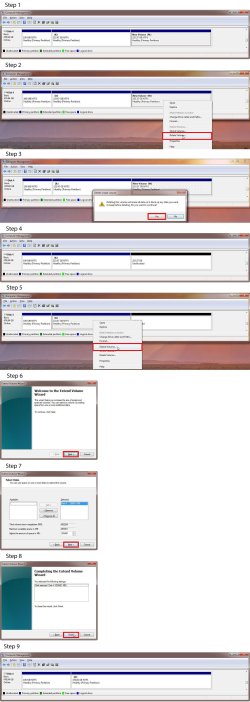
Step 1:
In the following I am assuming the following:
Partition X has the cloned partition with Windows.
Partition M is empty.

Step 2:
Since Partition M is empty you can delete it.
Right-click on Partition M and select Delete Volume

Step 3:
To complete the Deletion click Yes

Step 4:
Now the space is unallocated and empty

Step 5:
Now you can extend the Partition X to use the new free space.
Right-click on Partition X and select Extend Volume...

Step 6:
Click Next

Step 7:
You are going to use all the free space to the right so accept default.
Click Next

Step 8:
Click Finish

Step 9:
Now Partition X uses all the available space on the new SSD.
 

Attachments

  • clone.jpg
    clone.jpg
    413.6 KB · Views: 5

My Computers My Computers

System One System Two

  • Computer type
    PC/Desktop
    Computer Manufacturer/Model Number
    Custom build
    OS
    Windows 7 Home Premium 64-bits
    CPU
    AMD FX-8350
    Motherboard
    Gigabyte GA-990FXA-UD3 (AM3+)
    Memory
    GSKILL Ripjaw-X PC3 12800 8GB (2x4GB)
    Graphics Card(s)
    ASUS ROG STRIX GTX 1060 6GB
    Sound Card
    Integrated
    Monitor(s) Displays
    Asus VE228H (21.5-in)
    Screen Resolution
    1920x1080 60Hz
    Hard Drives
    SAMSUNG 870 EVO 2.5 Inch SATA SSD (1TB)
    SAMSUNG 870 EVO 2.5 Inch SATA SSD (1TB)
    SAMSUNG 870 EVO 2.5 Inch SATA SSD (1TB)
    PSU
    Corsair RM750x (750 watts)
    Case
    Corsair Carbide Series 200R
    Cooling
    Corsair Hydro Series H60 (CWCH60)
    Keyboard
    Logitech Elite
    Mouse
    Logitech M510 Wireless Mouse
    Internet Speed
    Comcast Gigabit Extra (1200Mbps down / 35Mbps up)
    Antivirus
    Malwarebytes
    Browser
    Firefox, Edge, Chrome
    Other Info
    ASUS DRW-24B1ST DVD-RW (24X) optical drive
    Seagate Expansion Desk (5TB) external SATA/USB HDD
    Comcast XB8 Internet Gateway
  • Computer type
    PC/Desktop
    System Manufacturer/Model Number
    Custom
    OS
    Windows 7 Pro (64-bit)
    CPU
    AMD Phenom II 960T X4
    Motherboard
    ASUS M4N82 Deluxe
    Memory
    Corsair XMS2 DDR2-800 8GB (4x2GB)
    Graphics Card(s)
    ASUS ENGTX560 DCII OC/2DI/1GD5 1GB
    Monitor(s) Displays
    Samsung 930B 19-inch LCD
    Screen Resolution
    1280x1024
    Hard Drives
    Samsung SSD 870 EVO 1000 GB (Windows 10)
    Seagate ST1000DM003 1000 GB (Windows 7)
    PSU
    Antec TruePower (new) TP-650
    Case
    Antec Three Hundred
    Cooling
    AMD stock cooler from FX8350
    Mouse
    Logitech M100
    Internet Speed
    Xfinity Gigabit Extra 1200/35 Mbps
where is M?
 

My Computers My Computers

System One System Two

  • Computer type
    PC/Desktop
    OS
    7 X64
    CPU
    i5 8400
    Motherboard
    gigabyte b365m ds3h
    Memory
    2x8gb 3200mhz
    Hard Drives
    various
    PSU
    pure power 11 400w cm
    Case
    Coolermaster
    Cooling
    cryorig m9i
  • Computer type
    PC/Desktop
    OS
    7x64
    CPU
    g5400
    Motherboard
    ga b365m ds3h
    Memory
    8gb ddr4 2400
    PSU
    xfx pro 450w
Finally gotten back around to this and had an issue :
  • Cloned the drive and extended the partition.
  • Shut the computer down
  • removed the old 240gig drive
  • inserted the newly cloned 500 gig drive instead
  • Booted without any other drives except the newly cloned 500gig drive.

"DISK BOOT FAILURE, INSERT SYSTEM DISK AND PRESS ENTER"

Replaced the 500 gig with the 240gig and rebooted - booted fine to the old drive.
Any ideas?
 

My Computer My Computer

Computer type
PC/Desktop
OS
Win 7 dual boot with win 10
Motherboard
Gigabyte GA-970A-d3
Memory
16gig
Graphics Card(s)
GTX
Monitor(s) Displays
3
Hard Drives
500 gig ssd Samsung
might mean it cant find a bootbale disk.

what kind of "cloning" did you do ?
 

My Computers My Computers

System One System Two

  • Computer type
    PC/Desktop
    OS
    7 X64
    CPU
    i5 8400
    Motherboard
    gigabyte b365m ds3h
    Memory
    2x8gb 3200mhz
    Hard Drives
    various
    PSU
    pure power 11 400w cm
    Case
    Coolermaster
    Cooling
    cryorig m9i
  • Computer type
    PC/Desktop
    OS
    7x64
    CPU
    g5400
    Motherboard
    ga b365m ds3h
    Memory
    8gb ddr4 2400
    PSU
    xfx pro 450w
Macrium reflect cloning - but I didn't know there was a different kind. I thought MR would do the trick.
I cloned the entire 240 gig drive to the 500gig drive.
 

My Computer My Computer

Computer type
PC/Desktop
OS
Win 7 dual boot with win 10
Motherboard
Gigabyte GA-970A-d3
Memory
16gig
Graphics Card(s)
GTX
Monitor(s) Displays
3
Hard Drives
500 gig ssd Samsung
I used the macrium reflect USB repair to fix the error. This has been solved (through my own personal research).
 

My Computer My Computer

Computer type
PC/Desktop
OS
Win 7 dual boot with win 10
Motherboard
Gigabyte GA-970A-d3
Memory
16gig
Graphics Card(s)
GTX
Monitor(s) Displays
3
Hard Drives
500 gig ssd Samsung
dunno about Mr, but i would say that editing win10 partitions is a very risky business, atleast on multiboot systems
 

My Computer My Computer

Computer type
PC/Desktop
OS
32
Back
Top