upgrading windows 7 to 10 for free

Don1978

New member
Local time
4:27 PM
Messages
4
Im sorry if this has been asked alot, im trying to update my windows 7 home premium PC to windows 10. iv downloaded the media creation tool all im now getting is error 0x80072f8f-0x20000. any advice?
thanks
 

My Computers My Computers

System One System Two

  • OS
    Windows 7
  • Computer type
    PC/Desktop
You could try downloading the iso file directly instead of using MCT.

extract the iso file using 7-zip.

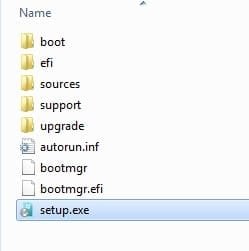
then run setup.exe which is in the extracted folder.
 

My Computers My Computers

System One System Two

  • Computer type
    PC/Desktop
    OS
    7 X64
    CPU
    i5 8400
    Motherboard
    gigabyte b365m ds3h
    Memory
    2x8gb 3200mhz
    Hard Drives
    various
    PSU
    pure power 11 400w cm
    Case
    Coolermaster
    Cooling
    cryorig m9i
  • Computer type
    PC/Desktop
    OS
    7x64
    CPU
    g5400
    Motherboard
    ga b365m ds3h
    Memory
    8gb ddr4 2400
    PSU
    xfx pro 450w
I suggest before you start you make sure all hardware is working with the correct drivers and you make sure Windows 7 has the latest updates. When you are satisfied do a system backup in case there is a problem with the upgrade.

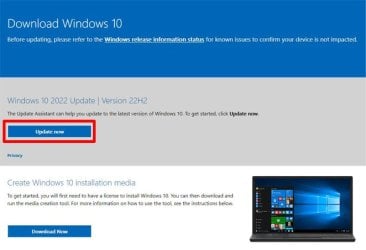
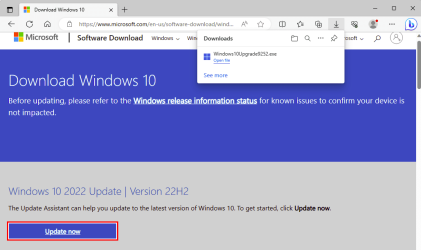
I just did a free upgrade from Windows 7 Pro to Windows 10 Pro yesterday. I didn't download anything directly. I just went to the Download Windows 10 webpage and selected Update now. An hour and a few reboots later the computer was running Windows 10.

Upgrade.jpg

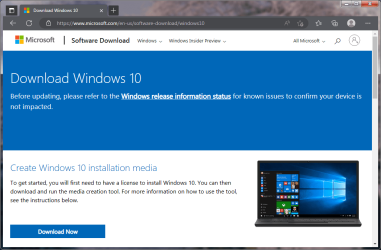
Download Windows 10
https://www.microsoft.com/en-us/software-download/windows10

Considering it was a 17 year old laptop things went smoothly. Back in 2006 the laptop came with Windows XP Media Center edition. Last week I replaced the hard drive and installed Windows 7 Home Premium. This was just to make sure I could get everything working. When that was done I did an Anytime Upgrade to Windows 7 Pro. This week I did the free upgrade to Windows 10 Pro. Note I already had keys for both Windows 7 Home Premium and Windows 7 Pro. Only Windows 10 Pro was a free upgrade.
 

My Computers My Computers

System One System Two

  • Computer type
    PC/Desktop
    Computer Manufacturer/Model Number
    Custom build
    OS
    Windows 7 Home Premium 64-bits
    CPU
    AMD FX-8350
    Motherboard
    Gigabyte GA-990FXA-UD3 (AM3+)
    Memory
    GSKILL Ripjaw-X PC3 12800 8GB (2x4GB)
    Graphics Card(s)
    ASUS ROG STRIX GTX 1060 6GB
    Sound Card
    Integrated
    Monitor(s) Displays
    Asus VE228H (21.5-in)
    Screen Resolution
    1920x1080 60Hz
    Hard Drives
    SAMSUNG 870 EVO 2.5 Inch SATA SSD (1TB)
    SAMSUNG 870 EVO 2.5 Inch SATA SSD (1TB)
    SAMSUNG 870 EVO 2.5 Inch SATA SSD (1TB)
    PSU
    Corsair RM750x (750 watts)
    Case
    Corsair Carbide Series 200R
    Cooling
    Corsair Hydro Series H60 (CWCH60)
    Keyboard
    Logitech Elite
    Mouse
    Logitech M510 Wireless Mouse
    Internet Speed
    Comcast Gigabit Extra (1200Mbps down / 35Mbps up)
    Antivirus
    Malwarebytes
    Browser
    Firefox, Edge, Chrome
    Other Info
    ASUS DRW-24B1ST DVD-RW (24X) optical drive
    Seagate Expansion Desk (5TB) external SATA/USB HDD
    Comcast XB8 Internet Gateway
  • Computer type
    PC/Desktop
    System Manufacturer/Model Number
    Custom
    OS
    Windows 7 Pro (64-bit)
    CPU
    AMD Phenom II 960T X4
    Motherboard
    ASUS M4N82 Deluxe
    Memory
    Corsair XMS2 DDR2-800 8GB (4x2GB)
    Graphics Card(s)
    ASUS ENGTX560 DCII OC/2DI/1GD5 1GB
    Monitor(s) Displays
    Samsung 930B 19-inch LCD
    Screen Resolution
    1280x1024
    Hard Drives
    Samsung SSD 870 EVO 1000 GB (Windows 10)
    Seagate ST1000DM003 1000 GB (Windows 7)
    PSU
    Antec TruePower (new) TP-650
    Case
    Antec Three Hundred
    Cooling
    AMD stock cooler from FX8350
    Mouse
    Logitech M100
    Internet Speed
    Xfinity Gigabit Extra 1200/35 Mbps
All updates up to date, When I unzip the iso file with 7-zip it does not come up with an icon setup.exe?? So can't go forward from.there?
 

My Computers My Computers

System One System Two

  • OS
    Windows 7
  • Computer type
    PC/Desktop
Why would it come up with an icon?

setup.exe is in the folder you unpacked the iso to.

rt click on setup.exe and run as admin

setup-root.jpg
 

My Computers My Computers

System One System Two

  • Computer type
    PC/Desktop
    OS
    7 X64
    CPU
    i5 8400
    Motherboard
    gigabyte b365m ds3h
    Memory
    2x8gb 3200mhz
    Hard Drives
    various
    PSU
    pure power 11 400w cm
    Case
    Coolermaster
    Cooling
    cryorig m9i
  • Computer type
    PC/Desktop
    OS
    7x64
    CPU
    g5400
    Motherboard
    ga b365m ds3h
    Memory
    8gb ddr4 2400
    PSU
    xfx pro 450w
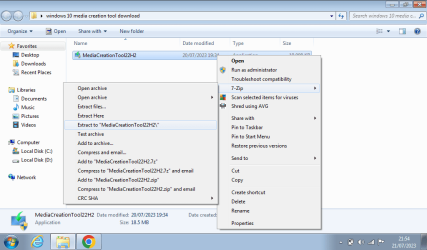
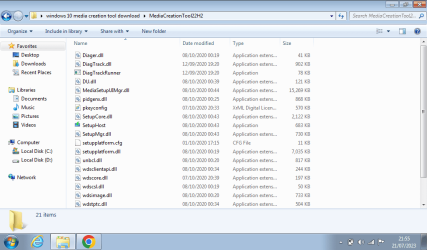
When I unzip the mediacreation file I get alot more files about 14-15. i dont get the options shown above? The setup.exe isn't there ? i dont think I'm doing anything wrong? Following all the tutorials online etc

- - - Updated - - -

When I open media creation tool with 7-zip It opens about 15-16 files setup exe isn't there?
image.png

image.png
 

My Computers My Computers

System One System Two

  • OS
    Windows 7
  • Computer type
    PC/Desktop
Did anybody suggest you open the media creation tool with 7-zip ?
 

My Computers My Computers

System One System Two

  • Computer type
    PC/Desktop
    OS
    7 X64
    CPU
    i5 8400
    Motherboard
    gigabyte b365m ds3h
    Memory
    2x8gb 3200mhz
    Hard Drives
    various
    PSU
    pure power 11 400w cm
    Case
    Coolermaster
    Cooling
    cryorig m9i
  • Computer type
    PC/Desktop
    OS
    7x64
    CPU
    g5400
    Motherboard
    ga b365m ds3h
    Memory
    8gb ddr4 2400
    PSU
    xfx pro 450w
Seems to be on alot of the YouTube video I see. What am.i suppose to do then? If you can advise. I just get an error message if I try to.open it by double clicking it??

- - - Updated - - -

Can you send me a link of the setup.exe file on here?
 

My Computers My Computers

System One System Two

  • OS
    Windows 7
  • Computer type
    PC/Desktop

My Computers My Computers

System One System Two

  • Computer type
    Laptop
    Computer Manufacturer/Model Number
    Toshiba satellite C650D
    OS
    Windows 7 Home Premium x64
    CPU
    AMD V120
    Memory
    4GB
    Internet Speed
    150 Mbps
    Antivirus
    MSE
    Browser
    IE11, Edge, Firefox
    Other Info
    I also have W7 Pro on my System Two, and several W7 Hyper-V VMs. My other machines run Windows 10/11. Their specs are in my Ten Forums & Eleven Forum profiles.
  • Computer type
    Laptop
    System Manufacturer/Model Number
    Lenovo Thinkpad T430
    OS
    Windows 7 Pro x64
    CPU
    Intel i5-3320M
    Memory
    8 GB
    Hard Drives
    250GB Samsung SSD 860 EVO
    Antivirus
    MSE
the iso file should be extracted, not the mct.
 

My Computers My Computers

System One System Two

  • Computer type
    PC/Desktop
    OS
    7 X64
    CPU
    i5 8400
    Motherboard
    gigabyte b365m ds3h
    Memory
    2x8gb 3200mhz
    Hard Drives
    various
    PSU
    pure power 11 400w cm
    Case
    Coolermaster
    Cooling
    cryorig m9i
  • Computer type
    PC/Desktop
    OS
    7x64
    CPU
    g5400
    Motherboard
    ga b365m ds3h
    Memory
    8gb ddr4 2400
    PSU
    xfx pro 450w
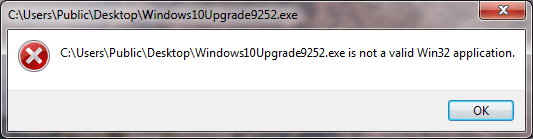
I just get an error message if I try to.open it by double clicking it??


The MCT 22H2 fails by default. Install KB3140245 and EasyFix 51044, then try again.

Microsoft Update Catalog

https://download.microsoft.com/down...F-BC2C-D69E5B9E9A68/MicrosoftEasyFix51044.msi

- - - Updated - - -

I just went to the Download Windows 10 webpage and selected Update now.


When I visit the page using Windows 7 and Microsoft Edge, there is no "Update Now" to select.

Windows 10-1.png
 

My Computer My Computer

Computer type
PC/Desktop
OS
Windows 7 Home Premium
When I visit the page using Windows 7 and Microsoft Edge, there is no "Update Now" to select.
Interesting. I don't see it in Edge on a Windows 7 PC either. I still see it with Edge on a Windows 10 or 11 machine, and can click on it. Looks like MS don't want to offer the Update Assistant to a Win7 PC.

image.png

The missing download link for the Windows 10 Update Assistant Windows10Upgrade9252.exe is:
https://go.microsoft.com/fwlink/?LinkID=799445
 

My Computers My Computers

System One System Two

  • Computer type
    Laptop
    Computer Manufacturer/Model Number
    Toshiba satellite C650D
    OS
    Windows 7 Home Premium x64
    CPU
    AMD V120
    Memory
    4GB
    Internet Speed
    150 Mbps
    Antivirus
    MSE
    Browser
    IE11, Edge, Firefox
    Other Info
    I also have W7 Pro on my System Two, and several W7 Hyper-V VMs. My other machines run Windows 10/11. Their specs are in my Ten Forums & Eleven Forum profiles.
  • Computer type
    Laptop
    System Manufacturer/Model Number
    Lenovo Thinkpad T430
    OS
    Windows 7 Pro x64
    CPU
    Intel i5-3320M
    Memory
    8 GB
    Hard Drives
    250GB Samsung SSD 860 EVO
    Antivirus
    MSE
Oops don't provide the thing. Have you tried running this in Windows 7? They're keeping it away from Windows 7 users for a reason. And from Windows 8/8.1 users, for that matter.

Valid.png
 

My Computer My Computer

Computer type
PC/Desktop
OS
Windows 7 Home Premium
Interesting. I don't see it in Edge on a Windows 7 PC either. I still see it with Edge on a Windows 10 or 11 machine, and can click on it. Looks like MS don't want to offer the Update Assistant to a Win7 PC.

View attachment 423073

The missing download link for the Windows 10 Update Assistant Windows10Upgrade9252.exe is:
https://go.microsoft.com/fwlink/?LinkID=799445
Now I am not sure about the exact steps I took last week to upgrade Windows 7 to 10 on the computer Toshiba-PC.

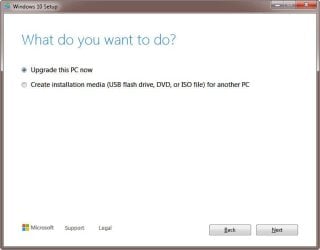
I just checked Toshiba-PC and see that I downloaded the Media Creation Tool (MediaCreationTool22H2.exe) right before I did the upgrade. I ran it on another computer Lightning-7 with Windows 7 and see that there is an option to Upgrade this PC now. I must have done the upgrade that way.

2023-07-23 21_31_07-Windows 10 Setup.jpg

Toshiba-PC must have been up to date because I didn't have a problem running the Media Creation Tool on it. However, I got error "0x80072F8F- 0x20000" when I tried to run it on the computer Lightning-7. That is a known problem discussed in the following:

Update to enable TLS 1.1 and TLS 1.2 as default secure protocols in WinHTTP in Windows

In that thread I downloaded Easy fix which fixed the problem and allowed me to run the Media Creation Tool on Lightning-7.
 
Last edited:

My Computers My Computers

System One System Two

  • Computer type
    PC/Desktop
    Computer Manufacturer/Model Number
    Custom build
    OS
    Windows 7 Home Premium 64-bits
    CPU
    AMD FX-8350
    Motherboard
    Gigabyte GA-990FXA-UD3 (AM3+)
    Memory
    GSKILL Ripjaw-X PC3 12800 8GB (2x4GB)
    Graphics Card(s)
    ASUS ROG STRIX GTX 1060 6GB
    Sound Card
    Integrated
    Monitor(s) Displays
    Asus VE228H (21.5-in)
    Screen Resolution
    1920x1080 60Hz
    Hard Drives
    SAMSUNG 870 EVO 2.5 Inch SATA SSD (1TB)
    SAMSUNG 870 EVO 2.5 Inch SATA SSD (1TB)
    SAMSUNG 870 EVO 2.5 Inch SATA SSD (1TB)
    PSU
    Corsair RM750x (750 watts)
    Case
    Corsair Carbide Series 200R
    Cooling
    Corsair Hydro Series H60 (CWCH60)
    Keyboard
    Logitech Elite
    Mouse
    Logitech M510 Wireless Mouse
    Internet Speed
    Comcast Gigabit Extra (1200Mbps down / 35Mbps up)
    Antivirus
    Malwarebytes
    Browser
    Firefox, Edge, Chrome
    Other Info
    ASUS DRW-24B1ST DVD-RW (24X) optical drive
    Seagate Expansion Desk (5TB) external SATA/USB HDD
    Comcast XB8 Internet Gateway
  • Computer type
    PC/Desktop
    System Manufacturer/Model Number
    Custom
    OS
    Windows 7 Pro (64-bit)
    CPU
    AMD Phenom II 960T X4
    Motherboard
    ASUS M4N82 Deluxe
    Memory
    Corsair XMS2 DDR2-800 8GB (4x2GB)
    Graphics Card(s)
    ASUS ENGTX560 DCII OC/2DI/1GD5 1GB
    Monitor(s) Displays
    Samsung 930B 19-inch LCD
    Screen Resolution
    1280x1024
    Hard Drives
    Samsung SSD 870 EVO 1000 GB (Windows 10)
    Seagate ST1000DM003 1000 GB (Windows 7)
    PSU
    Antec TruePower (new) TP-650
    Case
    Antec Three Hundred
    Cooling
    AMD stock cooler from FX8350
    Mouse
    Logitech M100
    Internet Speed
    Xfinity Gigabit Extra 1200/35 Mbps
I made sure Windows 7 was up to date. Does that make a difference?

It's not supposed to. It's not supposed to make a difference for the MCT, let alone the Update Assistant which only works on Windows 10 devices, as it reveals in Windows 11.
 

Attachments

  • Windows 10 devices.PNG
    Windows 10 devices.PNG
    4.1 KB · Views: 0

My Computer My Computer

Computer type
PC/Desktop
OS
Windows 7 Home Premium
It's not supposed to. It's not supposed to make a difference for the MCT, let alone the Update Assistant which only works on Windows 10 devices, as it reveals in Windows 11.
Like I mentioned in my last (corrected) post I must have run the Media Creation Tool in Windows 7 to to the upgrade. MediaCreationTool22H2.exe does work in Windows 7 as long Windows 7 is up to date or has the fix I mentioned.
 

My Computers My Computers

System One System Two

  • Computer type
    PC/Desktop
    Computer Manufacturer/Model Number
    Custom build
    OS
    Windows 7 Home Premium 64-bits
    CPU
    AMD FX-8350
    Motherboard
    Gigabyte GA-990FXA-UD3 (AM3+)
    Memory
    GSKILL Ripjaw-X PC3 12800 8GB (2x4GB)
    Graphics Card(s)
    ASUS ROG STRIX GTX 1060 6GB
    Sound Card
    Integrated
    Monitor(s) Displays
    Asus VE228H (21.5-in)
    Screen Resolution
    1920x1080 60Hz
    Hard Drives
    SAMSUNG 870 EVO 2.5 Inch SATA SSD (1TB)
    SAMSUNG 870 EVO 2.5 Inch SATA SSD (1TB)
    SAMSUNG 870 EVO 2.5 Inch SATA SSD (1TB)
    PSU
    Corsair RM750x (750 watts)
    Case
    Corsair Carbide Series 200R
    Cooling
    Corsair Hydro Series H60 (CWCH60)
    Keyboard
    Logitech Elite
    Mouse
    Logitech M510 Wireless Mouse
    Internet Speed
    Comcast Gigabit Extra (1200Mbps down / 35Mbps up)
    Antivirus
    Malwarebytes
    Browser
    Firefox, Edge, Chrome
    Other Info
    ASUS DRW-24B1ST DVD-RW (24X) optical drive
    Seagate Expansion Desk (5TB) external SATA/USB HDD
    Comcast XB8 Internet Gateway
  • Computer type
    PC/Desktop
    System Manufacturer/Model Number
    Custom
    OS
    Windows 7 Pro (64-bit)
    CPU
    AMD Phenom II 960T X4
    Motherboard
    ASUS M4N82 Deluxe
    Memory
    Corsair XMS2 DDR2-800 8GB (4x2GB)
    Graphics Card(s)
    ASUS ENGTX560 DCII OC/2DI/1GD5 1GB
    Monitor(s) Displays
    Samsung 930B 19-inch LCD
    Screen Resolution
    1280x1024
    Hard Drives
    Samsung SSD 870 EVO 1000 GB (Windows 10)
    Seagate ST1000DM003 1000 GB (Windows 7)
    PSU
    Antec TruePower (new) TP-650
    Case
    Antec Three Hundred
    Cooling
    AMD stock cooler from FX8350
    Mouse
    Logitech M100
    Internet Speed
    Xfinity Gigabit Extra 1200/35 Mbps
Back
Top