Solved Second HDD not recognized after switch HDD to SSD

raver4444

New member
Local time
11:40 AM
Messages
7
Hello guys.
Was trying to look over the forum but couldn't find an answer. Maybe somebody has an answer for me.

So I had two HDD ( one with OS C:/ ) and another HDD for storage only ( F:/ ).
Decided to replace C:/ ( Win 10 OS ) with a Samsung SDD. Did a copy and all good, Samsung SSD works flawless and super fast.
But now, the F:/ ( my storage with SUPER IMPORTNAT stuff ) is gone, meaning it doesn't show in " My Computer " but shows in Device Manager. Using Disk Management I found it finally.
I renamed it ( tried at first F: then a different letter ), BUT no luck. I get a message saying " IN ORDER TO USE IT YOU HAVE TO FORMAT IT ". DEFINEATLY NOT AN OPTION.
Any ideas ? Thank you.
 

My Computers My Computers

System One System Two

  • Computer type
    PC/Desktop
    Computer Manufacturer/Model Number
    Custom Build
    OS
    Win10-64bit
    Memory
    18GB
    Monitor(s) Displays
    Samsung 27"
    Hard Drives
    HDD
    SDD - Samsung
    Antivirus
    WIN
    Browser
    Google
  • Computer type
    PC/Desktop
better take a look at it with a data recovery program.
 

My Computers My Computers

System One System Two

  • Computer type
    PC/Desktop
    OS
    7 X64
    CPU
    i5 8400
    Motherboard
    gigabyte b365m ds3h
    Memory
    2x8gb 3200mhz
    Hard Drives
    various
    PSU
    pure power 11 400w cm
    Case
    Coolermaster
    Cooling
    cryorig m9i
  • Computer type
    PC/Desktop
    OS
    7x64
    CPU
    g5400
    Motherboard
    ga b365m ds3h
    Memory
    8gb ddr4 2400
    PSU
    xfx pro 450w
better take a look at it with a data recovery program.
Tks.
It was my last option.
But if no other ideas, I have no choice.
BTW, if I connect my old HDD ( with OS ) , I gain access AGAIN to my HDD - storage ( F : / )

Any recommended free option ?
 

My Computers My Computers

System One System Two

  • Computer type
    PC/Desktop
    Computer Manufacturer/Model Number
    Custom Build
    OS
    Win10-64bit
    Memory
    18GB
    Monitor(s) Displays
    Samsung 27"
    Hard Drives
    HDD
    SDD - Samsung
    Antivirus
    WIN
    Browser
    Google
  • Computer type
    PC/Desktop

My Computers My Computers

System One System Two

  • Computer type
    PC/Desktop
    OS
    7 X64
    CPU
    i5 8400
    Motherboard
    gigabyte b365m ds3h
    Memory
    2x8gb 3200mhz
    Hard Drives
    various
    PSU
    pure power 11 400w cm
    Case
    Coolermaster
    Cooling
    cryorig m9i
  • Computer type
    PC/Desktop
    OS
    7x64
    CPU
    g5400
    Motherboard
    ga b365m ds3h
    Memory
    8gb ddr4 2400
    PSU
    xfx pro 450w
How did you clone?

Was F drive still attached during the clone?

Try initializing the HDD by going to Windows search and entering disk management.
 

My Computer My Computer

Computer type
PC/Desktop
OS
Windows 7 Ultimate x64
How did you clone?

Was F drive still attached during the clone?

Try initializing the HDD by going to Windows search and entering disk management.

I cloned ONLY C:/. Yes, F:/ was still attached but did not clone it, did not touch it.
HDD it's initialized, as it's recognized ( anyway I don't get the option when I go to Properties ). I can change the volume of the HDD to whatever I want for example.

- - - Updated - - -

How did you clone?

ement[/c].

Samsung Data Migration software that came with the new SSD.
 

My Computers My Computers

System One System Two

  • Computer type
    PC/Desktop
    Computer Manufacturer/Model Number
    Custom Build
    OS
    Win10-64bit
    Memory
    18GB
    Monitor(s) Displays
    Samsung 27"
    Hard Drives
    HDD
    SDD - Samsung
    Antivirus
    WIN
    Browser
    Google
  • Computer type
    PC/Desktop
It seems like the Samsung clone software may have interacted with your secondary hard drive and caused it to mess up.

If I were you, I would get a SATA to USB adapter and see if you can't see the contents inside the drive that way. Is there an intact partition now on the drive, or is the partition that was there just now gone? There is partition recovery software out there. I have used them before with great success. But that's only if the partition is deleted. If the drive refuses to show under "My Computer" I'm suspecting the partition went poof, and gone. Only a guess though. I'd need to be at your computer to see what the deal is.

Here's a very good SATA to USB adapter that I own. It'll work with 2.5" and 3.5" drives. For 3.5" drives you use the included power adapter. For 2.5" drives you don't need to use the power adapter.

Amazon link

- - - Updated - - -

Another question:

Was the HDD ever encrypted at all?

Post #4 may have the solution.
 

My Computer My Computer

Computer type
PC/Desktop
OS
Windows 7 Ultimate x64
It seems like the Samsung clone software may have interacted with your secondary hard drive and caused it to mess up.

If I were you, I would get a SATA to USB adapter and see if you can't see the contents inside the drive that way. Is there an intact partition now on the drive, or is the partition that was there just now gone? There is partition recovery software out there. I have used them before with great success. But that's only if the partition is deleted. If the drive refuses to show under "My Computer" I'm suspecting the partition went poof, and gone. Only a guess though. I'd need to be at your computer to see what the deal is.

Here's a very good SATA to USB adapter that I own. It'll work with 2.5" and 3.5" drives. For 3.5" drives you use the included power adapter. For 2.5" drives you don't need to use the power adapter.

Amazon link

- - - Updated - - -

Another question:

Was the HDD ever encrypted at all?

Post #4 may have the solution.

Yes, I thought too about the Samsung software.
Well, the good part as I mentioned is that I can access the HDD ( storage ), by reconnecting old HDD ( OS ). So I can make a copy of that...
When I reconnect my old C: / the F:/ shows up with all the data. So the data is not lost.

I tried #4 , although it doesn't recognize it either. Meaning it sees it as empty only.
 

My Computers My Computers

System One System Two

  • Computer type
    PC/Desktop
    Computer Manufacturer/Model Number
    Custom Build
    OS
    Win10-64bit
    Memory
    18GB
    Monitor(s) Displays
    Samsung 27"
    Hard Drives
    HDD
    SDD - Samsung
    Antivirus
    WIN
    Browser
    Google
  • Computer type
    PC/Desktop
Perhaps you should see if Windows has any integrity violations. Go to Windows search and enter cmd Right click cmd and open as Admin. Now run the following command: sfc /scannow

You could try and use a different cloning software and see if you can access the secondary drive. I personally prefer Clonezilla (not related to Mozilla), but it may be a little hard to understand. A really easy to use cloning software is AOMEI Backupper. Both are free.
 

My Computer My Computer

Computer type
PC/Desktop
OS
Windows 7 Ultimate x64
Hi @raver4444

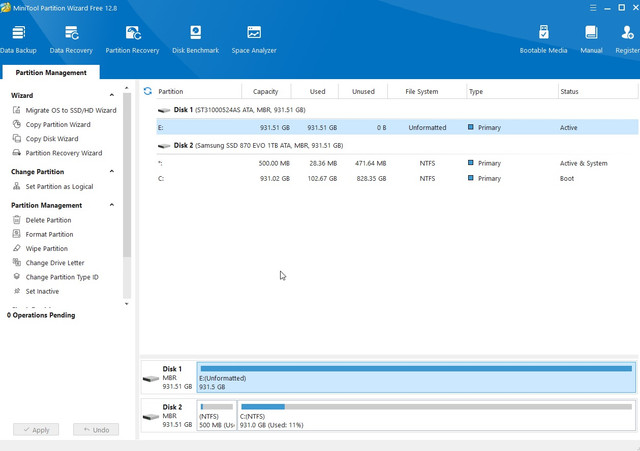
If you have MiniTools Partition Wizard installed, post a screenshot of how the disks show in it.

Also a screenshot of Windows Disk Management.
 

My Computer My Computer

OS
Windows 7 Home Premium 32 bit

My Computers My Computers

System One System Two

  • Computer type
    PC/Desktop
    Computer Manufacturer/Model Number
    Custom Build
    OS
    Win10-64bit
    Memory
    18GB
    Monitor(s) Displays
    Samsung 27"
    Hard Drives
    HDD
    SDD - Samsung
    Antivirus
    WIN
    Browser
    Google
  • Computer type
    PC/Desktop
Hi @raver4444, Good morning.

Thanks for the screenshots.

However it does not give any clue as to what could have happened.. Since it has a drive letter a valid partition exists and it is not a partition lost problem.

Usually when the disk has a drive letter but shows as RAW , it could be due to a corrupted volume boot sector, corrupted backup of the volume bootsector -either or both - or corrupted MFT. In such cases we run File system utility in TestDisk to ascertain which is bad and initiate corrective action to make the disk accessible..

But in your case you say that when you replace the SSD with the original HDD, you are able to see and access all data. So I rule out running TestDisk on it.

The only jarring thing I find is that the secondary HDD is "active" . It need not be active.

Using Partition Wizard, right click on the "unformatted" partition, in the resulting menu set it inactive, click on "Apply" in the top menu bar.After it gets executed and set inactive, reboot the PC and check whether the HDD becomes accessible.

If it does not, I would advise you to replace the SSD with the original HDD, copy all data in the secondary HDD to another external HDD.

Once done, safely remove the external HDD, put the SSD back in place and then format the secondary HDD after a clean wipe - disk part "clean all".
 
Last edited:

My Computer My Computer

OS
Windows 7 Home Premium 32 bit
Hi @raver4444, Good morning.

Thanks for the screenshots.

However it does not give any clue as to what could have happened.. Since it has a drive letter a valid partition exists and it is not a partition lost problem.

Usually when the disk has a drive letter but shows as RAW , it could be due to a corrupted volume boot sector, corrupted backup of the volume bootsector -either or both - or corrupted MFT. In such cases we run File system utility in TestDisk to ascertain which is bad and initiate corrective action to make the disk accessible..

But in your case you say that when you replace the SSD with the original HDD, you are able to see and access all data. So I rule out running TestDisk on it.

The only jarring thing I find is that the secondary HDD is "active" . It need not be active.

Using Partition Wizard, right click on the "unformatted" partition, in the resulting menu set it inactive, click on "Apply" in the top menu bar.After it gets executed and set inactive, reboot the PC and check whether the HDD becomes accessible.

If it does not, I would advise you to replace the SSD with the original HDD, copy all data in the secondary HDD to another external HDD.

Once done, safely remove the external HDD, put the SSD back in place and then format the secondary HDD after a clean wipe - disk part "clean all".
Unfortunately the ACTIVE / INACTIVE did not work.

I reconnected old HDD, transferred everything to an external SSD, formatted old partition and copied it back from external SSD. All set !
Thank you guys for the hope
 

My Computers My Computers

System One System Two

  • Computer type
    PC/Desktop
    Computer Manufacturer/Model Number
    Custom Build
    OS
    Win10-64bit
    Memory
    18GB
    Monitor(s) Displays
    Samsung 27"
    Hard Drives
    HDD
    SDD - Samsung
    Antivirus
    WIN
    Browser
    Google
  • Computer type
    PC/Desktop
Good to know.:thumbsup:
 

My Computer My Computer

OS
Windows 7 Home Premium 32 bit
Back
Top