Trying to install win7 in a third partition

Christaras

New member
Local time
5:37 PM
Messages
9
Hello there.
In the past I had installed win7 in 3rd partition(win98 first partirion, winxp second partition) but don't remember the right way

I made a bootable USB flash drive that contains win7 installation files
I use plop boot manager to boot from USB flash drive.

In the last step called finishing installation the 1sr reboot happens and I get the message winload exe not found when I click win7. The bcd store has entries that don't work except earlier version of windows that works

I also made DVD bootable optical drive to install win7 but when I try to boot with plop boot manager I get black screen with blinking cursor.

Please help
 

My Computers My Computers

System One System Two

  • Computer type
    PC/Desktop
    OS
    Win98se
    CPU
    Pentium 3
    Motherboard
    Ibm
    Memory
    1gb
  • Computer type
    PC/Desktop

My Computers My Computers

System One System Two

  • Computer type
    PC/Desktop
    OS
    7 X64
    CPU
    i5 8400
    Motherboard
    gigabyte b365m ds3h
    Memory
    2x8gb 3200mhz
    Hard Drives
    various
    PSU
    pure power 11 400w cm
    Case
    Coolermaster
    Cooling
    cryorig m9i
  • Computer type
    PC/Desktop
    OS
    7x64
    CPU
    g5400
    Motherboard
    ga b365m ds3h
    Memory
    8gb ddr4 2400
    PSU
    xfx pro 450w
It is an an active partition?
 

My Computer My Computer

Computer type
PC/Desktop
OS
win 8 32 bit
Please enter your system specs.


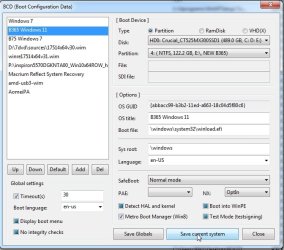
the bcd entry is wrong.

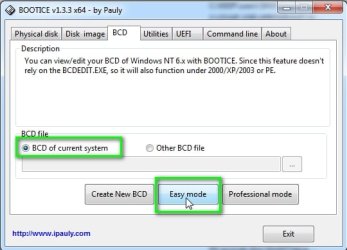
If you can boot into xp you could use bootice to fix it

:ar: View attachment 423370

View attachment 423369


Win98 Se is on c:
It's the active system partition

Winxp on d:

Win7 trying to install on e:

Thanks for the program, I will check it!

- - - Updated - - -

It is an an active partition?

No, win98 on c: is the active system partition containing all boot files
Ntldr, bootmgr, the folder bcd.

Winload.exe is on folder system 32 of e: so I guess the installer is dump and thinks it's on c:

May I ask... When the 1st reboot takes place ( the installation hasn't finished but just the copying of files on e) do I boot from hard disk?

I boot from flash drive in the beginning to start the installation so why the installation is dump and doesn't continue from the point I have left? It just messes up with partitions and bcd store.
At the 1st reboot I no longer see plop boot manager so that I can choose boot from USB, I instantly go at the black screen of win7 with a messed up bad store where I get the error winload missing if I choose win7.

It doesn't even show an installation is taking place, I see the entry "Windows 7" instead of a windows 7 temporary entry of installation
 

My Computers My Computers

System One System Two

  • Computer type
    PC/Desktop
    OS
    Win98se
    CPU
    Pentium 3
    Motherboard
    Ibm
    Memory
    1gb
  • Computer type
    PC/Desktop
May I ask... When the 1st reboot takes place ( the installation hasn't finished but just the copying of files on e) do I boot from hard disk?

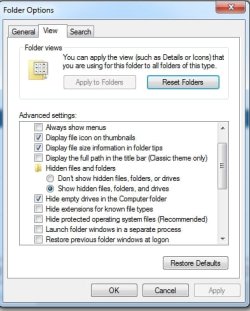
yes. it uses the bcd store in the boot folder on the active partition. The boot folder is hidden so to see you need to set hidden and protected os files showing

bootmgr looks in the bcd store to find the address of winload.exe

the message you got indicates bootmgr can't find winload.exe

folder-options.jpg
 

My Computers My Computers

System One System Two

  • Computer type
    PC/Desktop
    OS
    7 X64
    CPU
    i5 8400
    Motherboard
    gigabyte b365m ds3h
    Memory
    2x8gb 3200mhz
    Hard Drives
    various
    PSU
    pure power 11 400w cm
    Case
    Coolermaster
    Cooling
    cryorig m9i
  • Computer type
    PC/Desktop
    OS
    7x64
    CPU
    g5400
    Motherboard
    ga b365m ds3h
    Memory
    8gb ddr4 2400
    PSU
    xfx pro 450w
yes. it uses the bcd store in the boot folder on the active partition. The boot folder is hidden so to see you need to set hidden and protected os files showing

bootmgr looks in the bcd store to find the address of winload.exe

the message you got indicates bootmgr can't find winload.exe

View attachment 423371

Yes, that seems to be the problem... I will try to install win7 again to see what happens. I found some command lines of bcdedit that could probably correct the problem( pointing winload to e: instead of c:).

I just can't understand why win7 installation can not handle correctly the partitions. It's supposed it knows winload will be on e since the files are copied and expanded to e: from the the temporary files on c:

With the ntdr bootloader and manager Ive got 3 entries
1.Windows Xp Professional
2.Windows 98
3.Recovery Console System(of xp)

When bootmgr takes control to create bcd store
see what happens.

It takes the above to a new menu called Earlier Version of Windows and the entries are
1.Earlier version of Windows
2.Windows 7
3. Windows 98
4. Recovery Console System(of xp)

From this menu only 1 and 4 work. Choosing 2 or 3 gives error. Also I notice that Recovery Console from the menu earlier version of windows gives error but I can access it from entry 4.

So let's suppose I don't manage to correctly install win7 and repair the bcd store and menu. How do I restore ntldr menu without needing to reinstall windows98 so that old menu is automatically corrected and reappears instead of the messed one of win7 bootmgr? Boot.ini lines are there and they are correct , what else do I do?

Thanks.
 

My Computers My Computers

System One System Two

  • Computer type
    PC/Desktop
    OS
    Win98se
    CPU
    Pentium 3
    Motherboard
    Ibm
    Memory
    1gb
  • Computer type
    PC/Desktop
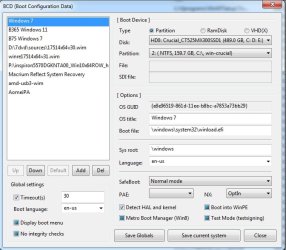
Show us what bootice says for each entry

like this:

bootice0.jpg

bootice1.jpg

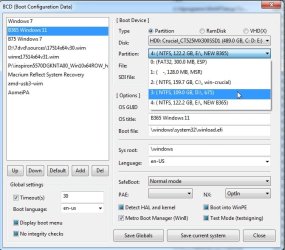
if the entry is pointing at the wrong partition, select the correct partition in the dropdown

bootice2.jpg

then click "save current system"

it is not hard to do.

bootice3.jpg
 

My Computers My Computers

System One System Two

  • Computer type
    PC/Desktop
    OS
    7 X64
    CPU
    i5 8400
    Motherboard
    gigabyte b365m ds3h
    Memory
    2x8gb 3200mhz
    Hard Drives
    various
    PSU
    pure power 11 400w cm
    Case
    Coolermaster
    Cooling
    cryorig m9i
  • Computer type
    PC/Desktop
    OS
    7x64
    CPU
    g5400
    Motherboard
    ga b365m ds3h
    Memory
    8gb ddr4 2400
    PSU
    xfx pro 450w
Show us what bootice says for each entry

like this:

View attachment 423372

View attachment 423373

if the entry is pointing at the wrong partition, select the correct partition in the dropdown

View attachment 423374

then click "save current system"

it is not hard to do.

View attachment 423375

Thanks for the bootice info, I'll let you know, first I will install win7 cause there's no bcd yet

- - - Updated - - -

Thanks for the bootice info, I'll let you know, first I will install win7 cause there's no bcd yet

Show us what bootice says for each entry

like this:

View attachment 423372

View attachment 423373

if the entry is pointing at the wrong partition, select the correct partition in the dropdown

View attachment 423374

then click "save current system"

it is not hard to do.

View attachment 423375

OK I tried to install win7 again and what a mess...

I opened your program bootice.

The bcd doesn't appear as a system bcd. System bcd is empty.
I have to choose the option open another bcd and go to the bcd that's on the folder boot on c

OK I opened in easy and professional mode, I put e: , I put the correct ppartitions etc.
Still winload missing or corrupt even with the correct drive letter

By the way when I tried to enter to windows xp professional I got the message hal.dll is missing so I opened boot.ini and corrected

multi(0)disk(0)rdisk(0)partition(3) to
multu(0)disk(0)rdisk)partition(2)

Win7 changed 2 to 3 for win xp and in dos mode winxp still appears as partition 3(win7 appears as partition 2) even though in boot.ini I changed 3 to 2 so that I can boot on winxp. Now it's take longer to boot on xp


I also used bcdedit /set commands. Nothing was corrected.

Win7 is inaccessible, has generated messy boot menus and I'm afraid to delete bcd cause I will lose access to win98 and xp because ntldr menu is inside bcd menu.

Last another info I tried to install win7 to a partition I made to the unallocated space at the end of the disk. Was it correct to use all 21 GB of unallocated space or should I choose 19 or 20 leaving 1 GB?

- - - Updated - - -

By the way I tried to install through setup files on bootable USB flash drive using plop boot manager. I can't install through bootable disc on dvd drive. I see a black screen with white tab blinking and nothing happens.

I made the partition to the unallocated space through the installation. Should I had already make it with partition magic on win98 on win xp?
Now partition magic closes saying the drive letter of the win 7 partition is inaccessible

- - - Updated - - -

Thanks for your bootice. At least I corrected the boot menu
By choosing for pbr the ntldr menu. Then I deleted boot folder and bootmgr.

If I don't have your program and I can't boot to win98 for example how do I build/install primary boot record. What are the commands for io.sys

- - - Updated - - -

Thanks for your bootice. At least I corrected the boot menu
By choosing for pbr the ntldr menu. Then I deleted boot folder and bootmgr.

If I don't have your program and I can't boot to win98 for example how do I build/install primary boot record. What are the commands for io.sys
 

My Computers My Computers

System One System Two

  • Computer type
    PC/Desktop
    OS
    Win98se
    CPU
    Pentium 3
    Motherboard
    Ibm
    Memory
    1gb
  • Computer type
    PC/Desktop
I dont know, that was before my time. Maybe somebody else will see this and can advise you.
 

My Computers My Computers

System One System Two

  • Computer type
    PC/Desktop
    OS
    7 X64
    CPU
    i5 8400
    Motherboard
    gigabyte b365m ds3h
    Memory
    2x8gb 3200mhz
    Hard Drives
    various
    PSU
    pure power 11 400w cm
    Case
    Coolermaster
    Cooling
    cryorig m9i
  • Computer type
    PC/Desktop
    OS
    7x64
    CPU
    g5400
    Motherboard
    ga b365m ds3h
    Memory
    8gb ddr4 2400
    PSU
    xfx pro 450w
Back
Top