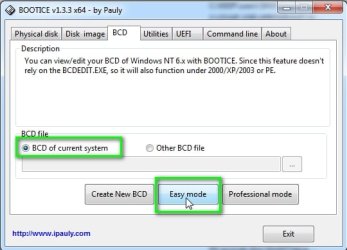
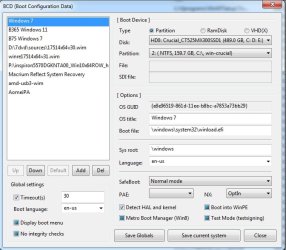
Show us what bootice says for each entry
like this:
View attachment 423372
View attachment 423373
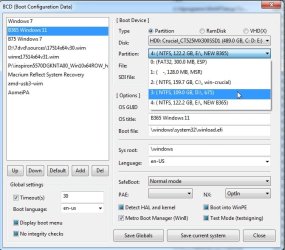
if the entry is pointing at the wrong partition, select the correct partition in the dropdown
View attachment 423374
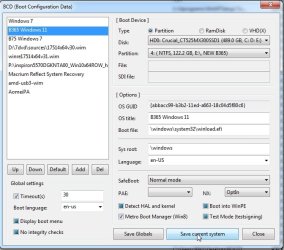
then click "save current system"
it is not hard to do.
View attachment 423375
Thanks for the bootice info, I'll let you know, first I will install win7 cause there's no bcd yet
- - - Updated - - -
Thanks for the bootice info, I'll let you know, first I will install win7 cause there's no bcd yet
Show us what bootice says for each entry
like this:
View attachment 423372
View attachment 423373
if the entry is pointing at the wrong partition, select the correct partition in the dropdown
View attachment 423374
then click "save current system"
it is not hard to do.
View attachment 423375
OK I tried to install win7 again and what a mess...
I opened your program bootice.
The bcd doesn't appear as a system bcd. System bcd is empty.
I have to choose the option open another bcd and go to the bcd that's on the folder boot on c
OK I opened in easy and professional mode, I put e: , I put the correct ppartitions etc.
Still winload missing or corrupt even with the correct drive letter
By the way when I tried to enter to windows xp professional I got the message hal.dll is missing so I opened boot.ini and corrected
multi(0)disk(0)rdisk(0)partition(3) to
multu(0)disk(0)rdisk)partition(2)
Win7 changed 2 to 3 for win xp and in dos mode winxp still appears as partition 3(win7 appears as partition 2) even though in boot.ini I changed 3 to 2 so that I can boot on winxp. Now it's take longer to boot on xp
I also used bcdedit /set commands. Nothing was corrected.
Win7 is inaccessible, has generated messy boot menus and I'm afraid to delete bcd cause I will lose access to win98 and xp because ntldr menu is inside bcd menu.
Last another info I tried to install win7 to a partition I made to the unallocated space at the end of the disk. Was it correct to use all 21 GB of unallocated space or should I choose 19 or 20 leaving 1 GB?
- - - Updated - - -
By the way I tried to install through setup files on bootable USB flash drive using plop boot manager. I can't install through bootable disc on dvd drive. I see a black screen with white tab blinking and nothing happens.
I made the partition to the unallocated space through the installation. Should I had already make it with partition magic on win98 on win xp?
Now partition magic closes saying the drive letter of the win 7 partition is inaccessible
- - - Updated - - -
Thanks for your bootice. At least I corrected the boot menu
By choosing for pbr the ntldr menu. Then I deleted boot folder and bootmgr.
If I don't have your program and I can't boot to win98 for example how do I build/install primary boot record. What are the commands for io.sys
- - - Updated - - -
Thanks for your bootice. At least I corrected the boot menu
By choosing for pbr the ntldr menu. Then I deleted boot folder and bootmgr.
If I don't have your program and I can't boot to win98 for example how do I build/install primary boot record. What are the commands for io.sys



 .
.