OnlyMe
New member
Howdy all
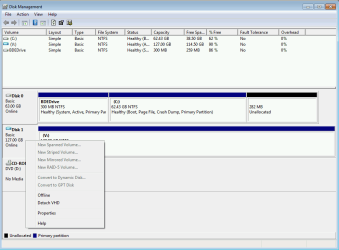
On my offline win7-sp1 workstation (this puter is my w10 online one), I mounted a saved MS system image of my C: drv, to grab a couple of files. Had difficulty viewing it in win explorer since it showed in disc management, but not in explorer.
Fortunately, using my installed Paragon BU program, the image structure was visible & I could retrieve the files.
However I can't see how to dismount it. I used "All tasks" in disk management, right clicked the vol & all sort of other things, but never found "unmount disk" the only command even close to that is "remove volume". I didn't want to do that w/o checking with you folks.
This might have something to do with the fact, that since the sys image is a copy of my C: drive, it's an "active" partition, just like the real C: drive. Right clicking & choosing "remove vol" brings up the warning that this drive is an active drive & contains the MBR, etc.
btw;
Per w7's Help instructions, I also gave it a drive letter. That didn't make it's structure visible in explorer or bring up a "unmount" command. Only the remove command was available with the same above warning.
I would appreciate your advice on this, TIA
Peter
On my offline win7-sp1 workstation (this puter is my w10 online one), I mounted a saved MS system image of my C: drv, to grab a couple of files. Had difficulty viewing it in win explorer since it showed in disc management, but not in explorer.
Fortunately, using my installed Paragon BU program, the image structure was visible & I could retrieve the files.
However I can't see how to dismount it. I used "All tasks" in disk management, right clicked the vol & all sort of other things, but never found "unmount disk" the only command even close to that is "remove volume". I didn't want to do that w/o checking with you folks.
This might have something to do with the fact, that since the sys image is a copy of my C: drive, it's an "active" partition, just like the real C: drive. Right clicking & choosing "remove vol" brings up the warning that this drive is an active drive & contains the MBR, etc.
btw;
Per w7's Help instructions, I also gave it a drive letter. That didn't make it's structure visible in explorer or bring up a "unmount" command. Only the remove command was available with the same above warning.
I would appreciate your advice on this, TIA
Peter
My Computers
-
At a glance
Win 7 Prontel Core i7 CPU 920-OC'd @ 4.4GHz24GBAMD Radeon HD 7700- Computer type
- PC/Desktop
- Computer Manufacturer/Model Number
- OnlyMe
- OS
- Win 7 Pro
- CPU
- ntel Core i7 CPU 920-OC'd @ 4.4GHz
- Motherboard
- GB X58A-OC
- Memory
- 24GB
- Graphics Card(s)
- AMD Radeon HD 7700
- Hard Drives
- C:\
Samsung 840Pro SSD
D:\ & E:\
WD Black
- Antivirus
- none- Offline puter
- Browser
- FF
-
- Computer type
- PC/Desktop
- Antivirus
- none on offline w7, MS on this online w10