Windows 7 weather gadget

Jeff 100

New member
Local time
7:08 AM
Messages
5
Location
Texas
I have for about a year now have had the windows 7 weather gadget work after following a community fix to add a file called "config.xml" to a location that the gadget reads. The gadget no longer updates any of its weather info anymore. Does anyone know if there was a update to the msn weather servers at mircosoft, or have any fix that might work?
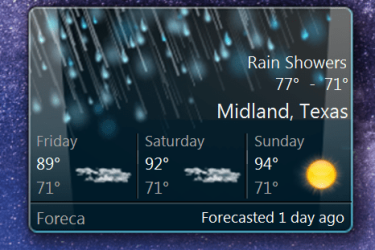
image.png
 
Last edited:

My Computers

System One System Two

  • Computer type
    PC/Desktop
    Computer Manufacturer/Model Number
    Asus
    OS
    Windows 7 Ultimate x64
    CPU
    i6700k
    Motherboard
    Maximus ix extreme
    Memory
    Gskill 4x8 GB
    Graphics Card(s)
    Asus strix 1070
    Sound Card
    On Board
    Monitor(s) Displays
    Asus PG279
    Screen Resolution
    1440p 16:9
    Hard Drives
    Nvme M.2 for boot GPT, Raid 0 on hhd. More hdd's.
    PSU
    Asus Thor 750 watt.
    Case
    Cooler master Haf x
    Cooling
    Custom water cooling.
    Keyboard
    Rog Claymore I
    Mouse
    Rog Sparta
    Internet Speed
    Gigabit
    Antivirus
    Windows defender.
    Browser
    Chrome.
    Other Info
    Hard drives are a mess, so much data everywhere.
  • Computer type
    PC/Desktop
According to the MSN Weather website the MSN Weather app only supports Windows 10 or above. I don't know but that may mean that they don't support the MSN Weather gadget any more for Windows 7.

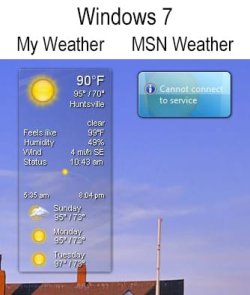
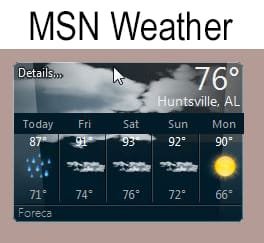
On one of my Windows 7 computers I verified that the MSN Weather gadget can't connect to the server. However, an alternate one the My Weather gadget still works with Windows 7.

Windows 7 #2.jpg

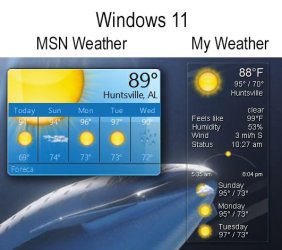
On my Windows 11 laptop the MSN Weather gadget works fine. Also, the My Weather gadget works also.

Windows 11 #2.jpg

BTW, I use a program called 8 Gadget Pack to enable gadgets on my Windows 10 & 11 computers. It includes the MSN Weather gadget. I added the My Weather gadget from its website.


MSN Weather app
MSN Weather - Free download and install on Windows | Microsoft Store

My Weather gadget
00ff00 - Mit Liebe zum Internet

Update:

The screenshot I showed is for the Weather gadget not the MSN Weather gadget. Sorry about that. See Post #8 to see how to get the MSN Weather gadget for Windows 7.
 
Last edited:

My Computers

System One System Two

  • Computer type
    PC/Desktop
    Computer Manufacturer/Model Number
    Custom build
    OS
    Windows 7 Home Premium 64-bits
    CPU
    AMD FX-8350
    Motherboard
    Gigabyte GA-990FXA-UD3 (AM3+)
    Memory
    GSKILL Ripjaw-X PC3 12800 8GB (2x4GB)
    Graphics Card(s)
    ASUS ROG STRIX GTX 1060 6GB
    Sound Card
    Integrated
    Monitor(s) Displays
    Asus VE228H (21.5-in)
    Screen Resolution
    1920x1080 60Hz
    Hard Drives
    SAMSUNG 870 EVO 2.5 Inch SATA SSD (1TB)
    SAMSUNG 870 EVO 2.5 Inch SATA SSD (1TB)
    SAMSUNG 870 EVO 2.5 Inch SATA SSD (1TB)
    PSU
    Corsair RM750x (750 watts)
    Case
    Corsair Carbide Series 200R
    Cooling
    Corsair Hydro Series H60 (CWCH60)
    Keyboard
    Logitech Elite
    Mouse
    Logitech M510 Wireless Mouse
    Internet Speed
    Comcast Gigabit Extra (1200Mbps down / 35Mbps up)
    Antivirus
    Malwarebytes
    Browser
    Firefox, Edge, Chrome
    Other Info
    ASUS DRW-24B1ST DVD-RW (24X) optical drive
    Seagate Expansion Desk (5TB) external SATA/USB HDD
    Comcast XB8 Internet Gateway
  • Computer type
    PC/Desktop
    System Manufacturer/Model Number
    Custom
    OS
    Windows 7 Pro (64-bit)
    CPU
    AMD Phenom II 960T X4
    Motherboard
    ASUS M4N82 Deluxe
    Memory
    Corsair XMS2 DDR2-800 8GB (4x2GB)
    Graphics Card(s)
    ASUS ENGTX560 DCII OC/2DI/1GD5 1GB
    Monitor(s) Displays
    Samsung 930B 19-inch LCD
    Screen Resolution
    1280x1024
    Hard Drives
    Samsung SSD 870 EVO 1000 GB (Windows 10)
    Seagate ST1000DM003 1000 GB (Windows 7)
    PSU
    Antec TruePower (new) TP-650
    Case
    Antec Three Hundred
    Cooling
    AMD stock cooler from FX8350
    Mouse
    Logitech M100
    Internet Speed
    Xfinity Gigabit Extra 1200/35 Mbps
I tried installing the My Weather (German one), but it won't display. I am able to display the calendar so I know that my gadgets do work. On the Gadget control panel, the My Weather gadget does look kind of grayed-out, not sure what that means...

- - - Updated - - -

In the meantime, I installed the Weatherbar app from Dark Skies. It installed and runs, but seems to have trouble with my location, even though it lists it correctly.
 

My Computer

Computer type
PC/Desktop
Computer Manufacturer/Model Number
Gateway GT5656
OS
Windows 7 x64 SP1
CPU
AMD Athlon 64 X2 6000+ / 3.0 GHz
Motherboard
NVIDIA GeForce 6150 SE
Memory
6 GB
Monitor(s) Displays
Lenovo LED
Screen Resolution
1920 X 1080
Hard Drives
Windows on 500 GB spinner; Ubuntu 16 on Sandisk 250GB SSD; Bodhi5 on Samsung 250GB SSD; another old spinner for fooling around.
PSU
Original that came with computer
Keyboard
Logitech wireless
Mouse
Logitech wireless
Antivirus
Microsoft Sec Essentials
Browser
Vivaldi
I don't know why the My Weather gadget is not working for you. I just downloaded and installed it this morning on my Windows 7 desktop computer.

Note the My Weather gadget doesn't automatically find your location. You have to go into the settings and change it from its default.

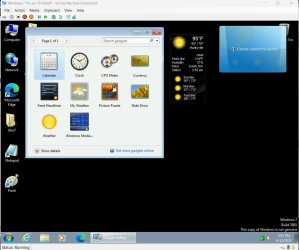
Also, I tried the My Weather gadget on a Windows 7 virtual machine. It works fine on it also. On the screenshot note that the MSN Weather gadget runs but can't connect to the server.

2024-06-22 15_51_38-Greenshot #2.jpg

Update:

The screenshot I showed is for the Weather gadget not the MSN Weather gadget. Sorry about that. See Post #8 to see how to get the MSN Weather gadget for Windows 7.
 
Last edited:

My Computers

System One System Two

  • Computer type
    PC/Desktop
    Computer Manufacturer/Model Number
    Custom build
    OS
    Windows 7 Home Premium 64-bits
    CPU
    AMD FX-8350
    Motherboard
    Gigabyte GA-990FXA-UD3 (AM3+)
    Memory
    GSKILL Ripjaw-X PC3 12800 8GB (2x4GB)
    Graphics Card(s)
    ASUS ROG STRIX GTX 1060 6GB
    Sound Card
    Integrated
    Monitor(s) Displays
    Asus VE228H (21.5-in)
    Screen Resolution
    1920x1080 60Hz
    Hard Drives
    SAMSUNG 870 EVO 2.5 Inch SATA SSD (1TB)
    SAMSUNG 870 EVO 2.5 Inch SATA SSD (1TB)
    SAMSUNG 870 EVO 2.5 Inch SATA SSD (1TB)
    PSU
    Corsair RM750x (750 watts)
    Case
    Corsair Carbide Series 200R
    Cooling
    Corsair Hydro Series H60 (CWCH60)
    Keyboard
    Logitech Elite
    Mouse
    Logitech M510 Wireless Mouse
    Internet Speed
    Comcast Gigabit Extra (1200Mbps down / 35Mbps up)
    Antivirus
    Malwarebytes
    Browser
    Firefox, Edge, Chrome
    Other Info
    ASUS DRW-24B1ST DVD-RW (24X) optical drive
    Seagate Expansion Desk (5TB) external SATA/USB HDD
    Comcast XB8 Internet Gateway
  • Computer type
    PC/Desktop
    System Manufacturer/Model Number
    Custom
    OS
    Windows 7 Pro (64-bit)
    CPU
    AMD Phenom II 960T X4
    Motherboard
    ASUS M4N82 Deluxe
    Memory
    Corsair XMS2 DDR2-800 8GB (4x2GB)
    Graphics Card(s)
    ASUS ENGTX560 DCII OC/2DI/1GD5 1GB
    Monitor(s) Displays
    Samsung 930B 19-inch LCD
    Screen Resolution
    1280x1024
    Hard Drives
    Samsung SSD 870 EVO 1000 GB (Windows 10)
    Seagate ST1000DM003 1000 GB (Windows 7)
    PSU
    Antec TruePower (new) TP-650
    Case
    Antec Three Hundred
    Cooling
    AMD stock cooler from FX8350
    Mouse
    Logitech M100
    Internet Speed
    Xfinity Gigabit Extra 1200/35 Mbps
It was also happened July last year. At back then, it was off for a week and silently came back. And the MSN gadget MisterED mentioned is user modified version. Which is still working on Windows 7 (Seems like it gets data from yesterday tho), with lack of location relate services tho.
 
Last edited:

My Computers

System One System Two

  • OS
    ultimate x64
  • Computer type
    PC/Desktop
It was also happened July last year. At back then, it was off for a week and silently came back. And the MSN gadget MisterED mentioned is user modified version. Which is still working on Windows 7, with lack of location relate services tho.
What do mean by user modified version? In Windows 7 the MSN Weather gadget is the standard one from gadgets. This is the one not working.

With Windows 7, I installed the MSN Weather gadget from the Windows gadgets app. It couldn't find the MSN server. Is there a reason it is not able to do this.

With Windows 10 and 11, I installed the program "8 Gadget Pack". It adds Windows 7 gadgets. I installed the MSN Weather gadget from it. This gadget works fine and loads data from the server.

Update:

The screenshot I showed is for the Weather gadget not the MSN Weather gadget. Sorry about that. See Post #8 to see how to get the MSN Weather gadget for Windows 7.
 
Last edited:

My Computers

System One System Two

  • Computer type
    PC/Desktop
    Computer Manufacturer/Model Number
    Custom build
    OS
    Windows 7 Home Premium 64-bits
    CPU
    AMD FX-8350
    Motherboard
    Gigabyte GA-990FXA-UD3 (AM3+)
    Memory
    GSKILL Ripjaw-X PC3 12800 8GB (2x4GB)
    Graphics Card(s)
    ASUS ROG STRIX GTX 1060 6GB
    Sound Card
    Integrated
    Monitor(s) Displays
    Asus VE228H (21.5-in)
    Screen Resolution
    1920x1080 60Hz
    Hard Drives
    SAMSUNG 870 EVO 2.5 Inch SATA SSD (1TB)
    SAMSUNG 870 EVO 2.5 Inch SATA SSD (1TB)
    SAMSUNG 870 EVO 2.5 Inch SATA SSD (1TB)
    PSU
    Corsair RM750x (750 watts)
    Case
    Corsair Carbide Series 200R
    Cooling
    Corsair Hydro Series H60 (CWCH60)
    Keyboard
    Logitech Elite
    Mouse
    Logitech M510 Wireless Mouse
    Internet Speed
    Comcast Gigabit Extra (1200Mbps down / 35Mbps up)
    Antivirus
    Malwarebytes
    Browser
    Firefox, Edge, Chrome
    Other Info
    ASUS DRW-24B1ST DVD-RW (24X) optical drive
    Seagate Expansion Desk (5TB) external SATA/USB HDD
    Comcast XB8 Internet Gateway
  • Computer type
    PC/Desktop
    System Manufacturer/Model Number
    Custom
    OS
    Windows 7 Pro (64-bit)
    CPU
    AMD Phenom II 960T X4
    Motherboard
    ASUS M4N82 Deluxe
    Memory
    Corsair XMS2 DDR2-800 8GB (4x2GB)
    Graphics Card(s)
    ASUS ENGTX560 DCII OC/2DI/1GD5 1GB
    Monitor(s) Displays
    Samsung 930B 19-inch LCD
    Screen Resolution
    1280x1024
    Hard Drives
    Samsung SSD 870 EVO 1000 GB (Windows 10)
    Seagate ST1000DM003 1000 GB (Windows 7)
    PSU
    Antec TruePower (new) TP-650
    Case
    Antec Three Hundred
    Cooling
    AMD stock cooler from FX8350
    Mouse
    Logitech M100
    Internet Speed
    Xfinity Gigabit Extra 1200/35 Mbps
With Windows 10 and 11, I installed the program "8 Gadget Pack". It adds Windows 7 gadgets. I installed the MSN Weather gadget from it. This gadget works fine and loads data from the server.

Layout from that gadget is actually from Vista. It was modified because original gadget wasn't serviced in certain regions. Interesting point is - it still needs config.xml workaround even if it got modified.

EDIT: I searched more about backstory about that modification, version that has five dates when enlarged was result of modification. They said original cache had too many unused information. I'd just used that one if it had 'find location automatically' option.

- - - Updated - - -

If we have to modify original gadget to work, seems like it'd work when we touch code related with variable 'oMSN', still couldn't figure out how.
 
Last edited:

My Computers

System One System Two

  • OS
    ultimate x64
  • Computer type
    PC/Desktop
Layout from that gadget is actually from Vista. It was modified because original gadget wasn't serviced in certain regions. Interesting point is - it still needs config.xml workaround even if it got modified.
EDIT: I searched more about backstory about that modification, version that has five dates when enlarged was result of modification. They said original cache had too many unused information. I'd just used that one if it had 'find location automatically' option.
- - - Updated - - -
If we have to modify original gadget to work, seems like it'd work when we touch code related with variable 'oMSN', still couldn't figure out how.
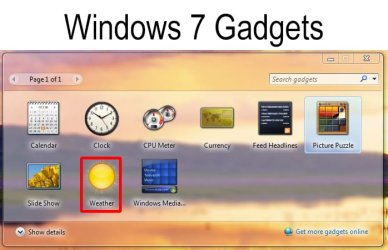
I just realized something. I just checked the gadgets on my Windows 7 computer and the MSN Weather is not even there. I was looking at a gadget called Weather. That is the one that didn't work.

w1.jpg

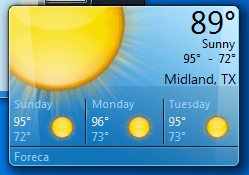
Now for the good news. 8GadgetPack not only works in Windows 10/11 but it also works in Windows 7. I installed it in my Windows 7 Pro computer. The MSN Weather gadget in 8GadgetPack does work in Windows 7 as shown in the screen shot below.

w2.jpg

w3.jpg
 

My Computers

System One System Two

  • Computer type
    PC/Desktop
    Computer Manufacturer/Model Number
    Custom build
    OS
    Windows 7 Home Premium 64-bits
    CPU
    AMD FX-8350
    Motherboard
    Gigabyte GA-990FXA-UD3 (AM3+)
    Memory
    GSKILL Ripjaw-X PC3 12800 8GB (2x4GB)
    Graphics Card(s)
    ASUS ROG STRIX GTX 1060 6GB
    Sound Card
    Integrated
    Monitor(s) Displays
    Asus VE228H (21.5-in)
    Screen Resolution
    1920x1080 60Hz
    Hard Drives
    SAMSUNG 870 EVO 2.5 Inch SATA SSD (1TB)
    SAMSUNG 870 EVO 2.5 Inch SATA SSD (1TB)
    SAMSUNG 870 EVO 2.5 Inch SATA SSD (1TB)
    PSU
    Corsair RM750x (750 watts)
    Case
    Corsair Carbide Series 200R
    Cooling
    Corsair Hydro Series H60 (CWCH60)
    Keyboard
    Logitech Elite
    Mouse
    Logitech M510 Wireless Mouse
    Internet Speed
    Comcast Gigabit Extra (1200Mbps down / 35Mbps up)
    Antivirus
    Malwarebytes
    Browser
    Firefox, Edge, Chrome
    Other Info
    ASUS DRW-24B1ST DVD-RW (24X) optical drive
    Seagate Expansion Desk (5TB) external SATA/USB HDD
    Comcast XB8 Internet Gateway
  • Computer type
    PC/Desktop
    System Manufacturer/Model Number
    Custom
    OS
    Windows 7 Pro (64-bit)
    CPU
    AMD Phenom II 960T X4
    Motherboard
    ASUS M4N82 Deluxe
    Memory
    Corsair XMS2 DDR2-800 8GB (4x2GB)
    Graphics Card(s)
    ASUS ENGTX560 DCII OC/2DI/1GD5 1GB
    Monitor(s) Displays
    Samsung 930B 19-inch LCD
    Screen Resolution
    1280x1024
    Hard Drives
    Samsung SSD 870 EVO 1000 GB (Windows 10)
    Seagate ST1000DM003 1000 GB (Windows 7)
    PSU
    Antec TruePower (new) TP-650
    Case
    Antec Three Hundred
    Cooling
    AMD stock cooler from FX8350
    Mouse
    Logitech M100
    Internet Speed
    Xfinity Gigabit Extra 1200/35 Mbps
Thank you Mister Ed, the 8 gadget pak works perfectly. When I installed it, there were instantly about 7 clocks on my desktop, along several instances of the weather app that actually works (My Weather? - I'm currently on Linux so I'm trusting to memory here). Evidently I kept trying to get them on my desktop, and they wouldn't show, until I installed the gadget pak.

At first I wondered if it was safe, but there were articles on it from several sites I generally trust, so I figured it's probably OK. Really cool. I prefer the My Weather gadget to the MSN one, since it displays humidity etc. MSN does also, but you have to click something, and then it's hard to read.
 

My Computer

Computer type
PC/Desktop
Computer Manufacturer/Model Number
Gateway GT5656
OS
Windows 7 x64 SP1
CPU
AMD Athlon 64 X2 6000+ / 3.0 GHz
Motherboard
NVIDIA GeForce 6150 SE
Memory
6 GB
Monitor(s) Displays
Lenovo LED
Screen Resolution
1920 X 1080
Hard Drives
Windows on 500 GB spinner; Ubuntu 16 on Sandisk 250GB SSD; Bodhi5 on Samsung 250GB SSD; another old spinner for fooling around.
PSU
Original that came with computer
Keyboard
Logitech wireless
Mouse
Logitech wireless
Antivirus
Microsoft Sec Essentials
Browser
Vivaldi
Thank you Mister Ed, the 8 gadget pak works perfectly. When I installed it, there were instantly about 7 clocks on my desktop, along several instances of the weather app that actually works (My Weather? - I'm currently on Linux so I'm trusting to memory here). Evidently I kept trying to get them on my desktop, and they wouldn't show, until I installed the gadget pak.

At first I wondered if it was safe, but there were articles on it from several sites I generally trust, so I figured it's probably OK. Really cool. I prefer the My Weather gadget to the MSN one, since it displays humidity etc. MSN does also, but you have to click something, and then it's hard to read.
I don't remember whether the My Weather gadget came with 8GadgetPak or if I installed it separately. In any case you can update it if there is a new version available. I have v.8.2 which was released recently.
 

My Computers

System One System Two

  • Computer type
    PC/Desktop
    Computer Manufacturer/Model Number
    Custom build
    OS
    Windows 7 Home Premium 64-bits
    CPU
    AMD FX-8350
    Motherboard
    Gigabyte GA-990FXA-UD3 (AM3+)
    Memory
    GSKILL Ripjaw-X PC3 12800 8GB (2x4GB)
    Graphics Card(s)
    ASUS ROG STRIX GTX 1060 6GB
    Sound Card
    Integrated
    Monitor(s) Displays
    Asus VE228H (21.5-in)
    Screen Resolution
    1920x1080 60Hz
    Hard Drives
    SAMSUNG 870 EVO 2.5 Inch SATA SSD (1TB)
    SAMSUNG 870 EVO 2.5 Inch SATA SSD (1TB)
    SAMSUNG 870 EVO 2.5 Inch SATA SSD (1TB)
    PSU
    Corsair RM750x (750 watts)
    Case
    Corsair Carbide Series 200R
    Cooling
    Corsair Hydro Series H60 (CWCH60)
    Keyboard
    Logitech Elite
    Mouse
    Logitech M510 Wireless Mouse
    Internet Speed
    Comcast Gigabit Extra (1200Mbps down / 35Mbps up)
    Antivirus
    Malwarebytes
    Browser
    Firefox, Edge, Chrome
    Other Info
    ASUS DRW-24B1ST DVD-RW (24X) optical drive
    Seagate Expansion Desk (5TB) external SATA/USB HDD
    Comcast XB8 Internet Gateway
  • Computer type
    PC/Desktop
    System Manufacturer/Model Number
    Custom
    OS
    Windows 7 Pro (64-bit)
    CPU
    AMD Phenom II 960T X4
    Motherboard
    ASUS M4N82 Deluxe
    Memory
    Corsair XMS2 DDR2-800 8GB (4x2GB)
    Graphics Card(s)
    ASUS ENGTX560 DCII OC/2DI/1GD5 1GB
    Monitor(s) Displays
    Samsung 930B 19-inch LCD
    Screen Resolution
    1280x1024
    Hard Drives
    Samsung SSD 870 EVO 1000 GB (Windows 10)
    Seagate ST1000DM003 1000 GB (Windows 7)
    PSU
    Antec TruePower (new) TP-650
    Case
    Antec Three Hundred
    Cooling
    AMD stock cooler from FX8350
    Mouse
    Logitech M100
    Internet Speed
    Xfinity Gigabit Extra 1200/35 Mbps
I checked default gadget and modified gadget and both of them seems trying to get information from 'weather.service.msn.com'. Server seems operating normally. I suspect wlsrvc.dll makes error.
 

My Computers

System One System Two

  • OS
    ultimate x64
  • Computer type
    PC/Desktop
If anyone still wondering about the original weather gadget, I made it working by modifying server's response. Gadget seems can't decode UTF-16 encoding. I used pydivert to modify request(for response is not being zipped) and response.

Code:
import pydivert

print("started")


with pydivert.WinDivert("tcp.SrcPort == 80 or tcp.DstPort == 80") as w:
        for packet in w:
                
                
                payload = packet.tcp.payload


                if packet.is_inbound:
                        payload = payload.replace(b"<?xml version=\"1.0\" encoding=\"utf-16\"?><weatherdata>",b"<?xml version=\"1.0\" encoding=\"utf-8\"?> <weatherdata>")
                if packet.is_outbound:
                        payload = payload.replace(b"Accept-Encoding: gzip, deflate", b"Accept-Encoding: ")

                packet.payload = payload
                packet.recalculate_checksums(0)
                
                w.send(packet,recalculate_checksum=True)
 

My Computers

System One System Two

  • OS
    ultimate x64
  • Computer type
    PC/Desktop
If anyone still wondering about the original weather gadget, I made it working by modifying server's response.

Gadget seems can't decode UTF-16 encoding. I used pydivert to modify request(for response is not being zipped) and response.

Code:
import pydivert

print("started")


with pydivert.WinDivert("tcp.SrcPort == 80 or tcp.DstPort == 80") as w:
        for packet in w:
                
                
                payload = packet.tcp.payload


                if packet.is_inbound:
                        payload = payload.replace(b"<?xml version=\"1.0\" encoding=\"utf-16\"?><weatherdata>",b"<?xml version=\"1.0\" encoding=\"utf-8\"?> <weatherdata>")
                if packet.is_outbound:
                        payload = payload.replace(b"Accept-Encoding: gzip, deflate", b"Accept-Encoding: ")

                packet.payload = payload
                packet.recalculate_checksums(0)
                
                w.send(packet,recalculate_checksum=True)

Is possible to modify gadget file directly? example modify the js files (weather.js) to redirect this?
 

My Computers

System One System Two

  • OS
    Win 10 x64
  • Computer type
    PC/Desktop
Is possible to modify gadget file directly? example modify the js files (weather.js) to redirect this?

Looks like it gets data from server via ActiveXobject. Code that we need to touch are not visible on .js files.

- - - Updated - - -

I added code to make target packet more specific. I compiled it into exe and makes it running background via task scheduler. Other network activity works smoothly and gadget activity is bit jamming but at least works.

Code:
                payload = packet.tcp.payload
        
        if len(payload) == 0:
            w.send(packet)
        if payload.find(b"weather") == -1:
            w.send(packet)


                if packet.is_inbound:

- - - Updated - - -

And now, sever removed first tag that saying about UTF-16. It'll work without packet modifying I think.

- - - Updated - - -

As server removed header tag so it is working on weather displaying. But I thought about broken search feature on weather gadget. Interestingly, it works searching by zip code. So I compared results and result from name search lack of variable zipcode.
Code:
import pydivert


print("started")


with pydivert.WinDivert("tcp.SrcPort == 80 or tcp.DstPort == 80") as w:
        for packet in w:
                
                
                payload = packet.tcp.payload


                if len(payload) == 0:
                        w.send(packet)
                if payload.find(b"weather") == -1:
                        w.send(packet)


                if packet.is_inbound:
                        if payload.find(b"zipcode") != -1:
                                w.send(packet)
                        if payload.find(b"weatherfullname") == -1:
                                w.send(packet)
                        payload = payload.replace(b"weatherfullname",b"zipcode=\"\" weatherfullname")
                        payload = payload.replace(b"searchlocation",b"ion")                      
                if packet.is_outbound:
                        if payload.find(b"find.aspx") == -1:
                                w.send(packet)
                        if payload.find(b",%20") != -1:
                                w.send(packet)
                        payload = payload.replace(b"Accept-Encoding: gzip, deflate", b"Accept-Encoding: ")


                packet.payload = payload
                packet.recalculate_checksums(0)
                
                w.send(packet,recalculate_checksum=True)

I had to touch name of variable "searchlocation" for not breaking XML structure by adding variable "zipcode". Which is used on search by location. So I had to make an exception when search query includes ",%20" (comma and space) for search by latitude and longitude.
Capture.PNG
After running packet modifier, it works now!

- - - Updated - - -

And I found it during debugging, I found when search query includes ", "(,%20), it works with original response. So if you want use search from original weather gadget, add comma and space for no reason to make search works. It was done because comma was processed before sending query.
 

My Computers

System One System Two

  • OS
    ultimate x64
  • Computer type
    PC/Desktop
Possible errors are found when packet is divided on targeted string, or some of search results includes object that lack of variable "weatherlocationname". As this workaround is modifying data during transmission, I think won't fix them for performance.
 

My Computers

System One System Two

  • OS
    ultimate x64
  • Computer type
    PC/Desktop
Possible errors are found when packet is divided on targeted string, or some of search results includes object that lack of variable "weatherlocationname". As this workaround is modifying data during transmission, I think won't fix them for performance.

Now seems to work again without any modification....
 

My Computers

System One System Two

  • OS
    Win 10 x64
  • Computer type
    PC/Desktop
Gadget itself was became working since last week. After that, I changed its code for its "Select current location" feature.
Are you saying that the gadget work for you now without a fix? Or it works after what you have done. How could I do what you did on my pc, to get the gadget working again? Currently it is not working for me.
 

My Computers

System One System Two

  • Computer type
    PC/Desktop
    Computer Manufacturer/Model Number
    Asus
    OS
    Windows 7 Ultimate x64
    CPU
    i6700k
    Motherboard
    Maximus ix extreme
    Memory
    Gskill 4x8 GB
    Graphics Card(s)
    Asus strix 1070
    Sound Card
    On Board
    Monitor(s) Displays
    Asus PG279
    Screen Resolution
    1440p 16:9
    Hard Drives
    Nvme M.2 for boot GPT, Raid 0 on hhd. More hdd's.
    PSU
    Asus Thor 750 watt.
    Case
    Cooler master Haf x
    Cooling
    Custom water cooling.
    Keyboard
    Rog Claymore I
    Mouse
    Rog Sparta
    Internet Speed
    Gigabit
    Antivirus
    Windows defender.
    Browser
    Chrome.
    Other Info
    Hard drives are a mess, so much data everywhere.
  • Computer type
    PC/Desktop
Are you saying that the gadget work for you now without a fix? Or it works after what you have done. How could I do what you did on my pc, to get the gadget working again? Currently it is not working for me.

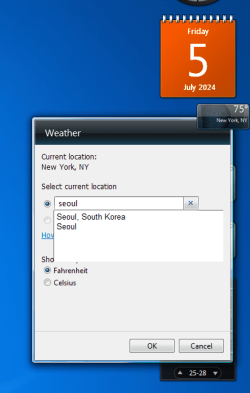
Displaying weather would be work now without a fix, as weather.service.msn.com result removed first XML tag that causes malfunctioning. (example - it should start with <weatherdata> tag when viewing page source. When it was broken, it was starting with <?xml version="1.0" encoding="utf-16"?> and gadget couldn't decode utf-16.)

What I currently applied is on post #14, which is some kind of additional fix for searching location feature, which I done is compile its python code to .exe (with admin privilege required) via pyinstaller and made it running background.

If it is still not working for you, try some old workaround. Such as emptying AppData\Local\Microsoft\Windows Sidebar\Cache\

I tried location on first post, it should be look like this now.
Capture.PNG
 

My Computers

System One System Two

  • OS
    ultimate x64
  • Computer type
    PC/Desktop
How does it compare to the one that comes with 8GadgetPack?
 

My Computers

System One System Two

  • Computer type
    PC/Desktop
    Computer Manufacturer/Model Number
    Custom build
    OS
    Windows 7 Home Premium 64-bits
    CPU
    AMD FX-8350
    Motherboard
    Gigabyte GA-990FXA-UD3 (AM3+)
    Memory
    GSKILL Ripjaw-X PC3 12800 8GB (2x4GB)
    Graphics Card(s)
    ASUS ROG STRIX GTX 1060 6GB
    Sound Card
    Integrated
    Monitor(s) Displays
    Asus VE228H (21.5-in)
    Screen Resolution
    1920x1080 60Hz
    Hard Drives
    SAMSUNG 870 EVO 2.5 Inch SATA SSD (1TB)
    SAMSUNG 870 EVO 2.5 Inch SATA SSD (1TB)
    SAMSUNG 870 EVO 2.5 Inch SATA SSD (1TB)
    PSU
    Corsair RM750x (750 watts)
    Case
    Corsair Carbide Series 200R
    Cooling
    Corsair Hydro Series H60 (CWCH60)
    Keyboard
    Logitech Elite
    Mouse
    Logitech M510 Wireless Mouse
    Internet Speed
    Comcast Gigabit Extra (1200Mbps down / 35Mbps up)
    Antivirus
    Malwarebytes
    Browser
    Firefox, Edge, Chrome
    Other Info
    ASUS DRW-24B1ST DVD-RW (24X) optical drive
    Seagate Expansion Desk (5TB) external SATA/USB HDD
    Comcast XB8 Internet Gateway
  • Computer type
    PC/Desktop
    System Manufacturer/Model Number
    Custom
    OS
    Windows 7 Pro (64-bit)
    CPU
    AMD Phenom II 960T X4
    Motherboard
    ASUS M4N82 Deluxe
    Memory
    Corsair XMS2 DDR2-800 8GB (4x2GB)
    Graphics Card(s)
    ASUS ENGTX560 DCII OC/2DI/1GD5 1GB
    Monitor(s) Displays
    Samsung 930B 19-inch LCD
    Screen Resolution
    1280x1024
    Hard Drives
    Samsung SSD 870 EVO 1000 GB (Windows 10)
    Seagate ST1000DM003 1000 GB (Windows 7)
    PSU
    Antec TruePower (new) TP-650
    Case
    Antec Three Hundred
    Cooling
    AMD stock cooler from FX8350
    Mouse
    Logitech M100
    Internet Speed
    Xfinity Gigabit Extra 1200/35 Mbps
Back
Top