TurtleShroom
New member
Good afternoon.
This is a long, long post, so get ready for a wild ride.
For fifteen years, I have had a "Windows VII" operating system. It survived multiple updates, transplants, and even upgrade to the "Professional" version. I even got it to boot into an UEFI environment natively. My OS was of a sixty-four bit persuasion. It was a legitimate one, with a legitimate key that is verified as Genuine. No, I do not care that it's outdated, and no, I am not upgrading. My current computer's make and model is a Dell Optiplex 9020 with thirty-two gigabytes of RAM.
However, recently, I made a fatal mistake on top of a string of cascading errors, and my PC instantly committed suicide.
In an attempt to create a RAID I Array, I realized that I could use the "Disk Manager" to convert to a Dynamic Disk and mirror accordingly, because the alternative was formatting everything. I did so, and the moment I clicked the button, my computer instantly crashed and has never started up again.
The problem is that the System Images I have relied on for all these years, which I took daily, have failed. I updated to a four terabyte solid-state drive and had to configure UEFI, which worked, but I discovered too late that the "Windows Back Up and Restore" did not make a System Image, either the night before or when I manually did so. As my configuration deletes the old image to make a new one, it was GONE.
"No problem," I thought, getting my full W7 installation Original Equipment Manufactuer disc, "I can use the System Restore Points that I took regularly, including a manual one yesterday."
The installation disc said that no such recovery point existed. I took one the moment I updated to the UEFI.
I'm getting nervous.
Thankfully, I have "Disk Genius Professional", so I went in and restored the partition tables. Both the OEM Disc and the "Disk Genuis" boot environment recognized SOMETHING as existing, and say "Windows 7 Professional".
No dice, because that won't boot.
Well, there is "Start Up Repair". It told me, each time I ran it, that whatever I tried could not be saved.
Thankfully, I can use CHKDSK and SFC, right?
No. CHKDSK fixed nothing. The SFC system is permanently locked out in the W7 ISO because it says I need to reboot it, and rebooting solves nothing. Every command (e.g. the DISM delete pending repairs thing) does not fix it. At one point I got the SFC system to say "Windows Resource Protection could not start the repair service", instead, but that did nothing. I tried it both with things like "/OFFBOOTDIR and "/WINBOOTDIR" and without. (I ran the CKHDSK again, with the "/F" and "/R" qualifiers, and it got to stage four of five, but it froze at twelve percent and has done nothing for the past twenty minutes.)
I then went through every conceivable step concerning BOOTREC, BCDEDIT, and so on, just in case it was the UEFI system itself that failed. That worked, but it did not fix the OS itself. Through that process, I found that it is NOT the boot system that failed because I have not changed that and the error I was given (Class 0xc0000225) is stated to be the operating system itself being corrupted. (I cannot use the Set Active feature of the DISKPART command because I use the UEFI structure instead of the Master Boot Record.)
Thankfully, I have a second W7 installation on a hard drive, of the same OS. These systems are identical, so I plug that in and try to copy the files I am told are corrupted, particularly overwriting the WINLOAD.EFI file with the factory version (from the W7 that;s unchanged) that gets an error. I copy the boot files and the WINSXS folder from the working one (making sure to rename the original folders). While that changes the error from "WINLOAD.EFI" failure to Class 0xc0000225, it does not work. I unplug the working OS with nothing else on it and continue.
I try the DISM suggestions but because my OS is W7, nothing can be done, and the one situation that says it can be done, with the "/ONLINE" qualifier, does not work because I am running from the W7 OEM disc. The W7 version, "/SCANHEALTH", also fails.
I tried some third-party software called the "Windows Recovery Environment", but it is corrupted and says:
WELCOME TO YOUR BOX
/SLITAZ BOOT TIME: 12S.S
TARTING OPENSSH SERVER: OPENSSH...
STARTING OPENSSH SERVER: OPENSSH...
SLITAZ GNU/LINUX KERNEL 2.6.37-SLITAZ TTY1
I was told to E-Mail them and I am still waiting on that.
Currently, when I try to boot into the corrupted OS, the error I get is a Class 0xc0000225 Error, with the stipulation that "the boot selection failed because a required device is inaccessible". I assume that is referring to the other hard disk with a working W7 version.
In the "Disk Genius" software, my corrupted OS has all of its files intact and its file directory can be browsed ,with every file being readable, but that isn't the same as it booting!
I have been at this for over a week.
It would be effortless to format and install a clean copy of W7, and I tested it on other hard drives in case I needed to do it. As I have legitimate W7 keys, I don't fear any issues with corporate bureaucracy to activate it. The good news is that my years of pictures, videos, and so on are backed up, but that's not enough.
The bad news is that I CANNOT afford to lose this version of the OS because of both its configuration (fifteen years of settings) and because of all my games and content that were backed up only on the System Image.
I was confident in my System Image back ups because I took them daily, and it ran as surely as the sun rose. The one time I needed it most, I didn't have one.
I am at my wit's end but I have refused to give up for the simple fact that I am disabled and unable to contribute or work, so everything I have ever done or made in my adult life is on that computer.
Again, I can recover the FILES, but the OPERATING SYSTEM is corrupted. I want to restore the OPERATING SYSTEM. I have all of my files.
Have mercy on me, and please help me if you can. Thank you in advance for any assistance you may render.
-TURTLESHROOM
-----------------------
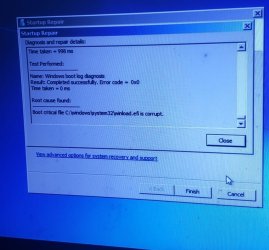
Click here for the current error that I am experiencing.
This is a long, long post, so get ready for a wild ride.
For fifteen years, I have had a "Windows VII" operating system. It survived multiple updates, transplants, and even upgrade to the "Professional" version. I even got it to boot into an UEFI environment natively. My OS was of a sixty-four bit persuasion. It was a legitimate one, with a legitimate key that is verified as Genuine. No, I do not care that it's outdated, and no, I am not upgrading. My current computer's make and model is a Dell Optiplex 9020 with thirty-two gigabytes of RAM.
However, recently, I made a fatal mistake on top of a string of cascading errors, and my PC instantly committed suicide.
In an attempt to create a RAID I Array, I realized that I could use the "Disk Manager" to convert to a Dynamic Disk and mirror accordingly, because the alternative was formatting everything. I did so, and the moment I clicked the button, my computer instantly crashed and has never started up again.
The problem is that the System Images I have relied on for all these years, which I took daily, have failed. I updated to a four terabyte solid-state drive and had to configure UEFI, which worked, but I discovered too late that the "Windows Back Up and Restore" did not make a System Image, either the night before or when I manually did so. As my configuration deletes the old image to make a new one, it was GONE.
"No problem," I thought, getting my full W7 installation Original Equipment Manufactuer disc, "I can use the System Restore Points that I took regularly, including a manual one yesterday."
The installation disc said that no such recovery point existed. I took one the moment I updated to the UEFI.
I'm getting nervous.
Thankfully, I have "Disk Genius Professional", so I went in and restored the partition tables. Both the OEM Disc and the "Disk Genuis" boot environment recognized SOMETHING as existing, and say "Windows 7 Professional".
No dice, because that won't boot.
Well, there is "Start Up Repair". It told me, each time I ran it, that whatever I tried could not be saved.
Thankfully, I can use CHKDSK and SFC, right?
No. CHKDSK fixed nothing. The SFC system is permanently locked out in the W7 ISO because it says I need to reboot it, and rebooting solves nothing. Every command (e.g. the DISM delete pending repairs thing) does not fix it. At one point I got the SFC system to say "Windows Resource Protection could not start the repair service", instead, but that did nothing. I tried it both with things like "/OFFBOOTDIR and "/WINBOOTDIR" and without. (I ran the CKHDSK again, with the "/F" and "/R" qualifiers, and it got to stage four of five, but it froze at twelve percent and has done nothing for the past twenty minutes.)
I then went through every conceivable step concerning BOOTREC, BCDEDIT, and so on, just in case it was the UEFI system itself that failed. That worked, but it did not fix the OS itself. Through that process, I found that it is NOT the boot system that failed because I have not changed that and the error I was given (Class 0xc0000225) is stated to be the operating system itself being corrupted. (I cannot use the Set Active feature of the DISKPART command because I use the UEFI structure instead of the Master Boot Record.)
Thankfully, I have a second W7 installation on a hard drive, of the same OS. These systems are identical, so I plug that in and try to copy the files I am told are corrupted, particularly overwriting the WINLOAD.EFI file with the factory version (from the W7 that;s unchanged) that gets an error. I copy the boot files and the WINSXS folder from the working one (making sure to rename the original folders). While that changes the error from "WINLOAD.EFI" failure to Class 0xc0000225, it does not work. I unplug the working OS with nothing else on it and continue.
I try the DISM suggestions but because my OS is W7, nothing can be done, and the one situation that says it can be done, with the "/ONLINE" qualifier, does not work because I am running from the W7 OEM disc. The W7 version, "/SCANHEALTH", also fails.
I tried some third-party software called the "Windows Recovery Environment", but it is corrupted and says:
WELCOME TO YOUR BOX
/SLITAZ BOOT TIME: 12S.S
TARTING OPENSSH SERVER: OPENSSH...
STARTING OPENSSH SERVER: OPENSSH...
SLITAZ GNU/LINUX KERNEL 2.6.37-SLITAZ TTY1
I was told to E-Mail them and I am still waiting on that.
Currently, when I try to boot into the corrupted OS, the error I get is a Class 0xc0000225 Error, with the stipulation that "the boot selection failed because a required device is inaccessible". I assume that is referring to the other hard disk with a working W7 version.
In the "Disk Genius" software, my corrupted OS has all of its files intact and its file directory can be browsed ,with every file being readable, but that isn't the same as it booting!
I have been at this for over a week.
It would be effortless to format and install a clean copy of W7, and I tested it on other hard drives in case I needed to do it. As I have legitimate W7 keys, I don't fear any issues with corporate bureaucracy to activate it. The good news is that my years of pictures, videos, and so on are backed up, but that's not enough.
The bad news is that I CANNOT afford to lose this version of the OS because of both its configuration (fifteen years of settings) and because of all my games and content that were backed up only on the System Image.
I was confident in my System Image back ups because I took them daily, and it ran as surely as the sun rose. The one time I needed it most, I didn't have one.
I am at my wit's end but I have refused to give up for the simple fact that I am disabled and unable to contribute or work, so everything I have ever done or made in my adult life is on that computer.
Again, I can recover the FILES, but the OPERATING SYSTEM is corrupted. I want to restore the OPERATING SYSTEM. I have all of my files.
Have mercy on me, and please help me if you can. Thank you in advance for any assistance you may render.
-TURTLESHROOM
-----------------------
Click here for the current error that I am experiencing.
Last edited:
My Computer
At a glance
Windows VII Professional (Sixty Four Bit)Intel Core I7-4770 CPU (at 3.400 Gigahertz/3....32GB RAMNVIDIA Geforce GTX 1660
- Computer type
- PC/Desktop
- Computer Manufacturer/Model Number
- Dell Optiplex 9020
- OS
- Windows VII Professional (Sixty Four Bit)
- CPU
- Intel Core I7-4770 CPU (at 3.400 Gigahertz/3.39 Gigahertz)
- Motherboard
- Intel
- Memory
- 32GB RAM
- Graphics Card(s)
- NVIDIA Geforce GTX 1660
- Sound Card
- Standard
- Monitor(s) Displays
- MULTISYNC LCD 1530V + Evoyo Display
- Screen Resolution
- 1024 x 768
- Hard Drives
- Four Terabyte Solid State Drive
- PSU
- Gold Standard
- Case
- Original
- Cooling
- Traditional
- Keyboard
- Compaq Internet Keyboard (KU-9978)
- Mouse
- Genius Net Scroll Serial
- Antivirus
- Kaspersky
- Browser
- Supermium; Google Chrome; Firefox 28
- Other Info
- Jesus loves you and died for you!